2023 TOYOTA MIRAI remote control
[x] Cancel search: remote controlPage 144 of 572

1444-3. Adjusting the seats
Owners Manual_USA_M62064_en
■Registering procedure
Record your driving position to
button “1” or “2” before perform-
ing the following:
Carry only the key you want to
register, and then close the
driver’s door.
If 2 or more keys are in the vehi-
cle, the driving position cannot
be recorded properly.
1 Turn the power switch to ON.
2 Check that the shift position
is in P.
3 Recall the driving position
that you want to record.
4 While pressing the recalled
button, press and hold the
door lock switch (either lock
or unlock) until the buzzer
sounds.
If the button could not be regis-
tered, the buzzer sounds continu- ously for approxim
ately 3 seconds.
■Recall procedure
1 Make sure that the doors are
locked before recalling the
driving position. Carry the
electronic key that has been
registered to the driving posi-
tion, and then unlock and
open the driver’s door using
the smart key system wire-
less remote control.
The driving position will move to the
recorded position (not including the
steering wheel and head-up display
[if equipped]). However, the seat
will move to a position slightly
behind the recorded position in
order to make entering the vehicle
easier.
If the driving position is in a position
that has already been recorded, the
seat and outside rear view mirrors
will not move.
2Turn the power switch to
ACC or ON, or fasten a seat
belt.
The seat, steering wheel and head-
up display (if equipped) will move to
the recorded position.
■Cancelation procedure
Carry only the key you want to
cancel and then close the
driver’s door.
WARNING
■Seat adjustment caution
Take care during seat adjustment
so that the seat d oes not strike
the rear passenger or squeeze
your body again st the steering
wheel.
Registering/recall/cancel-
ing a driving position to
an electronic key (mem-
ory recall function)
Page 163 of 572

1634-5. Opening, closing the windows
Owners Manual_USA_M62064_en
4
Before driving
5 Release the power window
switch for a m oment, resume
pushing the switch in the one-
touch opening direction, and
hold it there for a pproximately 4
seconds or more.
6 Pull and hold the power window
switch in the one-touch closing
direction again. After the side
window is completely closed,
continue holding the switch for a
further 1 second or more.
If you release the switch while the
window is moving, start again from
the beginning.
If the window reverses and cannot
be fully closed or opened, have the
vehicle inspected by your Toyota
dealer.
■Door lock linked window opera-
tion
●The power windows can be
opened and closed using the
mechanical key.
* ( P.483)
●The power windows can be
opened using the wireless remote
control.
* ( P.127)
*: These settings must be custom-
ized at your Toyota dealer.
■Power windows open warning
buzzer
A buzzer sounds and a message is
shown on the multi -information dis-
play in the instrument cluster when
the power switch is turned off and
the driver’s door is opened with the
power windows open.
■Customization
Some functions can be customized.
( P.512)
WARNING
Observe the following precau-
tions.
Failure to do so m ay result in
death or serious injury.
■Closing the windows
●The driver is responsible for all
the power window operations,
including the operation for the
passengers. In order to prevent
accidental operation, especially
by a child, do not let a child
operate the power windows. It is
possible for children and other
passengers to have body parts
caught in the power window.
Also, when ridin g with a child, it
is recommended to use the win-
dow lock switch. ( P.164)
●Check to make sure that all pas-
sengers do not have any part of
their body in a position where it
could be caught when a window
is being operated.
●When using the wireless remote
control or mechanical key and
operating the power windows,
operate the power window after
checking to make sure that
there is no possibility of any
passenger having any of their
body parts caug ht in the win-
dow. Also do not let a child
operate window by the wireless
remote control or mechanical
key. It is possib le for children
and other passengers to get
caught in the power window.
●When exiting the vehicle, turn
the power switch off, carry the
key and exit the vehicle along
with the child. There may be
accidental operation, due to
mischief, etc., that may possibly
lead to an accident.
Page 373 of 572

3736-4. Using the other interior features
Owners Manual_USA_M62064_en
6
Interior features
The power outlet can be used
for 120 V accessories that run
on less than 100 W.
Rear of the console box
Open the lid.
In the trunk
Open the lid.
■The power outlet can be used
when
The power switch is in ACC or ON.
■When stopping the fuel cell sys-
tem
Disconnect electrical devices with
charging functions, such as mobile
battery packs.
If such devices are left connected,
the fuel cell system may not stop
normally.
NOTICE
■To prevent incorrect opera-
tion of the vehicle
When turning the power switch
off, make sure to disconnect
accessories designed for
charging, such as portable char-
gers, power banks , etc., from the
power outlet.
If such an accessory is left con-
nected, the following may occur:
●The doors cannot be locked
using the smart key system or
wireless remote control.
●The opening scr een will be dis-
played on the multi-information
display.
●The interior lights, instrument
panel lights, etc., will illuminate.
■To prevent 12-volt battery dis-
charge
Do not use the power outlet lon-
ger than necessary when the fuel
cell system is off.
Power outlet (120
VAC/100W) (if equipped)
NOTICE
■To avoid damaging the power
outlet
Close the power outlet lid when
the power outlet is not in use.
Foreign objects or liquids that
enter the power outlet may cause
a short circuit.
■To prevent the fuse from
being blown
Do not use an accessory that
uses more than 120 V 100 W.
Page 374 of 572

3746-4. Using the other interior features
Owners Manual_USA_M62064_en
This system allows the use of
electrical devices with a total
power consumption of 1500W at
120 VAC in the vehicle. Supply-
ing power to electrical devices
outside the vehicle is not recom-
mended, as it may violate the
laws and regulations of the
country or region where it is
used. When supplying power to
electrical devices outside the
vehicle, check the laws and reg-
ulations with the relevant local
government of each country or region in advance. Also, be
careful not to drag electrical
devices and cords when moving
the vehicle.
■Using the power outlets
Rear of the console box
Open the lid.
In the trunk
Open the lid.
■When turning the power
outlets on
1 Check that the parking brake
is engaged, securely depress
the brake pedal and press
the power switch.
2 Check that the READY indi-
cator is illuminated, and
press the AC120V switch.
The power outlets can be used
when the indicator on the AC120V
switch is illuminated.
NOTICE
■To prevent incorrect opera-
tion of the vehicle
When turning the power switch
off, make sure to disconnect
accessories designed for
charging, such as portable char-
gers, power banks , etc., from the
power outlet.
If such an accessory is left con-
nected, the following may occur:
●The doors cannot be locked
using the smart key system or
wireless remote control.
●The opening scr een will be dis-
played on the multi-information
display.
●The interior lights, instrument
panel lights, etc., will illuminate.
■To prevent 12-volt battery dis-
charge
Do not use the power outlet lon-
ger than necessary when the fuel
cell system is off.
Power outlets (120
VAC/1500W) (if equipped)
Page 383 of 572

3836-4. Using the other interior features
Owners Manual_USA_M62064_en
6
Interior features
Vehicles with auto anti-glare
inside rear view mirror HomeLink
® indicator light
Garage door operation indi-
cators
HomeLink
® icon
Illuminates while HomeLink® is
operating.
Buttons
Vehicles with Digital Rear-
view Mirror
HomeLink
® logo
Appears while HomeLink® is oper-
ating. When the menu button
( P.150) is pressed, the logo dis-
appears even while the HomeLink
®
is operating.
Garage door operation indi-
cators HomeLink
® indicator light
Illuminates above each button
selected.
Buttons
■Codes stored in the Home-
Link® memory
●The registered codes are not
erased even if the 12-volt battery
cable is disconnected.
●If learning failed when registering
a different code to a HomeLink®
button that already has a code
registered to it, the already regis-
tered code will not be erased.
■Certification
P.569
WARNING
■When programming a garage
door or other remote control
device
The garage door or other device
may operate, so ensure people
and objects are out of danger to
prevent potential harm.
■Conforming to federal safety
standards
Do not use the HomeLink
® com-
patible transce iver with any
garage door opener or device that
lacks safety stop and reverse fea-
tures as required by federal safety
standards.
This includes any garage door
that cannot detect an interfering
object. A door or device without
these features increases the risk
of death or serious injury.
■When operating or program-
ming HomeLink®
Never allow a child to operate or
play with the HomeLink® buttons.
Page 384 of 572
3846-4. Using the other interior features
Owners Manual_USA_M62064_en
■Before programming Home-
Link
®
During programming, it is pos-
sible that garage doors,
gates, or other devices may
operate. For this reason,
make sure that people and
objects are clear of the
garage door or other devices
to prevent injury or other
potential harm.
It is recommended that a new
battery be placed in the
remote control transmitter for
more accurate programming.
Garage door opener motors
manufactured after 1995 may
be equipped with rolling code
protection. If this is the case,
you may need a stepladder or
other sturdy, safe device to
reach the “Learn” or “Smart”
button on the garage door
opener motor.
■Programming HomeLink®
Steps 1 through 3 must be per-
formed within 60 seconds, oth-
erwise the indicator light will
stop flashing and programming
will not be successfully com-
pleted.
1 Press and release the Home-
Link
® button you want to pro-
gram and check that the HomeLink
® indicator light
flashes (orange).
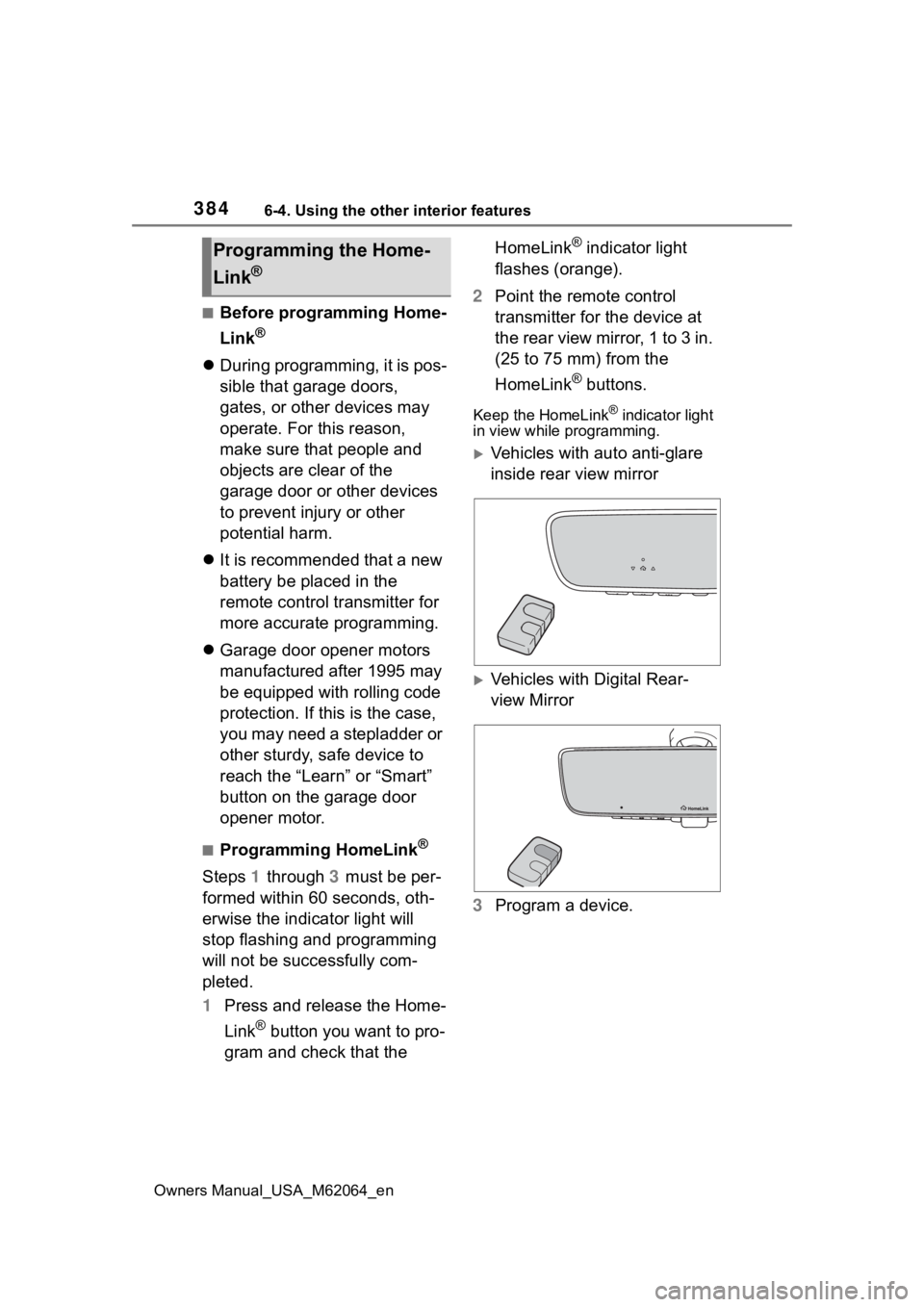
2 Point the remote control
transmitter for the device at
the rear view mirror, 1 to 3 in.
(25 to 75 mm) from the
HomeLink
® buttons.
Keep the HomeLink® indicator light
in view while programming.
Vehicles with auto anti-glare
inside rear view mirror
Vehicles with Digital Rear-
view Mirror
3 Program a device.
Programming the Home-
Link
®
Page 385 of 572

3856-4. Using the other interior features
Owners Manual_USA_M62064_en
6
Interior features
Vehicles with auto anti-glare
inside rear view mirror
Vehicles with Digital Rear-
view Mirror
Programming a device other
than an entry gate (for U.S.A.
owners)
Press and hold the remote control
transmitter button until the Home-
Link
® indicator light changes from
slowly flashing orange to rapidly
flashing green (ro lling code) or con-
tinuously lit green (fixed code), then
release the button.
Programming an entry gate
(for U.S.A. owners)/Program-
ming a device in the Cana-
dian market
Press and release the remote con-
trol transmitter button at 2 second
intervals, repeatedly, until the
HomeLink
® indicator light changes from slowly flashing (orange) to
rapidly flashing (green) (rolling
code) or continuously lit (green)
(fixed code).
4
Test the HomeLink® opera-
tion by pressing the newly
programmed button and
observing the indicator light:
HomeLink
® indicator light illu-
minates: Programming of a
fixed code device has com-
pleted. The garage door or
other device should operate
when a HomeLink
® button is
pressed and released.
HomeLink
® indicator light
flashes rapidly: The garage
door opener motor or other
device is equipped with a roll-
ing code. To complete pro-
gramming, firmly press and
hold the HomeLink
® button
for 2 seconds then release it.
If the garage door or other
device does not operate, pro-
ceed to “Programming a roll-
ing code system”.
5 Repeat the steps above to
program another device for
any of the remaining Home-
Link
® buttons.
■Programming a rolling code
system
Two or more people may be
necessary to complete rolling
code programming.
Page 413 of 572

4137-3. Do-it-yourself maintenance
Owners Manual_USA_M62064_en
7
Maintenance and care
The 12-volt battery is located in
the right-hand side of the trunk.
Remove the luggage mat: P. 3 6 1
■Before recharging
When recharging, the 12-volt bat-
tery produces hydrogen gas which
is flammable and explosive. There-
fore, observe the following precau-
tions before recharging:
●If recharging with the 12-volt bat-
tery installed on the vehicle, be
sure to disconnect the ground
cable.
●Make sure the power switch on
the charger is off when connecting
and disconnecting the charger
cables to the 12-volt battery.
■After recharging/reconnecting
the 12-volt battery
●Unlocking the doors using the
smart key system may not be pos-
sible immediately after reconnect-
ing the 12-volt battery. If this
happens, use the wireless remote
control or the mechanical key to
lock/unlock the doors.
●Start the fuel cell system with the
power switch in ACC. The fuel cell
system may not start with the
power switch turned off. However,
the fuel cell system will operate
normally from the second attempt.
WARNING
■When adding washer fluid
Do not add washer fluid when the
fuel cell system is hot or operating
as washer fluid contains alcohol
and may catch fire if spilled on the
fuel cell system, etc.
NOTICE
■Do not use any fluid other
than washer fluid
Do not use soapy water or anti-
freeze instead of washer fluid.
Doing so may cause streaking on
the vehicle’s painted surfaces, as
well as damaging the pump lead-
ing to problems of the washer
fluid not spraying.
■Diluting washer fluid
Dilute washer fluid with water as
necessary.
Refer to the freezing tempera-
tures listed on the label of the
washer fluid bottle.
12-volt batter y
Location