Page 116 of 810
1141-4. Theft deterrent system
HILUX_OM_OM0K789E_(EE)
Vehicles with smart entry & start system:
The indicator light flashes after the engine switch has been turned off
to indicate that the system is operating.
The indicator light stops flashing after the engine switch has been
turned to ACCESSORY or IGNITION ON mode to indicate that the
system has been canceled.
■ System maintenance
The vehicle has a maintenance-free type engine immobilizer system.
■ Conditions that may cause the system to malfunction
● If the grip portion of the key is in contact with a metallic object
● If the key is in close proximity to or touching a key to the security system
(key with a built-in transponder chip) of another vehicle
NOTICE
■ To ensure the system operates correctly
Do not modify or remove the system. If modified or removed, the proper
operation of the system cannot be guaranteed.
Page 125 of 810

1232. Instrument cluster
2
Instrument cluster
HILUX_OM_OM0K789E_(EE)
*1: These lights turn on when the engine switch is turned to the “ON” position
(vehicles without smart entry & start system) or IGNITION ON mode (vehi-
cles with smart entry & start system) to indicate that a system check is
being performed. They will turn off after the engine is started, or after a few
seconds. There may be a malfunction in a system if a light does not come
on, or if the lights do not turn off. Have the vehicle inspected by any autho-
rized Toyota retailer or Toyota authorized repairer, or any reliable repairer.
*2: Vehicles with multi-information display: a indicator is displayed on the
multi-information display.
*3: The light turns on or flashes to indicate a malfunction.
*4: The light flashes rapidly to indicate a malfunction.
*5: The light flashes to indicate a malfunction.
*6: The light turns to yellow to indicate a malfunction. (vehicles without multi-
information display)
*7: The lights illuminate on the center panel.
Page 127 of 810

1252. Instrument cluster
2
Instrument cluster
HILUX_OM_OM0K789E_(EE)
*1: These lights turn on when the engine switch is turned to the “ON” position
(vehicles without smart entry & start system) or IGNITION ON mode (vehi-
cles with smart entry & start system) to indicate that a system check is
being performed. They will turn off after the engine is started, or after a few
seconds. There may be a malfunction in a system if a light does not come
on, or if the lights do not turn off. Have the vehicle inspected by any autho-
rized Toyota retailer or Toyota authorized repairer, or any reliable repairer.
*2: The light turns on when the system is turned off.
*3: The light flashes to indicate that the system is operating.
*4: Depending on the operating condition, the color and illuminating/flashing
state of the light change.
*5: The light illuminates on the center panel.
*6: The light turns to green.
(if equipped)
“PWR” indicator
( P. 232, 239)(if equipped)
Low outside
temperature indicator
( P. 129)
(if equipped)
“iMT” indicator
( P. 240)
Parking brake indicator
light ( P. 246)
*1, 2
(if equipped)
PCS warning light
( P. 272)
*1
(if equipped)
“AUTO LSD” indicator
( P. 366)
*4
(if equipped)
LDA indicator (P. 289)
*1, 5
(if equipped)
“PASSENGER AIR
BAG” indicator
( P. 57, 62)
Page 133 of 810

1312. Instrument cluster
2
Instrument cluster
HILUX_OM_OM0K789E_(EE)
■The meters illuminate when
The engine switch is in the “ON” position (vehicles without smart entry & start
system) or IGNITION ON mode (vehicles with smart entry & start system).
■ The brightness of the instrument panel lights (vehicles with multi-infor-
mation display)
The instrument panel brightness levels when the tail lights are on and off can
be adjusted individually.
When the headlight switch is turned to on, the brightness will be reduced
slightly unless the instrument panel brightness level is set to the brightest set-
ting.
■ When disconnecting and reconnecting battery terminals
The trip meter data will be reset.
■ Outside temperature display
In the following situations, the correct outside temperature may not be dis-
played, or the display may take longer than normal to change:
● When the vehicle is stopped, or moving at low speeds (less than 25 km/h
[15 mph])
● When the outside temperature has changed suddenly (at the entrance/exit
of a garage, tunnel, etc.)
■ When “--” is displayed
The system may be malfunctioning. Take your vehicle to any authorized
Toyota retailer or Toyota authorized repairer, or any reliable repairer.
Page 145 of 810
1432. Instrument cluster
2
Instrument cluster
HILUX_OM_OM0K789E_(EE)
■Trip information
If the trip information screen does not appear, select “Trip Informa-
tion”.
Fuel consumption in the past
15 minutes
Current fuel consumption
Reset the trip information
data
“History” screen appears
Cruising range
Elapsed time since the
engine was started
Average vehicle speed since the engine was started
Average fuel consumption for the past 15 minutes is divided by
color into past averages and averages attained since the engine
switch was last turned to the “ON” position (vehicles without smart
entry & start system) or IGNITION ON mode (vehicles with smart
entry & start system). Use the displayed average fuel consumption
as a reference.
These images are examples only, and may vary slightly from actual
conditions.
Fuel consumption
1
2
3
4
5
6
7
Page 156 of 810
1543-2. Opening, closing and locking the doors
HILUX_OM_OM0K789E_(EE)
Move the inside lock button to the lock position.
Close the door while pulling the door handle.
Vehicles without smart entry & start system (vehicles with power door
lock system): The driver’s door cannot be locked if either of the door is
open and the key is in the engine switch.
Vehicles with smart entry & start system: The door cannot be locked if
the engine switch is in ACCESSORY or IGNITION ON mode, or the
electronic key is left inside the vehicle.
However, the key may not be detected correctly and the door may be
locked.
The door cannot be opened from
inside the vehicle when the lock is
set.
Unlock
Lock
These locks can be set to prevent
children from opening the rear
doors. Push down on each rear
door switch to lock both rear doors.
Locking the front doors from the outside without a key
Rear door child-protector lock (double-cab models only)
1
2
1
2
Page 157 of 810

1553-2. Opening, closing and locking the doors
3
Operation of each component
HILUX_OM_OM0K789E_(EE)
The following functions can be set or canceled:
■Setting and canceling the functions
To switch between setting and canceling, follow the procedure
below.
Close all the doors and turn the engine switch to the “ON” posi-
tion (vehicles without smart entry & start system) or IGNITION
ON mode (vehicles with smart entry & start system). (Perform
step within 20 seconds.)
Press and hold the driver’s
door lock switch ( or
) for approximately 5
seconds and then release.
The switch positions corre-
sponding to the desired function
to be set are shown in the fol-
lowing table.
Use the same procedure to can-
cel the function.
When the setting or canceling operation is complete, all the doors are
locked and then unlocked after the driver’s door lock switch is
released.
Automatic door locking and unlocking systems (if equipped)
FunctionOperation
Speed linked door lock-
ing function
All the doors are locked when the vehicle speed
is approximately 20 km/h (12 mph) or higher.
Driver’s door linked door
unlocking function
All the doors are unlocked when the driver’s
door is opened within approximately 45 seconds
after turning the engine switch off.
1
2
2
FunctionDriver’s door lock
switch position
Speed linked door locking function
Driver’s door linked door unlocking function
Page 181 of 810
1793-4. Adjusting the steering wheel and mirrors
3
Operation of each component
HILUX_OM_OM0K789E_(EE)
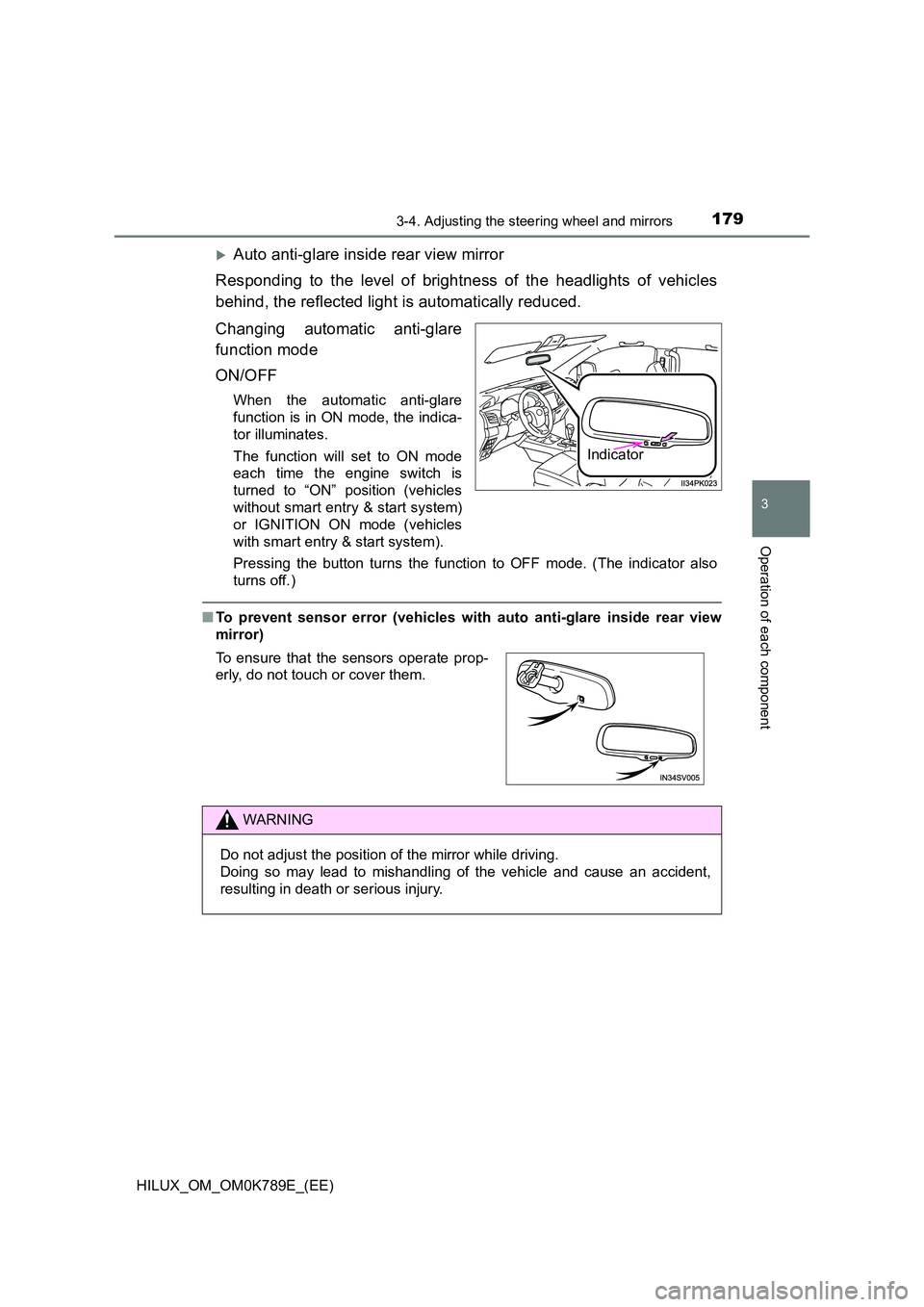
Auto anti-glare inside rear view mirror
Responding to the level of brightness of the headlights of vehicles
behind, the reflected light is automatically reduced.
Changing automatic anti-glare
function mode
ON/OFF
When the automatic anti-glare
function is in ON mode, the indica-
tor illuminates.
The function will set to ON mode
each time the engine switch is
turned to “ON” position (vehicles
without smart entry & start system)
or IGNITION ON mode (vehicles
with smart entry & start system).
Pressing the button turns the function to OFF mode. (The indicator also
turns off.)
■ To prevent sensor error (vehicles with auto anti-glare inside rear view
mirror)
Indicator
To ensure that the sensors operate prop-
erly, do not touch or cover them.
WARNING
Do not adjust the position of the mirror while driving.
Doing so may lead to mishandling of the vehicle and cause an accident,
resulting in death or serious injury.


