2023 TOYOTA HIGHLANDER ECO mode
[x] Cancel search: ECO modePage 310 of 552

3104-5. Using the driving support systems
■AWD system operation sounds
and vibrations when switching
between AWD and front wheel
drive (if equipped)
When the vehicle switches from
AWD to front wheel drive and vice
versa, operation sounds and vibra-
tions may be generated, but this is
not a malfunction.
■Reduced effectiveness of the
EPS system
The effectiveness of the EPS sys-
tem is reduced to prevent the sys-
tem from overheating when there is
frequent steering input over an
extended period of time. The steer-
ing wheel may feel heavy as a
result. Should this occur, refrain
from excessive steering input or
stop the vehicle and turn the engine
off. The EPS syst em should return
to normal within 10 minutes.
■Automatic reactivation of
TRAC, Trailer Sway Control and
VSC systems
After turning the TRAC, Trailer
Sway Control and VSC systems off,
the systems will be automatically
re-enabled in the following situa-
tions:
●When the engine switch is turned
OFF
●If only the TRAC system is turned
off, the TRAC will turn on when
vehicle speed increases
If both the TRAC and VSC sys-
tems are turned off, automatic
re-enabling will not occur when
vehicle speed increases.
■Operating conditions of Active
Cornering Assist
The system operates when the fol-
lowing occurs.
●TRAC/VSC can operate
●The driver is at tempting to accel-
erate while turning
●The system detects that the vehi-
cle is drifting to the outer side
●The brake pedal is released
■If a message about AWD is
shown on the multi-information
display (AWD models)
Perform the following actions.
●“AWD System Over-heated
Switching to 2WD Mode.” AWD
system is overheated. Stop the
vehicle in a safe place with the
engine running.
*
If the message disappears after a
while, there is no problem. If the
message remains, have the vehi-
cle inspected by your Toyota
dealer immediately.
●“AWD System Over-heated 2WD
Mode Engaged.” AWD system
has been temporarily released
and switched to front-wheel drive
due to overheating. Stop the vehi-
cle in a safe place with the engine
running.
*
If the message disappears after a
while, AWD system will automati-
cally recover. If the message
remains, have the vehicle
inspected by your Toyota dealer
immediately.
●“AWD system Malfunction 2WD
Mode Engaged Visit Your Dealer.”
A malfunction occurs in the AWD
system. Have the vehicle
inspected by your Toyota dealer
immediately.
*: When stopping the vehicle, do not stop the engine until the display
message has turned off.
■Secondary Collision Brake
operating conditions
The system operates when the SRS
airbag sensor de tects a collision
while the vehicle is in motion.
However, the system does not oper-
ate when the components are dam-
aged.
Page 325 of 552

3255-1. Using the air conditioning system and defogger
5
Interior features
recirculated air mode is used.
■When driving on dusty roads
Close all windows. If dust thrown up
by the vehicle is still drawn into the
vehicle after closing the windows, it
is recommended that the air intake
mode be set to outside air mode and
the fan speed to any setting except
off.
■Outside/recirculated air mode
●Setting to the r ecirculated air
mode temporarily is recom-
mended in preventing dirty air
from entering the vehicle interior
and helping to c ool the vehicle
when the outside air temperature
is high.
●Outside/recirculated air mode may
automatically switch depending on
the temperature setting or the
inside temperature.
■Operation of the air condition-
ing system in Eco drive mode
●In Eco drive mode, the air condi-
tioning system is controlled as fol-
lows to prioritize fuel efficiency:
• Engine speed and compressor operation controlled to restrict
heating/cooling capacity
• Fan speed restr icted when auto-
matic mode is selected
●To improve air co nditioning perfor-
mance, perform the following
operations:
• Adjust the fan speed
• Turn off Eco drive mode ( P.300)
■When the outside temperature
is low
The dehumidification function may
not operate even when the “A/C”
switch is pressed.
■Ventilation and air conditioning
odors
●To let fresh air in, set the air condi-
tioning system to the outside air
mode.
●During use, various odors from
inside and outside the vehicle may enter into and accumulate in the
air conditioning system. This may
then cause odor
to be emitted
from the vents.
●To reduce potential odors from
occurring:
• It is recommended that the air conditioning system be set to out-
side air mode prior to turning the
vehicle off.
• The start timing of the blower may
be delayed for a short period of
time immediately after the air con-
ditioning system is started in auto-
matic mode.
●When parking, the system auto-
matically switches to outside air
mode to encourage better air cir-
culation throughout the vehicle,
helping to reduce odors that occur
when starting the vehicle.
■Air conditioning system opera-
tions when the engine is
stopped due to the Stop & Start
system (vehicles with Stop &
Start system)
When the engine is stopped due to
Stop & Start system operations, the
automatic air conditioning cooling,
heating and dehumidification func-
tions turn off and the fan speed is
decreased according to the outside
temperature etc. or air blowing
stops. To stop the air conditioning
system from turning off, press the
Stop & Start cancel switch and
refrain from using the Stop & Start
system.
■When the windshield is fogged
up and the engine is stopped
due to the Stop & Start system
(vehicles with Stop & Start sys-
tem)
Press the windshield defogger
switch to restart the engine and
defog the windshield.
If the windshield continuously fogs
up, press the Stop & Start cancel
switch and refrain from using the
Stop & Start system.
Page 327 of 552

3275-1. Using the air conditioning system and defogger
5
Interior features
■Main screen
1 Touch on the main menu.
2 Select "Climate".
3 Select "Front".
Select the air flow mode
: Air flows to the upper body
: Air flows to the upper body and
feet
: Air flows to the feet
: Air flows to the feet and the
windshield defogger operates
Set cooling and dehumidifi-
cation function
If “A/C” switch is not pressed, the
system will blow a mbient tempera-
ture air or heated air.
“Sync” switch
If the indicator on the “Sync” switch
is off, the temperature for the driver,
passenger and rear seats can be
adjusted separately.
Select front seat concen-
trated airflow mode
(S-FLOW) ( P.328) Adjust the fan speed setting
■Option screen
1 Touch on the main menu.
2 Select "Climate".
3 Select "Options".
Set eco air conditioning
mode on/off. ( P.300)
The air conditioning is controlled
with low fuel con sumption priori-
tized such as reducing fan speed,
etc.
Set windshield wiper de-icer
on/off. ( P.324)
■When the outside temperature
exceeds 75°F (24°C) and the air
conditioning system is on
In order to reduce t he air condition-
ing power consumption, the air con-
ditioning system may switch to
recirculated air mode automatically.
This may also reduce fuel consump-
tion.
■Fogging up of the windows
●The windows will easily fog up
when the humidity in the vehicle is
high. Turning “A/C” on will dehu-
midify the air from the outlets and
defog the windshield effectively.
●If you turn “A/C” off, the windows
may fog up more easily.
Front air conditioning
control screen (audio sys-
tem screen)
Page 328 of 552
3285-1. Using the air conditioning system and defogger
■Eco air conditioning mode
When Eco drive mode is selected
using the driving mode select
switch, eco air conditioning mode
turns on.
When a drive mode other than Eco
drive mode is sele cted, eco air con-
ditioning mode may turn off.
■Operation of the air condition-
ing system in Eco drive mode
●In Eco drive mode, the air condi-
tioning system is controlled as fol-
lows to prioritize fuel efficiency:
• Engine speed and compressor operation controlled to restrict
heating/cooling capacity
• Fan speed restr icted when auto-
matic mode is selected
●To improve air co nditioning perfor-
mance, perform the following
operations:
• Adjust the fan speed
• Turn off Eco drive mode ( P.300)
• Turn off Eco air conditioning mode
●When the driving mode is set to
Eco driving mode, the air condi-
tioning eco mode will be turned on
automatically. Even in this case,
the air conditioning eco mode can
be turned off by pressing the Eco
air conditioning mode switch.
■When the outside temperature
is low
The dehumidification function may
not operate even when “A/C” is
pressed.
1 Press the automatic mode
switch.
The dehumidification function
begins to operate. Air outlets and
fan speed are automatically
adjusted according to the tempera-
ture setting and humidity.
2 Adjust the temperature set-
ting. 3
To stop the operation, press
the “OFF” switch.
If the fan speed setting or air
flow modes are operated, the
automatic mode indicator goes
off. However, automatic mode
for functions other than that
operated is maintained.
■Using automatic mode
Fan speed is adjusted automati-
cally according to the temperature
setting and the am bient conditions.
Therefore, the fan may stop for a
while until warm or cool air is ready
to flow immediately after the auto-
matic mode switch is pressed.
This function automatically con-
trols the air conditioning airflow
so that priority is given to the
front seats. Unnecessary air
conditioning is suppressed, con-
tributing to increased fuel effi-
ciency.
Front seat concentrated airflow
mode operates in the following
situations.
No passengers are detected
in the rear seats
The windshield defogger is
not operating
While operating, the indicator illumi-
nates on the S-FLOW mode switch.
Using automatic mode
Front seat concentrated
airflow mode (S-FLOW)
Page 332 of 552

3325-1. Using the air conditioning system and defogger
■Front air conditioning control panelRear air conditioning system on/off switch
“REAR CLIMATE” switch
The mode switches between the rea r air conditioning control mode and
front air conditioning control mode each time the “REAR CLIMATE ” switch
is pressed.
Rear seat temperature control knob
To set temperature, move the rear seat temperature control knob upward or
downward.
Upward: Increases the temperature
Downward: Decreases the temperature
Airflow mode control knob
The airflow mode control knob can be operated while the rear ai r condition-
ing control indica tor is appeared.
Adjust the rear seats fan speed setting
Rear seats fan speed setting can be adjusted while the rear air conditioning
control indicator is appeared.
To set the fan speed, m ove the fan speed control knob upward or down-
ward.
Upward: Increases the fan speed
Downward: Decreases the fan speed
Automatic mode switch ( P.334)
The automatic mode switch can be operated when the rear air con ditioning
control indicator is displayed.
Rear air conditioning control indicator
When the “REAR CLIMATE” switch is pressed, the rear air conditi oning
control indicator is displ ayed for several seconds.
Page 341 of 552

3415-3. Using the storage features
5
Interior features
1Unlock with the mechanical
key
2 Lock with the mechanical key
3 Open (pull lever)
■Glove box light
The glove box light turns on when
the tail lights are on.
Push the tab and slide the con-
sole box lid.
■Tray inside console box
The tray can be slid forward/back-
ward.
Front seats
Second seats (8-seat models)
Pull the armrest down.
WARNING
■When storage compartments
are not in use
When driving or when the storage
compartments are not in use,
keep the lids closed.
In the event of sudden braking or
sudden swerving, an accident
may occur due to an occupant
being struck by an open lid or the
items stored inside.
Glove box
Console box
Cup holders
Page 342 of 552
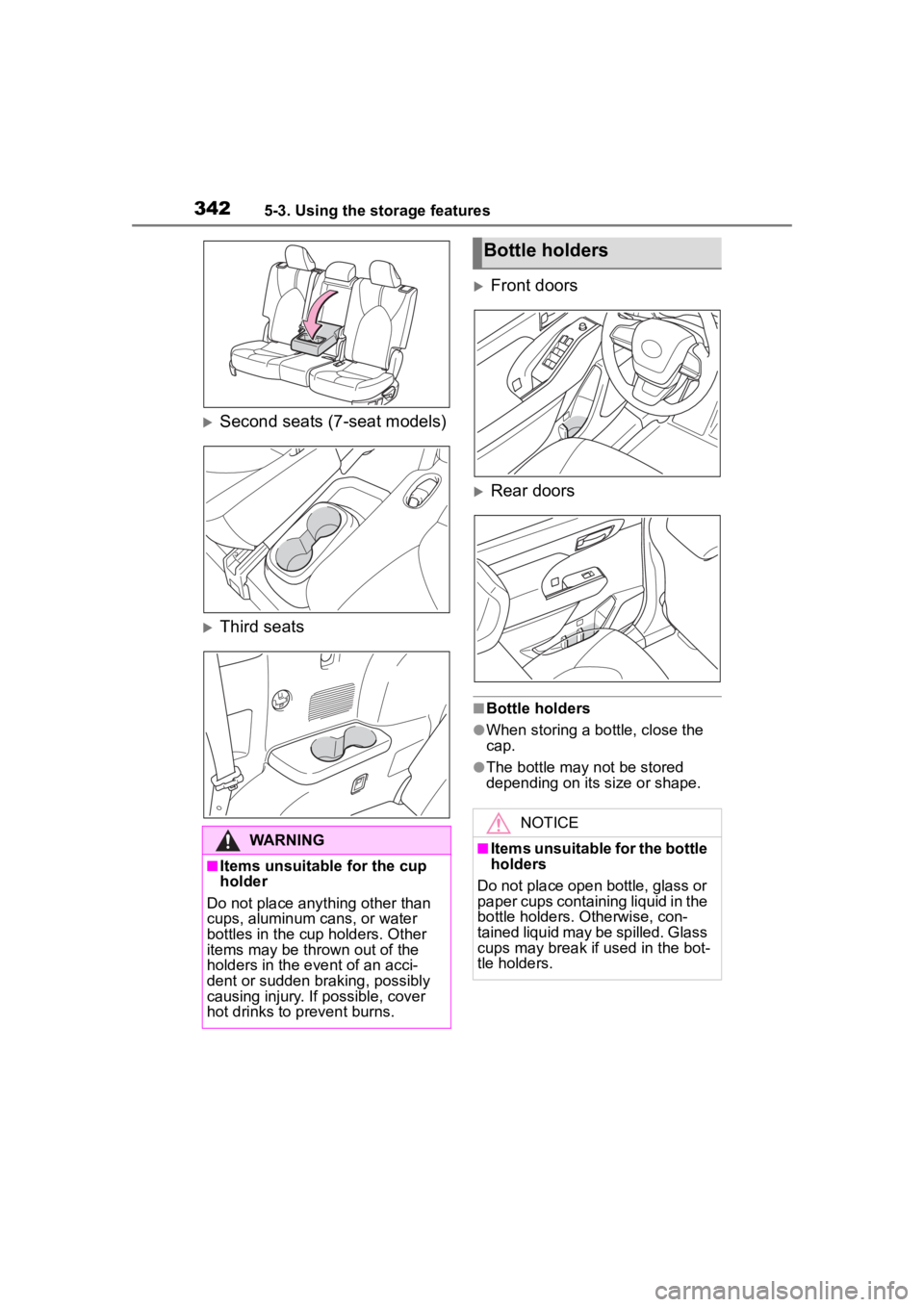
3425-3. Using the storage features
Second seats (7-seat models)
Third seats
Front doors
Rear doors
■Bottle holders
●When storing a bottle, close the
cap.
●The bottle may not be stored
depending on its size or shape.
WARNING
■Items unsuitable for the cup
holder
Do not place anything other than
cups, aluminum cans, or water
bottles in the cup holders. Other
items may be thrown out of the
holders in the event of an acci-
dent or sudden braking, possibly
causing injury. If possible, cover
hot drinks to p revent burns.
Bottle holders
NOTICE
■Items unsuitable for the bottle
holders
Do not place open bottle, glass or
paper cups containing liquid in the
bottle holders. Otherwise, con-
tained liquid may be spilled. Glass
cups may break if used in the bot-
tle holders.
Page 356 of 552

3565-4. Using the other interior features
Second seats (8-seat models)
Pull the armrest down for use.
Second seats (7-seat models)
Pull the armrest down for use.
NOTICE
• A metal accessory
• A case or cover made of metal
• A case which ha s magnet in it
on the charging side of the por-
table device
●Electric wave type wireless
remote controls are being used
nearby
●The electronic key is not inside
the vehicle
●2 or more portable devices are
placed on the charging tray at
the same time
If charging is abnormal or the
operation indicator light contin-
ues to flash for any other reason,
the wireless charger may be mal-
functioning. Contact your Toyota
dealer.
■To prevent malfunctions and
data corruptions
●When charging, bringing a
credit, or other magnetic card,
or magnetic storage media
close to the charge area may
clear any stored data due to
magnetic influence. Also, do not
bring a wristwatch or other pre-
cision instrument close to the
charge area since doing so may
cause it to malfunction.
●Do not charge with a non-con-
tact IC card such as a transpor-
tation system IC card inserted
between the charging side of a
portable device and the charge
area. The IC chip may become
extremely hot and damage the
portable device or IC card. Be
especially careful not to charge
a portable device inside a case
or cover with a non-contact IC
card attached.
●Do not leave portable devices
inside the vehicle. The inside of
the vehicle can become hot in
extreme heat, which could
cause a malfunction.
■If the smartphone OS has
been updated
If the smartphone OS has been
updated to a newer version, its
charging specifications may have
changed significantly.
For details, check the information
on the manufacturer’s website.
■To prevent battery discharge
Do not use the wireless charger
for a long period of time with the
engine is stopped.
Armrest