2023 TOYOTA HIGHLANDER OFF
[x] Cancel search: OFFPage 54 of 552
541-2. Child safety
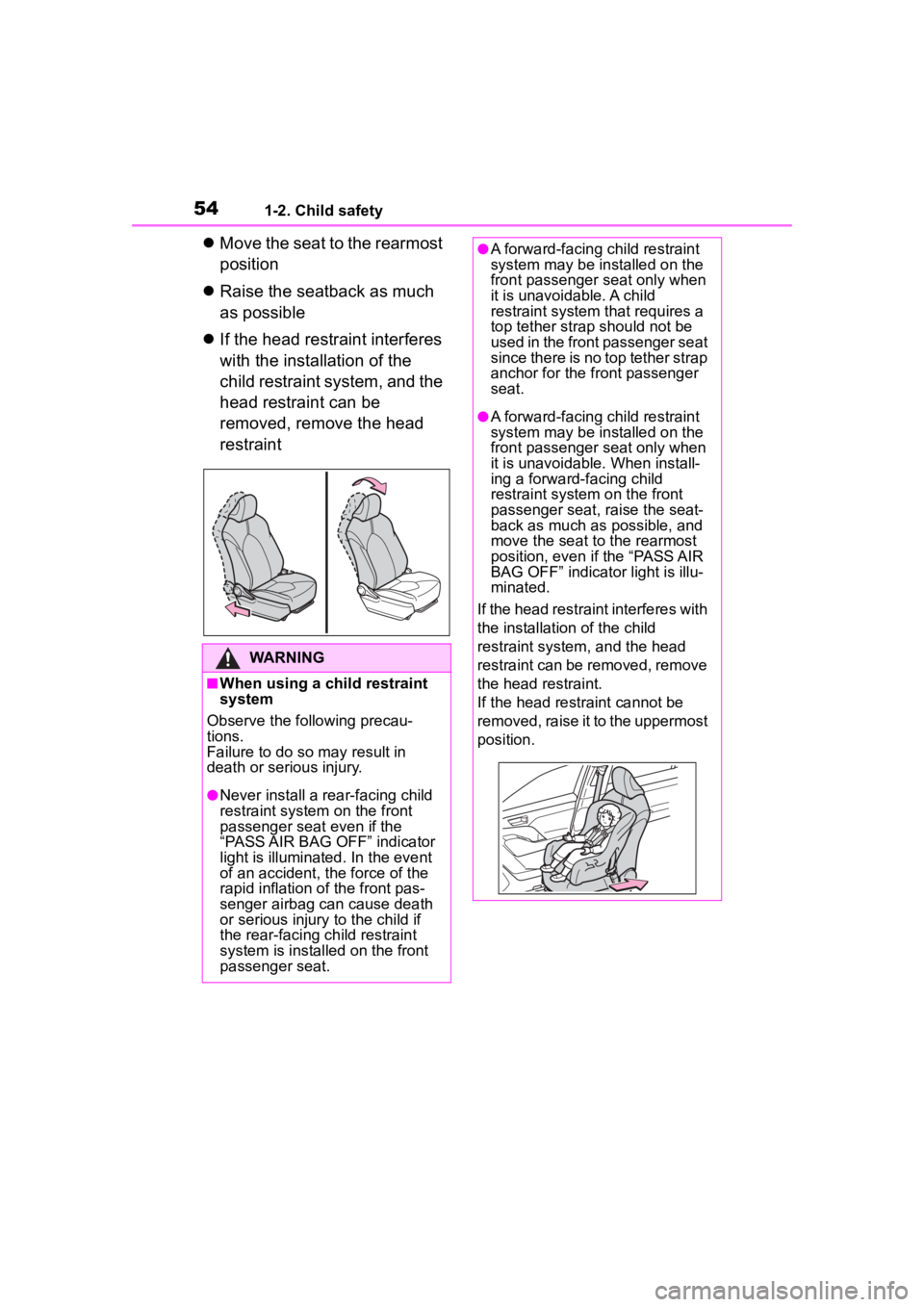
Move the seat to the rearmost
position
Raise the seatback as much
as possible
If the head restraint interferes
with the installation of the
child restraint system, and the
head restraint can be
removed, remove the head
restraint
WARNING
■When using a child restraint
system
Observe the following precau-
tions.
Failure to do so m ay result in
death or serious injury.
●Never install a rear-facing child
restraint system on the front
passenger seat even if the
“PASS AIR BAG OFF” indicator
light is illuminated. In the event
of an accident, the force of the
rapid inflation of the front pas-
senger airbag can cause death
or serious injury to the child if
the rear-facing child restraint
system is installed on the front
passenger seat.
●A forward-facing child restraint
system may be installed on the
front passenger seat only when
it is unavoidable. A child
restraint system that requires a
top tether strap should not be
used in the front passenger seat
since there is no top tether strap
anchor for the front passenger
seat.
●A forward-facing child restraint
system may be installed on the
front passenger seat only when
it is unavoidable. When install-
ing a forward-facing child
restraint system on the front
passenger seat, raise the seat-
back as much as possible, and
move the seat to the rearmost
position, even i f the “PASS AIR
BAG OFF” indicator light is illu-
minated.
If the head restraint interferes with
the installation of the child
restraint system, and the head
restraint can be removed, remove
the head restraint.
If the head restraint cannot be
removed, raise it to the uppermost
position.
Page 55 of 552
551-2. Child safety
1
For safety and security
A child restraint system for a
small child or baby must itself be
properly restrained on the seat
with the lap portion of the
lap/shoulder belt.
■Installing child restraint
system using a seat belt
(child restraint lock func-
tion belt)
Install the child restraint system
in accordance to the operation
manual enclosed with the child
restraint system.
■Rear-facing Infant
seat/convertible seat
1 Adjust the rear seat
If there is a gap between the child
seat and the seatb ack, adjust the
seatback angle until good contact is
achieved.
WARNING
●Do not allow the child to lean
his/her head or any part of
his/her body against the door or
the area of the seat, front or rear
pillars, or roof side rails from
which the SRS side airbags or
SRS curtain shield airbags
deploy even if the child is
seated in the child restraint sys-
tem. It is dangerous if the SRS
side airbags and curtain shield
airbags inflate, and the impact
could cause death or serious
injury to the child.
●When a booster seat is
installed, always ensure that the
shoulder belt is positioned
across the center of the child’s
shoulder. The belt should be
kept away from the child’s neck,
but not so that it could fall off the
child’s shoulder.
●Use child restraint system suit-
able to the age and size of the
child and install it to the rear
seat.
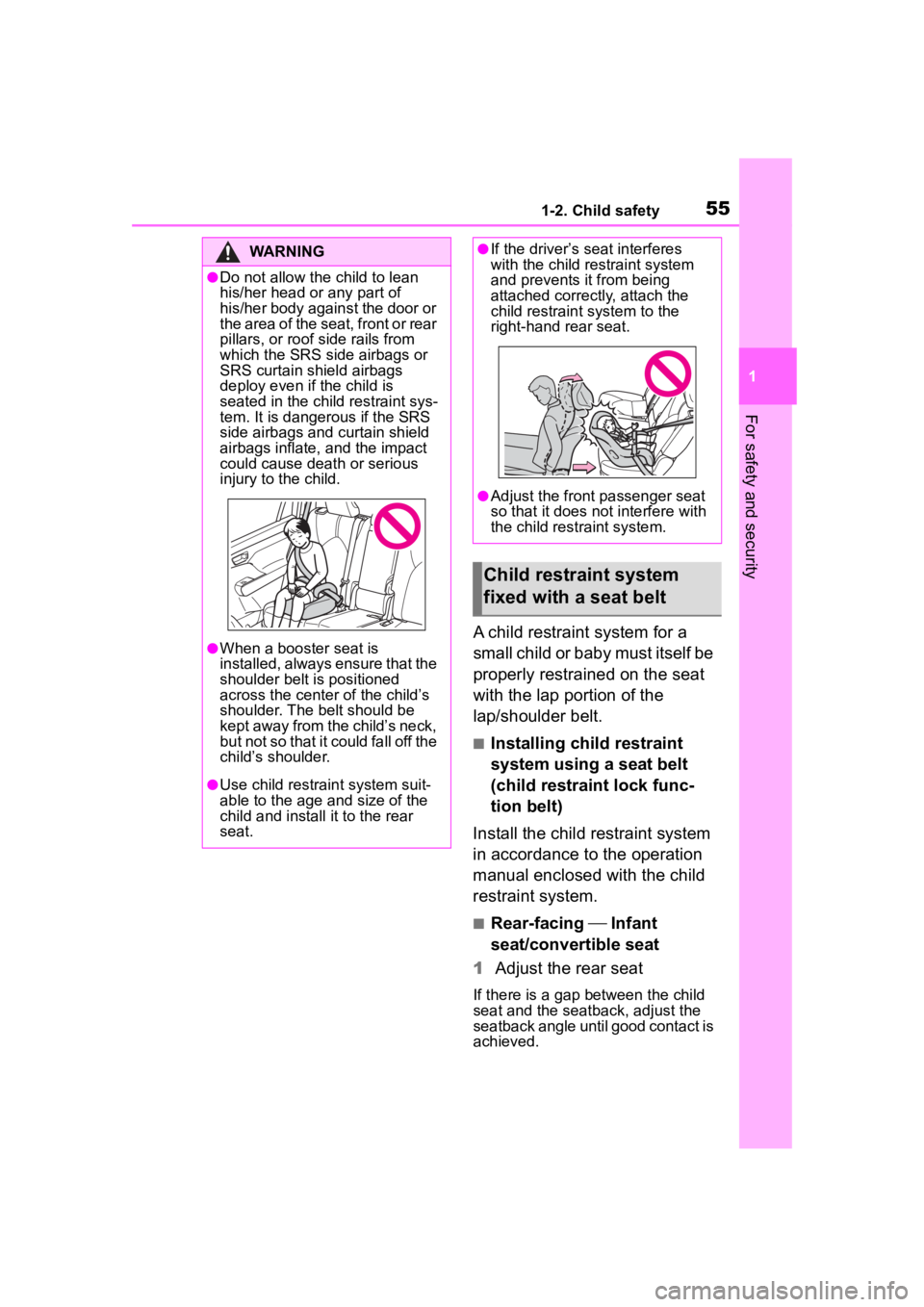
●If the driver’s seat interferes
with the child restraint system
and prevents it from being
attached correct ly, attach the
child restraint system to the
right-hand rear seat.
●Adjust the front passenger seat
so that it does not interfere with
the child restraint system.
Child restraint system
fixed with a seat belt
Page 59 of 552

591-2. Child safety
1
For safety and security
system.
Since the seat belt automatically
reels itself, slowly return it to the
stowing position.
WARNING
■When installing a child
restraint system
Observe the following precau-
tions.
Failure to do so m ay result in
death or serious injury.
●Do not allow children to play
with the seat belt. If the seat belt
becomes twisted around a
child’s neck, it may lead to
choking or other serious injuries
that could result in death.
If this occurs and the buckle
cannot be unfastened, scissors
should be used to cut the belt.
●Ensure that the belt and plate
are securely locked and the
seat belt is not twisted.
●Shake the child restraint system
left and right, and forward and
backward to ensure that it has
been securely installed.
●After securing a child restraint
system, never adjust the seat.
●When a booster seat is
installed, always ensure that the
shoulder belt is positioned
across the center of the child’s
shoulder. The belt should be
kept away from the child’s neck,
but not so that it could fall off the
child’s shoulder.
●Follow all installation instruc-
tions provided by the child
restraint system manufacturer.
●When securing some types of
child restraint systems in rear
seats, it may not be possible to
properly use the seat belts in
positions next to the child
restraint without interfering with
it or affecting seat belt effective-
ness. Be sure your seat belt fits
snugly across your shoulder
and low on your hips. If it does
not, or if it interferes with the
child restraint, move to a differ-
ent position. Fa ilure to do so
may result in death or serious
injury.
■When installing a booster
seat
To prevent the belt from going into
ALR lock mode, do not fully
extend the shoulder belt. ALR
mode causes the belt to tighten
only. This could cause injury or
discomfort to the child. ( P. 2 8 )
■Do not use a seat belt
extender
If a seat belt extender is used
when installing a child restraint
system, the seat belt will not
securely hold the child restraint
system, which could cause death
or serious injury to the child or
other passengers in the event of
sudden braking, sudden swerv-
ing or an accident.
Page 66 of 552

661-3. Emergency assistance
After you have signed the
Telematics Subscription Service
Agreement and are enrolled,
you can begin receiving ser-
vices.
A variety of subscription terms
are available for purchase. Con-
tact your Toyota dealer, call the
following appropriate Customer
Experience Center or push the
“SOS” button in your vehicle for
further subscription details.
The United States
1-800-331-4331
Canada
1-888-869-6828
Puerto Rico
1-877-855-8377
■Safety Connect Services Infor-
mation
●Phone calls using the vehicle’s
Bluetooth® technology will not be
possible when Safety Connect is
active and in use.
●Safety Connect is available begin-
ning Fall 2009 on select Toyota
models (in the contiguous United
States only). Contact with the
Safety Connect response center
is dependent upon the telematics
device being in operative condi-
tion, cellular connection availabil-
ity, and GPS satellite signal
reception, which can limit the abil-
ity to reach the response center or
receive emergency service sup-
port. Enrollment and Telematics
Subscription Service Agreement
are required. A variety of subscrip-
tion terms are available; charges vary by subscription term selected
and location.
●Automatic Collision Notification,
Emergency Assistance and Stolen
Vehicle Location are available in
the United States, including
Hawaii and Alaska
, Puerto Rico
and Canada, and Enhanced
Roadside Assist ance are avail-
able in the United States, Puerto
Rico and Canada.
●Automatic Collision Notification,
Emergency Assistance, Stolen
Vehicle and Enhanced Road
Assistance are not available in the
U.S. Virgin Islands.
For vehicles first sold in the U.S.
Virgin Islands, no Safety Connect
services will function in or outside
the U.S. Virgin Islands.
●Safety Connect services are not
subject to section 255 of the Tele-
communications Act and the
device is not TTY compatible.
■Languages
The Safety Connect response cen-
ter will offer suppor t in multiple lan-
guages. The Safety Connect system
will offer voice prom pts in English,
Spanish, and French. Please indi-
cate your language of choice when
enrolling.
■When contacting the response
center
You may be unable to contact the
response center if the network is
busy.
When the engine switch is
turned to ON, the red indicator
light comes on for 2 seconds
then turns off. Afterward, the
green indicator light comes on,
indicating that the service is
Subscription
Safety Connect LED light
Indicators
Page 67 of 552

671-3. Emergency assistance
1
For safety and security
active.
The following indicator light pat-
terns indicate specific system
usage conditions:
Green indicator light on =
Active service
Green indicator light flashing
= Safety Connect call in pro-
cess
Red indicator light (except at
vehicle start-up) = System
malfunction (contact your Toy-
ota dealer)
No indicator light (off) =
Safety Connect service not
active
■Automatic Collision Notifi-
cation
In case of either airbag deploy-
ment or severe rear-end colli-
sion, the system is designed to
automatically call the response
center. The responding agent
receives the vehicle’s location
and attempts to speak with the
vehicle occupants to assess the
level of emergency. If the occu-
pants are unable to communi-
cate, the agent automatically
treats the call as an emergency,
contacts the nearest emer-
gency services provider to
describe the situation, and
requests that assistance be sent
to the location.
■Stolen Vehicle Location
If your vehicle is stolen, Safety
Connect can work with local
authorities to assist them in
locating and recovering the
vehicle. After filing a police
report, call the Customer Experi-
ence Center at 1-800-331-4331
in the United States,
1-877-855-8377 in Puerto Rico
or 1-888-869-6828 in Canada,
and follow the prompts for
Safety Connect to initiate this
service.
In addition to assisting law
enforcement with recovery of a
stolen vehicle, Safety-Con-
nect-equipped vehicle location
data may, under certain circum-
stances, be shared with third
parties to locate your vehicle.
Further information is available
at Toyota.com in the United
States, Toyotapr.com in Puerto
Rico and Toyota.ca in Canada.
■Emergency Assistance But-
ton (“SOS”)
In the event of an emergency on
the road, push the “SOS” button
to reach the Safety Connect
response center. The answer-
ing agent will determine your
vehicle’s location, assess the
emergency, and dispatch the
necessary assistance required.
If you accidentally press the “SOS”
button, tell the response-center
agent that you are not experiencing
an emergency.
Safety Connect services
Page 69 of 552

691-4. Theft deterrent system
1
For safety and security
1-4.Theft deterrent system
Vehicles with 8-inch audio
system screen
Vehicles with 12.3-inch audio
system screen
The indicator light flashes after
the engine switch has been
turned off to indicate that the
system is operating.
The indicator light stops flashing
after the engine switch has been
turned to ACC or ON to indicate
that the system has been can-
celed.
■System maintenance
The vehicle has a mainte-
nance-free type engine immobilizer
system.
■Conditions that may cause the
system to malfunction
●If the grip portion of the key is in
contact with a metallic object
●If the key is in close proximity to or
touching a key registered to the
security system (key with a built-in
transponder chip) of another vehi-
cle
Engine immobilizer
system
The vehicle’s keys have
built-in transponder chips
that prevent the engine from
starting if a key has not
been previously registered
in the vehicle’s on-board
computer.
Never leave the keys inside
the vehicle when you leave
the vehicle.
This system is designed to
help prevent vehicle theft
but does not guarantee
absolute security against all
vehicle thefts.
Operating the system
NOTICE
■To ensure the system oper-
ates correctly
Do not modify or remove the sys-
tem. If modified or removed, the
proper operation of the system
cannot be guaranteed.
Page 76 of 552

762-1. Instrument cluster
*1: These lights turn on when the engine switch is turned to ON to
indicate that a system check is
being performed. They will turn
off after the engine is started, or
after a few seconds. There may
be a malfunction in a system if a
light does not come on, or turn
off. Have the vehicle inspected
by your Toyota dealer.
*2: This light illuminates on the
multi-information display.
*3: 7-inch display only: These lights turn on when the engine switch
is turned to ON to i ndicate that a
system check is being per-
formed. They will turn off after
the engine is started, or after a
few seconds. There may be a
malfunction in a system if a light
does not come on, or turn off.
Have the vehicle inspected by
your Toyota dealer.
12.3-inch display only: This light
illuminates on the multi-informa-
tion display.
The indicators inform the driver
of the operating state of the
vehicle’s various systems.
Rear passengers’ seat
belt reminder light (7-inch
display)
*2 ( P.435)
Rear passengers’ seat
belt reminder light
(12.3-inch display)
*2
( P.435)
Tire pressure warning
light
*1 ( P.435)
(orange)
LTA indicator ( P.436)
(flashes)
Stop & Start cancel indica-
tor
*1 (if equipped)
( P.436)
(flashes)
Intuitive parking assist
OFF indicator
*1 (if
equipped) ( P.436)
“RCTA OFF” indicator (if
equipped)
*1 ( P.436)
(flashes)
PKSB OFF indicator*1 (if
equipped) ( P.437)
(flashes or
illumi-
nates)PCS warning light*1
( P.437)
Slip indicator
*1 ( P.438)
(flashes)
(U.S.A.)
Parking brake indicator*1
( P.438)
(flashes)
(Canada)
Parking brake indicator*1
( P.438)
(flashes)
Brake hold operated indi-
cator
*1 ( P.438)
WARNING
■If a safety system warning
light does not come on
Should a safety system light such
as the ABS and SRS warning
lights not come on when you start
the engine, this could mean that
these systems are not available to
help protect you in an accident,
which could result in death or seri-
ous injury. Have the vehicle
inspected by you r Toyota dealer
immediately if this occurs.
Indicators
Page 77 of 552

772-1. Instrument cluster
2
Vehicle status information and indicators
Drive mode indicators
Turn signal indicator
( P.204)
(U.S.A.)
Headlight indicator
( P.210)
(Canada)
Tail light indicator
( P.210)
Headlight high beam indi-
cator ( P.212)
Automatic High Beam indi-
cator ( P.213)
Front fog light indicator (if
equipped) (P.216)
PCS warning light
*1, 2
( P.228)
Cruise control indicator
( P.249)
Dynamic radar cruise con-
trol indicator ( P.249)
Cruise control “SET” indi-
cator ( P.249)
*7
LTA i n d i c a t o r ( P.228,
245)
BSM outside rear view
mirror indicators
*2, 3 (if
equipped) (P.270, 283)
BSM OFF indicator
*1, 2 (if
equipped) (P.270)
Intuitive parking assist
OFF indicator
*1, 2(if
equipped) (P.276)
“RCTA OFF” indicator
*1, 2
(if equipped) ( P.284)
PKSB OFF indicator
*1, 2(if
equipped) (P.291)
Stop & Start indicator
*2 (if
equipped) (P.264)
Stop & Start cancel indica-
tor
*1, 2 (if equipped)
( P.265)
(flashes)
Slip indicator*2 ( P.308)
VSC OFF indicator
*1, 2
( P.309)
Smart key system indica-
tor
*4 ( P.197)
(U.S.A.)
Parking brake indicator*2
( P.205)
(Canada)
Parking brake indicator*2
( P.205)
Brake hold standby indica-
tor
*2 ( P.208)
Brake hold operated indi-
cator
*2 ( P.208)
Snow mode indicator
( P.304)
Downhill assist control
system indicator (if
equipped) ( P.305)
Eco Driving Indicator
Light
*2 ( P.89, 100)
Low outside temperature
indicator
*6 ( P.79)
Security indicator
*5
( P.69, 70)
“PASS AIR BAG ON/OFF”
indicator
*2, 5 ( P. 4 3 )
“PASS AIR BAG
ON/OFF” indicator
*2,
5
( P. 4 3 )