Page 333 of 468
3336-3. Do-it-yourself maintenance
6
Maintenance and care
*: If equipped
■If the key battery is depleted
The following symptoms may occur:
●The smart key system (if
equipped) and wireless remote
control will not fu nction properly.
●The operational range will be
reduced.
Flathead screwdriver
Small flathead screwdriver
Lithium battery CR2032 (vehi-
cles without a smart key sys-
tem), or CR2450 (vehicles
with a smart key system)
■Use a CR2032 (vehicles without
a smart key system), or CR2450
(vehicles with a smart key sys-
tem) lithium battery
●Batteries can be purchased at
your Toyota dealer, local electrical
appliance shops or camera stores.
●Replace only with the same or
equivalent type recommended by
the manufacturer.
●Dispose of used batteries accord-
ing to local laws.
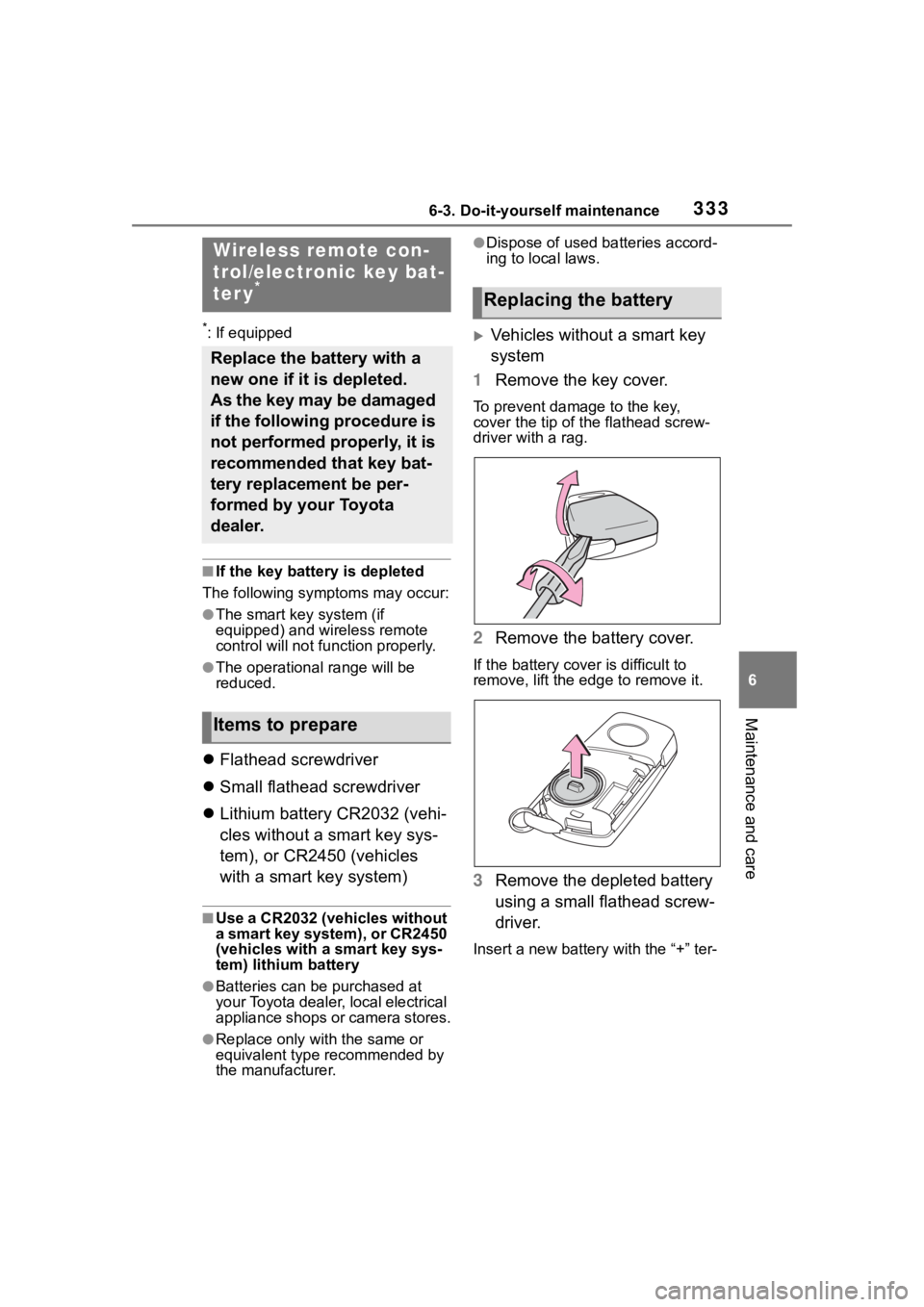
Vehicles without a smart key
system
1 Remove the key cover.
To prevent damage to the key,
cover the tip of the flathead screw-
driver with a rag.
2Remove the battery cover.
If the battery cover is difficult to
remove, lift the e dge to remove it.
3Remove the depleted battery
using a small flathead screw-
driver.
Insert a new battery with the “+” ter-
Wireless remote con-
trol/electronic key bat-
ter y
*
Replace the battery with a
new one if it is depleted.
As the key may be damaged
if the following procedure is
not performed properly, it is
recommended that key bat-
tery replacement be per-
formed by your Toyota
dealer.
Items to prepare
Replacing the battery
Page 334 of 468
3346-3. Do-it-yourself maintenance
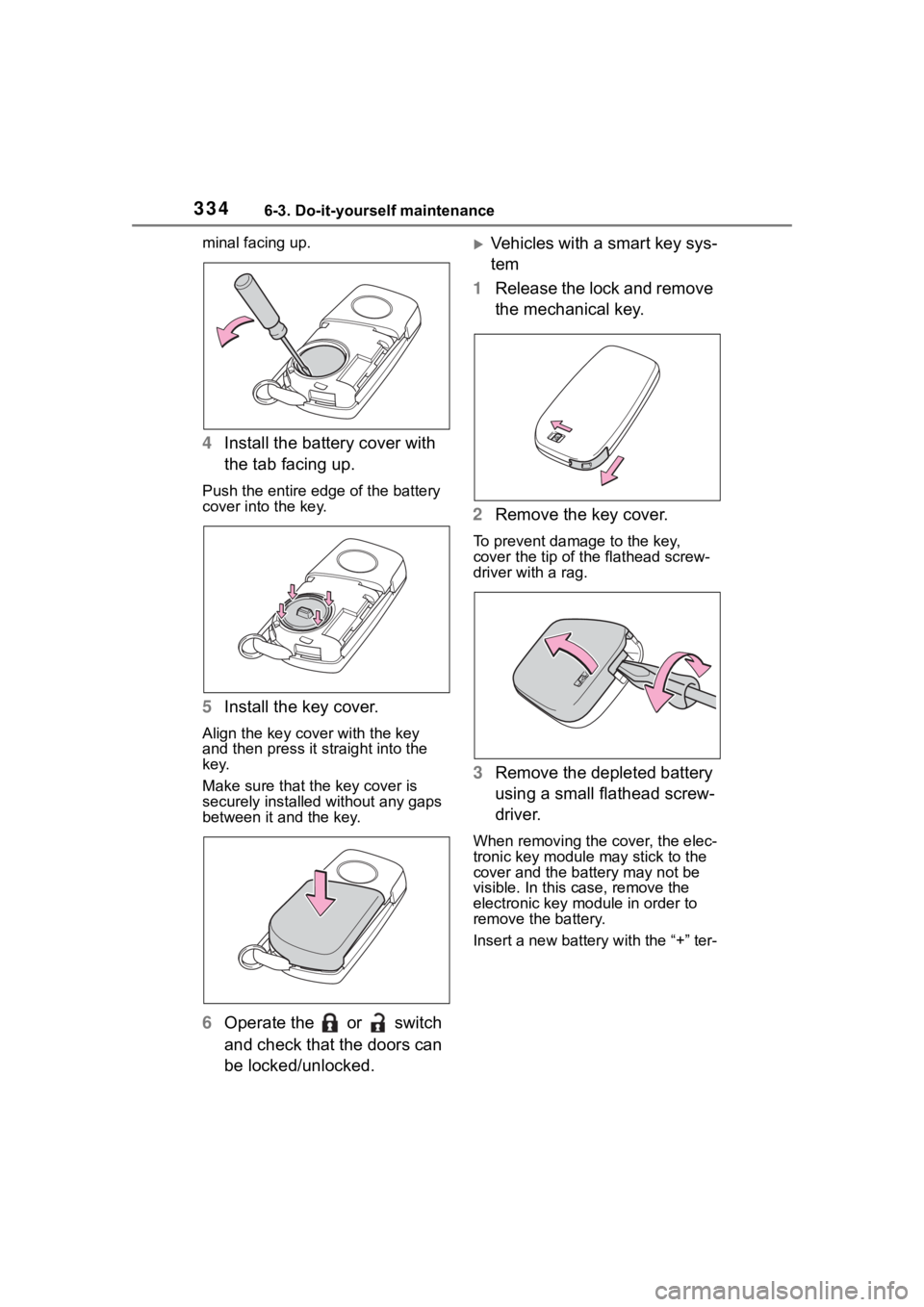
minal facing up.
4Install the battery cover with
the tab facing up.
Push the entire edge of the battery
cover into the key.
5Install the key cover.
Align the key cover with the key
and then press it straight into the
key.
Make sure that the key cover is
securely installed without any gaps
between it and the key.
6Operate the or switch
and check that the doors can
be locked/unlocked.
Vehicles with a smart key sys-
tem
1 Release the lock and remove
the mechanical key.
2 Remove the key cover.
To prevent damage to the key,
cover the tip of the flathead screw-
driver with a rag.
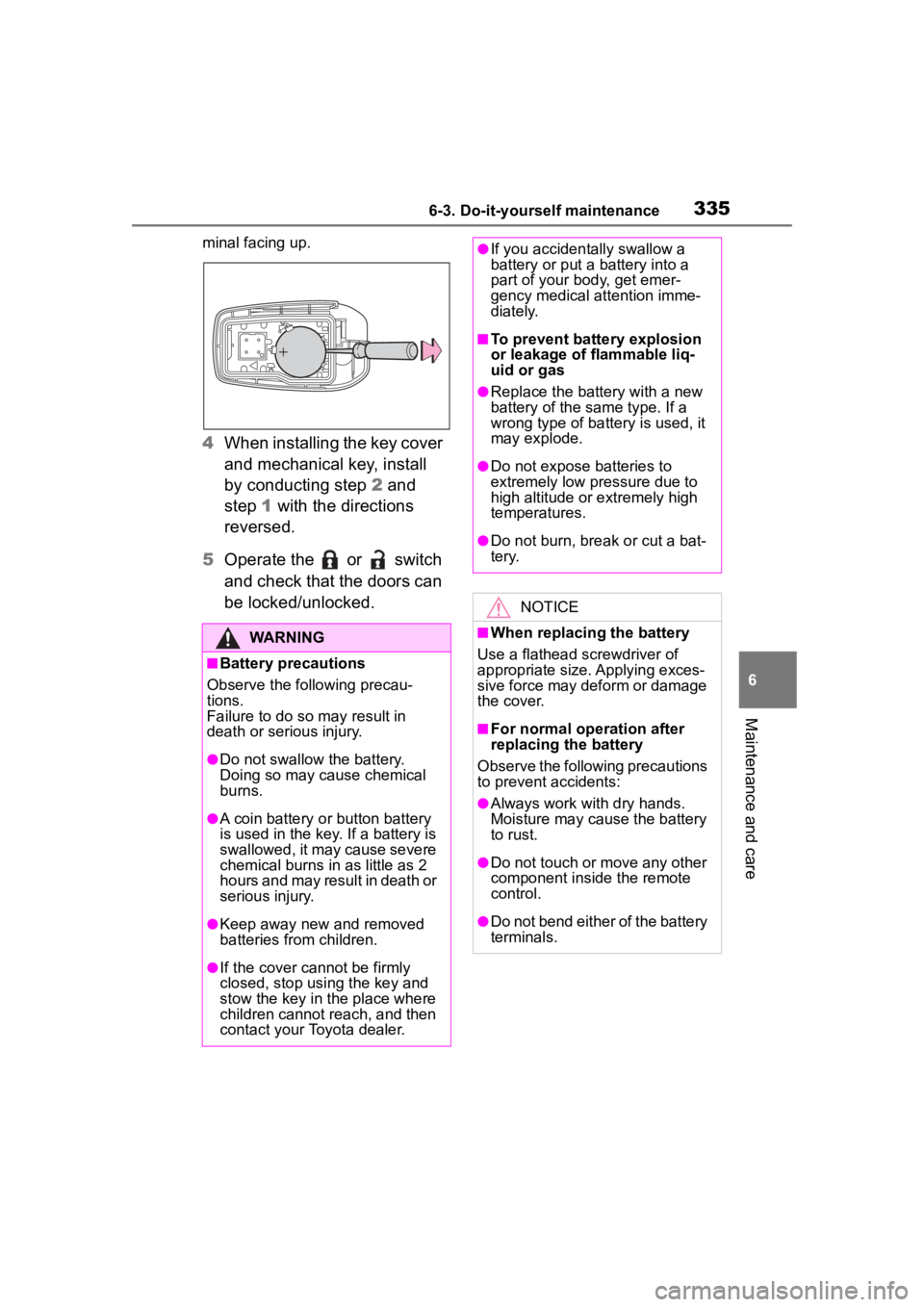
3Remove the depleted battery
using a small flathead screw-
driver.
When removing the cover, the elec-
tronic key module may stick to the
cover and the batt ery may not be
visible. In this case, remove the
electronic key module in order to
remove the battery.
Insert a new battery with the “+” ter-
Page 335 of 468
3356-3. Do-it-yourself maintenance
6
Maintenance and care
minal facing up.
4When installing the key cover
and mechanical key, install
by conducting step 2 and
step 1 with the directions
reversed.
5 Operate the or switch
and check that the doors can
be locked/unlocked.
WARNING
■Battery precautions
Observe the following precau-
tions.
Failure to do so m ay result in
death or serious injury.
●Do not swallow the battery.
Doing so may cause chemical
burns.
●A coin battery o r button battery
is used in the key. If a battery is
swallowed, it may cause severe
chemical burns in as little as 2
hours and may result in death or
serious injury.
●Keep away new and removed
batteries from children.
●If the cover cannot be firmly
closed, stop using the key and
stow the key in the place where
children cannot reach, and then
contact your Toyota dealer.
●If you accidentally swallow a
battery or put a battery into a
part of your b ody, get emer-
gency medical attention imme-
diately.
■To prevent battery explosion
or leakage of flammable liq-
uid or gas
●Replace the battery with a new
battery of the same type. If a
wrong type of battery is used, it
may explode.
●Do not expose batteries to
extremely low pr essure due to
high altitude or extremely high
temperatures.
●Do not burn, bre ak or cut a bat-
tery.
NOTICE
■When replacing the battery
Use a flathead screwdriver of
appropriate size. Applying exces-
sive force may deform or damage
the cover.
■For normal operation after
replacing the battery
Observe the following precautions
to prevent accidents:
●Always work with dry hands.
Moisture may cause the battery
to rust.
●Do not touch or move any other
component inside the remote
control.
●Do not bend either of the battery
terminals.
Page 336 of 468
3366-3. Do-it-yourself maintenance
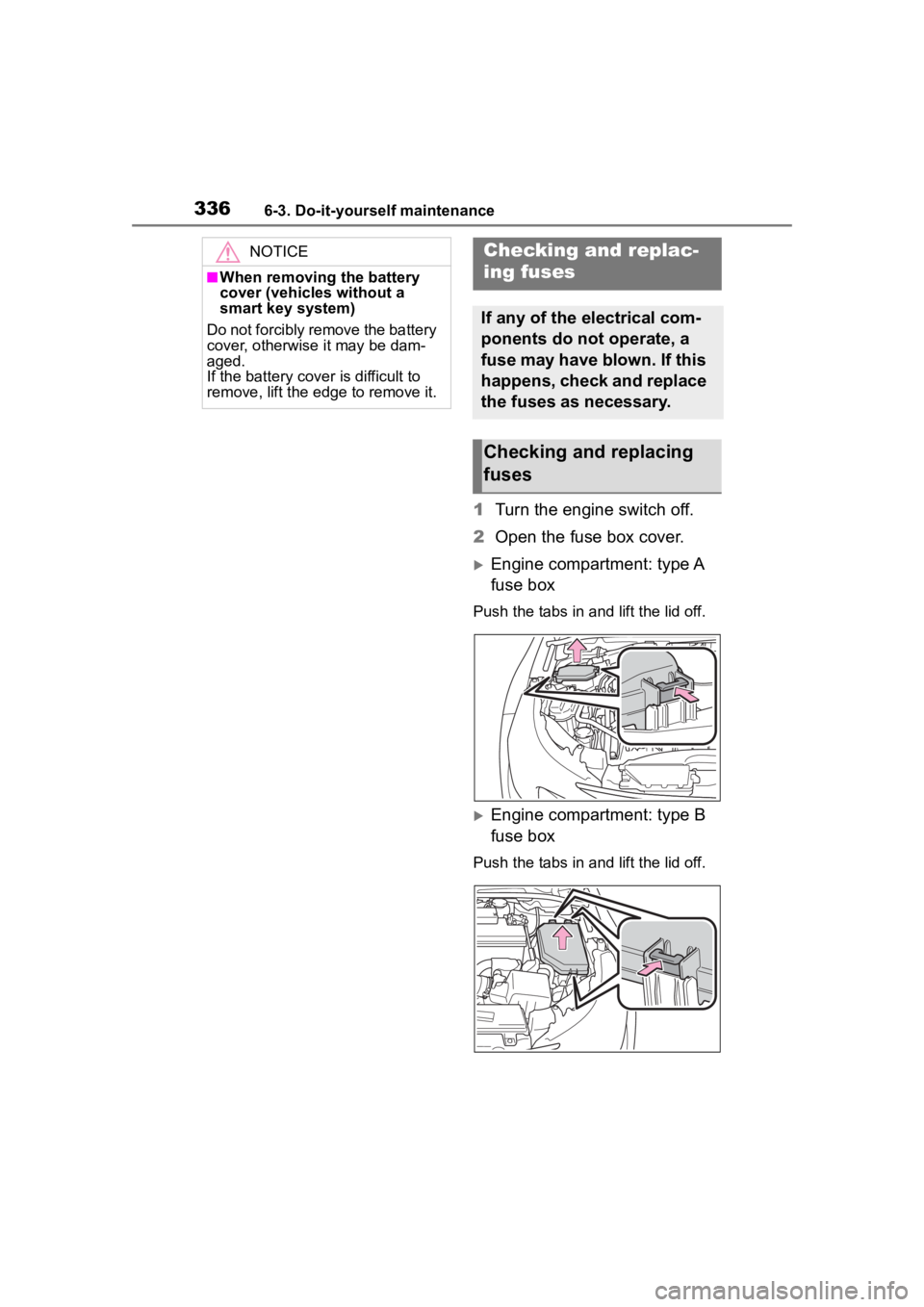
1Turn the engine switch off.
2 Open the fuse box cover.
Engine compartment: type A
fuse box
Push the tabs in and lift the lid off.
Engine compartment: type B
fuse box
Push the tabs in and lift the lid off.
NOTICE
■When removing the battery
cover (vehicles without a
smart key system)
Do not forcibly remove the battery
cover, otherwise it may be dam-
aged.
If the battery cover is difficult to
remove, lift the edge to remove it.
Checking a nd replac-
ing fuses
If any of the electrical com-
ponents do not operate, a
fuse may have blown. If this
happens, check and replace
the fuses as necessary.
Checking and replacing
fuses
Page 347 of 468
347
7
7
When trouble arises
When trouble arises
.7-1. Essential informationEmergency flashers .... 348
If your vehicle has to be stopped in an emergency.................................. 348
If the vehicle is submerged or water on the road is ris-
ing ............................. 350
7-2. Steps to take in an emer- gency
If your vehicle needs to be towed......................... 351
If you think something is wrong ........................ 354
Fuel pump shut off system .................................. 355
If a warning light turns on or a warning buzzer sounds.................................. 356
If a warning message is dis- played........................ 366
If you have a flat tire.... 370
If the engine will not start .................................. 379
If you lose your keys ... 381
If the electronic key does not operate properly .. 381
If the vehicle battery is dis- charged ..................... 383
If your vehicle overheats .................................. 387
If the vehicle becomes stuck .................................. 389
Page 348 of 468
3487-1. Essential information
7-1.Essential information
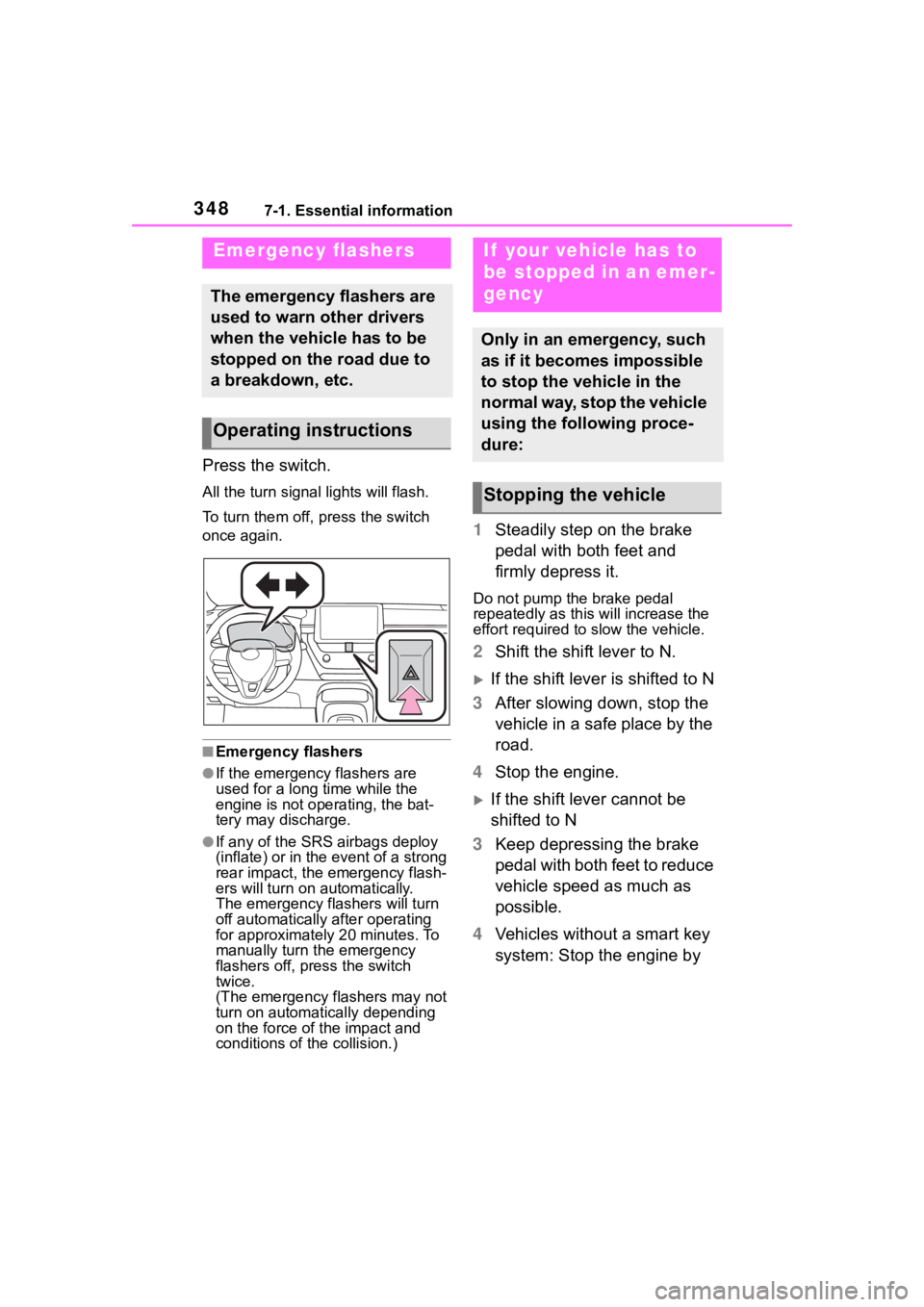
Press the switch.
All the turn signal lights will flash.
To turn them off, press the switch
once again.
■Emergency flashers
●If the emergency flashers are
used for a long time while the
engine is not operating, the bat-
tery may discharge.
●If any of the SRS airbags deploy
(inflate) or in the event of a strong
rear impact, the emergency flash-
ers will turn on automatically.
The emergency flashers will turn
off automatically after operating
for approximately 20 minutes. To
manually turn t he emergency
flashers off, press the switch
twice.
(The emergency flashers may not
turn on automatically depending
on the force of the impact and
conditions of the collision.)
1 Steadily step on the brake
pedal with both feet and
firmly depress it.
Do not pump the brake pedal
repeatedly as this will increase the
effort required to slow the vehicle.
2Shift the shift lever to N.
If the shift lever is shifted to N
3 After slowing down, stop the
vehicle in a safe place by the
road.
4 Stop the engine.
If the shift lever cannot be
shifted to N
3 Keep depressing the brake
pedal with both feet to reduce
vehicle speed as much as
possible.
4 Vehicles without a smart key
system: Stop the engine by
Emergency flashers
The emergency flashers are
used to warn other drivers
when the vehicle has to be
stopped on the road due to
a breakdown, etc.
Operating instructions
If your vehicle has to
be stopped in an emer-
gency
Only in an emergency, such
as if it becomes impossible
to stop the vehicle in the
normal way, stop the vehicle
using the following proce-
dure:
Stopping the vehicle
Page 349 of 468
3497-1. Essential information
7
When trouble arises
turning the engine switch to
ACC.
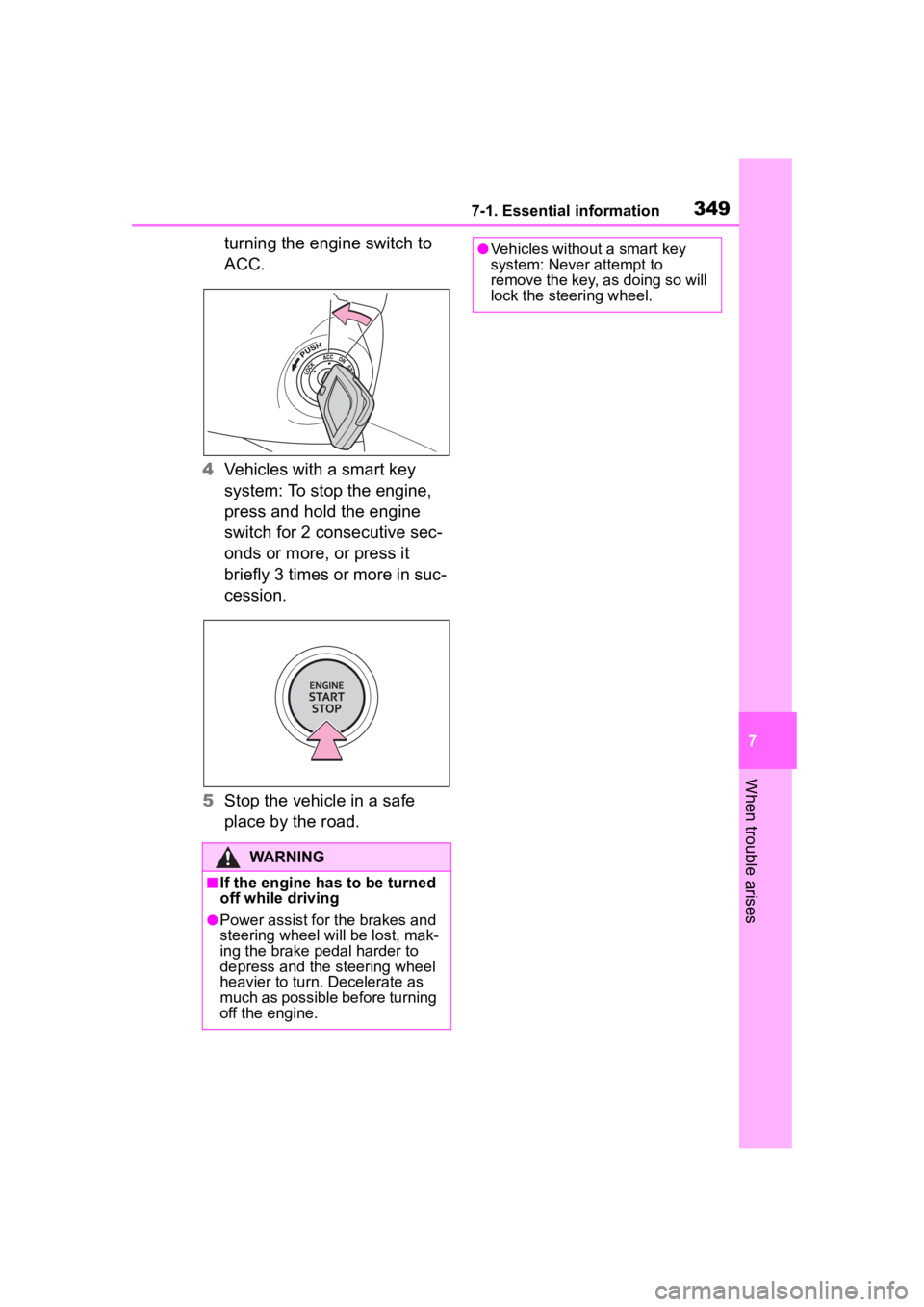
4 Vehicles with a smart key
system: To stop the engine,
press and hold the engine
switch for 2 consecutive sec-
onds or more, or press it
briefly 3 times or more in suc-
cession.
5 Stop the vehicle in a safe
place by the road.
WARNING
■If the engine has to be turned
off while driving
●Power assist for the brakes and
steering wheel will be lost, mak-
ing the brake pedal harder to
depress and the steering wheel
heavier to turn. Decelerate as
much as possible before turning
off the engine.
●Vehicles without a smart key
system: Never attempt to
remove the key, as doing so will
lock the steering wheel.
Page 351 of 468
3517-2. Steps to take in an emergency
7
When trouble arises
7-2.Steps to take in an emergency
If your vehicle needs
to be towed
If towing is necessary, we
recommend having your
vehicle towed by your Toy-
ota dealer or commercial
towing service, using a
wheel-lift type truck or flat-
bed truck.
Use a safety chain system
for all towing, and abide by
all state/provincial and local
laws.
WARNING
Observe the following precau-
tions.
Failure to do so may result in
death or serious injury.
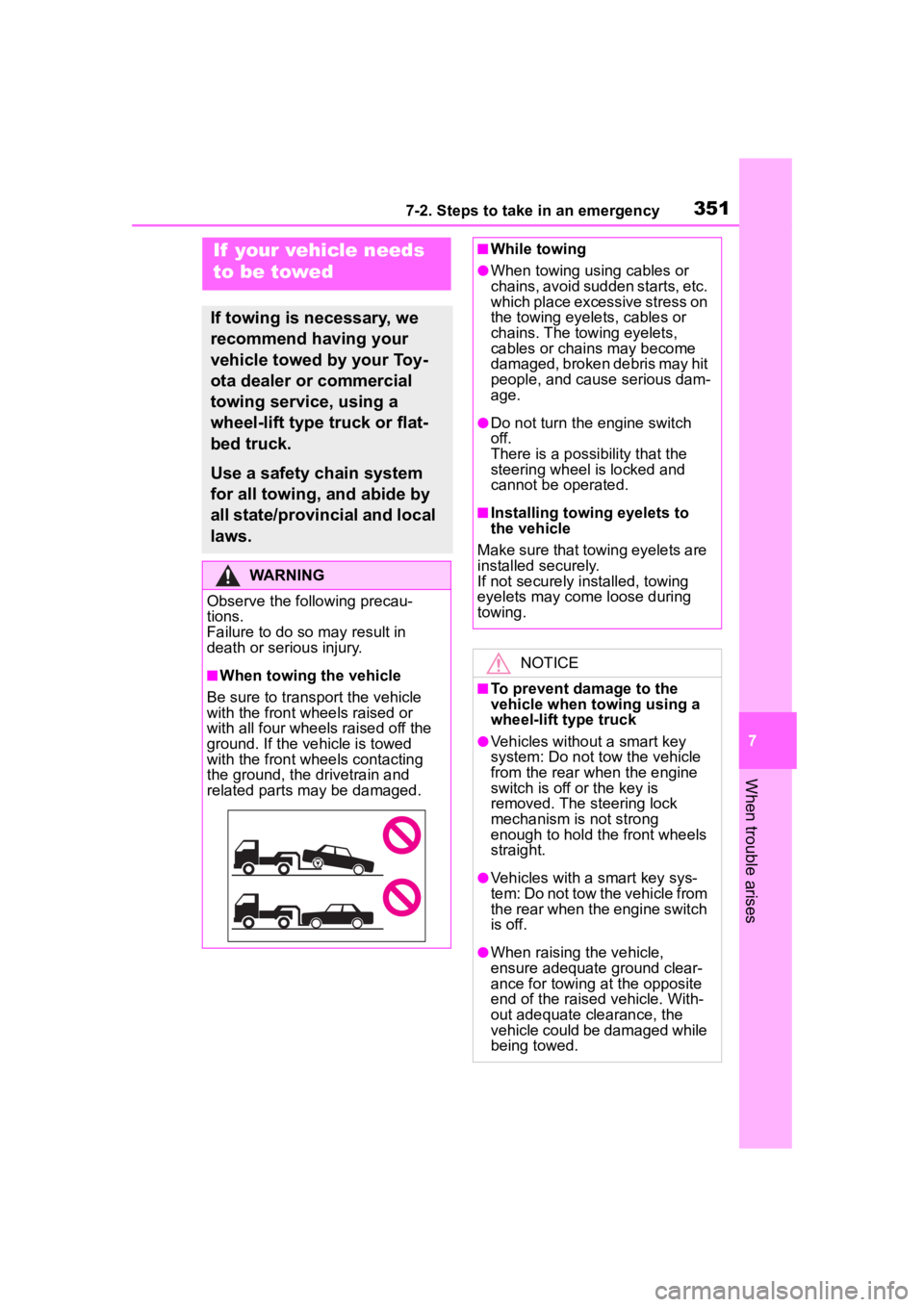
■When towing the vehicle
Be sure to transport the vehicle
with the front wh eels raised or
with all four wheels raised off the
ground. If the vehicle is towed
with the front wh eels contacting
the ground, the drivetrain and
related parts may be damaged.
■While towing
●When towing using cables or
chains, avoid sudden starts, etc.
which place excessive stress on
the towing eyelets, cables or
chains. The towing eyelets,
cables or chains may become
damaged, broken debris may hit
people, and cause serious dam-
age.
●Do not turn the engine switch
off.
There is a possibility that the
steering wheel is locked and
cannot be operated.
■Installing towing eyelets to
the vehicle
Make sure that towing eyelets are
installed securely.
If not securely installed, towing
eyelets may come loose during
towing.
NOTICE
■To prevent damage to the
vehicle when t owing using a
wheel-lift type truck
●Vehicles without a smart key
system: Do not tow the vehicle
from the rear when the engine
switch is off or the key is
removed. The steering lock
mechanism is not strong
enough to hold the front wheels
straight.
●Vehicles with a smart key sys-
tem: Do not tow the vehicle from
the rear when the engine switch
is off.
●When raising the vehicle,
ensure adequate ground clear-
ance for towing at the opposite
end of the raised vehicle. With-
out adequate clearance, the
vehicle could be damaged while
being towed.