2023 TOYOTA COROLLA towing
[x] Cancel search: towingPage 184 of 468
1844-5. Using the driving support systems
Toyota Safety Sense
3.0
The Toyota Safety Sense 3.0
consists of the driving
assist systems and contrib-
utes to a safe and comfort-
able driving experience:
WARNING
■Toyota Safety Sense 3.0
The Toyota Safety Sense 3.0
operates under the assumption
that the driver will drive safely,
and is designed to help reduce
the impact to the occupants in a
collision and assist the driver
under normal driving conditions.
As there is a limit to the degree of
recognition accuracy and control
performance that this system can
provide, do not ov erly rely on this
system. The driver is solely
responsible for paying attention to
the vehicle’s surroundings and
driving safely.
■For safe use
●Do not overly rely on this sys-
tem. The driver is solely respon-
sible for paying attention to the
vehicle’s surroundings and driv-
ing safely. This system may not
operate in all situations and pro-
vided assistance is limited.
Over-reliance on this system to
drive the vehicle safely may
lead to an accident resulting in
death or serious injury.
●Do not attempt to test the oper-
ation of the system, as it may
not operate properly, possibly
leading to an accident.
●If attention is necessary while
performing driving operations or
a system malfunction occurs, a
warning message or warning
buzzer will be operated. If a
warning message is displayed
on the display, follow the
instructions displayed.
●Depending on external noise,
the volume of the audio system,
etc. it may be difficult to hear the
warning buzzer. Also, depend-
ing on the road conditions, it
may be difficult to recognize the
operation of the system.
■When it is necessary to dis-
able the system
In the following si tuations, make
sure to disable the system.
Failure to do so may lead to the
system not operating properly,
possibly leading to an accident
resulting in death o r serious injury.
●When the vehicle is tilted due to
being overloaded or having a
flat tire
●When driving at extremely high
speeds
●When towing another vehicle
●When the vehicle is being trans-
ported by a truck, ship, train,
etc.
●When the vehicle is raised on a
lift and the tires are allowed to
rotate freely
●When inspecting the vehicle
using a drum tester such as a
chassis dynamometer or speed-
ometer tester, or when using an
on vehicle wheel balancer
●When the vehicle is driven in a
sporty manner or off-road
●When using an automatic car
wash
Page 237 of 468

2374-5. Using the driving support systems
4
Driving
Monitor is turned on
• When towing with the vehicle
●Instances of the Blind Spot Moni-
tor unnecessarily d etecting a vehi-
cle and/or object may increase in
the following situations:
• When the sensor is misaligned
due to a strong impact to the sen-
sor or its surrounding area
• When the distance between your vehicle and a guardrail, wall, etc.
that enters the detection area is
short
• When driving up and down con-
secutive steep inclines, such as
hills, dips in the road, etc.
• When vehicle lanes are narrow, or
when driving on the edge of a
lane, and a vehicle traveling in a
lane other than the adjacent lanes
enters the detection area
• When driving on roads with sharp bends, consecutive curves, or
uneven surfaces
• When the tires are slipping or spinning
• When the distance between your vehicle and a following vehicle is
short
• When an accessory (such as a bicycle carrier) is installed to the
rear of the vehicle
• When towing with the vehicle
*: If equipped
Meter control switches
RCTA (Rear Cross Traf-
fic Alert) function*
The RCTA function uses the
BSM rear side radar sensors
installed behind the rear
bumper. This function is
intended to assist the driver
in checking areas that are
not easily visible when
backing up.
WARNING
■Cautions regarding the use of
the system
The driver is solely responsible for
safe driving. Always drive safely,
taking care to observe your sur-
roundings. The RCTA function is
only a supplementary function
which alerts the driver that a vehi-
cle is approaching from the right
or left at the rear of the vehicle. As
the RCTA function may not func-
tion correctly under certain condi-
tions, the driver’s own visual
confirmation of safety is neces-
sary. Over reliance on this func-
tion may lead to an accident
resulting death or serious injury.
System components
Page 240 of 468

2404-5. Using the driving support systems
■The RCTA function is opera-
tional when
The RCTA function operates when
all of the followin g conditions are
met:
●The engine swit ch is in ON.
●The RCTA function is on.
●The shift lever is in R.
●The vehicle speed is less than
approximately 9 mph (15 km/h).
●The approaching vehicle speed is
between approximately 5 mph (8
km/h) and 34 mph (56 km/h).
■Setting the buzzer volume
The buzzer volume can be adjusted
on the multi-information display.
The volume of the RCTA buzzer can
be adjusted on (4.2-inch dis-
play) or (7-inch display) of the
multi-information display. ( P.412)
■Conditions under which the
system will not detect a vehicle
The RCTA function is not designed
to detect the following types of vehi-
cles and/or objects:
●Vehicles approaching from directly
behind
●Vehicles backing up in a parking
space next to your vehicle
●Vehicles that the sensors cannot
detect due to obstructions
●Guardrails, walls, signs, parked
vehicles and similar stationary
objects
*
●Small motorcycles, bicycles,
pedestrians, etc.*
●Vehicles moving away from your
vehicle
●Vehicles approaching from the
parking spaces nex t to your vehi-
cle
*
●The distance between the sensor
and approaching vehicle gets too
close
*: Depending on the conditions, detection of a v ehicle and/or
object may occur.
■Situations in which the system
may not operate properly
The RCTA function may not detect
vehicles correctly in the following
situations:
●When the sensor is misaligned
due to a strong impact to the sen-
sor or its surrounding area
●When mud, snow, ice, a sticker,
etc., is covering the sensor or sur-
rounding area on the position
above the rear bumper
●When driving on a road surface
that is wet with standing water
during bad weather, such as
heavy rain, snow, or fog
●When multiple vehicles are
approaching with only a small gap
between each vehicle
●When a vehicle is approaching at
high speed
●When equipment that may
obstruct a sensor is installed, such
as a towing eyelet, bumper pro-
tector (an additional trim strip,
Approaching vehicle speed Approximate alert distance
34 mph (56 km/h) (fast)131 ft. (40 m)
5 mph (8 km/h) (slow)18 ft. (5.5 m)
Page 241 of 468

2414-5. Using the driving support systems
4
Driving
etc.), bicycle carrier, or snow plow
●When backing up on a slope with
a sharp change in grade
●When backing out of a sharp
angle parking spot
●Immediately after the RCTA func-
tion is turned on
●Immediately afte r the engine is
started with the RCTA function on
●When the sensors cannot detect a
vehicle due to obstructions
●When towing a trailer
●When there is a significant differ-
ence in height between your vehi-
cle and the vehicle that enters the
detection area
●When a sensor or the area around
a sensor is extremely hot or cold
●If the suspension has been modi-
fied or tires of a size other than
specified are installed
●If the front of the vehicle is raised
or lowered due to the carried load
●When turning while backing up
●When a vehicle tu rns into the
detection area
■Situations in which the system
may operate even if there is no
possibility of a collision
Instances of the RCTA function
unnecessary detec ting a vehicle
and/or object may increase in the
following situations:
●When the parking space faces a
street and vehicles are being
driven on the street
●When the distance between your
vehicle and metal objects, such as
a guardrail, wall, sign, or parked
vehicle, which may reflect electri-
cal waves toward the rear of the
vehicle, is short
Page 242 of 468

2424-5. Using the driving support systems
●When equipment that may
obstruct a sensor is installed, such
as a towing eyelet, bumper pro-
tector (an additional trim strip,
etc.), bicycle carrier, or snow plow
●When a vehicle passes by the
side of your vehicle
●When a detected vehicle turns
while approaching the vehicle
●When there are spinning objects
near your vehicle such as the fan
of an air conditioning unit
●When water is splashed or
sprayed toward t he rear bumper,
such as from a sprinkler
●Moving objects (flags, exhaust
fumes, large rain droplets or
snowflakes, rain water on the road
surface, etc.)
●When the distanc e between your
vehicle and a guardr ail, wall, etc.,
that enters the detection area is
short
●Gratings and gutters
●When a sensor or the area around
a sensor is extremely hot or cold
●If the suspension has been modi-
fied or tires of a size other than
specified are installed
●If the front of the v ehicle is raised
or lowered due to the carried load
Page 246 of 468

2464-5. Using the driving support systems
(the time which operation is possi-
ble may be extended if a door is
opened and closed)
●Safe exit assist is on
●The vehicle is stopped.
●The shift lever is in a position
other than R.
■The Safe exit assist will detect a
vehicle when
The Safe exit assist will detect a
vehicle present in the detection area
in the followin g situations:
●When the vehicle is stopped and a
vehicle or bicycle, which is travel-
ing parallel to the vehicle, is
approaching within the area that a
door opens
■Conditions under which the
system will not detect a vehicle
●Safe exit assist does not detect
the following objects, vehicles,
and bicycles:
• Vehicles or bicycles which are
approaching slowly
*
• Vehicles or bicycles which are determined to have a low possibil-
ity of colliding with a door when
opened
*
• Vehicles or bicycles which are
approaching from directly behind*
• Vehicles or bicycles which are approaching from the front*
• Guardrails, walls , signs, parked
vehicles, and other stationary
objects
*
• Pedestrians, animals, etc.*
*
: Depending on the conditions, detection of a vehicle and/or
object may occur.
●In situations such as the following,
safe exit assist will not operate:
• When 3 minutes or more have elapsed since the engine off (the
time which operation is possible
may be extended if a door is
opened and closed)
• When your vehicle is not com- pletely stopped
■Conditions under which the
system may not function cor-
rectly
●The Safe exit assist may not
detect vehicles corr ectly in the fol-
lowing situations:
• When the sensor is misaligned due to a strong impact to the sen-
sor or its surrounding area
• When mud, snow, ice, a sticker, etc. is covering the sensor or sur-
rounding area on the rear bumper
• When the vehicle is stopped on a
wet road surface, such as in a
puddle, while in inclement
weather, such as heavy rain,
snow, fog, etc.
• When a vehicle or bicycle approaches from behind a nearby
parked vehicle
• When an approaching vehicle or bicycle suddenly changes direc-
tion
• Immediately after a vehicle or bicycle starts moving
• When the trunk is open
• When a bicycle carrier, ramp, or
other accessory is installed to the
back of the vehicle
• When a parked vehicle, wall, sign, person or other stationary object
is behind the vehicle
• When the vehicle is stopped at an angle to the road
• When a vehicle is traveling near
an approaching vehicle or bicycle
• When an approaching vehicle or bicycle is traveling along a station-
ary object, such a wall or sign
• When a vehicle or bicycle is approaching at high speed
• When towing with the vehicle
• When stopped on a steep slope
• When stopped on a curve or at the exit of a curve
●Instances of the Safe exit assist
unnecessarily detecting a vehicle
and/or object may increase in the
following situations:
• When the sensor is misaligned
due to a strong impact to the sen-
sor or its surrounding area
• When a vehicle or bicycle
Page 247 of 468
2474-5. Using the driving support systems
4
Driving
approaches from behind your
vehicle at an angle
• When the vehicle is stopped at an
angle to the road
• When a vehicle or bicycle approaches from behind a parked
vehicle at an angle
• When a parked vehicle, wall, sign, person or other stationary object
is behind the vehicle
• When an approaching vehicle or bicycle suddenly changes direc-
tion
• When an approaching vehicle or bicycle is traveling along a station-
ary object, such a wall or sign
• When the trunk is open
• When a bicycle carrier, ramp, or other accessory is installed to the
back of the vehicle
• When a vehicle or bicycle is
approaching at high speed
• When towing with the vehicle
• When stopped on a steep slope
• When stopped on a curve or at the exit of a curve
*: If equipped
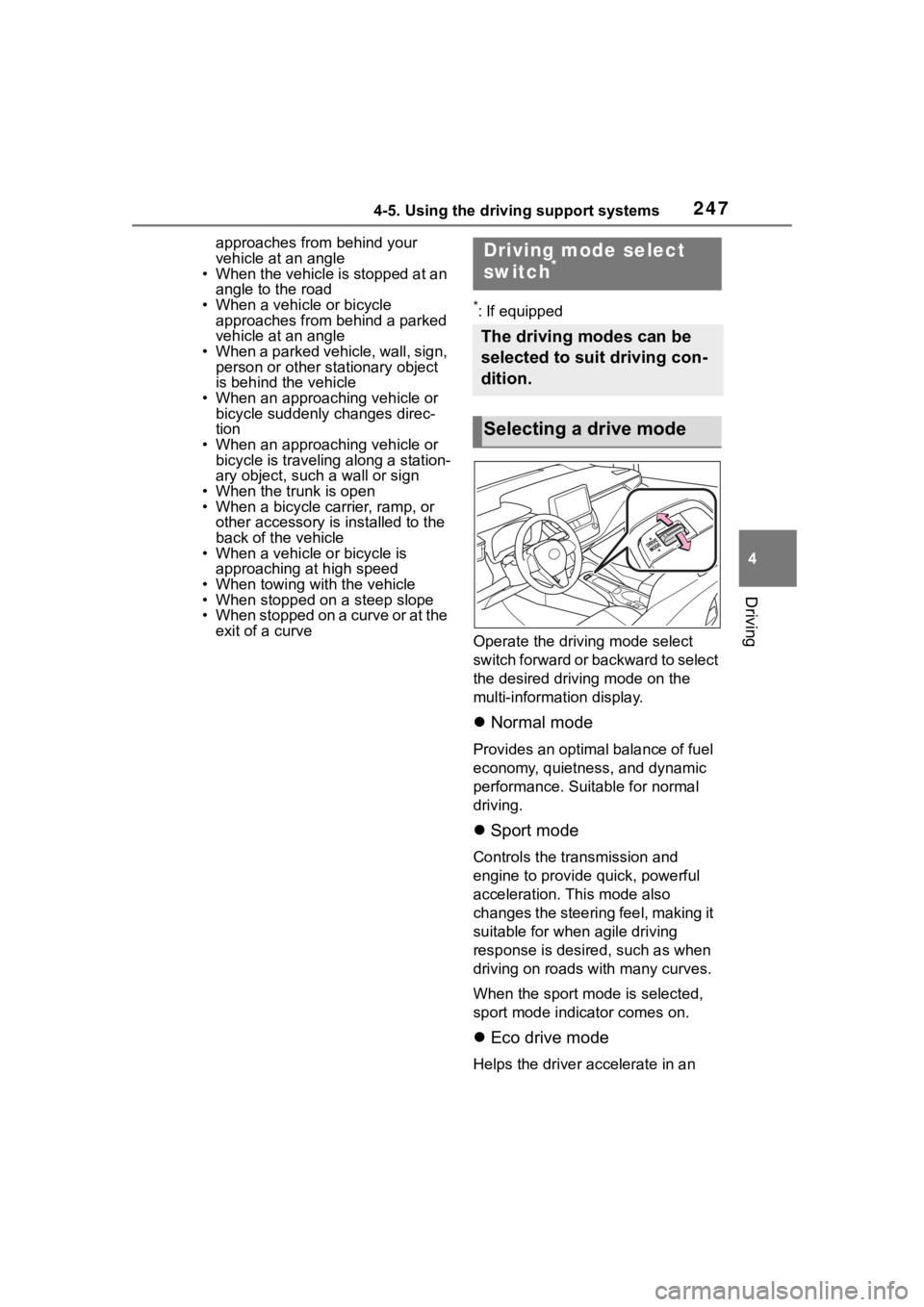
Operate the driv ing mode select
switch forward or backward to select
the desired driving mode on the
multi-information display.
Normal mode
Provides an optimal balance of fuel
economy, quietness, and dynamic
performance. Suitable for normal
driving.
Sport mode
Controls the transmission and
engine to provide quick, powerful
acceleration. This mode also
changes the steering feel, making it
suitable for when agile driving
response is desire d, such as when
driving on roads w ith many curves.
When the sport mode is selected,
sport mode indicator comes on.
Eco drive mode
Helps the driver accelerate in an
Driving mode select
switch*
The driving modes can be
selected to suit driving con-
dition.
Selecting a drive mode
Page 351 of 468
3517-2. Steps to take in an emergency
7
When trouble arises
7-2.Steps to take in an emergency
If your vehicle needs
to be towed
If towing is necessary, we
recommend having your
vehicle towed by your Toy-
ota dealer or commercial
towing service, using a
wheel-lift type truck or flat-
bed truck.
Use a safety chain system
for all towing, and abide by
all state/provincial and local
laws.
WARNING
Observe the following precau-
tions.
Failure to do so may result in
death or serious injury.
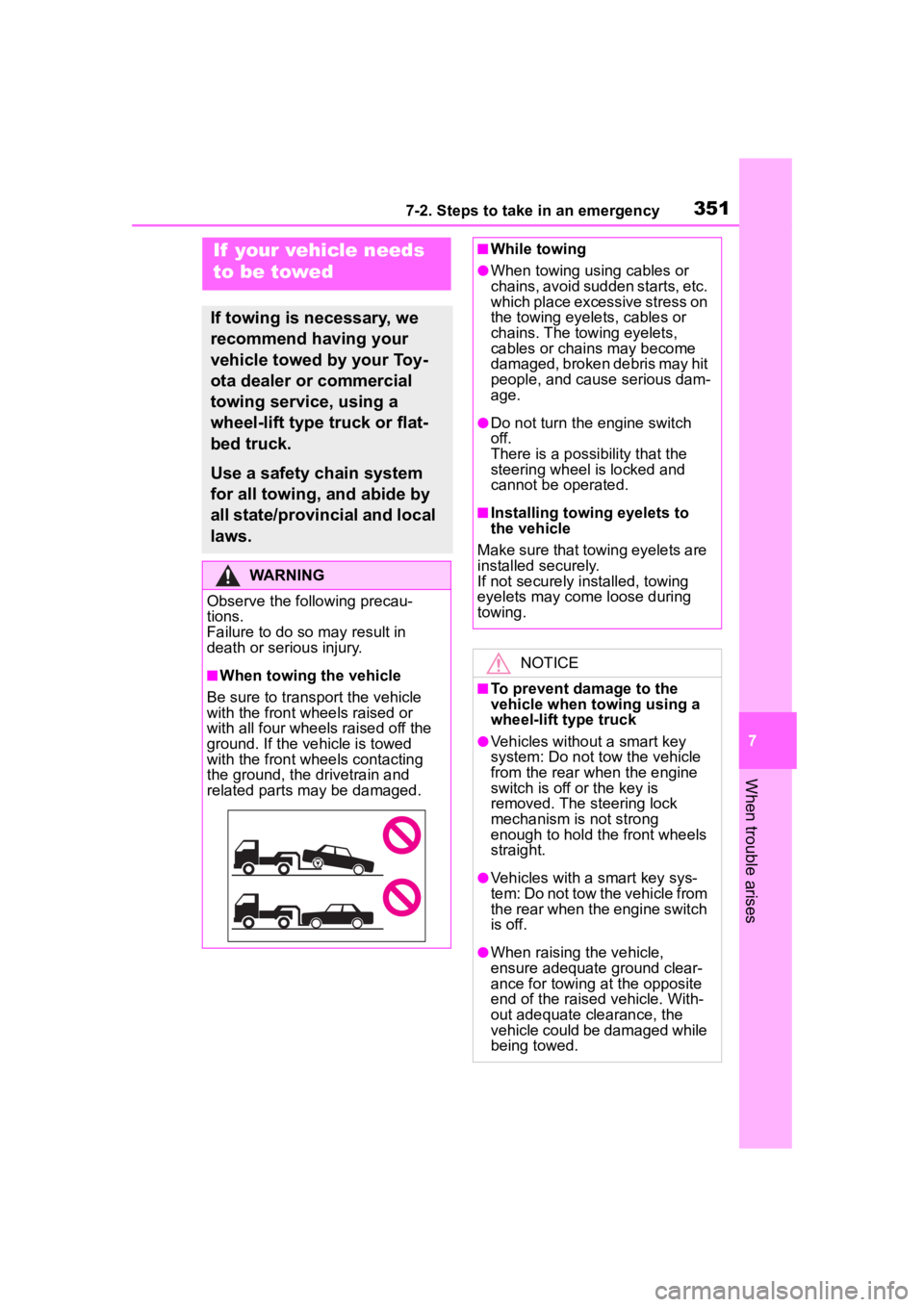
■When towing the vehicle
Be sure to transport the vehicle
with the front wh eels raised or
with all four wheels raised off the
ground. If the vehicle is towed
with the front wh eels contacting
the ground, the drivetrain and
related parts may be damaged.
■While towing
●When towing using cables or
chains, avoid sudden starts, etc.
which place excessive stress on
the towing eyelets, cables or
chains. The towing eyelets,
cables or chains may become
damaged, broken debris may hit
people, and cause serious dam-
age.
●Do not turn the engine switch
off.
There is a possibility that the
steering wheel is locked and
cannot be operated.
■Installing towing eyelets to
the vehicle
Make sure that towing eyelets are
installed securely.
If not securely installed, towing
eyelets may come loose during
towing.
NOTICE
■To prevent damage to the
vehicle when t owing using a
wheel-lift type truck
●Vehicles without a smart key
system: Do not tow the vehicle
from the rear when the engine
switch is off or the key is
removed. The steering lock
mechanism is not strong
enough to hold the front wheels
straight.
●Vehicles with a smart key sys-
tem: Do not tow the vehicle from
the rear when the engine switch
is off.
●When raising the vehicle,
ensure adequate ground clear-
ance for towing at the opposite
end of the raised vehicle. With-
out adequate clearance, the
vehicle could be damaged while
being towed.