2023 TOYOTA COROLLA height
[x] Cancel search: heightPage 131 of 468
1313-4. Adjusting the steering wheel and mirrors
3
Before driving
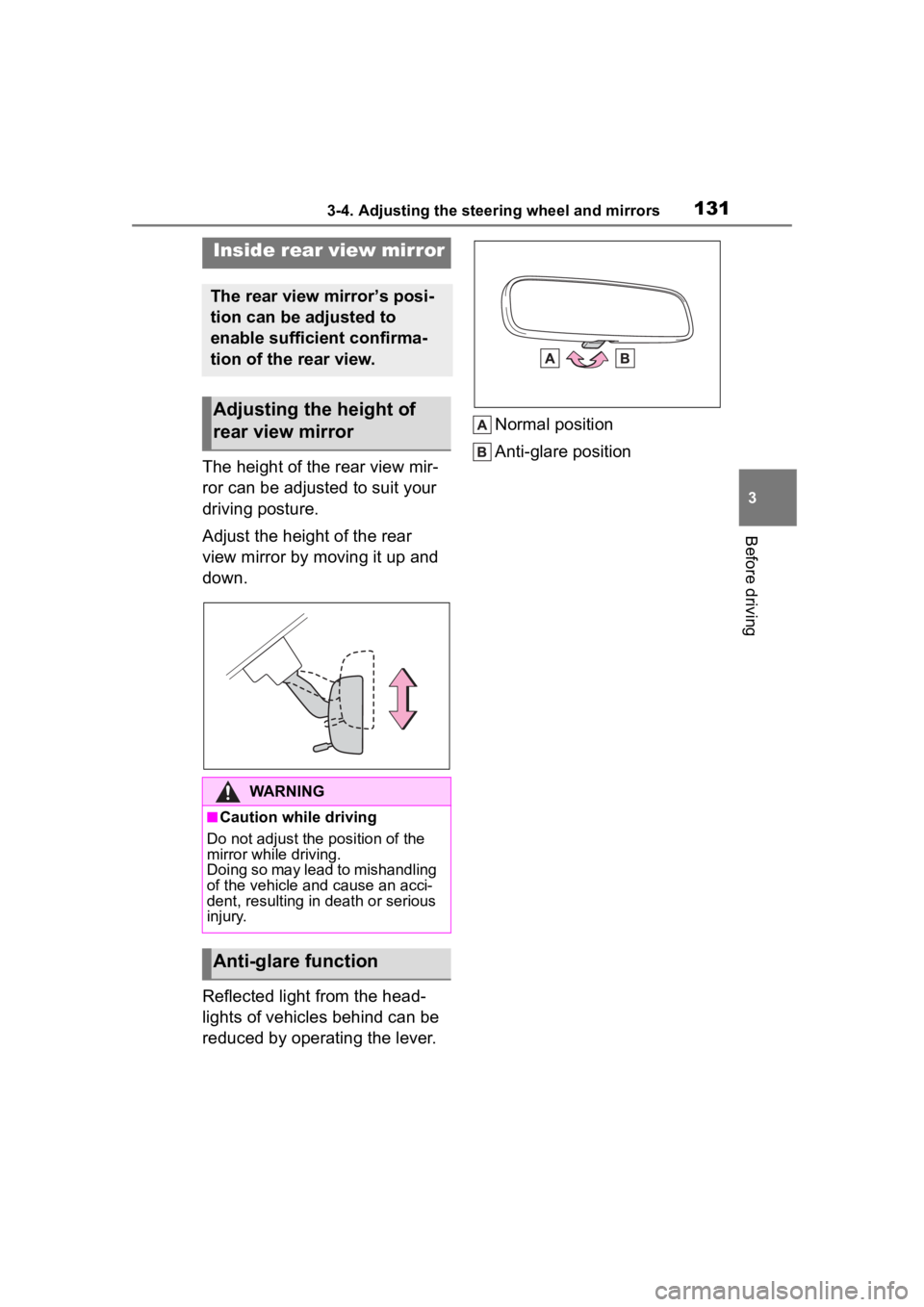
The height of the rear view mir-
ror can be adjusted to suit your
driving posture.
Adjust the height of the rear
view mirror by moving it up and
down.
Reflected light from the head-
lights of vehicles behind can be
reduced by operating the lever.Normal position
Anti-glare position
Inside rear view mirror
The rear view mirror’s posi-
tion can be adjusted to
enable sufficient confirma-
tion of the rear view.
Adjusting the height of
rear view mirror
WARNING
■Caution while driving
Do not adjust the position of the
mirror while driving.
Doing so may lead to mishandling
of the vehicle and cause an acci-
dent, resulting in death or serious
injury.
Anti-glare function
Page 148 of 468
1484-1. Before driving
WARNING
■If the vehicle becomes stuck
Do not spin the wheels exces-
sively when a driven wheel is up
in the air, or the vehicle is stuck in
sand, mud, etc. This may damage
the driveline components or pro-
pel the vehicle forward or back-
ward, causing an accident.
NOTICE
■When driving the vehicle
●Do not depress t he accelerator
and brake pedals at the same
time during drivin g, as this may
restrain the engine output.
●Do not use the accelerator
pedal or depress the accelera-
tor and brake pedals at the
same time to hold the vehicle on
a hill.
■When parking the vehicle
Always set the parking brake and
shift the shift lever to P. Failure to
do so may cause the vehicle to
move or the vehi cle may acceler-
ate suddenly if the accelerator
pedal is accidentally depressed.
■Avoiding damage to vehicle
parts
●Do not turn the steering wheel
fully in either direction and hold
it there for an extended period
of time.
Doing so may damage the
power steering.
●When driving over bumps in the
road, drive as slowly as possible
to avoid damagi ng the wheels,
underside of the vehicle, etc.
●For APEX models: APEX vehi-
cle height is lower than other
vehicle grades.
Driving over rough or damaged
road surfaces, as well as park-
ing blocks, curbs, and other
obstacles may cause damage
to the underside of your vehicle.
Drive carefully under rough con-
ditions to avoid damage.
■If you get a flat tire while driv-
ing
A flat or damaged tire may cause
the following situations. Hold the
steering wheel firmly and gradu-
ally depress the brake pedal to
slow down the vehicle.
●It may be difficult to control your
vehicle.
●The vehicle will make abnormal
sounds or vibrations.
●The vehicle will lean abnor-
mally.
Information on what to do in case
of a flat tire (
P.370)
■When encountering flooded
roads
Do not drive on a road that has
flooded after h eavy rain etc.
Doing so may cause the following
serious damage to the vehicle:
●Engine stalling
●Short in electrical components
●Engine damage caused by
water immersion
In the event that you drive on a
flooded road and the vehicle
becomes flooded or stuck in mud
or sand, be sure to have your Toy-
ota dealer check the following:
●Brake function
Page 188 of 468

1884-5. Using the driving support systems
■Situations in which the sensors
may not operate properly
●When the height or inclination of
the vehicle has been changed due
to modifications
●When the windshield is dirty,
fogged up, cracked or damaged
●When the ambient temperature is
high or low
●When mud, water, snow, dead
insects, foreign matter, etc., is
attached to the front of the sensor
●When in inclement weather such
as heavy rain, fog, snow, or a
sandstorm
●When water, snow, dust, etc. is
thrown up in front of the vehicle, or
when driving through mist or
smoke
●When the headlig hts are not illu-
minated while driving in the dark,
such as at night o r when in a tun-
nel
●When the lens of a headlight is
dirty and illumination is weak
●When the headlights are mis-
aligned
●When a headlight is malfunction-
ing
●When the headlights of another
vehicle, sunlight, or reflected light
shines directly into the front cam-
era
●When the brightness of the sur-
rounding area changes suddenly
●When driving near a TV tower,
broadcasting station, electric
power plant, radar equipped vehi-
cles, etc., or other location where
strong radio waves or electrical
noise may be present
●When a wiper blade is blocking
the front camera
●When in a location or near objects
which strongly reflect radio waves,
such as the following:
• Tunnels
• Truss bridges
• Gravel roads
• Rutted, snow-covered roads
• Walls
• Large trucks
• Manhole covers
• Guardrail
• Metal plates
●When near a step or protrusion
●When a detectable vehicle is nar-
row, such as a small mobility vehi-
cle
●When a detectable vehicle has a
small front or rear end, such as an
unloaded truck
●When a detectable vehicle has a
low front or rear end, such as a
low bed trailer
●When a detectable vehicle has
extremely high ground clearance
WARNING
■Front camera installation area
on the windshield
If the system determines that the
windshield may be fogged up, it
will automatically operate the
heater to defog the part of the
windshield around the front cam-
era. When cleaning, etc., be care-
ful not to touch the area around
the front camera until the wind-
shield has cooled sufficiently, as
touching it may cause burns.
Page 236 of 468

2364-5. Using the driving support systems
tional when all of the following con-
ditions are met:
●The engine switch is in ON.
●The Blind Spot Monitor is on.
●The shift lever is in a position
other than R.
●The vehicle speed is approxi-
mately 7 mph (10 km/h) or more.
■The Blind Spot Monitor will
detect a vehicle when
The Blind Spot Mon itor will detect a
vehicle present in the detection area
in the followin g situations:
●A vehicle in an adjacent lane over-
takes your vehicle.
●You overtake a vehicle in an adja-
cent lane slowly.
●Another vehicle enters the detec-
tion area when it changes lanes.
■Situations in which the blind
spot monitor cannot detect
vehicles.
The blind spot monitor cannot
detect the following vehicles and
other objects:
●Small motorcycles, bicycles,
pedestrians, etc.*
●Vehicles traveling in the opposite
direction
●Guardrails, walls, signs, parked
vehicles and similar stationary
objects
*
●Following vehicles that are in the
same lane*
●Vehicles traveling 2 lanes away
from your vehicle*
●Vehicles which are being over-
taken rapidly by your vehicle*
*
: Depending on the conditions, detection of a vehicle and/or
object may occur.
■Conditions under which the
System may not function cor-
rectly
●The Blind Spot Monitor may not
detect vehicles corr ectly in the fol-
lowing situations:
• When the sensor is misaligned due to a strong impact to the sen-
sor or its surrounding area
• When mud, snow, ice, a sticker, etc. is covering the sensor or sur-
rounding area on the rear bumper
• When driving on a road surface that is wet with standing water
during bad weather, such as
heavy rain, snow, or fog
• When multiple vehicles are
approaching with only a small gap
between each vehicle
• When the distance between your
vehicle and a following vehicle is
short
• When there is a significant differ-
ence in speed between your vehi-
cle and the vehicle that enters the
detection area
• When the difference in speed between your vehicle and another
vehicle is changing
• When a vehicle enters a detection area traveling at about the same
speed as your vehicle
• As your vehicle starts from a stop, a vehicle remains in the detection
area
• When driving up and down con- secutive steep inclines, such as
hills, dips in the road, etc.
• When driving on r oads with sharp
bends, consecutive curves, or
uneven surfaces
• When vehicle lanes are wide, or when driving on the edge of a
lane, and the vehicle in an adja-
cent lane is far away from your
vehicle
• When an accessory (such as a bicycle carrier) is installed to the
rear of the vehicle
• When there is a significant differ- ence in height between your vehi-
cle and the vehicle that enters the
detection area
• Immediately after the Blind Spot
Page 241 of 468

2414-5. Using the driving support systems
4
Driving
etc.), bicycle carrier, or snow plow
●When backing up on a slope with
a sharp change in grade
●When backing out of a sharp
angle parking spot
●Immediately after the RCTA func-
tion is turned on
●Immediately afte r the engine is
started with the RCTA function on
●When the sensors cannot detect a
vehicle due to obstructions
●When towing a trailer
●When there is a significant differ-
ence in height between your vehi-
cle and the vehicle that enters the
detection area
●When a sensor or the area around
a sensor is extremely hot or cold
●If the suspension has been modi-
fied or tires of a size other than
specified are installed
●If the front of the vehicle is raised
or lowered due to the carried load
●When turning while backing up
●When a vehicle tu rns into the
detection area
■Situations in which the system
may operate even if there is no
possibility of a collision
Instances of the RCTA function
unnecessary detec ting a vehicle
and/or object may increase in the
following situations:
●When the parking space faces a
street and vehicles are being
driven on the street
●When the distance between your
vehicle and metal objects, such as
a guardrail, wall, sign, or parked
vehicle, which may reflect electri-
cal waves toward the rear of the
vehicle, is short
Page 350 of 468
3507-1. Essential information
If the door can be opened,
open the door and exit the
vehicle.
If the door can not be opened,
open the window using the
power window switch and
ensure an escape route.
If the window can be opened,
exit the vehicle through the
window.
If the door and window cannot
be opened due to the rising
water, remain calm, wait until
the water level inside the
vehicle rises to the point that
the water pressure inside of
the vehicle equals the water
pressure outside of the vehi-
cle and then open the door
after waiting for the rising
water to enter the vehicle, and
exit the vehicle. When the outside water level exceeds
half the height of the door, the
door cannot be opened from
the inside due to water pres-
sure.
■Water level exceeds the floor
When the water level exceeds the
floor and time has passed, the elec-
trical equipment will get damaged,
the power windows will not operate,
the engine stop, and the vehicle
may not be able to get moving.
■Using an emergency escape
hammer*
Laminated glass is used in the wind-
shield on this vehicle.
Laminated glass cannot be shat-
tered with an emergency hammer
*.
Tempered glass is used in the win-
dows on this vehicle.
*: Contact your Toyota dealer or
aftermarket accessory manufac-
turer for further information about
an emergency hammer.
If the vehicle is sub-
merged or water on
the road is rising
This vehicle is not designed
to be able to drive on roads
that are deeply flooded with
water. Do not drive on roads
where the roads may be
submerged or the water
may be rising. It is danger-
ous to remain in the vehicle,
if it anticipated that the vehi-
cle will be flooded or set a
drift. Remain calm and fol-
low the following.
WARNING
■Caution while driving
Do not drive on roads where the
roads may be submerged or the
water may be rising. Otherwise
the vehicle may be damaged and
cannot move, as well as become
flooded and set a drift, which may
lead to death.
Page 373 of 468
3737-2. Steps to take in an emergency
7
When trouble arises
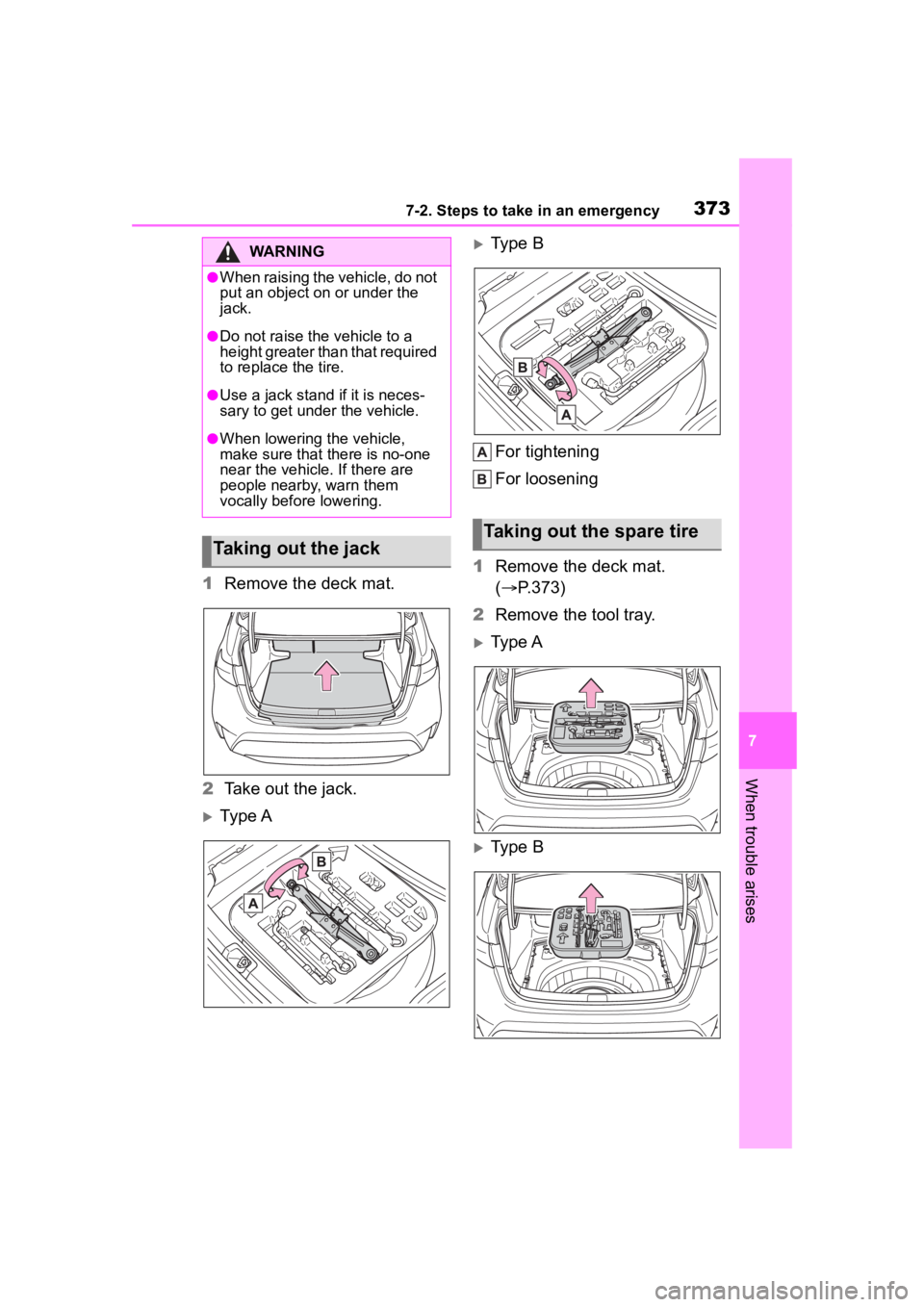
1Remove the deck mat.
2 Take out the jack.
Ty p e A
Type B
For tightening
For loosening
1 Remove the deck mat.
( P.373)
2 Remove the tool tray.
Type A
Type B
WARNING
●When raising the vehicle, do not
put an object on or under the
jack.
●Do not raise the vehicle to a
height greater than that required
to replace the tire.
●Use a jack stand if it is neces-
sary to get under the vehicle.
●When lowering the vehicle,
make sure that there is no-one
near the vehicle. If there are
people nearby, warn them
vocally before lowering.
Taking out the jack
Taking out the spare tire
Page 392 of 468
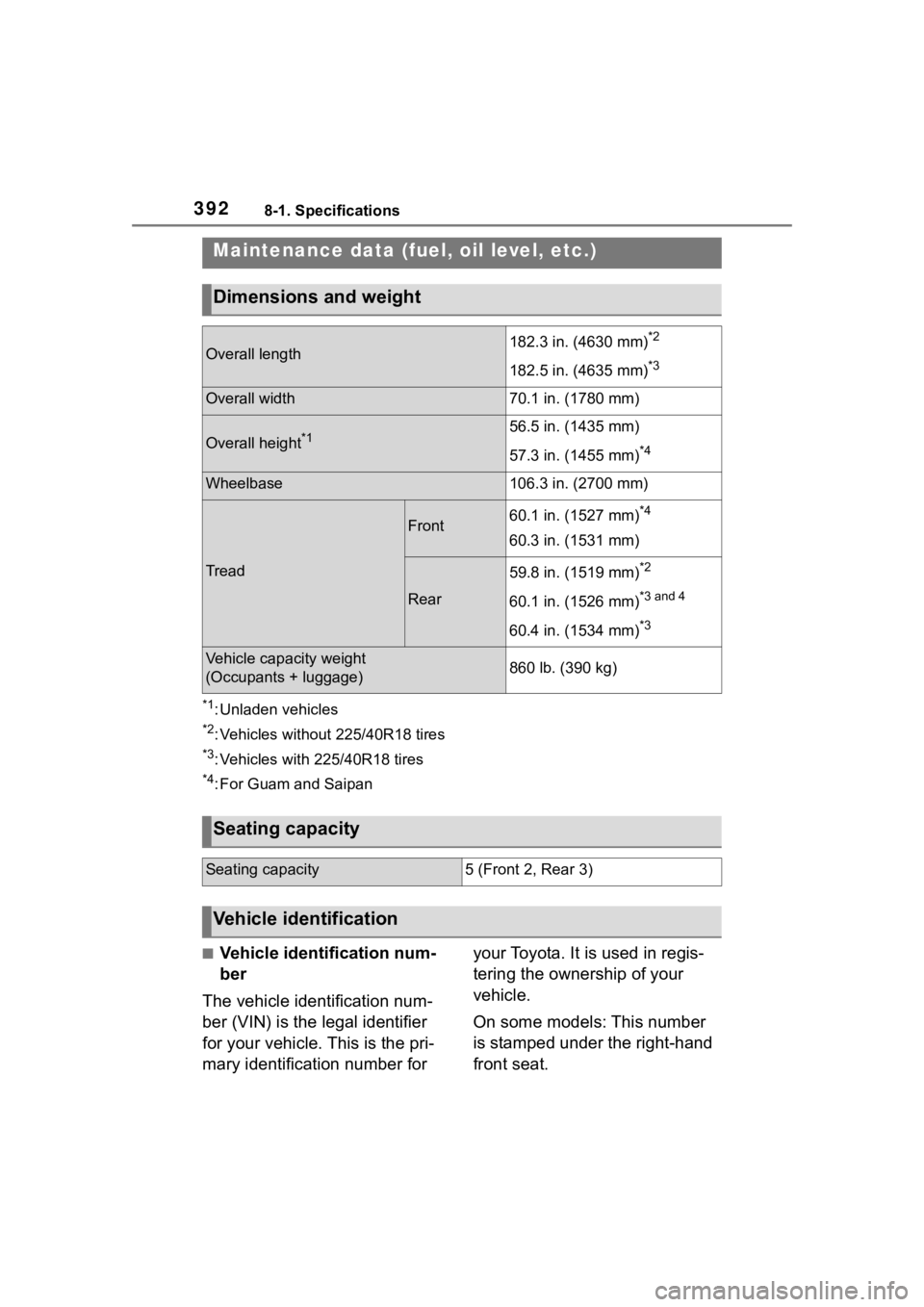
3928-1. Specifications
8-1.Specifications
*1: Unladen vehicles
*2: Vehicles without 225/40R18 tires
*3: Vehicles with 225/40R18 tires
*4: For Guam and Saipan
■Vehicle identification num-
ber
The vehicle identification num-
ber (VIN) is the legal identifier
for your vehicle. This is the pri-
mary identification number for your Toyota. It is used in regis-
tering the ownership of your
vehicle.
On some models: This number
is stamped under the right-hand
front seat.
Maintenance data (fuel, oil level, etc.)
Dimensions and weight
Overall length182.3 in. (4630 mm)*2
182.5 in. (4635 mm)*3
Overall width70.1 in. (1780 mm)
Overall height*156.5 in. (1435 mm)
57.3 in. (1455 mm)
*4
Wheelbase106.3 in. (2700 mm)
Tread
Front60.1 in. (1527 mm)*4
60.3 in. (1531 mm)
Rear
59.8 in. (1519 mm)*2
60.1 in. (1526 mm)*3 and 4
60.4 in. (1534 mm)*3
Vehicle capacity weight
(Occupants + luggage)860 lb. (390 kg)
Seating capacity
Seating capacity5 (Front 2, Rear 3)
Vehicle identification