2023 TOYOTA COROLLA HYBRID engine
[x] Cancel search: enginePage 80 of 496
801-4. Hybrid system
vehicle compared to the front.
*: This function can only be used in
the mainland U.S.A. It cannot be
used in other states and territo-
ries, including Alaska and Hawaii.
This system operates based on
the driving situation and traffic
information to enhance fuel
economy.
For details about Predictive effi-
cient drive, refer to the “MULTI-
MEDIA OWNER’S MANUAL”.
■Predictive deceleration sup-
port
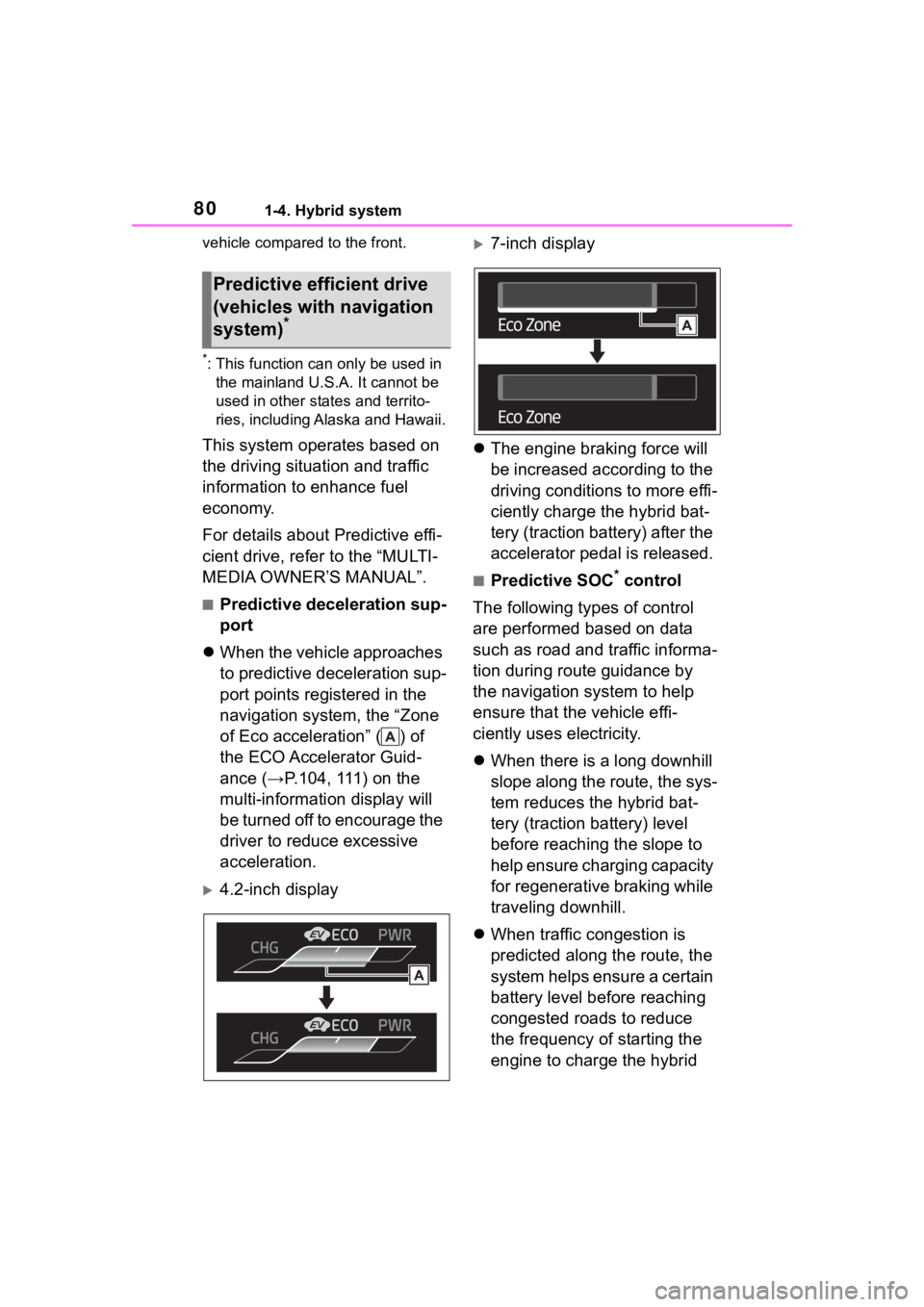
When the vehicle approaches
to predictive deceleration sup-
port points registered in the
navigation system, the “Zone
of Eco acceleration” ( ) of
the ECO Accelerator Guid-
ance (→P.104, 111) on the
multi-information display will
be turned off to encourage the
driver to reduce excessive
acceleration.
4.2-inch display
7-inch display
The engine braking force will
be increased according to the
driving conditions to more effi-
ciently charge the hybrid bat-
tery (traction battery) after the
accelerator pedal is released.
■Predictive SOC* control
The following types of control
are performed based on data
such as road and traffic informa-
tion during route guidance by
the navigation system to help
ensure that the vehicle effi-
ciently uses electricity.
When there is a long downhill
slope along the route, the sys-
tem reduces the hybrid bat-
tery (traction battery) level
before reaching the slope to
help ensure charging capacity
for regenerative braking while
traveling downhill.
When traffic congestion is
predicted along the route, the
system helps ensure a certain
battery level before reaching
congested roads to reduce
the frequency of starting the
engine to charge the hybrid
Predictive efficient drive
(vehicles with navigation
system)
*
Page 93 of 496
932-1. Instrument cluster
2
Vehicle status information and indicators
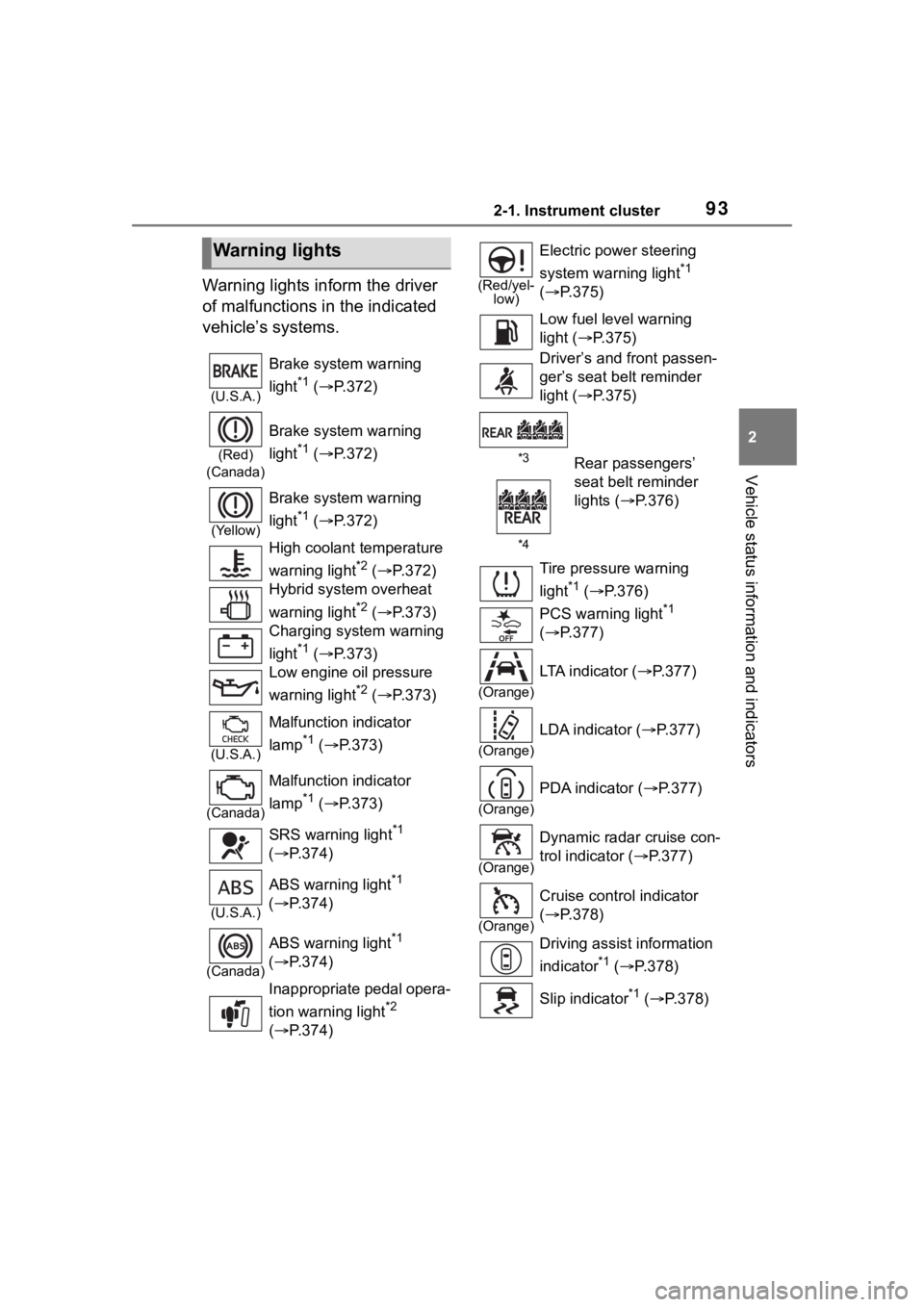
Warning lights inform the driver
of malfunctions in the indicated
vehicle’s systems.
Warning lights
(U.S.A.)
Brake system warning
light
*1 ( P.372)
(Red)
(Canada)
Brake system warning
light
*1 ( P.372)
(Yellow)
Brake system warning
light
*1 ( P.372)
High coolant temperature
warning light
*2 ( P.372)
Hybrid system overheat
warning light
*2 ( P.373)
Charging system warning
light
*1 ( P.373)
Low engine oil pressure
warning light
*2 ( P.373)
(U.S.A.)
Malfunction indicator
lamp
*1 ( P.373)
(Canada)
Malfunction indicator
lamp
*1 ( P.373)
SRS warning light
*1
( P.374)
(U.S.A.)
ABS warning light*1
( P.374)
(Canada)
ABS warning light*1
( P.374)
Inappropriate pedal opera-
tion warning light
*2
( P.374)
(Red/yel-
low)
Electric power steering
system warning light
*1
( P.375)
Low fuel leve l warning
light ( P.375)
Driver’s and front passen-
ger’s seat belt reminder
light ( P.375)
*3Rear passengers’
seat belt reminder
lights ( P.376)
*4
Tire pressure warning
light
*1 ( P.376)
PCS warning light
*1
( P.377)
(Orange)
LTA indicator ( P.377)
(Orange)
LDA indicator ( P.377)
(Orange)
PDA indicator ( P.377)
(Orange)
Dynamic radar cruise con-
trol indicator ( P.377)
(Orange)
Cruise control indicator
( P.378)
Driving assist information
indicator
*1 ( P.378)
Slip indicator
*1 ( P.378)
Page 96 of 496

962-1. Instrument cluster
■Locations of gauges and meters
The units of measure may differ depending on the intended destination of
the vehicle.
Tachometer
Displays the engine speed in revolutions per minute
Outside temperature
Displays the outside temperature within the range of -40°F (-40 °C) to 140°F
(60°C)
Clock ( P. 9 8 )
Multi-information display
Presents the driver with a variety of vehicle data (P.102)
Displays warning messages if a malfunction occurs (P.382)
Speedometer
Fuel gauge
Displays the quantity of fu el remaining in the tank
Odometer and trip meter display ( P.97)
Shift position indicator ( P.180)
Engine coolant temperature gauge
Displays the engine c oolant temperature
Display change button ( P.97)
Gauges and meters (4.2-inch display)
Meter display
Page 97 of 496
972-1. Instrument cluster
2
Vehicle status information and indicators
■Engine speed
On hybrid electric vehicles, engine
speed is precisely controlled in
order to help improve fuel efficiency
and reduce exhaust emissions etc.
There are times when the engine
speed that is displayed may differ
even when vehicle operation and
driving conditions are the same.
■Outside temperature display
●In the following si tuations, the cor-
rect outside tempe rature may not
be displayed, or the display may
take longer than normal to
change:
• When stopped, or driving at low
speeds (less than 12 mph [20
km/h])
• When the outside temperature
has changed suddenly (at the
entrance/exit of a garage, tunnel,
etc.)
●When “--” or “E” is displayed, the
system may be malfunctioning.
Take your vehicle to your Toyota
dealer.
■Liquid crystal display
P. 1 0 3
■Customization
The gauges and meters can be cus-
tomized in of the multi-informa-
tion display. ( P.442)
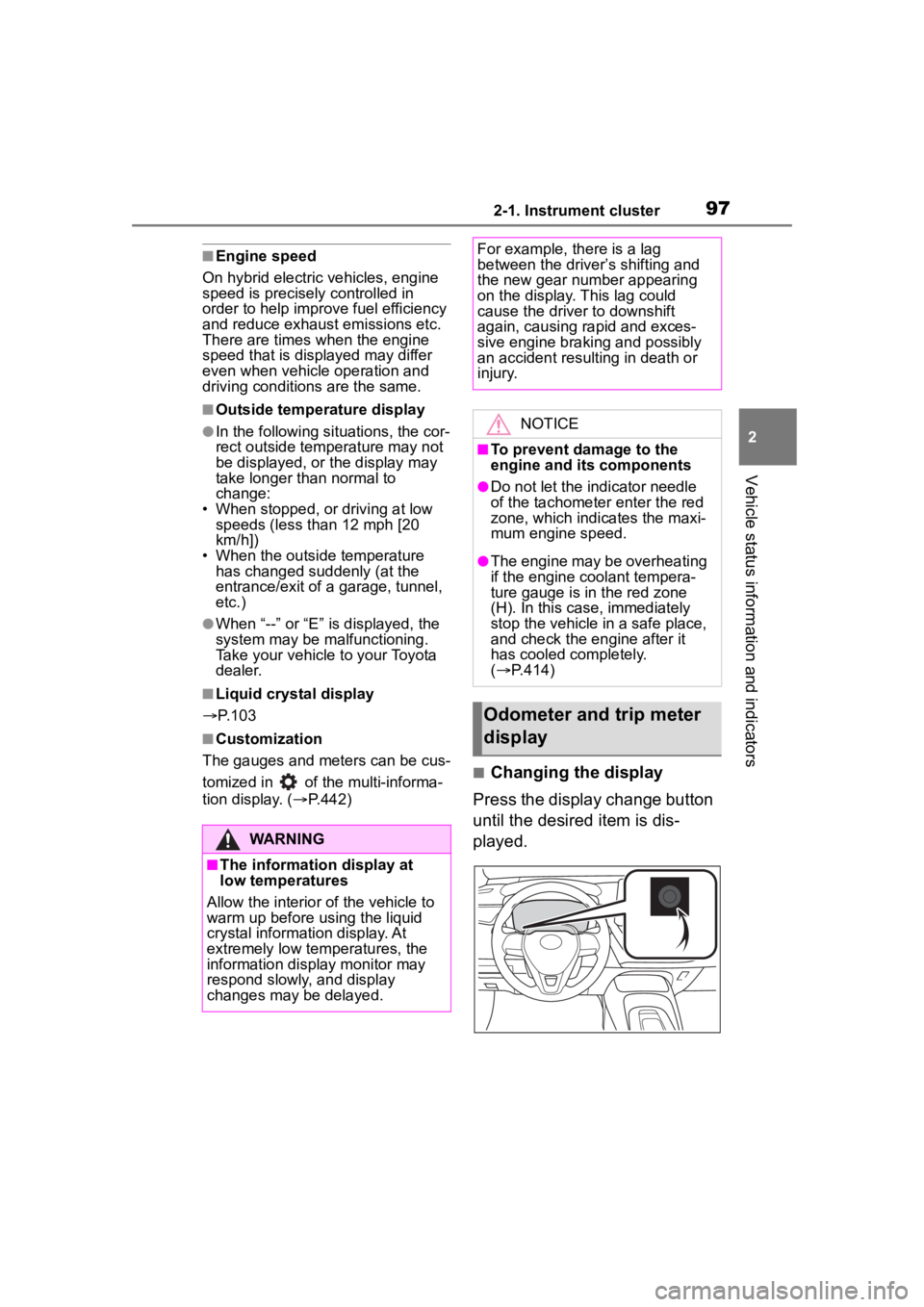
■Changing the display
Press the display change button
until the desired item is dis-
played.
WARNING
■The information display at
low temperatures
Allow the interior of the vehicle to
warm up before u sing the liquid
crystal informat ion display. At
extremely low temperatures, the
information display monitor may
respond slowly, and display
changes may be delayed.
For example, there is a lag
between the driver’s shifting and
the new gear number appearing
on the display. This lag could
cause the driver to downshift
again, causing rapid and exces-
sive engine braking and possibly
an accident resulting in death or
injury.
NOTICE
■To prevent damage to the
engine and its components
●Do not let the indicator needle
of the tachometer enter the red
zone, which indicates the maxi-
mum engine speed.
●The engine may be overheating
if the engine coolant tempera-
ture gauge is in the red zone
(H). In this case, immediately
stop the vehicle in a safe place,
and check the engine after it
has cooled completely.
( P.414)
Odometer and trip meter
display
Page 99 of 496

992-1. Instrument cluster
2
Vehicle status information and indicators
■Locations of gauges and metersEngine coolant temperature gauge
Displays the engine c oolant temperature
Outside temperature
Displays the outside temperature within the range of -40°F (-40 °C) to 140°F
(60°C)
Hybrid System Indicator/Analog speedometer/Tachometer
Displays hybrid system output or regeneration level ( P.100)
This setting can be changed on the setting screen. ( P.442)
Clock ( P.102)
Fuel gauge
Displays the quantity of fu el remaining in the tank
Odometer and trip meter display ( P.101)
Shift position indicator ( P.180)
Multi-information display
Presents the driver with a variety of vehicle data (P.109)
Displays warning messages if a malfunction occurs (P.382)
Gauges and meters (7-inch display)
Meter display
Page 100 of 496
1002-1. Instrument cluster
Digital speedometer
Display change button (P.101)
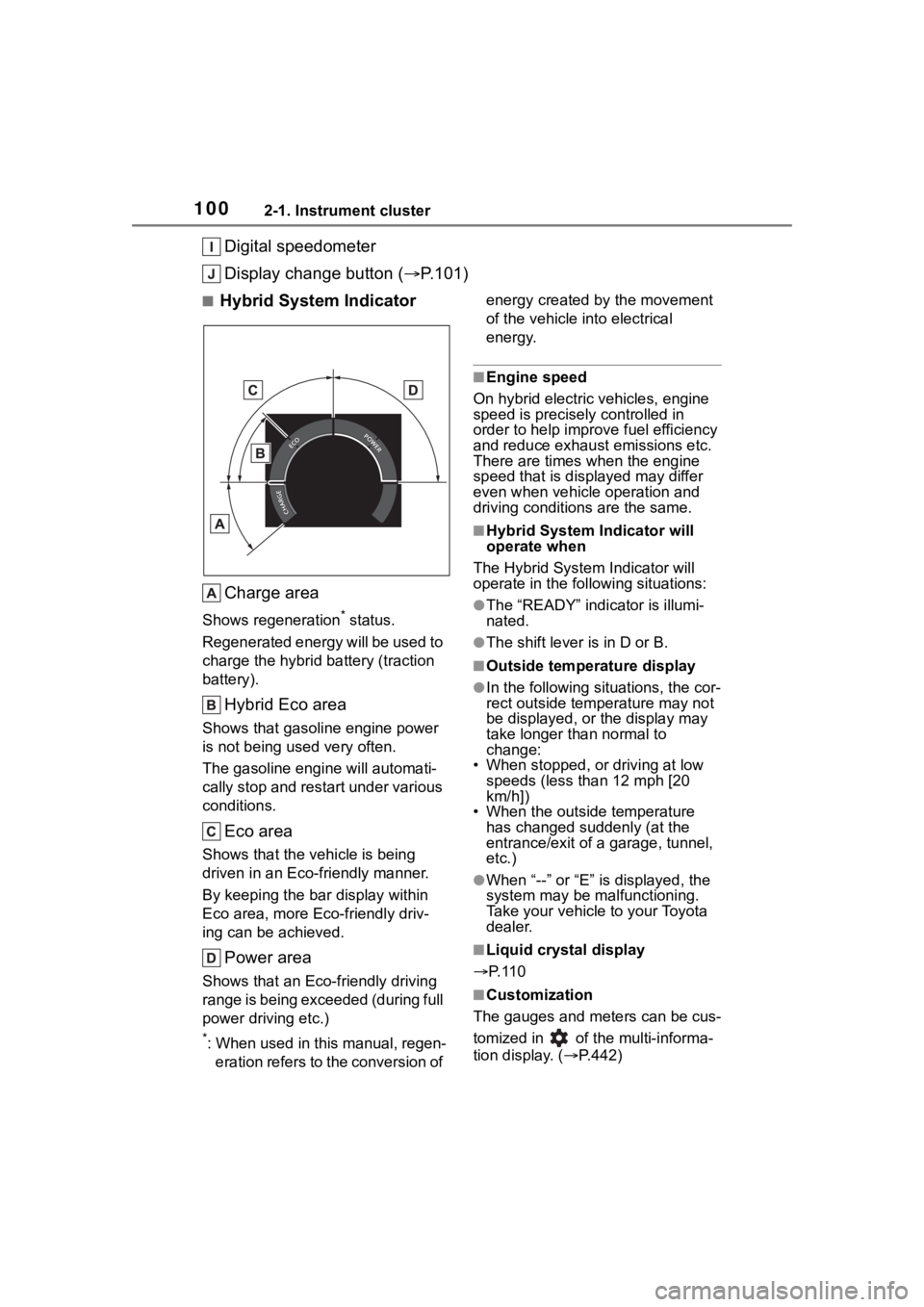
■Hybrid System Indicator
Charge area
Shows regeneration* status.
Regenerated energy will be used to
charge the hybrid battery (traction
battery).
Hybrid Eco area
Shows that gasoline engine power
is not being used very often.
The gasoline engine will automati-
cally stop and restart under various
conditions.
Eco area
Shows that the vehicle is being
driven in an Eco-friendly manner.
By keeping the bar display within
Eco area, more Eco-friendly driv-
ing can be achieved.
Power area
Shows that an Eco-friendly driving
range is being exceeded (during full
power driving etc.)
*: When used in this manual, regen- eration refers to the conversion of energy created by the movement
of the vehicle into electrical
energy.
■Engine speed
On hybrid electric vehicles, engine
speed is precisely controlled in
order to help improve fuel efficiency
and reduce exhaust emissions etc.
There are times when the engine
speed that is displayed may differ
even when vehicle operation and
driving conditions are the same.
■Hybrid System Indicator will
operate when
The Hybrid System Indicator will
operate in the following situations:
●The “READY” indicator is illumi-
nated.
●The shift lever is in D or B.
■Outside temperature display
●In the following sit uations, the cor-
rect outside temperature may not
be displayed, or the display may
take longer than normal to
change:
• When stopped, or driving at low
speeds (less than 12 mph [20
km/h])
• When the outside temperature
has changed suddenly (at the
entrance/exit of a garage, tunnel,
etc.)
●When “--” or “E” i s displayed, the
system may be malfunctioning.
Take your vehicle to your Toyota
dealer.
■Liquid crystal display
P. 1 1 0
■Customization
The gauges and meters can be cus-
tomized in of t he multi-informa-
tion display. ( P.442)
Page 101 of 496
1012-1. Instrument cluster
2
Vehicle status information and indicators
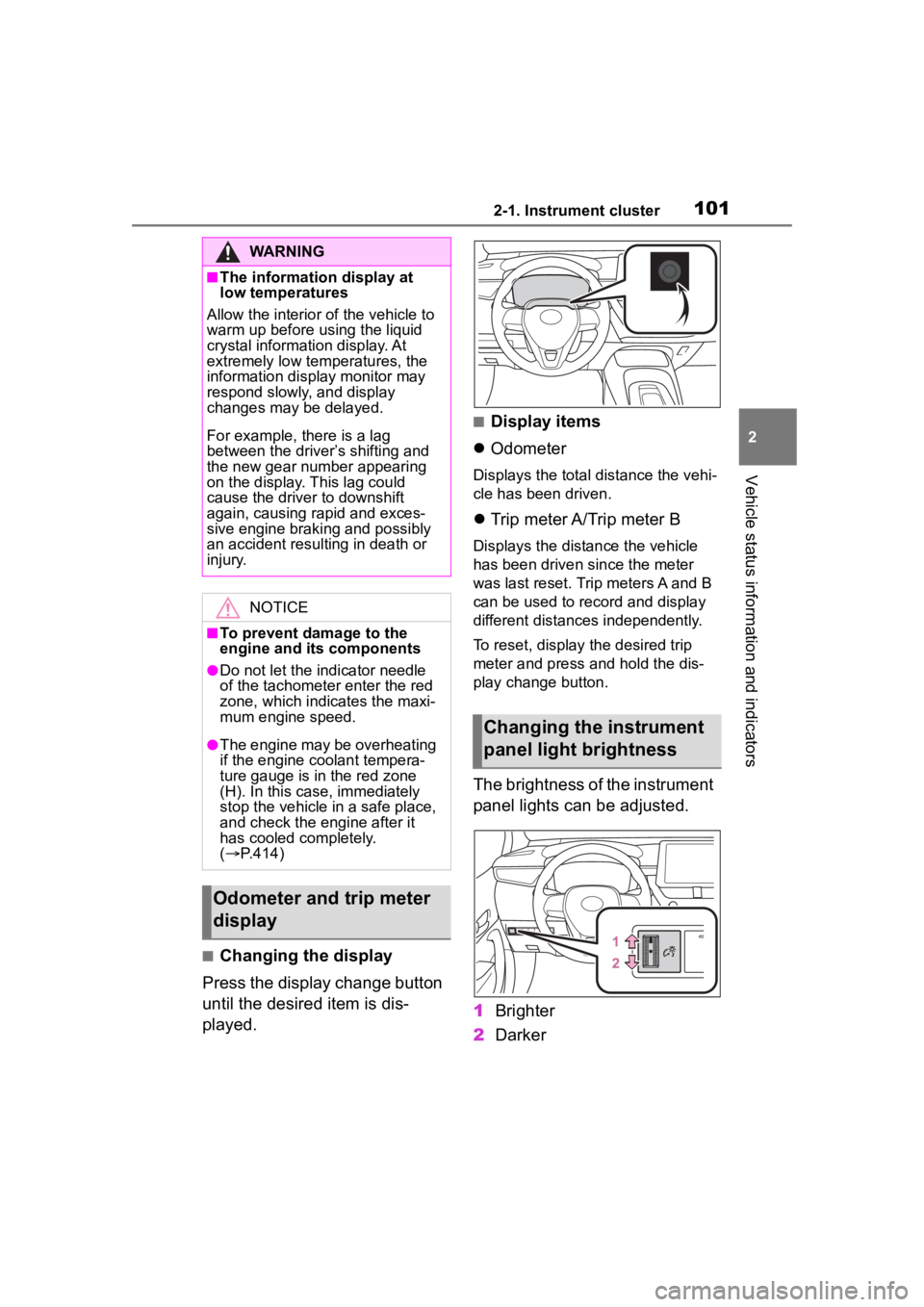
■Changing the display
Press the display change button
until the desired item is dis-
played.
■Display items
Odometer
Displays the total distance the vehi-
cle has been driven.
Trip meter A/Trip meter B
Displays the distance the vehicle
has been driven since the meter
was last reset. Trip meters A and B
can be used to record and display
different distances independently.
To reset, display the desired trip
meter and press and hold the dis-
play change button.
The brightness of the instrument
panel lights can be adjusted.
1 Brighter
2 Darker
WARNING
■The information display at
low temperatures
Allow the interior of the vehicle to
warm up before u sing the liquid
crystal informat ion display. At
extremely low temperatures, the
information display monitor may
respond slowly, and display
changes may be delayed.
For example, there is a lag
between the driver’s shifting and
the new gear number appearing
on the display. This lag could
cause the driver to downshift
again, causing rapid and exces-
sive engine braking and possibly
an accident resulting in death or
injury.
NOTICE
■To prevent damage to the
engine and its components
●Do not let the i ndicator needle
of the tachomete r enter the red
zone, which indicates the maxi-
mum engine speed.
●The engine may be overheating
if the engine coolant tempera-
ture gauge is in the red zone
(H). In this case, immediately
stop the vehicle in a safe place,
and check the engine after it
has cooled completely.
( P.414)
Odometer and trip meter
display
Changing the instrument
panel light brightness
Page 105 of 496
1052-1. Instrument cluster
2
Vehicle status information and indicators
EV indicator (P.78)
Hybrid System Indicator/ECO
Accelerator Guidance
Eco score
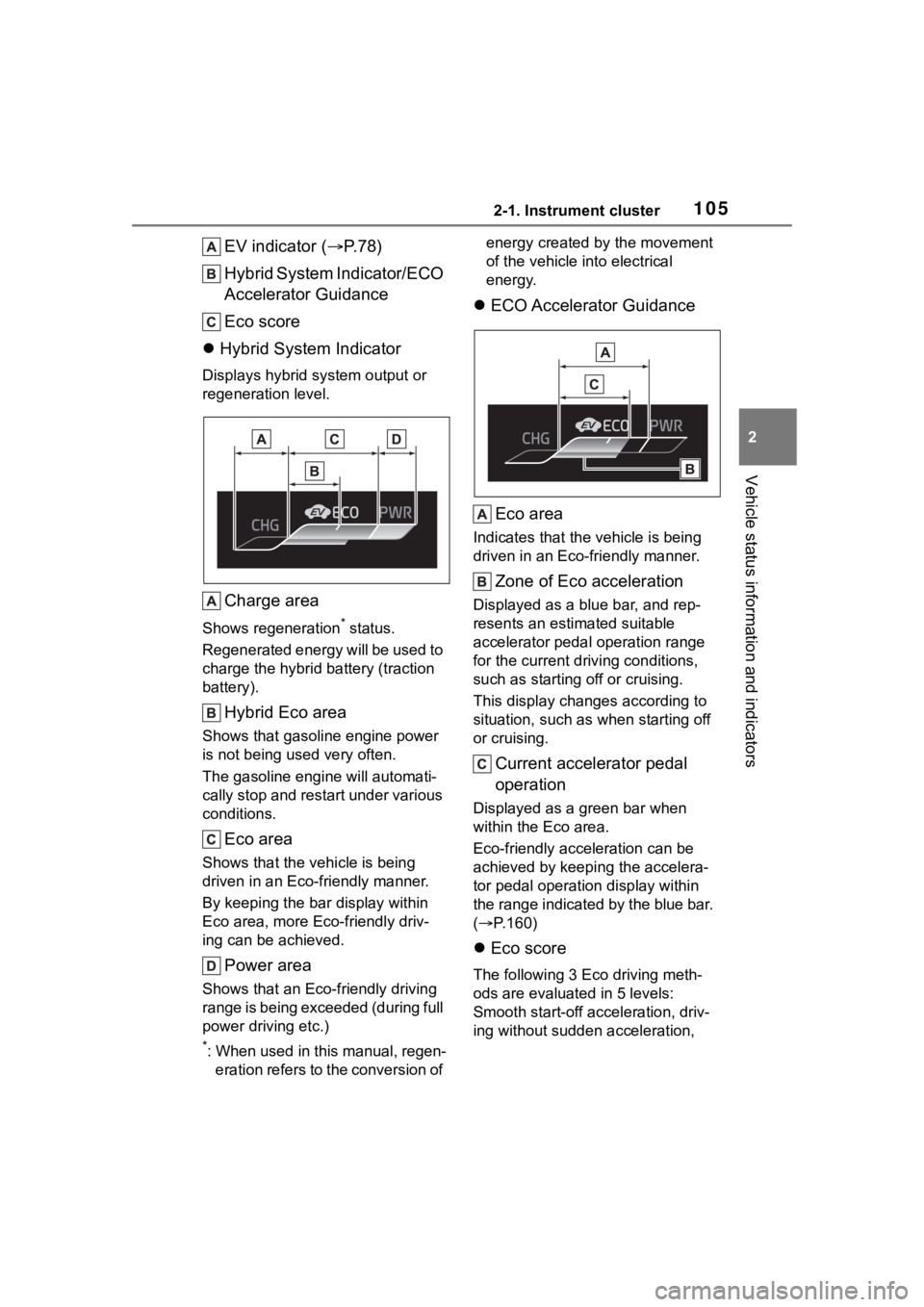
Hybrid System Indicator
Displays hybrid system output or
regeneration level.
Charge area
Shows regeneration* status.
Regenerated energy will be used to
charge the hybrid battery (traction
battery).
Hybrid Eco area
Shows that gasoline engine power
is not being used very often.
The gasoline engine will automati-
cally stop and restart under various
conditions.
Eco area
Shows that the vehicle is being
driven in an Eco-friendly manner.
By keeping the bar display within
Eco area, more Eco-friendly driv-
ing can be achieved.
Power area
Shows that an Eco-friendly driving
range is being exceeded (during full
power driving etc.)
*: When used in this manual, regen- eration refers to the conversion of energy created by the movement
of the vehicle into electrical
energy.
ECO Accelerator Guidance
Eco area
Indicates that the vehicle is being
driven in an Eco-friendly manner.
Zone of Eco acceleration
Displayed as a blue bar, and rep-
resents an estimated suitable
accelerator pedal operation range
for the current driving conditions,
such as starting off or cruising.
This display changes according to
situation, such as when starting off
or cruising.
Current accelerator pedal
operation
Displayed as a green bar when
within the Eco area.
Eco-friendly acceleration can be
achieved by keeping the accelera-
tor pedal operation display within
the range indicated by the blue bar.
( P.160)
Eco score
The following 3 Ec o driving meth-
ods are evaluated in 5 levels:
Smooth start-off acceleration, driv-
ing without sudden acceleration,