2023 TOYOTA COROLLA CROSS parking brake
[x] Cancel search: parking brakePage 174 of 500
1744-2. Driving procedures
■Parking brake automatic lock
function
The parking brake will be set auto-
matically under the following condi-
tions:
●The brake pedal is not depressed
●The driver’s door is open
●The driver’s seat belt is not fas-
tened
●The shift lever is in a position
other than P or N
●The malfunction indicator lamp
and brake system warning light
are not illuminated
■If “Parking Brake Temporarily
Unavailable” i s displayed on
the multi-information display
If the parking brake is operated
repeatedly over a short period of
time, the system may restrict opera-
tion to prevent overheating. If this
happens, refrain from operating the
parking brake. Nor mal operation will
return after about 1 minute.
■If “Parking Brake Unavailable”
is displayed on the multi-infor-
mation display
Operate the parking brake switch. If
the message does not disappear
after operating the switch several
times, the system may be malfunc-
tioning. Have the vehicle inspected
by your Toyota dealer.
■Parking brake operation sound
When the parking brake operates, a
motor sound (whirring sound) may
be heard. This does not indicate a
malfunction.
■Parking brake indicator light
and Parking brake switch indi-
cator
●Depending on the engine switch
position/mode, the parking brake
indicator light and the parking
brake switch indicator will turn on
and stay on as described below:
ON: Comes on until the parking
brake is released. Not in ON: Stays
on for approxi-
mately 15 seconds.
●When the engine switch is turned
off with the parking brake set, the
parking brake indicator light and
the parking brake switch indicator
will stay on for abo ut 15 seconds.
This does not indicate a malfunc-
tion.
■When the parking brake switch
malfunctions
Automatic mode (automatic brake
setting and releas ing) will be turned
on automatically.
■Parking the vehicle
P.141
■Parking brake engaged warning
buzzer
A buzzer will sound if the vehicle is
driven with the parking brake
engaged. “Parking Brake ON” is dis-
played on the multi-information dis-
play (with the vehicle reaching a
speed of 3 mph [5 km/h]).
■If the brake system warning
light comes on
P.391
■Usage in winter time
P.279
WARNING
■When parking the vehicle
Do not leave a child in the vehicle
alone. The parking brake may be
released unintentionally by a child
and there is the danger of the
vehicle moving that may lead to
an accident resulting in death or
serious injury.
■Parking brake switch
Do not set any objects near the
parking brake switch. Objects
may interfere with the switch and
may lead the parking brake to
unexpectedly operate.
Page 175 of 500
1754-2. Driving procedures
4
Driving
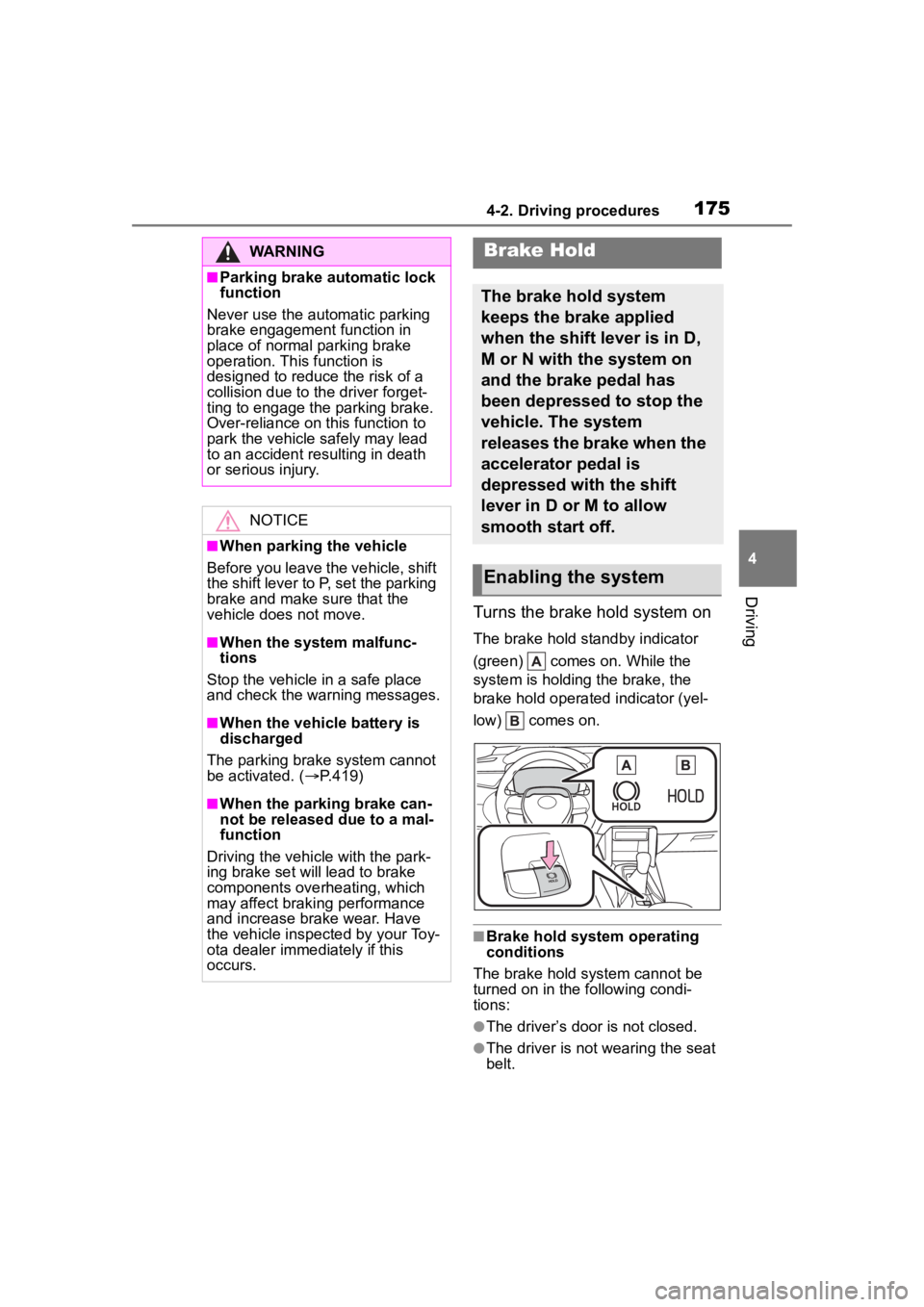
Turns the brake hold system on
The brake hold standby indicator
(green) comes on. While the
system is holding the brake, the
brake hold operated indicator (yel-
low) comes on.
■Brake hold system operating
conditions
The brake hold system cannot be
turned on in the following condi-
tions:
●The driver’s door is not closed.
●The driver is not wearing the seat
belt.
WARNING
■Parking brake automatic lock
function
Never use the automatic parking
brake engagement function in
place of normal parking brake
operation. This function is
designed to reduc e the risk of a
collision due to the driver forget-
ting to engage the parking brake.
Over-reliance on this function to
park the vehicle safely may lead
to an accident resulting in death
or serious injury.
NOTICE
■When parking the vehicle
Before you leave the vehicle, shift
the shift lever to P, set the parking
brake and make sure that the
vehicle does not move.
■When the system malfunc-
tions
Stop the vehicle in a safe place
and check the warning messages.
■When the vehicle battery is
discharged
The parking brake system cannot
be activated. ( P.419)
■When the parking brake can-
not be released due to a mal-
function
Driving the vehicle with the park-
ing brake set will lead to brake
components overheating, which
may affect braking performance
and increase brake wear. Have
the vehicle inspected by your Toy-
ota dealer immediately if this
occurs.
Brake Hold
The brake hold system
keeps the brake applied
when the shift lever is in D,
M or N with the system on
and the brake pedal has
been depressed to stop the
vehicle. The system
releases the brake when the
accelerator pedal is
depressed with the shift
lever in D or M to allow
smooth start off.
Enabling the system
Page 176 of 500
1764-2. Driving procedures
●The parking brake is engaged.
If any of the conditions above are
detected when the brake hold sys-
tem is enabled, the system will turn
off and the brake hold standby indi-
cator light will go of f. In addition, if
any of the conditions are detected
while the system is holding the
brake, a warning buzzer will sound
and a message will be shown on the
multi-information display. The park-
ing brake will then be set automati-
cally.
■Brake hold function
●If the brake pedal is left released
for a period of about 3 minutes
after the system has started hold-
ing the brake, the parking brake
will be set automatically. In this
case, a warning buzzer sounds
and a message is shown on the
multi-informat ion display.
●To turn the system off while the
system is holding the brake, firmly
depress the brake pedal and
press the button again.
●The brake hold function may not
hold the vehicle when the vehicle
is on a steep inclin e. In this situa-
tion, it may be necessary for the
driver to apply the brakes. A warn-
ing buzzer will sound and the
multi-informatio n display will
inform the driver of this situation. If
a warning message is shown on
the multi-information display, read
the message and follow the
instructions.
●When do not wish for the parking
brake to operate automatically,
press and hold the brake hold
switch until the standby indicator
(green) turns off, and then turn the
engine switch off.
■When the parking brake is set
automatically while the system
is holding the brakes
Perform any of the following opera-
tions to release the parking brake.
●Depress the accelerator pedal. (The parking brake will not be
released automatically if the seat
belt is not fastened.)
●Operate the parking brake switch
with the brake pedal depressed.
Make sure that the parking brake
indicator light goes off. ( P.172)
■When an inspection at your
Toyota dealer is necessary
When the brake hold standby indi-
cator (green) does not illuminate
even when the brake hold switch is
pressed with the brake hold system
operating conditions met, the sys-
tem may be malf unctioning. Have
the vehicle inspected at your Toyota
dealer.
■If “Brake Hold Malfunction
Press Brake to Deactivate Visit
Your Dealer” or “Brake Hold
Malfunction Visit Your Dealer”
is displayed on the multi-infor-
mation display
The system may be malfunctioning.
Have the vehicle inspected by your
Toyota dealer.
■Warning messages and buzzers
Warning messages and buzzers are
used to indicate a system malfunc-
tion or to inform the driver of the
need for caution. If a warning mes-
sage is shown on the multi-informa-
tion display, read the message and
follow the instructions.
■If the brake hold operated indi-
cator flashes
P.398
WARNING
■When the vehicle is on a
steep incline
Take care when using the brake
hold system on a steep incline,
exercise caution. The brake hold
function may not hold brakes in
such situations. Also, the system
may not activate depending on
the angle of the slope.
Page 177 of 500
1774-2. Driving procedures
4
Driving
WARNING
■When stopped on a slippery
road
The system cannot stop the vehi-
cle when the gripping ability of the
tires has been exceeded. Do not
use the system when stopped on
a slippery road.
NOTICE
■When parking the vehicle
The brake hold s ystem is not
designed for use when parking
the vehicle for a long period of
time. Turning the engine switch off
while the system i s holding the
brake may release the brake,
which would cause the vehicle to
move. When operating the engine
switch, depress the brake pedal,
shift the shift lever to P and set
the parking brake.
Page 179 of 500
1794-3. Operating the lights and wipers
4
Driving
■Daytime running light system
●Vehicles without a smart key sys-
tem :The daytime running lights
illuminate using the same lights as
the headlights and illuminate
darker than the headlights.
Vehicles with a smart key system
:The daytime runni ng lights illumi-
nate using the sa me lights as the
parking lights and illuminate darker
than the parking lights.
●To make your vehicle more visible
to other drivers during daytime
driving, the daytime running lights
turn on automatically when all of
the following condi tions are met.
(The daytime running lights are
not designed for use at night.)
• The engine is running
• The parking brake is released
• The headlight switch is in the
or
* position
*: When the surroundings are bright
The daytime running lights remain
on after they illumi nate, even if the
parking brake is set again.
●Daytime running lights can be
turned off by operating the switch.
●Compared to turning on the head-
lights, the daytime running light
system offers gr eater durability
and consumes less electricity, so
it can help improve fuel economy.
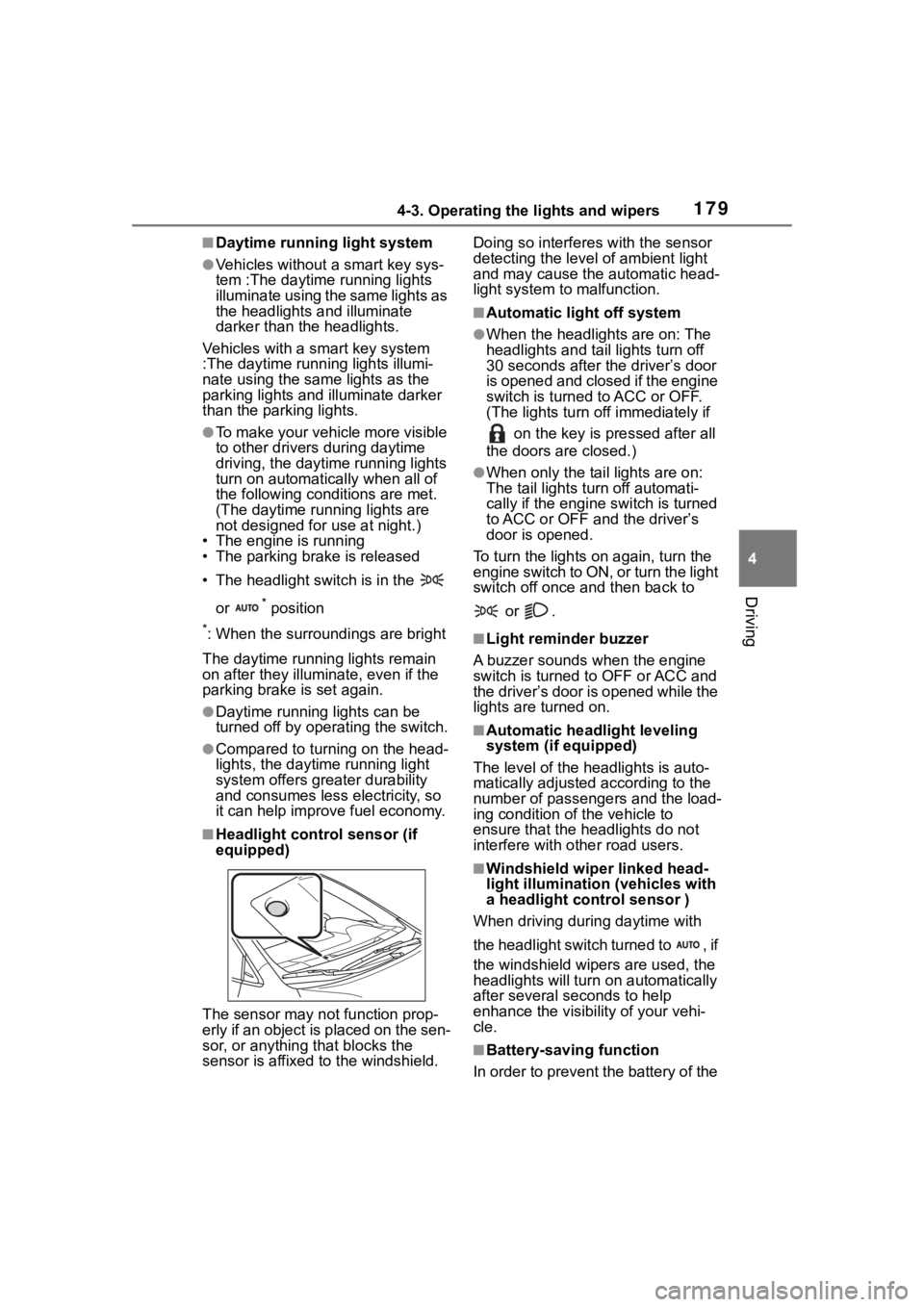
■Headlight control sensor (if
equipped)
The sensor may not function prop-
erly if an object is placed on the sen-
sor, or anything that blocks the
sensor is affixed to the windshield. Doing so interferes with the sensor
detecting the level
of ambient light
and may cause t he automatic head-
light system to malfunction.
■Automatic light off system
●When the headlights are on: The
headlights and tail lights turn off
30 seconds after the driver’s door
is opened and closed if the engine
switch is turned to ACC or OFF.
(The lights turn off immediately if
on the key is pressed after all
the doors are closed.)
●When only the tail lights are on:
The tail lights turn off automati-
cally if the engine switch is turned
to ACC or OFF and the driver’s
door is opened.
To turn the lights on again, turn the
engine switch to ON, or turn the light
switch off once and then back to
or .
■Light reminder buzzer
A buzzer sounds when the engine
switch is turned t o OFF or ACC and
the driver’s door is opened while the
lights are turned on.
■Automatic headlight leveling
system (if equipped)
The level of the headlights is auto-
matically adjusted according to the
number of passengers and the load-
ing condition of the vehicle to
ensure that the headlights do not
interfere with o ther road users.
■Windshield wiper linked head-
light illumination (vehicles with
a headlight control sensor )
When driving during daytime with
the headlight switch turned to , if
the windshield wipers are used, the
headlights will turn o n automatically
after several se conds to help
enhance the visibility of your vehi-
cle.
■Battery-saving function
In order to prevent the battery of the
Page 197 of 500
1974-5. Using the driving support systems
4
Driving
has become extremely short
●When a detectable vehicle is at an
angle
●When snow, mud, etc. is attached
to a detectable vehicle
●When driving on the following
kinds of roads:
• Roads with sharp curves or wind- ing roads
• Roads with chang es in grade,
such as sudden inclines or
declines
• Roads which is slo ped to the left
or right
• Roads with deep ruts
• Roads which are rough and
unmaintained
• Roads which frequently undulate
or are bumpy
●When the steering wheel is being
operated frequently or suddenly
●When the vehicle is not in a con-
stant position within a lane
●When parts related to this system,
the brakes, etc. are cold or
extremely hot, wet, etc.
●When the wheels are misaligned
●When driving on slick road sur-
faces, such as when it is covered
with ice, snow, gravel, etc.
●When the course of the vehicle
differs from the shape of a curve
●When the vehicle speed is exces-
sively high when entering a curve
●When entering/exiting a parking
lot, garage, car elevator, etc.
●When driving in a parking lot
●When driving through an area
where there are obstructions
which may contact your vehicle,
such as tall grass, tree branches,
a curtain, etc.
●When driving in strong wind
■Situations in which the lane
may not be detected
●When the lane is extremely wide
or narrow
●Immediately after changing lanes
or passing through an intersection
●When driving in a temporary lane
or lane regulated by construction
●When there are s tructures, pat-
terns, shadows which are similar
to lane lines in the surrounding
●When there are m ultiple white
lines for a lane line
●When the lane lines are not clear
or driving on a wet road surface
●When a lane line is on a curb
●When driving on a bright, reflec-
tive road surface, such as con-
crete
■Situations in which some or all
of the functions of the system
cannot operate
●When a malfunction is detected in
this system or a related system,
such as the brakes, steering, etc.
●When the VSC, TRAC, or other
safety related system is operating
●When the VSC, TRAC, or other
safety related system is off
■Changes in brake operation
sound and pedal response
●When the brakes have been oper-
ated, brake operation sounds may
be heard and the brake pedal
response may cha nge, but this
does not indicate a malfunction.
●When the system is operating, the
brake pedal may feel stiffer than
expected or sink. In either situa-
tion the brake pedal can be
depressed further. Further
depress the brake pedal as nec-
essary.
Page 226 of 500

2264-5. Using the driving support systems
vehicle speed. However, while in
vehicle-to-vehicle distance control
mode, the vehicle speed may
decrease to below the set vehicle
speed in order to maintain the dis-
tance from the preceding vehicle.
■When the vehicle is stopped by
system control during follow-up
cruising
●When the “+RES” switch is
pressed while the vehicle is
stopped by system control, if the
preceding vehicle starts off within
approximately 3 seconds, fol-
low-up cruising will resume.
●If the preceding vehicle starts off
within approximately 3 seconds of
the vehicle being stopped by sys-
tem control, follo w-up cruising will
resume.
■Automatic cancellation of vehi-
cle-to-vehicle d istance control
mode
In the following situations, vehi-
cle-to-vehicle dista nce control mode
will be canceled automatically:
●When the brake control or output
restriction control of a driving sup-
port system operates
(For example: Pre-Collision Sys-
tem, drive-start control)
●When the parking brake has been
operated
●When the vehicle is stopped by
system control on a steep incline
●When any of the following are
detected while the vehicle is
stopped by system control:
• The driver’s seat belt is unfas- tened
• The driver’s door is opened
• Approximately 3 minutes have elapsed since the vehicle was
stopped
The parking brake may be actived
automatically.
●Situations in whic h some or all of
the functions of the system cannot
operate: P. 1 9 7
■Dynamic radar cruise control
system warning messages and
buzzers
For safe use: P. 1 9 2
■Preceding vehicles that the sen-
sor may not detect correctly
In the following situations, depend-
ing on the conditions, if the system
cannot provide sufficient decelera-
tion or acceleration is necessary,
operate the brake pedal or accelera-
tor pedal.
As the sensor may not be able to
correctly detect th ese types of vehi-
cles, the approach warning
( P.226) may not operate.
●When a vehicle cuts in front of
your vehicle or changes lanes
away from your vehicle extremely
slowly or quickly
●When changing lanes
●When a preceding vehicle is driv-
ing at a low speed
●When a vehicle is stopped in the
same lane as the vehicle
●When a motorcycle is traveling in
the same lane as the vehicle
■Conditions under which the
system may not operate cor-
rectly
In the following situations, operate
the brake pedal (or accelerator
pedal, depending on the situation)
as necessary.
As the sensor may not be able to
correctly detect a vehicle, the sys-
tem may not operate properly.
●When a preceding vehicle brakes
suddenly
●When changing lanes at low
speeds, such as in a traffic jam
In situations where the vehicle
approaches a preceding vehicle
Approach warning
Page 233 of 500
2334-5. Using the driving support systems
4
Driving
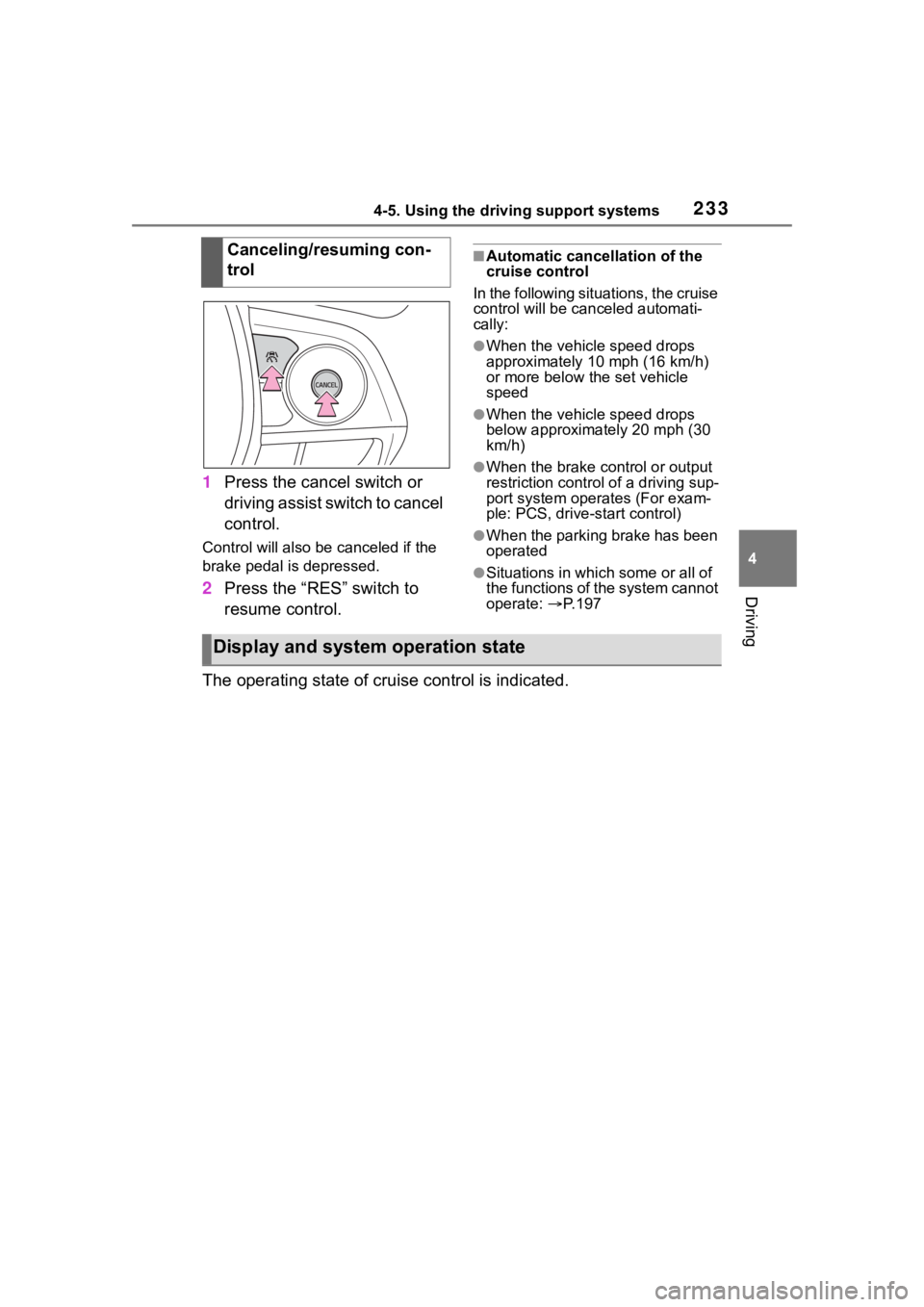
1Press the cancel switch or
driving assist switch to cancel
control.
Control will also be canceled if the
brake pedal is depressed.
2Press the “RES” switch to
resume control.
■Automatic cancellation of the
cruise control
In the following situations, the cruise
control will be canceled automati-
cally:
●When the vehicle speed drops
approximately 10 mph (16 km/h)
or more below the set vehicle
speed
●When the vehicle speed drops
below approximately 20 mph (30
km/h)
●When the brake control or output
restriction control of a driving sup-
port system oper ates (For exam-
ple: PCS, drive-start control)
●When the parking brake has been
operated
●Situations in which some or all of
the functions of the system cannot
operate: P. 1 9 7
The operating state of cruise control is indicated. Canceling/resuming con-
trol
Display and system operation state