2023 TOYOTA COROLLA CROSS charging
[x] Cancel search: chargingPage 317 of 500
3175-4. Other interior features
5
Interior features
WARNING
●Do not attach metallic objects,
such as aluminum stickers, to
the charging area.
●Do not charge portable devices
with aluminum stickers or other
metallic objects attached to the
side which touches the charging
area.
●Do not store items on the wire-
less charger instead of in an
auxiliary box.
●Do not apply force or impact to
the wireless charger.
●Do not disassemble, modify or
remove the wireless charger.
●Do not attempt t o charge porta-
ble devices whic h are not com-
patible with the Qi wireless
charging standard.
●Do not allow magnetic objects
to come near the wireless char-
ger.
●Do not perform charging if the
charging area is dirty.
●When not using the wireless
charger, to prevent foreign mat-
ter or liquids from contacting it,
make sure to close the lid.
●Do not cover the wireless char-
ger with a cloth or other object
while charging.
NOTICE
■To prevent failure or damage
to data
●Do not place magnetic cards,
such as a credit card, or mag-
netic recording media, close to
the wireless charger while
charging. Otherwise, data may
be erased due to the influence
of magnetism.
Additionally, do not bring preci-
sion instruments such as wrist
watches, close to the wireless
charger, as such objects may
malfunction.
●Do not perform c harging with a
contactless smart card, such as
a credit card, between the
charging surface of a portable
device and the charging area.
The IC chip in the card may
become extremely hot, possibly
damaging the portable device or
smart card.
Be extra careful to not charge a
portable device with a case or
cover which a contactless smart
card can be inserted.
●Do not leave portable devices in
the cabin. The temperature
inside the cabin may become
high when parke d in the sun,
and cause damage to the
device.
■When the OS of a smartphone
has been updated
When the OS version of a smart-
phone has been changed, the
charging specifications may have
changed. If the WPC compatibility
version is changed, the rapid
charging function may no longer
be able to be used . For details,
check for inform ation on the web-
site for the smartphone manufac-
turer.
Page 349 of 500
3496-3. Do-it-yourself maintenance
6
Maintenance and care
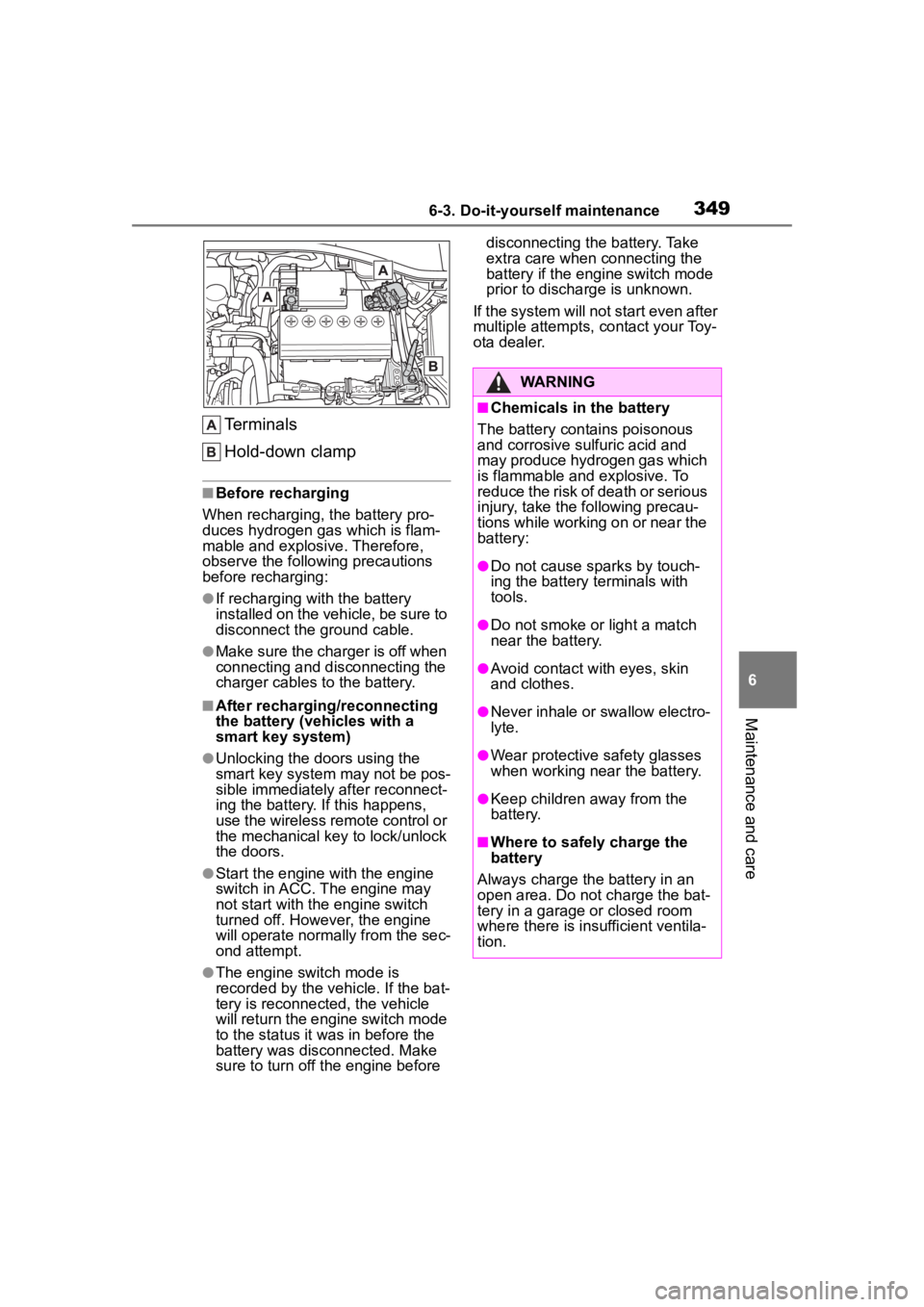
Terminals
Hold-down clamp
■Before recharging
When recharging, t he battery pro-
duces hydrogen ga s which is flam-
mable and explosive. Therefore,
observe the following precautions
before recharging:
●If recharging wi th the battery
installed on the vehicle, be sure to
disconnect the ground cable.
●Make sure the charger is off when
connecting and disconnecting the
charger cables to the battery.
■After recharging/reconnecting
the battery (vehicles with a
smart key system)
●Unlocking the doors using the
smart key system may not be pos-
sible immediately after reconnect-
ing the battery. If this happens,
use the wireless remote control or
the mechanical key to lock/unlock
the doors.
●Start the engine with the engine
switch in ACC. The engine may
not start with the engine switch
turned off. However, the engine
will operate normally from the sec-
ond attempt.
●The engine switch mode is
recorded by the vehicle. If the bat-
tery is reconnected, the vehicle
will return the engi ne switch mode
to the status it was in before the
battery was disconnected. Make
sure to turn off the engine before disconnecting the battery. Take
extra care when connecting the
battery if the engine switch mode
prior to discharge is unknown.
If the system will not start even after
multiple attempts, contact your Toy-
ota dealer.
WARNING
■Chemicals in the battery
The battery contains poisonous
and corrosive sulfuric acid and
may produce hydrogen gas which
is flammable and explosive. To
reduce the risk of death or serious
injury, take the following precau-
tions while working on or near the
battery:
●Do not cause sparks by touch-
ing the battery terminals with
tools.
●Do not smoke or light a match
near the battery.
●Avoid contact with eyes, skin
and clothes.
●Never inhale or swallow electro-
lyte.
●Wear protective safety glasses
when working near the battery.
●Keep children away from the
battery.
■Where to safely charge the
battery
Always charge the battery in an
open area. Do not charge the bat-
tery in a garage or closed room
where there is ins ufficient ventila-
tion.
Page 350 of 500
3506-3. Do-it-yourself maintenance
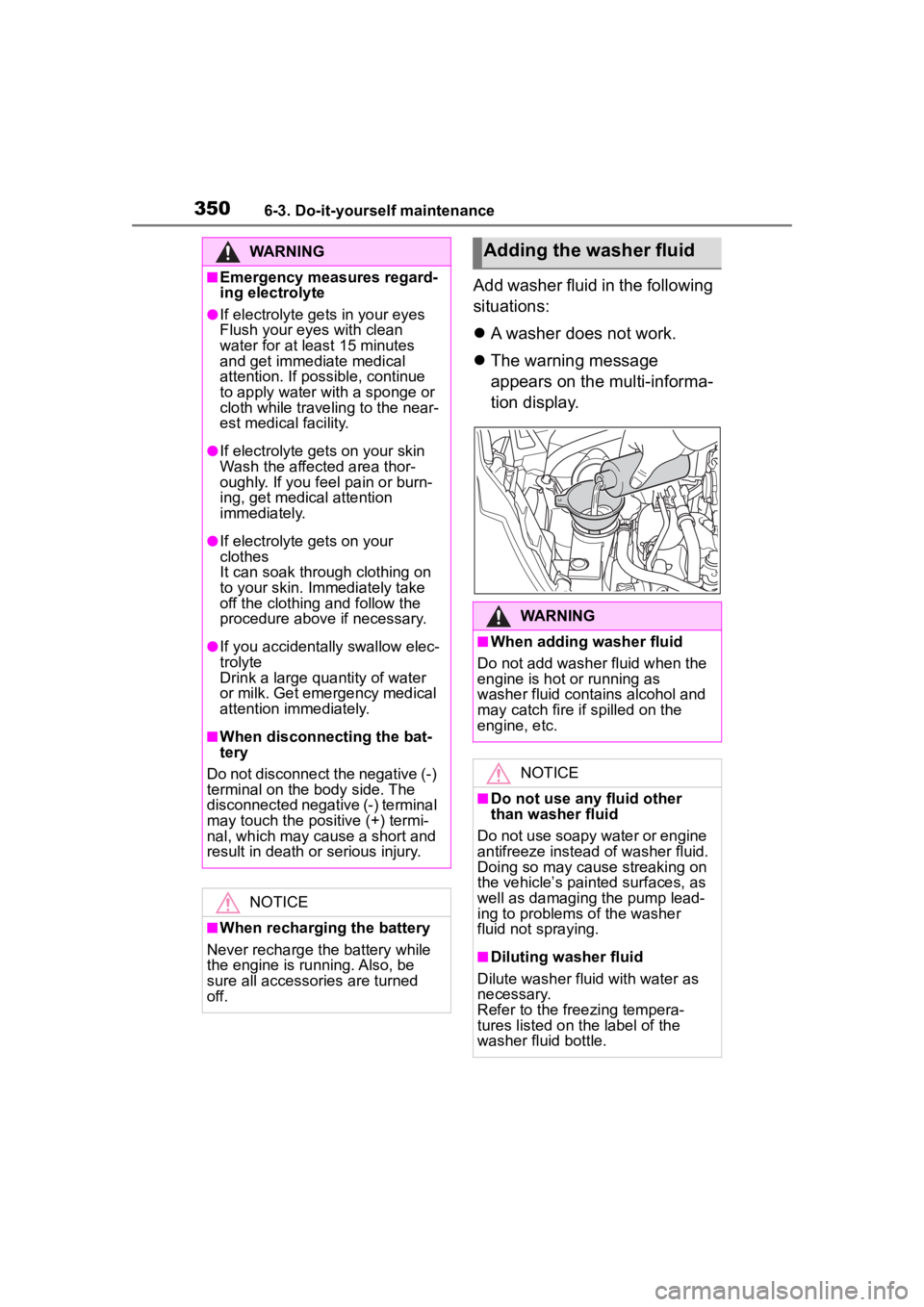
Add washer fluid in the following
situations:
A washer does not work.
The warning message
appears on the multi-informa-
tion display.
WARNING
■Emergency measures regard-
ing electrolyte
●If electrolyte gets in your eyes
Flush your eyes with clean
water for at least 15 minutes
and get immediate medical
attention. If possible, continue
to apply water with a sponge or
cloth while traveling to the near-
est medical facility.
●If electrolyte gets on your skin
Wash the affected area thor-
oughly. If you fee l pain or burn-
ing, get medical attention
immediately.
●If electrolyte gets on your
clothes
It can soak through clothing on
to your skin. Immediately take
off the clothing and follow the
procedure above if necessary.
●If you accidentally swallow elec-
trolyte
Drink a large quantity of water
or milk. Get emergency medical
attention immediately.
■When disconnecting the bat-
tery
Do not disconnect the negative (-)
terminal on the body side. The
disconnected negative (-) terminal
may touch the positive (+) termi-
nal, which may cause a short and
result in death or serious injury.
NOTICE
■When recharging the battery
Never recharge the battery while
the engine is running. Also, be
sure all accessories are turned
off.
Adding the washer fluid
WARNING
■When adding washer fluid
Do not add washer fluid when the
engine is hot or running as
washer fluid contains alcohol and
may catch fire if spilled on the
engine, etc.
NOTICE
■Do not use any fluid other
than washer fluid
Do not use soapy water or engine
antifreeze instead of washer fluid.
Doing so may cause streaking on
the vehicle’s painted surfaces, as
well as damaging the pump lead-
ing to problems of the washer
fluid not spraying.
■Diluting washer fluid
Dilute washer fluid with water as
necessary.
Refer to the freezing tempera-
tures listed on the label of the
washer fluid bottle.
Page 392 of 500
3927-2. Steps to take in an emergency
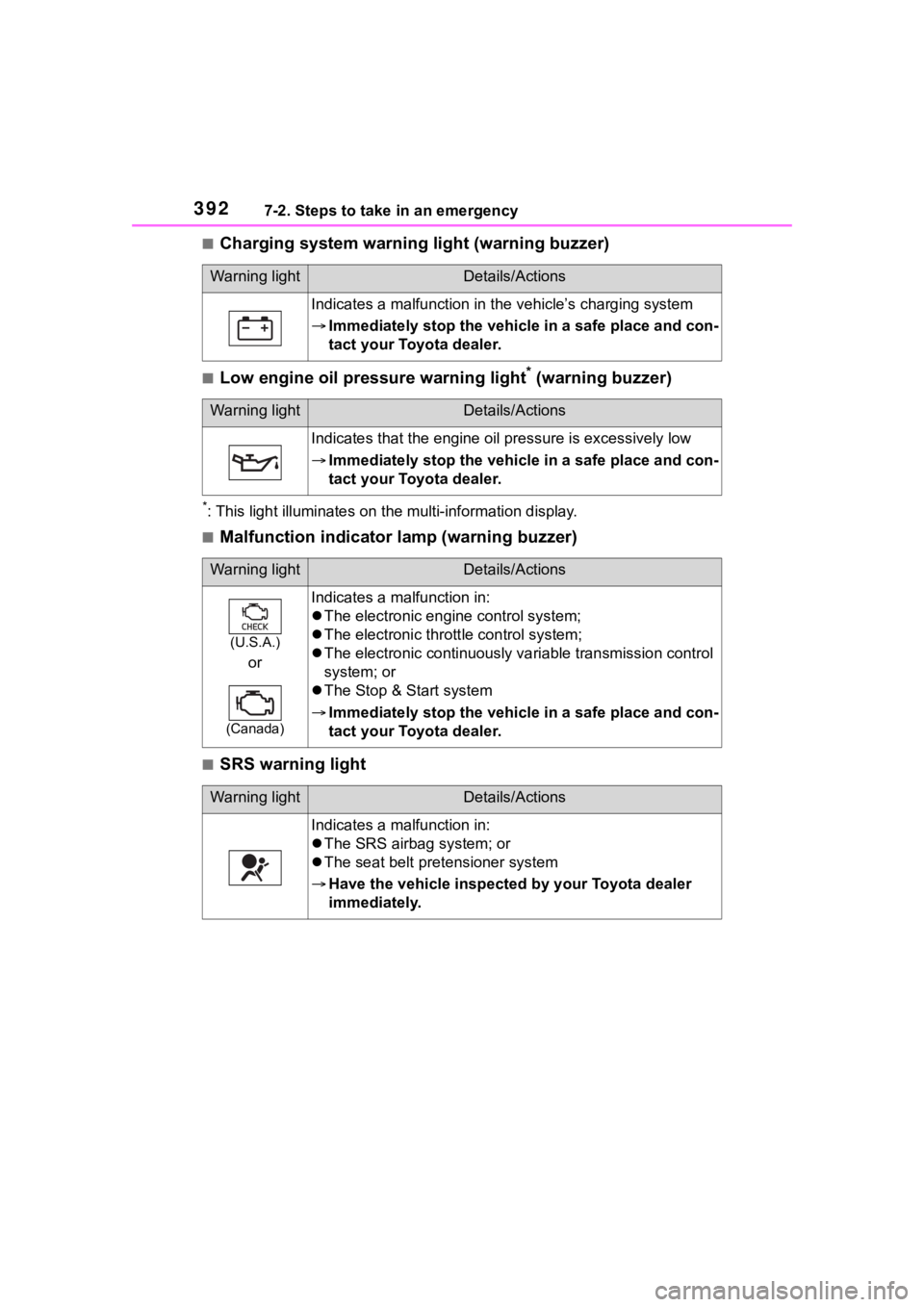
■Charging system warning light (warning buzzer)
■Low engine oil pressure warning light* (warning buzzer)
*: This light illuminat es on the multi-information display.
■Malfunction indicator lamp (warning buzzer)
■SRS warning light
Warning lightDetails/Actions
Indicates a malfunction in the vehicle’s charging system
Immediately stop the vehicle in a safe place and con-
tact your Toyota dealer.
Warning lightDetails/Actions
Indicates that the engine oil pressure is excessively low
Immediately stop the vehicle in a safe place and con-
tact your Toyota dealer.
Warning lightDetails/Actions
(U.S.A.)
or
(Canada)
Indicates a malfunction in:
The electronic engine control system;
The electronic thrott le control system;
The electronic continuously variable transmission control
system; or
The Stop & Start system
Immediately stop the vehicle in a safe place and con-
tact your Toyota dealer.
Warning lightDetails/Actions
Indicates a malfunction in:
The SRS airbag system; or
The seat belt pretensioner system
Have the vehicle inspected by your Toyota dealer
immediately.
Page 421 of 500
4217-2. Steps to take in an emergency
7
When trouble arises
approximately 5 minutes to
recharge the battery of your
vehicle.
5 Vehicles with a smart key
system: Open and close any
of the doors of your vehicle
with the engine switch OFF.
6 Maintain the engine speed of
the second vehicle and start
the engine of your vehicle by
turning the engine switch to
ON.
7 Once the vehicle’s engine
has started, remove the
jumper cables in the exact
reverse order from which
they were connected.
Once the engine starts, have the
vehicle inspected at your Toyota
dealer as soon as possible.
■Starting the engine when the
battery is discharged
The engine cannot be started by
push-starting.
■To prevent battery discharge
●Turn off the headlights and the
audio system while the engine is
off.
●Turn off any unnecessary electri-
cal components when the vehicle
is running at a low speed for an
extended period, such as in heavy
traffic.
■When the battery is removed or
discharged
●Information stor ed in the ECU is
cleared. When the battery is
depleted, have the vehicle
inspected at you r Toyota dealer.
●Some systems may require initial-
ization. ( P.459)
■When removing the battery ter-
minals
When the battery terminals are
removed, the information stored in
the ECU is cleared. Before remov-
ing the battery term inals, contact
your Toyota dealer.
■Charging the battery
The electricity stored in the battery
will discharge grad ually even when
the vehicle is not in use, due to nat-
ural discharge and the draining
effects of certain electrical appli-
ances. If the vehicle is left for a long
time, the battery may discharge,
and the engine may be unable to
start. (The battery recharges auto-
matically during driving.)
■When recharging or replacing
the battery (vehicles with a
smart key system)
●In some cases, it may not be pos-
sible to unlock the doors using the
smart key system when the bat-
tery is discharged. Use the wire-
less remote control or the
mechanical key to lock or unlock
the doors.
●The engine may not start on the
first attempt after the battery has
recharged but will start normally
after the second attempt. This is
not a malfunction.
●The engine switch mode is memo-
rized by the vehicle. When the
battery is reconnected, the system
will return to the mode it was in
before the bat tery was dis-
charged. Before disconnecting the
battery, turn the engine switch off.
If you are unsure what mode the
engine switch wa s in before the
battery discharged, be especially
careful when reconnecting the
battery.
●Vehicles with power back door:
The power back door must be ini-
tialized. ( P. 1 1 4 )
■When replacing the battery
●Use a battery that conforms to
Page 432 of 500
4328-1. Specifications
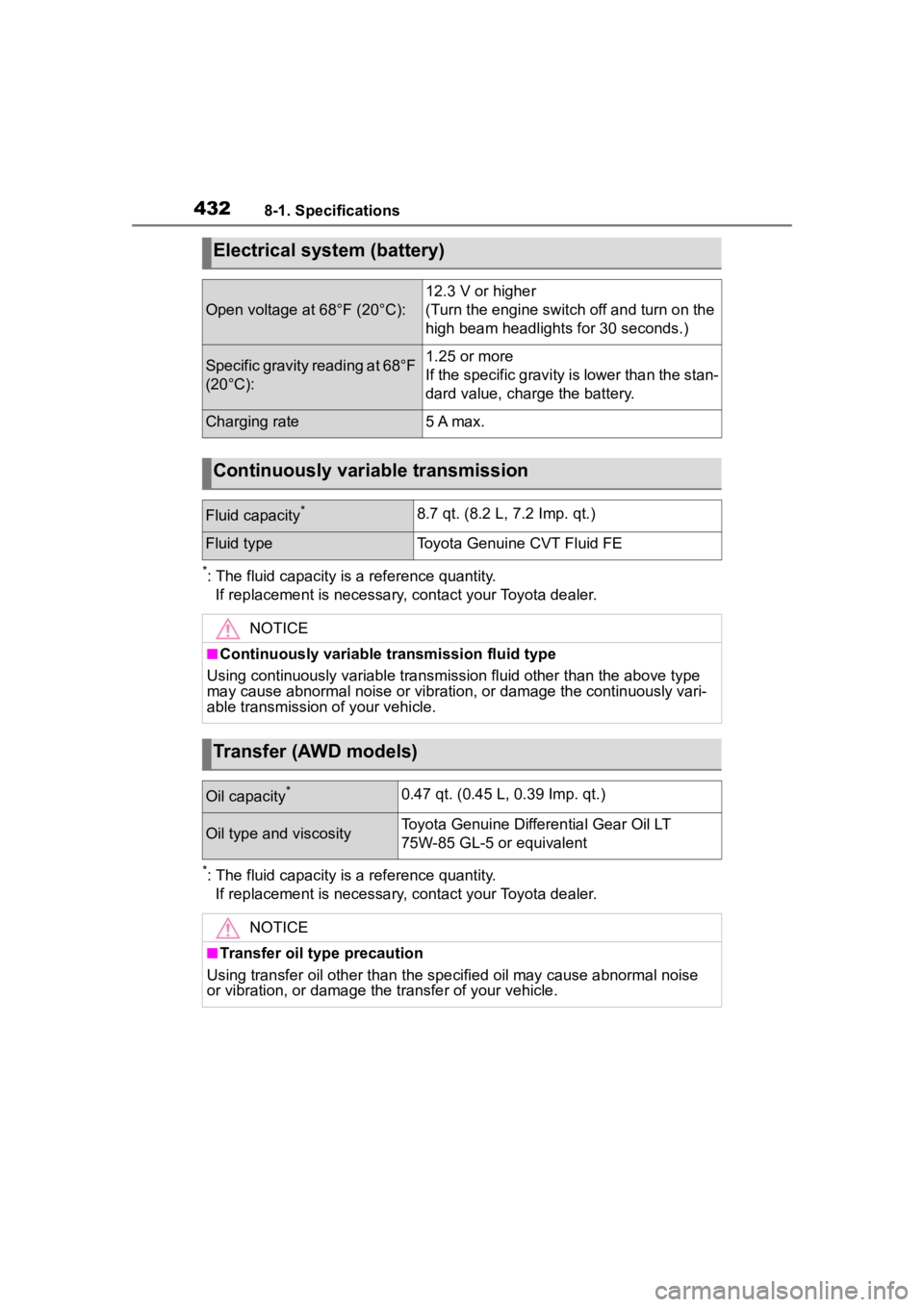
*: The fluid capacity is a reference quantity.If replacement is necessary, contact your Toyota dealer.
*: The fluid capacity is a reference quantity.If replacement is necessary, contact your Toyota dealer.
Electrical system (battery)
Open voltage at 68°F (20°C):
12.3 V or higher
(Turn the engine switch off and turn on the
high beam headlights for 30 seconds.)
Specific gravity reading at 68°F
(20°C):1.25 or more
If the specific gravity is lower than the stan-
dard value, charge the battery.
Charging rate5 A max.
Continuously variable transmission
Fluid capacity*8.7 qt. (8.2 L, 7.2 Imp. qt.)
Fluid typeToyota Genuine CVT Fluid FE
NOTICE
■Continuously variable transmission fluid type
Using continuously variable tran smission fluid other than the above type
may cause abnormal noise or vibration, or damage the continuous ly vari-
able transmission of your vehicle.
Transfer (AWD models)
Oil capacity*0.47 qt. (0.45 L, 0.39 Imp. qt.)
Oil type and viscosityToyota Genuine Differential Gear Oil LT
75W-85 GL-5 or equivalent
NOTICE
■Transfer oil type precaution
Using transfer oil other than t he specified oil may cause abnormal noise
or vibration, or damage the transfer of your vehicle.
Page 485 of 500

485Alphabetical Index
Registering ID codes ............ 358
Warning light ........................ 395
Tires Checking .............................. 351
If you have a flat tire ............. 405
Inflation pressure.................. 363
Information ........................... 438
Replacing ............................. 405
Rotating tires ........................ 353
Size ...................................... 434
Snow tires ............................ 279
Spare tire.............................. 405
Tire pressure warning system........................................... 353
Warning light ........................ 395
Tools ........................................ 406
Top tether strap ........................ 61
Total load capacity ................. 428
To w i n g Dinghy towing....................... 161
Emergency towing................ 385
Towing eyelet ....................... 387
Trailer towing ........................ 151
Toyota Safety Sense 3.0 Automatic High Beam .......... 181
Dynamic radar cruise control 220
Emergency Driving Stop System........................................... 235
LDA (Lane Departure Alert) .. 213
LTA (Lane Tracing Assist) ..... 208
PCS (Pre-Collision System) . 198
RSA (Road Sign Assist) ....... 218
TRAC (Traction Control) ........ 274
Traction Control (TRAC) ........ 274
Trailer towing .......................... 151
Transmission Continuously variable transmis-sion..................................... 168
If the shift lever cannot be shifted from P................................. 169
M mode ................................ 170
Trip meters .......................... 77, 80 Turn signal lights
Replacing light bulbs ............374
Turn signal lever ...................171
Wattage ................................435
U
USB charging port ..................309
V
Vanity lights ............................318
Vanity mirrors .........................318
Vehicle data recording ...............6
Vehicle identification number429
Vehicle information display85, 92
Vehicle Stability Control (VSC)...............................................274
VSC (Vehicle Stability Control) ...............................................274
W
Warning buzzers ABS ......................................393
Airbags .................................392
Approach warning ................226
Brake hold ............................398
Brake Override System ........393
Brake system ........................391
Charging system ..................392
Downshifting .........................170
Drive-Start Control ................393
Electric power steering .........393
Engine ..................................392
High coolant temperature .....391
Intuitive parking assist OFF indi- cator ...................................396
Key reminder ........................163
LDA (Lane Departure Alert) 213, 396
Low engine oil pressure .......392
Page 486 of 500

486Alphabetical Index
LTA (Lane Tracing Assist) ... 208, 395
Open door ......... ........... 105, 107
Seat belt ....................... 394, 395
Warning lights ........................ 391 ABS ...................................... 393
Brake hold operated indicator........................................... 398
Brake Override System ........ 393
Brake system ....................... 391
Charging system .................. 392
Cruise control indicator ........ 397
Drive-Start Control ............... 393
Driving assist information indica- tor ....................................... 397
Dynamic radar cruise control indicator.............................. 396
Electric power steering ......... 393
High coolant temperature ..... 391
Intuitive parking assist OFF indi- cator ................................... 396
LDA indicator ........................ 396
Low engine oil pressure ....... 392
Low fuel level ....................... 394
LTA indicator ......................... 395
Malfunction indicator lamp ... 392
Parking brake indicator ........ 398
Pre-collision system ............. 396
Seat belt reminder light 394, 395
Slip indicator......................... 397
SRS ...................................... 392
Stop & Start cancel indicator 396
Tire pressure ........................ 395
Warning messages................. 401
Washer Checking .............................. 350
Preparing and c hecking before
winter.................................. 279
Switch................................... 184
Washing and waxing .............. 328
Weight Cargo capacity ..................... 150 Load limits ............................150
Wheels .....................................365 Replacing .............................365
Size ......................................434
Window lock switch ...............134
Windows Power windows ....................132
Rear window defogger .288, 295
Washer .................................184
Windshield wiper de-icer289, 298
Windshield wipers ..................184
Winter driving tips ..................279
Wireless charger.....................310
Wireless remote control Battery-Saving Function ....... 119
Locking/Unlocking ................100
Replacing the battery ...........368
For vehicles with Audio Plus or Premium Audio,
refer to “MULTIMEDIA
OWNER’S MANUAL” for
information regarding the
equipment listed below.
· Navigation system
· Audio/visual system
· Rear view monitor system