2023 TOYOTA 86 air conditioning
[x] Cancel search: air conditioningPage 274 of 449
2745-1. Using the air conditioning system
operating light remains illuminated.
The rear window defogger will con-
tinue to operate in this cycle until it
is turned off.
■Customization
Some functions can be customized.
( P.400)
1 Press the automatic mode
switch.
2 Adjust the temperature set-
ting.
3 To stop the operation, press
the “ON/OFF” switch.
If the fan speed setting or air
flow modes are operated, the
automatic mode indicator goes
off. However, automatic mode
for functions other than that
operated is maintained.
■Using automatic mode
Fan speed is adjusted automati-
cally according to the temperature
setting and the ambient conditions.
Therefore, the fan may stop for a
while until warm or cool air is ready
to flow immediately after the auto-
matic mode switch pressed.
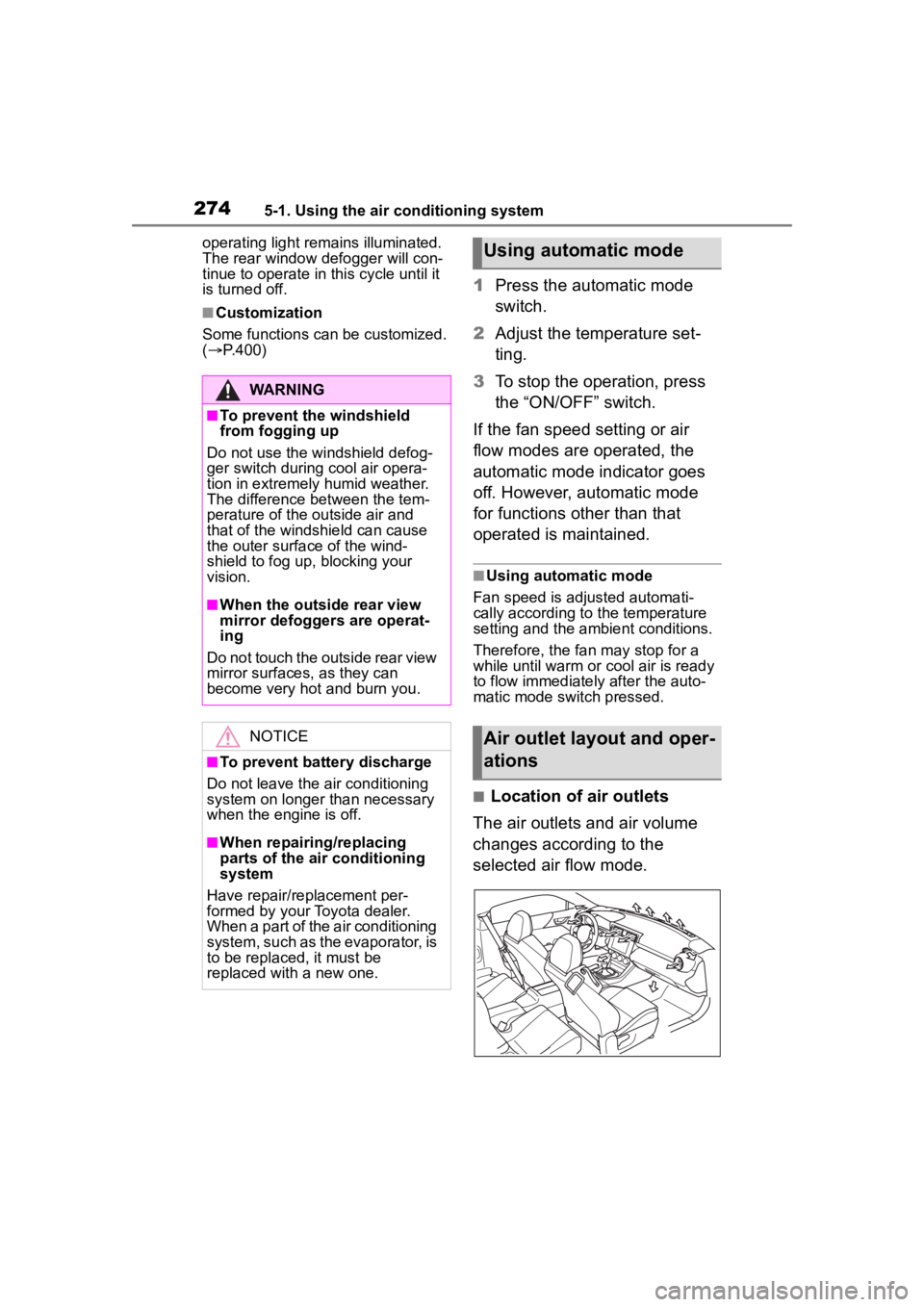
■Location of air outlets
The air outlets and air volume
changes according to the
selected air flow mode.
WARNING
■To prevent the windshield
from fogging up
Do not use the windshield defog-
ger switch during cool air opera-
tion in extremely humid weather.
The difference between the tem-
perature of the outside air and
that of the windshield can cause
the outer surface of the wind-
shield to fog up, blocking your
vision.
■When the outside rear view
mirror defoggers are operat-
ing
Do not touch the outside rear view
mirror surfaces, as they can
become very hot and burn you.
NOTICE
■To prevent battery discharge
Do not leave the air conditioning
system on longer than necessary
when the engine is off.
■When repairing/replacing
parts of the air conditioning
system
Have repair/replacement per-
formed by your Toyota dealer.
When a part of the air conditioning
system, such as the evaporator, is
to be replaced, it must be
replaced with a new one.
Using automatic mode
Air outlet layout and oper-
ations
Page 275 of 449
2755-1. Using the air conditioning system
5
Interior features
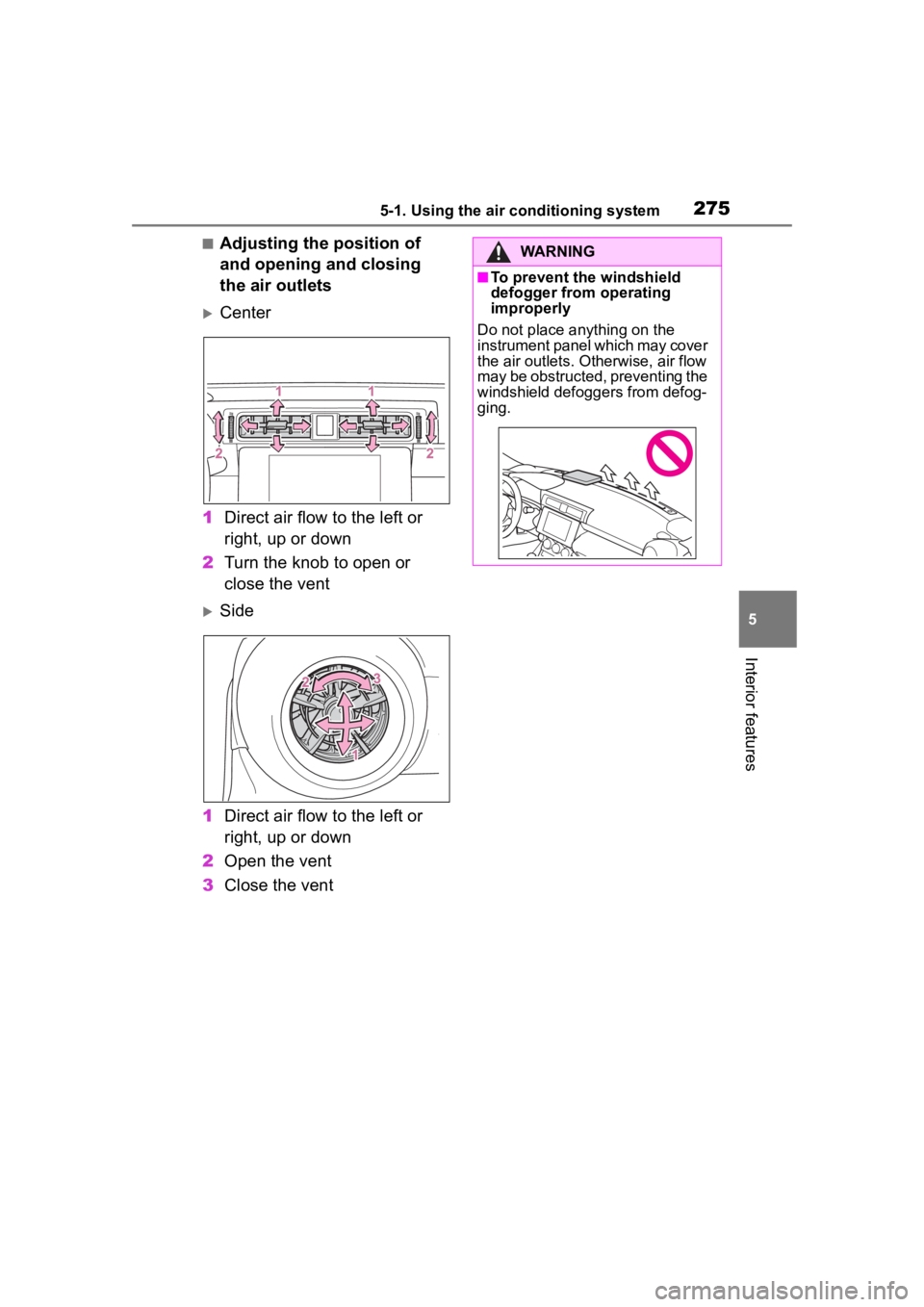
■Adjusting the position of
and opening and closing
the air outlets
Center
1 Direct air flow to the left or
right, up or down
2 Turn the knob to open or
close the vent
Side
1 Direct air flow to the left or
right, up or down
2 Open the vent
3 Close the vent
WARNING
■To prevent the windshield
defogger from operating
improperly
Do not place anything on the
instrument panel which may cover
the air outlets. Otherwise, air flow
may be obstructed, preventing the
windshield defoggers from defog-
ging.
Page 276 of 449
2765-1. Using the air conditioning system
*: If equipped
■Seat heaters
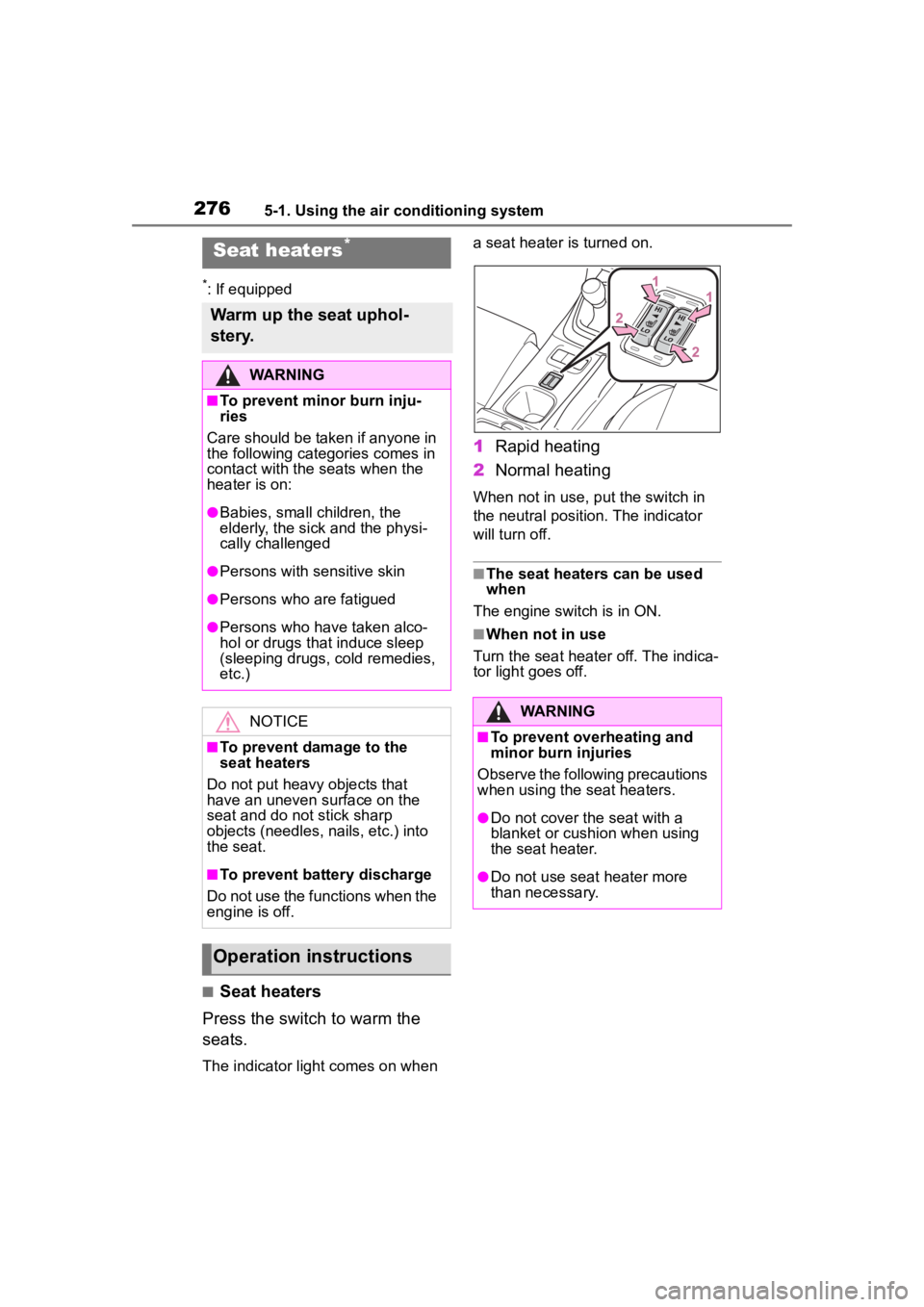
Press the switch to warm the
seats.
The indicator light comes on when a seat heater is turned on.
1
Rapid heating
2 Normal heating
When not in use, put the switch in
the neutral position. The indicator
will turn off.
■The seat heaters can be used
when
The engine switch is in ON.
■When not in use
Turn the seat heater off. The indica-
tor light goes off.
Seat heaters*
Warm up the seat uphol-
stery.
WARNING
■To prevent minor burn inju-
ries
Care should be taken if anyone in
the following categories comes in
contact with the seats when the
heater is on:
●Babies, small children, the
elderly, the sick and the physi-
cally challenged
●Persons with sensitive skin
●Persons who are fatigued
●Persons who have taken alco-
hol or drugs that induce sleep
(sleeping drugs, cold remedies,
etc.)
NOTICE
■To prevent damage to the
seat heaters
Do not put heavy objects that
have an uneven surface on the
seat and do not stick sharp
objects (needles, nails, etc.) into
the seat.
■To prevent battery discharge
Do not use the functions when the
engine is off.
Operation instructions
WARNING
■To prevent overheating and
minor burn injuries
Observe the following precautions
when using the seat heaters.
●Do not cover the seat with a
blanket or cushion when using
the seat heater.
●Do not use seat heater more
than necessary.
Page 287 of 449
287
6
6
Maintenance and care
Maintenance and care
.6-1. Maintenance and careCleaning and protecting the vehicle exterior .......... 288
Cleaning and protecting the vehicle interior ........... 291
Cleaning and protecting the Ultrasuede
®area ....... 293
6-2. Maintenance Maintenance requirements.................................. 295
General maintenance.. 296
Emission inspection and maintenance (I/M) pro-
grams ........................ 299
6-3. Do-it-yourself mainte- nance
Do-it-yourself service pre- cautions ..................... 300
Hood ........................... 302
Positioning a floor jack .................................. 303
Engine compartment ... 305
Tires ............................ 312
Replacing the tire ........ 319
Tire inflation pressure.. 323
Wheels ......... ...............325
Air conditioning filter .... 327
Electronic key battery.. 328
Checking and replacing fuses.......................... 330
Headlight aim .............. 332Light bulbs ...................
333
Page 290 of 449

2906-1. Maintenance and care
NOTICE
• If liquids such as benzene and gasoline are spilled on the paint
surface
●If the paint is chipped or
scratched, have it repaired
immediately.
●To prevent the wheels from cor-
roding, remove any dirt and
store in a place with low humid-
ity when storing the wheels.
■Protective film for side sill
plates (if equipped)
Make sure to remove the protec-
tive film. Failure to do so may
cause rust, depending on condi-
tions.
■Cleaning the exterior lights
●Wash carefully. Do not use
organic substances or scrub
with a hard brush. This may
damage the surfaces of the
lights.
●Do not apply wax to the sur-
faces of the lights.
Wax may cause damage to the
lenses.
■To prevent damage to the
windshield wiper arms
When lifting the wiper arms away
from the windshield, pull the driver
side wiper arm upward first, and
repeat for the passenger side.
When returning the wipers to their
original position, do so from the
passenger side first.
■When using a high pressure
car wash
●When washing the vehicle, do
not spray the came ra or its sur-
rounding area directly with a
high pressure washer. Shock
applied from high pressure
water may cause the device to
not operate normally.
●Do not bring the nozzle tip close
to boots (rubber or resin manu-
factured cover), connectors or
the following parts. The parts
may be damaged if they come
into contact with high-pressure
water.
• Traction related parts
• Suspension parts
• Steering parts
• Brake parts
●Keep the cleaning nozzle at
least 11.9 in. (30 cm) away from
the vehicle body. Otherwise
resin section, s uch as moldings
and bumpers, may be deformed
and damaged.
Also, do not continuously hold the
nozzle in the same place.
●Do not spray the lower part of
the windshield continuously.
If water enters the air conditioning
system intake located near the
lower part of the windshield, the
air conditioning system may not
operate correctly.
●Do not wash the underside of
the vehicle using a high pres-
sure car washer.
Page 292 of 449
2926-1. Maintenance and care
Remove dirt and dust using a
vacuum cleaner.
Wipe off any excess dirt and
dust with a soft cloth damp-
ened with diluted detergent.
Use a diluted water solution of
approximately 5% neutral wool
detergent.
Wring out any excess water
from the cloth and thoroughly
wipe off all remaining traces
NOTICE
●Do not use a chemical agent
containing silicone
(highly-polymerized silicon com-
pound) when cleaning any of
the electrical appliances such
as the air conditioning, all
switches and their surrounding
areas.
If silicon (highly-polymerized sil-
icon compound) contacts these
components, it may cause the
electrical appliances to malfunc-
tion.
■Preventing damage to leather
surfaces
Observe the following precautions
to avoid damage to and deteriora-
tion of leather surfaces:
●Remove any dust or dirt from
leather surfaces immediately.
●Do not expose the vehicle to
direct sunlight for extended peri-
ods of time. Park the vehicle in
the shade, especially during
summer.
●Do not place items made of
vinyl, plastic, or containing wax
on the upholstery, as they may
stick to the leather surface if the
vehicle interior heats up signifi-
cantly.
■Water on the floor
Do not wash the vehicle floor with
water.
Vehicle systems such as the
audio system may be damaged if
water comes into contact with
electrical components such as the
audio system above or under the
floor of the vehicle. Water may
also cause the body to rust.
■When cleaning the inside of
the windshield
Do not allow glass cleaner to con-
tact the lens. Also, do not touch
the lens. (
P.174)
■Cleaning the inside of the rear
window
●Do not use glass cleaner to
clean the rear window, as this
may cause damage to the rear
window defogger heater wires.
Use a cloth dampened with
lukewarm water to gently wipe
the window clean. Wipe the win-
dow in strokes running parallel
to the heater wires.
●Be careful not to scratch or
damage the heater wires.
■When cleaning the instrument
panel
When small grains of sand and so
forth have gotten into instrument
panel’s surface and cannot be
wiped away using a cloth, use a
clay bar without adding water.
Forcibly trying to wipe the surface
clean with a brush or sponge may
scratch the surface or fragments
of the cloth may be left in the sur-
face.
Cleaning the leather areas
Page 327 of 449
3276-3. Do-it-yourself maintenance
6
Maintenance and care
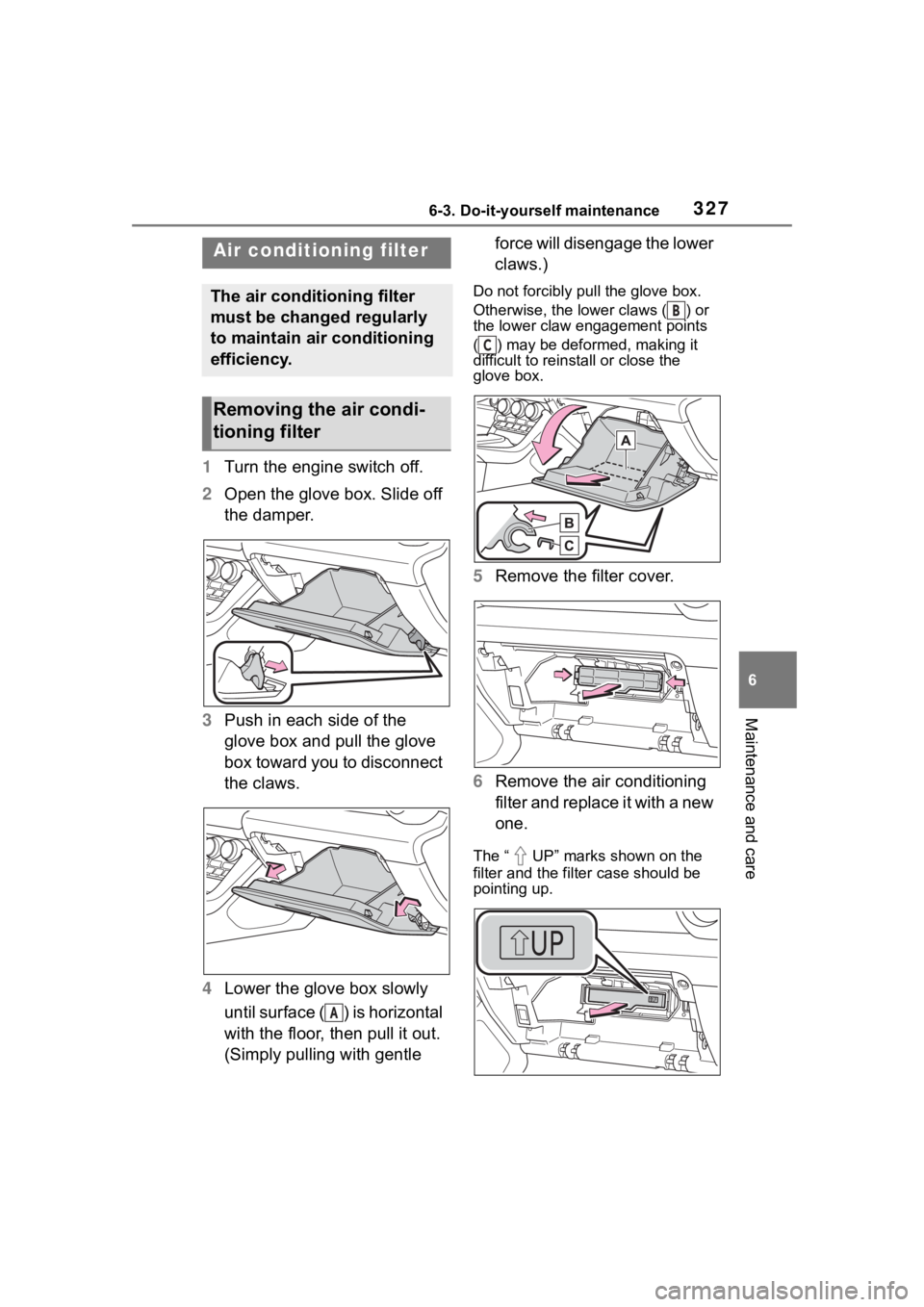
1Turn the engine switch off.
2 Open the glove box. Slide off
the damper.
3 Push in each side of the
glove box and pull the glove
box toward you to disconnect
the claws.
4 Lower the glove box slowly
until surface ( ) is horizontal
with the floor, then pull it out.
(Simply pulling with gentle force will disengage the lower
claws.)
Do not forcibly pull the glove box.
Otherwise, the lower claws ( ) or
the lower claw engagement points
( ) may be deformed, making it
difficult to reinstall or close the
glove box.
5
Remove the filter cover.
6 Remove the air conditioning
filter and replace it with a new
one.
The “ UP” marks shown on the
filter and the filter case should be
pointing up.
Air condition ing filter
The air conditioning filter
must be changed regularly
to maintain air conditioning
efficiency.
Removing the air condi-
tioning filter
A
B
C
Page 328 of 449
3286-3. Do-it-yourself maintenance
7When installing, reverse the
steps listed.
■Checking interval
Inspect and replace the air condi-
tioning filter according to the mainte-
nance schedule. In dusty areas or
areas with heavy traffic flow, early
replacement may be required. (For
scheduled maintenance information,
please refer to the “Owner’s Manual
Supplement” or “Scheduled Mainte-
nance”.)
■If air flow from the vents
decreases dramatically
The filter may be clogged. Check
the filter and replace if necessary.
■If the electronic key battery is
depleted
The following symptoms may occur:
●The smart key system and wire-
less remote control will not func-
tion properly.
●The operational range will be
reduced.
Flathead screwdriver
Lithium battery CR2032
■Use a CR2032 lithium battery
●Batteries can be purchased at
your Toyota dealer, local electrical
appliance shops or camera stores.
●Replace only with the same or
equivalent type recommended by
the manufacturer.
●Dispose of used batteries accord-
ing to local laws.
NOTICE
■When removing the glove box
Do not forcibly pull the glove box.
Otherwise, the lower claws or the
lower claw engagement points
may be deformed, m aking it diffi-
cult to reinstall or close the glove
box.
■When using the air condition-
ing system
Make sure that a filter is always
installed.
Using the air conditioning system
without a filter may cause damage
to the system.
Electronic key batter y
Replace the battery with a
new one if it is depleted.
As the key may be damaged
if the following procedure is
not performed properly, it is
recommended that key bat-
tery replacement be per-
formed by your Toyota
dealer.
Items to prepare