Page 447 of 608
4476-3. Do-it-yourself maintenance
6
Maintenance and care
4RUNNER (U)
●Flathead screwdriver
● Small flathead screwdriver
● Lithium battery CR2032
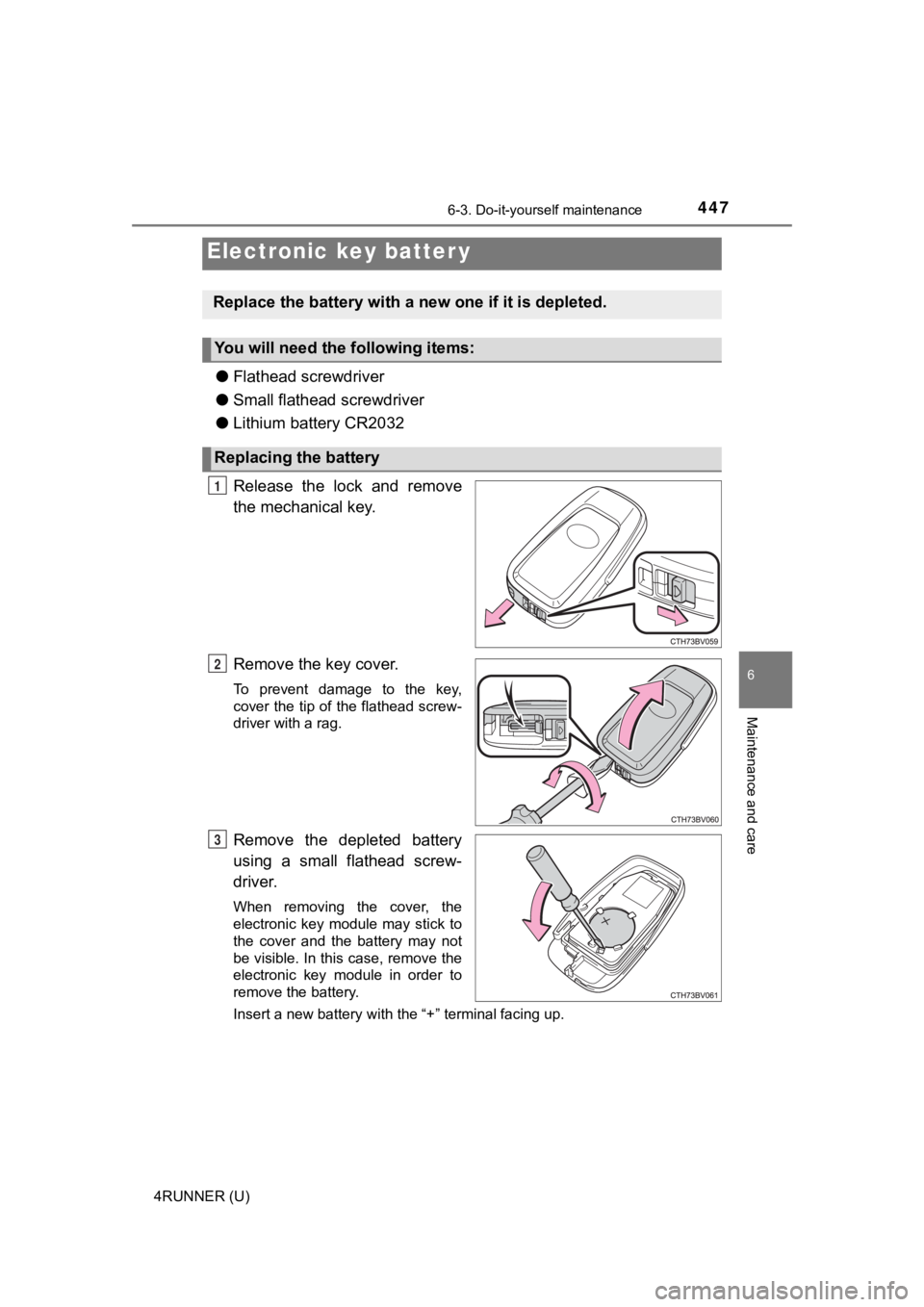
Release the lock and remove
the mechanical key.
Remove the key cover.
To prevent damage to the key,
cover the tip of the flathead screw-
driver with a rag.
Remove the depleted battery
using a small flathead screw-
driver.
When removing the cover, the
electronic key module may stick to
the cover and the battery may not
be visible. In this case, remove the
electronic key module in order to
remove the battery.
Insert a new battery with the “+” terminal facing up.
Electronic key batter y
Replace the battery with a n ew one if it is depleted.
You will need the following items:
Replacing the battery
1
2
3
Page 448 of 608
4486-3. Do-it-yourself maintenance
4RUNNER (U)
When installing the key cover and mechanical key, install by con-
ducting and with the directions reversed.
Operate the or switch and check that the doors can
be locked/unlocked.
■When replacing the key battery
Be careful not to lose the battery or any other small parts.
■ Use a CR2032 lithium battery
●Batteries can be purchased at your Toyota dealer, local electrical appliance
shops or camera stores.
● Replace only with the same or equivalent type recommended by the manu-
facturer.
● Dispose of used batteries according to local laws.
■ If the electronic key battery is depleted
The following symptoms may occur:
●The smart key system and wireless remote control will not funct ion properly.
● The operational range will be reduced.
WARNING
■ Battery precautions
Observe the following precautions.
Failure to do so may result in death or serious injury.
● Do not swallow the battery. Doing so may cause chemical burns.
● A coin battery or button battery is used in the wireless remote control/elec-
tronic key. If a battery is swallowed, it may cause severe chem ical burns in
as little as 2 hours and may result in death or serious injury.
● Keep away new and removed batteries from children.
● If the cover cannot be firmly closed, stop using the wireless r emote con-
trol/electronic key and stow the key in the place where childre n cannot
reach, and then contact your Toyota dealer.
● If you accidentally swallow a battery or put a battery into a part of your
body, get emergency medical attention immediately.
■ To prevent battery explosion or leakage of flammable liquid or gas
● Replace the battery with a new battery of the same type. If a w rong type of
battery is used, it may explode.
● Do not expose batteries to extremely low pressure due to high altitude or
extremely high temperatures.
● Do not burn, break or cut a battery.
4
21
5
Page 449 of 608
4496-3. Do-it-yourself maintenance
6
Maintenance and care
4RUNNER (U)
NOTICE
■For normal operation after replacing the battery
Observe the following precautions to prevent accidents:
● Always work with dry hands.
Moisture may cause the battery to rust.
● Do not touch or move any other component inside the remote cont rol.
● Do not bend either of the battery terminals.
Page 465 of 608

465
When trouble arises7
4RUNNER (U)7-1. Essential information
Emergency flashers .......... 466
If your vehicle has to be stopped in
an emergency ................. 467
If the vehicle is submerged or water
on the road is rising ........ 468
7-2. Steps to take in an emergency
If your vehicle needs to be towed ..................... 469
If you think something is wrong .......................... 475
Fuel pump shut off system ............................ 476
If a warning light turns on or a warning
buzzer sounds ................ 477
If a warning message is displayed ..................... 488
If you have a flat tire.......... 493
If the engine will not start ................................. 509
If you cannot operate back door opener ............ 511
If the electronic key does not operate
properly ........................... 512
If the vehicle battery is discharged ................... 515
If your vehicle overheats ........................ 519
If the vehicle becomes stuck ............................... 522
Page 466 of 608
466
4RUNNER (U)
7-1. Essential information
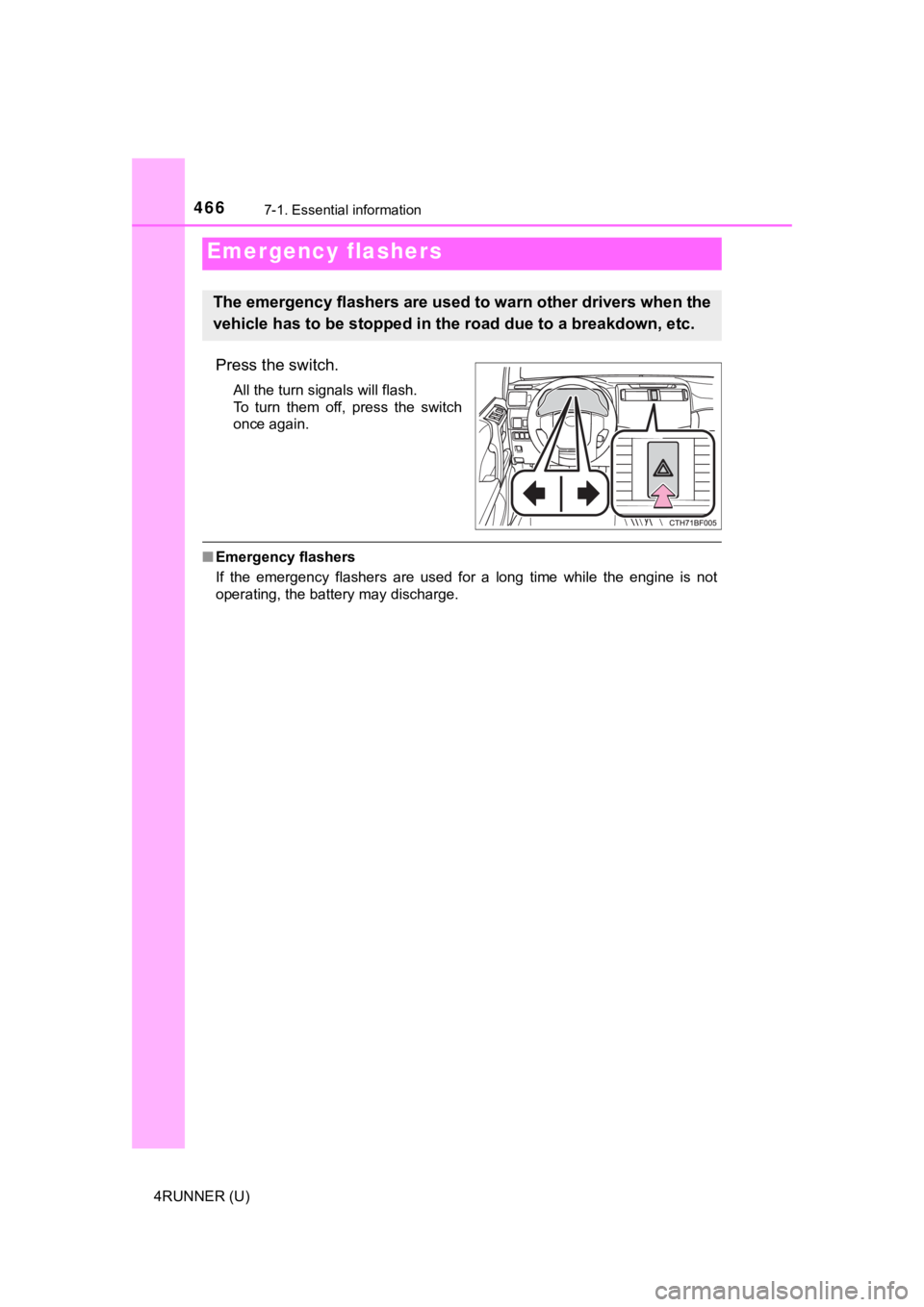
Press the switch.
All the turn signals will flash.
To turn them off, press the switch
once again.
■Emergency flashers
If the emergency flashers are used for a long time while the en gine is not
operating, the battery may discharge.
Emergency flashers
The emergency flashers are used to warn other drivers when the
vehicle has to be stopped in the road due to a breakdown, etc.
Page 491 of 608

4917-2. Steps to take in an emergency
7
When trouble arises
4RUNNER (U)■
If “Auto power off to co nserve battery” is shown
Power was turned off due to the automatic power off function.
Next time when starting the engine, increase the engine speed s lightly and
maintain that level for approximately 5 minutes to recharge the battery.
■ When a message that indicates the need for the shift lever oper ation is
shown
To prevent the shift lever from being operated incorrectly or t he vehicle from
moving unexpectedly, a message that requires shifting the shift lever may be
shown on the multi-information display. In that case, follow th e instruction of
the message and shift the shift lever.
■ When “Headlight System Malfuncti on Visit Your Dealer” is displayed on
the multi-information display
The following system may be malfunctioning. Have the vehicle in spected by
your Toyota dealer.
● Automatic High Beam
■ If a message that indicates the malfunction of front camera is displayed
The following systems may be suspended until the problem shown in the
message is resolved. ( P. 237, 488)
● PCS (Pre-Collision System)
● LDA (Lane Departure Alert)
● Dynamic radar cruise control
● Automatic High Beam
■ If a message that indicates the m alfunction of radar sensor is displayed
The following systems may be suspended until the problem shown in the
message is resolved. ( P. 237, 488)
● PCS (Pre-Collision System)
● LDA (Lane Departure Alert)
● Dynamic radar cruise control
■ If a following message is shown, take appropriate action and co nfirm
that the message has disappeared.
*
● “Crawl Not Available Select L4 and Shift to [D] or [R] Position ”
● “Crawl Not Available Check System Operation Conditions”
*: Refer to the “Off-road Driving Owner’s Manual”.
■ If “Oil Maintenance Required Soon” is displayed (U.S.A. only)
Indicates that all maintenance according to the driven distance on the mainte-
nance schedule
* should be performed soon.
Comes on approximately 4500 miles (7200 km) after the message has been
reset.
If necessary, perform maintenance. Please reset the message aft er the main-
tenance is performed. ( P. 404)
*: Refer to the separate “Scheduled Maintenance Guide” or “Owner’ s Manual
Supplement” for the maintenance interval applicable to your veh icle.
Page 509 of 608

5097-2. Steps to take in an emergency
7
When trouble arises
4RUNNER (U)
One of the following may be the cause of the problem:
● There may not be sufficient fuel in the vehicle’s tank.
Refuel the vehicle.
● The engine may be flooded.
Try to restart the engine again following correct starting proc edures.
( P. 199)
● There may be a malf unction in the engine immobilizer system.
( P. 78)
One of the following may be the cause of the problem:
● The battery may be discharged. ( P. 515)
● The battery terminal connecti ons may be loose or corroded.
The engine starting system may be malfunctioning due to an elec trical
problem such as an open circuit or a blown fuse. However, an in terim
measure is available to start the engine. ( P. 510)
If the engine will not star t
If the engine will not start eve n though correct starting proce -
dures are being followed ( P. 199), consider each of the follow-
ing points:
The engine will not start even t hough the starter motor operates
normally.
The starter motor turns over slowly, the interior lights and he ad-
lights are dim, or the horn does not sound or sounds at a low
volume.
The starter motor d oes not turn over
Page 510 of 608
5107-2. Steps to take in an emergency
4RUNNER (U)
One of the following may be the cause of the problem:
● One or both of the battery t erminals may be disconnected.
● The battery may be discharged. ( P. 515)
Contact your Toyota dealer if the problem cannot be repaired, o r if repair
procedures are unknown.
When the engine does not start, the following steps can be used as an
interim measure to start the engine if the engine switch is fun ctioning
normally:
Set the parking brake.
Shift the shift lever to P.
Turn the engine switch to ACCESSORY mode.
Press and hold the engine switch for about 15 seconds while
depressing the brake pedal firmly.
Even if the engine can be start ed using the above steps, the sy stem
may be malfunctioning. Have the vehicle inspected by your Toyot a
dealer.
The starter motor does not turn over, the interior lights and h ead-
lights do not turn on, o r the horn does not sound.
Emergency start function
1
2
3
4