2023 TOYOTA 4RUNNER towing
[x] Cancel search: towingPage 197 of 608

1974-1. Before driving
4
Driving
4RUNNER (U)
WARNING
■Hitch
Trailer hitch assemblies have different weight capacities estab lished by the
hitch manufacturer. Even though the vehicle may be physically capable of
towing a higher weight, the operator must determine the maximum weight
rating of the particular hitch assembly and never exceed the maximum
weight rating specified for the trailer-hitch. Exceeding the maximum weight
rating set by the trailer-hitch manufacturer can cause an accid ent resulting
in death or serious personal injuries.
■ When towing a trailer
Toyota recommends trailers with brakes that conform to any applicable fed-
eral and state/provincial regulations.
● If the gross trailer weight exceeds unbraked TWR, trailer brakes are
required. Toyota recommends trailers with brakes that conform t o all appli-
cable federal and state/provincial regulations.
● Never tap into your vehicle’s hydraulic system, as this will lo wer the vehi-
cle’s braking effectiveness.
● Never tow a trailer without using a safety chain securely attac hed to both
the trailer and the vehicle. If damage occurs to the coupling u nit or hitch
ball, there is danger of the trailer wandering into another lan e.
NOTICE
■When installing a trailer hitch
Use only the position recommended by your Toyota dealer. Do not install
the trailer hitch on the bumper; this may cause body damage.
■ Do not directly splice trailer lights
Do not directly splice trailer lights. Directly splicing traile r lights may damage
your vehicle’s electrical system and cause a malfunction.
Page 198 of 608
1984-1. Before driving
4RUNNER (U)
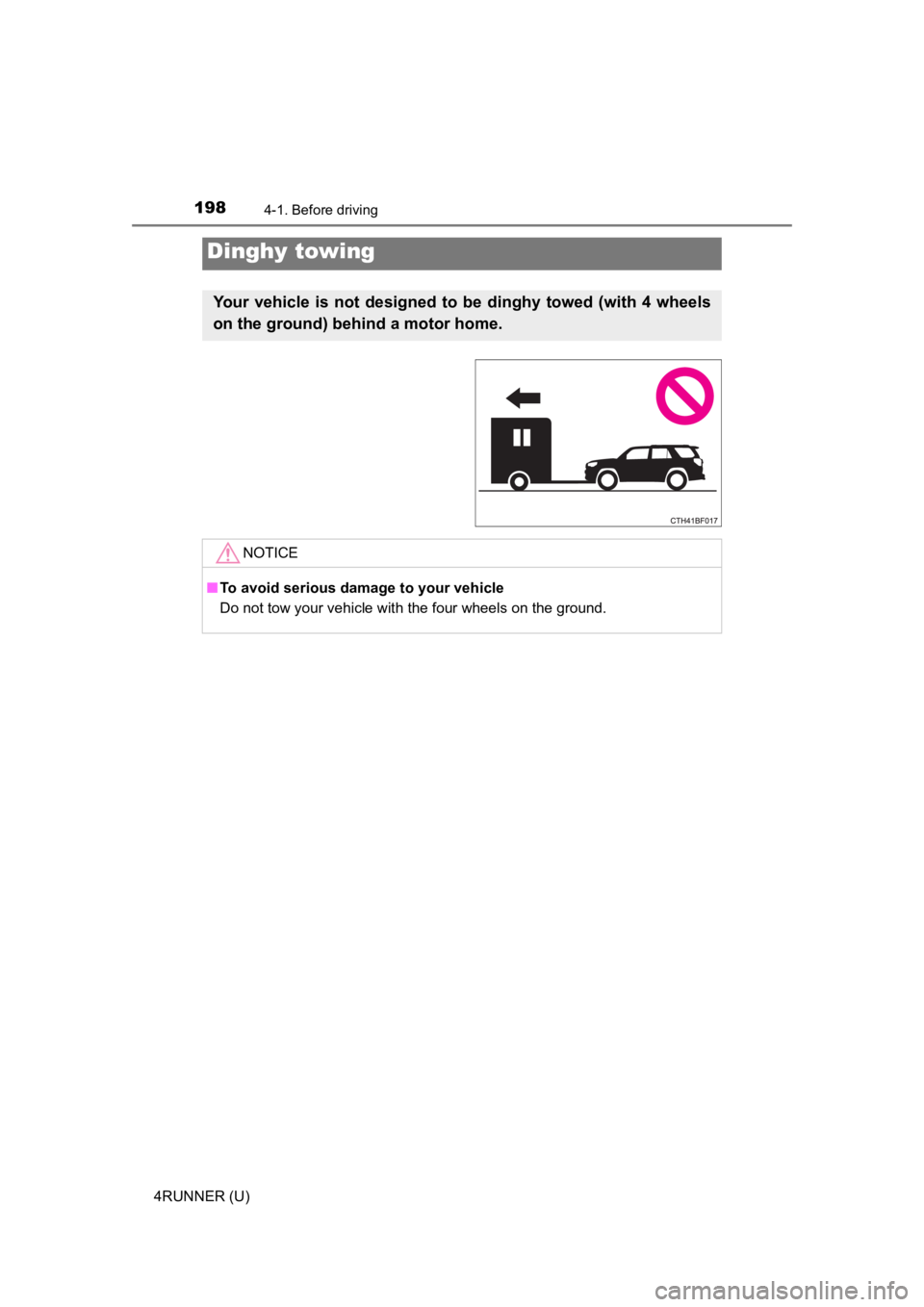
Dinghy towing
Your vehicle is not designed to be dinghy towed (with 4 wheels
on the ground) behind a motor home.
NOTICE
■To avoid serious damage to your vehicle
Do not tow your vehicle with the four wheels on the ground.
Page 241 of 608
2414-5. Using the driving support systems
4
Driving
4RUNNER (U)
WARNING
■When to disable the pre-collision system
In the following situations, disable the system, as it may not operate prop-
erly, possibly leading to an accident resulting in death or serious injury:
● When the vehicle is being towed
● When your vehicle is towing another vehicle
● When transporting the vehicle via truck, boat, train or similar means of
transportation
● When the vehicle is raised on a lift with the engine running and the tires
are allowed to rotate freely
● When inspecting the vehicle using a drum tester such as a chass is dyna-
mometer or speedometer tester, or when using an on vehicle whee l bal-
ancer
● When a strong impact is applied to the front bumper or front gr ille, due to
an accident or other reasons
● If the vehicle cannot be driven in a stable manner, such as when the vehi-
cle has been in an accident or is malfunctioning
● When the vehicle is driven in a sporty manner or off-road
● When the tires are not properly inflated
● When the tires are very worn
● When tires of a size other than specified are installed
● When tire chains are installed
● When a compact spare tire or an emergency tire puncture repair kit is used
● If equipment (snow plow, etc.) that may obstruct the radar sens or or front
camera is temporarily installed to the vehicle
Page 260 of 608

2604-5. Using the driving support systems
4RUNNER (U)
WARNING
■Situations unsuitable for dynamic radar cruise control
Do not use dynamic radar cruise control in any of the following situations.
Doing so may result in inappropriate speed control and could ca use an acci-
dent resulting in death or serious injury.
● Roads where there are pedestrians, cyclers, etc.
● In heavy traffic
● On roads with sharp bends
● On winding roads
● On slippery roads, such as those covered with rain, ice or snow
● On steep downhills, or where there are sudden changes between s harp up
and down gradients
Vehicle speed may exceed the set speed when driving down a stee p hill.
● At entrances to freeways and highways
● When weather conditions are bad enough that they may prevent the sen-
sors from detecting correctly (fog, snow, sandstorm, heavy rain, etc.)
● When there is rain, snow, etc. on the front surface of the rada r sensor or
camera sensor
● In traffic conditions that require frequent repeated acceleration and decel-
eration
● When your vehicle is towing a trailer or during emergency towin g
● When an approach warning buzzer is heard often
Page 276 of 608

2764-5. Using the driving support systems
4RUNNER (U)■
Conditions under which the system may not function correctly
●The Blind Spot Monitor may not detect vehicles correctly in the following sit-
uations:
• When the sensor is misaligned due to a strong impact to the se nsor or its
surrounding area
• When mud, snow, ice, a sticker, etc. is covering the sensor or surround-
ing area on the rear bumper
• When driving on a road surface that is wet with standing water during bad
weather, such as heavy rain, snow, or fog
• When multiple vehicles are approaching with only a small gap b etween
each vehicle
• When the distance between your vehicle and a following vehicle is short
• When there is a significant difference in speed between your v ehicle and
the vehicle that enters the detection area
• When the difference in speed between your vehicle and another vehicle
is changing
• When a vehicle enters a detection area traveling at about the same
speed as your vehicle
• As your vehicle starts from a stop, a vehicle remains in the d etection area
• When driving up and down consecutive steep inclines, such as hills, dips in the road, etc.
• When driving on roads with sharp bends, consecutive curves, or uneven
surfaces
• When vehicle lanes are wide, or when driving on the edge of a lane, and
the vehicle in an adjacent lane is far away from your vehicle
• When an accessory (such as a bicycle carrier) or towing eyelet is
installed to the rear of the vehicle
• When there is a significant difference in height between your vehicle and
the vehicle that enters the detection area
• Immediately after the Blind Spot Monitor is turned on
● Instances of the Blind Spot Monitor unnecessarily detecting a vehicle and/or
object may increase in the following situations:
• When the sensor is misaligned due to a strong impact to the se nsor or its
surrounding area
• When the distance between your vehicle and a guardrail, wall, etc. that
enters the detection area is short
• When driving up and down consecutive steep inclines, such as h ills, dips
in the road, etc.
• When vehicle lanes are narrow, or when driving on the edge of a lane,
and a vehicle traveling in a lane other than the adjacent lanes enters the
detection area
• When driving on roads with sharp bends, consecutive curves, or uneven
surfaces
• When the tires are slipping or spinning
• When the distance between your vehicle and a following vehicle is short
• When an accessory (such as a bicycle carrier) or towing eyelet is
installed to the rear of the vehicle
• When the vehicle throws up water or snow behind.
Page 282 of 608

2824-5. Using the driving support systems
4RUNNER (U)■
Situations in which the syst em may not operate properly
Certain vehicle conditions and the surrounding environment may affect the
ability of a sensor to correctly detect objects. Particular instances where this
may occur are listed below.
● There is dirt, snow, water drops or ice on a sensor. (Cleaning the sensors
will resolve this problem.)
● A sensor is frozen. (Thawing t he area will resolve this problem .)
In especially cold weather, if a sensor is frozen the sensor di splay may be
displayed abnormally, or objects, such as a wall, may not be detected.
● On an extremely bumpy road, on an incline, on gravel, or on grass.
● When vehicle horns, vehicle detectors, motorcycle engines, air brakes of
large vehicles, the clearance sonar of other vehicles or other devices which
produce ultrasonic waves are near the vehicle
● A sensor is coated with a sheet of spray or heavy rain.
● If objects draw too close to the sensor.
● When a pedestrian is wearing clothing that does not reflect ult rasonic waves
(ex. skirts with gathers or frills).
● When objects that are not perpendicular to the ground, not perpendicular to
the vehicle traveling direction, uneven, or waving are in the d etection range.
● Strong wind is blowing
● When driving in inclement weather such as fog, snow or a sandst orm
● When an object that cannot be detected is between the vehicle a nd a
detected object
● If an object such as a vehicle, motorcycle, bicycle or pedestrian cuts in front
of the vehicle or runs out from the side of the vehicle
● If the orientation of a sensor has been changed due to a collis ion or other
impact
● When equipment that may obstruct a sensor is installed, such as a towing
eyelet, bumper protector (an additional trim strip, etc.), bicy cle carrier, or
snow plow
● If the front of the vehicle is raised or lowered due to the car ried load
● If the vehicle cannot be driven in a stable manner, such as whe n the vehicle
has been in an accident or is malfunctioning
● When a tire chains, compact spare tire or an emergency tire pun cture repair
kit is used
●
When a sensor or the area around a
sensor is extremely hot or cold.
Page 291 of 608

2914-5. Using the driving support systems
4
Driving
4RUNNER (U)■
Situations in which the syst em may not operate properly
The RCTA function may not detect vehicles correctly in the foll owing situa-
tions:
● When the sensor is misaligned due to a strong impact to the sensor or its
surrounding area
● When mud, snow, ice, a sticker, etc., is covering the sensor or surrounding
area on the rear bumper
● When driving on a road surface that is wet with standing water during bad
weather, such as heavy rain, snow, or fog
● When multiple vehicles are approaching with only a small gap be tween
each vehicle
● When a vehicle is approaching at high speed
● When equipment that may obstruct a sensor is installed, such as a towing
eyelet, bumper protector (an additional trim strip, etc.), bicy cle carrier, or
snow plow
● When towing a trailer
● When there is a significant difference in height between your vehicle and the
vehicle that enters the detection area
● When a sensor or the area around a sensor is extremely hot or c old
● If the suspension has been modified or tires of a size other th an specified
are installed
● If the front of the vehicle is raised or lowered due to the car ried load
●
When backing up on a slope with a
sharp change in grade
● When backing out of a sharp angle park-
ing spot
Page 292 of 608

2924-5. Using the driving support systems
4RUNNER (U)■
Situations in which the system may operate even if there is no possibil-
ity of a collision
Instances of the RCTA function unnecessarily detecting a vehicl e and/or
object may increase in the following situations:
● When equipment that may obstruct a sensor is installed, such as a towing
eyelet, bumper protector (an additional trim strip, etc.), bicy cle carrier, or
snow plow
●
When turning while backing up
● When a vehicle turns into the detection
area
● When the parking space faces a street
and vehicles are being driven on the
street
● When the distance between your vehicle
and metal objects, such as a guardrail,
wall, sign, or parked vehicle, which may
reflect electrical waves toward the rear
of the vehicle, is short