Page 159 of 608

1593-5. Opening, closing the windows and moon roof
3
Operation of each component
4RUNNER (U)
■The power back window can be oper ated from inside the vehicle when
The engine switch is in IGNITION ON mode.
● The power back window can be opened when the rear window wiper is
working, but the wiper stops working until the window is closed again.
If the power back window is not fully closed, the rear window w iper, washer,
and defogger will not work.
● If the back door is not fully closed, the power back window cannot be
opened using the switch located in the cabin. (It is still poss ible to close the
window.)
● If the back door is opened while the power back window is openi ng or clos-
ing, window operation will stop.
■ The power back window can be oper ated from outside the vehicle when
● The engine switch is off.
● The back door is closed.
■ Operating the power back window from inside the vehicle after turning
the engine off
The power back window can be operated for approximately 45 seco nds even
after the engine switch is turned to ACCESSORY mode or turned off. It can-
not, however, be operated once either front door is opened.
■ Jam protection function
If an object becomes caught between the window and the window f rame, win-
dow travel is stopped and the window is opened slightly.
■ When the power back window does not close normally
If the jam protection function is operating abnormally and a wi ndow cannot be
closed, perform the following operations using the power back window
switch.
● After stopping the vehicle, the window can be closed by holding the power
back window switch in the one-touch closing position while the engine
switch is turned to IGNITION ON mode.
● If the window still cannot be closed even by carrying out the operation
explained above, initialize the function by performing the foll owing proce-
dure.
Hold the power back window switch in the one-touch closing posi tion.
Continue holding the switch for a further 6 seconds after the w indow has
closed.
Hold the power back window switch in the one-touch opening position.
Continue holding the switch for a further 2 seconds after the w indow has
opened completely.
Hold the power back window switch in the one-touch closing posi tion
once again. Continue holding the switch for a further 2 seconds after the
window has closed.
1
2
3
Page 162 of 608
1623-5. Opening, closing the windows and moon roof
4RUNNER (U)
■The moon roof can be operated when
The engine switch is in IGNITION ON mode.
■ Operating the moon roof after turning the engine off
The moon roof can be operated for approximately 45 seconds afte r the
engine switch is turned to ACCESSORY mode or turned off. It can not, how-
ever, be operated once either front door is opened.
■ Jam protection function
If an object is detected between the moon roof and the frame wh ile the moon
roof is closing or tilting down, travel is stopped and the moon roof opens
slightly.
■ To reduce moon roof wind noise
When the moon roof is opened automatically, it will stop slightly before the
fully open position. Driving with the moon roof in this position can help reduce
wind noise.
■ Sunshade
The sunshade can be opened and closed manually. However, the su nshade
will open automatically when the moon roof is opened.
Page 165 of 608

165
Driving4
4RUNNER (U)4-1. Before driving
Driving the vehicle ............. 166
Cargo and luggage ........... 176
Vehicle load limits ............. 181
Trailer towing..................... 182
Dinghy towing ................... 198
4-2. Driving procedures Engine (ignition) switch ..... 199
Automatic transmission ..... 205
Turn signal lever................ 210
Parking brake .................... 211
4-3. Operating the lights and wipers
Headlight switch ................ 212
AHB (Automatic High Beam) ............................. 217
Fog light switch ................. 221
Windshield wipers and washer ............................ 223
Rear window wiper and washer ............................ 226
4-4. Refueling Opening the fuel tank cap .................................. 229 4-5. Using the driving
support systems
Toyota Safety Sense P ..... 232
PCS (Pre-Collision System)........................... 239
LDA (Lane Departure Alert) ............................... 249
Dynamic radar cruise control ............................. 257
BSM (Blind Spot Monitor)........................... 270
Intuitive parking assist....... 277
RCTA (Rear Cross Traffic Alert) .................... 286
Four-wheel drive system (part-time 4WD
models) ........................... 294
Four-wheel drive system (full-time 4WD
models) ........................... 298
Active traction control system ............................ 302
AUTO LSD system (2WD models) ................. 304
Rear differential lock system ............................ 306
Downhill assist control system ............................ 309
Crawl Control .................... 312
Multi-terrain Select ............ 315
Driving assist systems ...... 322
4-6. Driving tips Winter driving tips ............. 331
Off-road precautions ......... 335
Page 199 of 608
199
4
Driving
4RUNNER (U)
4-2. Driving procedures
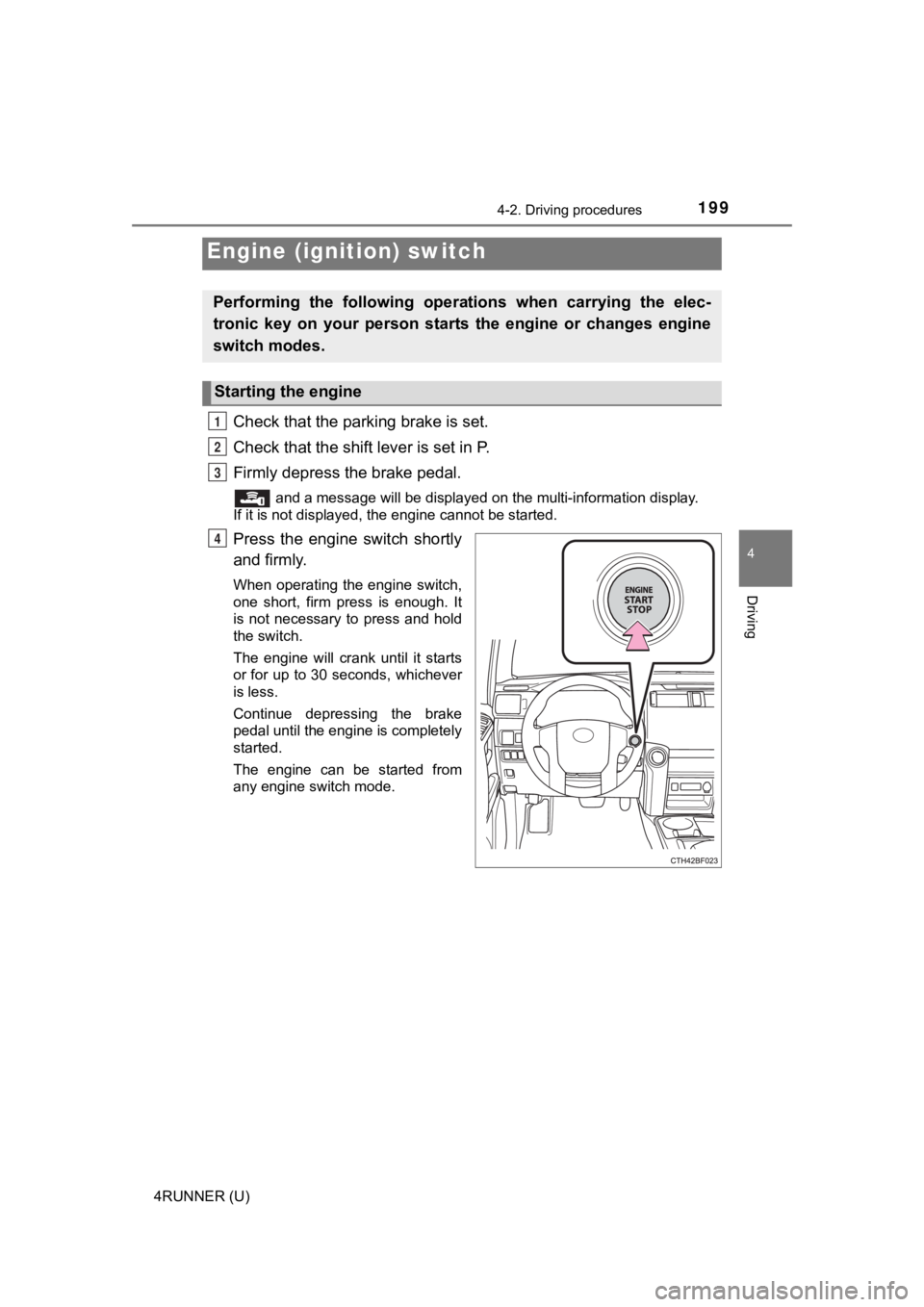
Check that the parking brake is set.
Check that the shift lever is set in P.
Firmly depress the brake pedal.
and a message will be displayed on the multi-information display.
If it is not displayed, the engine cannot be started.
Press the engine switch shortly
and firmly.
When operating the engine switch,
one short, firm press is enough. It
is not necessary to press and hold
the switch.
The engine will crank until it starts
or for up to 30 seconds, whichever
is less.
Continue depressing the brake
pedal until the engine is completely
started.
The engine can be started from
any engine switch mode.
Engine (ignition) switch
Performing the following opera tions when carrying the elec-
tronic key on your person starts the engine or changes engine
switch modes.
Starting the engine
1
2
3
4
Page 200 of 608
2004-2. Driving procedures
4RUNNER (U)
Stop the vehicle.
Set the parking brake (
P. 211), and shift the shift lever to P.
Press the engine switch.
Release the brake pedal and check that “ACCESSORY” or “IGNI-
TION ON” is not shown on the meter.
Modes can be changed by pressing the engine switch with brake
pedal released. (The mode changes each time the switch is pressed.)
Off
*
The emergency flashers can be
used.
ACCESSORY mode
Some electrical components such
as the audio system can be used.
“ACCESSORY” will be displayed
on the multi-information display.
IGNITION ON mode
All electrical components can be
used.
“IGNITION ON” will be displayed
on the multi-information display.
*: If the shift lever is in a position other than P when turning off the engine, the engine switch will be turned to ACCESSORY mode, not to off.
Stopping the engine
Changing engine switch modes
1
2
3
4
1
2
3
Page 201 of 608

2014-2. Driving procedures
4
Driving
4RUNNER (U)
If the engine is stopped with the shift lever in a position other than P,
the engine switch will not be turned off but instead be turned to
ACCESSORY mode. Perform the following procedure to turn the
switch off:
Check that the park ing brake is set.
Shift the shift lever to P.
Check that “Turn Power Off” is displayed on the multi-informati on
display and then press the engine switch once.
Check that “Turn Power Off” on the multi-information display is
turned off.
■ Auto power off function
If the vehicle is left in ACCESSORY mode for more than 20 minut es or IGNI-
TION ON mode (the engine is not running) for more than an hour with the
shift lever in P, the engine switch will automatically turn off. However, this
function cannot entirely prevent battery discharge. Do not leav e the vehicle
with the engine switch in ACCESSORY or IGNITION ON mode for lon g peri-
ods of time when the engine is not running.
■ Automatic engine shut off feature
●The vehicle is equipped with a feature that automatically shuts off the
engine when the shift lever is in P with the engine running for an extended
period.
● The engine will automatically shut off after approximately 1 hour if it has
been left running while the shift lever is in P.
● The timer for the automatic engine shut off feature will reset if the brake
pedal is depressed or if the shift lever is in a position other than P.
● After the vehicle is parked, if the door is locked with the door lock switch
(P. 108) from the inside or the mechanical key ( P. 512) from the outside,
the automatic engine shut off feature will be disabled. The tim er for the auto-
matic engine shut off feature will be re-enabled if the driver’ s door is
opened.
■ Electronic key battery depletion
P. 104
■ Conditions affecting operation
P. 117
■ Notes for the entry function
P. 118
When stopping the engine with the shift lever in a position other
than P
1
2
3
4
Page 204 of 608

2044-2. Driving procedures
4RUNNER (U)
NOTICE
■To prevent battery discharge
● Do not leave the engine switch in ACCESSORY or IGNITION ON mode
for long periods of time without the engine running.
● If “ACCESSORY” or “IGNITION ON” is displayed on the multi-infor mation
display, the engine switch is not off. Exit the vehicle after t urning the
engine switch off.
● Do not stop the engine when the shift lever is in a position ot her than P. If
the engine is stopped in another shift lever position, the engine switch will
not be turned off but instead be turned to ACCESSORY mode. If t he vehi-
cle is left in ACCESSORY mode, battery discharge may occur.
■ When starting the engine
● Do not race a cold engine.
● If the engine becomes difficult to start or stalls frequently, have your vehi-
cle checked by your Toyota dealer immediately.
■ Symptoms indicating a malf unction with the engine switch
If the engine switch seems to be operating somewhat differently than usual,
such as the switch sticking slightly, there may be a malfunction. Contact
your Toyota dealer immediately.
Page 205 of 608
2054-2. Driving procedures
4
Driving
4RUNNER (U)
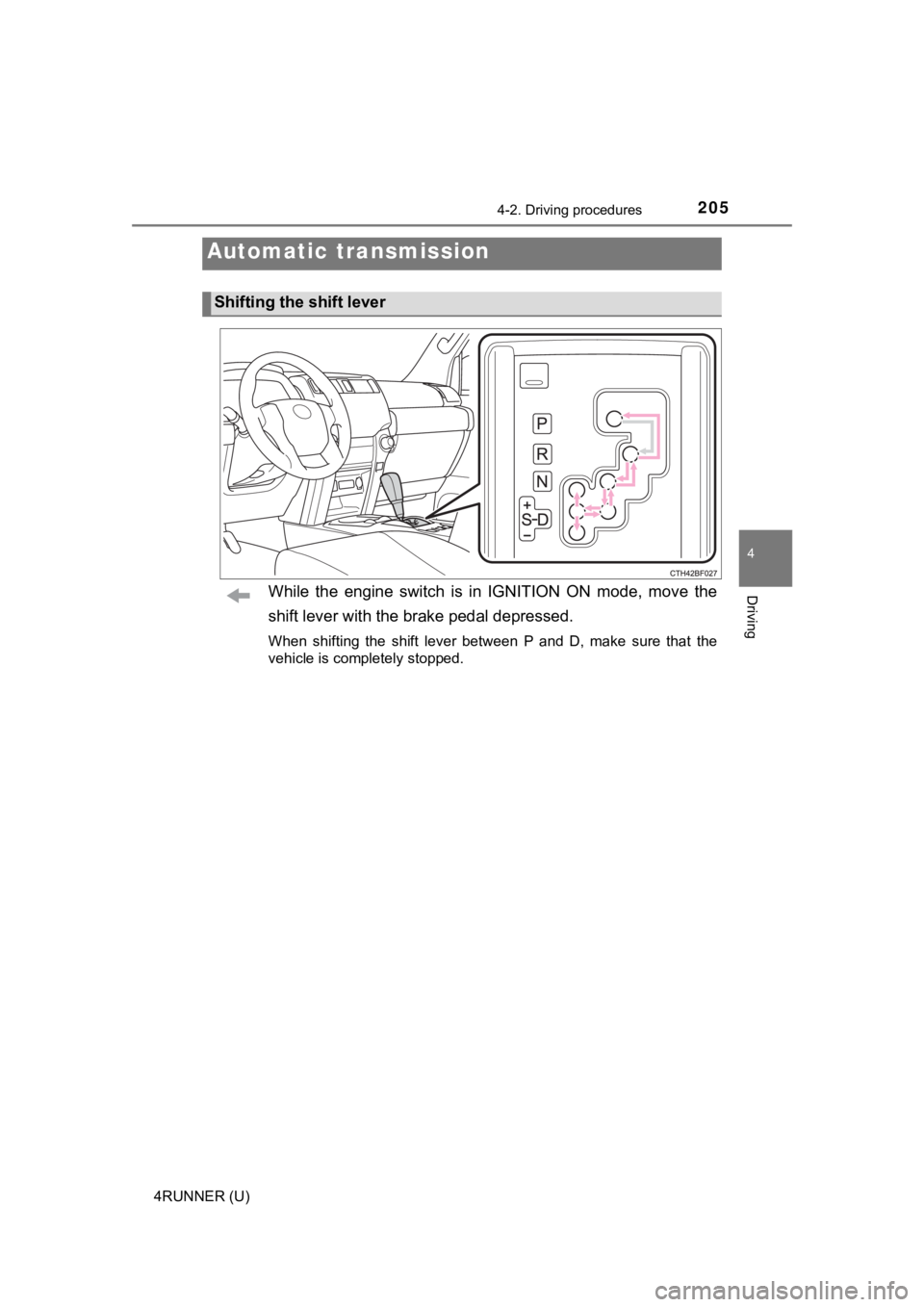
While the engine switch is in IGNITION ON mode, move the
shift lever with the brake pedal depressed.
When shifting the shift lever between P and D, make sure that the
vehicle is completely stopped.
Automatic transmission
Shifting the shift lever