Page 380 of 608
3805-4. Other interior features
4RUNNER (U)
NOTICE
■To avoid damaging the power outlet and the plug
● Close the power outlet lid when not in use.
● Do not allow foreign objects or liquids to enter the power outlet, as this
may cause a short circuit.
● Do not use plug adaptors to connect too many plugs to the power outlet.
● After removing a plug, gently close the power outlet lid.
■ To prevent the fuse from being blown
Do not use a 120 V AC appliance that requires more than the maximum
capacity of the power outlet. If a 120 V AC appliance that consumes more
than the maximum capacity is used, the protection circuit will cut the power
supply.
■ Appliances that may not operate properly (120 V AC)
The following 120 V AC appliances may not operate even if their power con-
sumption is under maximum capacity.
● Appliances with high initial peak wattage
● Measuring devices that process precise data.
● Other appliances that require an extremely stable power supply
■ To prevent battery discharge
Turn off all the vehicle's electronic equipment and accessories , such as the
headlights and air conditioning, when electrical appliances tha t consume in
excess of 100 W are used continuously for long periods of time.
■ To prevent any damage caused by heat
● Do not use any electrical appliances that give off intense heat, such as
toasters, in any locations including the internal or external t rim, seats and
deck.
● Do not use any electrical appliances that are easily affected by vibration or
heat inside the vehicle. Vibration while driving, or the heat o f the sun while
parking, may result in damage to those electrical appliances.
Page 455 of 608
4556-3. Do-it-yourself maintenance
6
Maintenance and care
4RUNNER (U)■
Headlight high beam (if equi
pped)/daytime running lights
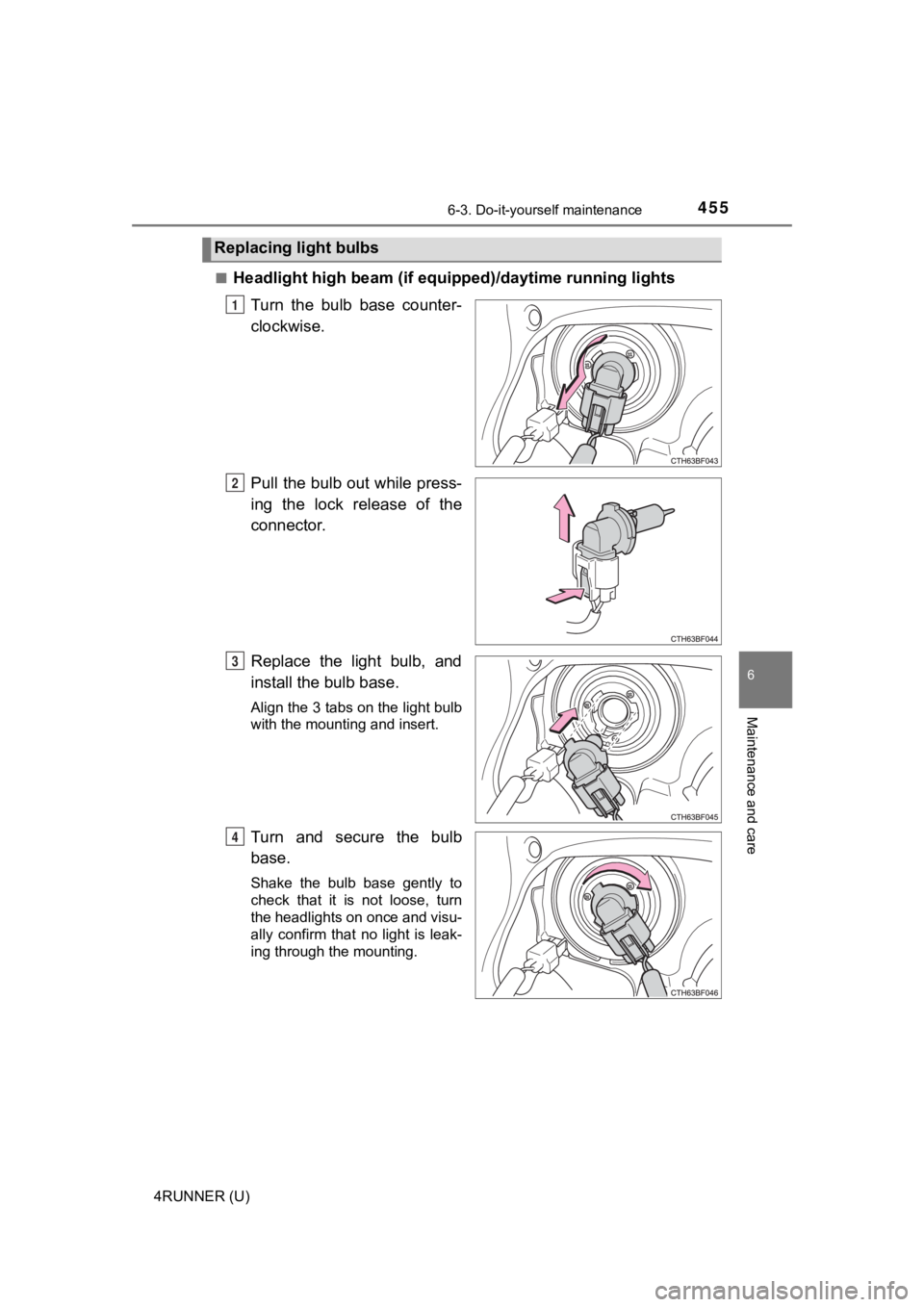
Turn the bulb base counter-
clockwise.
Pull the bulb out while press-
ing the lock release of the
connector.
Replace the light bulb, and
install the bulb base.
Align the 3 tabs on the light bulb
with the mounting and insert.
Turn and secure the bulb
base.
Shake the bulb base gently to
check that it is not loose, turn
the headlights on once and visu-
ally confirm that no light is leak-
ing through the mounting.
Replacing light bulbs
1
2
3
4
Page 463 of 608
4636-3. Do-it-yourself maintenance
6
Maintenance and care
4RUNNER (U)■
Replacing the following bulbs
If any of the lights listed below has burnt out, have it replaced by
your Toyota dealer.
●
Headlight low beams (if equipped)
● Headlight low/high beams (if equipped)
● Fog lights
● Side turn signal lights
● Stop/tail lights
● Rear side marker lights
● High mounted stoplight
● Outer foot lights (if equipped)
■LED light bulbs
The headlight low beams (if equipped), headlight low/high beams (if
equipped), fog lights, side turn signal lights, stop/tail lights, rear side marker
lights, high mounted stoplight and outer foot lights consist of a number of
LEDs. If any LEDs burn out, take your vehicle to your Toyota dealer to have
the light replaced.
■ Condensation build-up on the inside of the lens
Temporary condensation build-up on the inside of the lens does not indicate a
malfunction. Contact your Toyota dealer for more information in the following
situations:
● Large drops of water have built up on the inside of the lens.
● Water has built up inside the lens.
WARNING
■Replacing light bulbs
● Turn off the lights. Do not attempt to replace the bulb immediately after
turning off the lights.
The bulbs become very hot and may cause burns.
● Do not touch the glass portion of the light bulb with bare hand s. When it is
unavoidable to hold the glass portion, use and hold with a clea n dry cloth
to avoid getting moisture and oils on the bulb.
Also, if the bulb is scratched or dropped, it may blow out or crack.
● Fully install light bulbs and any parts used to secure them. Failure to do so
may result in heat damage, fire, or water entering the headligh t unit. This
may damage the headlights or cause condensation to build up on the lens.
■ To prevent damage or fire
● Make sure bulbs are fully seated and locked.
● Check the wattage of the bulb before installing to prevent heat damage.
Page 517 of 608
5177-2. Steps to take in an emergency
7
When trouble arises
4RUNNER (U)
■Starting the engine when t he battery is discharged
The engine cannot be started by push-starting.
■ To prevent battery discharge
●Turn off the headlights and the audio system while the engine is off.
● Turn off any unnecessary electrical components when the vehicle is running
at a low speed for an extended period, such as in heavy traffic .
■ Charging the battery
The electricity stored in the battery will discharge gradually even when the
vehicle is not in use, due to natural discharge and the draining effects of cer-
tain electrical appliances. If the vehicle is left for a long t ime, the battery may
discharge, and the engine may be unable to start. (The battery recharges
automatically during driving.)
■ When recharging or replacing the battery
●In some cases, it may not be possible to unlock the doors using the smart
key system when the battery is discharged. Use the wireless rem ote control
or the mechanical key to lock or unlock the doors.
● The engine may not start on the first attempt after the battery has recharged
but will start normally after the second attempt. This is not a malfunction.
● The engine switch mode is memorized by the vehicle. When the ba ttery is
reconnected, the system will return to the mode it was in befor e the battery
was discharged. Before disconnecting the battery, turn the engine switch off.
If you are unsure what mode the engine switch was in before the battery dis-
charged, be especially careful when reconnecting the battery.
● Make sure that the key is not inside the vehicle when rechargin g or replac-
ing the battery. The key may be locked in the vehicle if the al arm is acti-
vated. ( P. 80)
Page 587 of 608
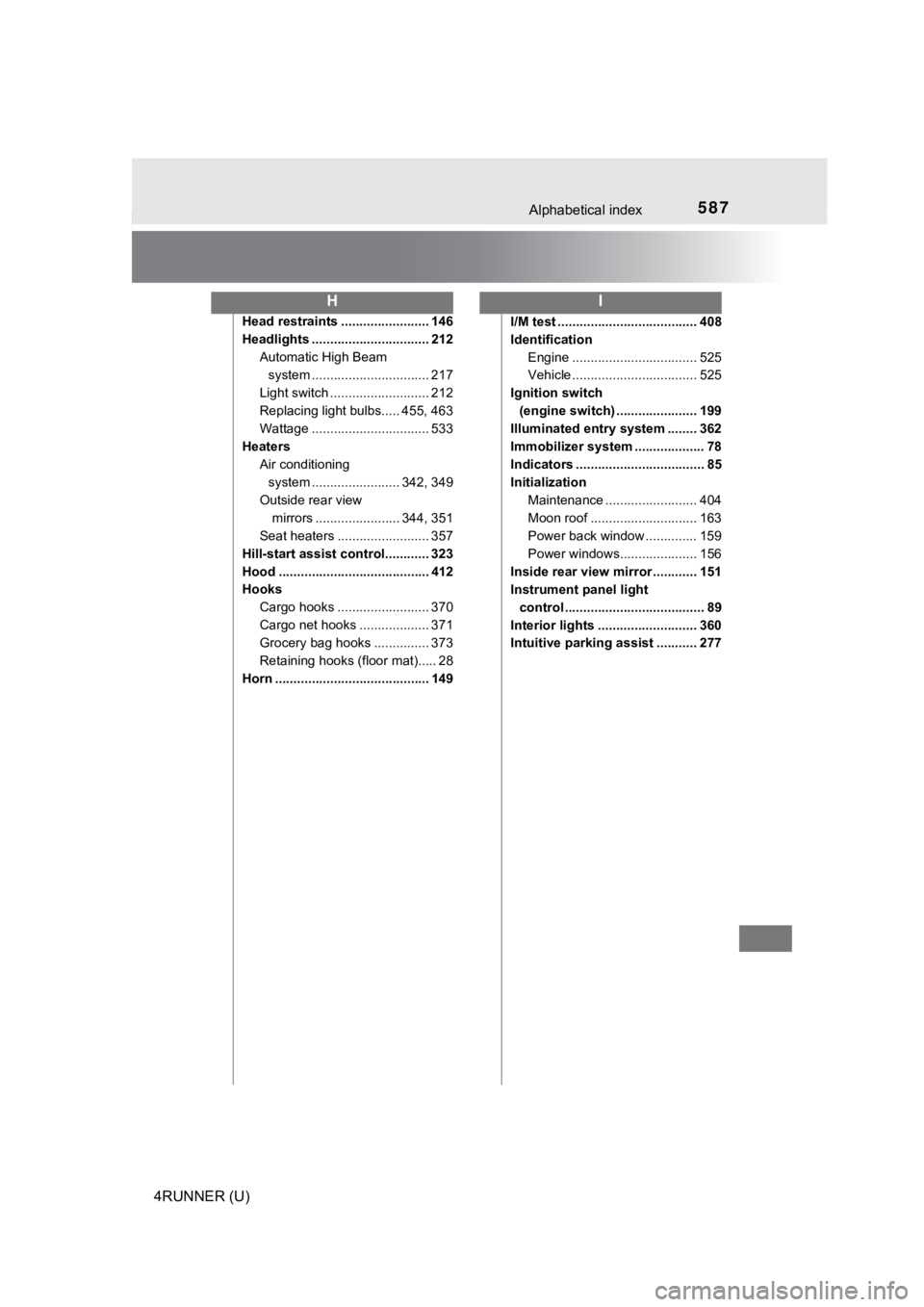
587Alphabetical index
4RUNNER (U)
Head restraints ........................ 146
Headlights ................................ 212Automatic High Beam system ......... ....................... 217
Light switch ........................... 212
Replacing light bulbs..... 455, 463
Wattage ................................ 533
Heaters Air conditioning system ....... ................. 342, 349
Outside rear view mirrors ....................... 344, 351
Seat heaters ......................... 357
Hill-start assist control............ 323
Hood ......................................... 412
Hooks Cargo hooks ......................... 370
Cargo net hooks ................... 371
Grocery bag hooks ............... 373
Retaining hooks (floor mat)..... 28
Horn .......................................... 149 I/M test ...................................... 408
Identification
Engine .................................. 525
Vehicle .................................. 525
Ignition switch (engine switch) ...................... 199
Illuminated entry system ........ 362
Immobilizer system ................... 78
Indicators ................................... 85
Initialization
Maintenance ......................... 404
Moon roof ............................. 163
Power back window .............. 159
Power windows..................... 156
Inside rear view mirror ............ 151
Instrument panel light control ...................................... 89
Interior lights ........................... 360
Intuitive parking assist ........... 277
HI
Page:
< prev 1-8 9-16 17-24