Page 210 of 608
2104-2. Driving procedures
4RUNNER (U)
The lever will return to its original position after operation.
Right turn
Lane change to the right (push
and hold the lever partway)
The right hand signals will flash
until you release the lever.
Lane change to the left (push
and hold the lever partway)
The left hand signals will flash until
you release the lever.
Left turn
■ Turn signals can be operated when
The engine switch is in IGNITION ON mode.
■ If the indicator flashes faster than usual
Check that a light bulb in the front or rear turn signal lights has not burned
out.
Turn signal lever
Operating instructions
1
2
3
4
Page 213 of 608
2134-3. Operating the lights and wipers
4
Driving
4RUNNER (U)
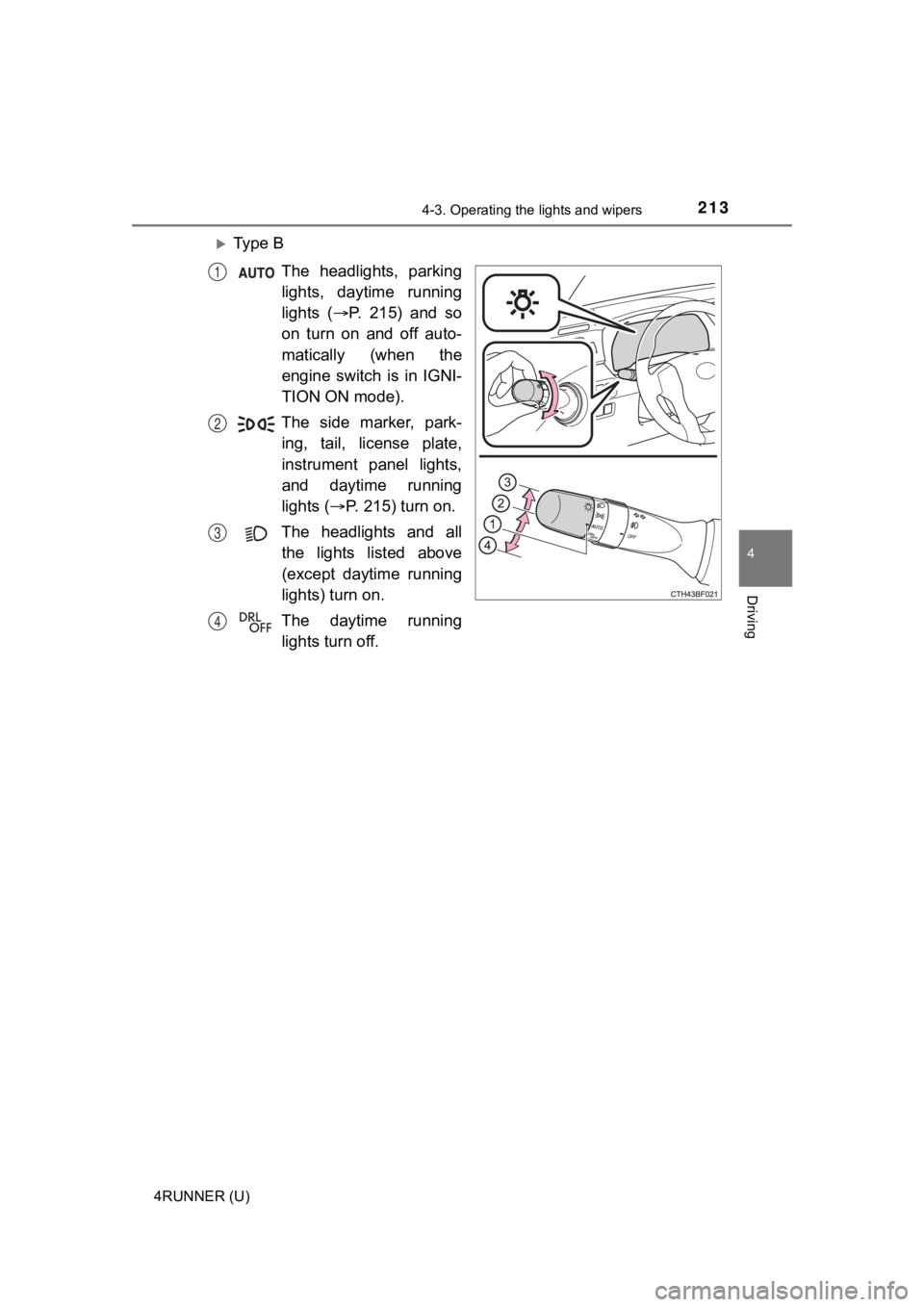
Ty p e B
The headlights, parkinglights, daytime running
lights ( P. 215) and so
on turn on and off auto-
matically (when the
engine switch is in IGNI-
TION ON mode).
The side marker, park- ing, tail, license plate,
instrument panel lights,
and daytime running
lights ( P. 215) turn on.
The headlights and all the lights listed above
(except daytime running
lights) turn on.
The daytime running lights turn off.
1
2
3
4
Page 214 of 608
2144-3. Operating the lights and wipers
4RUNNER (U)
Ty p e CThe headlights, parkinglights, daytime running
lights ( P. 215) and so
on turn on and off auto-
matically (when the
engine switch is in IGNI-
TION ON mode).
The side marker, park- ing, tail, license plate,
instrument panel lights,
and daytime running
lights ( P. 215) turn on.
The headlights and all the lights listed above
turn on.
With the headlights on, push
the lever away from you to turn
on the high beams.
Pull the lever toward you to the
center position to turn the high
beams off.
Pull the lever toward you and
release it to flash the high
beams once.
You can flash the high beams with the headlights on or off.
1
2
3
Turning on the high beam headlights
1
2
Page 215 of 608

2154-3. Operating the lights and wipers
4
Driving
4RUNNER (U)
■Daytime running light system
●Vehicles with a headlight high beam/daytime running lights: The daytime
running lights illuminate using the same lights as the headligh t high beam
and illuminate dimmer than the headlight high beam.
● To make your vehicle more visible to other drivers during dayti me driving,
the daytime running lights turn on automatically when all of the following
conditions are met. (The daytime running lights are not designe d for use at
night.)
• The engine is running
• The parking brake is released
• The headlight switch is in the , (type A only),
* (type B
and C) position
*: When the surroundings are bright
The daytime running lights remain on after they illuminate, eve n if the park-
ing brake is set again.
Type A and B: Daytime running lights can be turned off by opera ting the
switch.
● Compared to turning on the headlights, the daytime running ligh t system
offers greater durability and consumes less electricity, so it can help improve
fuel economy.
■ Headlight control sensor (if equipped)
The sensor may not function properly if an
object is placed on the sensor, or anything
that blocks the sensor is affixed to the
windshield.
Doing so interferes with the sensor
detecting the level of ambient light and
may cause the automatic headlight sys-
tem to malfunction.
Page 216 of 608
2164-3. Operating the lights and wipers
4RUNNER (U)■
Automatic light off system (if equipped)
●When the headlights come on: The headlights and tail lights turn off 30 sec-
onds after a door is opened and closed if the engine switch is turned to
ACCESSORY mode or turned off. (The lights turn off immediately if
on the key is pressed after all the doors are locked.)
● When only the tail lights come on: The tail lights turn off automatically if the
engine switch is turned off and the driver’s door is opened.
To turn the lights on again, turn the engine switch to IGNITION ON mode, or
turn the light switch off and then back to or .
■ Customization
Settings (e.g. light sensor sensitivity) can be changed.
(Customizable features: P. 549)
NOTICE
■To prevent battery discharge
Do not leave the lights on longer than necessary when the engin e is not
running.
Page 220 of 608

2204-3. Operating the lights and wipers
4RUNNER (U)• When driving in inclement weather (heavy rain, snow, fog, sand
storms,
etc.)
• When the windshield is obscured by fog, mist, ice, dirt, etc.
• When the windshield is cracked or damaged
• When the camera sensor is deformed or dirty
• When the temperature of the camera sensor is extremely high
• When the surrounding brightness level is equal to that of head lights, tail
lights or fog lights
• When headlights or tail lights of vehicles ahead are turned off, dirty, changing color, or not aimed properly
• When the vehicle is hit by water, snow, dust, etc. from a prec eding vehi-
cle
• When driving through an area of intermittently changing brightness and
darkness
• When frequently and repeatedly driving ascending/descending roads, or roads with rough, bumpy or uneven surfaces (such as stone-paved
roads, gravel roads, etc.)
• When frequently and repeatedly taking curves or driving on a w inding
road
• When there is a highly reflective object ahead of the vehicle, such as a sign or mirror
• When the back of a preceding vehicle is highly reflective, suc h as a con-
tainer on a truck
• When the vehicle's headlights are damaged or dirty, or are not aimed
properly
• When the vehicle is listing or titling due to a flat tire, a trailer being towed, etc.
• When the headlights are changed between the high beams and low beams repeatedly in an abnormal manner
• When the driver believes that the high beams may be flashing or dazzling
pedestrians or other drivers
■ Temporarily lowering sensor sensitivity
The sensitivity of the sensor can be temporarily lowered.
Turn the engine switch off while the following conditions are m et.
• The headlight switch is in or .
• The headlight switch lever is in the high beam position.
• Automatic High Beam switch is on.
Turn the engine switch to the IGNITION ON mode.
Within 60 seconds after , repeat pulling the headlight switch l ever to the
original position then pushing it to the high beam position qui ckly 10 times,
then leave the lever in the high beam position.
If the sensitivity is changed, the Automatic High Beam indicato r will turn on
and off 3 times.
Automatic High Beam (headlights) may turn on even when the vehicle is
stopped.
1
2
32
4
Page 225 of 608
2254-3. Operating the lights and wipers
4
Driving
4RUNNER (U)
■The windshield wiper and washer can be operated when
The engine switch is in IGNITION ON mode.
■ If no windshield washer fluid sprays
Check that the washer nozzles are not blocked if there is washe r fluid in the
washer fluid reservoir.
WARNING
■ Caution regarding the use of washer fluid
When it is cold, do not use the washer fluid until the windshie ld becomes
warm. The fluid may freeze on the windshield and cause low visi bility. This
may lead to an accident, resulting in death or serious injury.
NOTICE
■ When the windshield is dry
Do not use the wipers, as they may damage the windshield.
■ When the washer fluid tank is empty
Do not operate the switch continually as the washer fluid pump may over-
heat.
■ When a nozzle becomes blocked
In this case, contact your Toyota dealer.
Do not try to clear it with a pin or other object. The nozzle will be damaged.
Page 227 of 608

2274-3. Operating the lights and wipers
4
Driving
4RUNNER (U)
Ty p e B
Off
Intermittent window
wiper operation
Normal window wiper
operation
Washer/wiper dual oper-
ation
Washer/wiper dual oper-
ation
The wiper will automatically
operate a couple of times after
the washer squirts.
(After operating several times,
the wiper operates one more
time after a short delay to pre-
vent dripping.)
■The rear window wiper and washer can be operated when
●The engine switch is in IGNITION ON mode.
● The back window is completely closed.
■ Intermittent window wiper operation
●When intermittent window wiper operation mode is selected, the wiper will
operate a couple of times and then switch to intermittent opera tion.
● During intermittent operation, the wiper stops temporarily at the reversing
position.
■ When the rear window wiper and washer switch is turned off
The rear wiper will stop operation, and return to the retracted position after
approximately 3 seconds.
However, if the engine switch is turned to the engine switch is turned to
ACCESSORY mode or turned off while the rear wiper is operating, the rear
wiper will stop at that position and will not return to the retracted position.
■ If no washer fluid sprays
Check that the washer nozzle is not blocked if there is washer fluid in the
washer fluid reservoir.
■ Customization
Settings (e.g. drip prevention function) can be changed.
(Customizable features P. 549)
1
2
3
4
5