2023 TESLA MODEL Y door
[x] Cancel search: doorPage 3 of 298

Overview................................................................3
Exterior Overview............................................................................3
Interior Overview.............................................................................4
Touchscreen Overview..................................................................5
Opening and Closing.......................................10
Keys.....................................................................................................10
Doors..................................................................................................14
Windows............................................................................................17
Rear Trunk.........................................................................................18
Front Trunk......................................................................................20
Interior Storage and Electronics..............................................23
Seating and Safety Restraints.....................27
Front and Rear Seats...................................................................27
Seat Belts.........................................................................................33
Child Safety Seats.........................................................................36
Airbags..............................................................................................43
Driving..................................................................50
Driver Profiles.................................................................................50
Steering Wheel...............................................................................52
Mirrors...............................................................................................54
Starting and Powering Off.........................................................55
Shifting..............................................................................................56
Lights.................................................................................................58
Car Status..........................................................................................61
Wipers and Washers....................................................................64
Braking and Stopping..................................................................65
Traction Control.............................................................................69
Park Assist.......................................................................................70
Vehicle Hold....................................................................................72
Acceleration Modes......................................................................73
Track Mode......................................................................................74
Trip Information.............................................................................76
Rear Facing Camera(s)...............................................................77
Pedestrian Warning System......................................................78
Towing and Accessories.............................................................79
Cold Weather Best Practices....................................................85
Autopilot..............................................................88
About Autopilot.............................................................................88
Traffic-Aware Cruise Control.....................................................91
Autosteer.........................................................................................96
Navigate on Autopilot................................................................101
Traffic Light and Stop Sign Control.....................................104
Autopark...........................................................................................111
Summon...........................................................................................113
Smart Summon..............................................................................116
Active Safety Features...................................119
Lane Assist......................................................................................119
Collision Avoidance Assist........................................................122
Speed Assist..................................................................................125
Cabin Camera................................................................................126
Using the Touchscreen..................................127
Climate Controls...........................................................................127
Phone, Calendar, and Web Conferencing...........................133
Voice Commands.........................................................................136
Safety & Security Settings.......................................................138
Dashcam.........................................................................................140
Sentry Mode..................................................................................142
USB Drive Requirements for Recording Videos..............144
Smart Garage Connectivity.....................................................145
Connecting to Wi-Fi...................................................................148
Software Updates........................................................................149
Mobile App......................................................................................151
Navigation and Entertainment...................153
Maps and Navigation..................................................................153
Media................................................................................................159
Theater, Arcade, and Toybox...................................................162
Charging and Energy Consumption........165
Electric Vehicle Components..................................................165
High Voltage Battery Information.........................................167
Charging Instructions.................................................................169
Scheduled Charging and Scheduled Departure..............174
Getting Maximum Range..........................................................175
Maintenance......................................................177
Maintenance Service Intervals................................................177
Tire Care and Maintenance......................................................184
Cleaning...........................................................................................191
Windshield Wiper Blades, Jets and Fluid...........................195
Jacking and Lifting......................................................................197
Parts and Accessories................................................................198
Do It Yourself Maintenance....................................................206
Specifications..................................................207
Identification Labels..................................................................207
Vehicle Loading..........................................................................208
Dimensions.....................................................................................210
Subsystems....................................................................................213
Wheels and Tires..........................................................................215
Roadside Assistance.....................................222
Contacting Tesla Roadside Assistance...............................222
Instructions for Transporters..................................................223
Running Out of Range..............................................................226
Jump Starting...............................................................................227
Troubleshooting.............................................229
Troubleshooting Alerts.............................................................229
Contents
Page 5 of 298

1.
Exterior lights (Lights on page 58)
2.
Autopilot camera (About Autopilot on page 88)
3.
Front door handle (Using Exterior Door Handles on page 14)
4.
Key card sensor (Keys on page 10), Autopilot camera (About Autopilot on page 88)
5.
Rear door handle (Using Exterior Door Handles on page 14)
6.
Charge port (Charging Instructions on page 169)
7.
Autopilot cameras (About Autopilot on page 88)
8.
Exterior mirrors (Mirrors on page 54)
9.
Radar sensor, if equipped (hidden from view) (About Autopilot on page 88)
10.
Hood/front trunk (Front Trunk on page 20)
11.
Front tow eye cover (Instructions for Transporters on page 223)
12.
Wheels and tires (Wheels and Tires on page 215)
13.
Rear trunk (Rear Trunk on page 18)
14.
Rear view camera (Rear Facing Camera(s) on page 77)
15.
Rear tow eye cover (Instructions for Transporters on page 223)
Exterior Overview
3Overview
Page 6 of 298

1.
Door open button (Opening Doors from the Interior on page 14)
2.
Turn signal stalk (High Beam Headlights on page 59), Turn Signals on page 60, and Windshield Washers on page
64)
3.
Horn (Horn on page 53)
4.
Drive stalk (How to Shift on page 56, Traffic-Aware Cruise Control on page 91, Autosteer on page 96)
5.
Touchscreen (Touchscreen Overview on page 5)
6.
Driver dome light (Lights on page 58)
7.
Cabin camera (Cabin Camera on page 126)
8.
Hazard warning flashers (Hazard Warning Flashers on page 60)
9.
Passenger dome light (Lights on page 58)
10.
Climate control vent (see Climate Controls on page 127)
11.
Power window switches (Windows on page 17)
12.
Manual door release (Opening Doors from the Interior on page 14)
13.
Left scroll button (Scroll Buttons on page 52)
14.
Brake pedal (Braking and Stopping on page 65)
15.
Accelerator pedal (Regenerative Braking on page 66)
16.
Right scroll button (Scroll Buttons on page 52)
17.
Center console (Interior Storage and Electronics on page 23)
18.
Glovebox (Glovebox on page 23)
Interior Overview
4MODEL Y Owner
Page 7 of 298

WARNING: Always pay attention to road and traffic conditions when driving. To minimize driver distraction and
ensure the safety of vehicle occupants as well as other road users, avoid using the touchscreen to adjust
settings while the vehicle is in motion.
Use the touchscreen to control many features that, in traditional cars, are controlled using physical buttons (for example, adjusting the cabin heating and air conditioning, headlights, etc.). You also use the touchscreen to control
media, navigate, use entertainment features, and customize
Model Y to suit your preferences. For hands-free access
to common touchscreen controls, use voice commands (see
Voice Commands on page 136).
If the touchscreen is unresponsive or demonstrates unusual behavior, you can restart it (see Restarting the
Touchscreen on page 7).
NOTE: Illustrations are provided to improve conceptual understanding only. Depending on vehicle options, software
version, market region and regional and language settings, the details displayed on the screen will differ.
1.
Status bar: This area on the top of the touchscreen displays the time of day, the outside temperature, and the
following icons:
Touch to lock/unlock all doors and trunks.4:20 pmYour vehicle automatically updates the time. If the time is incorrect, confirm your vehicle has
internet and GPS connectivity with the latest software.
Touchscreen Overview
5Overview
Page 16 of 298

Using Exterior Door Handles
Use your thumb to push the wide part of the door
handle. The handle pivots toward you, and you can open
the door by pulling the handle or pulling the edge of the door.
The handle retracts automatically.
When a door or trunk is open, the
touchscreen displays the Door Open
indicator light.
NOTE: See Cold Weather Best Practices on page 85 to
ensure door handles function properly in cold weather.
WARNING: While using the door handle, take care
to avoid allowing fingers, jewelry, acrylic nails, etc.
from being pinched by the door or door handle
mechanism. Failure to do so may result in damage
or injury.
Opening Doors from the Interior
Model Y doors are electrically powered. To open a door
while sitting inside, press the button located at the top of the interior door handle and push the door open.
NOTE: To prevent children from opening the rear doors,
turn on child locks (see
Child Locks on page 16).
You can also use the touchscreen popup to open and close doors when inside
Model Y while the vehicle is in
Park.
To open a front door in the unlikely situation when
Model Y has no power, pull up the manual door release
located in front of the window switches.
If equipped, you can open a rear door manually in the unlikely situation in which
Model Y has no power:
Doors
14MODEL Y Owner
Page 17 of 298

1.
Remove the mat from the bottom of the rear door pocket.
2.
Press the red tab to remove the access door.
3.
Pull the mechanical release cable forward.
CAUTION: Manual door releases are designed to
be used only in situations when Model Y has no
power. When Model Y has power, use the button
located at the top of the interior door handle.
Interior Locking and Unlocking
While sitting inside Model Y, you can lock and unlock all
doors and trunks by touching the lock icon
on the
touchscreen.
The icon changes to indicate whether
doors are locked or unlocked.
You can also unlock the doors by pressing the Park
button on the end of the drive stalk a second time.
Pressing this button once engages Park and pressing it again unlocks the doors.
Walk-Away Door Lock
Doors and trunks can automatically lock when you walk away carrying your phone key or paired key fob. To turn
this feature on or
off, touch Controls > Locks > Walk-
Away Door Lock.
When the doors lock, the exterior lights flash once and
the mirrors fold (if
Fold Mirrors is on). To also hear a
confirmation sound when Model Y locks, touch Controls
> Locks > Lock Confirmation Sound.
Model Y does not automatically lock if:
Page 18 of 298

Child Locks
Model Y has child locks on the rear doors to prevent
them from being opened using the interior release buttons. On the touchscreen,
touch Controls > Locks >
Child Lock. You can choose Both to engage the child
lock on both rear doors, or you can choose
Left or Right
to engage it on just a specific door.
WARNING: It is recommended that you turn on
child locks when children are seated in the rear
seats.
Unlock on Park
When you stop Model Y and engage Park, you can
choose to unlock all doors. To turn this feature on or
off,
touch Controls > Locks > Unlock on Park.
NOTE: If set to OFF, you can unlock all doors by
pressing the Park button a second time after engaging Park.
Doors
16MODEL Y Owner
Page 26 of 298
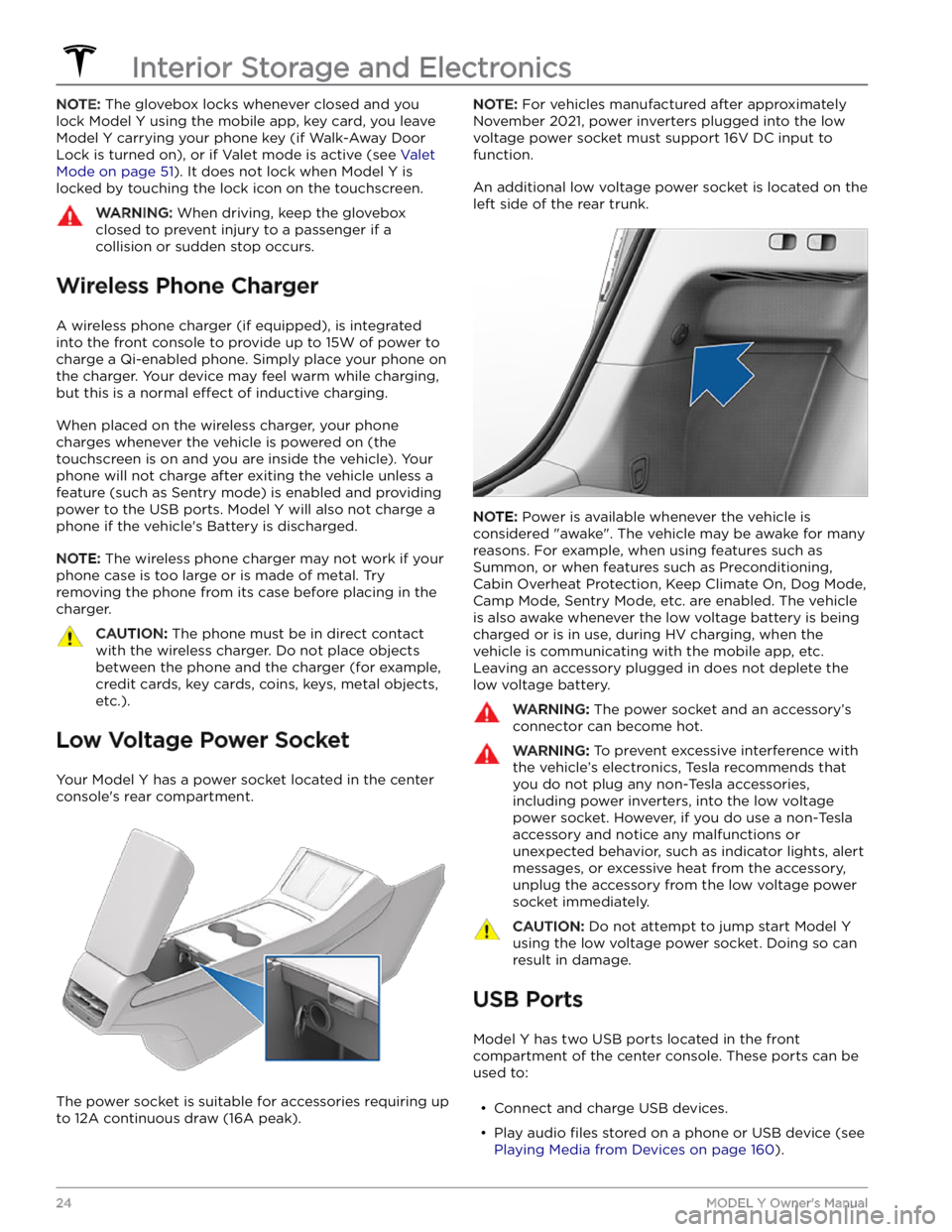
NOTE: The glovebox locks whenever closed and you
lock
Model Y using the mobile app, key card, you leave
Model Y carrying your phone key (if Walk-Away Door
Lock is turned on), or if Valet mode is active (see
Valet
Mode on page 51). It does not lock when Model Y is
locked by touching the lock icon on the touchscreen.
WARNING: When driving, keep the glovebox
closed to prevent injury to a passenger if a
collision or sudden stop occurs.
Wireless Phone Charger
A wireless phone charger (if equipped), is integrated
into the front console to provide up to 15W of power to charge a Qi-enabled phone. Simply place your phone on
the charger. Your device may feel warm while charging, but this is a normal
effect of inductive charging.
When placed on the wireless charger, your phone
charges whenever the vehicle is powered on (the
touchscreen is on and you are inside the vehicle). Your
phone will not charge after exiting the vehicle
unless a
feature (such as Sentry mode) is enabled and providing
power to the USB ports. Model Y will also not charge a
phone if the vehicle