2023 TESLA MODEL S VIN
[x] Cancel search: VINPage 36 of 276

Seat Belt WarningsWARNING: Seat belts should be worn by all
occupants at all times, even if driving for a very
short distance. Failure to do so increases the risk
of injury or death if a collision occurs.
WARNING: Secure small children in a suitable child
safety seat as described in the Child Safety Seat
topic. Always follow the child safety seat
manufacturer
Page 47 of 276

Incorrect seating position - the passenger must not slide
forward on the seat cushion:
Incorrect seating position - the passenger must not
recline the backrest to a laying down position when the
vehicle is moving:
Inflation EffectsWARNING: When airbags inflate, a fine powder is
released. This powder can irritate the skin and
should be thoroughly flushed from the eyes and
from any cuts or abrasions.
After inflation, the airbags deflate to provide a gradual
cushioning
effect for the occupants and to ensure the
driver
Page 53 of 276

Steering Yoke (or Steering Wheel)
51Driving
Page 60 of 276
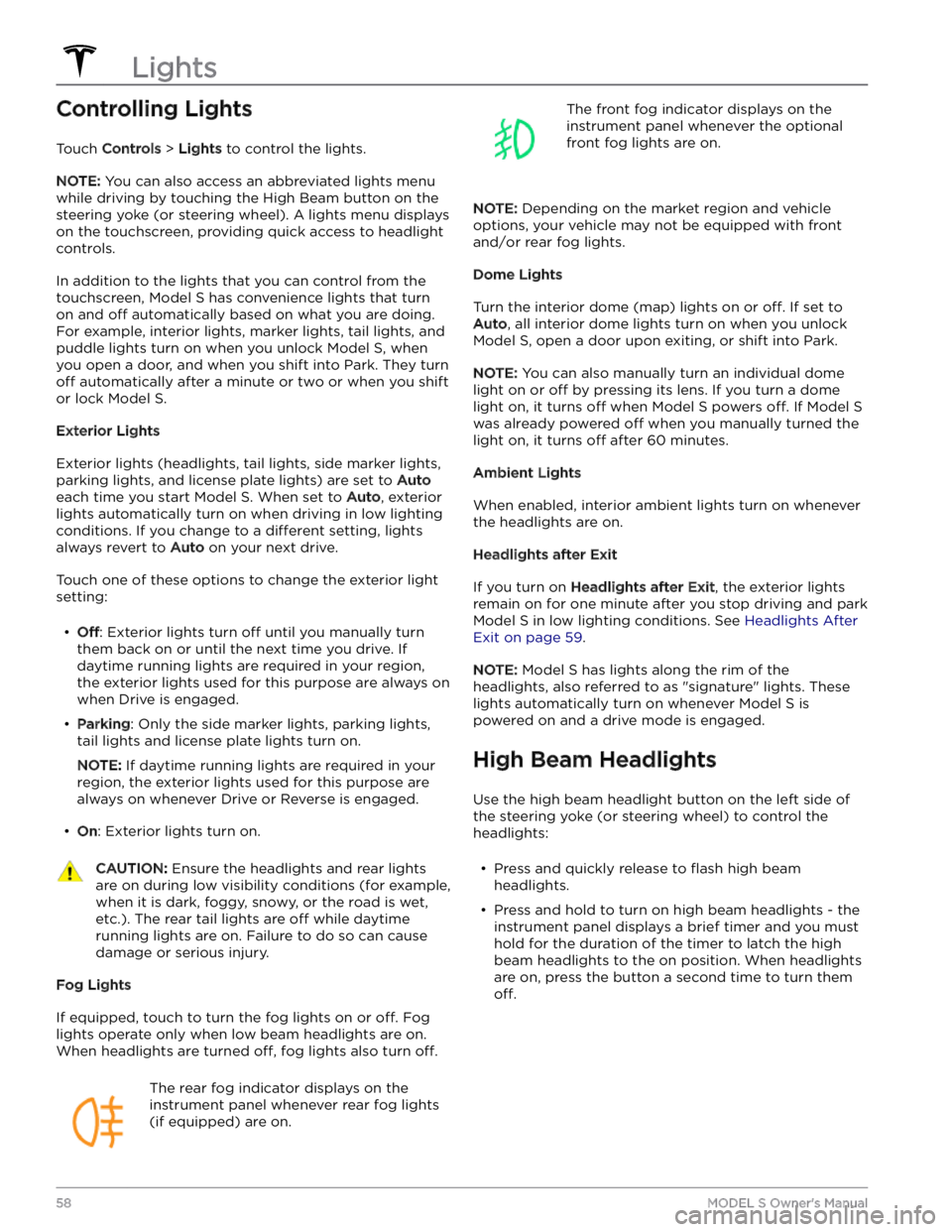
Controlling Lights
Touch Controls > Lights to control the lights.
NOTE: You can also access an abbreviated lights menu
while driving by touching the High Beam button on the
steering yoke (or steering wheel). A lights menu displays
on the touchscreen, providing quick access to headlight controls.
In addition to the lights that you can control from the
touchscreen,
Model S has convenience lights that turn
on and
off automatically based on what you are doing.
For example, interior lights, marker lights, tail lights, and
puddle lights turn on when you unlock
Model S, when
you open a door, and when you shift into Park. They turn
off automatically after a minute or two or when you shift
or lock
Model S.
Exterior Lights
Exterior lights (headlights, tail lights, side marker lights,
parking lights, and license plate lights) are set to
Auto
each time you start Model S. When set to Auto, exterior
lights automatically turn on when driving in low lighting
conditions. If you change to a
different setting, lights
always revert to
Auto on your next drive.
Touch one of these options to change the exterior light setting:
Page 64 of 276
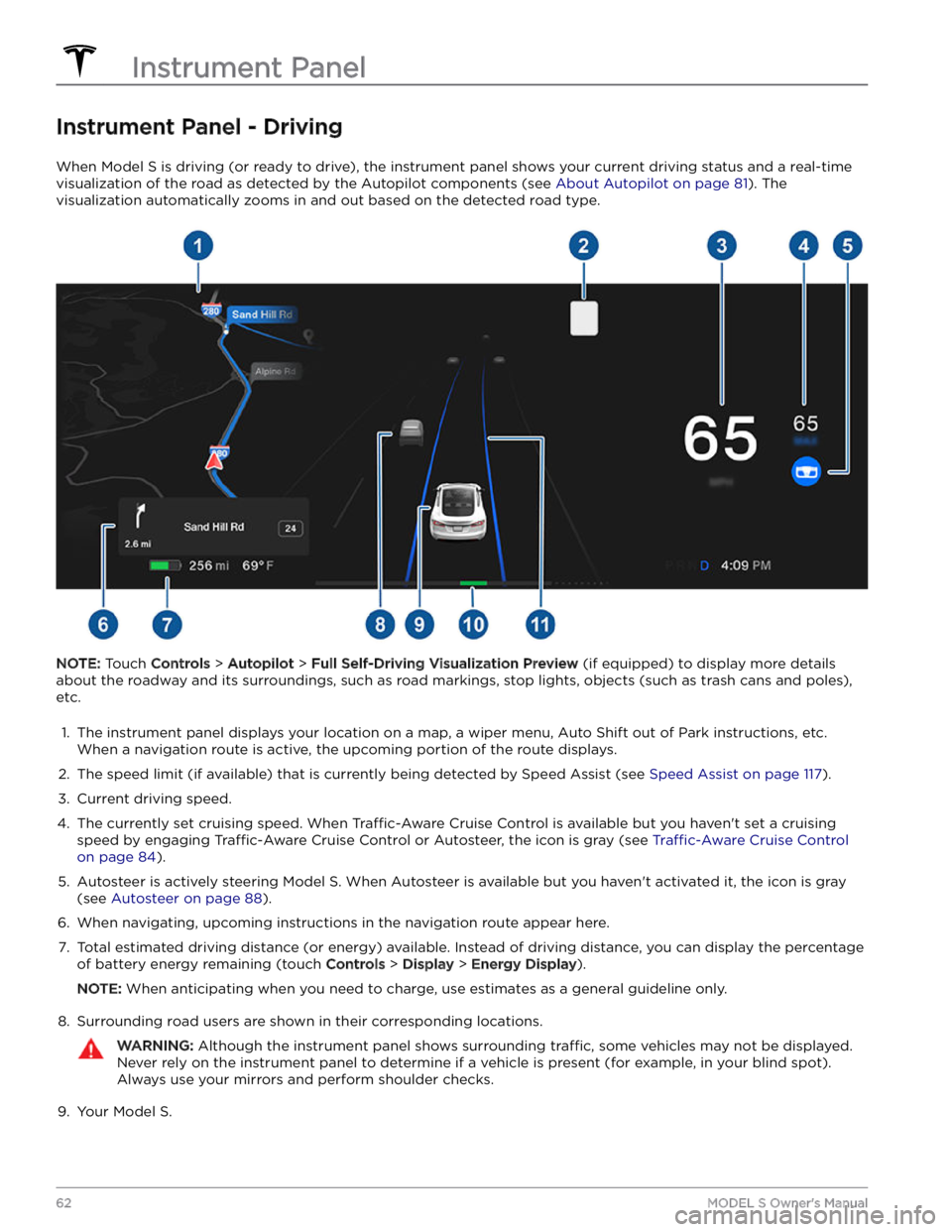
Instrument Panel - Driving
When Model S is driving (or ready to drive), the instrument panel shows your current driving status and a real-time
visualization of the road as detected by the Autopilot components (see
About Autopilot on page 81). The
visualization automatically zooms in and out based on the detected road type.
NOTE: Touch Controls > Autopilot > Full Self-Driving Visualization Preview (if equipped) to display more details
about the roadway and its surroundings, such as road markings, stop lights, objects (such as trash cans and poles),
etc.
1.
The instrument panel displays your location on a map, a wiper menu, Auto Shift out of Park instructions, etc. When a navigation route is active, the upcoming portion of the route displays.
2.
The speed limit (if available) that is currently being detected by Speed Assist (see Speed Assist on page 117).
3.
Current driving speed.
4.
The currently set cruising speed. When Traffic-Aware Cruise Control is available but you haven
Page 65 of 276
10. The power meter displays real-time power usage. During acceleration, the bar fills to the right with a gray color
(or white if the display is dark) to represent power being used. During deceleration (when
Model S is moving and
you release your foot from the accelerator pedal), the bar
fills to the left with a green color to represent power
being fed back to the Battery by regenerative braking (see
Regenerative Braking on page 67).
11.
When Autosteer is active and detects the driving lane, it is highlighted in blue (see Autosteer on page 88).
Depending on the current driving scenario, you may see neighboring lanes.
NOTE: In situations where Autosteer is unable to detect lane markings, the driving lane is determined based on
the vehicle you are following.
NOTE: If Navigate on Autopilot is active, the driving lane displays as a single blue line in front of Model S (see
Navigate on Autopilot on page 93).
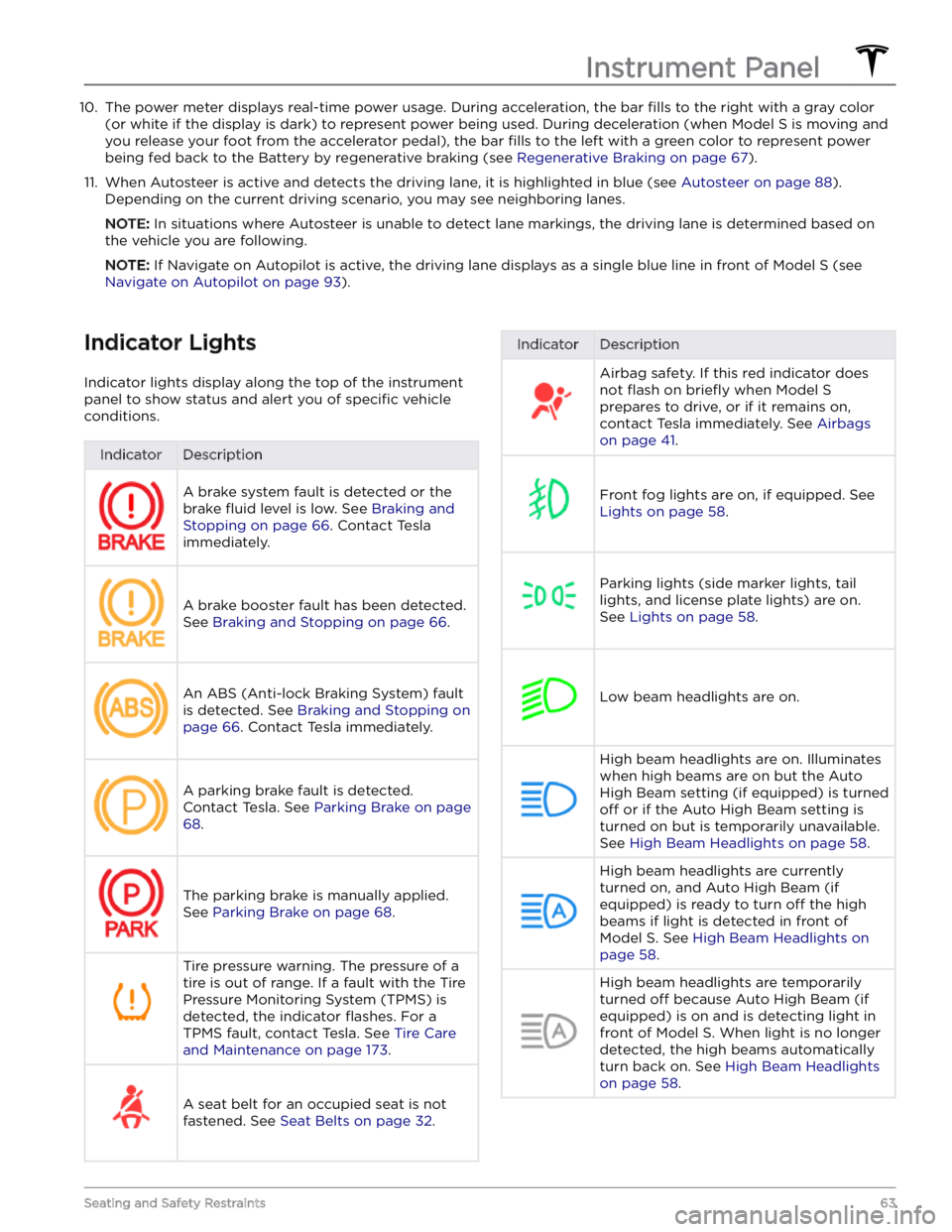
Indicator Lights
Indicator lights display along the top of the instrument panel to show status and alert you of
specific vehicle
conditions.
IndicatorDescriptionA brake system fault is detected or the brake
fluid level is low. See Braking and
Stopping on page 66. Contact Tesla
immediately.
A brake booster fault has been detected. See
Braking and Stopping on page 66.
An ABS (Anti-lock Braking System) fault is detected. See
Braking and Stopping on
page 66. Contact Tesla immediately.
A parking brake fault is detected. Contact Tesla. See
Parking Brake on page
68.
The parking brake is manually applied.
See
Parking Brake on page 68.
Tire pressure warning. The pressure of a tire is out of range. If a fault with the Tire Pressure Monitoring System (TPMS) is
detected, the indicator
flashes. For a
TPMS fault, contact Tesla. See
Tire Care
and Maintenance on page 173.
A seat belt for an occupied seat is not
fastened. See
Seat Belts on page 32.
IndicatorDescriptionAirbag safety. If this red indicator does not
flash on briefly when Model S
prepares to drive, or if it remains on, contact Tesla immediately. See
Airbags
on page 41.
Front fog lights are on, if equipped. See
Lights on page 58.
Parking lights (side marker lights, tail
lights, and license plate lights) are on. See
Lights on page 58.
Low beam headlights are on.
High beam headlights are on. Illuminates when high beams are on but the Auto High Beam setting (if equipped) is turned
off or if the Auto High Beam setting is
turned on but is temporarily unavailable.
See
High Beam Headlights on page 58.
High beam headlights are currently
turned on, and Auto High Beam (if equipped) is ready to turn
off the high
beams if light is detected in front of
Model S. See High Beam Headlights on
page 58.
High beam headlights are temporarily
turned
off because Auto High Beam (if
equipped) is on and is detecting light in
front of
Model S. When light is no longer
detected, the high beams automatically turn back on. See
High Beam Headlights
on page 58.
Instrument Panel
63Seating and Safety Restraints
Page 68 of 276

Braking SystemsWARNING: Properly functioning braking systems
are critical to ensure safety. If you experience a
problem with the brake pedal, brake calipers, or
any component of a Model S braking system,
contact Tesla immediately.
Model S has an anti-lock braking system (ABS) that
prevents the wheels from locking when you apply
maximum brake pressure. This improves steering control
during heavy braking in most road conditions.
During emergency braking conditions, the ABS
constantly monitors the speed of each wheel and varies
the brake pressure according to the grip available.
The alteration of brake pressure can be felt as a pulsing sensation through the brake pedal. This demonstrates that the ABS is operating and is not a cause for concern. Keep
firm and steady pressure on the brake pedal while
experiencing the pulsing.
The ABS indicator briefly flashes amber on
the
instrument panel when you first start
Model S. If this indicator lights up at any
other time, an ABS fault has occurred and the ABS is not operating. Contact Tesla.
The braking system remains fully
operational and is not
affected by an ABS
failure. However, braking distances may increase. Drive cautiously and avoid heavy braking.
If the instrument panel displays this red
brake indicator at any time other than
briefly when you first start Model S, a brake
system fault is detected, or the level of the
brake
fluid is low. Contact Tesla
immediately. Apply steady pressure and
keep the brakes
firm to bring the vehicle to
a stop when safe to do so.
The instrument panel displays this amber
brake indicator if a brake booster fault is detected. Apply steady pressure and keep the brakes
firm to stop the vehicle when
safety permits. Hydraulic Boost Compensation will be active (see
Hydraulic
Boost Compensation on page 67).
WARNING: When driving a Model S Plaid
equipped with the optional Carbon Ceramic Brake
Kit in temperatures below 14 degrees Fahrenheit
(-10 degrees Celsius), the instrument panel
displays an alert indicating that stability and
braking performance may be degraded in cold
weather. You may need to increase the amount of
pressure you apply to the brake pedal when
driving in cold weather. Be aware of this reduced
performance and drive cautiously in cold weather
conditions. The Apply Brakes When Regenerative
Braking is Limited feature is not available on a
Model S Plaid equipped with the optional Carbon
Ceramic Brake Kit.
Emergency Braking
In an emergency, fully press the brake pedal and
maintain
firm pressure, even on low traction surfaces.
The ABS varies the braking pressure to each wheel
according to the amount of traction available. This prevents wheels from locking and ensures that you stop as safely as possible.
WARNING: Do not pump the brake pedal. Doing so
interrupts operation of the ABS and can increase
braking distance.
WARNING: Always maintain a safe distance from
the vehicle in front of you and be aware of
hazardous driving conditions. While the ABS can
improve stopping distance, it cannot overcome the
laws of physics. It also does not prevent the
danger of hydroplaning (where a layer of water
prevents direct contact between the tires and the
road).
CAUTION: Automatic Emergency Braking (see
Automatic Emergency Braking on page 115) may
intervene to automatically brake in situations
where a collision is considered imminent.
Automatic Emergency Braking is not designed to
prevent a collision. At best, it can minimize the
impact of a frontal collision by attempting to
reduce your driving speed. Depending on
Automatic Emergency Braking to avoid a collision
can result in serious injury or death.
Dynamic Brake Lights (if equipped)
If you are driving over 30 mph (50 km/h) and brake
forcefully
(or if Automatic Emergency Braking engages),
the brake lights
flash quickly to warn other drivers that
Model S is rapidly slowing down. If Model S stops
completely, the hazard warning lights
flash. Flashing
continues until you press the accelerator or manually press the hazard lights button to turn them
off (see
Hazard Warning Flashers on page 60).
NOTE: When towing a trailer (if applicable), the brake
lights on the trailer also operate as described above,
even when the trailer is not equipped with a separate
braking system.
Braking and Stopping
66MODEL S Owner
Page 69 of 276

WARNING: When towing a trailer (if applicable),
always increase your following distance. Sudden
braking may result in skidding, jack-knifing, and
loss of control.
Brake Disc Wiping
To ensure brakes remain responsive in cold and wet
weather,
Model S is equipped with brake disc wiping.
When cold and wet weather is detected, this feature
repeatedly applies an imperceptible amount of brake
force to remove water from the surface of the brake
discs.
Hydraulic Fade Compensation
Model S is equipped with hydraulic fade compensation.
This assists in monitoring brake system pressure and ABS activity for instances of reduced brake
performance. If reduced brake performance is detected (for example, as a result of brake fade, or cold or wet
conditions), you may hear a sound, feel the brake pedal pull away from your foot, and notice a strong increase in braking. Brake as you normally would and continue to
press the brake pedal without releasing or pumping the
brakes.
CAUTION: If brakes are not functioning properly,
stop the vehicle when safety permits and contact
Tesla Service.
WARNING: Always maintain a safe driving distance
from the vehicle in front of you and exercise
caution when driving conditions are hazardous.
Brake disc wiping and hydraulic fade
compensation is not a substitute for adequately
applying the brakes.
Hydraulic Boost Compensation
Model S is equipped with a brake booster that activates
the brakes when the brake pedal is pressed. Hydraulic boost compensation provides mechanical assistance if the brake booster fails. If a brake booster failure is detected, the brake pedal feels
stiffer to press and you
may hear a sound when you press the brake pedal. To
stop
Model S, apply steady force to the brake pedal
without releasing or pumping. Drive cautiously and
maintain a safe distance from other road users