2023 TESLA MODEL 3 restart
[x] Cancel search: restartPage 7 of 296

WARNING: Always pay attention to road and traffic conditions when driving. To minimize driver distraction and
ensure the safety of vehicle occupants as well as other road users, avoid using the touchscreen to adjust
settings while the vehicle is in motion.
Use the touchscreen to control many features that, in traditional cars, are controlled using physical buttons (for example, adjusting the cabin heating and air conditioning, headlights, etc.). You also use the touchscreen to control
media, navigate, use entertainment features, and customize
Model 3 to suit your preferences. For hands-free access
to common touchscreen controls, use voice commands (see
Voice Commands on page 125).
If the touchscreen is unresponsive or demonstrates unusual behavior, you can restart it (see Restarting the
Touchscreen on page 7).
NOTE: Illustrations are provided to improve conceptual understanding only. Depending on vehicle options, software
version, market region and regional and language settings, the details displayed on the screen will differ.
1.
Status bar: This area on the top of the touchscreen displays the time of day, the outside temperature, and the
following icons:
Touch to lock/unlock all doors and trunks.4:20 pmYour vehicle automatically updates the time. If the time is incorrect, confirm your vehicle has
internet and GPS connectivity with the latest software.
Touchscreen Overview
5Overview
Page 10 of 296

3.
After a few seconds, the Tesla logo appears. Wait approximately 30 seconds for the touchscreen to restart. If the
touchscreen is still unresponsive or demonstrating unusual behavior after a few minutes, try power cycling the
vehicle (if possible). See
Power Cycling the Vehicle on page 50.
NOTE: Pressing the scroll buttons only restarts the touchscreen. It does not restart any other vehicle component and
does not power
Model 3 off and on.
Customizing My Apps
For one-touch access to commonly used apps and controls, you can customize what displays in the My Apps area on
the touchscreen
Page 52 of 296
Starting
When you open a door to enter Model 3, the
touchscreen powers on and you can operate all controls.
To drive
Model 3:
1.
Press the brake pedal - Model 3 powers on and is
ready to drive.
2.
Select a drive mode - move the drive stalk down for
Drive or up for Reverse (see
Shifting on page 51).
NOTE: If the PIN to Drive feature is enabled (see PIN to
Drive on page 127), you must also enter a valid PIN on
the touchscreen before you can drive
Model 3.
Everything you need to know when driving Model 3
displays on the touchscreen.
Drive Disabled - Requires Authentication
If Model 3 does not detect a key when you press the
brake (a key fob or phone key is not detected or two
minutes have passed since you used the key card), the touchscreen displays a message telling you that driving requires authentication.
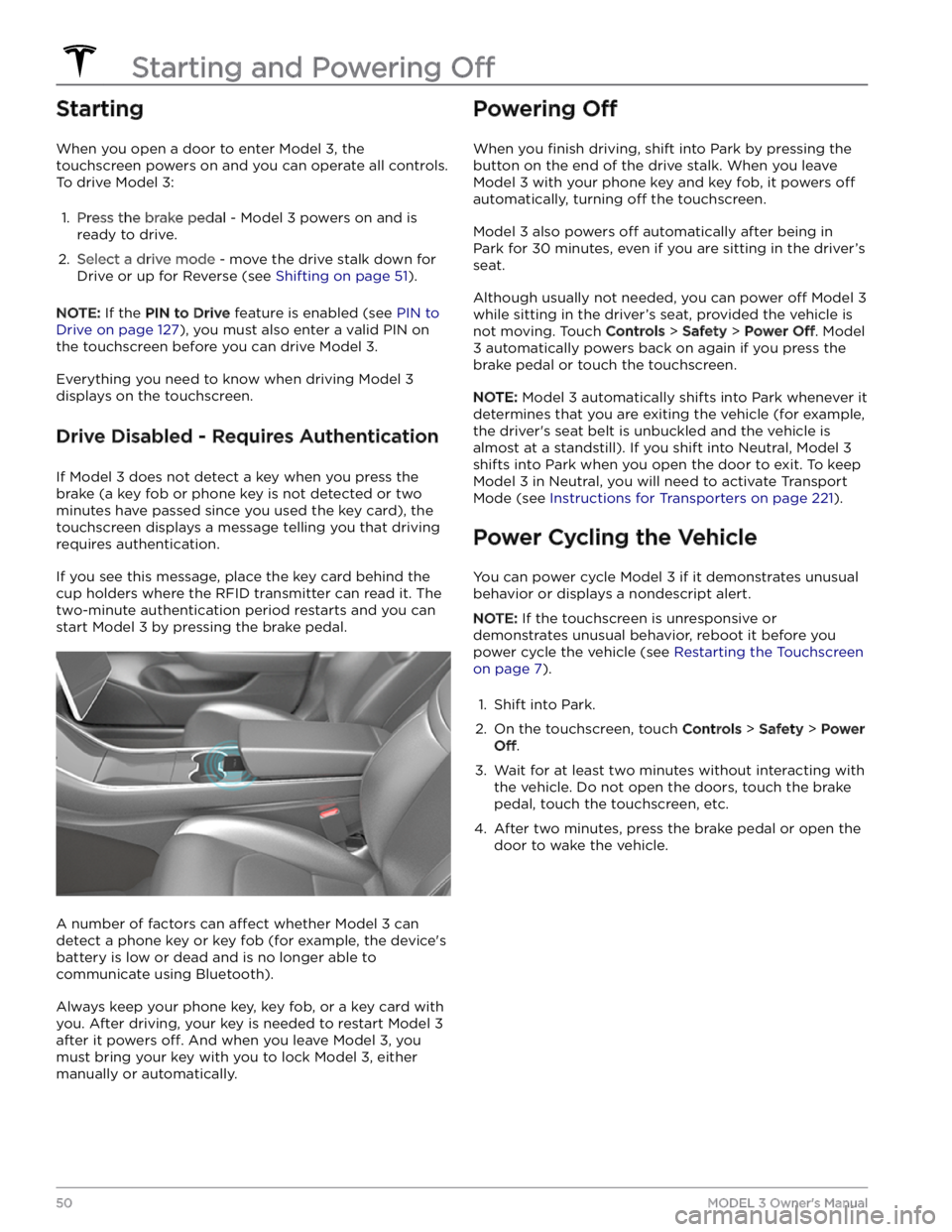
If you see this message, place the key card behind the
cup holders where the RFID transmitter can read it. The
two-minute authentication period restarts and you can start
Model 3 by pressing the brake pedal.
A number of factors can affect whether Model 3 can
detect a phone key or key fob (for example, the device
Page 275 of 296

The electrical system cannot maintain the voltage required to support all vehicle features.
If this alert is present while you are driving, it is possible your vehicle will shut down unexpectedly.
If this alert is present when your vehicle is in Park or when it first wakes, it is possible your vehicle may not have
adequate electrical power to start driving. A separate vehicle alert may be present to indicate that condition.
What to do:
It is recommended that you eliminate or reduce your use of any non-essential features. This can help your vehicle
maintain adequate electrical power for essential functions.
If this alert remains active, schedule service immediately. Without service, your vehicle may shut down unexpectedly
or may not restart.
VCFRONT_a182
Schedule service to replace low voltage battery
Software will not update until battery is replaced
What this alert means:
The low voltage battery is showing degraded performance and needs to be replaced. Until the low voltage battery is
replaced, vehicle software updates will not complete.
What to do:
It is recommended that you have the low voltage battery replaced at your earliest convenient opportunity.
You can schedule service via your Tesla Mobile App, or with an independent service provider that offers low voltage
battery replacement for your vehicle. Please note that independent service provider options may vary, based on your
vehicle configuration and your location.
If the low voltage battery does not have enough electrical power to turn on your vehicle or open the doors, follow the instructions in
Jump Starting on page 225.
For more information on the battery system, see High Voltage Battery Information on page 156.
VCFRONT_a191
Electrical system power reduced
Vehicle shutting down
What this alert means:
The low voltage battery cannot provide the electrical support necessary to drive or continue driving. Your vehicle is shutting down to preserve energy for essential functions other than driving.
Your vehicle cannot be driven or continue driving while this condition continues.
What to do:
If this alert is present while you are driving, your vehicle needs to come to a stop immediately. It is recommended
that you:
Page 276 of 296

When this alert is present, the electrical system cannot maintain the voltage required to support all vehicle features. Many vehicle functions may no longer work.
It is possible your vehicle may lose all electrical power. If this occurs, you can still use the manual door releases to exit the vehicle if necessary. For more information, see
Opening Doors from the Interior on page 14.
This alert may be present due to various vehicle conditions. For more information and further recommended actions,
check for other active vehicle alerts.
If this alert remains present, it is recommended that you schedule service immediately. Without service, your vehicle
may not drive, may shut down unexpectedly, or may not restart.
VCFRONT_a192
Electrical system is unable to support all features
Switching off features to conserve energy
What this alert means:
The electrical system cannot support all vehicle features. Your vehicle is shutting down nonessential features to preserve energy for essential functions.
If you are driving when this alert is present, it is possible your vehicle may shut down unexpectedly. It is also possible
that your vehicle will not restart once parked.
Nonessential features may be unavailable, including seat heaters, cabin climate control, and in-vehicle entertainment.
This is expected behavior intended to help your vehicle maintain adequate electrical power for essential functions,
including the ability to operate headlights, windows and doors, hazard lights, and the front trunk (frunk).
It is possible your vehicle may lose all electrical power. If this occurs, you can still use the manual door releases to exit the vehicle if necessary. For more information, see
Opening Doors from the Interior on page 14.
What to do:
This alert may be present due to various vehicle conditions. For more information and further recommended actions,
check for other active vehicle alerts.
VCFRONT_a216
Vehicle may not restart - Service is required
Electrical system issue detected
What this alert means:
An abnormally large and sustained power draw while driving or Supercharging / DC Fast Charging has made your
vehicle
Page 277 of 296

It is recommended that you schedule service at your earliest opportunity. Without service, your vehicle will remain
unable to restart, and the electrical system will remain unable to support all features and functions.
Some or all of the powered doors and windows in your vehicle may lose electrical power. If this occurs, you can still
use the manual door releases to exit the vehicle if necessary. For more information, see Opening Doors from the
Interior on page 14.
VCFRONT_a220
Electrical system is unable to support all features
Schedule service
What this alert means:
The low voltage battery is not available and cannot provide electrical support for vehicle features.
It is possible your vehicle will shut down unexpectedly. It is also possible that your vehicle will not restart after the
current drive.
You may notice that some nonessential features are not available. This is expected behavior due to your vehicle
preserving energy for essential functions.
What to do:
It is recommended that you eliminate or reduce your use of any nonessential features. This can help your vehicle maintain adequate electrical power for essential functions other than driving, until it can be serviced.
If this alert remains present, it is recommended that you schedule service immediately. Without service, your vehicle
may not drive, may shut down unexpectedly, or may not restart.
VCFRONT_a402
Electrical system backup power is unavailable
Vehicle will consume more energy while idle
What this alert means:
The backup power source for the electrical system, the low voltage battery, is not available or cannot provide the
voltage required to support all vehicle features.
The primary source of electrical power, the high voltage battery system, will continue to support vehicle functions,
even when your vehicle is idle. For more information on the high voltage battery, see
About the High Voltage Battery
on page 156.
You may notice that some nonessential features are not available. This is expected behavior due to your vehicle
preserving energy for essential functions.
You may also notice that your vehicle consumes more energy than usual when you are not driving it, or that your vehicle displays a lower projected range than you would normally expect after charging. This is normal vehicle behavior when this alert is present, and it will continue until the backup power source is restored.
There is a chance that an issue affecting the primary power source could cause your vehicle to shut down
unexpectedly.
What to do:
It is recommended that you limit or avoid the use of any nonessential features. This can help your vehicle maintain
adequate electrical power for essential functions.
It is recommended that you schedule service at your earliest opportunity, so the backup power source for the
electrical system can be restored.
Troubleshooting Alerts
275Troubleshooting
Page 293 of 296

Radio regulatory information: 285
range: 61, 164
driving tips to maximize: 164
regenerative braking: 61
range assurance: 165
re-naming your vehicle: 9
Re-route: 146
rear seats, folding and raising: 26
rear view camera: 72
rear window switches, disabling: 16
recent (Media Player): 149
Recents (navigation): 142
recording: 129, 131
recording videos (Track Mode): 69
regenerative braking: 61
regenerative braking, in Track Mode: 69
relative speed limit: 114
release notes: 139
restarting the touchscreen: 50
RFID transponders: 190
roadside assistance: 221
roof racks: 207
rotating tires: 177
Round Trip Energy (navigating): 146
run out of range: 224, 225
S
safety defects, reporting: 285
safety information: 31, 37
child seats: 37
seat belts: 31
Schedule: 163
schedule service: 140
scheduled charging: 163
scheduled departure: 163
using: 163
seat belts: 29, 30, 185
cleaning: 185
in a collision: 30
overview of: 29
pre-tensioners: 30
wearing when pregnant: 30
seat covers: 28
seat heaters: 116
seating capacity: 206
seats: 25, 116
adjusting: 25
heaters: 116
security settings: 127
sensors: 77
Sentry Mode: 131
service data recording: 282
service intervals: 166
settings, acceleration: 68
Settings, erasing: 9
shifting drive modes: 51
shortcuts: 7, 8
adding to My Apps: 8
restarting the touchscreen: 7
Show Calendar Upon Entry: 122, 124
side camera(s): 72
Side Clearance (Summon): 102
side collision warning: 108
slip start: 64
Smart Summon: 105
smartphone: 10
authenticating as a key: 10
Software Reinstall: 138
software reset: 9
software update preferences: 138
software updates: 138
specifications: 208, 210, 211, 213
brakes: 210
cargo volume: 210
dimensions: 208
exterior: 208
High Voltage Battery: 211
interior: 208
low voltage battery: 211
motor: 210
steering: 210
subsystems: 210
suspension: 211
tires: 213
transmission: 210
wheels: 213
speed assist: 114
speed limit warning: 114
Stability Assist (Track Mode): 69
stability control: 64
standby: 131
starting: 50
steering specifications: 210
steering wheel: 53
lights, controlling: 53
steering, automatic: 85
summer tires: 181
Summon: 102
Summon Distance: 102
superchargers, displaying on map: 142
Index
Page 294 of 296

supercharging: 161
described: 161
idle fees: 161
pay-per-use fees: 161
suspension specifications: 211
T
telematics: 282
temperature: 48, 56, 116, 156, 216
Battery (high voltage), limits: 156
cabin, controls for: 116
outside: 56
tires: 216
tesla profiles: 45
Teslacam: 129, 131
tie-down straps: 222
tilt/intrusion detection: 127
Tire and Loading Information label: 206
tire noise: 181
Tire Pressure Monitoring System: 180
overview of: 180
tire pressures, checking: 176
tire pressures, displaying: 176
tires: 176, 177, 180, 181, 213, 214, 216
all-season: 181
balancing: 177
chains: 181
configuration): 176
inspecting and maintaining: 176
pressures, displaying: 176
pressures, how to check: 176
quality grading: 216
replacing: 177
replacing a tire sensor: 180
rotation: 177
specification: 213
summer: 181
temperature grades: 216
tire markings: 214
traction grade: 216
treadwear grade: 216
wheel configuration: 176
winter: 181
toll system transponders, attaching: 190
torque specifications: 210
touch up body: 185
touchscreen: 5, 7, 8, 47, 138, 185
adding shortcuts: 8
cleaning: 185
customizing My Apps: 8
display settings: 5
frozen: 7
main: 5
overview: 5
rear: 5
reboot: 7
restarting: 47
software updates: 138
unresponsive: 7
towing: 224, 225
towing a trailer: 207
towing instructions: 221
Toybox: 151
TPMS: 180
overview of: 180
Track Mode: 69
Tracking Disabled: 142
traction control: 64
trademarks: 280
Traffic Light and Stop Sign Control: 93
Traffic-Aware Cruise Control: 80
trailer hitches: 207
transmission specifications: 210
transponders, attaching: 190
Transport Canada, contacting: 285
Transport Mode: 221
transporting: 221
trip chart: 165
trip meter: 71
Trip Planner: 146
trunk, adjust opening height: 17
trunk, front: 19
trunk, rear: 17
turn signals: 54
U
ultrasonic sensors: 77
uniform tire quality grading: 216
Unlock On Park: 15
unlocking: 14
USB devices: 23
connecting: 23
USB flash drive: 127, 129, 131
USB ports: 23
V
Valet mode: 46
vehicle certification label: 206
Vehicle Hold: 67
Vehicle Identification Number (VIN): 205
Index