2023 TESLA MODEL 3 pressure
[x] Cancel search: pressurePage 59 of 296
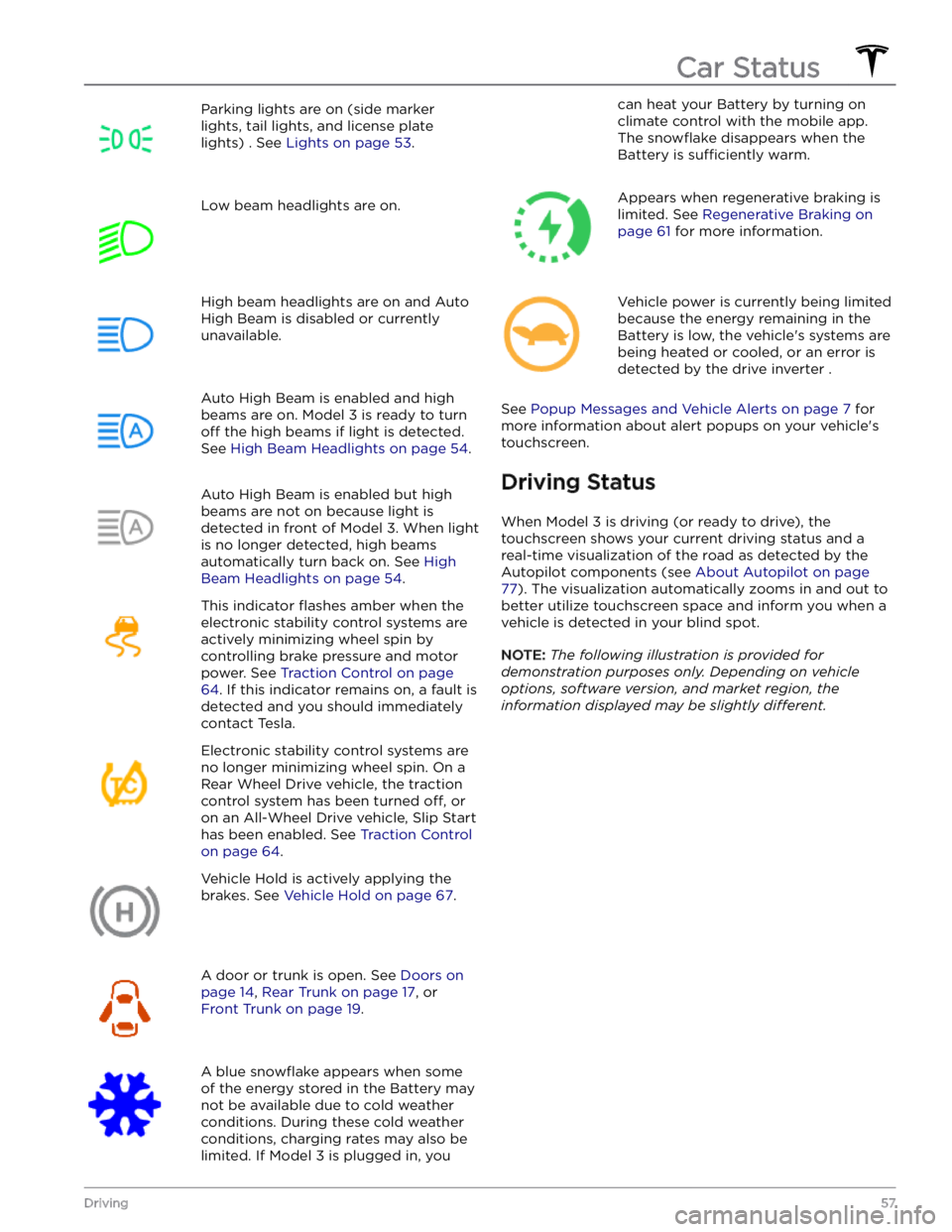
Parking lights are on (side marker
lights, tail lights, and license plate lights) . See
Lights on page 53.
Low beam headlights are on.High beam headlights are on and Auto
High Beam is disabled or currently
unavailable.Auto High Beam is enabled and high
beams are on.
Model 3 is ready to turn
off the high beams if light is detected.
See
High Beam Headlights on page 54.
Auto High Beam is enabled but high beams are not on because light is
detected in front of
Model 3. When light
is no longer detected, high beams
automatically turn back on. See
High
Beam Headlights on page 54.
This indicator flashes amber when the
electronic stability control systems are actively minimizing wheel spin by
controlling brake pressure and motor
power. See
Traction Control on page
64. If this indicator remains on, a fault is
detected and you should immediately contact Tesla.
Electronic stability control systems are no longer minimizing wheel spin. On a
Rear Wheel Drive vehicle, the traction
control system has been turned
off, or
on an All-Wheel Drive vehicle, Slip Start has been enabled. See
Traction Control
on page 64.
Vehicle Hold is actively applying the brakes. See
Vehicle Hold on page 67.
A door or trunk is open. See Doors on
page 14, Rear Trunk on page 17, or
Front Trunk on page 19.
A blue snowflake appears when some
of the energy stored in the Battery may not be available due to cold weather conditions. During these cold weather
conditions, charging rates may also be
limited. If
Model 3 is plugged in, you
can heat your Battery by turning on climate control with the mobile app.
The
snowflake disappears when the
Battery is
sufficiently warm.
Appears when regenerative braking is limited. See
Regenerative Braking on
page 61 for more information.
Vehicle power is currently being limited
because the energy remaining in the
Battery is low, the vehicle
Page 62 of 296

Braking SystemsWARNING: Properly functioning braking systems
are critical to ensure safety. If you experience a
problem with the brake pedal, brake calipers, or
any component of a Model 3 braking system,
contact Tesla immediately.
Model 3 has an anti-lock braking system (ABS) that
prevents the wheels from locking when you apply
maximum brake pressure. This improves steering control
during heavy braking in most road conditions.
During emergency braking conditions, the ABS
constantly monitors the speed of each wheel and varies
the brake pressure according to the grip available.
The alteration of brake pressure can be felt as a pulsing sensation through the brake pedal. This demonstrates that the ABS is operating and is not a cause for concern. Keep
firm and steady pressure on the brake pedal while
experiencing the pulsing.
The ABS indicator briefly flashes amber on
the
touchscreen when you first start Model
3. If this indicator lights up at any other
time, an ABS fault has occurred and the ABS is not operating. Contact Tesla. The
braking system remains fully operational
and is not
affected by an ABS failure.
However, braking distances may increase. Drive cautiously and avoid heavy braking.
If the touchscreen displays this red brake
indicator at any time other than
briefly
when you first start Model 3, a brake
system fault is detected, or the level of the
brake
fluid is low. Contact Tesla
immediately. Apply steady pressure and
keep the brakes
firm to bring the vehicle to
a stop when safe to do so.
The touchscreen displays this amber brake
indicator if a brake booster fault is detected. Apply steady pressure and keep the brakes
firm to stop the vehicle when
safety permits. Hydraulic Boost
Compensation will be active (see
Hydraulic
Boost Compensation on page 61).
Emergency Braking
In an emergency, fully press the brake pedal and
maintain
firm pressure, even on low traction surfaces.
The ABS varies the braking pressure to each wheel according to the amount of traction available. This prevents wheels from locking and ensures that you stop as safely as possible.
WARNING: Do not pump the brake pedal. Doing so
interrupts operation of the ABS and can increase
braking distance.
WARNING: Always maintain a safe distance from
the vehicle in front of you and be aware of
hazardous driving conditions. While the ABS can
improve stopping distance, it cannot overcome the
laws of physics. It also does not prevent the
danger of hydroplaning (where a layer of water
prevents direct contact between the tires and the
road).
CAUTION: Automatic Emergency Braking (see
Automatic Emergency Braking on page 112) may
intervene to automatically brake in situations
where a collision is considered imminent.
Automatic Emergency Braking is not designed to
prevent a collision. At best, it can minimize the
impact of a frontal collision by attempting to
reduce your driving speed. Depending on
Automatic Emergency Braking to avoid a collision
can result in serious injury or death.
CAUTION: In emergency situations, if the brakes
are not functioning properly, press and hold the
Park button on the drive stalk to bring the vehicle
to a stop. Do not use this method to stop the
vehicle unless absolutely necessary.
Dynamic Brake Lights (if equipped)
If you are driving over 30 mph (50 km/h) and brake
forcefully
(or if Automatic Emergency Braking engages),
the brake lights
flash quickly to warn other drivers that
Model 3 is rapidly slowing down. If Model 3 stops
completely, the hazard warning lights
flash. Flashing
continues until you press the accelerator or manually press the hazard lights button to turn them
off (see
Hazard Warning Flashers on page 55).
NOTE: Dynamic brake lights will not flash while Track
Mode is enabled (see
Track Mode on page 69).
NOTE: When towing a trailer (if applicable), the brake
lights on the trailer also operate as described above,
even when the trailer is not equipped with a separate
braking system.
WARNING: When towing a trailer (if applicable),
always increase your following distance. Sudden
braking may result in skidding, jack-knifing, and
loss of control.
Brake Disc Wiping
To ensure brakes remain responsive in cold and wet
weather,
Model 3 is equipped with brake disc wiping.
When cold and wet weather is detected, this feature repeatedly applies an imperceptible amount of brake
force to remove water from the surface of the brake discs.
Braking and Stopping
60MODEL 3 Owner
Page 63 of 296

Hydraulic Fade Compensation
Model 3 is equipped with hydraulic fade compensation.
This assists in monitoring brake system pressure and ABS activity for instances of reduced brake
performance. If reduced brake performance is detected (for example, as a result of brake fade, or cold or wet
conditions), you may hear a sound, feel the brake pedal pull away from your foot, and notice a strong increase in braking. Brake as you normally would and continue to
press the brake pedal without releasing or pumping the
brakes.
CAUTION: If brakes are not functioning properly,
stop the vehicle when safety permits and contact
Tesla Service. See Park on page 51 for information
on using the Park button to stop the vehicle in
case of emergency.
WARNING: Always maintain a safe driving distance
from the vehicle in front of you and exercise
caution when driving conditions are hazardous.
Brake disc wiping and hydraulic fade
compensation is not a substitute for adequately
applying the brakes.
Hydraulic Boost Compensation
Model 3 is equipped with a brake booster that activates
the brakes when the brake pedal is pressed. Hydraulic boost compensation provides mechanical assistance if the brake booster fails. If a brake booster failure is detected, the brake pedal feels
stiffer to press and you
may hear a sound when you press the brake pedal. To
stop
Model 3, apply steady force to the brake pedal
without releasing or pumping. Drive cautiously and
maintain a safe distance from other road users
Page 66 of 296
How It Works
The traction control system constantly monitors the speed of the front and rear wheels. If
Model 3
experiences a loss of traction, the system minimizes wheel spin by controlling brake pressure and motor power. By default, the traction control system is on. Under normal conditions, it should remain on to ensure
maximum safety.
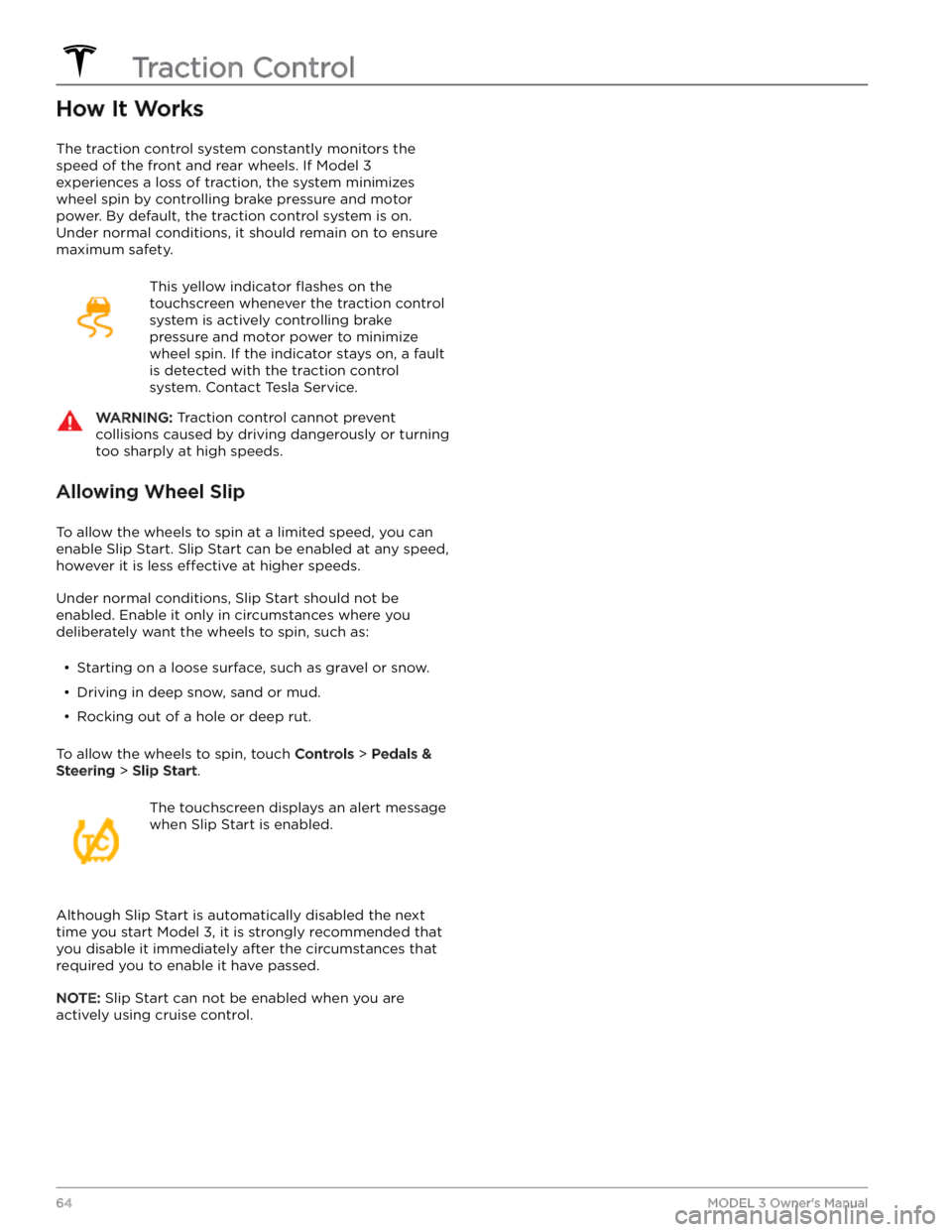
This yellow indicator flashes on the
touchscreen whenever the traction control
system is actively controlling brake
pressure and motor power to minimize wheel spin. If the indicator stays on, a fault is detected with the traction control system. Contact Tesla Service.
WARNING: Traction control cannot prevent
collisions caused by driving dangerously or turning
too sharply at high speeds.
Allowing Wheel Slip
To allow the wheels to spin at a limited speed, you can
enable Slip Start.
Slip Start can be enabled at any speed,
however it is less effective at higher speeds.
Under normal conditions, Slip Start should not be enabled. Enable it only in circumstances where you deliberately want the wheels to spin, such as:
Page 67 of 296
How Park Assist Works
This feature may be temporarily limited or inactive until
it is enabled with a future software update for vehicles
manufactured as of approximately October 2022.
Model 3 is designed to detect the presence of objects.
When driving slowly in Drive or Reverse (for example,
when parking), the vehicle alerts you if an object is
detected in close proximity of your
Model 3. Objects are
only detected in your chosen direction; front objects in
Drive, rear objects in Reverse.
WARNING: You may not be alerted if Model 3 rolls
freely in the opposite direction (for example, Park
Assist does not display an alert if Model 3 rolls
backwards down a hill while in Drive).
Park Assist is activated when driving slower than 5 mph
(8 km/h).
WARNING: Never depend on Park Assist to inform
you if an area you are approaching is free of
objects and/or people. Several external factors can
reduce the performance of Park Assist, causing
either no readings or false readings (see
Limitations and False Warnings on page 65).
Therefore, depending on Park Assist to determine
if Model 3 is approaching an obstruction can result
in damage to the vehicle and/or objects, and can
potentially cause serious injury. Always inspect the
area with your own eyes. When reversing, perform
shoulder checks and use all mirrors. Park assist
does not detect children, pedestrians, bicyclists,
animals, or objects that are moving, protruding,
located too far above or below the sensors (if
equipped) or cameras, or too close or too far from
the sensors or cameras. Park Assist is for guidance
purposes only and is not intended to replace your
own direct visual checks. It is not a substitute for
careful driving.
Visual and Audio Feedback
When you shift to Reverse, the Park Assist view displays on the
touchscreen, showing objects that are in close
proximity to the front and rear of
Model 3. This view
closes when you shift into Drive unless an object is
detected close to the front of
Model 3, in which case the
Park Assist view closes automatically when your driving speed exceeds
5 mph (8 km/h). When reversing, visual
feedback also displays on the touchscreen (see
Rear
Facing Camera(s) on page 72). You can manually close
the park assist view on the touchscreen by touching the
X.
When driving with the Camera app displayed on the
touchscreen, you can switch to the Park Assist view
when driving at speeds below
5 mph (8 km/h). Touch
the button located in the upper left corner of the Camera app screen. This is useful if you need assistance
with parallel parking.
If chimes are turned on (see Controlling Audible
Feedback on page 65), an audible beep sounds as you
approach an object.
NOTE: If Park Assist is unable to provide feedback, the
touchscreen displays an alert message.
CAUTION: Keep sensors (if equipped) and
cameras clean from dirt, debris, snow, and ice.
Avoid using a high pressure power washer on the
sensors and cameras, and do not clean a sensor or
camera with a sharp or abrasive object that can
scratch or damage its surface.
CAUTION: Do not install accessories or stickers on
or near the sensors (if equipped) or cameras.
Controlling Audible Feedback
You can use Park Assist with or without audible feedback. To turn chimes on or
off, touch Controls >
Safety > Park Assist Chimes.
Limitations and False Warnings
Park Assist may not function correctly in these situations:
Page 178 of 296

Displaying Tire Pressures
Tire pressures display on the touchscreen in the cards
area on the car status display, or by touching Controls >
Service. The pressure of each tire displays in the
visualization of your
Model 3, in addition to what time
your tire pressures were last measured. You can choose
whether you want to display tire pressures using Bar or PSI by touching
Controls > Display > Tire Pressure. The
touchscreen also displays your vehicle
Page 179 of 296

WARNING: Do not drive Model 3 if a tire is
damaged, excessively worn, or inflated to an
incorrect pressure. Check tires regularly for wear,
and ensure there are no cuts, bulges or exposure
of the ply/cord structure.
Tire Wear
Adequate tread depth is important for proper tire
performance. Tires with a tread depth less than
4/32”
(3 mm) are more likely to hydroplane in wet conditions
and should not be used. Tires with a tread depth less than
5/32” (4 mm) do not perform well in snow and
slush and should not be used when driving in winter conditions.
Model 3 is originally fitted with tires that have wear
indicators molded into the tread pattern. When the tread has been worn down to
4/32” (3 mm), the
indicators start to appear at the surface of the tread pattern, producing the
effect of a continuous band of
rubber across the width of the tire. For optimal performance and safety, Tesla recommends replacing
tires before the wear indicators are visible.
To improve vehicle handling characteristics and minimize
hydroplaning in wet conditions, put tires with the most tread on the rear of the car.
Tire Rotation, Balance, and Wheel
Alignment
Tesla recommends rotating the tires every 6,250 miles
(10,000 km) or if tread depth difference is 2/32 in (1.5
mm) or greater, whichever comes first.
Tire rotation is an essential part of tire maintenance. It helps maintain an even treadwear pattern which enhances the tire
Page 180 of 296

If tires need to be replaced early, for example due to a
flat tire, we recommend replacing the tires in pairs
unless the other tires are within
2/32 in (1.5 mm) of tread
depth of the new tire. When replacing tires, it is important to match the brand and model of the older
tires. Always place a pair of new tires on the rear if all four tires are the same size. Always balance the wheel and tire after replacing a tire. Consult with a professional tire retailer and installer for further guidance.
If you
replace your tires or install different ones, reset the tire
configuration (see Tire Configuration on page 179). This
resets the learned tire settings and improves the driving
experience on your new tires.
NOTE: Regardless of the number of tires replaced, a
complete set of matching tires is recommended for optimum performance.
If tires other than those specified are used, ensure that
the load and speed ratings marked on the tire
(see
Understanding Tire Markings on page 214) equal or
exceed those of the original
specification.
For the specification of the original wheels and tires
installed on
Model 3, see Wheels and Tires on page 213.
If you replace a wheel, the TPMS (Tire Pressure Monitoring System) sensors need to be reset to ensure they provide accurate warnings when tires are under-
or
over-inflated (see Automatic Reset of TPMS Sensors on
page 180).
NOTE: Installing winter tires with aggressive compound
and tread design may result in temporarily-reduced regenerative braking power. However, your vehicle is
designed to continuously recalibrate itself, and after changing tires it will increasingly restore regenerative
braking power after some moderate-torque straight-line accelerations. For most drivers this occurs after a short period of normal driving, but drivers who normally
accelerate lightly may need to use slightly harder accelerations while the recalibration is in progress. Go to
Service > Wheel & Tire Configuration > Tires to select
winter tires and quicken this process.
WARNING: For your safety, use only tires and
wheels that match the original specification. Tires
that do not match the original specification can
affect the operation of the TPMS.
WARNING: Never exceed the speed rating of your
vehicle