2023 SUBARU SOLTERRA ECU
[x] Cancel search: ECUPage 227 of 628

2275-1. Before driving
Owners Manual_USA_M42C01_en
5
Driving
Cargo capacity
Total load capacity (vehicle
capacity weight) ( P.550)
When 2 people with the com-
bined weight of A lb. (kg) are rid-
ing in your vehicle, which has a
total load capacity (vehicle
capacity weight) of B lb. (kg),
the available amount of cargo
and luggage load capacity will
be C lb. (kg) as follows:
B
*2 lb. (kg) - A*1 lb. (kg) = C*3 lb.
(kg)
*1: A = Weight of people
*2: B = Total load capacity
*3: C = Available cargo and luggage load
In this condition, if 3 more passen-
gers with the combined weight of D
lb. (kg) get on, the available cargo
and luggage load will be reduced E
lb. (kg) as follows:
C lb. (kg) - D*4 lb. (kg) = E*5 lb.
(kg)
*4: D = Additional weight of people
*5: E = Available cargo and luggage load
As shown in the example above,
if the number of occupants
increases, the cargo and lug-
gage load will be reduced by an
amount that equals the
increased weight due to the
additional occupants. In other
words, if an increase in the num-
ber of occupants causes an
excess of the total load capacity
(combined weight of occupants
plus cargo and luggage load),
you must reduce the cargo and
luggage on your vehicle.
Calculation formula for
your vehicle
WARNING
■When loading cargo on the
roof luggage carrier (if
equipped)
Observe the following precau-
tions:
●Place the cargo so that its
weight is distributed evenly
between the front and rear
axles.
●If loading long or wide cargo,
never exceed the vehicle overall
length or width. ( P.550)
●Before driving, m ake sure the
cargo is securely fastened on
the roof luggage carrier.
●Loading cargo on the roof lug-
gage carrier will make the cen-
ter of gravity of the vehicle
higher. Avoid high speeds, sud-
den starts, sharp turns, sudden
braking or abrupt maneuvers,
otherwise it may result in loss of
control or vehicle rollover due to
failure to operate this vehicle
correctly and result in death or
serious injury.
Page 237 of 628

2375-2. Driving procedures
Owners Manual_USA_M42C01_en
5
Driving
Rotary shifter
Operate the dial shift slowly and
securely.
To switch to N, hol d down the dial
shift and hold it for a while.
To switch to R or D, hold down the
dial shift and turn left or right
according to the arrow on the shift
position indicator.
Release the rotary shifter after each
shifting operation to allow it to
return to its regular position.
When shifting from P to N, D or R,
from N, D or R to P, from D to R, or
from R to D, ensure that the brake
pedal is being depressed and the
vehicle is stationary.
Shift position indicator
Meter display:
The current shift position is illumi- nated.
Rotary shifter display:
The current shift p
osition is illumi-
nated.
When selecting the shift position,
make sure that the shift position
has been changed to the desired
position by checking the shift posi-
tion indicator provided on the
instrument cluster.
P position switch
Fully stop the vehicle and set the
parking brake, and then press the P
position switch.
When the shift position is changed
to P, the switch illuminates.
Check that the shif t position indica-
tor shows P.
■Changing the shift position in
each power switch mode
●The shift position cannot be
changed when the power switch is
in ACC or off.
●When the power switch is in ON, if
the “READY” indica tor is not illu-
minated, the shift position can
only be changed to N.
●When the “READY” indicator is
illuminated, the shift position can
be changed from P to D, N, or R.
●When the “READY” indicator is
flashing, the shift position cannot
be changed from P to any other
position, even if the rotary shifter
is operated. Ope rate the rotary
shifter again after the “READY”
indicator changes from flashing to
illuminated.
■Shifting the shift position from
P to other positions
●While depressing the brake pedal
firmly, operate the rotary shifter. If
the rotary shifter is operated with-
out depressing the brake pedal,
the buzzer will sound and the
Shift position display and
how to change the shift
position
Page 284 of 628

2845-4. Using the driving support systems
Owners Manual_USA_M42C01_en
●When the system determines that
the driver is not securely holding
the steering wheel, or the steering
wheel is not being operated when
the steering assist operation of the
lane departure prevention function
is operating
The length of time that the warning
buzzer operates will become longer
as the frequency o f the steering
assist operating i ncreases. Even if
the system judges that the steering
wheel has been operated, the warn-
ing buzzer will sound for a certain
amount of time.
■Break suggestion function
If the vehicle is swaying, a message
will be displayed and a warning
buzzer will sound to u rge the driver
to take a break.
Depending on the condition of the
vehicle and road surface, the break
suggestion functi on may not oper-
ate.
The LDA system can be
enabled/disabled through a
customize setting. ( P.572)
The settings of the LDA can be changed through on the
customize settings. (
P.572)
Changing LDA settings
WARNING
■Situations in which the LDA
should not be used
In the following situations, disable
the LDA system. Failure to do so
may lead to an accident.
●When it is necessary to disable
the system: P.259
■Situations in which the sys-
tem may not ope rate properly
In the following situations, the
system may not operate properly
and the vehicle may depart from
its lane. Do not overly rely on
these functions. The driver is
solely responsible for paying
attention to their surroundings
and operating the steering wheel
as necessary to ensure safety.
●When the boundary between
the asphalt and grass, soil, etc.,
or structures, such as a curb,
guardrail, etc. is not clear or
straight
●When the vehicle is struck by a
crosswind or the turbulence of
other nearby vehicles
●Situations in which the lane may
not be detected: P.264
●Situations in which the sensors
may not operate properly:
P.263
●Situations in which some or all
of the functions of the system
cannot operate: P.264
Page 306 of 628

3065-4. Using the driving support systems
Owners Manual_USA_M42C01_en• When a vehicle enters a detection
area traveling at about the same
speed as your vehicle
• As your vehicle starts from a stop, a vehicle remains in the detection
area
• When driving up and down con- secutive steep inclines, such as
hills, dips in the road, etc.
• When driving on roads with sharp bends, consecutive curves, or
uneven surfaces
• When vehicle lanes are wide, or when driving on the edge of a
lane, and the vehicle in an adja-
cent lane is far away from your
vehicle
• When an accessory (such as a
bicycle carrier) is installed to the
rear of the vehicle
• When there is a significant differ-
ence in height between your vehi-
cle and the vehicle that enters the
detection area
• Immediately after the Blind Spot Monitor is turned on
• When towing with the vehicle
●Instances of the Blind Spot Moni-
tor unnecessarily d etecting a vehi-
cle and/or object may increase in
the following situations:
• When the sensor is misaligned
due to a strong impact to the sen-
sor or its surrounding area
• When the distanc e between your
vehicle and a guardr ail, wall, etc.,
that enters the detection area is
short
• When driving up and down con- secutive steep inclines, such as
hills, dips in the road, etc.
• When vehicle lanes are narrow, or when driving on the edge of a
lane, and a vehicle traveling in a
lane other than the adjacent lanes
enters the detection area
• When driving on roads with sharp bends, consecutive curves, or
uneven surfaces
• When the tires are slipping or spinning
• When the distanc e between your
vehicle and a following vehicle is
short • When an accessory (such as a
bicycle carrier) is installed to the
rear of the vehicle
• When towing with the vehicle
Page 370 of 628

3705-4. Using the driving support systems
Owners Manual_USA_M42C01_en
NOTICE
●If a parking space has been reg-
istered in situations such as the
following, assistance may not
be able to be started later or
assistance to the registered
position may not be possible.
• When shadows are cast on the parking space (there is a carport
over the parking space, etc.)
• When there are leaves, gar- bage, or other objects which will
likely move, in the parking
space
• When the road surface around the parking space has the same
repeating pattern (brick, etc.)
●In situations such as the follow-
ing, it may not be possible for
the system to provide assis-
tance to a registered parking
spot:
• When the appearance of the parking space is affected by the
shadow of the vehicle or trees
• When an object is detected in the registered parking space
• When a pedestrian or passing vehicle is detected during assis-
tance
• When the position the vehicle is stopped when assistance is
started differs from the position
when registration was per-
formed
• When the registered parking space cannot be reached due to
the existence of parking blocks,
etc.
• When the road surface around the parking space has changed
(road surface has degraded or
been resurfaced)
• When the sunlight conditions differ from when registration
was performed (due to weather
or time of day)
• When the sun is shining directly into a camera, such as in the
early morning or evening
• When the color or brightness of the road surface is uneven
• When a light is temporarily shined on the parking space
(lights of another vehicle, secu-
rity light, etc.)
• When the road surface around the parking space has the same
repeating pattern
• When there is a low protrusion on the road surface near the
parking space
• When the parking space is on a slope
• When a camera has been splashed by hot o r cold water
and the lens has fogged up
• When a camera lens is dirty or covered with water droplets
Page 410 of 628

4106-1. Using the air conditioning system and defogger
Owners Manual_USA_M42C01_en
System.
The system will shut off if a door is
opened.
The system can be stopped by
pressing “A/C” twice.
Ty p e A
Ty p e B
■Operating conditions
The system will only operate if all of
the following cond itions are met:
●The power switch is OFF.
●All doors are closed.
●The hood is closed.
■Remote Air Conditioning Sys-
tem automatic shut-off
The system will auto matically shut
off under the following conditions:
●About 20 minutes have passed
since operation began
●Any one of the operating condi-
tions is not met
The system may also shut off if the
charge level of the traction battery drops to low.
■Conditions affecting operation
The system may not start in the fol-
lowing situations:
●The charge level of the traction
battery is low
●When the EV system is cool (for
example, after being left for a long
time in low temperatures)
■Windshield defogger
When defogging the windshield
using the Remote Air Conditioning
System, defogging may be insuffi-
cient due to the power being
restricted more than during normal
air conditioning operation. Also, the
outside of the windshield may fog up
due to the outsi de temperature,
humidity or air conditioning set tem-
perature.
■Security feature
Any unlocked doors will be automat-
ically locked when the system is
operating. The emergency flashers
flash to indicate that the doors have
been locked.
■Conditions affecting operation
P.188
■While the Remote Air Condi-
tioning System is operating
●Depending on the operating con-
dition of the Remote Air Condition-
ing System, the e lectric fan may
spin and an operating noise may
be heard.
However, this does not indicate a
malfunction.
●The Remote Air Conditioning Sys-
tem may stop operating temporar-
ily if other features that use
electricity (for example, the seat
heater, lights, windshield wipers)
are in operation or if the charge
level of the 12-volt battery
becomes low.
●The headlights, windshield wiper,
meter, etc. will not operate.
Page 421 of 628
4216-3. Using the storage features
Owners Manual_USA_M42C01_en
6
Interior features
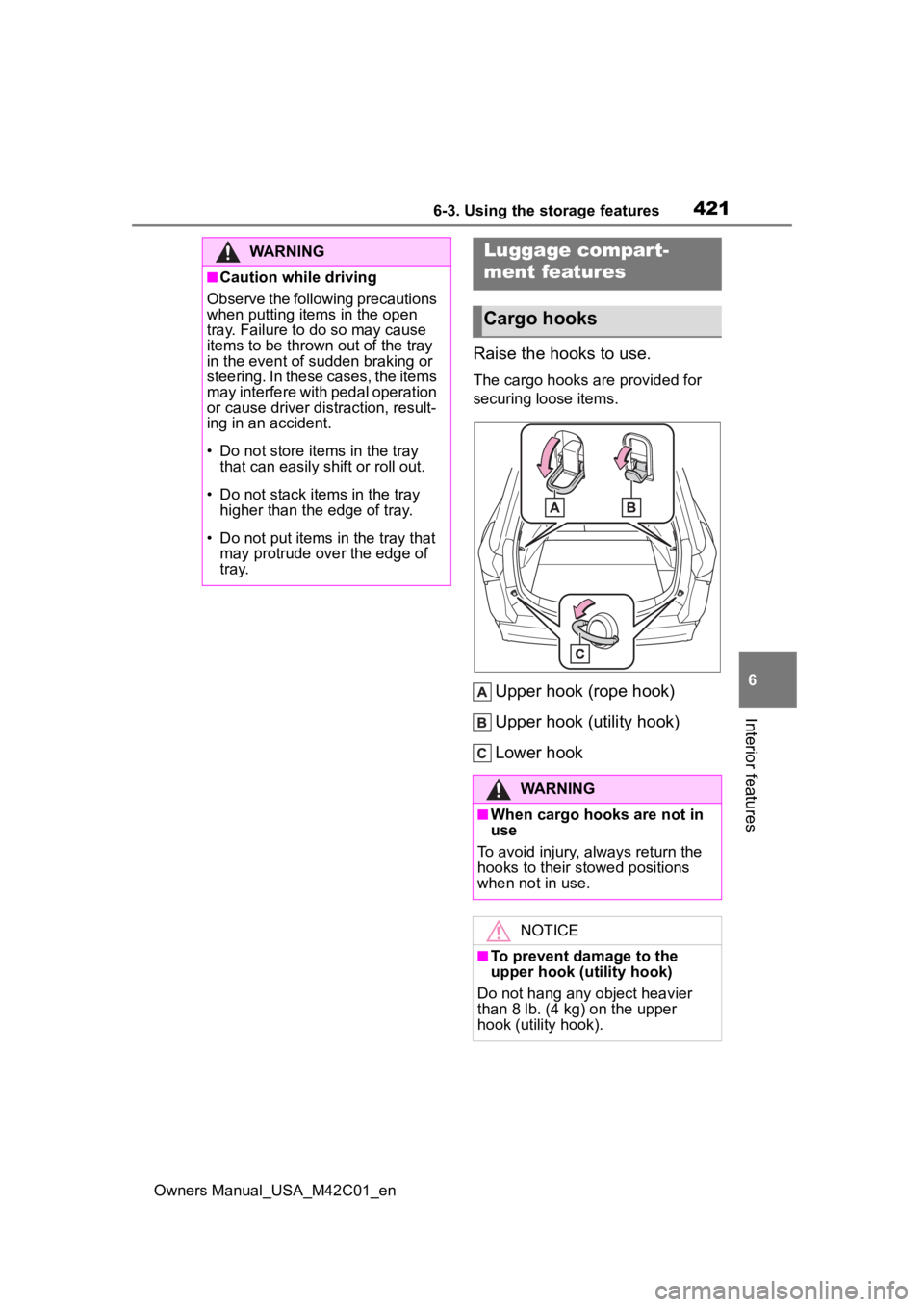
Raise the hooks to use.
The cargo hooks are provided for
securing loose items.
Upper hook (rope hook)
Upper hook (utility hook)
Lower hook
WARNING
■Caution while driving
Observe the following precautions
when putting items in the open
tray. Failure to do so may cause
items to be thrown out of the tray
in the event of sudden braking or
steering. In these cases, the items
may interfere with pedal operation
or cause driver distraction, result-
ing in an accident.
• Do not store items in the tray
that can easily shift or roll out.
• Do not stack items in the tray higher than the edge of tray.
• Do not put items in the tray that may protrude over the edge of
tray.
Luggage compar t-
ment features
Cargo hooks
WARNING
■When cargo hooks are not in
use
To avoid injury , always return the
hooks to their stowed positions
when not in use.
NOTICE
■To prevent damage to the
upper hook (utility hook)
Do not hang any object heavier
than 8 lb. (4 kg) on the upper
hook (utility hook).
Page 425 of 628
4256-3. Using the storage features
Owners Manual_USA_M42C01_en
6
Interior features
WARNING
■Luggage cover
●When installing/stowing the lug-
gage cover, make sure that the
luggage cover is securely
installed/stowed. Failure to do
so may result in serious injury in
the event of sudden braking or a
collision.
●Do not place anything on the
luggage cover. In the event of
sudden braking or turning, the
item may go flying and strike an
occupant. This could lead to an
unexpected accident, resulting
in death or serious injury.
●Do not allow ch ildren to climb
on the luggage cover. Climbing
on the luggage cover could
result in damage to the luggage
cover, possibly causing death or
serious injury to the child.