2023 SUBARU SOLTERRA ECU
[x] Cancel search: ECUPage 120 of 628

1202-2. Charging
Owners Manual_USA_M42C01_enschedule, connect the AC
charging connector
The charging start time is deter-
mined based on the charging
schedule at the t ime that the AC
charging connector was connected.
●Connect the AC charging connec-
tor before the start time
When the charging mode is set to
“Start”, if you connect the AC
charging connector after the set
start time, the next charging sched-
ule will be referenced.
When the charging mode is “Start-
Stop”, if you connect the AC
charging connector after the start
time, charging will start immediately
and charging will be performed until
the stop time.
●After connecting the AC charging
connector, check that the charging
indicator of the charging port
flashes ( P. 8 6 )
●Do not use an ou tlet that has a
power cut off function (including a
timer function)
Use an outlet that constantly sup-
plies electricity. For outlets where
the power is cut off due to a timer
function, etc., charging may not be
carried out accord ing to plan if the
power is cut off during the set time.
■When the AC charging connec-
tor remains connected to the
vehicle
●When the charging mode is set to
“Start”, even if multiple consecu-
tive charging schedules are regis-
tered, the next charge will not be
carried out according to the
charging schedule until the AC
charging connector is removed
and reconnected after charging
completes. Also, when the traction
battery is fully charged, charging
according to the charging sched- ule will not be carried out.
●If the charging stop time is
reached before t
he traction bat-
tery is fully cha rged and the
charging mode is set to “Start-
Stop”, the nearest charging
schedule after the stop time is
updated as the next charging
schedule, and charging is
repeated until the battery is fully
charged.
■Smartphone-linked operation
After applying to Toyota App, it is
possible to use the smartphone
application to change charging
schedule settings.
For details about Toyota Apps, refer
to http://www.toyota.com/
connected-services in the United
States and http://www.toy-
ota.ca/connected in Canada.
■When charging schedules are
ignored
When the following operations are
performed while the charging
schedule is on standby, charging
schedule is temporarily canceled
and charging is started.
●When the Remote Air Condition-
ing System ( P.409) is operated
●When turning “My Room Mode”
on ( P.129)
●When turning “Charge Now” on
( P.124, 128)
●When an operation that temporar-
ily cancel charging using the
charging schedule ( P.107)
■Battery heater ( P.99)/“Battery
Cooler” ( P. 9 9 )
Depending on the temperature of
the traction battery , the traction bat-
tery heater or traction battery cooler
may be activated and the charging
indicator may light up while the timer
is waiting for charging.
Page 134 of 628
1342-2. Charging
Owners Manual_USA_M42C01_en
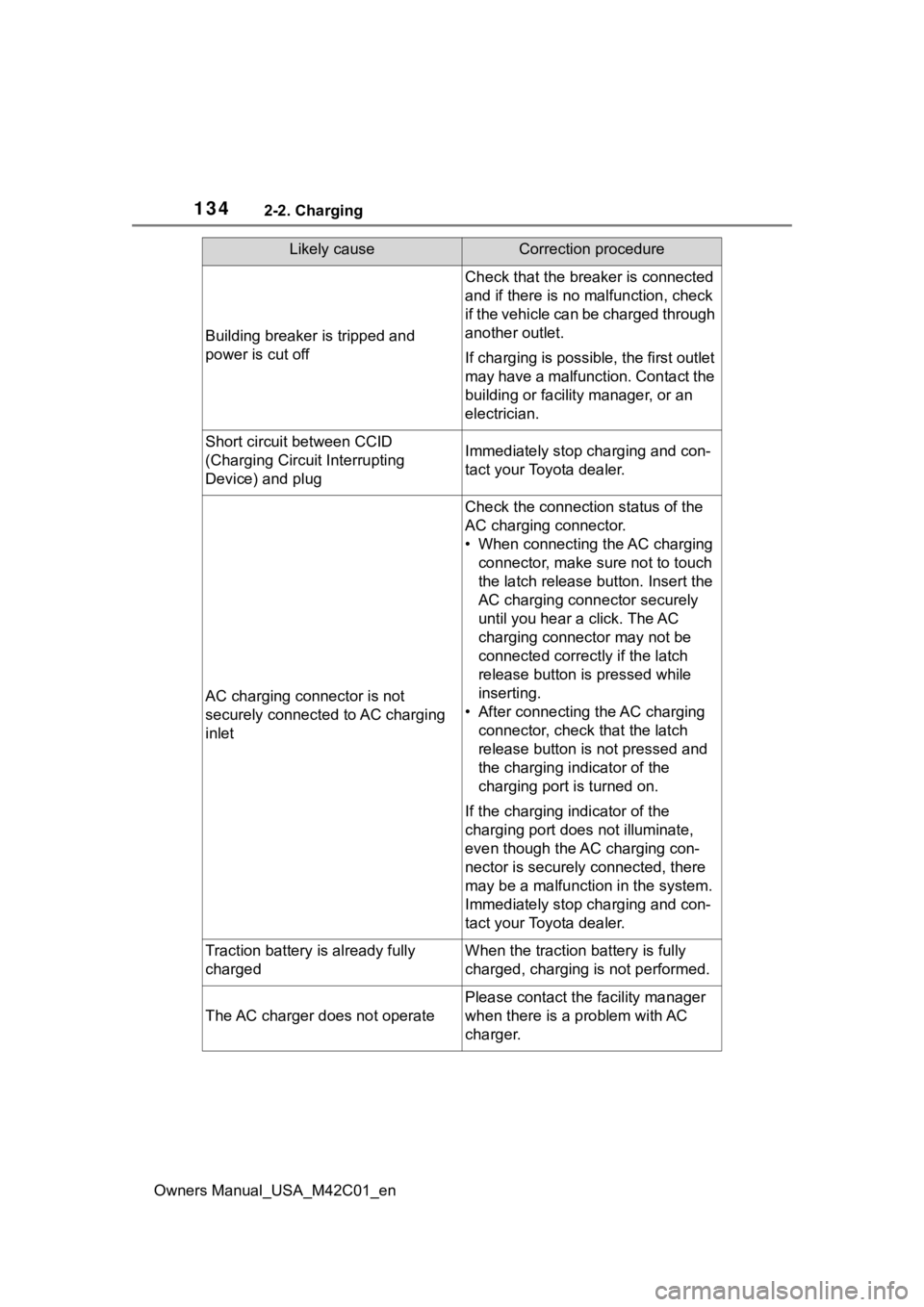
Building breaker is tripped and
power is cut off
Check that the breaker is connected
and if there is no malfunction, check
if the vehicle can be charged through
another outlet.
If charging is possible, the first outlet
may have a malfunction. Contact the
building or facilit y manager, or an
electrician.
Short circuit between CCID
(Charging Circuit Interrupting
Device) and plugImmediately stop charging and con-
tact your Toyota dealer.
AC charging connector is not
securely connected to AC charging
inlet
Check the connection status of the
AC charging connector.
• When connecting the AC charging connector, make sure not to touch
the latch release button. Insert the
AC charging connector securely
until you hear a click. The AC
charging connector may not be
connected correctly if the latch
release button is pressed while
inserting.
• After connecting the AC charging connector, check that the latch
release button is not pressed and
the charging indicator of the
charging port is turned on.
If the charging indicator of the
charging port does not illuminate,
even though the AC charging con-
nector is securely connected, there
may be a malfunction in the system.
Immediately stop charging and con-
tact your Toyota dealer.
Traction battery is already fully
chargedWhen the traction battery is fully
charged, charging is not performed.
The AC charger does not operate
Please contact the facility manager
when there is a problem with AC
charger.
Likely causeCorrection procedure
Page 135 of 628

1352-2. Charging
Owners Manual_USA_M42C01_en
2
Electric Vehicle system
■Charging indicator of the charging port flashes and charging
cannot be carried out.
*: Refer to P.86 for details regard ing charging indicator of the charging port
illumination and flashing.
■DC charging does not start
Likely causeCorrection procedure
When charging indicator of the
charging port flashes normally
*:
Charging schedule is registered
When you wish to charge according
to the charging schedule, wait until
the set time.
To start charging, set “Charge Now”
to on. ( P.124, 128)
When charging indicator of the
charging port rapidly flashes
*: Mal-
function occurred in an external
power source or the vehicle
A message will be d isplayed on the
multi-information display when the
power switch is off. Follow the
instructions displ ayed on the multi-
information display.
When DC charging cannot be performed normally
Likely causeCorrection procedure
The DC charging connector is not
properly connected to the vehicle.
Check the connection status of the
DC charging connec tor and be sure
that it is locked.
If the DC charging does not start,
even though the DC charging con-
nector is securely connected, there
may be a malfunction with the DC
charger or charging system.
The DC charging connector is not
securely locked.
• If there is a mal function with the
DC charger, contact the charging
station manager.
• If there is not a malfunction with
the DC charger, there may be a
malfunction in the system. Contact
your Toyota dealer.
Page 141 of 628
1412-2. Charging
Owners Manual_USA_M42C01_en
2
Electric Vehicle system
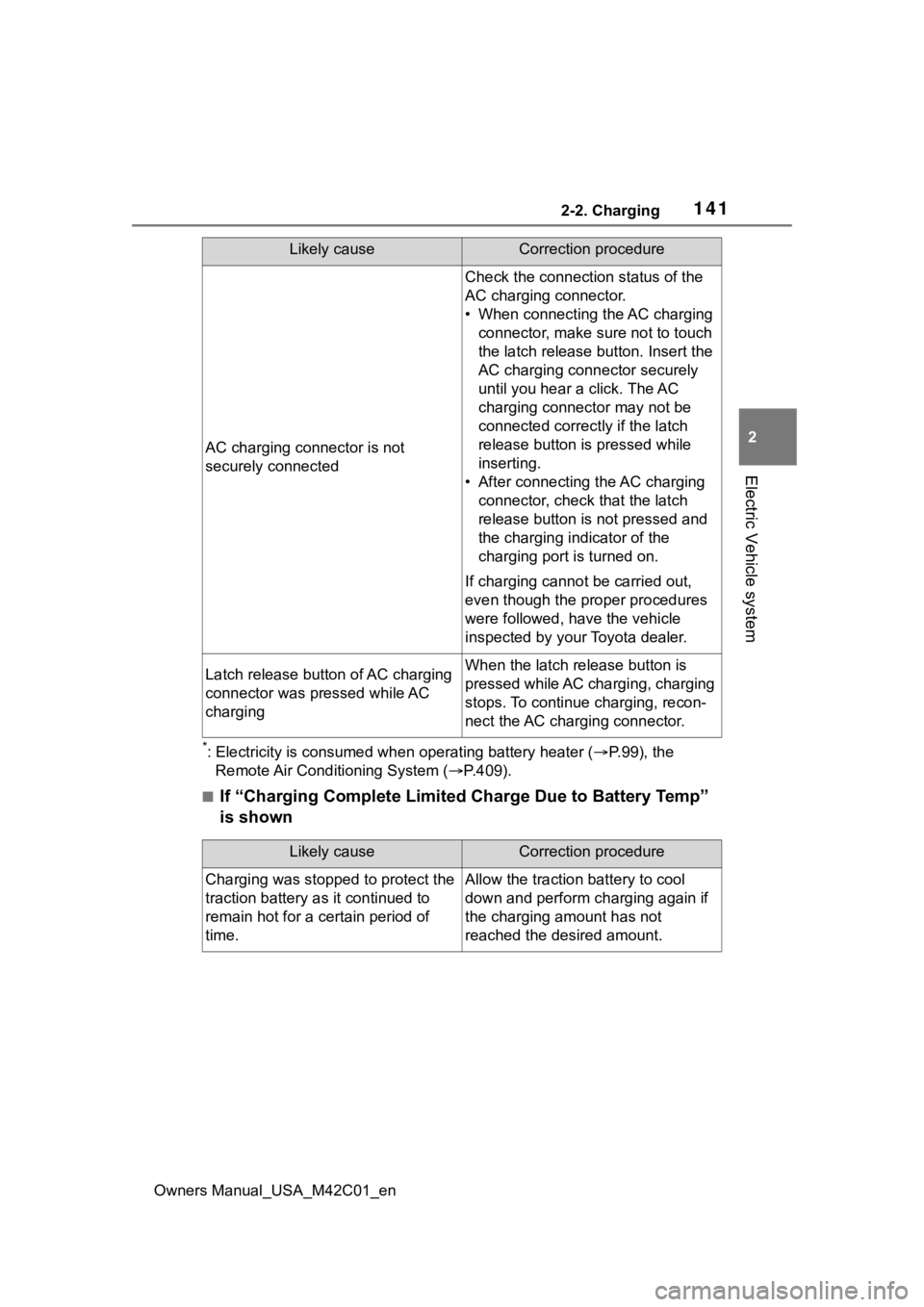
*: Electricity is consumed wh en operating battery heater ( P.99), the
Remote Air Conditioning System ( P.409).
■If “Charging Complete Limited Charge Due to Battery Temp”
is shown
AC charging connector is not
securely connected
Check the connection status of the
AC charging connector.
• When connecting the AC charging
connector, make sure not to touch
the latch release button. Insert the
AC charging connector securely
until you hear a click. The AC
charging connector may not be
connected correctly if the latch
release button is pressed while
inserting.
• After connecting the AC charging connector, check that the latch
release button is not pressed and
the charging indicator of the
charging port is turned on.
If charging cannot be carried out,
even though the proper procedures
were followed, h ave the vehicle
inspected by your Toyota dealer.
Latch release button of AC charging
connector was pressed while AC
chargingWhen the latch release button is
pressed while AC charging, charging
stops. To continue charging, recon-
nect the AC charging connector.
Likely causeCorrection procedure
Likely causeCorrection procedure
Charging was stopped to protect the
traction battery as it continued to
remain hot for a certain period of
time.Allow the traction battery to cool
down and perform ch arging again if
the charging amount has not
reached the desired amount.
Page 142 of 628
1422-2. Charging
Owners Manual_USA_M42C01_en
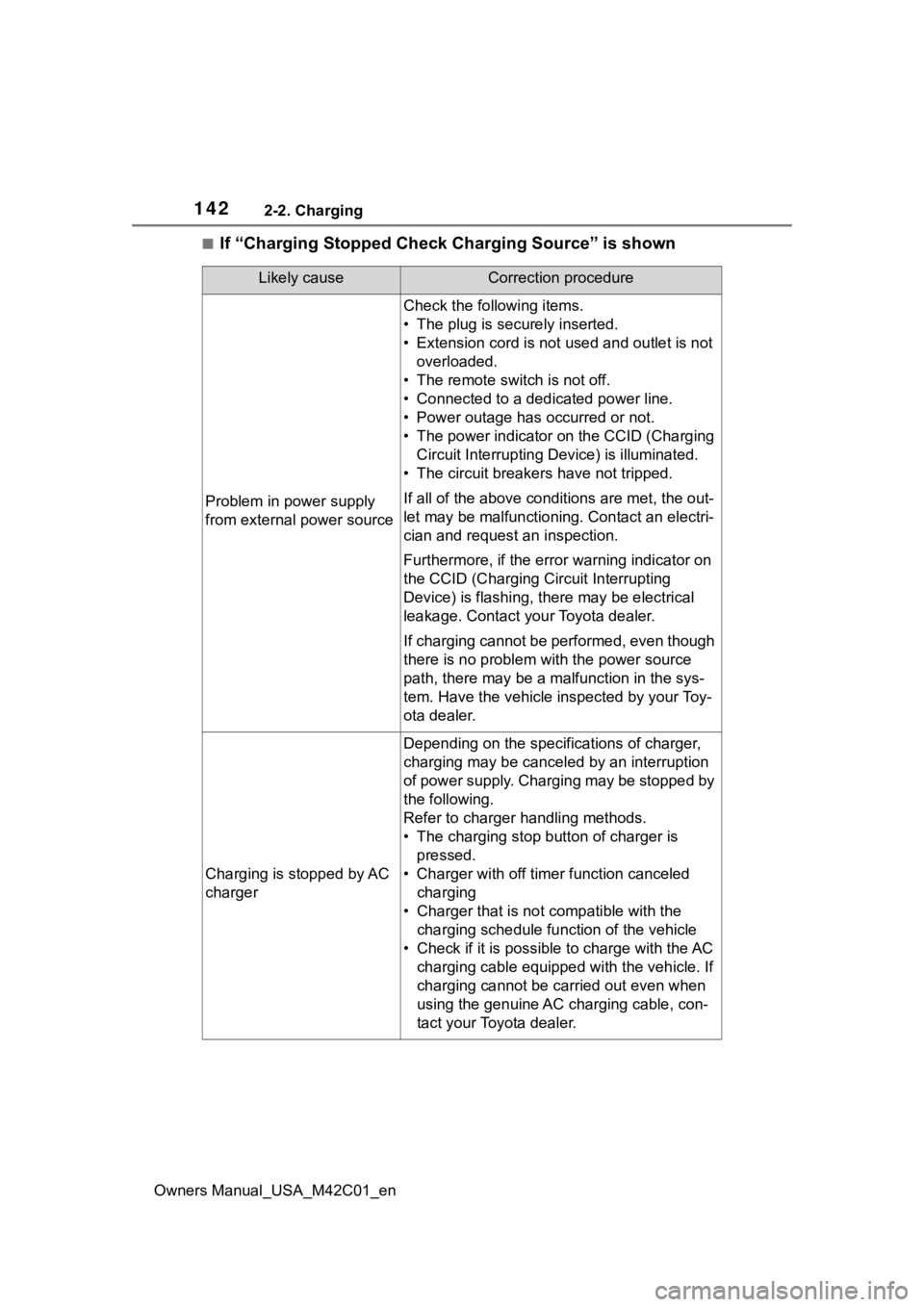
■If “Charging Stopped Check Charging Source” is shown
Likely causeCorrection procedure
Problem in power supply
from external power source
Check the following items.
• The plug is securely inserted.
• Extension cord is not used and outlet is not overloaded.
• The remote switch is not off.
• Connected to a dedicated power line.
• Power outage has occurred or not.
• The power indicator on the CCID (Charging Circuit Interrupting D evice) is illuminated.
• The circuit breakers have not tripped.
If all of the above condit ions are met, the out-
let may be malfunctioni ng. Contact an electri-
cian and request an inspection.
Furthermore, if the error warning indicator on
the CCID (Charging Circuit Interrupting
Device) is flash ing, there may be electrical
leakage. Contact your Toyota dealer.
If charging cannot be performed, even though
there is no problem with the power source
path, there may be a malfunction in the sys-
tem. Have the vehicle inspected by your Toy-
ota dealer.
Charging is stopped by AC
charger
Depending on the specifications of charger,
charging may be canceled by an interruption
of power supply. Charging may be stopped by
the following.
Refer to charger handling methods.
• The charging stop bu tton of charger is
pressed.
• Charger with off timer function canceled charging
• Charger that is not compatible with the charging schedule function of the vehicle
• Check if it is possible to charge with the AC charging cable equipped with the vehicle. If
charging cannot be carried out even when
using the genuine AC charging cable, con-
tact your Toyota dealer.
Page 150 of 628

1503-1. Instrument cluster
Owners Manual_USA_M42C01_enTurn signal indicator
(
P.242)
(U.S.A.)
Headlight indicator
( P.248)
(Canada)
Tail light indicator
( P.248)
Headlight high beam indi-
cator ( P.250)
AHB indicator ( P.250)
PCS warning light
*1, 2
( P.265)
(*4)
Cruise control indicator
( P.296)
(*4)
Dynamic radar cruise con-
trol indicator ( P.288)
(*4)
LDA indicator ( P.285)
BSM outside rear view
mirror indicators
*1, 5 (if
equipped) ( P.302, 307,
322)
LDA OFF
*2 indicator
( P.285)
(*4)
LTA i n d i c a t o r ( P.285)
Driving assist information
indicator
*1, 2 ( P.302,
322, 328, 331)
Intuitive parking assist
OFF indicator
*1, 2 (if
equipped) ( P.311)
(Flashes)
Slip indicator*1 ( P.388)
VSC OFF indicator*1, 2
( P.388)
Charging cable indicator
( P.101)
Smart key system indica-
tor
*3 ( P.231)
“READY” indicator
( P.231)
(U.S.A.)
Parking brake indicator
( P.243)
(Canada)
Parking brake indicator
( P.243)
Brake hold standby indi-
cator
*1 ( P.246)
Brake hold operated indi-
cator
*1 ( P.246)
Low outside temperature
indicator
*6 ( P.153)
Security indicator ( P. 6 8 ,
69)
“AIR BAG ON/OFF”
indicator
*1, 7 ( P. 4 4 )
Eco mode indicator
( P.241)
Snow Mode indicator (if
equipped) ( P.382)
Downhill assist control
system indicator (if
equipped) ( P.382)
Grip Control indicator (if
equipped) ( P.382)
Grip Control set speed
indicator (if equipped)
( P.385)
Regeneration Boost indi-
cator ( P.240)
Page 167 of 628

1674-2. Opening, closing and locking the doors
Owners Manual_USA_M42C01_en
4
Before driving
4-2.Opening, closing and locking the doors
■Using the entry function
Carry the electronic key to
enable this function.
1 Grip the driver’s door handle
to unlock the door. Holding
the driver’s door handle for
approximately 2 seconds
unlocks all the doors.
Grip the front passenger’s
door handle (some models)
or rear door handle (some
models) to unlock all the
doors
*.
Make sure to touch the sensor on
the back of the handle.
The doors cannot be unlocked for 3
seconds after the doors are locked.
*: The door unlock settings can be changed. (
P.167)
2 Touch the lock sensor (the
indentation on the side of the
door handle) to lock the
doors.
Check that the d oor is securely
locked.
■Using the wireless remote
control
1 Locks all the doors
Check that the d oor is securely
locked.
2 Unlocks all the doors
Pressing the button unlocks the
driver’s door. Pressing the button
again within 5 seconds unlocks the
other doors.
Press and hold to open the side
windows.
*
*
: This setting must be customized at your Toyota dealer.
■Switching the door unlock func-
tion
It is possible to set which doors the
entry function unlocks using the
wireless remote control. Perform the
switching operation in the vehicle or
within approximately 3.2 ft. (1 m) of
the vehicle.
1 Turn the power switch to OFF.
Side doors
The vehicle can be locked
and unlocked using the
entry function, wireless
remote control, door lock
switches or inside lock but-
tons.
Unlocking and locking the
doors from the outside
Page 168 of 628

1684-2. Opening, closing and locking the doors
Owners Manual_USA_M42C01_en2
When the indicator light on the
key surface is not on, press and
hold , or for
approximately 5 seconds while
pressing and holding .
The setting changes each time an
operation is performed, as shown
below. (When changing the setting
continuously, release the buttons,
wait for at least 5 seconds, and
repeat step 2.)
Vehicles with alarm: To prevent
unintended triggering of the alarm,
unlock the doors us ing the wireless
remote control and open and close
a door once after t he settings have
been changed. (If a door is not
opened within 60 seconds after
is pressed, the doors will be
locked again a nd the alarm will
automatically be set.) In a case that the alarm is triggered,
immediately stop the alarm. (
P. 6 9 )
■Locking the front doors from
the outside without a key
1 Move the inside l ock button to
the lock position. ( P.170)
2 Close the door.
The door cannot be locked if the
power switch is in ACC or ON, or
the electronic key is left inside the
vehicle.
Depending on the position of the
electronic key, the key may not be
detected correctly and the door may
be locked.
■Impact detection door lock
release system
In the event that t he vehicle is sub-
ject to a strong impact, all the doors
are unlocked. Depending on the
force of the impact or the type of
accident, however, the system may
not operate.
■Operation signals
Doors: A buzzer sounds and the
emergency flashers flash to indicate
that the doors have been
locked/unlocked. (Locked: Once;
Unlocked: Twice)
Side windows: A buzzer sounds to
indicate that the side windows are
operating.
■Security feature
If a door is not opened within
approximately 60 s econds after the
vehicle is unlocked, the security fea-
ture automatically locks the vehicle
again. (However, depending on the
location of the electronic key, the
key may be detected as being in the
vehicle. In this case, vehicle may be
unlocked.)
■When the door cannot be
locked by the lock sensor on
the surface of the door handle
When the door cannot be locked
even if the lock se nsor on the sur-
face of the door handle is touched
Multi-informa-
tion dis-
play/BeepUnlocking func- tion
Exterior: Beeps 3 times
Holding the
driver’s door han-
dle unlocks only
the driver’s door.
Holding the pas-
senger’s door
handle or press-
ing the back door
opener switch
unlocks all the
doors.
Exterior: Beeps twice
Holding a door
handle or press-
ing the back door
opener switch
unlocks all the
doors.