2023 SUBARU SOLTERRA check
[x] Cancel search: checkPage 69 of 628
691-4. Theft deterrent system
Owners Manual_USA_M42C01_en
1
For safety and security
■Items to check before lock-
ing the vehicle
To prevent unexpected trigger-
ing of the alarm and vehicle
theft, make sure of the following:
Nobody is in the vehicle.
The side windows are closed
before the alarm is set.
No valuables or other per-
sonal items are left in the
vehicle.
■Setting
Close the doors and hood, and
lock all the doors. The system
will be set automatically after 30
seconds.
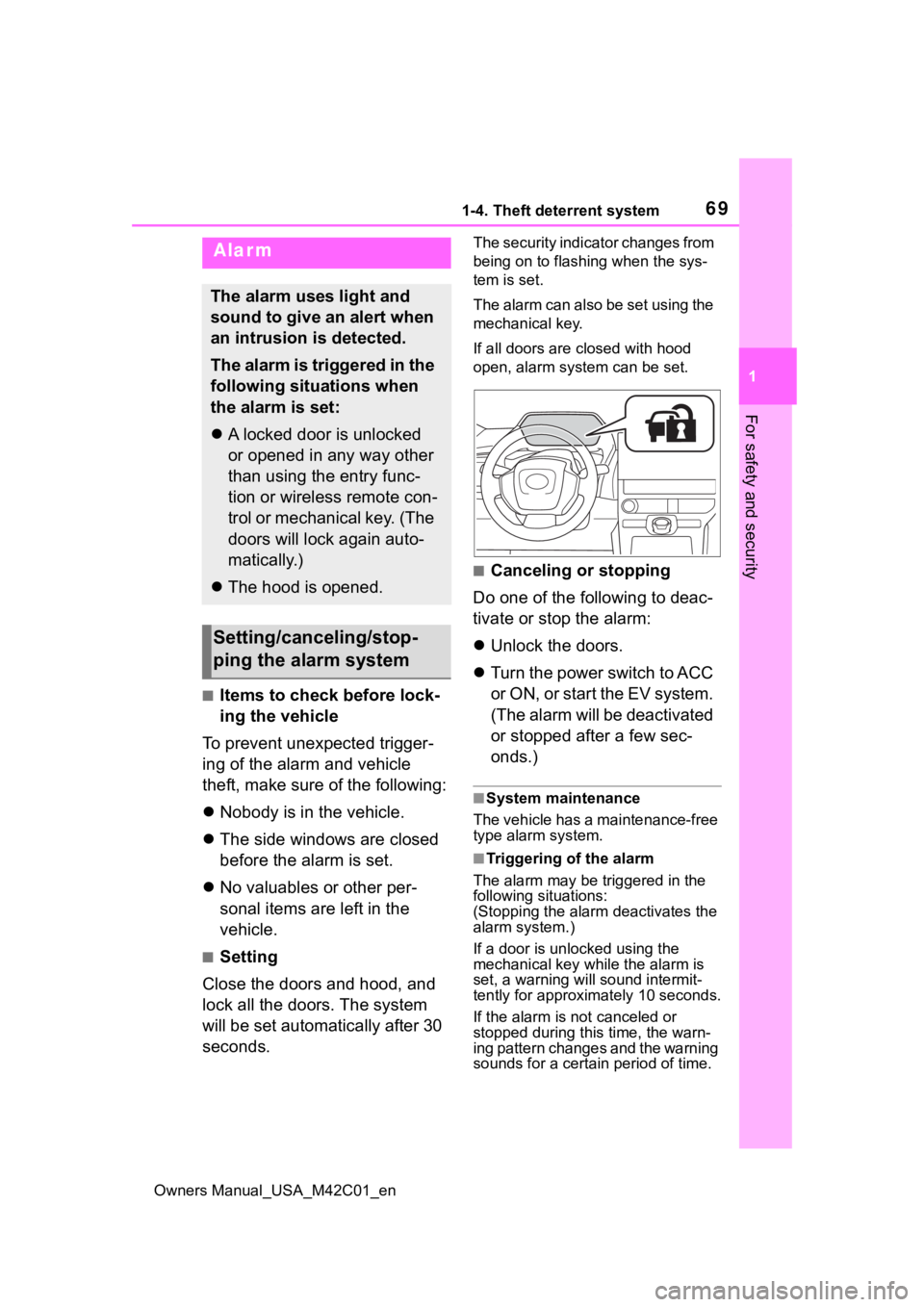
The security indicator changes from
being on to flashing when the sys-
tem is set.
The alarm can also be set using the
mechanical key.
If all doors are closed with hood
open, alarm system can be set.
■Canceling or stopping
Do one of the following to deac-
tivate or stop the alarm:
Unlock the doors.
Turn the power switch to ACC
or O N, or s tart the E V s ys tem .
(The alarm will be deactivated
or stopped after a few sec-
onds.)
■System maintenance
The vehicle has a maintenance-free
type alarm system.
■Triggering of the alarm
The alarm may be triggered in the
following situations:
(Stopping the alarm deactivates the
alarm system.)
If a door is unl ocked using the
mechanical key while the alarm is
set, a warning will sound intermit-
tently for approxi mately 10 seconds.
If the alarm is not canceled or
stopped during this time, the warn-
ing pattern changes and the warning
sounds for a certain period of time.
Alarm
The alarm uses light and
sound to give an alert when
an intrusion is detected.
The alarm is triggered in the
following situations when
the alarm is set:
A locked door is unlocked
or opened in any way other
than using the entry func-
tion or wireless remote con-
trol or mechanical key. (The
doors will lock again auto-
matically.)
The hood is opened.
Setting/canceling/stop-
ping the alarm system
Page 80 of 628

802-1. Electric vehicle system
Owners Manual_USA_M42C01_en
When a certain level of impact is
detected by the impact sensors,
the emergency shut off system turns off the EV system and
blocks the high voltage current.
If the emergency shut off system
activates, your vehicle will not
restart. To restart the EV sys-
tem, contact your Toyota dealer.
A message is automatically dis-
played when a malfunction
occurs in the EV system or an
improper operation is attempted.
If a warning message is shown
on the multi-information display,
read the message and follow the
instructions. (
P.140, 522)
■If a warning light comes on, a
warning message is displayed,
or the 12-volt battery is discon-
nected
The EV system may not start.
In that case, try to start the system
again. If the “READY” indicator does
not come on, contact your Toyota
dealer.
■When the traction battery is
completely discharged
When the EV system cannot be
started due to the traction battery
being completely discharged, restart
the system after AC charging or DC
charging. When charging, it is rec-
WARNING
■Caution while driving
●Pay special attention to the area
around the vehicle. Because
there is no engine noise, pedes-
trians, people riding bicycles or
other people and vehicles in the
area may not be aware of the
vehicle starting off or approach-
ing them, so take extra care
while driving. Therefore, take
extra care while driving even if
the Acoustic Vehicle Alerting
System is active.
●If the vehicle under floor area
receives strong shock or impact
while driving, stop the vehicle in
a safe place and check around
the bottom of the vehicle. If
there is damage to the traction
battery or liquid leakage, it may
lead to a vehicle fire, etc. Do not
touch the vehicle and immedi-
ately contact your Toyota dealer.
Even if no damage can be seen
under the floor, the traction bat-
tery may be damaged. If the
vehicle received an impact
under the floor, have the traction
battery inspected at a Toyota
dealer.
■Modifications
Do not make modifications that
lower the height of the vehicle.
The traction battery in the under
floor area may come into contact
with the ground when the height
of vehicle is lowered. If the trac-
tion battery is damaged, a vehicle
fire may occur, possibly resulting
in death or serious injury.
Emergency shut off sys-
tem
Warning message
Page 82 of 628

822-1. Electric vehicle system
Owners Manual_USA_M42C01_en
battery cannot be charged. Also,
when using the air conditioning
system, etc., the traction battery
electricity is consumed.
(P.237)
Repeated acceleration and
deceleration due to traffic con-
gestion, long waits at traffic
lights, and driving on steep
inclines will lead to poor electric-
ity consumption. In order to
avoid those situations as much
as possible, check traffic reports
before leaving. If the vehicle is
driven in traffic congestion, gen-
tly release the brake pedal to
allow the vehicle to move for-
ward slightly, avoid overuse of
the accelerator pedal. Doing so
can help minimize unnecessary
electricity consumption.
Make sure to operate the brakes
gently and a timely manner. A
greater amount of electrical
energy can be regenerated
when slowing down.
Control and maintain the vehicle
at a constant speed. Before
stopping at a toll booth or simi-
lar, allow plenty of time to release the accelerator and gen-
tly apply the brakes. A greater
amount of electrical energy can
be regenerated when slowing
down.
Use the air conditioning only
when necessary. Doing so
can help reduce excessive
electricity consumption.
In summer: When the ambient tem-
perature is high, use the recircu-
lated air mode. Doing so will help to
reduce the burden on the air condi-
tioning system and reduce electric-
ity consumption as well.
In winter: Exce ssive or unneces-
sary heating should be avoided.
Also, electricity consumption can
be improved by avoiding overuse of
the heater.
When using the Remote Air
Conditioning System
( P.409) while the AC
charging cable is connected
to the vehicle, electricity con-
sumption immediately after
starting off will be reduced
because air conditioning is
operated mainly using elec-
tricity from an external power
source.
Make sure to check the tire infla-
tion pressure frequently.
Delays
When braking
Highway (or freeways)
driving
Air conditioning
Checking tire inflation
pressure
Page 90 of 628
902-2. Charging
Owners Manual_USA_M42C01_en
■Automatic check function
This is an automatic system
check that is run before
charging begins to check for
problems in the operation of the
electrical leakage detection
function.
If a malfunction is found in the elec-
trical leakage detection function as
a result of the c heck, the error
warning indicator flashes to inform
the user. ( P. 9 0 )
■Temperature detection
function
A temperature detection func-
tion is equipped to the plug.
While charging, if heat is gener-
ated due to looseness on the
outlet side etc., this function
suppresses heat by controlling
the charging current.
■Conditions for supplying
current to the vehicle
The CCID (Charging Circuit
Interrupting Device) is designed
to prevent electrical current from
being supplied to the charging
connector when it is not con-
nected to the vehicle, even if the plug is inserted into the outlet.
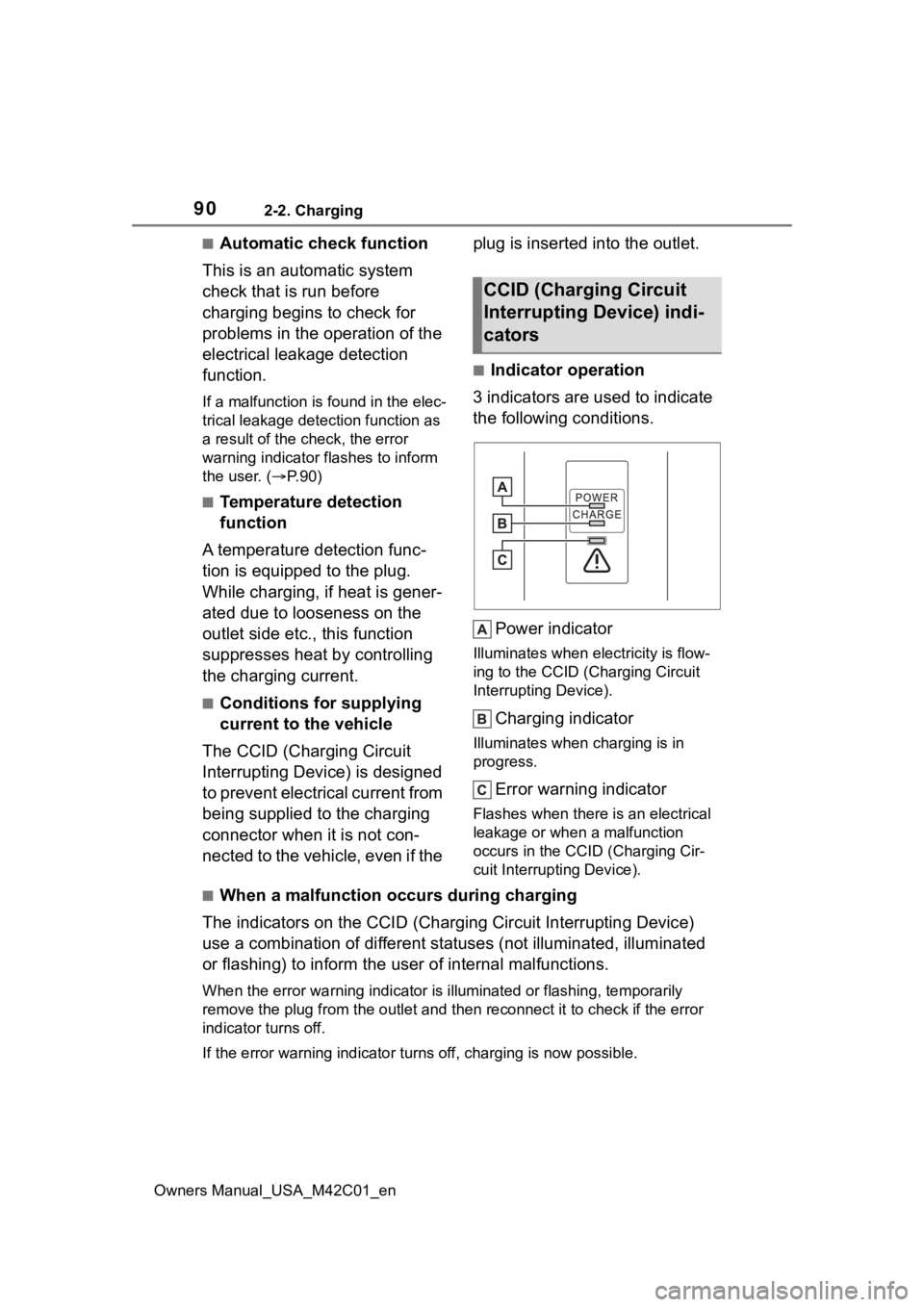
■Indicator operation
3 indicators are used to indicate
the following conditions.
Power indicator
Illuminates when electricity is flow-
ing to the CCID (C harging Circuit
Interrupting Device).
Charging indicator
Illuminates when charging is in
progress.
Error warning indicator
Flashes when there is an electrical
leakage or when a malfunction
occurs in the CCI D (Charging Cir-
cuit Interrupting Device).
■When a malfunction occurs during charging
The indicators on the CCID (Charging Circuit Interrupting Devic e)
use a combination of different statuses (not illuminated, illum inated
or flashing) to inform the user of internal malfunctions.
When the error wa rning indicator is illuminated or flashing, te mporarily
remove the plug from the outlet and then reconnect it to check if the error
indicator turns off.
If the error warning indicator turns off, charging is now possi ble.
CCID (Charging Circuit
Interrupting Device) indi-
cators
Page 91 of 628
912-2. Charging
Owners Manual_USA_M42C01_en
2
Electric Vehicle system
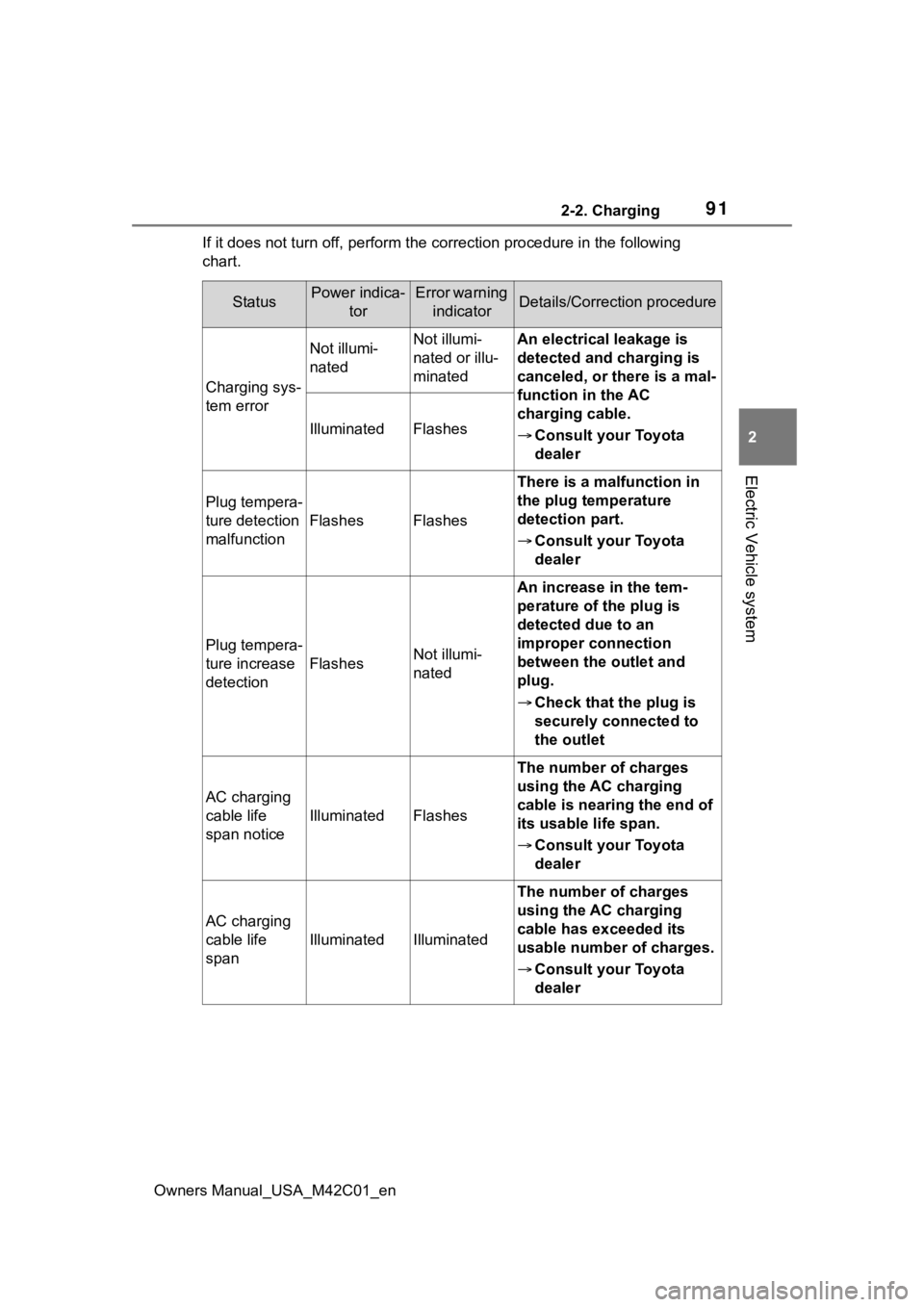
If it does not turn off, perform t he correction procedure in the following
chart.
StatusPower indica- torError warning indicatorDetails/Correction procedure
Charging sys-
tem error
Not illumi-
natedNot illumi-
nated or illu-
minatedAn electrical leakage is
detected and charging is
canceled, or there is a mal-
function in the AC
charging cable.
Consult your Toyota
dealer
IlluminatedFlashes
Plug tempera-
ture detection
malfunction
FlashesFlashes
There is a malfunction in
the plug temperature
detection part.
Consult your Toyota
dealer
Plug tempera-
ture increase
detection
FlashesNot illumi-
nated
An increase in the tem-
perature of the plug is
detected due to an
improper connection
between the outlet and
plug.
Check that the plug is
securely connected to
the outlet
AC charging
cable life
span notice
IlluminatedFlashes
The number of charges
using the AC charging
cable is nearing the end of
its usable life span.
Consult your Toyota
dealer
AC charging
cable life
span
IlluminatedIlluminated
The number of charges
using the AC charging
cable has exceeded its
usable number of charges.
Consult your Toyota
dealer
Page 92 of 628
922-2. Charging
Owners Manual_USA_M42C01_en
For safety, inspect the AC
charging cable on a routine
basis.
Inspecting the AC
charging cable
WARNING
■Routine inspection
Check the following points regu-
larly.
Failure to do so may cause an
unexpected accident, resulting in
death or serious injury.
●The AC charging cable, plug,
charging connector, CCID
(Charging Circuit Interrupting
Device), etc., have not been
damaged
●The outlet has not been dam-
aged.
●The plug can be securely
inserted into the outlet.
●The plug does not get extremely
hot during use
●The tip of the plug has not been
deformed.
●The plug is not dirtied by dust,
etc.
Remove the plug from the outlet
before inspecting it. If any abnor-
malities are found in the AC
charging cable as a result of the
inspection, immediately stop use
and consult your Toyota dealer.
■Maintaining the AC charging
cable
When the AC charging cable is
dirty, first remove the dirt with a
hard, wringed cloth, and then
wipe the cable with a dry cloth.
However, never wash it with
water. If the AC charging cable is
washed with water, fire or electric
shock may occur du ring charging,
possibly resulting in death or seri-
ous injury.
■When not using the AC
charging cable for a long time
Remove the plug fr om the outlet.
Dust could accumulate on the
plug or in the outlet, possibly
causing overheating which could
lead to a fire.
Also, keep the cable in a place
free from moisture.
Page 95 of 628
952-2. Charging
Owners Manual_USA_M42C01_en
2
Electric Vehicle system
■AC charging connector lock
function
If the AC charging connector is
locked/unlocked repeatedly, it may
not work temporarily due to protect
the system by AC charging system.
In this case, wait for a while before
connecting the AC charging connec-
tor to AC charging inlet again.
The AC charging connector lock
function does not guarantee that
theft of the AC charging cable will be
prevented, and is not necessarily
effective for all mischiefs.
■Security function for unlocking
If the AC charging connector is not
removed within approximately 30
seconds after the vehicle is
unlocked, the secur ity function auto-
matically locks the connector again.
■When the AC charging connec-
tor cannot be inserted into the
AC charging inlet
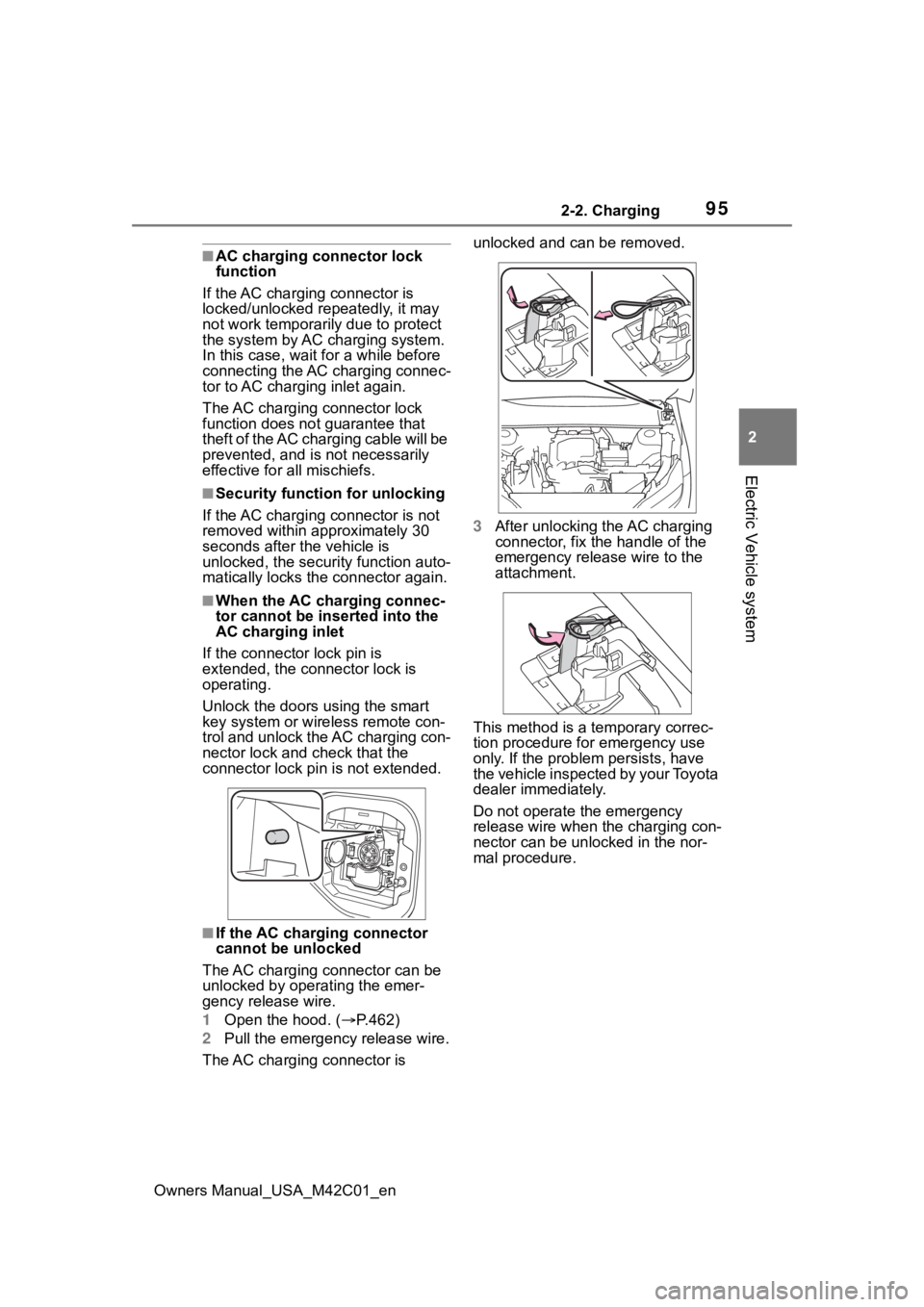
If the connector lock pin is
extended, the connector lock is
operating.
Unlock the doors using the smart
key system or wireless remote con-
trol and unlock the AC charging con-
nector lock and check that the
connector lock pin is not extended.
■If the AC charging connector
cannot be unlocked
The AC charging connector can be
unlocked by operating the emer-
gency release wire.
1 Open the hood. ( P.462)
2 Pull the emergency release wire.
The AC charging connector is unlocked and can be removed.
3
After unlocking the AC charging
connector, fix the handle of the
emergency release wire to the
attachment.
This method is a temporary correc-
tion procedure for emergency use
only. If the problem persists, have
the vehicle inspected by your Toyota
dealer immediately.
Do not operate the emergency
release wire when the charging con-
nector can be unlocked in the nor-
mal procedure.
Page 96 of 628
962-2. Charging
Owners Manual_USA_M42C01_en
Connect to an AC 120 V out-
let (NEMA 5-15R) with a
Ground-Fault Circuit-Inter-
rupter (GFCI) and a circuit
breaker. Use of a 15A individ-
ual circuit is strongly recom-
mended to ensure AC
charging cable will operate
properly.
When charging outdoors,
make sure to connect to a
weatherproof outlet that is
certified for outdoor use.
Checking Ground-Fault Cir-
cuit-Interrupter (GFCI) opera-
tion before its use is
recommended.
WARNING
■When connecting the AC
charging connector to the AC
charging inlet
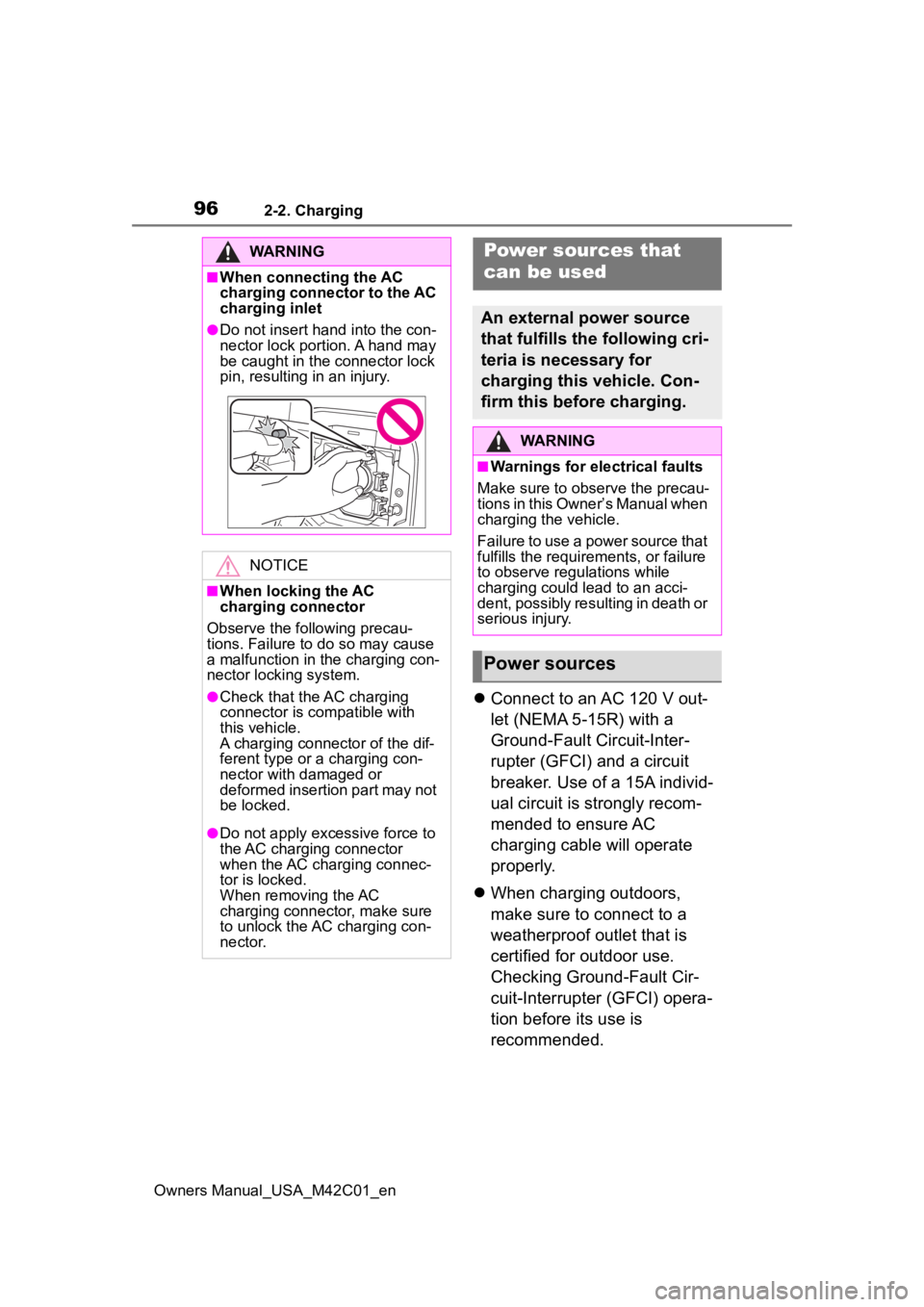
●Do not insert hand into the con-
nector lock portion. A hand may
be caught in the connector lock
pin, resulting in an injury.
NOTICE
■When locking the AC
charging connector
Observe the following precau-
tions. Failure to do so may cause
a malfunction in the charging con-
nector locking system.
●Check that the AC charging
connector is compatible with
this vehicle.
A charging connector of the dif-
ferent type or a charging con-
nector with damaged or
deformed insertion part may not
be locked.
●Do not apply excessive force to
the AC charging connector
when the AC charging connec-
tor is locked.
When removing the AC
charging connector, make sure
to unlock the AC charging con-
nector.
Power sources that
can be used
An external power source
that fulfills the following cri-
teria is necessary for
charging this vehicle. Con-
firm this before charging.
WARNING
■Warnings for electrical faults
Make sure to observe the precau-
tions in this Owner’s Manual when
charging the vehicle.
Failure to use a power source that
fulfills the requirements, or failure
to observe regulations while
charging could lead to an acci-
dent, possibly resulting in death or
serious injury.
Power sources