2023 SUBARU BRZ ron 95
[x] Cancel search: ron 95Page 148 of 432
Warning and Indicator Lights
142force will be restored after the steering
wheel is not operated for a while and
the power steering control system has
an opportunity to cool down. However,
if the power steering is operated in a
non-standard way which causes
power assist limitation to occur too
frequently, that may result in a mal-
function of the power steering control
system.■ TRAC OFF Indicator
LightThis light illuminates when the TRAC
system is off. For detai ls, refer to "Vehicle
Stability Control ( VSC)/TRAC System"
P247.
■ Vehicle Stability
Control (VSC)
Warning Light/Vehicle
Stability Control (VSC) Oper -
ation Indicator Light▼ Vehicle Stability Control (VSC)
warning light
NOTEIf the electrical circuit of the Vehicle
Stability Control (VSC) system itself
malfunctions, the warning light only
illuminates. At this time, the ABS (Anti-
lock Brake System) remains fully oper-
ational.
The warning light illuminates when
the electronic control system of the
ABS/Vehicle Stability Control (VSC)
system malfunctions.
The Vehicle Stability Control (VSC)
system is probably inoperative under any
of the following conditions. Have your
vehicle checked at a SUBARU dealer
immediately.
The warning light does not illuminate
when the ignition switch is turned to the
“ON” position.
The warning light illuminates while the
vehicle is running.NOTEIf the warning light behavior is as
described in the following examples,
the Vehicle Stability Control (VSC) sys-
tem may be considered normal.
The warning light illuminates right
after the engine is started but turns off
immediately and remains off.
The warning light illuminates after
the engine has started and turns off
CAUTION
The Vehicle Stability Control (VSC)
system provides its ABS control
through the electrica l circuit of the
ABS. Accordingly, if the ABS is
inoperative, the Vehicle Stability
Control (VSC) system becomes
unable to provide ABS control. As a
result, the Vehicle Stability Control
(VSC) system becomes inoperative,
causing the warning light to illumi-
nate. Although both the Vehicle Sta-
bility Control (VSC) and ABS are
inoperative in this case, the ordi-
nary functions of the brake system
are still available. You will be safe
while driving in this condition, but
drive carefully and have your vehi-
cle checked at a SUBARU dealer as
soon as possible.
BRZ_U.book 142 ページ 2022年3月29日 火曜日 午後3時59分
Page 150 of 432
Warning and Indicator Lights
144NOTEEven when the access key fob is
within the operating ranges inside the
vehicle, the access key warning for
engine start may be provided
depending on the status of the access key fob and the environmental condi-
tions.
When the access key fob is taken
out of the vehicle through an open
window, the access key takeout
warning or passenger access key
takeout warning will not be provided.
▼ List of warnings
WARNING
Never drive the vehicle if a steering
lock warning message is displayed
on the combination meter when
starting the engine. This indicates
the status that the steering lock is
not released and could result in an
accident involving serious injury or
death.
CAUTION
If a steering lock system malfunc-
tion warning message is
displayed on the combination
meter, there could be a steering
lock malfunction. Contact your
SUBARU dealer as soon as
possible. When the keyless access system
warning message is displayed on
the combination meter, contact a
SUBARU dealer immediately.
CAUTION
When any of the following warnings
occurs even if the access key warn-
ing indicator does not appear, take
the appropriate action.
BRZ_U.book 144 ページ 2022年3月29日 火曜日 午後3時59分
Page 183 of 432
Light Control Switch
177
Instruments and Controls3
– CONTINUED –
When the headlights are on high beam,
the high beam indicator light “ ” on the
combination meter also illuminates.■ High Beam Assist Function
(If Equipped)
NOTE The high beam assist function
utilizes the stereo camera installed at
the position of th e front map lights.
For details on how to handle the
stereo camera, refer to the Owner’s
Manual supplement for the EyeSight
system.
The high beam assist function automati-
cally changes the headlight from high
beam to low beam (or vice versa).
When all of the following conditions are
met, the headlight will change to high
beam.
When the vehicle speed increases to or
above 20 mph (32 km/h).
There is no preceding or oncoming
vehicle.
The forward area of the vehicle is dark.
The road does not have a sharp curve.
When any of the following conditions are
met, the headlight will change to low
beam.
When the vehicle speed decreases to
or below 10 mph (16 km/h).
When the forward area of the vehicle is
bright.
When there is a preceding or oncoming
vehicle.
When the EyeSight system is malfunc-
tioning or is temporarily stopped.
NOTE Do not overestimate the capacity of
the high beam assist function. The
driver always has the responsibility to
understand the surrounding situation,
to drive safely, and to change the head-
light mode manually if necessary.
The factory setting (default setting)
for this function is set as “operational”.
This setting can be changed to OFF
(non-operation) at SUBARU dealers.
For more details, contact a SUBARU
dealer.
▼ How to use the high beam assist
function
The high beam assist function will be acti-
vated when all the following conditions are
met.
The light control swit ch is in the “AUTO”
position and the low beam headlights are
on automatically.
The turn signal lever is pushed forward.
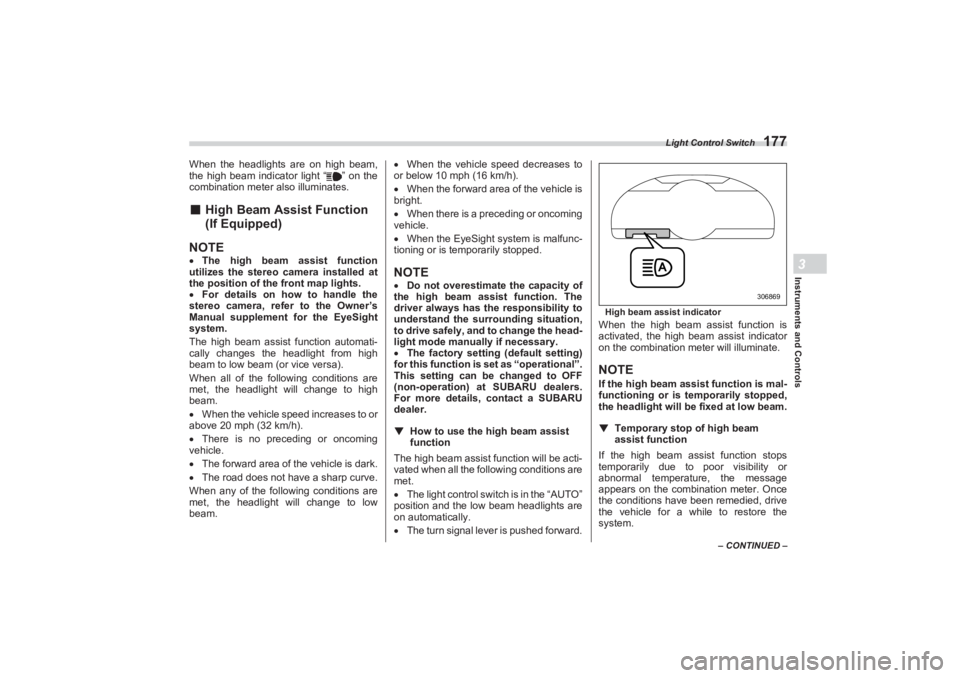
High beam assist indicatorWhen the high beam assist function is
activated, the high beam assist indicator
on the combination meter will illuminate.NOTEIf the high beam ass ist function is mal-
functioning or is temporarily stopped,
the headlight will be fixed at low beam.
▼ Temporary stop of high beam
assist functionIf the high beam assist function stops
temporarily due to poor visibility or
abnormal temperature, the message
appears on the combination meter. Once
the conditions have been remedied, drive
the vehicle for a while to restore the
system.
306869
BRZ_U.book 177 ページ 2022年3月29日 火曜日 午後3時59分
Page 185 of 432
Light Control Switch
179
Instruments and Controls3
– CONTINUED –
- In bad weather (fog, snow, sand
storm, heavy rain, etc.).
- When the windshield glass is dirty or
fogged.
- When the windshield is cracked or
damaged.
- If there are lights similar to the head-
lights or the tail lights in the surrounding
area.
- When an oncoming vehicle or
vehicle ahead is driven without its
headlights and tail lights on.
- If the headlights of an oncoming
vehicle or the tail lights of a vehicle
ahead are dirty or discolored, or if the
light beams are not aimed correctly.
- When a rapid change of brightness
continues while driving.
- When driving on a road with many
ups and downs or uneven surfaces.
- When driving on a road with many
curves.
- When there are some objects that
reflect light strongly, such as a road
sign or a mirror in vehicle ahead.
- When the rear part of the vehicle
ahead, such as a container, reflects
light strongly.
- When the headlights of your vehicle
are damaged or dirty.
- When your vehicle is tilted, such as
in case the vehicle has a flat tire or is
being towed. - When the stereo camera is
deformed or the stereo camera lenses
are dirty.
- Immediately after the engine has
started.
In the following conditions, the head-
light mode will not be automatically
changed from the high beam to the low
beam.
- When your vehicle passes an
oncoming vehicle suddenly in a blind
curve.
- When another vehicle passes in
front of your vehicle.
- When an oncoming vehicle or
vehicle ahead comes in and out of view
because of continuous curves, median
strips, roadside trees, etc.
If the stereo camera detects the light of
the front fog lights of an oncoming vehicle,
the headlight mode may change from the
high beam to the low beam automatically.
The headlight mode may change from
the high beam to the low beam, or the low
beam mode may continue, when affected
by a street light, traffic signal, illumination
of an advertisement board, or a reflective
object such as a road sign and signboard.
The timing of the change of headlight
mode may differ due to the following
factors. - Color or brightness of the headlights
of an oncoming vehicle or the tail lights
of a vehicle ahead.
- The headlights of the oncoming
vehicle or the tail lights of the vehicle
ahead are covered with mud, snow,
etc.
- Movement and direction of an
oncoming vehicle or a vehicle ahead.
- When the headlights of an
oncoming vehicle or the tail lights of a
vehicle ahead illuminate on only one
side.
- When the oncoming vehicle or
vehicle ahead is a motorcycle.
- Conditions of a road (slope, curve,
road surface, etc.).
- Number of passengers and weight
of loaded cargo.
- Limitation of the detection ability of
the stereo camera.
BRZ_U.book 179 ページ 2022年3月29日 火曜日 午後3時59分
Page 190 of 432
Wiper and Washer
184and to remove accumulations of road
salt or road film. Operate the wind-
shield washer for at least 1 second so
that washer solution will be sprinkled
all over the windshield or rear window.
Grease, wax, insects, or other mate-
rial on the windshield or the wiper
blade results in jerky wiper operation
and streaking on the glass. If you
cannot remove the streaks after oper-
ating the windshield washer or if the
wiper operation is jerky, clean the
outer surface of the windshield using a
sponge or soft cloth with a neutral
detergent or mild-abrasive cleaner. Do
not, however, use detergent to clean
the blade rubbers. Use only a sponge
or soft cloth (and no neutral detergent
or mild abrasive cleaner) when you
clean the blade rubbers. If you wipe the
rubber of the blade strongly, the black
coating component will peel off, which
will cause the wiper to judder. Also,
after wiping it off, check that the rubber
has not come loose. After cleaning the
window glass and wiper blade rubbers,
be sure to rinse them with clean water.
Rinse the window un til the water does
not form beads on the glass. This indi-
cates that the glass is clean.
If you cannot eliminate the streaking
even after followin g this procedure,
replace the wiper blades (or blade rubbers) with new ones. For replace-
ment instructions, refer to "Replace-
ment of Wiper Blades"
P367.
If the wipers do not operate in the
following conditions, turn the wiper
switch to the “ ” position. - The wiper switch is in the “ ”
position, however, it does not work.
- The wiper switch is in the “ ”
position, however, it does not work.
In these cases, contact your SUBARU
dealer.
■ Windshield Wiper and
Washer SwitchesThe wiper operates only when the ignition
switch is in the “ON” position.
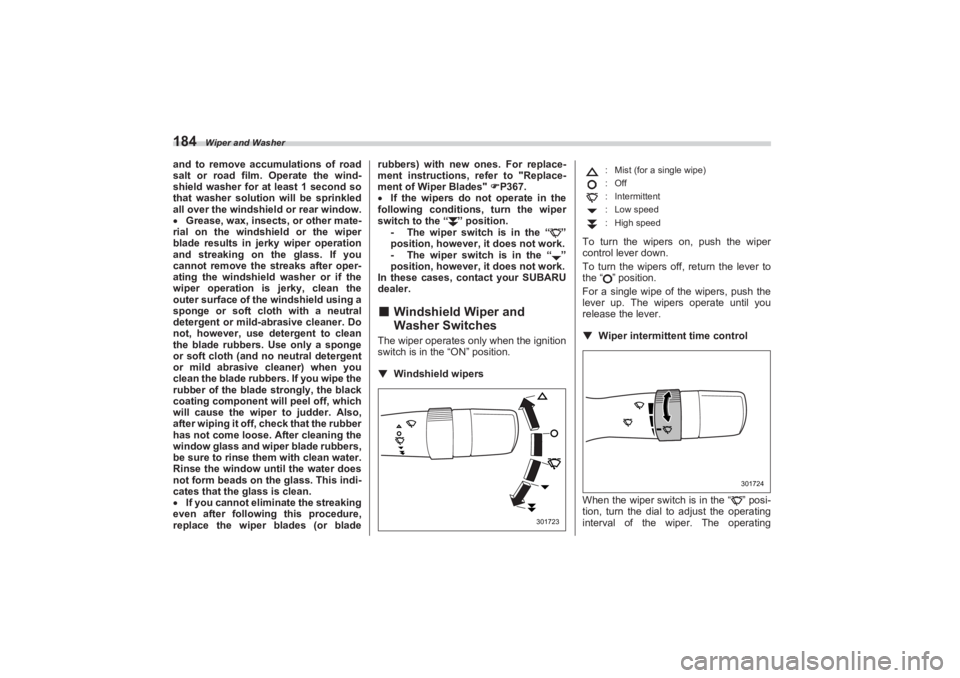
▼ Windshield wipers To turn the wipers on, push the wiper
control lever down.
To turn the wipers off, return the lever to
the “ ” position.
For a single wipe of the wipers, push the
lever up. The wipers operate until you
release the lever.
▼ Wiper intermittent time control
When the wiper switch is in the “ ” posi-
tion, turn the dial to adjust the operating
interval of the wiper. The operating
301723
: Mist (for a single wipe)
:Off
: Intermittent
: Low speed
: High speed
301724
BRZ_U.book 184 ページ 2022年3月29日 火曜日 午後3時59分
Page 201 of 432
Tilt/Telescopic Steering Wheel
195
Instruments and Controls3
3-17. Tilt/Telescopic SteeringWheel
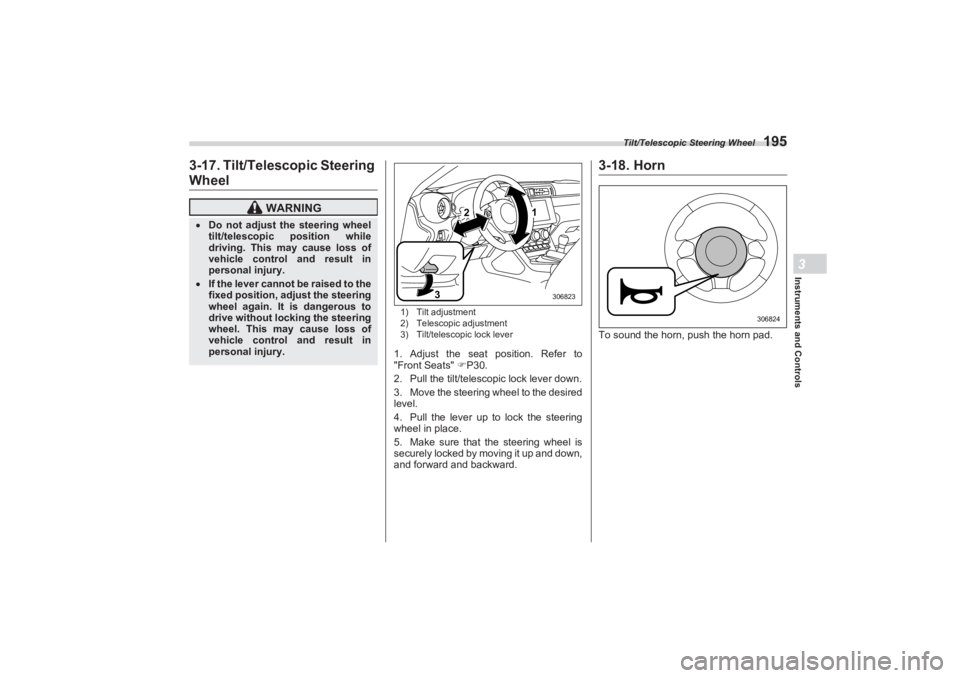
1) Tilt adjustment
2) Telescopic adjustment
3) Tilt/telescopic lock lever1. Adjust the seat position. Refer to
"Front Seats" P30.
2. Pull the tilt/telescopic lock lever down.
3. Move the steering wheel to the desired
level.
4. Pull the lever up to lock the steering
wheel in place.
5. Make sure that the steering wheel is
securely locked by moving it up and down,
and forward and backward.
3-18. HornTo sound the horn, push the horn pad.
WARNING
Do not adjust the steering wheel
tilt/telescopic position while
driving. This may cause loss of
vehicle control and result in
personal injury. If the lever cannot be raised to the
fixed position, adjust the steering
wheel again. It is dangerous to
drive without locking the steering
wheel. This may cause loss of
vehicle control and result in
personal injury.
2
3
1
306823
306824
BRZ_U.book 195 ページ 2022年3月29日 火曜日 午後3時59分
Page 205 of 432
Climate Control Panel
199
Climate Control4
17
2
3
4
6
5
15
13
8
9
10
11
12
14
403484
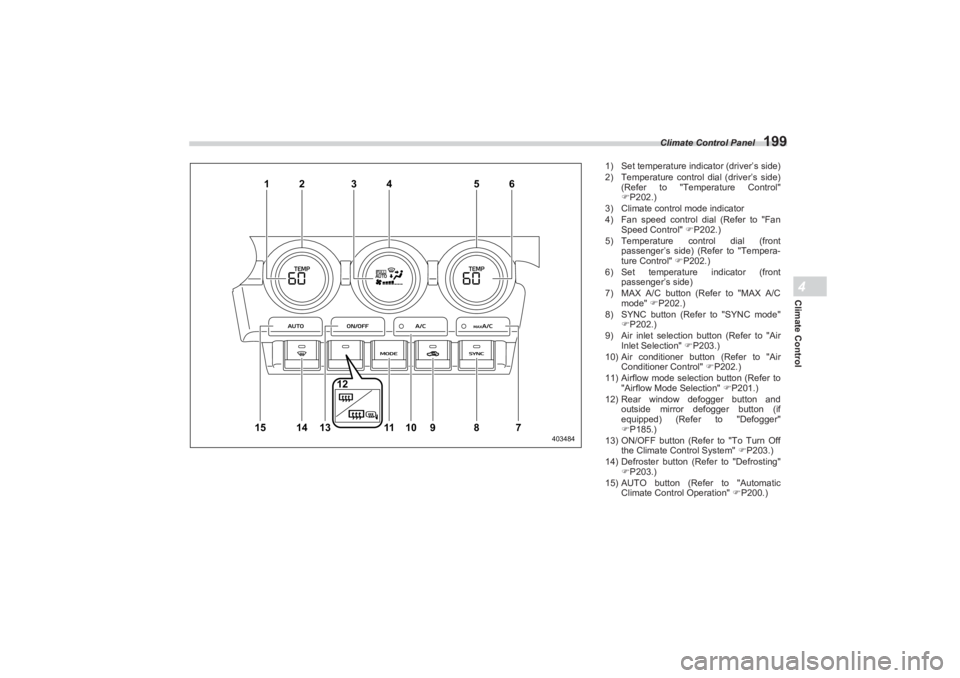
1) Set temperature indi cator (driver’s side)
2) Temperature control dial (driver’s side)
(Refer to "Temperature Control"
P202.)
3) Climate control mode indicator
4) Fan speed control dial (Refer to "Fan
Speed Control" P202.)
5) Temperature control dial (front
passenger’s side) (Refer to "Tempera-
ture Control" P202.)
6) Set temperature indicator (front
passenger’s side)
7) MAX A/C button (Refer to "MAX A/C
mode" P202.)
8) SYNC button (Refer to "SYNC mode"
P202.)
9) Air inlet selection button (Refer to "Air
Inlet Selection" P203.)
10) Air conditioner button (Refer to "Air
Conditioner Control" P202.)
11) Airflow mode selection button (Refer to
"Airflow Mode Selection" P201.)
12) Rear window defogger button and
outside mirror defogger button (if
equipped) (Refer to "Defogger"
P185.)
13) ON/OFF button (Refer to "To Turn Off
the Climate Control System" P203.)
14) Defroster button (Refer to "Defrosting"
P203.)
15) AUTO button (Refer to "Automatic
Climate Control Operation" P200.)
BRZ_U.book 199 ページ 2022年3月29日 火曜日 午後3時59分
Page 208 of 432
Manual Climate Control
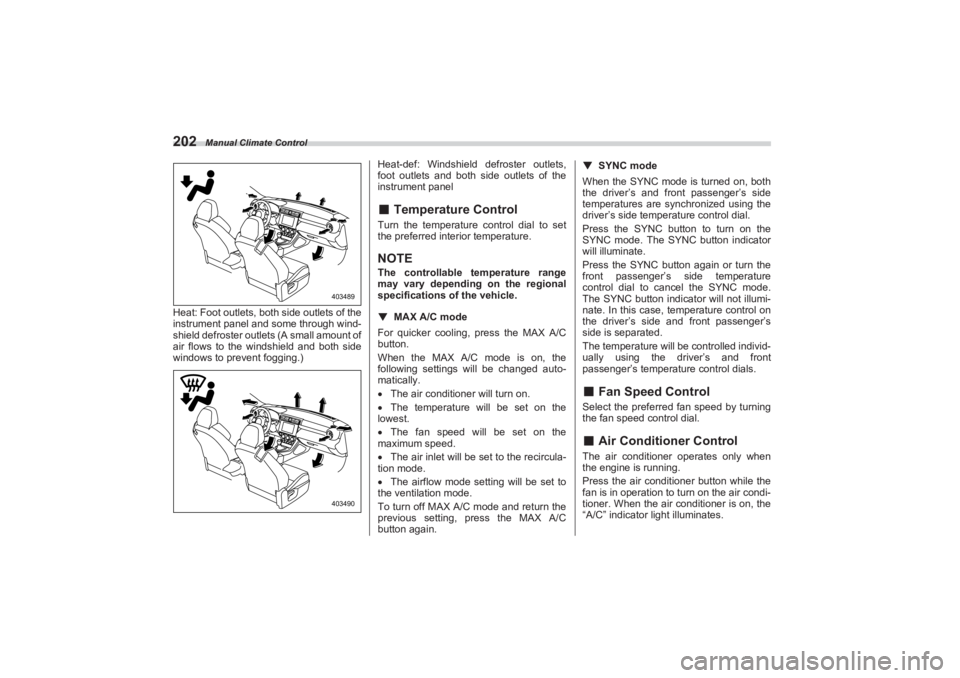
202Heat: Foot outlets, both side outlets of the
instrument panel and some through wind-
shield defroster outlets (A small amount of
air flows to the windshield and both side
windows to prevent fogging.) Heat-def: Windshield defroster outlets,
foot outlets and both side outlets of the
instrument panel
■ Temperature ControlTurn the temperature control dial to set
the preferred interior temperature.NOTEThe controllable temperature range
may vary depending on the regional
specifications of the vehicle.
▼ MAX A/C mode
For quicker cooling, press the MAX A/C
button.
When the MAX A/C mode is on, the
following settings will be changed auto-
matically.
The air conditioner will turn on.
The temperature will be set on the
lowest.
The fan speed will be set on the
maximum speed.
The air inlet will be set to the recircula-
tion mode.
The airflow mode setting will be set to
the ventilation mode.
To turn off MAX A/C mode and return the
previous setting, press the MAX A/C
button again. ▼
SYNC mode
When the SYNC mode is turned on, both
the driver’s and front passenger’s side
temperatures are synchronized using the
driver’s side temperature control dial.
Press the SYNC button to turn on the
SYNC mode. The SYNC button indicator
will illuminate.
Press the SYNC button again or turn the
front passenger’s side temperature
control dial to cancel the SYNC mode.
The SYNC button indicator will not illumi-
nate. In this case, temperature control on
the driver’s side and front passenger’s
side is separated.
The temperature will be controlled individ-
ually using the driver’s and front
passenger’s temperature control dials.
■ Fan Speed ControlSelect the preferred fan speed by turning
the fan speed control dial.■ Air Conditioner ControlThe air conditioner operates only when
the engine is running.
Press the air conditioner button while the
fan is in operation to turn on the air condi-
tioner. When the air conditioner is on, the
“A/C” indicator light illuminates.
403489403490
BRZ_U.book 202 ページ 2022年3月29日 火曜日 午後3時59分