2023 RAM CHASSIS CAB battery
[x] Cancel search: batteryPage 57 of 444

GETTING TO KNOW YOUR VEHICLE55
Cargo Lights Button (Vehicles Sold In Canada Only)
The cargo lights will turn on for approximately 60
seconds when a key fob unlock button is pushed,
as part of the Illuminated Entry feature.
When these lights are activated using the button
on the headlight switch, the rear guidance lights
will remain illuminated when the vehicle
transmission is in PARK, NEUTRAL, or REVERSE.
The rear guidance lights will turn off when the
vehicle transmission is placed in DRIVE.
BATTERY SAVER
Timers are set to both the interior and exterior
lights to protect the life of your vehicle’s battery.
If the ignition is OFF, the interior lights will
automatically turn off when:
Any door is left ajar for 10 minutes.
The Dome Defeat button is pushed.
The cargo and rear guidance lights are manually
activated by the headlight switch.
NOTE:Battery saver mode is canceled if the ignition is ON.
If the headlights remain on while the ignition is
placed in the OFF position, the exterior lights will
automatically turn off after eight minutes. If the
headlights are turned on and left on for eight
minutes while the ignition is OFF, the exterior lights
will automatically turn off.
INTERIOR LIGHTS
COURTESY LIGHTS
The courtesy, dome, and cargo lights are turned on
when any door is opened or the Dome On button is
pushed on the overhead console. Also, if your
vehicle is equipped with Remote Keyless Entry,
and the unlock button is pushed on the key fob, the
courtesy, dome, and cargo lights will turn on.
Courtesy/Reading Lights
The overhead console lights can also be operated
individually as reading lights by pushing the
corresponding buttons.
Front Courtesy/Reading Lights
1 — Driver’s Reading Light On/Off Button
2 — Dome Off Button
3 — Dome On Button
4 — Passenger’s Reading Light On/Off Button
2
23_DPF_OM_EN_USC_t.book Page 55
Page 73 of 444

GETTING TO KNOW YOUR VEHICLE71
Rear USB Ports
Applicable to only Uconnect 5/5 NAV With 8.4-inch
Display, and Uconnect 5 NAV With 12-inch Display
radios, different scenarios are listed as follows
when a non-phone device is plugged into the
smaller and larger USB ports, and when a phone
device is plugged into the smaller and larger USB
ports:
“A new device is now connected. Previous
connection was lost”.
“(Phone Name) now connected. Previous
connection was lost”.
“Another device is in use through the same USB
port. Please disconnect the first device to use
the second device”.
NOTE:
Charge unsupported devices with the Charge Only
USB ports. If an unsupported device is plugged into a
Media USB port, a message will display on the touch -
screen that the device is not supported by the system.
Plugging in a phone or another USB device may cause
the connection to a previous device to be lost.
If equipped, your vehicle may also contain a USB
port located on the top tray of the vehicle’s center
console.
If equipped, two Mini-USB Ports (Type C), two
Standard USB Ports (Type A), and one AUX port
may be located to the left of the center stack, just
below the climate controls.
USB/AUX Media Hub
Some USB ports support media and charging. You
can use features, such as Apple CarPlay®, Android
Auto™, Pandora®, and others while charging your
phone.
NOTE:Plugging in a phone or another USB device may
cause the connection to a previous device to be
lost.
For further information, refer to the Uconnect
Owner’s Manual Supplement or visit
UconnectPhone.com.
ELECTRICAL POWER OUTLETS
The auxiliary 12 Volt (13 Amp) power outlet can
provide power for in-cab accessories designed for
use with the standard “cigarette lighter” style plug.
The 12 Volt power outlets and 5 Volt (2.5 Amp) USB
port (Charge Only) have a cap attached to the
outlet indicating 12V DC, together with either a key
symbol, battery symbol, or USB symbol.
A key symbol indicates that the ignition must be in
the ON/RUN or ACC positions for the outlet to
provide power. The battery symbol indicates that
the outlet is connected to the battery, and can
provide power at all times.
1 — Rear Charge Only USB Ports 1
2 — Rear Charge Only USB Ports 2
1 — Standard USB Type A Ports
2 — Mini-USB Type C Ports
3 — AUX Port
2
23_DPF_OM_EN_USC_t.book Page 71
Page 74 of 444

72GETTING TO KNOW YOUR VEHICLE
An auxiliary power outlet can be found in the tray
on top of the center stack. This power outlet works
when the ignition is in the ON/RUN, ACC, or OFF
position.
Power Outlet — Top Of Center Stack
Power Outlet Fuse Locations:
F104 Fuse 20 A Yellow UCI Port/ USB Rear
Center Console
F90 Fuse 20 A Yellow Instrument Panel Power
Outlet Battery Fed (If Equipped)
F91 Fuse 20 A Yellow Instrument Panel Power
Outlet Ignition Fed (If Equipped)
F93 Fuse 20 A Yellow Cigar Lighter/ Instrument
Panel Power Outlet (If Equipped)
When the vehicle is turned off, be sure to unplug
any equipment as to not drain the battery of the
vehicle. All accessories connected to the outlet(s)
should be removed or turned off when the vehicle
is not in use to protect the battery against
discharge.
POWER INVERTER — IF EQUIPPED
If equipped, a 115 Volt (400 Watts maximum)
inverter may be located inside the center console
towards the right hand side, just under the
Wireless Charging Pad (if equipped). This inverter
can power cellular phones, electronics and other
low power devices requiring power up to
400 Watts. Certain video game consoles exceed
this power limit, as will most power tools.
CAUTION!
Do not exceed the maximum power of 160
Watts (13 Amps) at 12 Volts. If the 160 Watts
(13 Amps) power rating is exceeded, the fuse
protecting the system will need to be replaced.
Power outlets are designed for accessory
plugs only. Do not insert any other object in
the power outlets as this will damage the
outlet and blow the fuse. Improper use of the
power outlet can cause damage not covered
by your New Vehicle Limited Warranty.
WARNING!
To avoid serious injury or death:
Only devices designed for use in this type of
outlet should be inserted into any 12 Volt
outlet.
Do not touch with wet hands.
Close the lid when not in use and while driving
the vehicle.
If this outlet is mishandled, it may cause an
electric shock and failure.
CAUTION!
Many accessories that can be plugged in draw
power from the vehicle's battery, even when not
in use (i.e., cellular phones, etc.). Eventually, if
plugged in long enough, the vehicle's battery
will discharge sufficiently to degrade battery life
and/or prevent the engine from starting.
Accessories that draw higher power (i.e., coolers,
vacuum cleaners, lights, etc.), will discharge the
battery even more quickly. Only use these inter -
mittently and with greater caution.
After the use of high power draw accessories,
or long periods of the vehicle not being started
(with accessories still plugged in), the vehicle
must be driven a sufficient length of time to
allow the generator to recharge the vehicle's
battery.
23_DPF_OM_EN_USC_t.book Page 72
Page 81 of 444

GETTING TO KNOW YOUR INSTRUMENT PANEL79
Use this QR code to access your
digital experience.
MIDLINE INSTRUMENT
C
LUSTER DESCRIPTIONS
1. Tachometer
Indicates the engine speed
in revolutions per minute (RPM x 1000).
2. Voltmeter
When the vehicle is in the RUN state, the
gauge indicates the electrical system
voltage. The pointer should stay within the
normal range if the battery is charged. If the
pointer moves to either extreme left or right
and remains there during normal driving,
the electrical system should be serviced.
3. Instrument Cluster Display
When the appropriate conditions exist, this
display shows the instrument cluster
display messages Ú page 89.
The display always shows one of the main
menu item after the ignition is placed on.
4. Oil Pressure Gauge
The pointer should always indicate the oil
pressure when the engine is running. A
continuous high or low reading under
normal driving conditions may indicate a lubrication system malfunction. Immediate
service should be obtained from an autho
-
rized dealer.
5. Speedometer
Indicates vehicle speed.
6. Temperature Gauge
The gauge pointer shows engine coolant
temperature. The pointer positioned within
the normal range indicates that the engine
cooling system is operating satisfactorily.
The gauge pointer will likely indicate a
higher temperature when driving in hot
weather, up mountain grades, or when
towing a trailer. It should not be allowed to
exceed the upper limits of the normal oper -
ating range. 7. Fuel Gauge
The pointer shows the level of fuel in the
fuel tank when the ignition is in the ON/RUN
position.
The fuel pump symbol points to
the side of the vehicle where the
fuel door is located.
NOTE:The Instrument Cluster Warning Indicators will illu -
minate briefly for a bulb check when the ignition is
first cycled.
WARNING!
A hot engine cooling system is dangerous. You or
others could be badly burned by steam or boiling
coolant. It is recommended to call an authorized
dealer for service if your vehicle overheats. If you
decide to look under the hood yourself, Follow
the warnings under the Cooling System Pressure
Cap paragraph Ú page 368.
CAUTION!
Driving with a hot engine cooling system could
damage your vehicle. If the temperature gauge
reads “H,” pull over and stop the vehicle. Idle the
vehicle with the air conditioner turned off until
the pointer drops back into the normal range. If
the pointer remains on the “H,” turn the engine
off immediately and call an authorized dealer for
service.
3
23_DPF_OM_EN_USC_t.book Page 79
Page 94 of 444

92GETTING TO KNOW YOUR INSTRUMENT PANEL
You can customize your Instrument Cluster Display
with up to five tiles that may consist of the
following:
NOTE:These options may vary based on your vehicle trim
level.
Navigation
Route Set / Route Not Set
Trip A / Trip B
Vehicle Info
Coolant Temp
Trans Temp
Oil Temp
Oil Pressure
Battery Voltage
Oil Life
Tire Pressure
Fuel Economy
Air Suspension
Driver Info
Driver Assist
Audio
Audio Info
Off Road
Selec-Terrain / Air Suspension Status
Steering Angle
Pitch
Roll
Trailer Tow
Trailer Trip
Trailer Brake
Trailer Tire Pressure Monitor
OIL LIFE RESET
Use this QR code to access your
digital experience.
Your vehicle is equipped with an
engine oil change indicator
system. The “Oil Change
Required” message will display in
the instrument cluster display
after a single chime has sounded, to indicate the
next scheduled oil change interval. The engine oil
change indicator system is duty cycle based, which
means the engine oil change interval may
fluctuate, dependent upon your personal driving
style.
NOTE:Use the steering wheel instrument cluster display
controls for the following procedure. Oil Life Reset Procedure
1. Without pushing the brake pedal, push the
ENGINE START/STOP button and place the
ignition to the ON/RUN position (do not start
the engine).
2. Push and release the down arrow button to
scroll downward through the main menu to
“Vehicle Info.”
3. Push and release the right arrow button to
access the ”Vehicle Info” screen, then scroll up
or down to select “Oil Life.”
4. Push and hold the right arrow button to
select “Reset”.
5. Push and release the down arrow button to
select “Yes,” then push and release the
right arrow button to reset the Oil Life to
100%.
6. Push and release the up arrow button to
exit the instrument cluster display screen.
Secondary Method Of Resetting Engine Oil Life
1. Without pressing the brake pedal, push the ENGINE START/STOP button and place the
ignition to the ON/RUN position (do not start
the engine).
2. Fully press the accelerator pedal, slowly, three times within ten seconds.
23_DPF_OM_EN_USC_t.book Page 92
Page 96 of 444

94GETTING TO KNOW YOUR INSTRUMENT PANEL
Vehicle Info
Push and release the up or down arrow
button until the Vehicle Info menu item is
highlighted in the instrument cluster display. Push
and release the right arrow button to enter the
submenus items of Vehicle Info. Follow the
directional prompts to access or reset any of the
following Vehicle Info submenu items:
BASE AND MIDLINE CLUSTER
Tire Pressure Monitor System
Coolant Temperature — If Equipped
Trans Temperature — If Equipped
Oil Temperature
Oil Pressure
Exhaust Brake — If Equipped
Boost Pressure — If Equipped
Diesel Particulate Filter
Oil Life
Fuel Filter Life — If Equipped
Battery Voltage — If Equipped
Gauge Summary — If Equipped
Coolant Temp
Trans Temp
Oil Temp
Oil Pressure
Engine Hours — If Equipped
PREMIUM CLUSTER
Fuel Economy
Average
Current
Range to Empty
Gauge Summary
Coolant Temperature — If Equipped
Battery Voltage — If Equipped
Trans Temperature
Oil Summary
Oil Temperature
Oil Life
Oil Pressure — If Equipped
Tire Pressure Monitor System
Diesel Summary
Exhaust Brake — If Equipped
Boost Pressure — If Equipped
Fuel Filter Life — If Equipped
Diesel Particulate Filter
Fuel Tank Levels
Engine Hours — If Equipped
Off Road
Push and release the up or down arrow
button until the Off Road menu icon is displayed in
the instrument cluster display. Push and release
the left or right arrow button to scroll
through the information submenus.
Drivetrain
Front Wheel Angle: displays the graphical
and numerical value of calculated average
front wheel angle from the steering wheel
orientation.
Transfer Case Lock Status: displays “Lock”
graphic only during 4WD High, 4WD High
Part Time, 4WD Low status.
Axle Lock And Sway Bar Status (If
Equipped): displays front and rear or rear
only axle locker graphic, and sway bar
connection graphic with text message
(connected or disconnected).
23_DPF_OM_EN_USC_t.book Page 94
Page 98 of 444
96GETTING TO KNOW YOUR INSTRUMENT PANEL
NOTE:Trailer connection status is remembered after the
key cycle. If the trailer connection status has not
changed, no pop-up will appear in your Instrument
Cluster Display.
Audio
Push and release the up or down arrow
button until the Audio Menu icon/title is
highlighted in the instrument cluster display. This
menu will display the audio source information,
including the Song name, Artist name, and audio
source with an accompanying graphic.
Phone Call Status
When a call is incoming, a Phone Call Status
pop-up will display on the screen. The pop-up will
remain until the phone is answered or ignored.
NOTE:The call status will temporarily replace the
previous media source information displayed on
the screen. When the pop-up is no longer
displayed, the display will return to the last used
screen.
Stored Messages
Push and release the up or down arrow
button until the Messages Menu item is
highlighted. This feature shows the number of
stored warning messages. Push and release the
right or left arrow button to cycle through
stored messages.
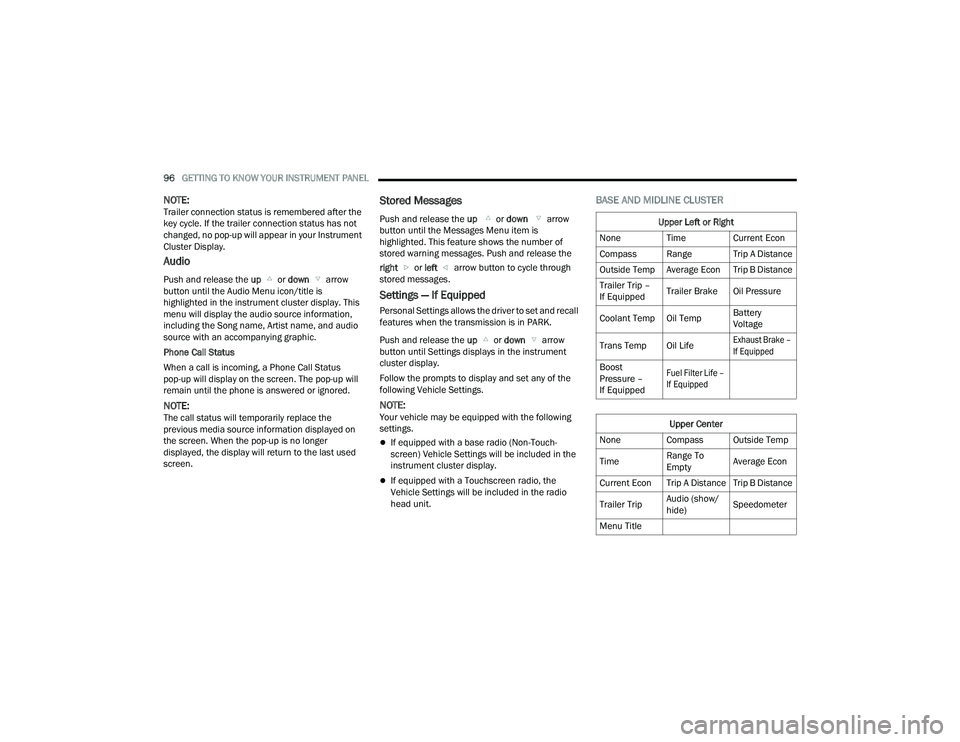
Settings — If Equipped
Personal Settings allows the driver to set and recall
features when the transmission is in PARK.
Push and release the up or down arrow
button until Settings displays in the instrument
cluster display.
Follow the prompts to display and set any of the
following Vehicle Settings.
NOTE:Your vehicle may be equipped with the following
settings.
If equipped with a base radio (Non-Touch -
screen) Vehicle Settings will be included in the
instrument cluster display.
If equipped with a Touchscreen radio, the
Vehicle Settings will be included in the radio
head unit.
BASE AND MIDLINE CLUSTER
Upper Left or Right
None Time Current Econ
Compass Range Trip A Distance
Outside Temp Average Econ Trip B Distance
Trailer Trip –
If Equipped Trailer Brake Oil Pressure
Coolant Temp Oil Temp Battery
Voltage
Trans Temp Oil Life
Exhaust Brake –
If Equipped
Boost
Pressure –
If Equipped
Fuel Filter Life –
If Equipped
Upper Center
None Compass Outside Temp
Time Range To
EmptyAverage Econ
Current Econ Trip A Distance Trip B Distance
Trailer Trip Audio (show/
hide)Speedometer
Menu Title
23_DPF_OM_EN_USC_t.book Page 96
Page 99 of 444

GETTING TO KNOW YOUR INSTRUMENT PANEL97
Current Gear
Off
On
Odometer
No Decimal Point
Decimal Point
Defaults (Restores All Settings To Default Settings)
Cancel
Restore
PREMIUM CLUSTER
Display Style
Modern
Traditional Current Gear
Off
On
Odometer
No Decimal Point
Decimal Point
Hide
Left or Right
None Range To
EmptyAverage Econ
Menu Icon Coolant Temp Oil Temp
Trans Temp Oil Life
Fuel Filter Life –
If Equipped
Lower Left or Right
None Time Current Econ
Compass Range Trip A Distance
Outside Temp Average Econ Trip B Distance
Trailer Trip –
If Equipped Trailer Brake Oil Pressure
Coolant Temp Oil Temp Battery
Voltage
Trans Temp Oil Life
Exhaust Brake –
If Equipped
Boost
Pressure –
If Equipped
Fuel Filter Life –
If Equipped
Favorite Menus
Speedometer Vehicle Info Driver Assist
Fuel Economy Trip Info Trailer Tow –
If Equipped
(show/hide)
Audio (show/
hide) Messages Screen Setup
Commercial
SettingsUpper Left or Right
None Time Current Econ
Compass Range Trip A Distance
Outside Temp Average Econ Trip B Distance
Trailer Trip –
If Equipped
Upper Center
None Badge Compass
Outside Temp Time Range To
Empty
Average Econ Current Econ Trip A Distance
Trip B Distance Trailer Trip Audio (show/
hide)
3
23_DPF_OM_EN_USC_t.book Page 97