2023 RAM 1500 light
[x] Cancel search: lightPage 33 of 416

GETTING TO KNOW YOUR VEHICLE31
Manual Front Seat Recline Adjustment
The recline lever is located on the outboard side of the
seat. To recline the seat, lean forward slightly, lift the lever,
lean back to the desired position and release the lever. To
return the seatback to its normal upright position, lean
forward and lift the lever. Release the lever once the
seatback is in the upright position.
Manual Recline Lever
Front Bench Seat — If Equipped
The seat is divided into three segments. The outboard seat
portions are each 40% of the total width of the seat. If
equipped, the back of the center portion (20%) easily folds
down to provide an armrest/center storage compartment.
Center Portion Of Front Bench Seat Center Portion Folded Forward
MANUAL ADJUSTMENT (REAR SEATS)
WARNING!
Do not stand or lean in front of the seat while actu-
ating the handle. The seatback may swing forward
and hit you causing injury.
To avoid injury, place your hand on the seatback and
actuate the handle, then position the seatback in the
desired position.
WARNING!
Do not pile luggage or cargo higher than the top of the
seatback. This could impair visibility or become a
dangerous projectile in a sudden stop or collision.
2
23_DT_OM_EN_USC_t.book Page 31
Page 36 of 416

34GETTING TO KNOW YOUR VEHICLE
Front Heated Seats — If Equipped
The heated seat control buttons are located on
the center stack below the radio screen, or
within the Uconnect system.
Press the heated seat button once to turn the HI
setting on.
Press the heated seat button a second time to turn the
MED setting on.
Press the heated seat button a third time to turn the
LO setting on.
Press the heated seat button a fourth time to turn the
heating elements off.
NOTE:
Once a heat setting is selected, heat will be felt within
two to five minutes.
The engine must be running for the heated seats to
operate.
The level of heat selected will stay on until the operator
changes it.
For information on use with the Remote Start system, see
Úpage 22.
Rear Heated Seats — If Equipped
On some models, the two rear outboard seats
may be equipped with heated seats. There are
two heated seat switches that allow the rear
passengers to operate the seats
independently. The heated seat switches for each heater
are located on the rear of the center console. You can choose from HI, MED, LO, or OFF heat settings.
Indicator lights in each switch indicate the level of heat in
use.
Push the heated seat button once to turn the HI
setting on.
Push the heated seat button a second time to turn the
MED setting on.
Push the heated seat button a third time to turn the
LO setting on.
Push the heated seat button a fourth time to turn the
heating elements off.
NOTE:The level of heat selected will stay on until the operator
changes it.
VENTILATED SEATS — IF EQUIPPED
Front Ventilated Seats
The ventilated seat control buttons are located
on the center stack below the radio screen, or
within the Uconnect system. The fans operate
at three speeds: HI, MED and LO.
Press the ventilated seat button once to choose HI.
Press the ventilated seat button a second time to
choose MED.
Press the ventilated seat button a third time to choose
LO.
Press the ventilated seat button a fourth time to turn
the ventilation off.
NOTE:The engine must be running for the ventilated seats to
operate.
For information on use with the Remote Start system, see
Úpage 22.
Rear Ventilated Seats — If Equipped
If equipped, the two outboard rear seats will
have ventilated seats. The rear ventilated seat
control switches are located on the rear of the
center console.
The fans operate at three speeds: HI, MED, and LO. Push
the ventilated seat buttons to toggle through the speeds,
or to turn the feature off.
NOTE:The engine must be running for the ventilated seats to
operate.
PLASTIC GROCERY BAG RETAINERS —
I
F EQUIPPED
Retainer hooks which will hold plastic grocery bag handles
are attached to the underside of the rear seat cushion. To
access these hooks, lift the rear seat cushion upward.
HEAD RESTRAINTS
Head restraints are designed to reduce the risk of injury by
restricting head movement in the event of a rear impact.
Head restraints should be adjusted so that the top of the
head restraint is located above the top of your ear.
23_DT_OM_EN_USC_t.book Page 34
Page 40 of 416
38GETTING TO KNOW YOUR VEHICLE
DRIVER ADJUSTABLE PEDALS —
IF EQUIPPED
The adjustable pedals system is designed to allow a
greater range of driver comfort for steering wheel tilt and
seat position. This feature allows the brake and
accelerator pedals to move toward or away from the driver
to provide improved position with the steering wheel.
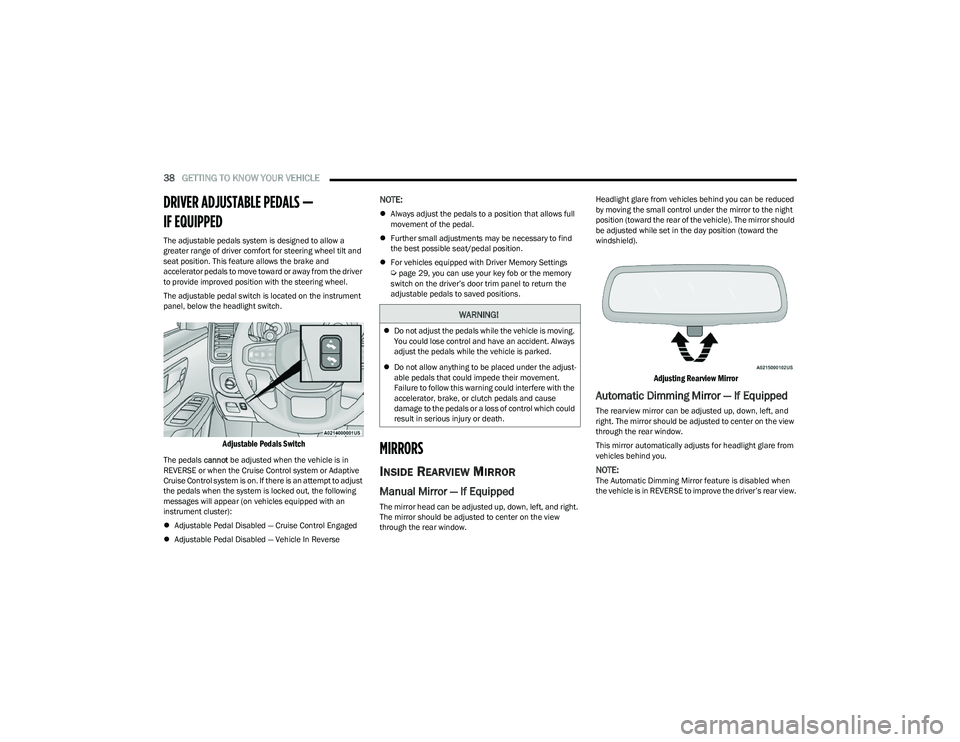
The adjustable pedal switch is located on the instrument
panel, below the headlight switch.
Adjustable Pedals Switch
The pedals cannot be adjusted when the vehicle is in
REVERSE or when the Cruise Control system or Adaptive
Cruise Control system is on. If there is an attempt to adjust
the pedals when the system is locked out, the following
messages will appear (on vehicles equipped with an
instrument cluster):
Adjustable Pedal Disabled — Cruise Control Engaged
Adjustable Pedal Disabled — Vehicle In Reverse
NOTE:
Always adjust the pedals to a position that allows full
movement of the pedal.
Further small adjustments may be necessary to find
the best possible seat/pedal position.
For vehicles equipped with Driver Memory Settings
Úpage 29, you can use your key fob or the memory
switch on the driver’s door trim panel to return the
adjustable pedals to saved positions.
MIRRORS
INSIDE REARVIEW MIRROR
Manual Mirror — If Equipped
The mirror head can be adjusted up, down, left, and right.
The mirror should be adjusted to center on the view
through the rear window. Headlight glare from vehicles behind you can be reduced
by moving the small control under the mirror to the night
position (toward the rear of the vehicle). The mirror should
be adjusted while set in the day position (toward the
windshield).
Adjusting Rearview Mirror
Automatic Dimming Mirror — If Equipped
The rearview mirror can be adjusted up, down, left, and
right. The mirror should be adjusted to center on the view
through the rear window.
This mirror automatically adjusts for headlight glare from
vehicles behind you.
NOTE:The Automatic Dimming Mirror feature is disabled when
the vehicle is in REVERSE to improve the driver’s rear view.
WARNING!
Do not adjust the pedals while the vehicle is moving.
You could lose control and have an accident. Always
adjust the pedals while the vehicle is parked.
Do not allow anything to be placed under the adjust -
able pedals that could impede their movement.
Failure to follow this warning could interfere with the
accelerator, brake, or clutch pedals and cause
damage to the pedals or a loss of control which could
result in serious injury or death.
23_DT_OM_EN_USC_t.book Page 38
Page 41 of 416

GETTING TO KNOW YOUR VEHICLE39
The Automatic Dimming feature can be turned on or off
through the touchscreen.
Automatic Dimming Mirror
Digital Rearview Mirror — If Equipped
The Digital Rearview Mirror provides a high definition,
wide and unobstructed view of the road behind while
driving.
Position the mirror in the regular Automatic Dimming
Mirror mode, then activate the Digital Rearview Mirror
mode.
To activate the Digital Rearview Mirror, pull the on/off
control lever on the bottom of the mirror rearward toward
the driver.
Digital Rearview Mirror
Push the menu button next to the on/off control/toggle to
access the following mirror options:
Brightness
Tilt
Use the left and right buttons to scroll through menu
options.
When not in use, push the on/off forward toward the
windshield to return the mirror to the regular Automatic
Dimming Mirror.
NOTE:The Digital Rearview Mirror is not as effective during
nighttime driving in low light applications due to low
ambient light levels. In the event that it provides the user
with less than expected vision, the mirror can be reverted
to a normal reflective Automatic Dimming Mirror by
pushing the control/toggle forward in the vehicle and
putting the mirror into Automatic Dimming Mirror mode.
ILLUMINATED VANITY MIRROR
To access an illuminated vanity mirror, flip down one of the
visors and lift the cover.
Lift Cover For Illuminated Mirror
CAUTION!
To avoid damage to the mirror during cleaning, never
spray any cleaning solution directly onto the mirror.
Apply the solution onto a clean cloth and wipe the
mirror clean.
1 — On/Off Control/Toggle
2 — Menu Button
3 — Left Scroll Button
4 — Right Scroll Button
2
23_DT_OM_EN_USC_t.book Page 39
Page 42 of 416
40GETTING TO KNOW YOUR VEHICLE
Slide-On-Rod Features Of Sun Visor —
If Equipped
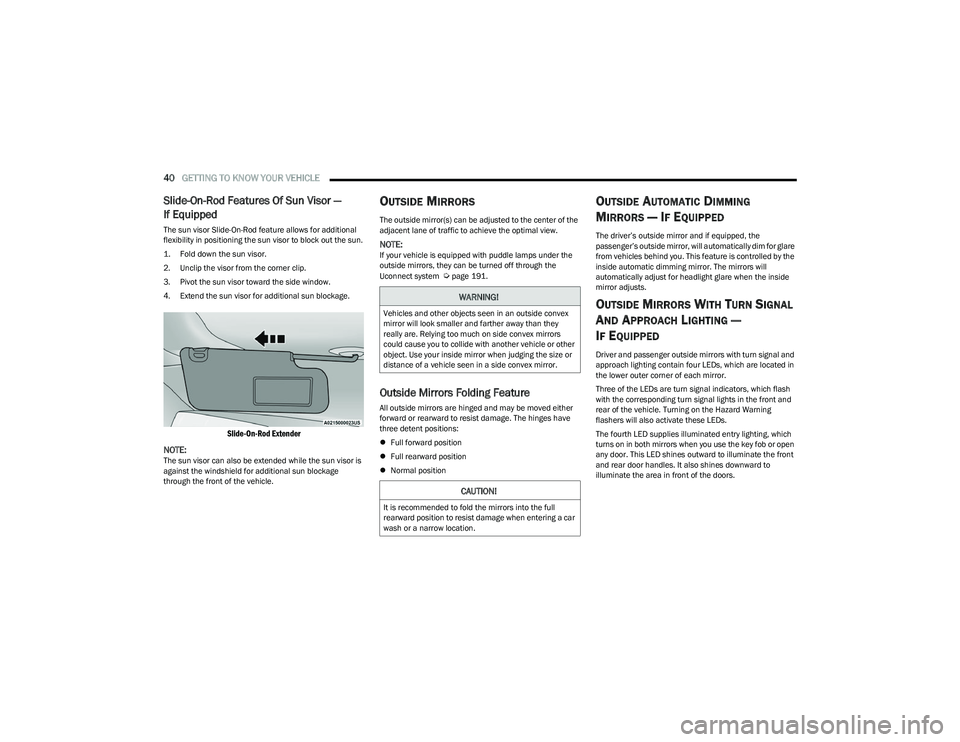
The sun visor Slide-On-Rod feature allows for additional
flexibility in positioning the sun visor to block out the sun.
1. Fold down the sun visor.
2. Unclip the visor from the corner clip.
3. Pivot the sun visor toward the side window.
4. Extend the sun visor for additional sun blockage.
Slide-On-Rod Extender
NOTE:
The sun visor can also be extended while the sun visor is
against the windshield for additional sun blockage
through the front of the vehicle.
OUTSIDE MIRRORS
The outside mirror(s) can be adjusted to the center of the
adjacent lane of traffic to achieve the optimal view.
NOTE:If your vehicle is equipped with puddle lamps under the
outside mirrors, they can be turned off through the
Uconnect system
Úpage 191.
Outside Mirrors Folding Feature
All outside mirrors are hinged and may be moved either
forward or rearward to resist damage. The hinges have
three detent positions:
Full forward position
Full rearward position
Normal position
OUTSIDE AUTOMATIC DIMMING
M
IRRORS — IF EQUIPPED
The driver’s outside mirror and if equipped, the
passenger’s outside mirror, will automatically dim for glare
from vehicles behind you. This feature is controlled by the
inside automatic dimming mirror. The mirrors will
automatically adjust for headlight glare when the inside
mirror adjusts.
OUTSIDE MIRRORS WITH TURN SIGNAL
A
ND APPROACH LIGHTING —
I
F EQUIPPED
Driver and passenger outside mirrors with turn signal and
approach lighting contain four LEDs, which are located in
the lower outer corner of each mirror.
Three of the LEDs are turn signal indicators, which flash
with the corresponding turn signal lights in the front and
rear of the vehicle. Turning on the Hazard Warning
flashers will also activate these LEDs.
The fourth LED supplies illuminated entry lighting, which
turns on in both mirrors when you use the key fob or open
any door. This LED shines outward to illuminate the front
and rear door handles. It also shines downward to
illuminate the area in front of the doors.
WARNING!
Vehicles and other objects seen in an outside convex
mirror will look smaller and farther away than they
really are. Relying too much on side convex mirrors
could cause you to collide with another vehicle or other
object. Use your inside mirror when judging the size or
distance of a vehicle seen in a side convex mirror.
CAUTION!
It is recommended to fold the mirrors into the full
rearward position to resist damage when entering a car
wash or a narrow location.
23_DT_OM_EN_USC_t.book Page 40
Page 43 of 416

GETTING TO KNOW YOUR VEHICLE41
The illuminated entry lighting fades to off after about 30
seconds or it will fade to off immediately once the ignition
is placed into the ON/RUN position.
NOTE:The approach lighting will not function when the gear
selector is moved out of the PARK position.
POWER MIRRORS
The power mirror switch is located on the driver's side door
trim panel.
Power Mirror Controls
The power mirror controls consist of mirror select buttons
and a four-way mirror control switch. To adjust a mirror,
push the mirror select button for the mirror that you want
to adjust. Using the mirror control switch, push on any of
the four arrows for the direction that you want the mirror
to move.
Power Mirror Movement
Power mirror preselected positions can be controlled by
the optional Driver Memory Settings feature Úpage 29.
POWER FOLDING OUTSIDE MIRRORS
F
OR STANDARD AND TRAILER TOW —
I
F EQUIPPED
The power folding mirrors can be folded rearward and
unfolded into the normal driving position.
The switch for the power folding mirrors is located
between the power mirror switches L (left) and R (right).
Push the switch once and the mirrors will fold in, push the
switch a second time and the mirrors will return to the
normal driving position.
If the mirror is manually folded after a powered cycle, a
potential extra button push is required to get the mirrors
back to the normal driving position. If the mirror does not
fold automatically, check for ice or dirt buildup at the pivot
area, which can cause excessive drag.
Power Folding Mirror Switch
1 — Left Mirror Selection
2 — Mirror Direction Control
3 — Right Mirror Selection
2
23_DT_OM_EN_USC_t.book Page 41
Page 45 of 416

GETTING TO KNOW YOUR VEHICLE43
Use this QR code to access your digital
experience.
HomeLink® replaces up to three
hand-held transmitters that operate
devices such as garage door
openers, motorized gates, lighting,
or home security systems. The
HomeLink® unit is powered by your
vehicle’s 12 Volt battery.
The HomeLink® buttons that are located in the over -
head console or sun visor designate the three different
HomeLink® channels.
To operate HomeLink®, push and release any of the
programmed HomeLink® buttons. These buttons will
activate the devices they are programmed to with each
press of the corresponding HomeLink® button.
The HomeLink® indicator light is located above the
center button.
NOTE:HomeLink® is disabled when the Vehicle Security system
is active Úpage 402.
BEFORE YOU BEGIN PROGRAMMING
H
OMELINK®
For efficient programming and accurate transmission of
the Radio Frequency signal, it is recommended that a new
battery be placed in the hand-held transmitter of the
device that is being programmed to the HomeLink®
system. Make sure your hand-held transmitter is
programmed to activate the device you are trying to
program your HomeLink® button to.
Ensure that your vehicle is parked outside of the garage
before you begin programming.
It is recommended that you erase all the channels of your
HomeLink® before you use it for the first time.
ERASING ALL THE HOMELINK®
C
HANNELS
To erase the channels, follow this procedure:
1. Place the ignition switch into the ON/RUN position.
2. Push and hold the two outside HomeLink® buttons
(I and III) for up to 20 seconds, or until the
HomeLink® indicator light flashes.
NOTE:Erasing all channels should only be performed when
programming HomeLink® for the first time. Do not erase
channels when programming additional buttons.
IDENTIFYING WHETHER YOU HAVE A
R
OLLING CODE OR NON-ROLLING CODE
D
EVICE
Before programming a device to one of your HomeLink®
buttons, you must determine whether the device has a
rolling code or non-rolling code.
Rolling Code Devices
To determine if your device has a rolling code, a good
indicator is its manufacturing date. Typically, devices
manufactured after 1995 have rolling codes. A device with
a rolling code will also have a “LEARN” or “TRAIN” button
located where the antenna is attached to the device. The
button may not be immediately visible when looking at the
device. The name and color of the button may vary slightly
by manufacturer.
NOTE:The “LEARN” or “TRAIN” button is not the button you
normally use to operate the device.
Non-rolling Code Devices
Most devices manufactured before 1995 will not have a
rolling code. These devices will also not have a “LEARN” or
“TRAIN” button.
2
23_DT_OM_EN_USC_t.book Page 43
Page 46 of 416

44GETTING TO KNOW YOUR VEHICLE
PROGRAMMING HOMELINK® TO A
G
ARAGE DOOR OPENER
To program any of the HomeLink® buttons to activate your
garage door opener motor, proceed as follows:
NOTE:All HomeLink® buttons are programmed using this
procedure. You do not need to erase all channels when
programming additional buttons.
1. Place the ignition switch into the ON/RUN position.
2. Place the garage door opener transmitter
1 to 3 inches (3 to 8 cm) away from the HomeLink®
button you wish to program, while keeping the
HomeLink® indicator light in view.
3. Push and hold the HomeLink® button you want to program while you push and hold the garage door
opener transmitter button you are trying to replicate.
4. Continue to hold both buttons and observe the HomeLink® indicator light. The HomeLink® indicator
light will flash slowly and then rapidly. Once this
happens, release both buttons.
NOTE:Make sure the garage door opener motor is plugged in
before moving on to the rolling code/non-rolling code final
steps. Rolling Code Garage Door Opener Final Steps
NOTE:You have 30 seconds in which to initiate rolling code final
step 2, after completing rolling code final step 1.
1. At the garage door opener motor (in the garage),
locate the “LEARN” or “TRAIN” button. This can
usually be found where the hanging antenna wire is
attached to the garage door opener motor. Firmly
push and release the “LEARN” or “TRAIN” button.
2. Return to the vehicle and push the programmed HomeLink® button three times (holding the button
for two seconds each time). If the garage door opener
motor operates, programming is complete.
3. Push the programmed HomeLink® button to confirm that the garage door opener motor operates. If the
garage door opener motor does not operate, repeat
the final steps for the rolling code procedure.
Non-Rolling Code Garage Door Opener Final Steps
1. Push and hold the programmed HomeLink® button and observe the HomeLink® indicator light. If the
HomeLink® indicator light stays on constantly,
programming is complete.
2. Push the programmed HomeLink® button to confirm that the garage door opener motor operates. If the
garage door opener motor does not operate, repeat
the steps from the beginning.
PROGRAMMING HOMELINK® TO A
M
ISCELLANEOUS DEVICE
The procedure on how to program HomeLink® to a
miscellaneous device follows the same procedure as
programming to a garage door opener
Úpage 44. Be sure
to determine if the device has a rolling code, or non-rolling
code before beginning the programming process.
NOTE:Canadian Radio Frequency (RF) laws require transmitter
signals to time-out (or quit) after several seconds of trans -
mission, which may not be long enough for HomeLink® to
pick up the signal during programming. Similar to this
Canadian law, some U.S. gate operators are designed to
time-out in the same manner. The procedure may need to
be performed multiple times to successfully pair the
device to your HomeLink® buttons.
WARNING!
Your motorized door or gate will open and close while
you are programming the universal transmitter.
Do not program the transmitter if people or pets are
in the path of the door or gate.
Do not run your vehicle in a closed garage or
confined area while programming the transmitter.
Exhaust gas from your vehicle contains carbon
monoxide (CO) which is odorless and colorless.
Carbon monoxide is poisonous when inhaled and
can cause you and others to be severely injured
or killed.
23_DT_OM_EN_USC_t.book Page 44