2023 RAM 1500 tow
[x] Cancel search: towPage 40 of 416
38GETTING TO KNOW YOUR VEHICLE
DRIVER ADJUSTABLE PEDALS —
IF EQUIPPED
The adjustable pedals system is designed to allow a
greater range of driver comfort for steering wheel tilt and
seat position. This feature allows the brake and
accelerator pedals to move toward or away from the driver
to provide improved position with the steering wheel.
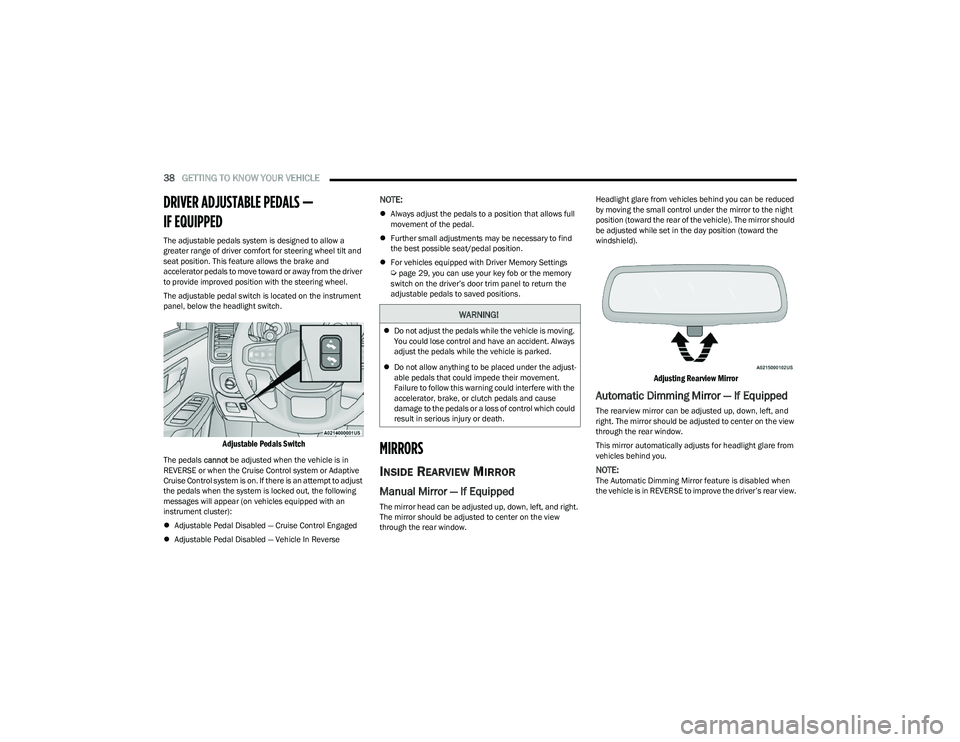
The adjustable pedal switch is located on the instrument
panel, below the headlight switch.
Adjustable Pedals Switch
The pedals cannot be adjusted when the vehicle is in
REVERSE or when the Cruise Control system or Adaptive
Cruise Control system is on. If there is an attempt to adjust
the pedals when the system is locked out, the following
messages will appear (on vehicles equipped with an
instrument cluster):
Adjustable Pedal Disabled — Cruise Control Engaged
Adjustable Pedal Disabled — Vehicle In Reverse
NOTE:
Always adjust the pedals to a position that allows full
movement of the pedal.
Further small adjustments may be necessary to find
the best possible seat/pedal position.
For vehicles equipped with Driver Memory Settings
Úpage 29, you can use your key fob or the memory
switch on the driver’s door trim panel to return the
adjustable pedals to saved positions.
MIRRORS
INSIDE REARVIEW MIRROR
Manual Mirror — If Equipped
The mirror head can be adjusted up, down, left, and right.
The mirror should be adjusted to center on the view
through the rear window. Headlight glare from vehicles behind you can be reduced
by moving the small control under the mirror to the night
position (toward the rear of the vehicle). The mirror should
be adjusted while set in the day position (toward the
windshield).
Adjusting Rearview Mirror
Automatic Dimming Mirror — If Equipped
The rearview mirror can be adjusted up, down, left, and
right. The mirror should be adjusted to center on the view
through the rear window.
This mirror automatically adjusts for headlight glare from
vehicles behind you.
NOTE:The Automatic Dimming Mirror feature is disabled when
the vehicle is in REVERSE to improve the driver’s rear view.
WARNING!
Do not adjust the pedals while the vehicle is moving.
You could lose control and have an accident. Always
adjust the pedals while the vehicle is parked.
Do not allow anything to be placed under the adjust -
able pedals that could impede their movement.
Failure to follow this warning could interfere with the
accelerator, brake, or clutch pedals and cause
damage to the pedals or a loss of control which could
result in serious injury or death.
23_DT_OM_EN_USC_t.book Page 38
Page 41 of 416

GETTING TO KNOW YOUR VEHICLE39
The Automatic Dimming feature can be turned on or off
through the touchscreen.
Automatic Dimming Mirror
Digital Rearview Mirror — If Equipped
The Digital Rearview Mirror provides a high definition,
wide and unobstructed view of the road behind while
driving.
Position the mirror in the regular Automatic Dimming
Mirror mode, then activate the Digital Rearview Mirror
mode.
To activate the Digital Rearview Mirror, pull the on/off
control lever on the bottom of the mirror rearward toward
the driver.
Digital Rearview Mirror
Push the menu button next to the on/off control/toggle to
access the following mirror options:
Brightness
Tilt
Use the left and right buttons to scroll through menu
options.
When not in use, push the on/off forward toward the
windshield to return the mirror to the regular Automatic
Dimming Mirror.
NOTE:The Digital Rearview Mirror is not as effective during
nighttime driving in low light applications due to low
ambient light levels. In the event that it provides the user
with less than expected vision, the mirror can be reverted
to a normal reflective Automatic Dimming Mirror by
pushing the control/toggle forward in the vehicle and
putting the mirror into Automatic Dimming Mirror mode.
ILLUMINATED VANITY MIRROR
To access an illuminated vanity mirror, flip down one of the
visors and lift the cover.
Lift Cover For Illuminated Mirror
CAUTION!
To avoid damage to the mirror during cleaning, never
spray any cleaning solution directly onto the mirror.
Apply the solution onto a clean cloth and wipe the
mirror clean.
1 — On/Off Control/Toggle
2 — Menu Button
3 — Left Scroll Button
4 — Right Scroll Button
2
23_DT_OM_EN_USC_t.book Page 39
Page 42 of 416
40GETTING TO KNOW YOUR VEHICLE
Slide-On-Rod Features Of Sun Visor —
If Equipped
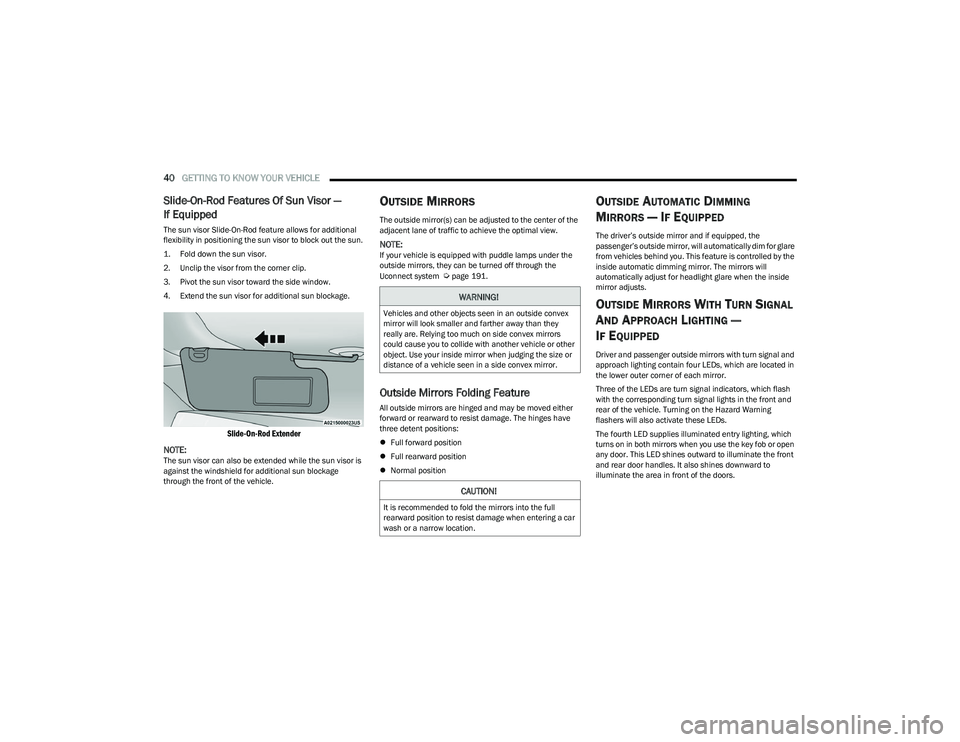
The sun visor Slide-On-Rod feature allows for additional
flexibility in positioning the sun visor to block out the sun.
1. Fold down the sun visor.
2. Unclip the visor from the corner clip.
3. Pivot the sun visor toward the side window.
4. Extend the sun visor for additional sun blockage.
Slide-On-Rod Extender
NOTE:
The sun visor can also be extended while the sun visor is
against the windshield for additional sun blockage
through the front of the vehicle.
OUTSIDE MIRRORS
The outside mirror(s) can be adjusted to the center of the
adjacent lane of traffic to achieve the optimal view.
NOTE:If your vehicle is equipped with puddle lamps under the
outside mirrors, they can be turned off through the
Uconnect system
Úpage 191.
Outside Mirrors Folding Feature
All outside mirrors are hinged and may be moved either
forward or rearward to resist damage. The hinges have
three detent positions:
Full forward position
Full rearward position
Normal position
OUTSIDE AUTOMATIC DIMMING
M
IRRORS — IF EQUIPPED
The driver’s outside mirror and if equipped, the
passenger’s outside mirror, will automatically dim for glare
from vehicles behind you. This feature is controlled by the
inside automatic dimming mirror. The mirrors will
automatically adjust for headlight glare when the inside
mirror adjusts.
OUTSIDE MIRRORS WITH TURN SIGNAL
A
ND APPROACH LIGHTING —
I
F EQUIPPED
Driver and passenger outside mirrors with turn signal and
approach lighting contain four LEDs, which are located in
the lower outer corner of each mirror.
Three of the LEDs are turn signal indicators, which flash
with the corresponding turn signal lights in the front and
rear of the vehicle. Turning on the Hazard Warning
flashers will also activate these LEDs.
The fourth LED supplies illuminated entry lighting, which
turns on in both mirrors when you use the key fob or open
any door. This LED shines outward to illuminate the front
and rear door handles. It also shines downward to
illuminate the area in front of the doors.
WARNING!
Vehicles and other objects seen in an outside convex
mirror will look smaller and farther away than they
really are. Relying too much on side convex mirrors
could cause you to collide with another vehicle or other
object. Use your inside mirror when judging the size or
distance of a vehicle seen in a side convex mirror.
CAUTION!
It is recommended to fold the mirrors into the full
rearward position to resist damage when entering a car
wash or a narrow location.
23_DT_OM_EN_USC_t.book Page 40
Page 43 of 416

GETTING TO KNOW YOUR VEHICLE41
The illuminated entry lighting fades to off after about 30
seconds or it will fade to off immediately once the ignition
is placed into the ON/RUN position.
NOTE:The approach lighting will not function when the gear
selector is moved out of the PARK position.
POWER MIRRORS
The power mirror switch is located on the driver's side door
trim panel.
Power Mirror Controls
The power mirror controls consist of mirror select buttons
and a four-way mirror control switch. To adjust a mirror,
push the mirror select button for the mirror that you want
to adjust. Using the mirror control switch, push on any of
the four arrows for the direction that you want the mirror
to move.
Power Mirror Movement
Power mirror preselected positions can be controlled by
the optional Driver Memory Settings feature Úpage 29.
POWER FOLDING OUTSIDE MIRRORS
F
OR STANDARD AND TRAILER TOW —
I
F EQUIPPED
The power folding mirrors can be folded rearward and
unfolded into the normal driving position.
The switch for the power folding mirrors is located
between the power mirror switches L (left) and R (right).
Push the switch once and the mirrors will fold in, push the
switch a second time and the mirrors will return to the
normal driving position.
If the mirror is manually folded after a powered cycle, a
potential extra button push is required to get the mirrors
back to the normal driving position. If the mirror does not
fold automatically, check for ice or dirt buildup at the pivot
area, which can cause excessive drag.
Power Folding Mirror Switch
1 — Left Mirror Selection
2 — Mirror Direction Control
3 — Right Mirror Selection
2
23_DT_OM_EN_USC_t.book Page 41
Page 44 of 416

42GETTING TO KNOW YOUR VEHICLE
Resetting The Power Folding Outside Mirrors
You may need to reset the power folding mirrors if the
following occurs:
The mirrors are accidentally blocked while folding.
The mirrors are accidentally manually folded/unfolded
(by hand or by pushing the power folding mirror switch).
The mirrors come out of the unfolded position.
The mirrors shake and vibrate at normal driving
speeds.
To reset the power folding mirrors: Fold and unfold them
by pushing the button (this may require multiple
attempts). This resets them to their normal driving
position.
TRAILER TOWING MIRRORS —
I
F EQUIPPED
These mirrors are designed with an adjustable mirror
head to provide a greater vision range when towing
extra-wide loads. To change position inboard or outboard,
the mirror head should be rotated (flipped in or out).
Trailer Towing Position
NOTE:
Fold the trailer towing mirrors prior to entering an auto -
mated car wash.
A small blindspot mirror is located next to the main mirror
and can be adjusted manually.
Blindspot Mirror
HEATED MIRRORS — IF EQUIPPED
These mirrors are heated to melt frost or ice.
This feature will be activated whenever you
turn on the rear window defroster (if equipped)
Úpage 54.
UNIVERSAL GARAGE DOOR OPENER
(HOMELINK®) — IF EQUIPPED
HomeLink® Buttons
23_DT_OM_EN_USC_t.book Page 42
Page 49 of 416

GETTING TO KNOW YOUR VEHICLE47
NOTE:For vehicles sold in Canada, rotate the headlight switch
clockwise from the parking lights and instrument panel
lights position to the first detent to turn on headlights,
parking lights, and instrument panel lights. Rotate the
headlight switch to the second detent for the AUTO
position.
NOTE:
Your vehicle is equipped with plastic headlight and fog
light (if equipped) lenses that are lighter and less
susceptible to stone breakage than glass lights. Plastic
is not as scratch resistant as glass and therefore
different lens cleaning procedures must be followed.
To minimize the possibility of scratching the lenses and
reducing light output, avoid wiping with a dry cloth.
To remove road dirt, wash with a mild soap solution
followed by rinsing.
MULTIFUNCTION LEVER
The multifunction lever is located on the left side of the
steering column.
Multifunction Lever
DAYTIME RUNNING LIGHTS (DRLS)
The Daytime Running Lights (DRLs) come on whenever the
engine is running, and the low beams are not on. The
lights will remain on until the ignition is placed in the OFF
or ACC position, or the parking brake is engaged.
NOTE:
For vehicles sold in Canada, the Daytime Running
Lights will automatically deactivate when the front fog
lights are turned on.
If allowed by law in the country in which the vehicle was
purchased, the Daytime Running Lights can be turned
on and off using the Uconnect system
Úpage 191.
On some vehicles, the Daytime Running Lights may
deactivate, or reduce intensity, on one side of the
vehicle (when a turn signal is activated on that side), or
on both sides of the vehicle (when the hazard warning
lights are activated).
HIGH/LOW BEAM SWITCH
Push the multifunction lever toward the instrument panel
to switch the headlights to high beams. Pulling the
multifunction lever back will turn the low beams on.
AUTOMATIC HIGH BEAM HEADLAMP
C
ONTROL — IF EQUIPPED
The Automatic High Beam Headlamp Control system
provides increased forward lighting at night by automating
high beam control through the use of a camera mounted
on the inside rearview mirror or a windshield mounted
camera. These cameras detect vehicle specific light and
automatically switch from high beams to low beams until
the approaching vehicle is out of view.
NOTE:
The Automatic High Beam Headlamp Control can be
turned on or off by selecting “ON” under “Auto Dim
High Beams” within your Uconnect Settings
Úpage 191, as well as turning the headlight switch to
the AUTO position.
Broken, muddy, or obstructed headlights and taillights
of vehicles in the field of view will cause headlights to
remain on longer (closer to the vehicle). Also, dirt, film,
and other obstructions on the windshield or camera
lens will cause the system to function improperly.
If the windshield or Automatic High Beam Headlamp
Control mirror is replaced, the mirror must be re-aimed
to ensure proper performance. See a local authorized
dealer.
To opt out of the Advanced Auto High Beam Sensitivity
Control (default) and enter Reduced High Beam Sensi -
tivity Control (not recommended), toggle the high beam
lever six full on/off cycles within 10 seconds of placing
the ignition in the ON position. The system will return to
the default setting upon placing the ignition in the OFF
position.
CAUTION!
Do not use abrasive cleaning components, solvents,
steel wool or other abrasive materials to clean the
lenses.
2
23_DT_OM_EN_USC_t.book Page 47
Page 50 of 416

48GETTING TO KNOW YOUR VEHICLE
FLASH-TO-PASS
You can signal another vehicle with your headlights by
lightly pulling the multifunction lever toward you. This will
cause the high beam headlights to turn on, and remain on,
until the lever is released.
AUTOMATIC HEADLIGHTS — IF EQUIPPED
This system automatically turns the headlights on or off
according to ambient light levels. To turn the system on,
rotate the headlight switch to the AUTO position.
When the system is on, the Headlight Delay feature is
also on. This means the headlights will stay on for up to
90 seconds after you place the ignition into the OFF
position. To turn the automatic headlights off, turn the
headlight switch out of the AUTO position.
NOTE:The engine must be running before the headlights will turn
on in the Automatic Mode.
PARKING LIGHTS AND PANEL LIGHTS
To turn on the parking lights and instrument panel lights,
rotate the headlight switch clockwise. To turn off the
parking lights, rotate the headlight switch back to the O
(off) position.
NOTE:Vehicles sold in Canada are equipped with a headlight
switch with an AUTO and ON detent but without an OFF
detent. Headlights will be deactivated when the headlight
switch is placed in the parking lights position. However,
the Daytime Running Lights (DRLs) will be activated along
with the front and rear marker lights. The DRLs may be
deactivated when the parking brake is engaged.
AUTOMATIC HEADLIGHTS WITH WIPERS
If your vehicle is equipped with Automatic Headlights, it
also has this customer-programmable feature. When your
headlights are in the automatic mode and the engine is
running, they will automatically turn on when the wiper
system is on. This feature is programmable through the
Uconnect system
Úpage 191.
If your vehicle is equipped with the Rain Sensing Wiper
system
Úpage 53, and it is activated, the headlights will
automatically turn on after the wipers complete five wipe
cycles within approximately one minute. They will turn off
approximately four minutes after the wipers completely
stop.
NOTE:When your headlights come on during the daytime, the
instrument panel lights will automatically dim to the lower
nighttime intensity.
HEADLIGHT DELAY
To assist when exiting the vehicle, the headlight delay
feature will leave the headlights on for up to 90 seconds.
This delay is initiated when the ignition is placed in the OFF
position while the headlight switch is on, and then the
headlight switch is cycled off. Headlight delay can be
canceled by either turning the headlight switch on then
off, or by placing the ignition in the ON position.
NOTE:
This feature can be programmed through the Uconnect
system Úpage 191.
The headlight delay feature is automatically activated if
the headlight switch is left in the AUTO position when
the ignition is placed in the OFF position.
LIGHTS-ON REMINDER
If the headlights, parking lights, or cargo lights are left on
after the ignition is placed in the OFF position, the vehicle
will chime when the driver’s door is opened.
FOG LIGHTS — IF EQUIPPED
To activate the front fog lights, turn on the parking lights or
low beam headlights and push the fog light switch located
within the headlight switch. Pushing the fog light switch a
second time will turn the front fog lights off.
Fog Light Button
23_DT_OM_EN_USC_t.book Page 48
Page 57 of 416

GETTING TO KNOW YOUR VEHICLE55
Auto Button
Set your desired temperature and press AUTO.
AUTO will achieve and maintain your desired
temperature by automatically adjusting the
blower speed and air distribution. Air
Conditioning (A/C) may be active during AUTO operation to
improve performance. AUTO mode is highly recommended
for efficiency.
You can turn AUTO on in one of two ways:
Press and release this button on the touchscreen.
Push the button on the faceplate.
Toggling this function will cause the system to switch
between manual mode and automatic mode
Úpage 59.
Front Defrost Button
Press and release the Front Defrost button on
the touchscreen, or push and release the
button on the faceplate, to change the current
airflow setting to Defrost mode. The Front
Defrost indicator illuminates when Front Defrost is on.
Air comes from the windshield and side window demist
outlets. When the defrost button is selected, the blower
level may increase. Use Defrost mode with maximum
temperature settings for best windshield and side window
defrosting and defogging. When toggling the front defrost
mode button, the climate system will return to the
previous setting.
Rear Defrost Button
Press and release the Rear Defrost button on
the touchscreen, or push and release the
button on the faceplate, to turn on the rear
window defroster and the heated outside
mirrors (if equipped). The Rear Defrost indicator
illuminates when the rear window defroster is on. The rear
window defroster automatically turns off after 10 minutes.
Driver And Passenger Temperature Up And
Down Buttons
These buttons provide the driver and passenger with
independent temperature control. Push the red button (or rotate knob if
equipped) on the faceplate, press the red
button on the touchscreen, or press and slide
the temperature bar towards the red arrow
button on the touchscreen for warmer temperature
settings.
Push the blue button (or rotate knob if
equipped) on the faceplate, press the blue
button on the touchscreen, or press and slide
the temperature bar towards the blue arrow
button on the touchscreen for cooler temperature
settings.
NOTE:
The numbers within the temperature display will only
appear if the system is equipped with an automatic
climate control system.
Up and down buttons are only available on vehicles
equipped with a 12-inch display.
SYNC Button
Press the SYNC button on the touchscreen to
toggle the SYNC feature on/off. The SYNC
indicator illuminates when SYNC is on. SYNC
synchronizes the passenger temperature
setting with the driver temperature setting. Changing the
passenger’s temperature setting while in SYNC will
automatically exit this feature.
NOTE:The SYNC button is only available on the touchscreen.
CAUTION!
Failure to follow these cautions can cause damage to
the heating elements:
Use care when washing the inside of the rear
window. Do not use abrasive window cleaners on the
interior surface of the window. Use a soft cloth and a
mild washing solution, wiping parallel to the heating
elements. Labels can be peeled off after soaking
with warm water.
Do not use scrapers, sharp instruments, or abrasive
window cleaners on the interior surface of the
window.
Keep all objects a safe distance from the window.
2
23_DT_OM_EN_USC_t.book Page 55