2023 PEUGEOT LANDTREK mirror
[x] Cancel search: mirrorPage 143 of 164
141
Peugeot Connect 10" Touchscreen
11Peugeot Connect 10"
Touchscreen
GPS navigation -
Applications - Multimedia
audio system - Bluetooth
®
telephone
The functions and settings described
vary according to the vehicle version and
configuration, as well as the country of sale.
For safety reasons and because they
require sustained attention by the driver,
the following operations must be carried out
with the vehicle stationary and the ignition
on:
–
Pairing the smartphone with the system via
Bluetooth.
–
Using the smartphone.
–
Connection to the CarPlay®, MirrorLinkTM
or Android Auto applications (certain
applications interrupt their display while the
vehicle is moving).
–
W
atching a video (the video stops when the
vehicle starts to move again).
–
Changing the system settings and
configuration.
To perform system and map updates, visit a Peugeot dealer.
First steps
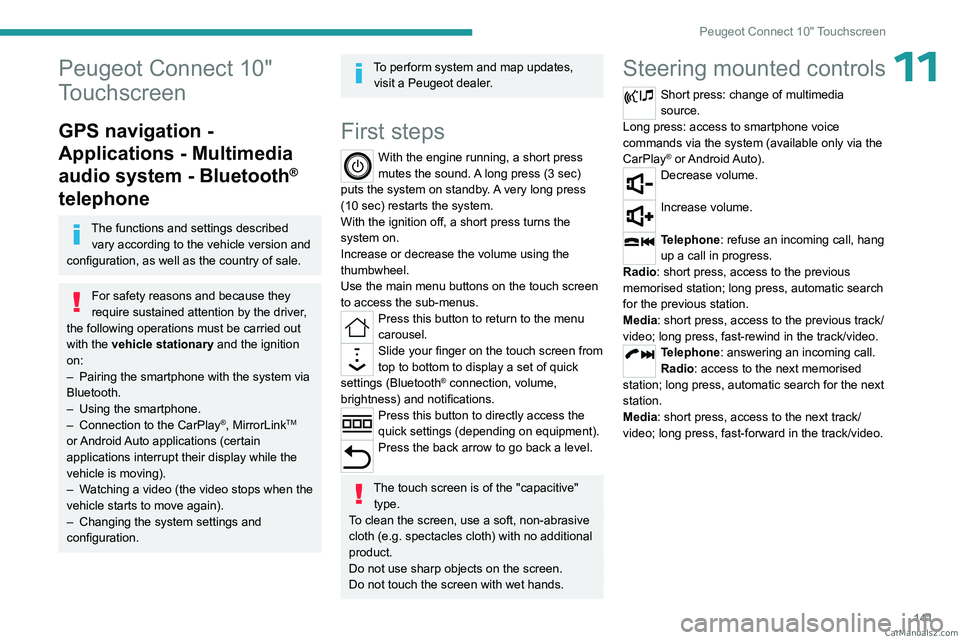
With the engine running, a short press
mutes the sound. A long press (3 sec)
puts the system on standby. A very long press
(10 sec) restarts the system.
With the ignition off, a short press turns the
system on.
Increase or decrease the volume using the
thumbwheel.
Use the main menu buttons on the touch screen
to access the sub-menus.
Press this button to return to the menu
carousel.
Slide your finger on the touch screen from
top to bottom to display a set of quick
settings (Bluetooth
® connection, volume,
brightness) and notifications.
Press this button to directly access the
quick settings (depending on equipment).
Press the back arrow to go back a level.
The touch screen is of the "capacitive" type.
To clean the screen, use a soft, non-abrasive
cloth (e.g. spectacles cloth) with no additional
product.
Do not use sharp objects on the screen.
Do not touch the screen with wet hands.
Steering mounted controls
Short press: change of multimedia
source.
Long press: access to smartphone voice
commands via the system (available only via the
CarPlay
® or Android Auto).Decrease volume.
Increase volume.
Telephone: refuse an incoming call, hang
up a call in progress.
Radio: short press, access to the previous
memorised station; long press, automatic search
for the previous station.
Media: short press, access to the previous track/
video; long press, fast-rewind in the track/video.
Telephone: answering an incoming call.
Radio: access to the next memorised
station; long press, automatic search for the next
station.
Media: short press, access to the next track/
video; long press, fast-forward in the track/video. CarM an uals 2 .c o m
Page 144 of 164
142
Peugeot Connect 10" Touchscreen
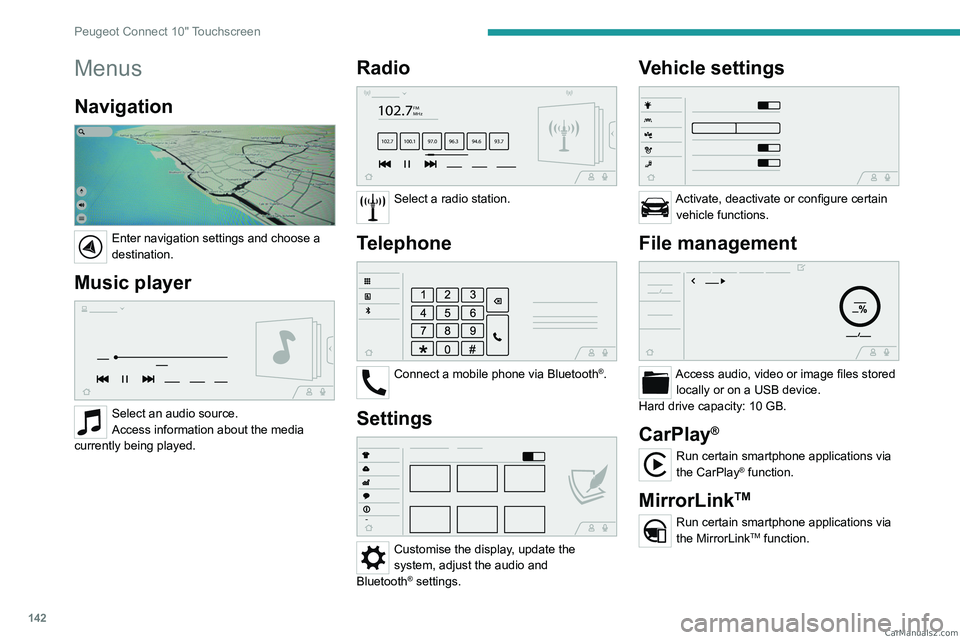
Menus
Navigation
Enter navigation settings and choose a
destination.
Music player
Select an audio source.
Access information about the media
currently being played.
Radio
102.7FM
MHz
102.7 100.1 97.0 96.3 94.69 3.7
Select a radio station.
Telephone
Connect a mobile phone via Bluetooth®.
Settings
Customise the display, update the
system, adjust the audio and
Bluetooth
® settings.
Vehicle settings
Activate, deactivate or configure certain vehicle functions.
File management
Access audio, video or image files stored locally or on a USB device.
Hard drive capacity: 10 GB.
CarPlay®
Run certain smartphone applications via
the CarPlay® function.
MirrorLinkTM
Run certain smartphone applications via
the MirrorLinkTM function. CarM an uals 2 .c o m
Page 147 of 164
145
Peugeot Connect 10" Touchscreen
11Deleting a telephone
In the list of paired telephones, press the
bin next to the telephone to be deleted.
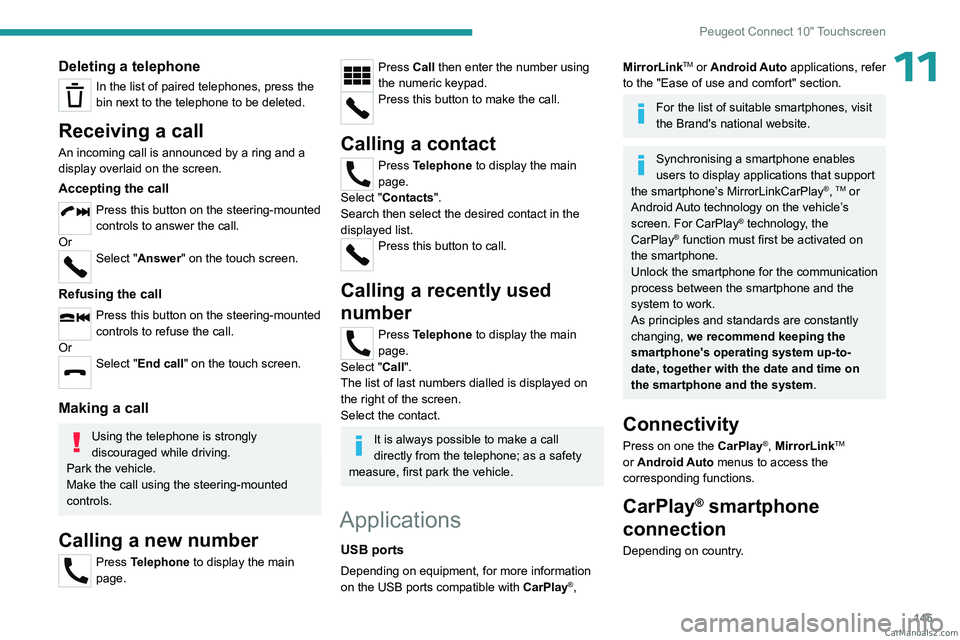
Receiving a call
An incoming call is announced by a ring and a
display overlaid on the screen.
Accepting the call
Press this button on the steering-mounted
controls to answer the call.
Or
Select "Answer" on the touch screen.
Refusing the call
Press this button on the steering-mounted
controls to refuse the call.
Or
Select "End call" on the touch screen.
Making a call
Using the telephone is strongly
discouraged while driving.
Park the vehicle.
Make the call using the steering-mounted
controls.
Calling a new number
Press Telephone to display the main
page.
Press Call then enter the number using
the numeric keypad.
Press this button to make the call.
Calling a contact
Press Telephone to display the main
page.
Select "Contacts".
Search then select the desired contact in the
displayed list.
Press this button to call.
Calling a recently used
number
Press Telephone to display the main
page.
Select "Call".
The list of last numbers dialled is displayed on
the right of the screen.
Select the contact.
It is always possible to make a call
directly from the telephone; as a safety
measure, first park the vehicle.
Applications
USB ports
Depending on equipment, for more information
on the USB ports compatible with CarPlay®,
MirrorLinkTM or Android Auto applications, refer
to the "Ease of use and comfort" section.
For the list of suitable smartphones, visit
the Brand's national website.
Synchronising a smartphone enables
users to display applications that support
the smartphone’s MirrorLinkCarPlay
®, TM or
Android Auto
technology on the vehicle’s
screen. For CarPlay
® technology, the
CarPlay® function must first be activated on
the smartphone.
Unlock the smartphone for the communication
process between the smartphone and the
system to work.
As principles and standards are constantly
changing, we recommend keeping the
smartphone's operating system up-to-
date, together with the date and time on
the smartphone and the system.
Connectivity
Press on one the CarPlay®, MirrorLinkTM
or Android Auto
menus
to access the
corresponding functions.
CarPlay® smartphone
connection
Depending on country. CarM an uals 2 .c o m
Page 148 of 164
146
Peugeot Connect 10" Touchscreen
On connecting the USB cable, the
CarPlay® function deactivates the
system's Bluetooth® mode.
The "CarPlay " function requires the use of
a compatible smartphone and compatible
applications.
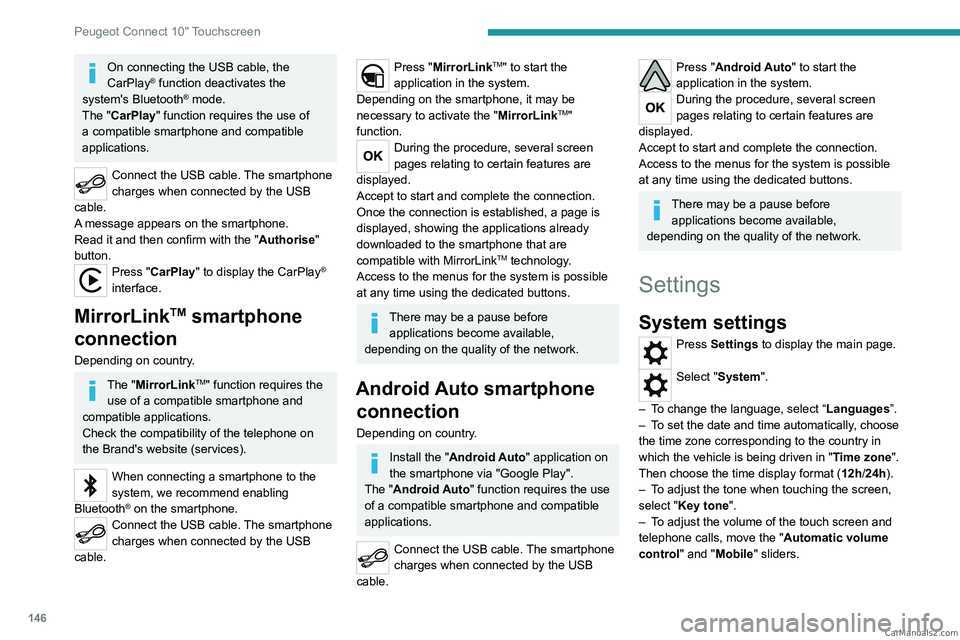
Connect the USB cable. The smartphone
charges when connected by the USB
cable.
A message appears on the smartphone.
Read it and then confirm with the " Authorise"
button.
Press "CarPlay" to display the CarPlay®
interface.
MirrorLinkTM smartphone
connection
Depending on country.
The "MirrorLinkTM" function requires the
use of a compatible smartphone and
compatible
applications.
Check the compatibility of the telephone on
the Brand's website (services).
When connecting a smartphone to the
system, we recommend enabling
Bluetooth
® on the smartphone.Connect the USB cable. The smartphone
charges when connected by the USB
cable.
Press "MirrorLinkTM" to start the
application in the system.
Depending on the smartphone, it may be
necessary to activate the "MirrorLink
TM"
function.
During the procedure, several screen
pages relating to certain features are
displayed.
Accept to start and complete the connection.
Once the connection is established, a page is
displayed, showing the applications already
downloaded to the smartphone that are
compatible with MirrorLink
TM technology.
Access to the menus for the system is possible
at any time using the dedicated buttons.
There may be a pause before applications become available,
depending on the quality of the network.
Android Auto smartphone connection
Depending on country.
Install the "Android Auto" application on
the smartphone via "Google Play".
The "Android Auto" function requires the use
of a compatible smartphone and compatible
applications.
Connect the USB cable. The smartphone
charges when connected by the USB
cable.
Press "Android Auto" to start the
application in the system.
During the procedure, several screen
pages relating to certain features are
displayed.
Accept to start and complete the connection.
Access to the menus for the system is possible
at any time using the dedicated buttons.
There may be a pause before applications become available,
depending on the quality of the network.
Settings
System settings
Press Settings to display the main page.
Select "System".
–
T
o change the language, select “ Languages”.
–
T
o set the date and time automatically, choose
the time zone corresponding to the country in
which the vehicle is being driven in " Time zone".
Then choose the time display format ( 12h/24h).
–
T
o adjust the tone when touching the screen,
select "Key tone".
–
T
o adjust the volume of the touch screen and
telephone calls, move the " Automatic volume
control" and "Mobile " sliders. CarM an uals 2 .c o m
Page 153 of 164
151
Alphabetical index
360° camera 89
A
ABS 54
Accessories
53
AdBlue®
14, 103
AdBlue® tank
104
Additive, Diesel
101
Adjusting headlamp beam height
49
Adjusting headlamps
49
Adjusting head restraints
30
Adjusting seat
30–31
Adjusting the air distribution
39
Adjusting the air flow
39
Adjusting the date
17, 147
Adjusting the headlamp beam height
49
Adjusting the height and reach
of the steering wheel
32
Adjusting the seat angle
31
Adjusting the seat belt height
58
Adjusting the temperature
39
Adjusting the time
17, 147
Advice on care and maintenance
111
Advice on driving
6, 66–67
Airbags
59–61, 63
Airbags, curtain
60–61
Airbags, front
60–61, 64
Airbags, lateral
60–61
Air conditioning
36, 38, 39
Air conditioning, automatic
40
Air conditioning, dual-zone automatic 38–40
Air conditioning, manual
37, 40
Air intake
39
Air vents
36
Alarm
27
Anti-lock braking system (ABS)
54
Antitheft / Immobiliser
21
Area, loading
45
Armrest, front
42
Armrest, rear
43
Assistance, emergency braking
54
Audio streaming (Bluetooth)
139
B
Battery 106
Battery, 12 V
100, 106, 124–128
Battery, charging
124, 127
Battery, remote control
24–25
Bench seat, folding
35
BlueHDi
14, 100, 115
Bluetooth (hands-free)
139–140
Bluetooth (telephone)
145
Bodywork
11 2
Bonnet
96–97
Brake discs
102
Brake lamps
123
Brakes
101–102
Braking assistance system
54
Bulbs
121
Bulbs (changing)
120, 123
C
Capacity, fuel tank 94
Cap, fuel filler
94
Care of the bodywork
11 2
Central locking
21, 23
Changing a bulb
120, 123
Changing a fuse
124
Changing a wheel
115–117
Changing a wiper blade
51
Changing the remote control battery
24
Changing to free-wheeling
111
Checking the levels
98–100
Checks
97–98, 100–103
Checks, routine
100–102, 105
Child lock
65
Children
59, 64
Children (safety)
65
Child seats
59, 62–63
Child seats, ISOFIX
64
Cigar lighter
41
Cleaning (advice)
110–113
Cleaning the engine throttle housing
11 0
Closing the boot
22
Closing the doors
22–23, 25–26
Closing the tailgate
26
Configuration, vehicle
17–19
Connection, Android Auto
146
Connection, Apple CarPlay
145
Connection, Bluetooth
140, 145
Connection, MirrorLink
146
Connectivity
145 CarM an uals 2 .c o m
Page 156 of 164
154
Alphabetical index
Markings, identification 135
Mat
42, 81
Mirror, rear view
33
Mirrors, door
33, 40
Mode, driving
77
Mountings, ISOFIX
64
N
Normal mode 77
O
Obstacle detection 86
Off-road camera
88
Oil change
98, 108
Oil consumption
98
Oil, engine
98, 108
On-board tools
115–116
Opening the bonnet
96–97
Opening the boot
22
Opening the doors
22, 25
Opening the windows
20
Over-speed buzzer
82
P
Pads, brake 101–102
Paint
112, 135
Paint colour code 135
Parking brake
72, 102
Parking (sensors)
86
Parking sensors, audible and visual
86
Parking sensors, front
87
Parking sensors, rear
86
Plates, identification
135
Player, Apple®
139
Player, USB
139, 143–144
Port, USB
41, 139, 143–145
Pressures, tyres
102, 136
Pre-tensioning (seat belts)
59
Priming pump
11 5
Priming the fuel system
11 5
Protecting children
60, 62–64
Puncture
11 6
R
Radio 138, 143
Range, AdBlue®
14, 100
Reading lamps
43
Rear bench seat
34–35
Rear differential locking
72
Rear screen (demisting)
40
Recharging the battery
124, 127
Recirculation, air
39
Recorder, trip distance
16
Regeneration of the particle filter
101
Reinitialising the remote control
25
Reinitialising the under-inflation
detection system
79
Reminder, key in ignition
70
Reminder, lighting on
48
Remote control
20–24
Removing a wheel
117–119
Removing the mat
42
Replacing bulbs
120, 123
Replacing fuses
124
Replacing the air filter
101, 108
Replacing the battery
106
Replacing the Diesel filter
109
Replacing the engine oil
108
Replacing the oil filter
101, 109
Replacing the passenger
compartment filter
100, 107
Reservoir, screenwash
100
Resetting the service indicator
13–14
Resetting the trip
16
Rev counter
8
Reversing camera
80, 87
Reversing lamps
123
Roof bars
96
Running out of fuel (Diesel)
11 5
S
Safety, children 60, 62–64
Saturation of the particle filter (Diesel)
101
Screen, monochrome
17
Screenwash
51 CarM an uals 2 .c o m