2023 PEUGEOT EXPERT display
[x] Cancel search: displayPage 25 of 348
23
Dashboard instruments
1Thermal comfort
consumption indicator
(Electric)
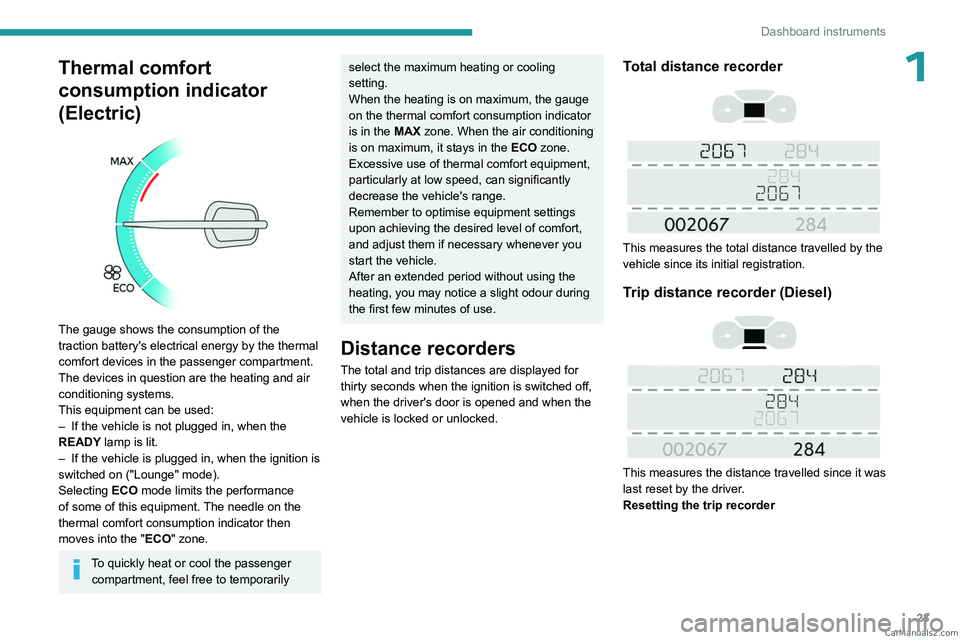
The gauge shows the consumption of the
traction battery's electrical energy by the thermal
comfort devices in the passenger compartment.
The devices in question are the heating and air
conditioning systems.
This equipment can be used:
–
If the vehicle is not plugged in, when the
READY
lamp is lit.
–
If the vehicle is plugged in, when the ignition is
switched on ("Lounge" mode).
Selecting ECO
mode limits the performance
of some of this equipment. The needle on the
thermal comfort consumption indicator then
moves into the "ECO" zone.
To quickly heat or cool the passenger compartment, feel free to temporarily
select the maximum heating or cooling
setting.
When the heating is on maximum, the gauge
on the thermal comfort consumption indicator
is in the MAX zone. When the air conditioning
is on maximum, it stays in the ECO zone.
Excessive use of thermal comfort equipment,
particularly at low speed, can significantly
decrease the vehicle's range.
Remember to optimise equipment settings
upon achieving the desired level of comfort,
and adjust them if necessary whenever you
start the vehicle.
After an extended period without using the
heating, you may notice a slight odour during
the first few minutes of use.
Distance recorders
The total and trip distances are displayed for thirty seconds when the ignition is switched off,
when the driver's door is opened and when the
vehicle is locked or unlocked.
Total distance recorder
This measures the total distance travelled by the
vehicle since its initial registration.
Trip distance recorder (Diesel)
This measures the distance travelled since it was
last reset by the driver.
Resetting the trip recorder
CarM an uals 2 .c o m
Page 26 of 348

24
Dashboard instruments
► With the ignition on, press the button until
zeros appear .
Lighting dimmer
This system allows the brightness of the
instruments and controls to be adjusted manually
to suit the ambient light level.
With buttons
With the lamps on, press button A to increase
the brightness of the lighting, or button B to
decrease it.
Release the button when the desired brightness
is reached.
With touch screen
► In the Settings menu, select "Brightness"
or "OPTIONS ", "Screen configuration " then
"Brightness".
►
Adjust the brightness by pressing the arrows
or moving the slider
.
The brightness can be set differently for day mode and night mode.
Trip computer
Displays information related to the current trip
(range, fuel consumption, average speed, etc.).
Information display
To display the various trip computer tabs in turn:
► Press the button located on the end of the
wiper control stalk .
With steering-mounted controls
► Press the knob on the steering wheel.
On the instrument panel
► Press this button.
The following current information is shown in
turn:
–
Driving range (Diesel). CarM an uals 2 .c o m
Page 27 of 348

25
Dashboard instruments
1– Current consumption.
– Stop & Start time counter (Diesel).
–
T
rip "1" followed by (depending on version)
trip "2" including average speed, average
consumption and distance travelled for each trip.
Trips "1" and "2" are independent but their use
is identical.
For example, trip "1" can be used for daily
figures and trip " 2" for monthly figures.
Trip reset
The reset is performed when the trip counter is
displayed.
► Press the button on the end of the wiper
control stalk for more than two seconds.
► Press the knob on the steering wheel for
more than two seconds.
► Press this button for more than 2 seconds.
Definitions
Range
(miles or km)
(Traction battery charge level percentage)
(Electric)
Distance that can still be travelled with the
fuel remaining in the tank (based on the
average fuel consumption over the last few miles
(kilometres) travelled).
This value may vary following a change in driving
style or terrain, leading to a significant change in
current fuel consumption.
When the range falls below 19 miles (30
km),
dashes are displayed.
After filling with at least 5 litres of fuel, the range
is recalculated and is displayed if it exceeds 62
miles (100
km).
Dashes appearing permanently in place of
numbers while driving indicates a malfunction. Consult a PEUGEOT dealer or a qualified
workshop.
Current consumption
(mpg or l/100 km or km/l)
(miles/kWh or kWh/100 km or km/kWh) (Electric)
/Calculated during the last few
seconds.
This function is only displayed at speeds above
19 mph (30
km/h) (Diesel).
Average consumption
(mpg or l/100 km or km/l)
(miles/kWh or kWh/100 km or km/kWh) (Electric)
/Calculated since the last trip
computer reset.
Average speed
(mph or km/h)Calculated since the last trip computer
reset.
Distance travelled
(miles or km)Calculated since the last trip computer
reset.
Stop & Start time counter
(minutes/seconds or hours/minutes)
If your vehicle is fitted with the Stop & Start
function, a time counter calculates the time spent
in STOP mode during a journey. CarM an uals 2 .c o m
Page 28 of 348

26
Dashboard instruments
The time counter is reset each time the ignition is
switched on.
Touch screen
This system gives access to the following elements:
–
Permanent display of the time and outside
temperature (a blue warning lamp appears if
there is a risk of ice).
–
V
ehicle functions and equipment setting
menus.
–
Audio system and telephone controls and
display of related information.
–
Display of visual manoeuvring aid functions
–
Internet services and display of
related
information.
–
Navigation system controls and
display
of related information (depending on
version).
For safety reasons, always stop the
vehicle before performing operations
that require sustained attention.
Some functions are not accessible while
driving.
Recommendations
This screen uses capacitive sensing technology.
– Do not use pointed objects on the touch
screen.
–
Do not touch the touch screen with wet hands.
– Use a soft, clean cloth to clean the touch
screen.
Principles
► Use the buttons on each side of the touch
screen to access the menus, then press the
buttons that appear on the touch screen.
Some menus may display across two pages:
press the "
OPTIONS" button to access the
second page.
After a few moments with no action on the second page, the first page is
displayed automatically.
To deactivate/activate a function, select " OFF"
or "ON".
Configuring a function
Access to additional information on the function
Confirm
Return to the previous page or confirm
Menus
Press the touch screen with three fingers
to show all of the menu buttons.
For more information about the menus,
refer to the sections describing the audio
and telematics systems.
Radio/Media
Navigation (Depending on equipment)
Driving or Vehicle (Depending on
equipment)
Activation, deactivation and settings for certain
functions.
The functions are organised in 2 tabs: " Driving
functions" and "Vehicle settings".
Telephone
Applications
Display of available connected services.
Energy
Access the specific Electric functions
(energy flow, consumption statistics, deferred
charge) organised in the corresponding 3 tabs.
or
Settings
Main settings for the audio system and
touch screen.
Audio system on/off Volume adjustment/mute CarM an uals 2 .c o m
Page 29 of 348

27
Dashboard instruments
1Upper bar
Certain information is displayed permanently in
the upper bar of the touch screen:
–
T
ime and outside temperature (a blue warning
lamp appears if there is a risk of ice).
–
Reminder of information from the
RadioMedia
and Telephone menus and
navigation instructions (depending on
equipment).
–
Notifications.
– Access to the Settings.
Energy menu (Electric)
This menu is only available with 3D Connected
Navigation.
Depending on version, this is accessible either:
– directly, by pressing the button near the
touch screen.
– via the Applications menu.
Flow
The page displays a real-time representation of
the electric drive train’s operation.
1.Active driving mode
2. Electric motor
3. Estimated traction battery charge level
4. Energy flows
The energy flows have a specific colour for each
type of driving:
A. Blue: energy consumption
B. Green: energy recovery
Statistics
This page shows electrical energy consumption
statistics.
– Blue bar chart: directly consumed energy
supplied by the traction battery .
–
Green bar chart: energy recovered during
deceleration and braking, used to recharge the
battery
.
The average result for the current trip is stated in
kWh/100 km.
►
Y
ou can change the displayed time scale by
pressing the
-
or + buttons.
A current trip is any trip of more than 20 minutes without switching off the ignition.
Charging
This page allows you to programme deferred
charging.
For more information on Charging the traction
battery, refer to the corresponding section.
Remotely operable
additional functions
(Electric)
(Depending on country of sale)
The following functions are
available from the MYPEUGEOT
APP application, which is
accessible from a smartphone:
–
Managing the traction battery charging
(deferred charging).
–
Managing the temperature pre-conditioning.
–
V
iewing the state of charge and range of the
vehicle. CarM an uals 2 .c o m
Page 30 of 348

28
Dashboard instruments
Installation procedure
► Download the MYPEUGEOT APP application
from the appropriate online store for your
smartphone.
►
Create an account.
►
Enter the vehicle identification number
(available on the vehicle registration certificate).
For more information on Identification
markings
, refer to the corresponding section.
Network coverage
In order to be able to use the various
remotely operable features, ensure that your
vehicle is located in an area covered by the
mobile network.
A lack of network coverage may prevent
communication with the vehicle (for example,
if it is in an underground car park). In such
cases, the application will display a message
indicating that the connection with the vehicle
could not be established.
Setting the date and time
With audio system
► Press the MENU button for access to the
main menu.
►
Press the "
7" or "8" button to select the
"Personalisation-configuration " menu, then
confirm by pressing the OK button. ►
Press the "
5" or "6" button to select the
Display configuration menu, then confirm by
pressing the OKbutton.
►
Press the "
5" or "6" and "7" or "8" buttons
to adjust the date and time values, then confirm
by pressing the OK button.
With Audio System with
Touch Screen
► Select the Settings menu in the upper
banner of the touch screen.
►
Select "
Configuration ".
► Select "Date and time".
►
Select "
Date" or "Time".
►
Choose the display formats.
►
Change the date and/or time using the
numeric keypad.
►
Confirm with "
OK".
With 3D Connected
Navigation
Time and date settings are only available if GPS
synchronisation is deactivated.
► Select the Settings menu in the
banner of the touch screen.
►
Press the "
OPTIONS " button to access the
secondary page.
► Select " Setting the time-date".
►
Select the "
Date:" or "Time" tab.
► Set the date and/or time using the numeric
keypad.
►
Confirm with "
OK".
Additional settings
You can choose:
– T o change the time zone.
–
T
o change the display format of the date and
time (12h/24h).
–
T
o activate or deactivate the summer time
management function (+1 hour).
–
T
o activate or deactivate GPS synchronisation
(UTC).
The system does not automatically change between winter and summer time
(depending on the country of sale). CarM an uals 2 .c o m
Page 38 of 348
36
Access
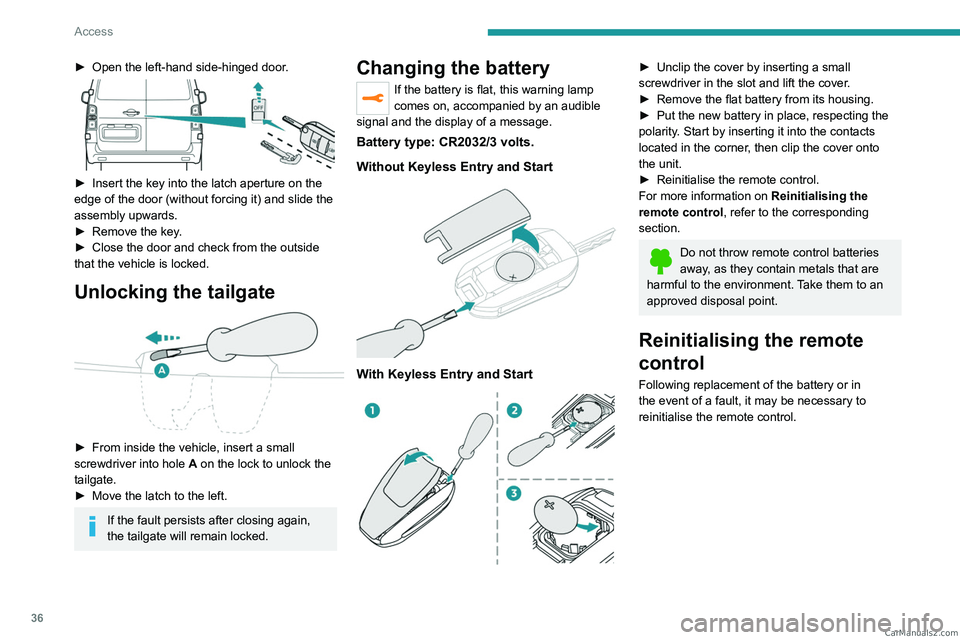
► Open the left-hand side-hinged door.
► Insert the key into the latch aperture on the
edge of the door (without forcing it) and slide the
assembly upwards.
►
Remove the key
.
►
Close the door and check from the outside
that the vehicle is locked.
Unlocking the tailgate
► From inside the vehicle, insert a small
screwdriver into hole A
on the lock to unlock the
tailgate.
►
Move the latch to the left.
If the fault persists after closing again,
the tailgate will remain locked.
Changing the battery
If the battery is flat, this warning lamp
comes on, accompanied by an audible
signal and the display of a message.
Battery type: CR2032/3 volts.
Without Keyless Entry and Start
With Keyless Entry and Start
► Unclip the cover by inserting a small
screwdriver in the slot and lift the cover .
►
Remove the flat battery from its housing.
►
Put the new battery in place, respecting the
polarity
. Start by inserting it into the contacts
located in the corner, then clip the cover onto
the unit.
►
Reinitialise the remote control.
For more information on Reinitialising the
remote control
, refer to the corresponding
section.
Do not throw remote control batteries
away, as they contain metals that are
harmful to the environment. Take them to an
approved disposal point.
Reinitialising the remote
control
Following replacement of the battery or in
the event of a fault, it may be necessary to
reinitialise the remote control. CarM an uals 2 .c o m
Page 71 of 348
69
Ease of use and comfort
3Any liquid which could spill risks causing an electrical short circuit and therefore a
potential fire.
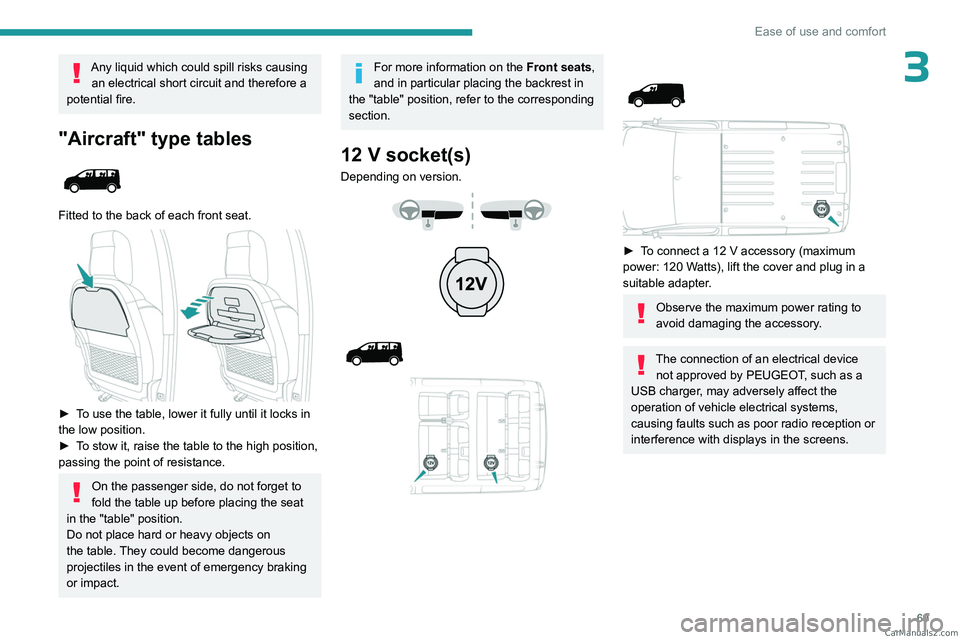
"Aircraft" type tables
Fitted to the back of each front seat.
► To use the table, lower it fully until it locks in
the low position.
►
T
o stow it, raise the table to the high position,
passing the point of resistance.
On the passenger side, do not forget to
fold the table up before placing the seat
in the "table" position.
Do not place hard or heavy objects on
the table. They could become dangerous
projectiles in the event of emergency braking
or impact.
For more information on the Front seats,
and in particular placing the backrest in
the "table" position, refer to the corresponding
section.
12 V socket(s)
Depending on version.
► To connect a 12 V accessory (maximum
power: 120 Watts), lift the cover and plug in a
suitable adapter.
Observe the maximum power rating to
avoid damaging the accessory.
The connection of an electrical device not approved by PEUGEOT, such as a
USB charger, may adversely affect the
operation of vehicle electrical systems,
causing faults such as poor radio reception or
interference with displays in the screens. CarM an uals 2 .c o m