2023 NISSAN SENTRA trunk
[x] Cancel search: trunkPage 12 of 556
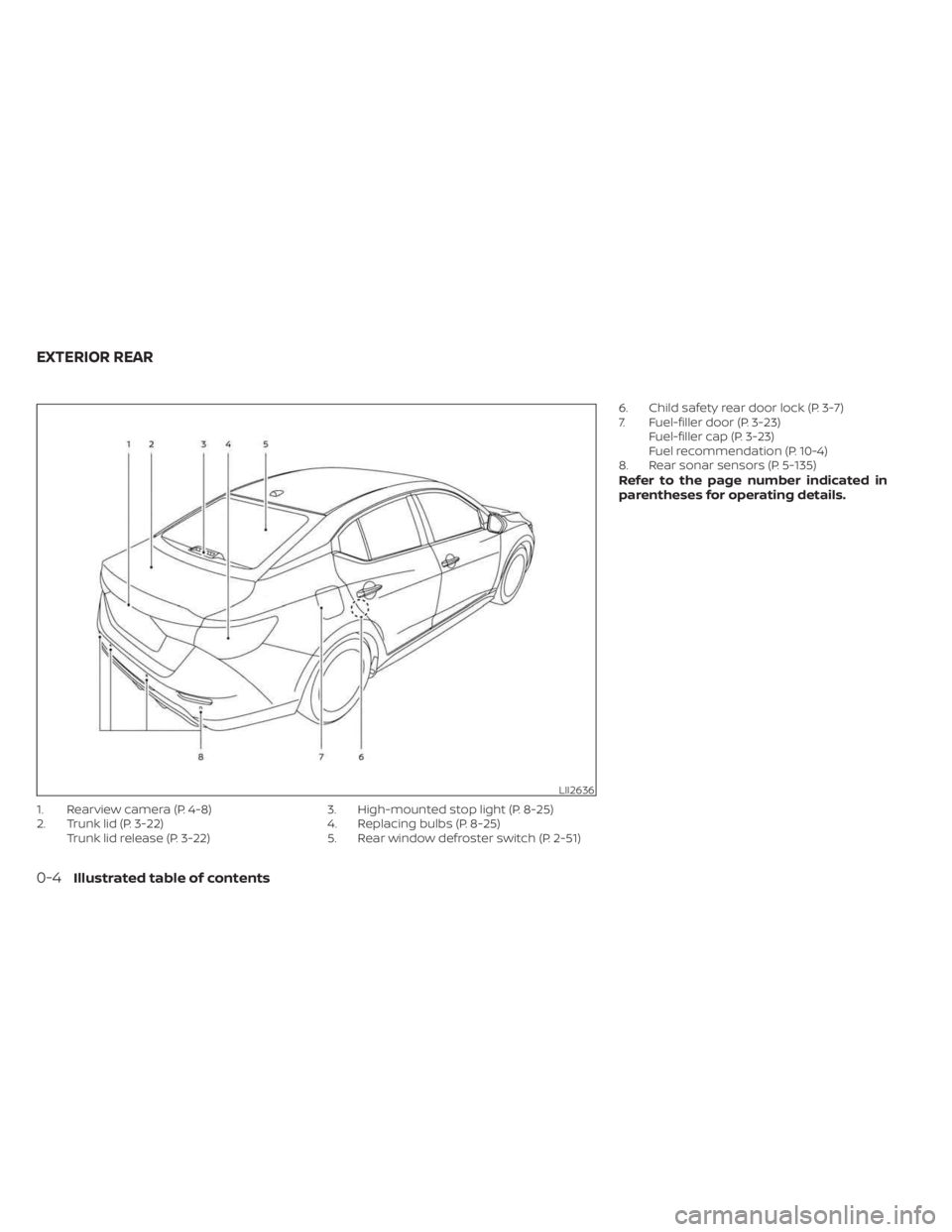
1. Rearview camera (P. 4-8)
2. Trunk lid (P. 3-22)Trunk lid release (P. 3-22) 3. High-mounted stop light (P. 8-25)
4. Replacing bulbs (P. 8-25)
5. Rear window defroster switch (P. 2-51) 6. Child safety rear door lock (P. 3-7)
7. Fuel-filler door (P. 3-23)
Fuel-filler cap (P. 3-23)
Fuel recommendation (P. 10-4)
8. Rear sonar sensors (P. 5-135)
Refer to the page number indicated in
parentheses for operating details.
LII2636
EXTERIOR REAR
0-4Illustrated table of contents
Page 15 of 556
20. Fuel filler door release (P. 3-23)
21. ECO mode switch (P. 5-24)Instrument brightness control (P. 2-58)
Trunk release (P. 3-22)
Trip reset switch (P. 2-5)
For additional information, refer to the sepa-
rate NissanConnect® Owner’s Manual.
Refer to the page number indicated in
parentheses for operating details.
Illustrated table of contents0-7
Page 25 of 556
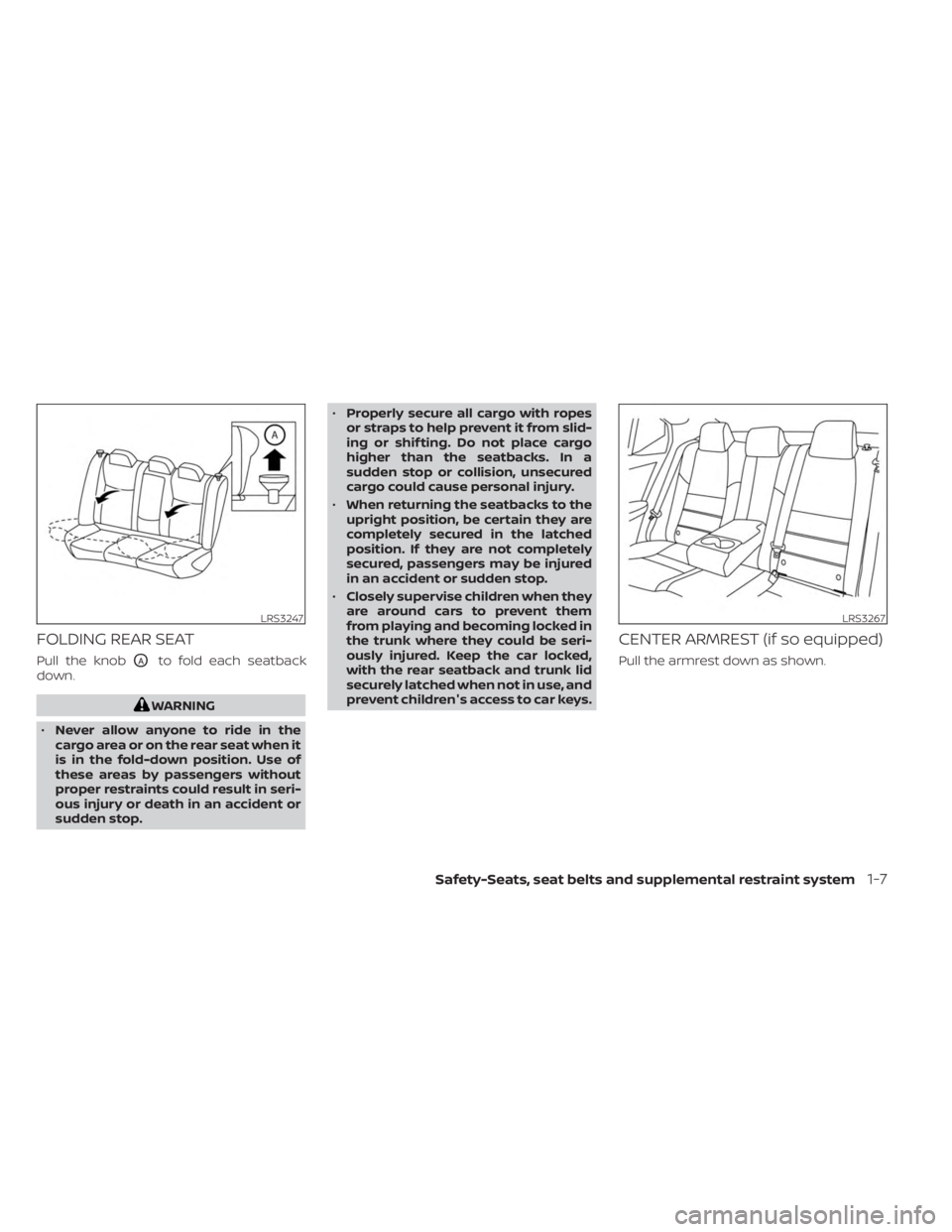
FOLDING REAR SEAT
Pull the knobOAto fold each seatback
down.
WARNING
• Never allow anyone to ride in the
cargo area or on the rear seat when it
is in the fold-down position. Use of
these areas by passengers without
proper restraints could result in seri-
ous injury or death in an accident or
sudden stop. •
Properly secure all cargo with ropes
or straps to help prevent it from slid-
ing or shif ting. Do not place cargo
higher than the seatbacks. In a
sudden stop or collision, unsecured
cargo could cause personal injury.
• When returning the seatbacks to the
upright position, be certain they are
completely secured in the latched
position. If they are not completely
secured, passengers may be injured
in an accident or sudden stop.
• Closely supervise children when they
are around cars to prevent them
from playing and becoming locked in
the trunk where they could be seri-
ously injured. Keep the car locked,
with the rear seatback and trunk lid
securely latched when not in use, and
prevent children's access to car keys.
CENTER ARMREST (if so equipped)
Pull the armrest down as shown.
LRS3247LRS3267
Safety-Seats, seat belts and supplemental restraint system1-7
Page 87 of 556
Storage ........................................2-66
Front-door pockets ......................... 2-66
Seatback pockets (if so equipped) ...........2-66
Storagetrays................................ 2-67
Glovebox ................................... 2-67
Console box ................................. 2-67
Overhead sunglasses storage ...............2-68
Cup holders ................................. 2-68Windows
....................................... 2-70
Power windows ............................. 2-70
Moonroof (if so equipped) ......................2-73
Power moonroof ............................ 2-73
Interior lights ...................................2-74
Map lights ................................... 2-75
Personal lights .............................. 2-75
Trunk light ................................... 2-76
Page 89 of 556
21. ECO mode switch (P. 5-24)Instrument brightness control (P. 2-58)
Trunk release (P. 3-22)
Trip reset switch (P. 2-5)
For additional information, refer to the
separate NissanConnect® Owner’s Manual.
Refer to the page number indicated in
parentheses for operating details.
Instruments and controls2-3
Page 101 of 556
Master warning light
When the ignition switch is in the ON posi-
tion, the master warning light illuminates if
any of the following are displayed on the
vehicle information display:
• Low washer fluid warning
• Loose fuel cap warning
• Low tire pressure warning
• Emergency brake warning
• Lock warning
• Shipping mode warning
• Door/Trunk open warning (when vehicleis moving)
• LED Headlight system warning (if so equipped)
• Chassis Control system fault warning (if so equipped)
• Service CVT warnings
• Service engine warnings
• Rear emergency braking warning (If so equipped)
• Parking sensor error warning
• Driver Attention Alert warning (if so equipped)
• ITS system malfunction warning • Traffic Sign Recognition warnings (if so
equipped)
• I-Key system warnings
For additional information, see “Vehicle in-
formation display 4.2 inch (11 cm) Type A”
(P. 2-18) or “Vehicle information display 7
inch (18 cm) Type B” (P. 2-32).
Power steering warning
light
WARNING
• If the engine is not running or is
turned off while driving, the power
assist for the steering will not work.
Steering will be harder to operate.
• When the power steering warning
light illuminates with the engine run-
ning, there will be no power assist for
the steering. You will still have control
of the vehicle but the steering will be
harder to operate. Have the power
steering system checked. It is recom-
mended that you visit a NISSAN
dealer for this service. When the ignition switch is placed in the ON
position, the power steering warning light
illuminates. Af ter starting the engine, the
power steering warning light turns off. This
indicates the power steering system is
operational.
If the power steering warning light illumi-
nates while the engine is running, it may
indicate the power steering system is not
functioning properly and may need servic-
ing. Have the power steering system
checked. It is recommended that you visit a
NISSAN dealer for this service.
When the power steering warning light illu-
minates with the engine running, there will
be no power assist for the steering but you
will still have control of the vehicle. At this
time, greater steering effort is required to
operate the steering wheel, especially in
sharp turns and at low speeds.
For additional information, see “Power
steering” (P. 5-128).
Rear Automatic Braking
(RAB) OFF warning light (if
so equipped)
This light comes on when the ignition
switch is placed in the ON position. It turns
off af ter the engine is started.
Instruments and controls2-15
Page 103 of 556
High Beam Assist indicator
light (green) (if so equipped)
This indicator light illuminates when the
headlights come on while the headlight
switch is in the AUTO position with the high
beams selected. This indicates that the
high beam assist is operational.
For additional information, see “Headlight
and turn signal switch” (P. 2-52).
High beam indicator light
(blue)
This blue light comes on when the head-
light high beams are on and goes out when
the low beams are selected.
The high beam indicator light also comes
on when the passing signal is activated.
Side light and headlight
indicator light (green)
The side light and headlight indicator light
illuminates when the side light or headlight
position is selected. For additional informa-
tion, see “Headlight and turn signal switch”
(P. 2-52).
Turn signal/hazard
indicator lights (green)
The appropriate light flashes when the turn
signal switch is activated.
Both lights flash when the hazard switch is
turned on.
AUDIBLE REMINDERS
Brake pad wear warning
The disc brake pads have audible wear
warnings. When a disc brake pad requires
replacement, it makes a high pitched
scraping sound when the vehicle is in mo-
tion, whether or not the brake pedal is de-
pressed. Have the brakes checked as soon
as possible if the warning sound is heard.
Light reminder chime
With the ignition switch placed in the OFF
position, a chime sounds when the driver's
door is opened if the headlights or parking
lights are on.
Turn the headlight control switch off before
leaving the vehicle.
NISSAN Intelligent Key® door
buzzer
The Intelligent Key door buzzer sounds if
any one of the following improper opera-
tions is found.
• The Intelligent Key is lef t inside the vehiclewhen locking the doors and trunk.
• The Intelligent Key is taken outside the vehicle when operating the vehicle.
• Any doors are not closed securely when locking the doors.
When the buzzer sounds, be sure to check
both the vehicle and the Intelligent Key.
For additional information, see “NISSAN In-
telligent Key®” (P. 3-2).
Parking brake reminder chime
A chime sounds if the parking brake is set
and the vehicle is driven. The chime will
stop if the parking brake is released or the
vehicle speed returns to zero.
Instruments and controls2-17
Page 113 of 556
• Using the steering wheel switch, a drivercan select “Dismiss Message” to clear the
display for a period of time. If no selection
is made, this message automatically
turns off af ter a period of time. If this mes-
sage does not automatically turn off, it is
not a malfunction.
• Using the steering wheel switch, a driver can select “Disable Alert” to disable the
selected alert for the remainder of the
current trip.
WARNING
Selecting “Dismiss Message” during a
stop within a trip temporarily dis-
misses the message for that stop with-
out turning the system off. Alerts can
be provided for other stops during the
trip. Selecting “Disable Alert” turns off
the Rear Door Alert system for the re-
mainder of a trip and no audible alert
will be provided.
NOTE:
This system is disabled until a driver en-
ables it using the vehicle information
display. For additional information, see
“How to use the vehicle information dis-
play ” (P. 2-18). For additional information, see “Rear Door
Alert” (P. 2-62).
Check Rear Seat For All Articles
When the system is enabled, this message
appears when the vehicle comes to a com-
plete stop, the vehicle is transitioned from
the D (Drive) position to P (Park) position,
and the driver exits the vehicle. This mes-
sage alerts the driver, af ter a period of time,
to check for items in the rear seat af ter the
audible alert has been provided.
NOTE:
This system is disabled until a driver en-
ables it using the vehicle information
display. For additional information, see
“How to use the vehicle information dis-
play ” (P. 2-33).
For additional information, see “Rear Door
Alert” (P. 2-62).
Door/Trunk Open
This warning appears when a door has
been opened.
Drive sport mode indicator
A small “S” appears to the right of the Trans-
mission Shif t Position indicator in the ve-
hicle information display when the drive
sport mode is engaged.
Activate the drive sport mode by pushing
the switch on the shif t lever while the shif t
lever is in the D (Drive) position.
For additional information, see “Drive sport
mode switch” (P. 5-20)
Headlight System Error: See Owner’s
Manual
This warning appears when the LED head-
lights are not functioning properly.
If this warning appears, have your system
checked. It is recommended that you visit a
NISSAN dealer for this service.
Illumination indicator
This indicator appears when the vehicle
information display screen brightness is
being adjusted.
Instruments and controls2-27