2023 NISSAN SENTRA Hand brake
[x] Cancel search: Hand brakePage 173 of 556
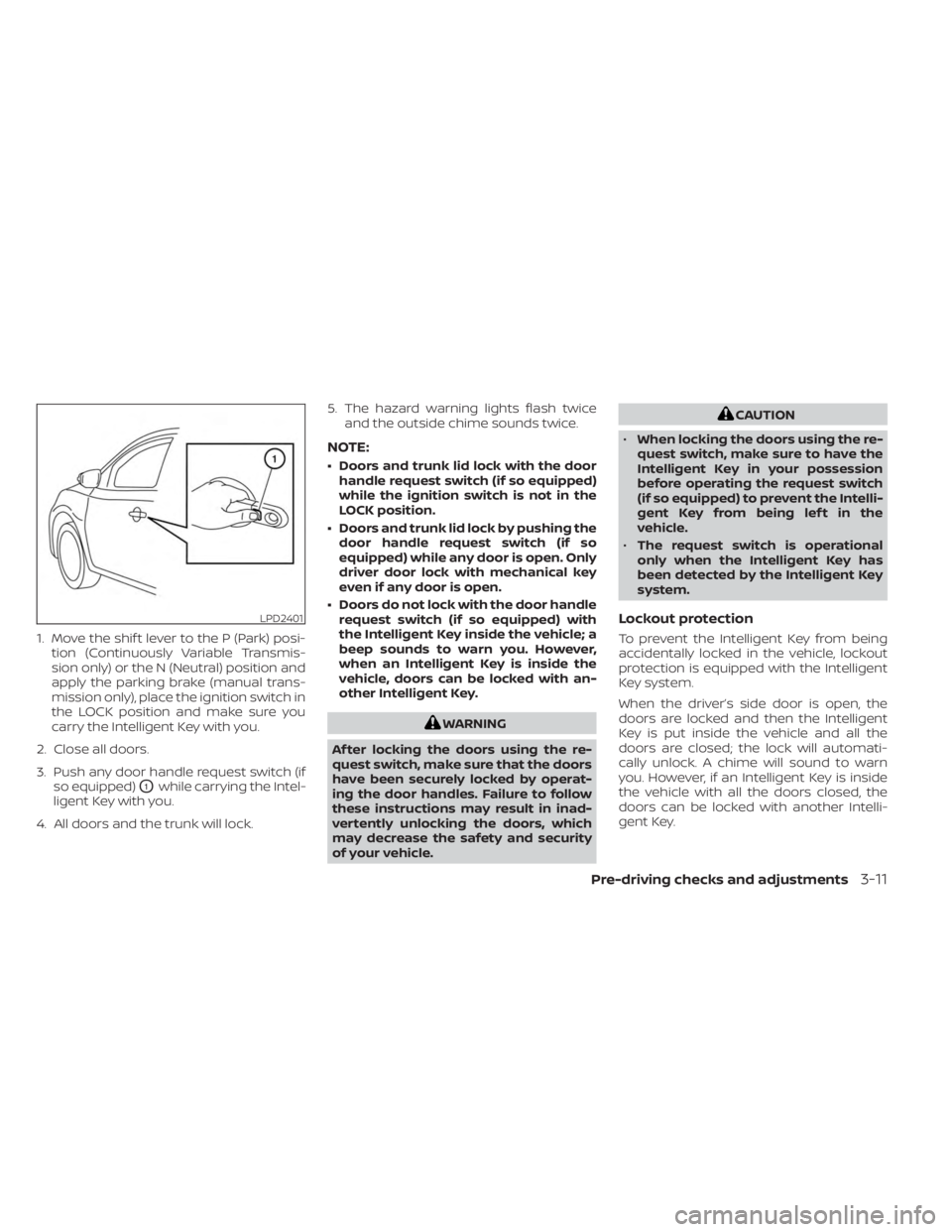
1. Move the shif t lever to the P (Park) posi-tion (Continuously Variable Transmis-
sion only) or the N (Neutral) position and
apply the parking brake (manual trans-
mission only), place the ignition switch in
the LOCK position and make sure you
carry the Intelligent Key with you.
2. Close all doors.
3. Push any door handle request switch (if so equipped)
O1while carrying the Intel-
ligent Key with you.
4. All doors and the trunk will lock. 5. The hazard warning lights flash twice
and the outside chime sounds twice.
NOTE:
• Doors and trunk lid lock with the doorhandle request switch (if so equipped)
while the ignition switch is not in the
LOCK position.
• Doors and trunk lid lock by pushing the door handle request switch (if so
equipped) while any door is open. Only
driver door lock with mechanical key
even if any door is open.
• Doors do not lock with the door handle request switch (if so equipped) with
the Intelligent Key inside the vehicle; a
beep sounds to warn you. However,
when an Intelligent Key is inside the
vehicle, doors can be locked with an-
other Intelligent Key.
WARNING
Af ter locking the doors using the re-
quest switch, make sure that the doors
have been securely locked by operat-
ing the door handles. Failure to follow
these instructions may result in inad-
vertently unlocking the doors, which
may decrease the safety and security
of your vehicle.
CAUTION
• When locking the doors using the re-
quest switch, make sure to have the
Intelligent Key in your possession
before operating the request switch
(if so equipped) to prevent the Intelli-
gent Key from being lef t in the
vehicle.
• The request switch is operational
only when the Intelligent Key has
been detected by the Intelligent Key
system.
Lockout protection
To prevent the Intelligent Key from being
accidentally locked in the vehicle, lockout
protection is equipped with the Intelligent
Key system.
When the driver’s side door is open, the
doors are locked and then the Intelligent
Key is put inside the vehicle and all the
doors are closed; the lock will automati-
cally unlock. A chime will sound to warn
you. However, if an Intelligent Key is inside
the vehicle with all the doors closed, the
doors can be locked with another Intelli-
gent Key.
LPD2401
Pre-driving checks and adjustments3-11
Page 179 of 556
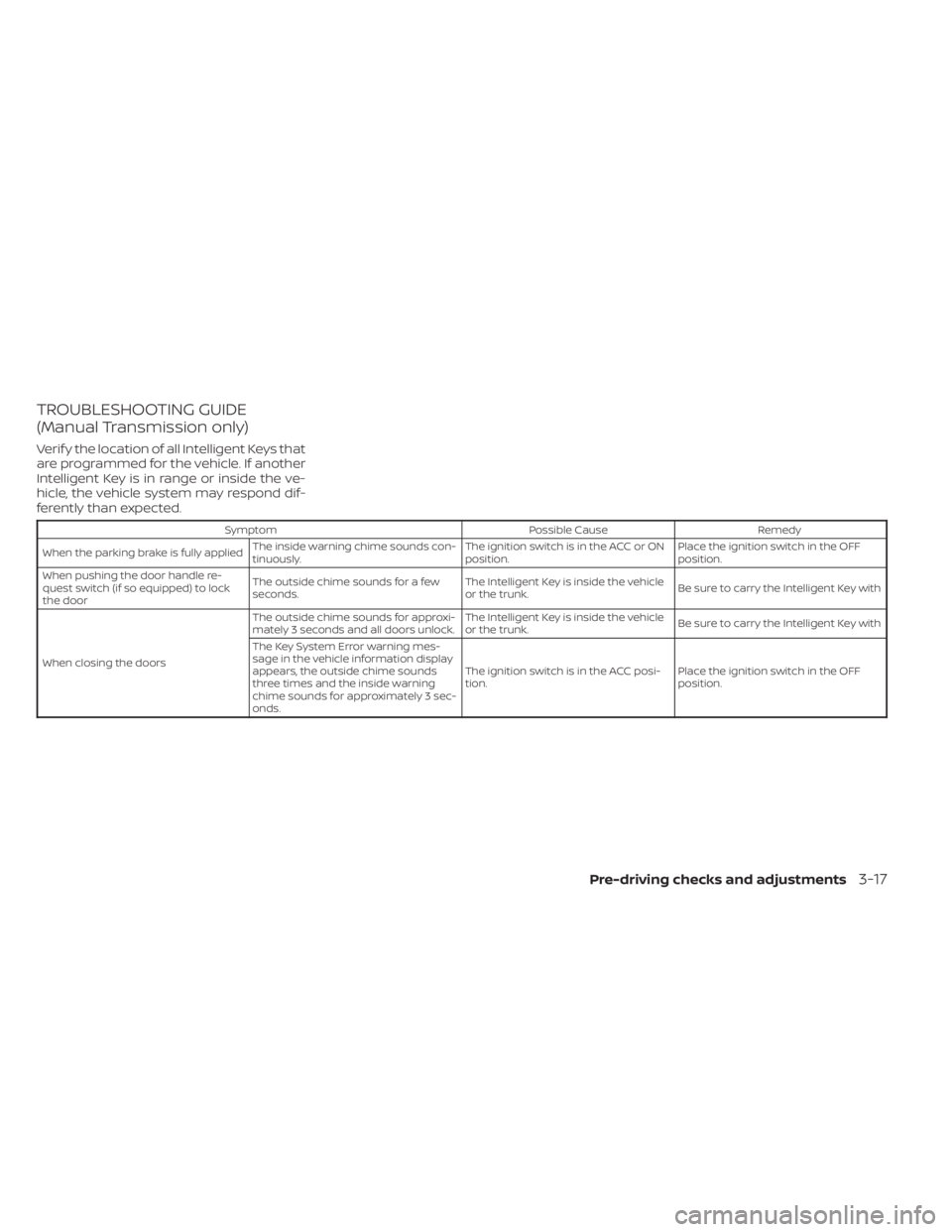
TROUBLESHOOTING GUIDE
(Manual Transmission only)
Verif y the location of all Intelligent Keys that
are programmed for the vehicle. If another
Intelligent Key is in range or inside the ve-
hicle, the vehicle system may respond dif-
ferently than expected.
SymptomPossible CauseRemedy
When the parking brake is fully applied The inside warning chime sounds con-
tinuously. The ignition switch is in the ACC or ON
position.Place the ignition switch in the OFF
position.
When pushing the door handle re-
quest switch (if so equipped) to lock
the door The outside chime sounds for a few
seconds.
The Intelligent Key is inside the vehicle
or the trunk.
Be sure to carry the Intelligent Key with
When closing the doors The outside chime sounds for approxi-
mately 3 seconds and all doors unlock.
The Intelligent Key is inside the vehicle
or the trunk.
Be sure to carry the Intelligent Key with
The Key System Error warning mes-
sage in the vehicle information display
appears, the outside chime sounds
three times and the inside warning
chime sounds for approximately 3 sec-
onds. The ignition switch is in the ACC posi-
tion.
Place the ignition switch in the OFF
position.
Pre-driving checks and adjustments3-17
Page 277 of 556
5 Starting and driving
Precautions when starting and driving..........5-4
Exhaust gas (carbon monoxide) ..............5-4
Three-way catalyst ...........................5-4
Tire Pressure Monitoring System
(TPMS) .......................................5-5
Avoiding collision and rollover ................5-9
Off-roadrecovery ............................5-9
Rapid air pressure loss .......................5-9
Drinking alcohol/drugs and driving ..........5-10
Push-button ignition switch .....................5-11
Operating range ............................ 5-12
Push-button ignition switch positions .......5-12
Emergency engine shut off ..................5-13
NISSAN Intelligent Key® battery
discharge ................................... 5-13
NISSAN Vehicle Immobilizer System .........5-14
Before starting the engine .....................5-14
Starting the engine ............................. 5-14
Remote Engine Start (if so equipped) ........5-15
Driving the vehicle .............................. 5-16
Continuously Variable Transmission
(CVT) (if so equipped) ........................ 5-16
Manual transmission (if so equipped) ........5-21
Parking brake .................................. 5-22
Hand type (if so equipped) ...................5-23
Pedal type (if so equipped) ..................5-23ECO mode switch
.............................. 5-24
Shif t lever indicator (2.0L 4 cylinder
(MR20DD engine model) Manual
Transmission models only)
(if so equipped) .............................. 5-24
Traffic Sign Recognition (TSR) (if so equipped) . . . 5-25 System operation ........................... 5-26
Turning the Traffic Sign Recognition
(TSR) system on and off .....................5-27
System temporarily unavailable .............5-28
System malfunction ......................... 5-28
System maintenance .......................5-28
Lane Departure Warning (LDW) .................5-29
LDW system operation ......................5-30
How to enable/disable the LDW system .....5-32
LDW system limitations .....................5-33
System temporarily unavailable .............5-34
System malfunction ......................... 5-35
System maintenance .......................5-35
Blind Spot Warning (BSW) .......................5-36
BS
W system operation ...................... 5-38
How to enable/disable the BSW system .....5-39
BSW system limitations .....................5-41
BSW driving situations .......................5-42
System temporarily unavailable .............5-45
System maintenance .......................5-47
Page 285 of 556
If the Easy-Fill Tire Alert is not working, use a
tire pressure gauge.
AVOIDING COLLISION AND
ROLLOVER
WARNING
Failure to operate this vehicle in a safe
and prudent manner may result in loss
of control or an accident.
Be alert and drive defensively at all times.
Obey all traffic regulations. Avoid excessive
speed, high speed cornering, or sudden
steering maneuvers, because these driving
practices could cause you to lose control of
your vehicle.
As with any vehicle, loss of control could
result in a collision with other vehicles or
objects or cause the vehicle to roll over,
particularly if the loss of control causes
the vehicle to slide sideways.
Be attentive at all times, and avoid driving
when tired. Never drive when under the in-
fluence of alcohol or drugs (including pre-
scription or over-the-counter drugs which
may cause drowsiness). Always wear your
seat belt as outlined in the “Safety – Seats,
seat belts and supplemental restraint sys- tem” section of this manual, and also in-
struct your passengers to do so.
Seat belts help reduce the risk of injury in
collisions and rollovers.
In a rollover crash, an unbelted person is
significantly more likely to die than a
person wearing a seat belt.
OFF-ROAD RECOVERY
While driving, the right side or lef t side
wheels may unintentionally leave the road
surface. If this occurs, maintain control of
the vehicle by following the procedure be-
low. Please note that this procedure is only
a general guide. The vehicle must be driven
as appropriate based on the conditions of
the vehicle, road and traffic.
1. Remain calm and do not overreact.
2. Do not apply the brakes.
3. Maintain a firm grip on the steering
wheel with both hands and try to hold a
straight course.
4. When appropriate, slowly release the ac- celerator pedal to gradually slow the
vehicle. 5. If there is nothing in the way, steer the
vehicle to follow the road while vehicle
speed is reduced. Do not attempt to
drive the vehicle back onto the road sur-
face until vehicle speed is reduced.
6. When it is safe to do so, gradually turn the steering wheel until both tires return
to the road surface. When all tires are on
the road surface, steer the vehicle to
stay in the appropriate driving lane.
• If you decide that it is not safe to return the vehicle to the road surface based
on vehicle, road or traffic conditions,
gradually slow the vehicle to a stop in
a safe place off the road.
RAPID AIR PRESSURE LOSS
Rapid air pressure loss or a “blow-out” can
occur if the tire is punctured or is damaged
due to hitting a curb or pothole. Rapid air
pressure loss can also be caused by driving
on under-inflated tires.
Rapid air pressure loss can affect the han-
dling and stability of the vehicle, especially
at highway speeds.
Help prevent rapid air pressure loss by
maintaining the correct air pressure and
visually inspecting the tires for wear and
damage. For additional information, see
Starting and driving5-9
Page 286 of 556
“Wheels and tires” (P. 6-3). If a tire rapidly
loses air pressure or “blows-out” while driv-
ing, maintain control of the vehicle by fol-
lowing the procedure below. Please note
that this procedure is only a general guide.
The vehicle must be driven as appropriate
based on the conditions of the vehicle, road
and traffic.
WARNING
If there is a sudden loss of tire air pres-
sure, the vehicle will generally move or
pull in the direction of the flat tire. In
this situation, losing control of the ve-
hicle may cause a collision and result in
personal injury.
To help avoid loss of control:
• Do not rapidly apply the brakes.
• Do not rapidly release the accelerator
pedal.
• Do not rapidly turn the steering
wheel.
1. Remain calm and do not overreact.
2. Maintain a firm grip on the steering wheel with both hands and try to hold a
straight course. 3. When appropriate, slowly release the ac-
celerator pedal to gradually slow the
vehicle.
4. Gradually steer the vehicle to a safe lo- cation off the road and away from traffic
if possible.
5. Lightly apply the brake pedal to gradu- ally stop the vehicle.
6. Turn on the hazard warning flashers and contact a roadside emergency service
to change the tire. For additional infor-
mation, see “Changing a flat tire” (P. 6-3 ).
DRINKING ALCOHOL/DRUGS AND
DRIVING
WARNING
Never drive under the influence of alco-
hol or drugs. Alcohol in the blood-
stream reduces coordination, delays
reaction time and impairs judgement.
Driving af ter drinking alcohol increases
the likelihood of being involved in an
accident injuring yourself and others.
Additionally, if you are injured in an ac-
cident, alcohol can increase the sever-
ity of the injury. NISSAN is committed to safe driving. How-
ever, you must choose not to drive under
the influence of alcohol. Every year thou-
sands of people are injured or killed in
alcohol-related collisions. Although the lo-
cal laws vary on what is considered to be
legally intoxicated, the fact is that alcohol
affects all people differently and most
people underestimate the effects of
alcohol.
Remember, drinking and driving don't mix!
That is true for drugs (over-the-counter,
prescription) and illegal drugs, too. Don't
drive if your ability to operate your vehicle is
impaired by alcohol, drugs, or some other
physical condition.
5-10Starting and driving
Page 289 of 556
OFF
The ignition switch is in the OFF position
when the engine is turned off using the
ignition switch. No lights will illuminate on
the ignition switch.
AUTO ACC:
With the vehicle in the P (Park) position, the
Intelligent Key with you, and the ignition
switch placed from the ON to the OFF po-
sition, the radio can still be used for a period
of time, or until the driver’s door is opened.
Af ter a period of time, functions such as
radio, navigation, and Bluetooth® Hands-
Free Phone System may be restarted by
pressing the “POWER button/VOLUME con-
trol knob” or the key fob unlock button. For
additional information, see the “Monitor, cli-
mate, audio, phone and voice recognition
systems” section of this manual.
EMERGENCY ENGINE SHUT OFF
To shut off the engine in an emergency
situation while driving, perform the follow-
ing procedure:
• Rapidly push the ignition switch threeconsecutive times in less than 1.5 sec-
onds, or
• Push and hold the ignition switch for more than 2 seconds.
NISSAN INTELLIGENT KEY®
BATTERY DISCHARGE
If the battery of the NISSAN Intelligent Key®
is discharged or environmental conditions
interfere with the Intelligent Key operation,
start the engine according to the following
procedure:
1. Place the shif t lever in the P (Park) position.
2. Firmly apply the foot brake.
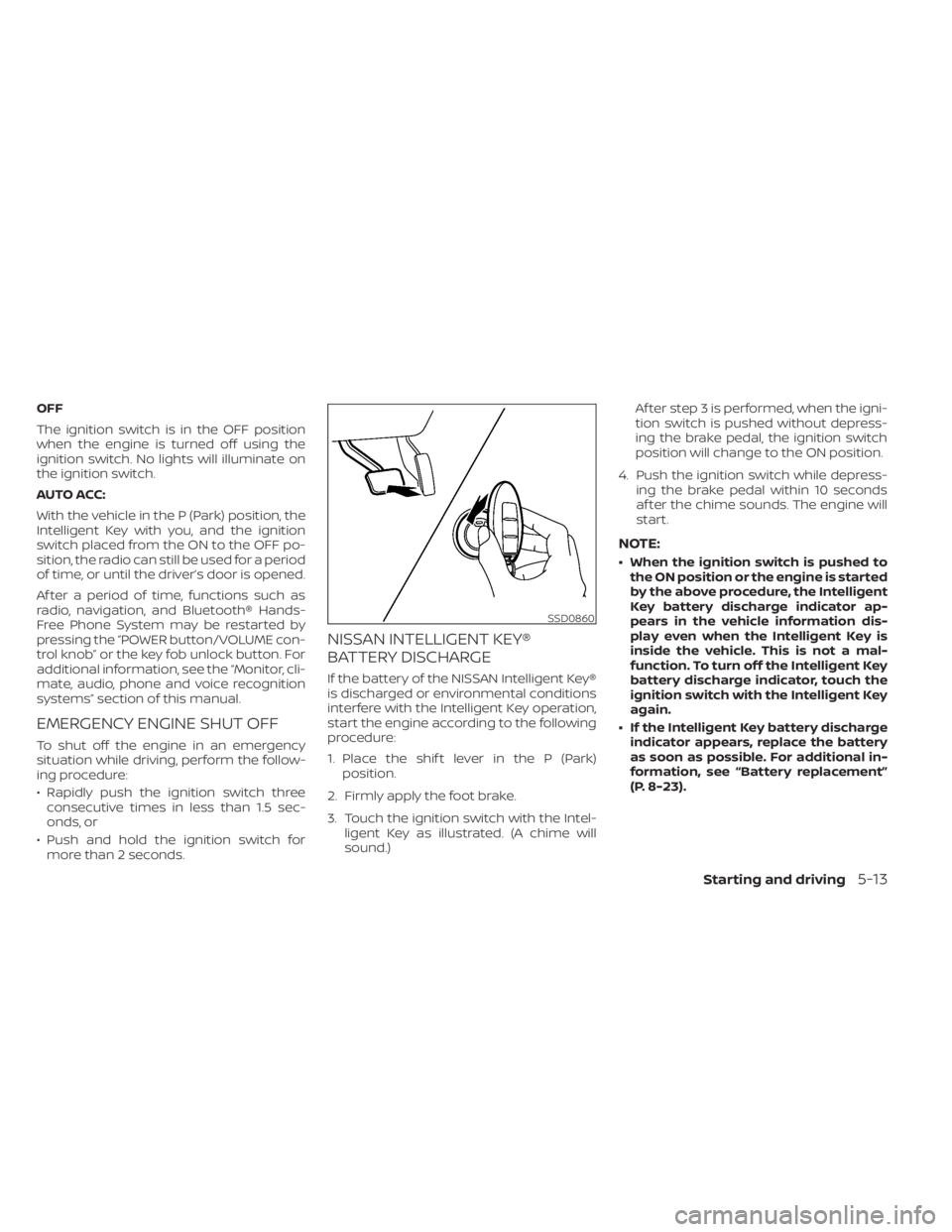
3. Touch the ignition switch with the Intel- ligent Key as illustrated. (A chime will
sound.) Af ter step 3 is performed, when the igni-
tion switch is pushed without depress-
ing the brake pedal, the ignition switch
position will change to the ON position.
4. Push the ignition switch while depress- ing the brake pedal within 10 seconds
af ter the chime sounds. The engine will
start.
NOTE:
• When the ignition switch is pushed tothe ON position or the engine is started
by the above procedure, the Intelligent
Key battery discharge indicator ap-
pears in the vehicle information dis-
play even when the Intelligent Key is
inside the vehicle. This is not a mal-
function. To turn off the Intelligent Key
battery discharge indicator, touch the
ignition switch with the Intelligent Key
again.
• If the Intelligent Key battery discharge indicator appears, replace the battery
as soon as possible. For additional in-
formation, see “Battery replacement”
(P. 8-23).
SSD0860
Starting and driving5-13
Page 299 of 556
HAND TYPE (if so equipped)
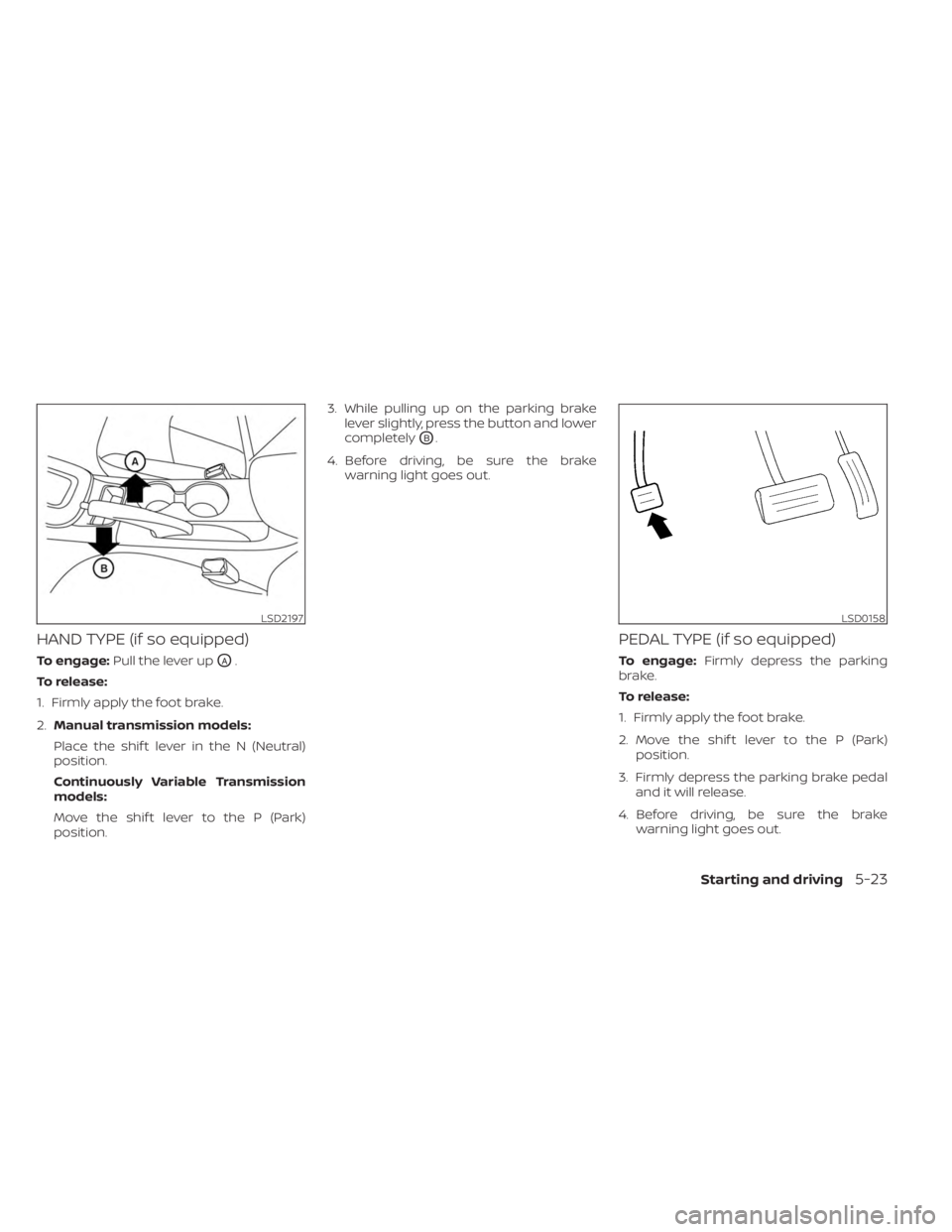
To engage:Pull the lever upOA.
To release:
1. Firmly apply the foot brake.
2. Manual transmission models:
Place the shif t lever in the N (Neutral)
position.
Continuously Variable Transmission
models:
Move the shif t lever to the P (Park)
position. 3. While pulling up on the parking brake
lever slightly, press the button and lower
completely
OB.
4. Before driving, be sure the brake warning light goes out.
PEDAL TYPE (if so equipped)
To engage: Firmly depress the parking
brake.
To release:
1. Firmly apply the foot brake.
2. Move the shif t lever to the P (Park) position.
3. Firmly depress the parking brake pedal and it will release.
4. Before driving, be sure the brake warning light goes out.
LSD2197LSD0158
Starting and driving5-23
Page 371 of 556
While the AEB with Pedestrian Detection
system is operating, you may hear the
sound of brake operation. This is normal
and indicates that the AEB with Pedestrian
Detection system is operating properly.
NOTE:
The vehicle’s brake lights come on when
any braking is performed by the AEB
with Pedestrian Detection system.
Depending on vehicle speed and distance
to the vehicle or pedestrian ahead, as well
as driving and roadway conditions, the sys-
tem may help the driver avoid a forward
collision or may help mitigate the conse-
quences if a collision should be unavoid-
able. If the driver is handling the steering
wheel, accelerating or braking, the AEB with
Pedestrian Detection system will function
later or will not function.The automatic braking will cease under the
following conditions:
• When the steering wheel is turned to
avoid a collision.
• When the accelerator pedal is depressed.
• When there is no longer a vehicle or a pedestrian detected ahead.
If the AEB with Pedestrian Detection sys-
tem has stopped the vehicle, the vehicle
will remain at a standstill for approximately
2 seconds before the brakes are released.
Starting and driving5-95