2023 NISSAN SENTRA ABS
[x] Cancel search: ABSPage 17 of 556
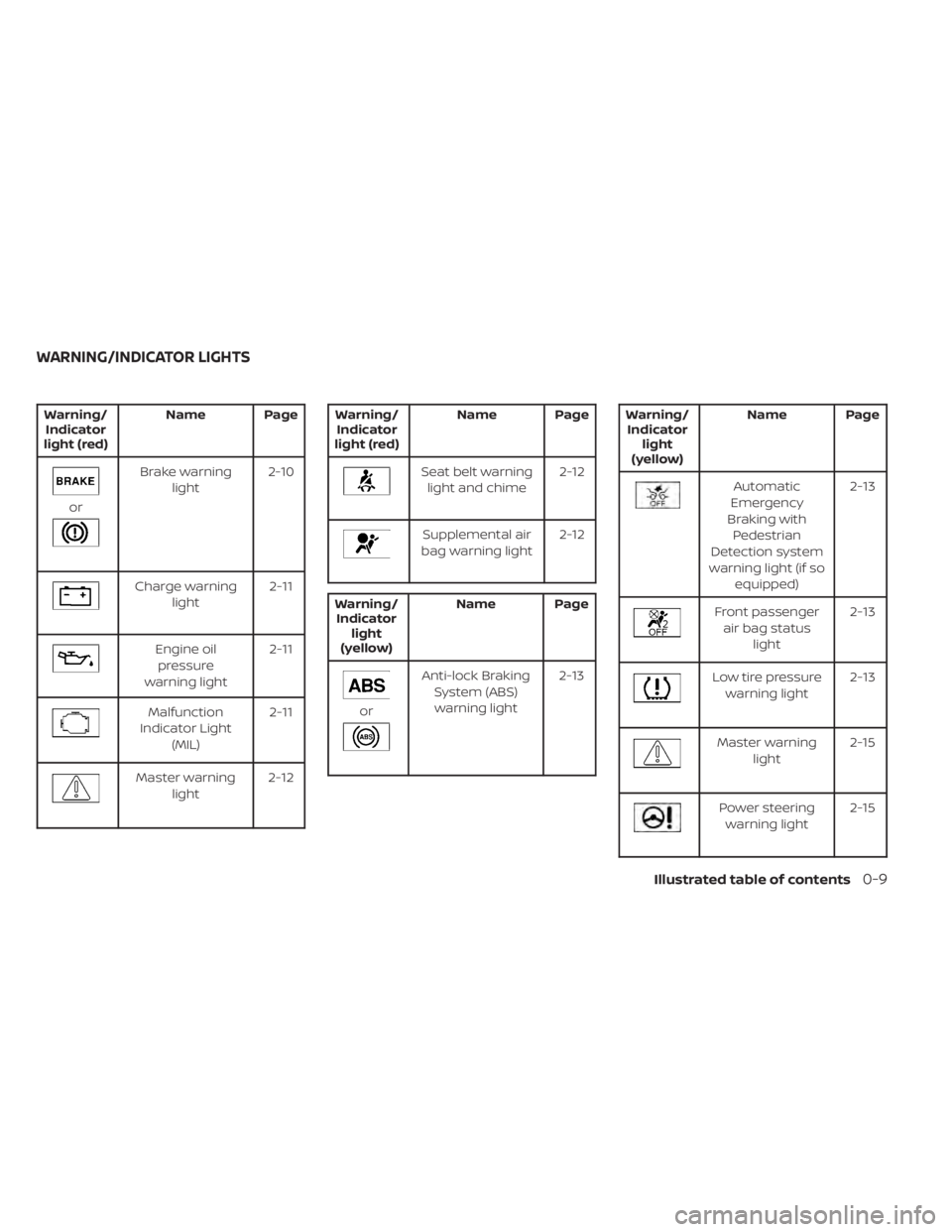
Warning/Indicator
light (red) Name Page
or
Brake warning
light 2-10
Charge warning
light 2-11
Engine oil
pressure
warning light 2-11
Malfunction
Indicator Light (MIL) 2-11
Master warning
light 2-12
Warning/
Indicator
light (red) Name Page
Seat belt warning
light and chime 2-12
Supplemental air
bag warning light 2-12
Warning/
Indicator light
(yellow) Name Page
or
Anti-lock Braking
System (ABS)warning light 2-13
Warning/
Indicator light
(yellow) Name Page
Automatic
Emergency
Braking with Pedestrian
Detection system
warning light (if so equipped) 2-13
Front passenger
air bag status light 2-13
Low tire pressure
warning light 2-13
Master warning
light 2-15
Power steering
warning light 2-15
WARNING/INDICATOR LIGHTS
Illustrated table of contents0-9
Page 95 of 556
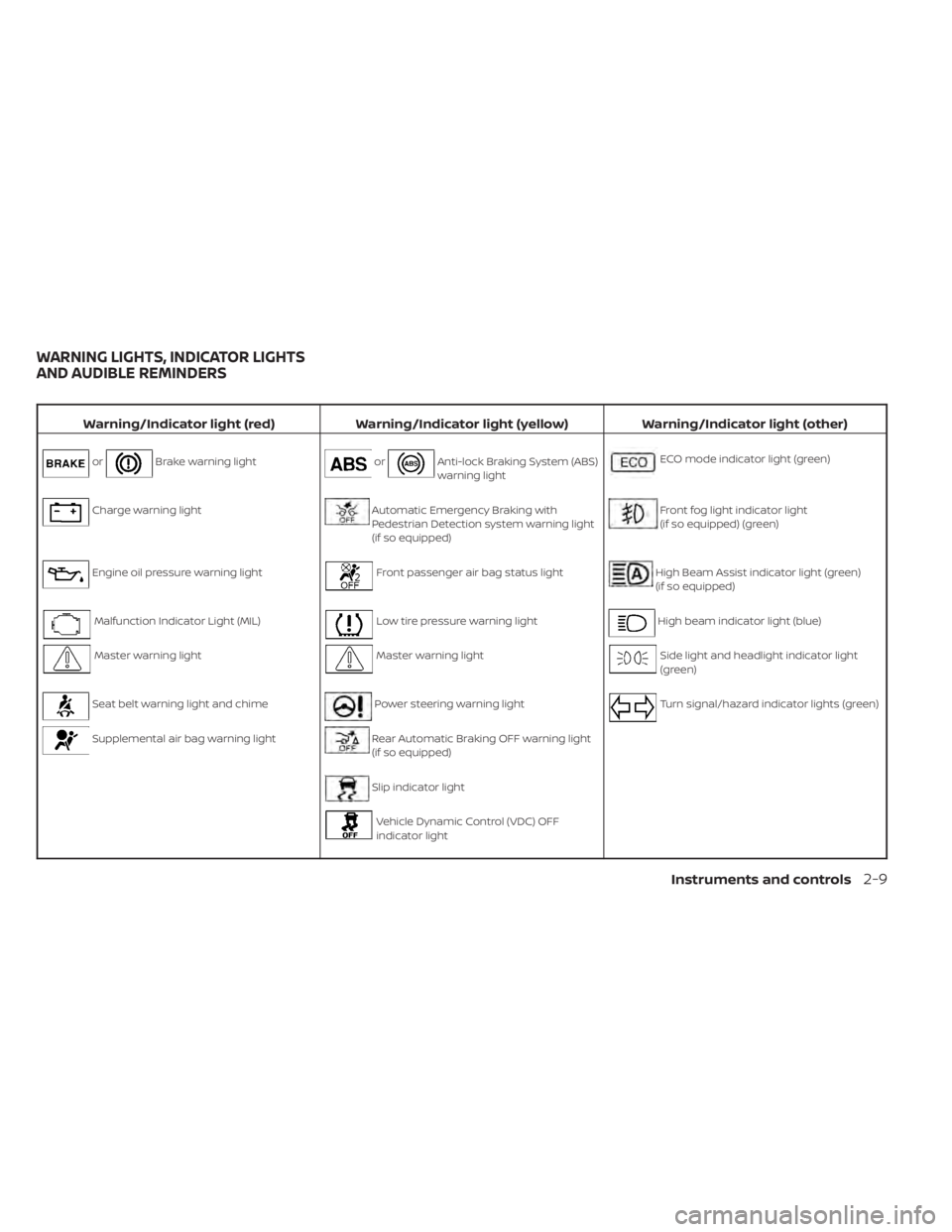
Warning/Indicator light (red)Warning/Indicator light (yellow) Warning/Indicator light (other)
orBrake warning lightorAnti-lock Braking System (ABS)
warning lightECO mode indicator light (green)
Charge warning lightAutomatic Emergency Braking with
Pedestrian Detection system warning light
(if so equipped)Front fog light indicator light
(if so equipped) (green)
Engine oil pressure warning lightFront passenger air bag status lightHigh Beam Assist indicator light (green)
(if so equipped)
Malfunction Indicator Light (MIL)Low tire pressure warning lightHigh beam indicator light (blue)
Master warning lightMaster warning lightSide light and headlight indicator light
(green)
Seat belt warning light and chimePower steering warning lightTurn signal/hazard indicator lights (green)
Supplemental air bag warning lightRear Automatic Braking OFF warning light
(if so equipped)
Slip indicator light
Vehicle Dynamic Control (VDC) OFF
indicator light
WARNING LIGHTS, INDICATOR LIGHTS
AND AUDIBLE REMINDERS
Instruments and controls2-9
Page 99 of 556
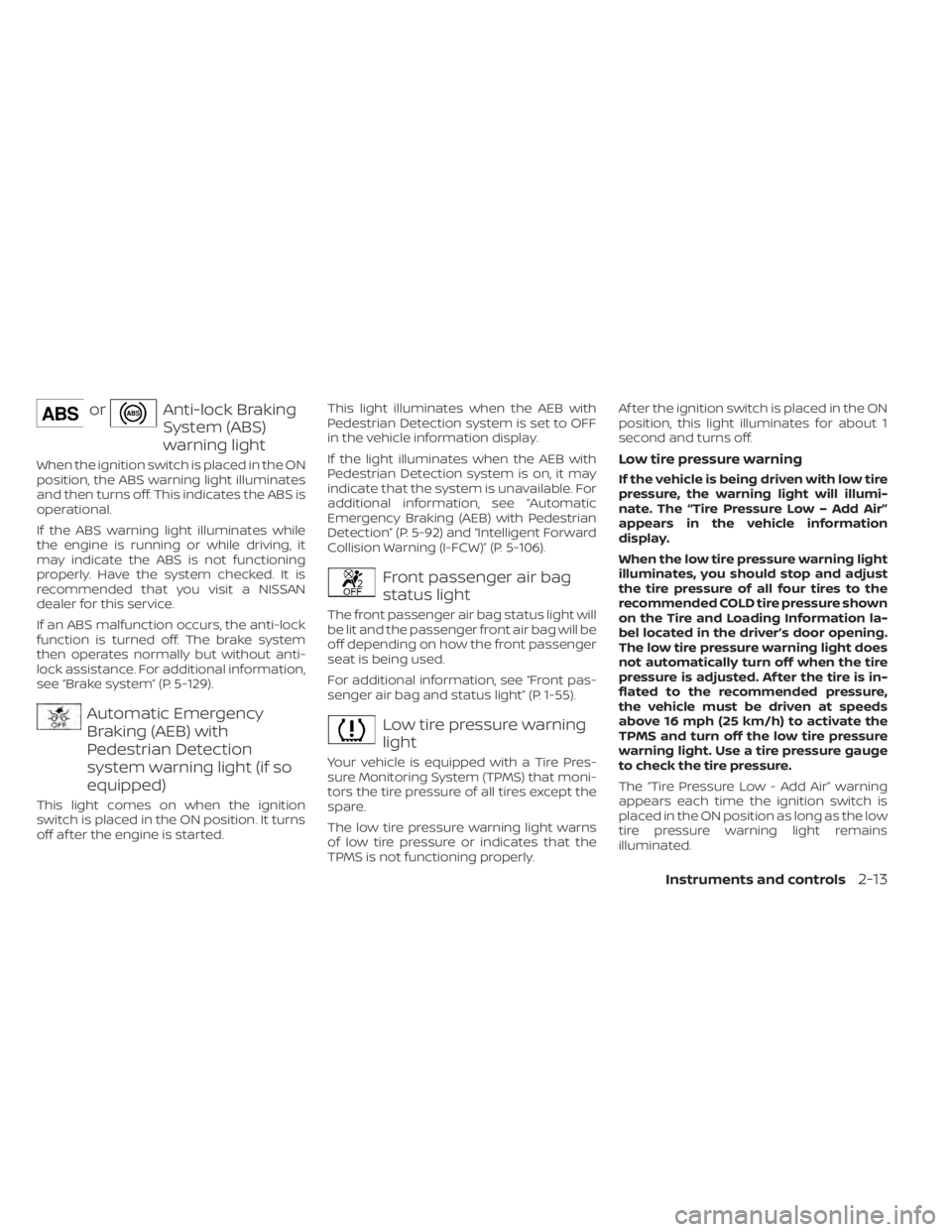
orAnti-lock Braking
System (ABS)
warning light
When the ignition switch is placed in the ON
position, the ABS warning light illuminates
and then turns off. This indicates the ABS is
operational.
If the ABS warning light illuminates while
the engine is running or while driving, it
may indicate the ABS is not functioning
properly. Have the system checked. It is
recommended that you visit a NISSAN
dealer for this service.
If an ABS malfunction occurs, the anti-lock
function is turned off. The brake system
then operates normally but without anti-
lock assistance. For additional information,
see “Brake system” (P. 5-129).
Automatic Emergency
Braking (AEB) with
Pedestrian Detection
system warning light (if so
equipped)
This light comes on when the ignition
switch is placed in the ON position. It turns
off af ter the engine is started.This light illuminates when the AEB with
Pedestrian Detection system is set to OFF
in the vehicle information display.
If the light illuminates when the AEB with
Pedestrian Detection system is on, it may
indicate that the system is unavailable. For
additional information, see “Automatic
Emergency Braking (AEB) with Pedestrian
Detection” (P. 5-92) and “Intelligent Forward
Collision Warning (I-FCW)” (P. 5-106).
Front passenger air bag
status light
The front passenger air bag status light will
be lit and the passenger front air bag will be
off depending on how the front passenger
seat is being used.
For additional information, see “Front pas-
senger air bag and status light” (P. 1-55).
Low tire pressure warning
light
Your vehicle is equipped with a Tire Pres-
sure Monitoring System (TPMS) that moni-
tors the tire pressure of all tires except the
spare.
The low tire pressure warning light warns
of low tire pressure or indicates that the
TPMS is not functioning properly.Af ter the ignition switch is placed in the ON
position, this light illuminates for about 1
second and turns off.
Low tire pressure warning
If the vehicle is being driven with low tire
pressure, the warning light will illumi-
nate. The “Tire Pressure Low – Add Air”
appears in the vehicle information
display.
When the low tire pressure warning light
illuminates, you should stop and adjust
the tire pressure of all four tires to the
recommended COLD tire pressure shown
on the Tire and Loading Information la-
bel located in the driver’s door opening.
The low tire pressure warning light does
not automatically turn off when the tire
pressure is adjusted. Af ter the tire is in-
flated to the recommended pressure,
the vehicle must be driven at speeds
above 16 mph (25 km/h) to activate the
TPMS and turn off the low tire pressure
warning light. Use a tire pressure gauge
to check the tire pressure.
The “Tire Pressure Low - Add Air” warning
appears each time the ignition switch is
placed in the ON position as long as the low
tire pressure warning light remains
illuminated.
Instruments and controls2-13
Page 268 of 556
• Call HistoryDisplays the Call History screen. For addi-
tional information, see “Making a call”
(P. 4-76).
• Dial Number Displays the Dial Number screen. For ad-
ditional information, see “Making a call”
(P. 4-76).
• Text Message Displays the received message screen.
For additional information, see “Text mes-
saging” (P. 4-77).
• Connections Displays the Connections screen. For ad-
ditional information, see “Bluetooth® con-
nections screen” (P. 4-81).
• Volume Displays the volume adjustment screen.
For additional information, see “Volume &
beeps” (P. 4-84).
MAKING A CALL
1. Press thebutton on the Launch Bar.
The “Phone” screen will appear on the
display.
2. Select one of the options to make a call. Phonebook
To access the phonebook:
1. Press the
button on the steering
wheel or touch the “” key on the
launch bar.
2. Touch the “Phonebook” key.
3. Choose the desired entry from the dis- played list.
Call History
1. Select a phonebook name or phone number from the recent incoming, out-
going, or missed calls tabs.
2. Touch a phonebook name or phone number listed to initiate the call.
Dial Number
1. Enter the phone number manually using the keypad displayed on the screen.
2. Touch the “OK” key on the screen to initi- ate the call.
For additional options to make a call, see
“Voice commands” (P. 4-73).
RECEIVING/ENDING A CALL
When a call is received by the phone con-
nected to the vehicle’s Bluetooth® Hands-
Free Phone System, the call information is
displayed on the control panel display.
To accept the incoming call, either:
• Press the
button on the steering
wheel, or
• Touch the “
Answer” key on the
screen.
To end or reject an incoming call, either:
• Press and hold the
button on the
steering wheel, or
• Touch the “
Decline” key on the
screen.
If the user is not able to answer the call
right away, touch the “Hold Call” key dis-
played on the screen. A message will be
played for the caller: “I’m not able to take a
call right now.” The user may then accept
the call when available or reject the call.
4-76Monitor, climate, audio, phone and voice recognition systems
Page 279 of 556
Intelligent Driver Alertness (I-DA)...............5-121
Intelligent Driver Alertness system
operation .................................. 5-121
How to enable/disable the Intelligent
Driver Alertness (I-DA) system ..............5-122
Intelligent Driver Alertness (I-DA)
system limitations ......................... 5-123
Break-in schedule ............................. 5-125
Fuel efficient driving tips .......................5-125
Increasing fuel economy ......................5-126
Parking/parking on hills .......................5-127
Power steering ................................ 5-128
Brake system ................................. 5-129
Brake precautions .......................... 5-129
Anti-lock Braking System (ABS) .............5-129
Brake Assist ................................ 5-131
Vehicle Dynamic Control (VDC) system ........5-131
Rise-up and build-up ....................... 5-132
Brake force distribution ....................5-132
Chassis Control ............................... 5-133Intelligent Trace Control
....................5-133
Active Ride Control ......................... 5-134
Intelligent Engine Brake ....................5-134
Hill start assist system ........................5-135
Rear Sonar System (RSS) ......................5-135
System operation .......................... 5-136
How to enable/disable the sonar
system ..................................... 5-138
Sonar limitations ........................... 5-140
System temporarily unavailable ............5-140
System maintenance ......................5-140
Cold weather driving .......................... 5-141
Freeing a frozen door lock ..................5-141
Antifreeze .................................. 5-141
Battery..................................... 5-141
Draining of coolant water ..................5-141
Tire equipment ............................. 5-141
Special winter equipment ..................5-142
Driving on snow or ice ......................5-142
Engine
block heater (if so equipped) ........5-142
Page 349 of 556
•The ICC system will not adapt auto-
matically to road conditions. This
system should be used in evenly
flowing traffic. Do not use the system
on roads with sharp curves, or on icy
roads, in heavy rain or in fog.
• As there is a performance limit to the
distance control function, never rely
solely on the ICC system. This system
does not correct careless, inattentive
or absentminded driving, or over-
come poor visibility in rain, fog, or
other bad weather. Decelerate the
vehicle speed by depressing the
brake pedal, depending on the dis-
tance to the vehicle ahead and the
surrounding circumstances in order
to maintain a safe distance between
vehicles.
• If the vehicle ahead comes to a stop,
the vehicle decelerates to a standstill
within the limitations of the system.
The system will cancel once it judges
that the vehicle has come to a stand-
still and sound a warning chime. To
prevent the vehicle from moving, the
driver must depress the brake pedal. •
Always pay attention to the opera-
tion of the vehicle and be ready to
manually control the proper follow-
ing distance. The ICC system may not
be able to maintain the selected dis-
tance between vehicles (following
distance) or selected vehicle speed
under some circumstances.
• The system may not detect the ve-
hicle in front of you in certain road or
weather conditions. To avoid acci-
dents, never use the ICC system un-
der the following conditions:
– On roads where the traffic is heavy
or there are sharp curves
– On slippery road surfaces such as
on ice or snow, etc.
– During bad weather (rain, fog,
snow, etc.)
– When rain, snow or dirt adhere to
the bumper around the distance
sensor
– On steep downhill roads (the ve-
hicle may go beyond the set ve-
hicle speed and frequent braking
may result in overheating the
brakes)
– On repeated uphill and downhill
roads –
When traffic conditions make it
difficult to keep a proper distance
between vehicles because of fre-
quent acceleration or
deceleration
– Interference by other radar
sources
• Do not use the ICC system if you are
towing a trailer. The system may not
detect a vehicle ahead.
• In some road or traffic conditions, a
vehicle or object can unexpectedly
come into the sensor detection zone
and cause automatic braking. Al-
ways stay alert and avoid using the
ICC system where not recommended
in this warning section.
Starting and driving5-73
Page 353 of 556
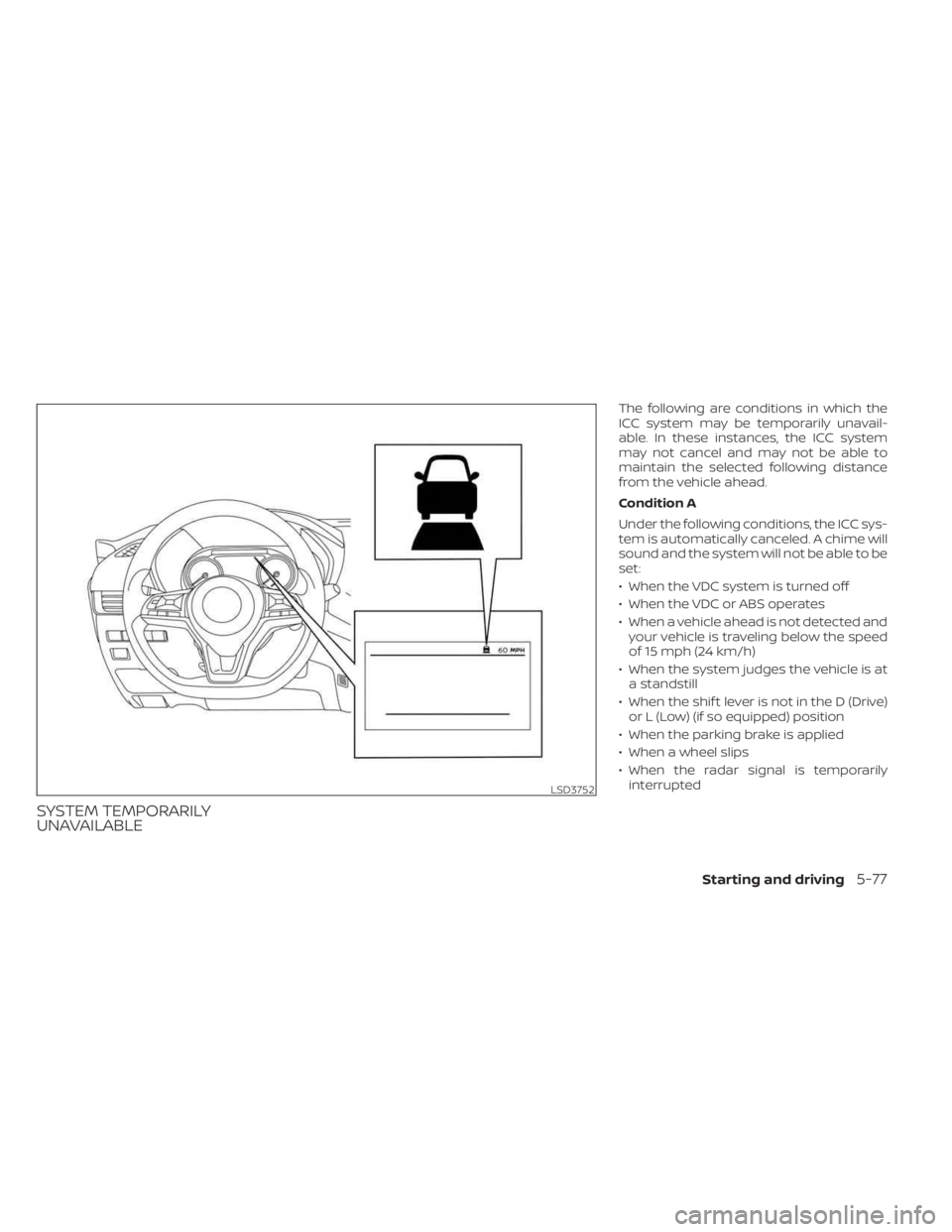
SYSTEM TEMPORARILY
UNAVAILABLE
The following are conditions in which the
ICC system may be temporarily unavail-
able. In these instances, the ICC system
may not cancel and may not be able to
maintain the selected following distance
from the vehicle ahead.
Condition A
Under the following conditions, the ICC sys-
tem is automatically canceled. A chime will
sound and the system will not be able to be
set:
• When the VDC system is turned off
• When the VDC or ABS operates
• When a vehicle ahead is not detected andyour vehicle is traveling below the speed
of 15 mph (24 km/h)
• When the system judges the vehicle is at a standstill
• When the shif t lever is not in the D (Drive) or L (Low) (if so equipped) position
• When the parking brake is applied
• When a wheel slips
• When the radar signal is temporarily interrupted
LSD3752
Starting and driving5-77
Page 366 of 556
•Always check your surroundings and
turn to check what is behind you be-
fore and while backing up. The RAB
system detects stationary objects
behind the vehicle. The RAB system
does not detect the following ob-
jects:
– Moving objects
– Low objects
– Narrow objects
– Wedge-shaped objects
– Objects close to the bumper (less
than approximately 1 f t [30 cm])
– Objects that suddenly appear
– Thin objects such as rope, wire,
chain, etc.
• The RAB system may not operate for
the following obstacles:
– Obstacles located high off the
ground
– Obstacles in a position offset from
your vehicle
– Obstacles, such as spongy materi-
als or snow, that have sof t outer
surfaces and can easily absorb a
sound wave •
The RAB system may not operate in
the following conditions:
– There is rain, snow, ice, dirt, etc.,
attached to the sonar sensors.
– A loud sound is heard in the area
around the vehicle.
– The surface of the obstacle is di-
agonal to the rear of the vehicle.
• The RAB system may unintentionally
operate in the following conditions:
– There is overgrown grass in the
area around the vehicle.
– There is a structure (e.g., a wall, toll
gate equipment, a narrow tunnel,
a parking lot gate) near the side of
the vehicle.
– There are bumps, protrusions, or
manhole covers on the road
surface.
– The vehicle drives through a
draped flag or a curtain.
– There is an accumulation of snow
or ice behind the vehicle.
– An ultrasonic wave source, such as
another vehicle’s sonar, is near
the vehicle. •
Once the automatic brake control
operates, it does not operate again if
the vehicle approaches the same
obstacle.
• The automatic brake control can only
operate for a short period of time.
Therefore, the driver must depress
the brake pedal.
• In the following situations, the RAB
system may not operate properly or
may not function sufficiently:
– The vehicle is driven in bad
weather (rain, fog, snow, etc.).
– The vehicle is driven on a steep
hill.
– The vehicle’s posture is changed
(e.g., when driving over a bump).
– The vehicle is driven on a slippery
road.
– The vehicle is turned sharply by
turning the steering wheel fully.
– Snow chains are used.
– Wheels or tires other than NISSAN
recommended are used.
– The brakes are cold at low ambi-
ent temperatures or immediately
af ter driving has started.
5-90Starting and driving