2023 NISSAN SENTRA USB
[x] Cancel search: USBPage 256 of 556
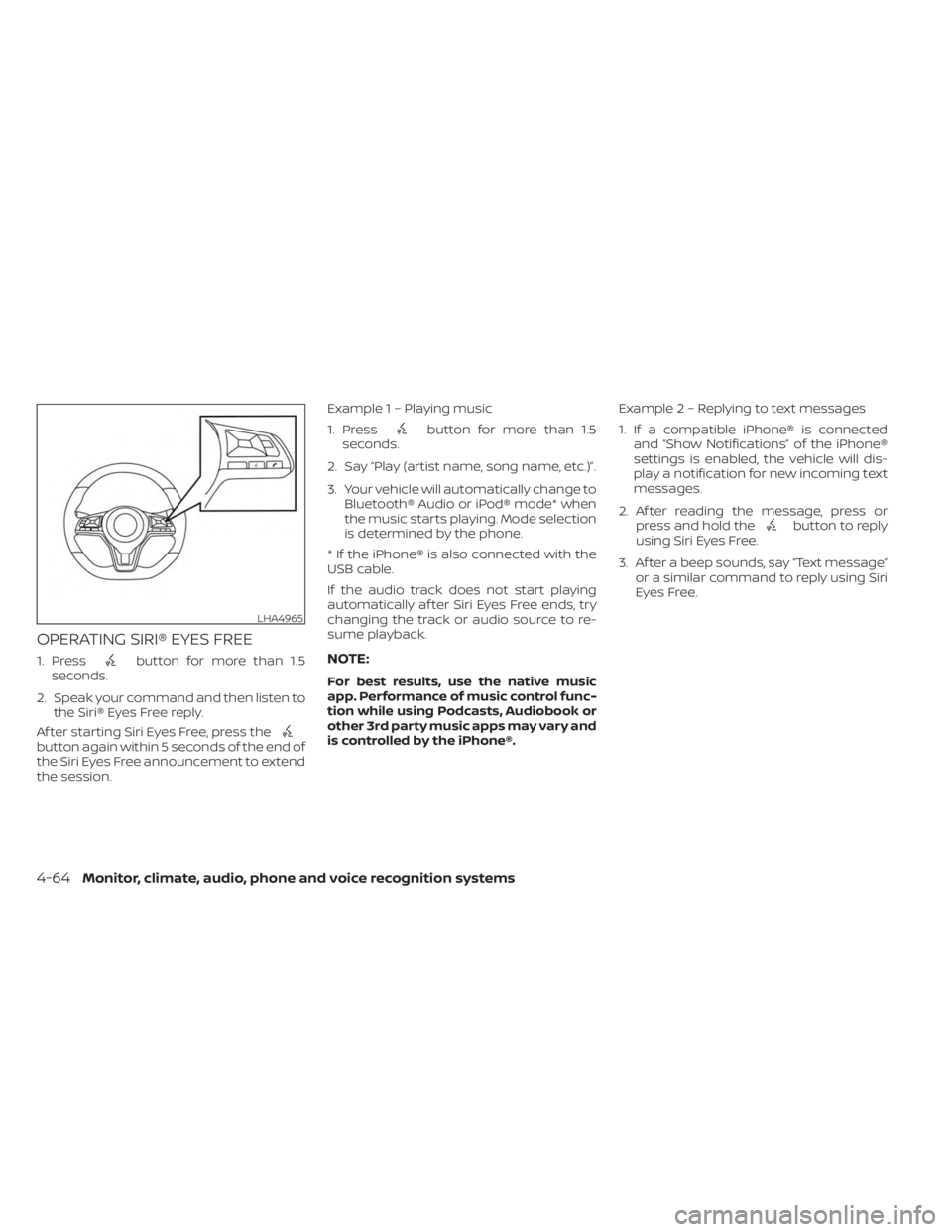
OPERATING SIRI® EYES FREE
1. Pressbutton for more than 1.5
seconds.
2. Speak your command and then listen to the Siri® Eyes Free reply.
Af ter starting Siri Eyes Free, press the
button again within 5 seconds of the end of
the Siri Eyes Free announcement to extend
the session. Example 1 – Playing music
1. Press
button for more than 1.5
seconds.
2. Say “Play (artist name, song name, etc.)”.
3. Your vehicle will automatically change to Bluetooth® Audio or iPod® mode* when
the music starts playing. Mode selection
is determined by the phone.
* If the iPhone® is also connected with the
USB cable.
If the audio track does not start playing
automatically af ter Siri Eyes Free ends, try
changing the track or audio source to re-
sume playback.
NOTE:
For best results, use the native music
app. Performance of music control func-
tion while using Podcasts, Audiobook or
other 3rd party music apps may vary and
is controlled by the iPhone®. Example2–Repl
ying to text messages
1. If a compatible iPhone® is connected and “Show Notifications” of the iPhone®
settings is enabled, the vehicle will dis-
play a notification for new incoming text
messages.
2. Af ter reading the message, press or press and hold the
button to reply
using Siri Eyes Free.
3. Af ter a beep sounds, say “Text message” or a similar command to reply using Siri
Eyes Free.
LHA4965
4-64Monitor, climate, audio, phone and voice recognition systems
Page 257 of 556
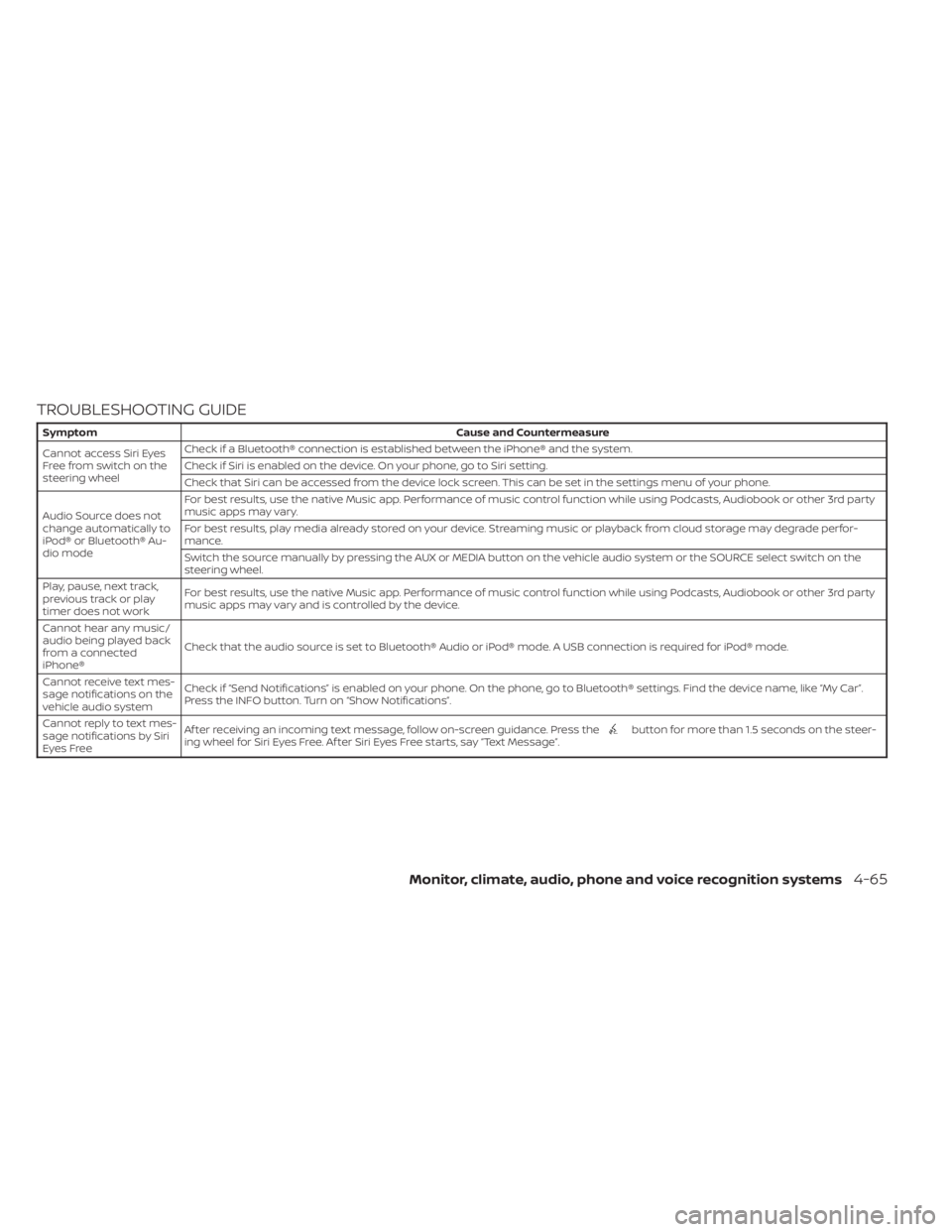
TROUBLESHOOTING GUIDE
SymptomCause and Countermeasure
Cannot access Siri Eyes
Freefromswitchonthe
steering wheel Check if a Bluetooth® connection is established between the iPhone® and the system.
Check if Siri is enabled on the device. On your phone, go to Siri setting.
Check that Siri can be accessed from the device lock screen. This can be set in the settings menu of your phone.
Audio Source does not
change automatically to
iPod® or Bluetooth® Au-
dio mode For best results, use the native Music app. Performance of music control function while using Podcasts, Audiobook or other 3rd party
music apps may vary.
For best results, play media already stored on your device. Streaming music or playback from cloud storage may degrade perfor-
mance.
Switch the source manually by pressing the AUX or MEDIA button on the vehicle audio system or the SOURCE select switch on the
steering wheel.
Play, pause, next track,
previous track or play
timer does not work For best results, use the native Music app. Performance of music control function while using Podcasts, Audiobook or other 3rd party
music apps may vary and is controlled by the device.
Cannot hear any music/
audio being played back
from a connected
iPhone® Check that the audio source is set to Bluetooth® Audio or iPod® mode. A USB connection is required for iPod® mode.
Cannot receive text mes-
sage notifications on the
vehicle audio system Check if “Send Notifications” is enabled on your phone. On the phone, go to Bluetooth® settings. Find the device name, like “My Car”.
Press the INFO button. Turn on “Show Notifications”.
Cannot reply to text mes-
sage notifications by Siri
Eyes Free Af ter receiving an incoming text message, follow on-screen guidance. Press the
button for more than 1.5 seconds on the steer-
ing wheel for Siri Eyes Free. Af ter Siri Eyes Free starts, say “Text Message”.
Monitor, climate, audio, phone and voice recognition systems4-65
Page 539 of 556

11 Index
A
Active Ride Control.............5-134Air bag (See supplemental restraint
system).....................1-44Air bag system
Front (See supplemental front impact
air bag system)
..............1-52Air bag warning labels............1-65Air bag warning light.........1-65, 2-12Air bag warning light,
supplemental..............1-65, 2-12Air cleaner...................8-17Air cleaner housing filter..........8-17Air conditionerAir conditioner operation. . . .4-35, 4-40Air conditioner service..........4-43Air conditioner specification label. .10-14Air conditioner system refrigerant
recommendations............10-8Air conditioner system refrigerant
and oil recommendations.......10-8Heater and air conditioner
controls...............4-32, 4-40Servicing air conditioner........4-43Air flow charts................4-36Alarm system (See vehicle security
system)................... .2-48Anchor point locations...........1-28Antenna....................4-63Anti-lock Braking System (ABS).....5-129
Antifreeze...................5-141Armrests.....................1-7Audio system.................4-44AM radio operation............4-50AM radio reception............4-44AM/FM radio............4-48, 4-50Auxiliary (AUX) devices operation. . .4-52Bluetooth® audio.............4-59FM radio operation............4-51FM radio reception............4-44iPod® Player................4-56iPod® player operation.........4-56Radio................... .4-44USB (Universal Serial Bus) Connection
Port.................... .4-53USB Connections.............4-54USB interface...............4-53Autolight switch...............2-53Automatic
Automatic power window switch. . .2-71Automatic anti-glare inside mirror. . . .3-28Automatic door locks.............3-6Automatic Emergency Braking (AEB)
with Pedestrian Detection......2-13, 5-92
B
Battery.................5- 141, 8-13Charge warning light...........2-11Battery replacement............8-23
Key fob...................8-23NISSAN Intelligent Key®.........8-23Before starting the engine.........5-14Belt (See drive belt)..............8-15Blind Spot Warning (BSW)..........5-36Bluetooth® audio..............4-59Bluetooth® hands-free phone
system.................... .4-66Bluetooth® connections.........4-81Connecting procedure..........4-71Phone indicators.............4-70Text messaging..............4-77Voice commands.............4-73Booster seats.................1-40Brake
Anti-lock Braking System (ABS). . . .5-129Brake fluid.................8-10Brake light (See stop light).......8-27Brake system...............5-129Brake warning light............2-10Brake wear indicators.......2-17,8-19Self-adjusting brakes...........8-19Brake and clutch fluid............8-10Brake Assist..................5-131Brake fluid...................8-10Brake system................5-129Brakes.....................8-19Break-in schedule.............5-125Brightness controlInstrument panel.............2-58Brightness/contrast button.........4-7
Page 545 of 556

T
Tachometer...................2-6Temperature gauge
Engine coolant temperature gauge. . .2-6Thef t (NISSAN Vehicle Immobilizer System),
engine start...............2-49, 5-14Three-way catalyst...............5-4TiltTelescopic steering............3-26TireFlat tire................... .6-3Spare tire................6-4, 8-41Tire and Loading Information label. .10-14Tire chains..................8-37Tire pressure................8-29Tire rotation.................8-38Types of tires................8-36Uniform tire quality grading.......10-21Wheel/tire size...............10-10Wheels and tires..............8-29Tire pressure
Low tire pressure warning light.....2-13Tire Pressure Monitoring System
(TPMS)...................... .5-5Towing
2-wheel drive models...........6-134-wheel drive models...........6-13Flat towing................ .10-20Trailer towing...............10-20Towing a trailer................10-20Towing your vehicle..............6-12Traffic Sign Recognition (TSR)........5-25
Transmission
Continuously Variable Transmission
(CVT) fluid
..................8-10Driving with Continuously Variable
Transmission (CVT)............5-16Driving with manual transmission. . .5-21Travel (See registering a vehicle in
another country)...............10-12Trip odometer................. .2-5Trunk access through the rear seat. . . .3-23Trunk lid.....................3-22Trunk lid lock opener lever..........3-22Trunk light....................2-76Turn signal switch...............2-58
U
Uniform tire quality grading........10-21USB interface.................4-53USB/iPod® Charging Ports.........2-64
V
Vanity mirror..................3-27Variable voltage control system......8-15Vehicle dimensions and weights.....10-11Vehicle Dynamic Control (VDC)
system.....................5-131Vehicle identification.............10-12Vehicle identification number (VIN)
(Chassis number)...............10-12Vehicle identification number (VIN)
plate...................... .10-12
Vehicle immobilizer system.....2-49, 5-14Vehicle information display......2-18,2-32Vehicle loading information........10-16Vehicle recovery................6-14Vehicle security system...........2-48Vehicle security system
(NISSAN Vehicle Immobilizer System),
engine start
...............2-49, 5-14Vents...................... .4-31Visors......................3-26Voice Prompt Interrupt...........4-69
W
Warning
Air bag warning light........1-65, 2-12Battery charge warning light.......2-11Brake warning light............2-10Engine oil pressure warning light. . . .2-11Hazard warning flasher switch......6-2Loose fuel cap warning......2-28, 2-42Low fuel warning light.......2-28, 2-43Low tire pressure warning light.....2-13Low windshield-washer fluid
warning light.............2-28, 2-43Seat belt warning light.......1-15,2-12Supplemental air bag warning
light.................. .1-65, 2-12Vehicle security system.........2-48Warning labels (for SRS)..........1-65Warning lights, indicator lights and
audible reminders...............2-9
11-7