2023 NISSAN PATHFINDER wiper
[x] Cancel search: wiperPage 16 of 665

1. Front view camera (if so equipped)(P. 4-10)
2. Engine hood (P. 3-23) 3. Wiper and washer switch (P. 2-78)
4. Windshield-washer fluid (P. 8-11)
5. Power windows (P. 2-117)6. Door locks (P. 3-5)
NISSAN Intelligent Key® system (P. 3-7)
Keys (P. 3-2)
7. Mirrors (P. 3-38) Side view camera (if so equipped)
(P. 4-10)
8. Tire pressure (P. 8-28) Flat tire (P. 6-3)
Tire chains (P. 8-38)
9. Front sonar sensors (if so equipped)
(P. 5-183)
10. Replacing bulbs (P. 8-26) Headlight and turn signal switch
(P. 2-82)
LED Daytime Running Lights (DRL)
system (P. 2-87)
11. Fog light switch (if so equipped) (P. 2-89)
Refer to the page number indicated in
parentheses for operating details.
LII2668
EXTERIOR FRONT
Illustrated table of contents0-3
Page 17 of 665

1. Rear window wiper and washer switch(P. 2-81)
2. Lif tgate release (P. 3-29) 3. Rearview camera (P. 4-3, 4-10)
4. Towing (P. 10-20)
5. Rear sonar sensors (P. 5-183)
6. Replacing bulbs (P. 8-26)7. Fuel-filler door (P. 3-31)
Fuel recommendation (P. 10-4)
8. Child safety rear door lock (P. 3-7)
Refer to the page number indicated in
parentheses for operating details.
LII2669
EXTERIOR REAR
0-4Illustrated table of contents
Page 19 of 665

1. Vents (P. 4-31)
2. Headlight/fog light (if so equipped)/turn signal switch (P. 2-82, 2-89) 3. Paddle shif ter (P. 5-24)
4. Driver supplemental air bag (P. 1-59)
Horn (P. 2-89) 5. Meters and gauges (P. 2-6)
Warning and indicator lights (P. 2-12)
Vehicle information display (P. 2-23,
2-48)
6. Cruise control switches (if so equipped)
(P. 5-87)
ProPILOT Assist switches (if so
equipped) (P. 5-88)
Bluetooth® Hands-Free Phone System*
7. Wiper and washer switch (P. 2-78) Rear window wiper and washer switch
(P. 2-80)
8. Center display* Navigation system* (if so equipped)
9. Audio controls*
10. Front passenger supplemental air bag
(P. 1-59)
11. Front passenger supplemental knee air
bag (P. 1-77)
12. Glove box (P. 2-110)
13. Passenger heated seat switch
(if so equipped) (P. 2-91)
Passenger climate-controlled seat
switch (if so equipped) (P. 2-90)
14. Automatic heater and air conditioning
controls (P. 4-32)
15. Heated steering wheel switch
(if so equipped) (P. 2-93)
16. Hazard warning flasher switch (P. 6-2)
17. Idling stop OFF switch (P. 5-195)
LII2671
INSTRUMENT PANEL
0-6Illustrated table of contents
Page 108 of 665

2 Instruments and controls
Instrument panel................................2-4
Meters and gauges .............................2-6
Speedometer and odometer .................2-6
Tachometer ..................................2-8
Engine coolant temperature gauge ..........2-9
Fuel gauge .................................. 2-10
Distance To Empty (DTE) .....................2-11
Warning lights, indicator lights and audible
reminders ...................................... 2-12
Checking lights .............................. 2-14
Warning/Indicator lights (red) ...............2-14
Warning/Indicator lights (yellow) ............2-17
Warning/Indicator lights (other) .............2-22
Audible reminders ........................... 2-23
Vehicle information display 7 inch (18 cm)
Type A (if so equipped) ......................... 2-23
How to use the vehicle information
display ...................................... 2-24
Startup display .............................. 2-24
Trip computer ............................... 2-25
Oil control system (if so equipped) ...........2-28
Settings ..................................... 2-29
Vehicle information display warnings
and indicators ............................... 2-39
Vehicle information display 12.3 inch (31 cm)
Type B (if so equipped) ......................... 2-48How to use the vehicle information
display
...................................... 2-48
Startup display .............................. 2-49
Trip computer ............................... 2-50
Changing the meter screen view ............2-53
Oil control system (if so equipped) ...........2-54
Settings ..................................... 2-55
Vehicle information display warnings
and indicators ............................... 2-65
Security systems ............................... 2-76
Vehicle security system .....................2-76
NISSAN Vehicle Immobilizer System .........2-77
Wiper and washer switch .......................2-78
Switch operation ............................ 2-78
Rain-sensing auto wiper system
(if so equipped) .............................. 2-79
Rear switch operation .......................2-80
R
ear window and outside mirror
(if so equipped) defroster switch ...............2-81
Headlight and turn signal switch ...............2-82
Headlight control switch ....................2-82
LED Daytime Running Lights (DRL)
system ...................................... 2-87
Instrument brightness control ..............2-88
Turn signal switch ........................... 2-88
Fog light switch (if so equipped) .............2-89
Page 111 of 665

1. Vents (P. 4-31)
2. Headlight/fog light (if so equipped)/turn signal switch (P. 2-82, 2-89) 3. Paddle shif ter (P. 5-24)
4. Driver supplemental air bag (P. 1-59)
Horn (P. 2-89) 5. Meters and gauges (P. 2-6)
Warning and indicator lights (P. 2-12)
Vehicle information display (P. 2-23,
2-48)
6. Cruise control switches (if so equipped)
(P. 5-87)
ProPILOT Assist switches
(if so equipped) (P. 5-88)
Bluetooth® Hands-Free Phone System*
7. Wiper and washer switch (P. 2-78) Rear window wiper and washer switch
(P. 2-80)
8. Center display* Navigation system* (if so equipped)
9. Audio controls*
10. Front passenger supplemental air bag
(P. 1-59)
11. Front passenger supplemental knee air
bag (P. 1-77)
12. Glove box (P. 2-110)
13. Passenger heated seat switch
(if so equipped) (P. 2-91)
Passenger climate-controlled seat
switch (if so equipped) (P. 2-90)
14. Automatic heater and air conditioning
controls (P. 4-32)
15. Heated steering wheel switch
(if so equipped) (P. 2-93)
16. Hazard warning flasher switch (P. 6-2)
17. Idling stop OFF switch (P. 5-195)
LII2671
INSTRUMENT PANEL
2-4Instruments and controls
Page 140 of 665

Vehicle Settings
The vehicle settings menu allows the user to change the settings for lights, wipers, locking, keys, and other vehicle settings.
Some menu items shown below may not be equipped on your vehicle.
Menu itemExplanation
Power Back Door Allows user to turn the power back door on or off.
Lighting Displays the available lighting options.
Welcome Headlight Allows user to turn the welcome headlight on or off.
Auto Room Lamp Allows user to turn the auto room lamp on or off.
Accent Lighting Allows user to adjust the accent lighting.
Auto Headlight Allows user to change when the lights illuminate based on the brightness outside the vehicle.
Light Off Delay Allows user to change the duration of time that the automatic headlights stay on af ter the vehicle is shut off.
Locking Displays the available locking options.
Ext. Door Switch Allows user to turn the exit door switch on or off.
Selective Unlock Allows user to turn the selective unlock feature o n or off. When this item is turned on (default), only the driver’s
door is unlocked af ter the driver’s door unlock operation. All the doors can be unlocked if the capacitive touch
pad is pressed within 60 seconds of the door handle capacitive unlock feature. When this feature is turned off, all
the doors unlock when the driver’s door unlock operation is performed once.
Auto Door Unlock Allows the user to set the auto door unlock to Shif t to P or Shif t to Park, IGN OFF and OFF.
Horn beeps on lock Allows the user to turn the horn beeps on lock feature on or off.
Walk Away Lock Allows the user to turn the walk away lock function ON or OFF. For additional information, see “Walk away lock
function” (P. 3-17).
Approach Unlock Allows the user to turn the approach unlock function ON or OFF. For additional information, see “Approach unlock
function” (P. 3-17).
Wipers Displays the available wiper options.
Speed Dependent Allows user to turn the speed dependent wipers on or off.
Rain Sensor Allows user to turn the rain sensor wipers on or off.
Reverse Link Allows user to turn the reverse link feature on or off.
Instruments and controls2-33
Page 144 of 665
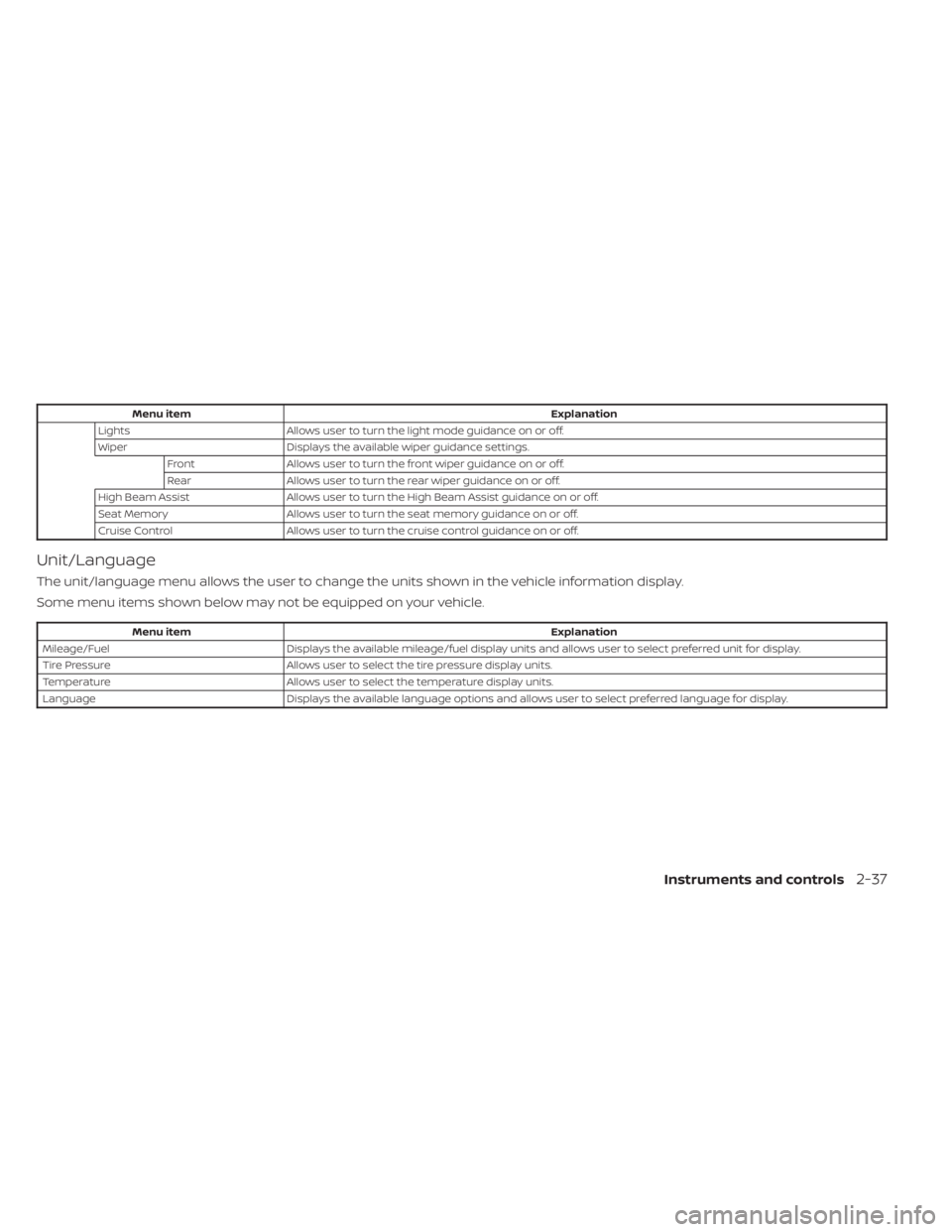
Menu itemExplanation
Lights Allows user to turn the light mode guidance on or off.
Wiper Displays the available wiper guidance settings.
Front Allows user to turn the front wiper guidance on or off.
Rear Allows user to turn the rear wiper guidance on or off.
High Beam Assist Allows user to turn the High Beam Assist guidance on or off.
Seat Memory Allows user to turn the seat memory guidance on or off.
Cruise Control Allows user to turn the cruise control guidance on or off.
Unit/Language
The unit/language menu allows the user to change the units shown in the vehicle information display.
Some menu items shown below may not be equipped on your vehicle.
Menu item Explanation
Mileage/Fuel Displays the available mileage/fuel display units and allows user to select preferred unit for display.
Tire Pressure Allows user to select the tire pressure display units.
Temperature Allows user to select the temperature display units.
Language Displays the available language options and allows user to select preferred language for display.
Instruments and controls2-37
Page 152 of 665

For additional information, see:
• Automatic Emergency Braking (AEB) withPedestrian Detection (P. 5-137)
• ProPILOT Assist (P. 5-88)
• Intelligent Forward Collision Warning (I- FCW) (P. 5-149)
Hands on detection
warning
This warning appears when the Steering
Assist system is engaged and the following
condition(s) occur:
• When not holding the steering wheel
• When there is no steering wheeloperation
Hold onto the steering wheel immediately.
When the steering operation is detected,
the warning turns off and the Steering As-
sist function is automatically restored.
For additional information, see “ProPILOT
Assist” (P. 5-88).
Idling Stop System
This indicator shows the Idling Stop Sys-
tem status.
For addition information, see “Idling Stop
System” (P. 5-189).
Intelligent Lane
Intervention (I-LI)/
Intelligent Blind Spot
Intervention (I-BSI)/
ProPILOT Assist indicator
This indicator shows when the I-LI, I-BSI or
ProPILOT Assist system is engaged.
For additional information, see “Intelligent
Lane Intervention (I-LI)” (P. 5-45), “Intelligent
Blind Spot Intervention (I-BSI)” (P. 5-65) or
“ProPILOT Assist” (P. 5-88).
Lane Departure Warning
(LDW) indicator
This indicator appears when the LDW sys-
tem is unavailable.
For additional information, see “Lane De-
parture Warning (LDW)” (P. 5-38).
Malfunction: See Owner’s Manual
This warning appears when one or more of
the following systems (if so equipped) is
not functioning properly:
• Rear Automatic Braking (RAB)
• Traffic Sign Recognition (TSR)
If one or more of these warning appears,
have the system checked. It is recom-
mended that you visit a NISSAN dealer for
this service.
Malfunction
This warning appears when one or more of
the following systems (if so equipped) mal-
function:
• Rear Cross Traffic Alert (RCTA)
• Automatic Emergency Braking (AEB) with Pedestrian Detection
• Intelligent Forward Collision Warning (I-FCW)
If one or more of these warning appears,
have the system checked. It is recom-
mended that you visit a NISSAN dealer for
this service.
Not Available Bad Weather
This message may appear when the Steer-
ing Assist system is engaged.
Under the following conditions, the Steer-
ing Assist system is automatically
canceled:
• When the wiper (HI) operates.
• When lane markers in the traveling lane cannot be correctly detected for a period
of time due to such items as a snow rut,
reflection of light on a rainy day or several
unclear lane markers are present.
Instruments and controls2-45