2023 NISSAN PATHFINDER parking brake
[x] Cancel search: parking brakePage 20 of 665

18. Electronic parking brake (P. 5-26)Automatic brake hold switch (P. 5-28)
19. Power outlet (P. 2-101)
20. Driver heated seat switch
(if so equipped) (P. 2-91)
Driver climate-controlled seat switch
(if so equipped) (P. 2-90)
21. Push-button ignition switch (P. 5-13)
22. Driver supplemental knee air bag
(P. 1-77)
23. Tilt and telescopic steering wheel
control (P. 3-34)
24. Hood release (P. 3-23)
25. Control panel and vehicle information
display switches (P. 2-23, 2-48)
26. Lif tgate instrument panel switch
(if so equipped) (P. 3-23)
Steering Assist switch (if so equipped)
(P. 2-95)
Instrument brightness control switch
(P. 2-88)
Head Up Display (HUD) switch
(if so equipped) (P. 2-95)
*: Refer to the separate NissanConnect®
Owner's Manual.
Refer to the page number indicated in
parenthesis for operating details.
Illustrated table of contents0-7
Page 22 of 665
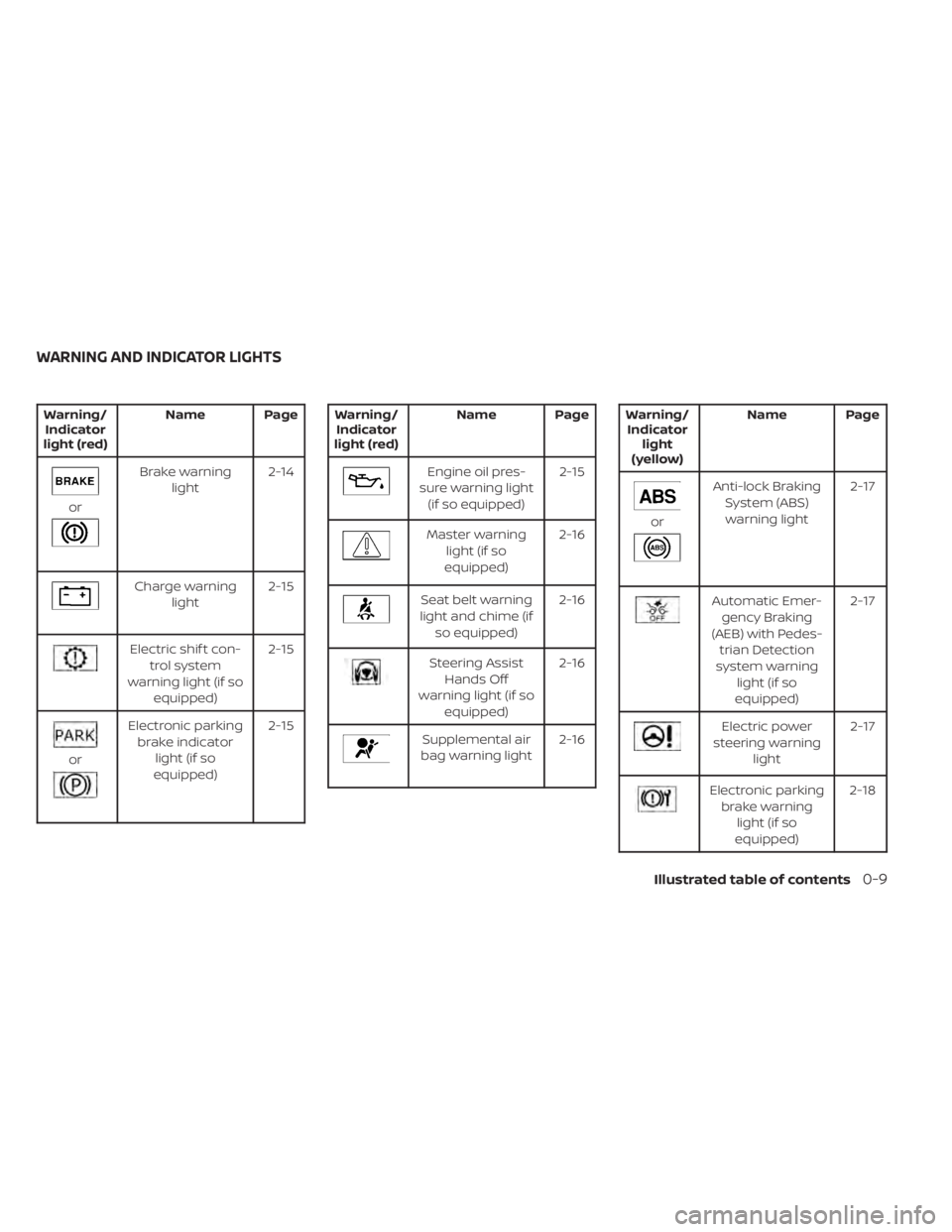
Warning/Indicator
light (red) Name Page
or
Brake warning
light 2-14
Charge warning
light 2-15
Electric shif t con-
trol system
warning light (if so equipped) 2-15
or
Electronic parking
brake indicator light (if so
equipped) 2-15
Warning/
Indicator
light (red) Name Page
Engine oil pres-
sure warning light (if so equipped) 2-15
Master warning
light (if so
equipped) 2-16
Seat belt warning
light and chime (if so equipped) 2-16
Steering Assist
Hands Off
warning light (if so equipped) 2-16
Supplemental air
bag warning light 2-16
Warning/
Indicator light
(yellow) Name Page
or
Anti-lock Braking
System (ABS)warning light 2-17
Automatic Emer-
gency Braking
(AEB) with Pedes- trian Detection
system warning light (if so
equipped) 2-17
Electric power
steering warning light 2-17
Electronic parking
brake warning light (if so
equipped) 2-18
WARNING AND INDICATOR LIGHTS
Illustrated table of contents0-9
Page 112 of 665

18. Electronic parking brake (P. 5-26)Automatic brake hold switch (P. 5-28)
19. Power outlet (P. 2-101)
20. Driver heated seat switch
(if so equipped) (P. 2-91)
Driver climate-controlled seat switch
(if so equipped) (P. 2-90)
21. Push-button ignition switch (P. 5-13)
22. Driver supplemental knee air bag
(P. 1-77)
23. Tilt and telescopic steering wheel
control (P. 3-34)
24. Hood release (P. 3-23)
25. Control panel and vehicle information
display switches (P. 2-23, 2-48)
26. Lif tgate instrument panel switch
(if so equipped) (P. 3-23)
Steering Assist switch (if so equipped)
(P. 2-95)
Instrument brightness control switch
(P. 2-88)
Head Up Display (HUD) switch
(if so equipped) (P. 2-95)
*: Refer to the separate NissanConnect®
Owner's Manual.
Refer to the page number indicated in
parenthesis for operating details.
Instruments and controls2-5
Page 119 of 665
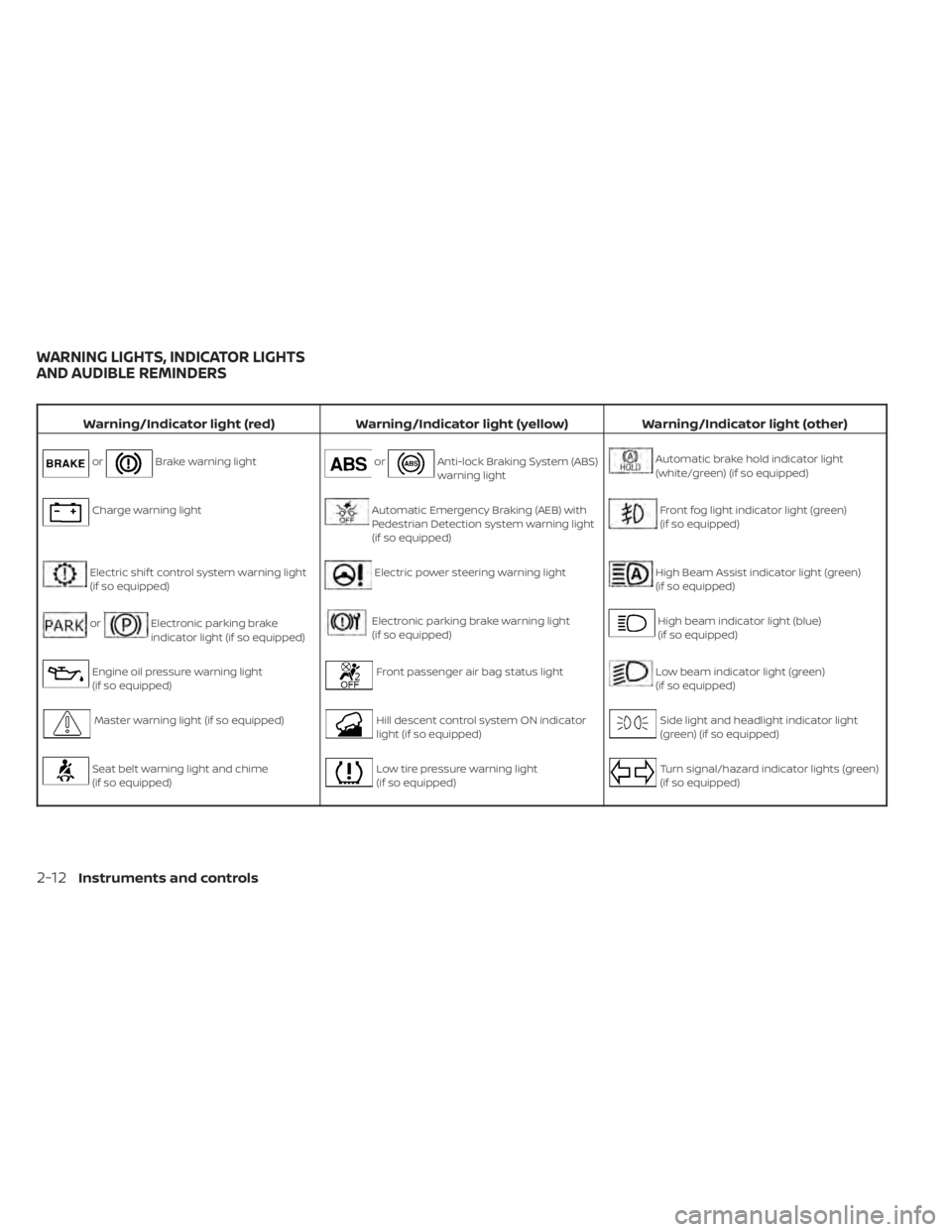
Warning/Indicator light (red)Warning/Indicator light (yellow) Warning/Indicator light (other)
orBrake warning lightorAnti-lock Braking System (ABS)
warning lightAutomatic brake hold indicator light
(white/green) (if so equipped)
Charge warning lightAutomatic Emergency Braking (AEB) with
Pedestrian Detection system warning light
(if so equipped)Front fog light indicator light (green)
(if so equipped)
Electric shif t control system warning light
(if so equipped)Electric power steering warning lightHigh Beam Assist indicator light (green)
(if so equipped)
orElectronic parking brake
indicator light (if so equipped)Electronic parking brake warning light
(if so equipped)High beam indicator light (blue)
(if so equipped)
Engine oil pressure warning light
(if so equipped)Front passenger air bag status lightLow beam indicator light (green)
(if so equipped)
Master warning light (if so equipped)Hill descent control system ON indicator
light (if so equipped)Side light and headlight indicator light
(green) (if so equipped)
Seat belt warning light and chime
(if so equipped)Low tire pressure warning light
(if so equipped)Turn signal/hazard indicator lights (green)
(if so equipped)
WARNING LIGHTS, INDICATOR LIGHTS
AND AUDIBLE REMINDERS
2-12Instruments and controls
Page 121 of 665

CHECKING LIGHTS
With all doors closed, apply the parking
brake, fasten the seat belts and place the
ignition switch in the ON position without
starting the engine. The following lights (if
so equipped) will come on:
or,,,,,
The following lights (if so equipped) will
come on briefly and then go off:
,or,or,,,,,,,
If any light does not come on or operate in
a way other than described, it may indicate
a burned-out bulb and/or a system mal-
function. Have the system checked. It is
recommended that you visit a NISSAN
dealer for this service.
Some indicators and warnings are also dis-
played on the vehicle information display
between the speedometer and tachom-
eter. For additional information, see “Ve-
hicle information display–7 inch (18 cm)
Type A” (P. 2-23) or “Vehicle information
display—12.3 inch (31 cm) Type B” (P. 2-48).
WARNING/INDICATOR LIGHTS (red)
For additional information on warnings
and indicators, see “Vehicle information
display–7 inch (18 cm) Type A” (P. 2-23) or
“Vehicle information display—12.3 inch (31
cm) Type B” (P. 2-48).
orBrake warning
light
Low brake fluid warning light
When the ignition switch is placed in the ON
position, the light warns of a low brake fluid
level. If the light comes on while the engine
is running with the parking brake not ap-
plied, stop the vehicle and perform the
following:
1. Check the brake fluid level. Add brakefluid as necessary. For additional infor-
mation, see “Brake fluid” (P. 8-11).
2. If the brake fluid level is correct, have the warning system checked. It is recom-
mended that you visit a NISSAN dealer
for this service.
WARNING
• Your brake system may not be work-
ing properly if the warning light is on.
Driving could be dangerous. If you
judge it to be safe, drive carefully to
the nearest service station for re-
pairs. Otherwise, have your vehicle
towed because driving it could be
dangerous.
• Pressing the brake pedal with the en-
gine stopped and/or a low brake
fluid level may increase your stop-
ping distance and braking will re-
quire greater pedal effort as well as
pedal travel.
• If the brake fluid level is below the
MINIMUM or MIN mark on the brake
fluid reservoir, do not drive until the
brake system has been checked. It is
recommended that you visit a
NISSAN dealer for this service.
2-14Instruments and controls
Page 122 of 665

Charge warning light
If this light comes on while the engine is
running, it may indicate the charging sys-
tem is not functioning properly. Turn the
engine off and check the generator belt. If
the belt is loose, broken, or missing, or if the
light remains on, have the system checked.
It is recommended that you visit a NISSAN
dealer for this service.
CAUTION
Do not continue driving if the generator
belt is loose, broken or missing.
Electric shif t control system
warning light (if so
equipped)
This light illuminates when a malfunction
occurs in the electric shif t control system.
When the master warning light illuminates,
the chime sounds and the following mes-
sage is displayed in the vehicle information
display: “When parked apply parking brake”.
When the ignition is placed in the OFF posi-
tion, the chime sounds continuously. En-
sure the parking brake is applied Have the system checked. It is recom-
mended that you visit a NISSAN dealer for
this service.
orElectronic parking
brake indicator
light (if so
equipped)
This light illuminates when the electronic
parking brake system is operating.
When the ignition switch is placed in the ON
position, the electronic parking brake indi-
cator light illuminates. When the engine is
started and the parking brake is released,
the indicator light turns off.
If the parking brake is not released, the
electronic parking brake indicator light re-
mains illuminated. Ensure the electronic
parking brake indicator light has turned off
before driving.
If the electronic parking brake indicator
light illuminates or flashes while the elec-
tronic parking brake warning light
(yellow) illuminates, it may indicate that the
electronic parking brake system is not
functioning properly. Have the system
checked. It is recommended that you visit a
NISSAN dealer for this service.For additional information, see “Electronic
parking brake (switch type)” (P. 5-26).
Engine oil pressure
warning light (if so
equipped)
This light warns of low engine oil pressure. If
the light flickers or comes on during nor-
mal driving, pull off the road in a safe area,
stop the engine
immediatelyand call a
NISSAN dealer or other authorized repair
shop.
The engine oil pressure warning light is
not designed to indicate a low oil level.
Use the dipstick to check the oil level. For
additional information, see “Engine oil”
(P. 8-6 ).
CAUTION
• Running the engine with the engine
oil pressure warning light on could
cause serious damage to the engine
almost immediately. Such damage is
not covered by warranty. Turn off the
engine as soon as it is safe to do so.
Instruments and controls2-15
Page 125 of 665

When the ignition switch is placed in the ON
position, the electric power steering
warning light illuminates. Af ter starting the
engine, the electric power steering
warning light turns off. This indicates the
power steering is operational.
If the electric power steering warning light
illuminates while the engine is running, it
may indicate the power steering is not
functioning properly and may need servic-
ing. Have the power steering checked. It is
recommended that you visit a NISSAN
dealer for this service.
When the electric power steering warning
light illuminates with the engine running,
there will be no power assist for the steer-
ing, but you will still have control of the
vehicle. At this time, greater steering effort
is required to operate the steering wheel,
especially in sharp turns and at low speeds.
For additional information, see “Power
steering” (P. 5-174).
Electronic parking brake
warning light (if so
equipped)
When the ignition switch is in the ON posi-
tion, the electronic parking brake warning
light illuminates and then turns off.The electronic parking brake system
warning light functions for the electronic
parking brake system. If the warning light
illuminates, it may indicate the electronic
parking brake system is not functioning
properly. Have the system checked. It is
recommended that you visit a NISSAN
dealer for this service.
For additional information, see “Parking
brake” (P. 5-26).
Front passenger air bag
status light
The front passenger air bag status light will
be lit and the passenger front air bag will be
off depending on how the front passenger
seat is being used.
For additional information, see “Front pas-
senger air bag and status light” (P. 1-71).
Hill descent control system
ON indicator light (if so
equipped)
When the ignition switch is placed in the ON
position, this light comes on briefly and
then turns off.
The light comes on when the hill descent
control system is activated.
If the hill descent control switch is on and
the indicator light blinks, the system is not
engaged.
If the indicator light does not come on
when the hill descent switch is on, the sys-
tem may not be functioning properly. Have
the system checked. It is recommended
that you visit a NISSAN dealer for this
service.
For additional information, see “Hill descent
control switch” (P. 2-94) or “Hill descent con-
trol system” (P. 5-182).
Low tire pressure warning
light (if so equipped)
Your vehicle is equipped with a Tire Pres-
sure Monitoring System (TPMS) that moni-
tors the tire pressure of all tires except the
spare.
The low tire pressure warning light warns
of low tire pressure or indicates that the
TPMS is not functioning properly.
Af ter the ignition switch is placed in the ON
position, this light illuminates for about 1
second and turns off.
2-18Instruments and controls
Page 130 of 665

AUDIBLE REMINDERS
Brake pad wear warning
The disc brake pads have audible wear
warnings. When a disc brake pad requires
replacement, it makes a high pitched
scraping sound when the vehicle is in mo-
tion, whether or not the brake pedal is de-
pressed. Have the brakes checked as soon
as possible if the warning sound is heard. It
is recommended that you visit a NISSAN
dealer for this service.
Key reminder chime (if so
equipped)
A chime sounds if the driver's door is
opened while the ignition switch is placed
in the AUTO ACC or OFF position or placed
in the OFF or LOCK position with the Intelli-
gent Key lef t in the vehicle. Make sure the
ignition switch is placed in the LOCK posi-
tion, and take the Intelligent Key with you
when leaving the vehicle.
Light reminder chime
With the ignition switch placed in the OFF
position, a chime sounds when the driver's
door is opened if the headlights or parking
lights are on.
Turn the headlight control switch off or to
AUTO before leaving the vehicle.
NISSAN Intelligent Key® door
buzzer
The Intelligent Key door buzzer sounds if
any one of the following improper opera-
tions is found.
• The Intelligent Key is lef t inside the vehiclewhen locking the doors.
• The Intelligent Key is taken outside the vehicle when operating the vehicle.
When the buzzer sounds, be sure to check
both the vehicle and the Intelligent Key. For
additional information, see “NISSAN Intelli-
gent Key® system” (P. 3-7). The vehicle information display is located
to the lef t of the speedometer. It displays
such items as:
• Vehicle settings
• Indicators and warnings
• Information/warning messages
• Tire pressure information
• Drive computer information
• Cruise control system information
• Driving Aids (if so equipped)
• ProPILOT Assist (if so equipped)
• NISSAN Intelligent Key® operation
information
LIC3224
VEHICLE INFORMATION DISPLAY 7
INCH (18 cm) TYPE A (if so equipped)
Instruments and controls2-23