2023 NISSAN PATHFINDER Fuel
[x] Cancel search: FuelPage 175 of 665

The low tire pressure indicator warns of low
tire pressure or indicates that the TPMS is
not functioning properly.
Af ter the ignition switch is placed in the ON
position, this indicator appears for about 1
second and turns off.
Low Washer Fluid
This warning appears when the
windshield-washer fluid is at a low level.
Add windshield-washer fluid as necessary.
For additional information, see
“Windshield-washer fluid” (P. 8-11).
Malfunction Indicator (MIL)
If this indicator appears steady or blinks
while the engine is running, it may indicate
a potential emission control malfunction.
The MIL may also come on steady if the
vehicle runs out of fuel. Check to make sure
that the vehicle has at least 3 gallons (11.4
liters) of fuel in the fuel tank.
Af ter a few driving trips, the
indicator
should turn off if no other potential emis-
sion control system malfunction exists.
If this indicator appears steady for 20 sec-
onds and then blinks for 10 seconds when
the engine is not running, it indicates that the vehicle is not ready for an emission
control system inspection/maintenance
test. For additional information, see “Readi-
ness for Inspection/Maintenance (I/M) test”
(P. 10-36).
Master warning indicator
When the ignition is in the ON position, the
master warning indicator appears with
various other warning messages.
For additional information, see “Vehicle in-
formation display–7 inch (18 cm) Type A”
(P. 2-23) or “Vehicle information display—12.3
inch (31 cm) Type B” (P. 2-48).
Neutral Hold Mode activated
This message appears when the Neutral
hold mode is activated. To exit the Neutral
hold mode, place the vehicle in any other
shif t position other than N (Neutral). For
additional information, see “Neutral hold
mode function” (P. 5-23).
Neutral Hold Mode was not activated
This message appears when the Neutral
hold mode is unavailable. To activate the
Neutral hold mode, wait for a while without
shif ting and then perform the operations
again. For additional information, see “Neu-
tral hold mode function” (P. 5-23).
Neutral Hold Mode guidance
This message appears af ter approxi-
mately 5 seconds when the ignition switch
is placed in the OFF position while the shif t
position is in the N (Neutral) position (Neu-
tral hold mode is available). For additional
information, see “Neutral hold mode func-
tion” (P. 5-23).
Parking Sensor Error: See Owner’s
Manual
This warning appears when there is an er-
ror with the system. For additional informa-
tion, see “Front and rear sonar system”
(P. 5-183).
Power will turn off to save the battery
Under the specific conditions, this warning
may appear in the vehicle information dis-
play af ter a period of time if the ignition
switch is in the ON position and if the ve-
hicle is in P (Park). For additional informa-
tion, see “Push-button ignition switch posi-
tions” (P. 5-14).
Power turned off to save the battery
Under the specific conditions, this warning
may appear af ter the ignition switch is au-
tomatically turned off. For additional infor-
mation, see “Push-button ignition switch
positions” (P. 5-14).
2-68Instruments and controls
Page 237 of 665

3 Pre-driving checks and adjustments
Keys.............................................3-2NISSAN Intelligent Key® .......................3-2
NISSAN Vehicle Immobilizer System
keys..........................................3-4
Doors ...........................................3-5
Locking with key .............................3-5
Locking with inside lock knob ................3-6
Locking with power door lock switch .........3-6
Automatic door locks ........................3-6
Child safety rear door lock .................... 3-7
NISSAN Intelligent Key® system .................. 3-7
Operating range .............................3-8
Door locks/unlocks precaution ...............3-9
NISSAN Intelligent Key® Operation ............3-9
How to use the remote keyless entry
function ..................................... 3-13
Approach unlock function ...................3-17
Walk away lock function .....................3-17
Warning signals ............................. 3-17
Troubleshooting guide ......................3-18
Remote Engine Start (if so equipped) ...........3-20
Remote Engine Start operating range .......3-20
Remote starting the vehicle .................3-21
Extending engine run time ..................3-21
Canceling a Remote Engine Start ...........3-21
Conditions the Remote Engine Start will
notwork .................................... 3-22Hood
........................................... 3-23
Lif tgate ........................................ 3-23
Operating the manual lif tgate
(if so equipped) .............................. 3-24
Operating the power lif tgate
(if so equipped) .............................. 3-24
Motion-Activated Lif tgate
(if so equipped) .............................. 3-27
Lif tgate release ............................. 3-29
Lif tgate position setting
(if so equipped) .............................. 3-30
Fuel-filler door .................................. 3-31
Opening the fuel-filler door ..................3-31
How to refuel ................................ 3-32
When refueling from a portable fuel
container ................................... 3-33
Steering wheel ................................. 3-34
Manual operation (if so equipped) ...........3-34
Automatic operation (if so equipped) ........3-35
Sun visors ...................................... 3-36
Vanity mirrors ............................... 3-36
C
ard holder ................................. 3-37
Mirrors ......................................... 3-37
Manual anti-glare rearview mirror
(if so equipped) .............................. 3-37
Page 268 of 665

3. While holding the lif tgate in position,push and hold the lif tgate switch
OClo-
cated on the lif tgate for approximately 5
seconds or until two beeps are heard.
The lif tgate will open to the selected posi-
tion setting. To change the position of the
lif tgate, repeat steps 1-3 for setting the po-
sition of the lif tgate.
OPENING THE FUEL-FILLER DOOR
To open the fuel-filler door, push the right
side of the fuel-filler door to release.
WARNING
• Gasoline is extremely flammable and
highly explosive under certain condi-
tions. You could be burned or seri-
ously injured if it is misused or mis-
handled. Always stop the engine and
do not smoke or allow open flames or
sparks near the vehicle when
refueling. •
Do not attempt to top off the fuel
tank af ter the fuel pump nozzle
shuts off automatically. Continued
refueling may cause fuel overflow,
resulting in fuel spray and possibly a
fire.
• Never pour fuel into the throttle body
to attempt to start your vehicle.
• Do not fill a portable fuel container in
the vehicle or trailer. Static electricity
can cause an explosion of flammable
liquid, vapor or gas in any vehicle or
trailer. To reduce the risk of serious
injury or death when filling portable
fuel containers:
– Always place the container on the
ground when filling.
– Do not use electronic devices
when filling.
– Keep the pump nozzle in contact
with the container while you are
filling it.
– Use only approved portable fuel
containers for flammable liquid.
LPD2725
FUEL-FILLER DOOR
Pre-driving checks and adjustments3-31
Page 269 of 665

CAUTION
• Do not use a fuel containing more
than 15% ethanol in your vehicle. For
additional information, see “Fuel rec-
ommendation” (P. 10-4).
• For additional information, see “Mal-
function Indicator Light (MIL)”
(P. 2-20).
• If fuel is spilled on the vehicle body,
flush it away with water to avoid
paint damage.
HOW TO REFUEL
The fuel tank is not equipped with a fuel
filler cap. Af ter opening the fuel-filler door,
insert the fuel pump nozzle directly into the
fuel-filler opening. When the fuel pump
nozzle is pulled out, the fuel filler opening
will be sealed.
To refuel:
Be sure to insert the fuel pump nozzle
slowly in to the fuel-filler opening as far as it
will go before fueling.
Never move the nozzle during the
refueling. Pull out the nozzle approximately 5 sec-
onds af ter the fuel pump nozzle shuts off
automatically (initial shut-off ).
Close the fuel-filler door af ter refueling.
If you need to refuel from a portable fuel
container, use the funnel supplied with your
vehicle. (see “When refueling from a por-
table fuel container” (P. 3-33).
CAUTION
• Do not attempt to open the flaps on
the fuel-filler opening using any tool
other than the fuel pump nozzle.
LPD3158LPD3273
3-32Pre-driving checks and adjustments
Page 270 of 665

•This fuel-filler opening is only con-
formable to normal fuel pump
nozzles at gas stations. Using a
nozzle with a small diameter may
damage the opening and the fuel
system.
• If fuel is spilled on the vehicle body,
flush it away with water to avoid
paint damage.
WARNING
• Gasoline is extremely flammable and
highly explosive under certain condi-
tions. You could be burned or seri-
ously injured if it is misused or mis-
handled. Always stop the engine and
do not smoke or allow open flames or
sparks near the vehicle when
refueling.
• Do not attempt to top off the fuel
tank af ter the fuel pump nozzle
shuts off automatically. Continued
refueling may cause fuel overflow,
resulting in fuel spray and possibly a
fire.
• Never pour fuel into the throttle body
to attempt to start your vehicle. •
Do not fill a portable fuel container in
the vehicle or trailer. Static electricity
can cause an explosion of flammable
liquid, vapor or gas in any vehicle or
trailer. To reduce the risk of serious
injury or death when filling portable
fuel containers:
– Always place the container on the
ground when filling.
– Do not use electronic devices
when filling.
– Keep the pump nozzle in contact
with the container while you are
filling it.
– Use only approved portable fuel
containers for flammable liquid.
WHEN REFUELING FROM A
PORTABLE FUEL CONTAINER
If you need to refuel from a portable fuel
container, use the funnel
OAstored in the
tool bag (located under the luggage
board).
LPD3275
Pre-driving checks and adjustments3-33
Page 271 of 665
Be sure to insert the funnel into the fuel-
filler opening slowly and fully. Insert the
nozzle of the portable fuel container into
the opening along the funnel and fill the
fuel tank.
Af ter refueling, remove the funnel from the
fuel-filler opening. Wipe the funnel clean
and return it to the tool bag.
CAUTION
• Do not insert the nozzle of the por-
table fuel container directly into the
fuel-filler opening. Doing so may
damage the opening and the fuel
system.
• Use only the funnel provided with
your vehicle. Otherwise the fuel-filler
opening and the fuel system may be
damaged.
WARNING
• Do not adjust the steering wheel
while driving. You could lose control
of your vehicle and cause an
accident.
• Do not adjust the steering wheel any
closer to you than is necessary for
proper steering operation and com-
fort. The driver's air bag inflates with
great force. If you are unrestrained,
leaning forward, sitting sideways or
out of position in any way, you are at
greater risk of injury or death in a
crash. You may also receive serious
or fatal injuries from the air bag if you
are up against it when it inflates. Al-
ways sit back against the seatback
and as far away as practical from the
steering wheel. Always use the seat
belts.
MANUAL OPERATION (if so
equipped)
Tilt and telescopic operation
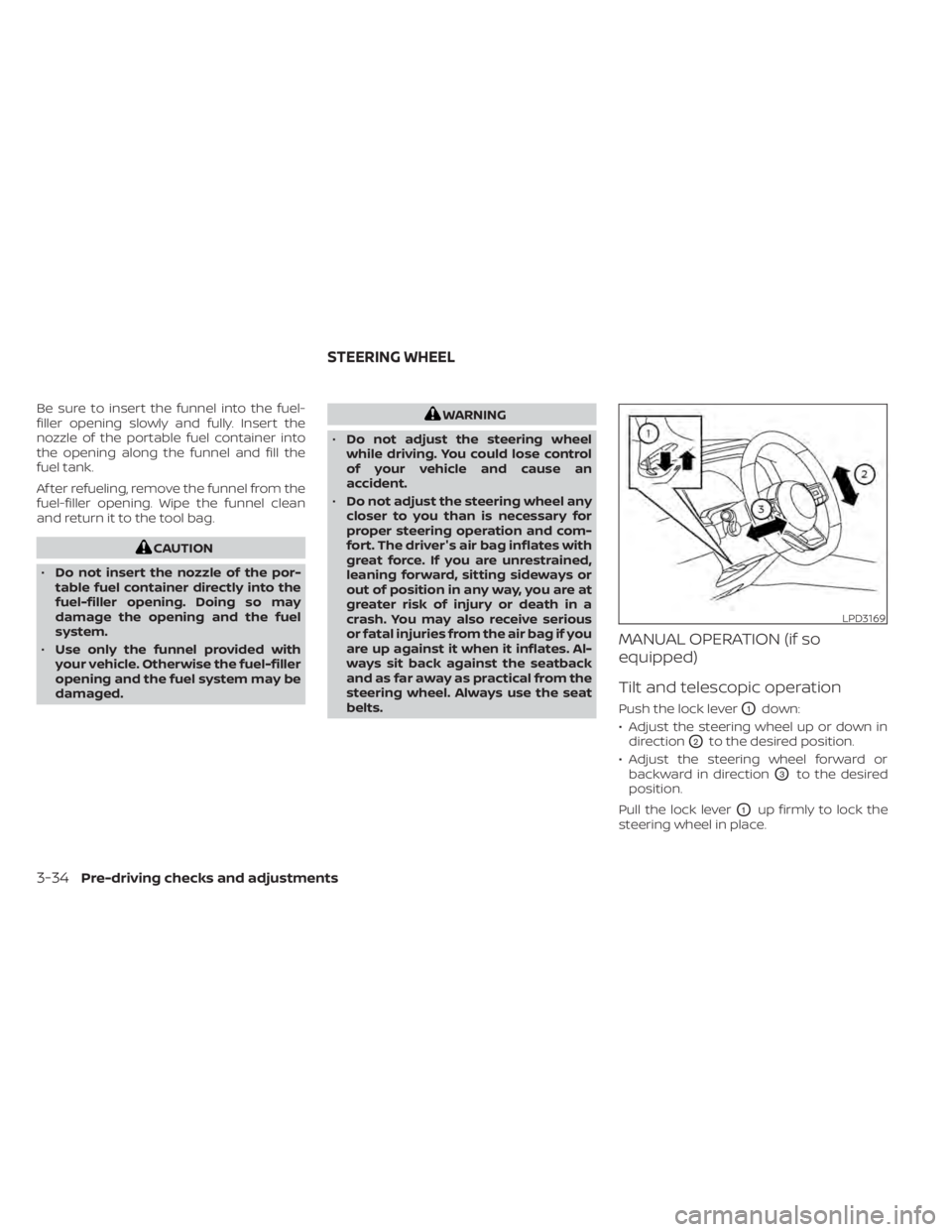
Push the lock leverO1down:
• Adjust the steering wheel up or down in direction
O2to the desired position.
• Adjust the steering wheel forward or backward in direction
O3to the desired
position.
Pull the lock lever
O1up firmly to lock the
steering wheel in place.
LPD3169
STEERING WHEEL
3-34Pre-driving checks and adjustments
Page 290 of 665
•Objects viewed in the RearView
Monitor differ from actual distance
because a wide-angle lens is used.
• Objects in the RearView Monitor will
appear visually opposite compared
to when viewed in the rearview and
outside mirrors.
• Use the displayed lines as a refer-
ence. The lines are highly affected by
the number of occupants, fuel level,
vehicle position, road conditions and
road grade.
• Make sure that the lif tgate is securely
closed when backing up.
• Do not put anything on the rearview
camera. The rearview camera is in-
stalled in the rear bumper.
• When washing the vehicle with high
pressure water, be sure not to spray it
around the camera. Otherwise, water
may enter the camera unit causing
water condensation on the lens, a
malfunction, fire or an electric shock.
• Do not strike the camera. It is a preci-
sion instrument. Otherwise, it may
malfunction or cause damage result-
ing in a fire or an electric shock. The following are operating limitations and
do not represent a system malfunction:
• When the temperature is extremely high
or low, the screen may not clearly display
objects.
• When strong light directly shines on the camera, objects may not be displayed
clearly.
• Vertical lines may be seen in objects on the screen. This is due to strong reflected
light from the bumper.
• The screen may flicker under fluorescent light.
• The colors of objects on the RearView Monitor may differ somewhat from the
actual color of objects.
• Objects on the monitor may not be clear in a dark environment.
• There may be a delay when switching between views.
• If dirt, rain or snow accumulate on the camera, the RearView Monitor may not
display objects clearly. Clean the camera.
• Do not use wax on the camera lens. Wipe off any wax with a clean cloth dampened
with a diluted mild cleaning agent, then
wipe with a dry cloth.
SYSTEM MAINTENANCE
CAUTION
• Do not use alcohol, benzine or thin-
ner to clean the camera. This will
cause discoloration.
• Do not damage the camera as the
monitor screen may be adversely
affected.
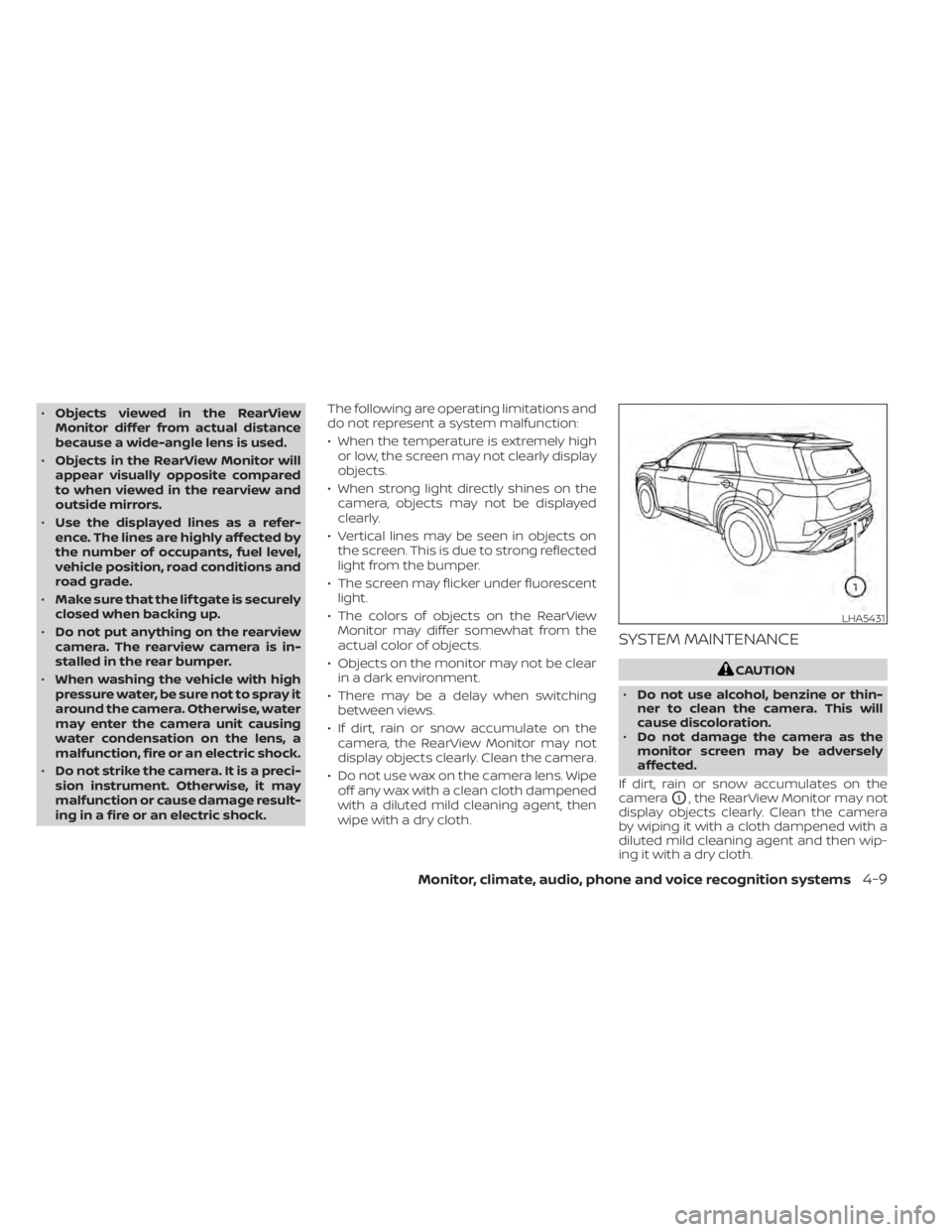
If dirt, rain or snow accumulates on the
camera
O1, the RearView Monitor may not
display objects clearly. Clean the camera
by wiping it with a cloth dampened with a
diluted mild cleaning agent and then wip-
ing it with a dry cloth.
LHA5431
Monitor, climate, audio, phone and voice recognition systems4-9
Page 293 of 665
When the camera is first activated with the
bird’s-eye view in the display, a red icon (if so
equipped) will flash on the screen. This in-
dicates that the sonar system is activated.
For additional information, see “Front and
Rear Sonar System (RSS)” (P. 5-183).
Available views
WARNING
• The distance guide lines and the ve-
hicle width lines should be used as a
reference only when the vehicle is on
a paved, level surface. The apparent
distance viewed on the monitor may
be different than the actual distance
between the vehicle and displayed
objects.
• Use the displayed lines and the
bird’s-eye view as a reference. The
lines and the bird’s-eye view are
greatly affected by the number of oc-
cupants, cargo, fuel level, vehicle po-
sition, road condition and road
grade.
• If the tires are replaced with different
sized tires, the predicted course lines
and the bird's-eye view may be dis-
played incorrectly. •
When driving the vehicle up a hill, ob-
jects viewed in the monitor are fur-
ther than they appear. When driving
the vehicle down a hill, objects
viewed in the monitor are closer than
they appear.
• Objects in the rear view will appear
visually opposite compared to when
viewed in the monitor and outside
mirrors.
• Use the mirrors or actually look to
properly judge distances to other
objects.
• On a snow-covered or slippery road,
there may be a difference between
the predicted course lines and the
actual course line.
• The vehicle width and predicted
course lines are wider than the actual
width and course.
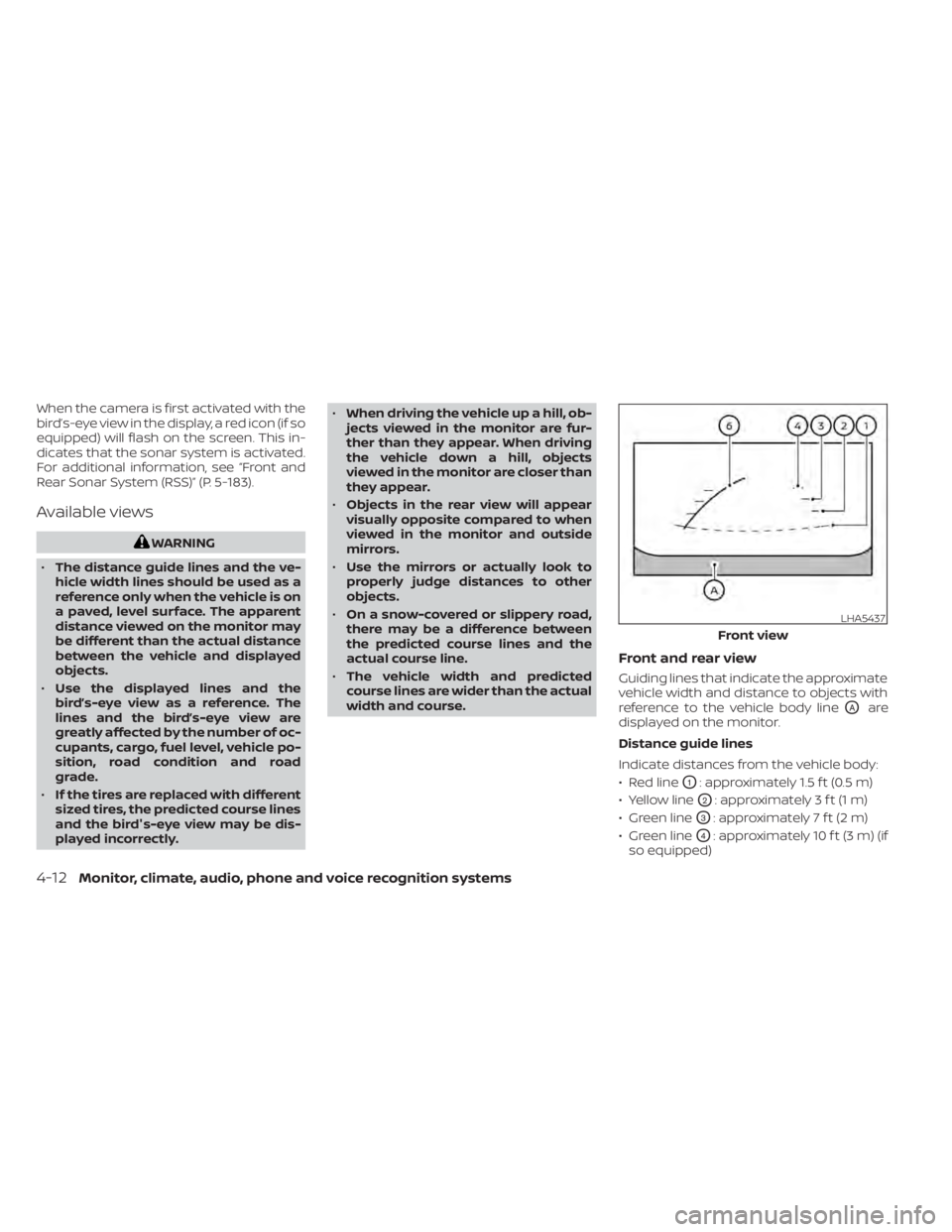
Front and rear view
Guiding lines that indicate the approximate
vehicle width and distance to objects with
reference to the vehicle body line
OAare
displayed on the monitor.
Distance guide lines
Indicate distances from the vehicle body:
• Red line
O1: approximately 1.5 f t (0.5 m)
• Yellow line
O2: approximately 3 f t (1 m)
• Green line
O3: approximately 7 f t (2 m)
• Green line
O4: approximately 10 f t (3 m) (if
so equipped)
LHA5437
Front view
4-12Monitor, climate, audio, phone and voice recognition systems