2023 NISSAN PATHFINDER climate control
[x] Cancel search: climate controlPage 317 of 665

Climate controlled seat switches
(if so equipped)
For additional information, see “Climate
controlled seat switches” (P. 2-90).
OPERATING TIPS
The sunload sensor, located on the top driver's
side of the instrument panel, helps the system
maintain a constant temperature. Do not put
anything on or around this sensor.
• When the climate system is in automaticoperation and the engine coolant tem-
perature and outside air temperature are
low, the air flow outlet may default to de-
froster mode for a maximum of 2 min-
utes 30 seconds. This is not a malfunc-
tion. Af ter the engine coolant
temperature warms up, the air flow outlet
will return to foot mode and operation will
continue normally. • When the outside and interior cabin tem-
peratures are moderate to high, the in-
take setting may default to turn off air
recirculation to allow fresh air into the
passenger compartment. You may no-
tice air flow from the foot mode, bi-level
mode or side demist vent outlets for a
maximum of 15 seconds. This may occur
when the previous climate setting was
turned off. This is not a malfunction. Af ter
the initial warm air is expelled, the intake
will return to automatic control, the air
flow outlet will return to previous settings,
and operation will continue normally. To
exit, press any climate control button.
• Keep the moonroof (if so equipped) closed while the air conditioner is in
operation.
• If you feel that the air flow mode you have selected and the outlets the air is coming
out do not match, select themode.
• When you change the air flow mode, you may feel air flow from the foot outlets for
just a moment. This is not a malfunction.
LHA5465
4-36Monitor, climate, audio, phone and voice recognition systems
Page 318 of 665
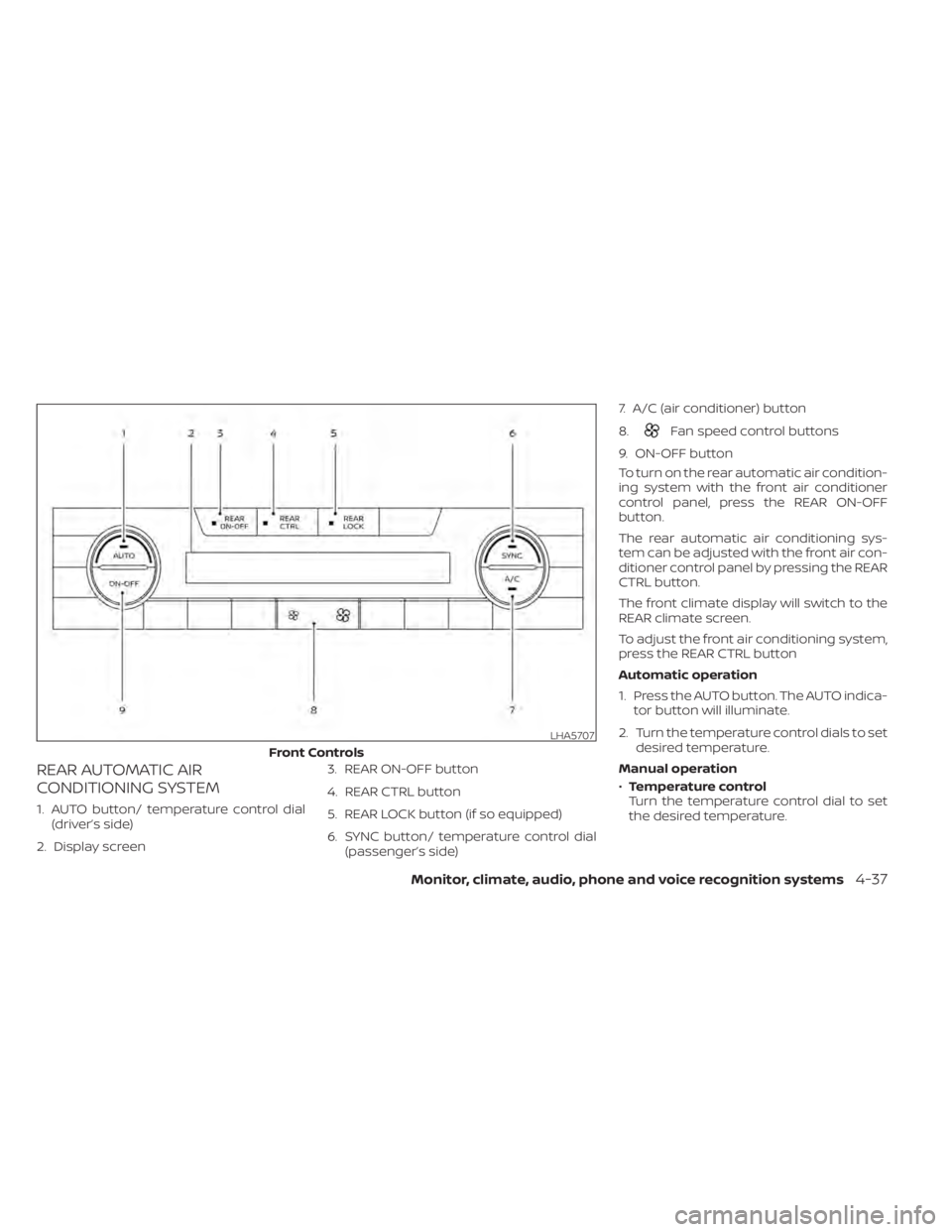
REAR AUTOMATIC AIR
CONDITIONING SYSTEM
1. AUTO button/ temperature control dial(driver’s side)
2. Display screen 3. REAR ON-OFF button
4. REAR CTRL button
5. REAR LOCK button (if so equipped)
6. SYNC button/ temperature control dial
(passenger’s side) 7. A/C (air conditioner) button
8.
Fan speed control buttons
9. ON-OFF button
To turn on the rear automatic air condition-
ing system with the front air conditioner
control panel, press the REAR ON-OFF
button.
The rear automatic air conditioning sys-
tem can be adjusted with the front air con-
ditioner control panel by pressing the REAR
CTRL button.
The front climate display will switch to the
REAR climate screen.
To adjust the front air conditioning system,
press the REAR CTRL button
Automatic operation
1. Press the AUTO button. The AUTO indica- tor button will illuminate.
2. Turn the temperature control dials to set desired temperature.
Manual operation
• Temperature control
Turn the temperature control dial to set
the desired temperature.
LHA5707
Front Controls
Monitor, climate, audio, phone and voice recognition systems4-37
Page 319 of 665
•Fan speed control
Press theFan speed control buttons
to manually control the fan speed.
Rear Heating
1. Press the AUTO button. The AUTO indica- tor button will illuminate on the front
display.
2. Turn the temperature control dial to set the desired temperature.
Turning the system off
• Press the REAR ON-OFF button on the front display to turn the rear climate sys-
tem off. The indicator light will turn off.
• Press the ON-OFF button. The rear cli- mate will turn off and the control will
switch to front climate.
Locking the REAR controls
1. Press the REAR LOCK button on the front climate control panel. LOCK will be dis-
played on the rear climate display
screen.
2. The rear climate controls will be locked and can only be adjusted using the front
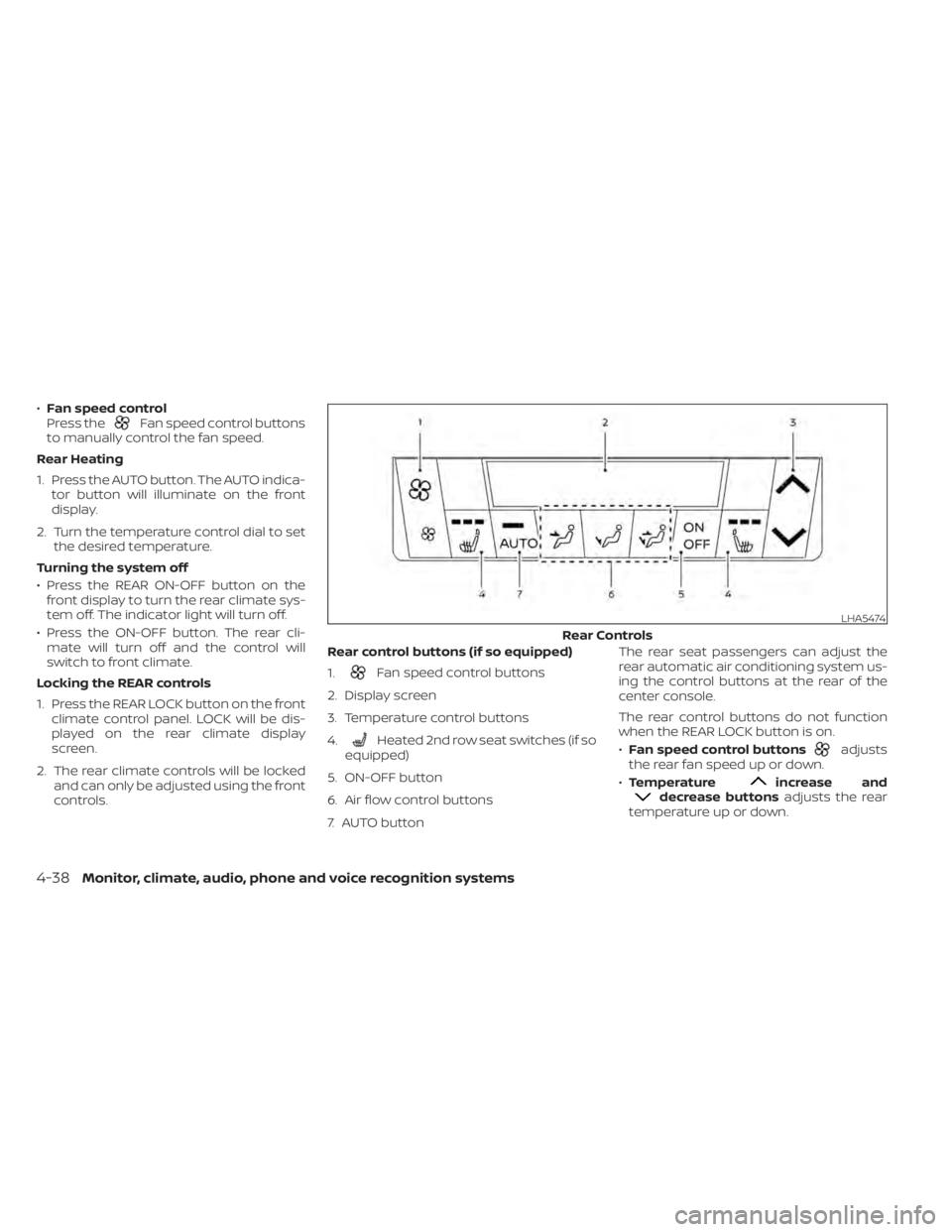
controls. Rear control buttons (if so equipped)
1.
Fan speed control buttons
2. Display screen
3. Temperature control buttons
4.
Heated 2nd row seat switches (if so
equipped)
5. ON-OFF button
6. Air flow control buttons
7. AUTO button The rear seat passengers can adjust the
rear automatic air conditioning system us-
ing the control buttons at the rear of the
center console.
The rear control buttons do not function
when the REAR LOCK button is on.
•
Fan speed control buttonsadjusts
the rear fan speed up or down.
• Temperature
increase anddecrease buttons adjusts the rear
temperature up or down.
LHA5474
Rear Controls
4-38Monitor, climate, audio, phone and voice recognition systems
Page 320 of 665
•Heated 2nd row seat switches (if so
equipped) For additional information,
see “Heated 2nd row seat switches”
(P. 2-92).
• ON-OFF button Turns rear automatic air
conditioning system on and off.
• Air flow control buttons controls air flow
and selects the air outlet.
• AUTO button Turns rear automatic air
conditioning system on, AUTO mode on. The air conditioner system in your NISSAN
vehicle is charged with a refrigerant de-
signed with the environment in mind.
This refrigerant does not harm the
earth's ozone layer.
Special charging equipment and lubricant
is required when servicing your NISSAN air
conditioner. Using improper refrigerants or
lubricants will cause severe damage to
your air conditioner system. For additional
information, see “Air conditioner system re-
frigerant and oil recommendations”
(P. 10-8).
It is recommended that you visit a NISSAN
dealer to service your “environmentally
friendly ” air conditioner system.
WARNING
The air conditioner system contains re-
frigerant under high pressure. To avoid
personal injury, any air conditioner ser-
vice should be done only by an experi-
enced technician with proper
equipment.
ROOF MOUNTED ANTENNA
The antenna is located on the rear part of
the vehicle roof.
CAUTION
• A build-up of ice on the antenna can
affect radio performance. Remove
the ice to restore radio reception.
• When removing snow from the roof,
do not apply strong force to the an-
tenna. That may cause broken an-
tenna and roof panel dent.
• When using a high pressure car wash,
keep the high pressure nozzle away
from the antenna. The seal may be
deformed or damaged.
• The radio performance may be af-
fected if cargo carried on the roof
blocks the radio signal. If possible, do
not put cargo near the antenna.
SERVICING AIR CONDITIONER ANTENNA
Monitor, climate, audio, phone and voice recognition systems4-39
Page 321 of 665
When installing a CB, ham radio or car
phone in your vehicle, be sure to observe
the following precautions; otherwise, the
new equipment may adversely affect the
engine control system and other electronic
parts.
WARNING
• A cellular phone should not be used
for any purpose while driving so full
attention may be given to vehicle op-
eration. Some jurisdictions prohibit
the use of cellular phones while
driving.
• If you must make a call while your
vehicle is in motion, the hands free
cellular phone operational mode is
highly recommended. Exercise ex-
treme caution at all times so full at-
tention may be given to vehicle
operation.
• If you are unable to devote full atten-
tion to vehicle operation while talk-
ing on the phone, pull off the road to
a safe location and stop your vehicle.
CAUTION
• Keep the antenna as far away as pos-
sible from the electronic control
modules.
• Keep the antenna wire more than 8 in
(20 cm) away from the electronic
control system harnesses. Do not
route the antenna wire next to any
harness.
• Adjust the antenna standing-wave
ratio as recommended by the
manufacturer.
• Connect the ground wire from the CB
radio chassis to the body.
• For additional information, it is rec-
ommended that you visit a NISSAN
dealer for servicing. “Made for iPod”, “Made for iPhone” and
“Made for iPad” mean that an electronic
accessory has been designed to connect
specifically to iPod, iPhone or iPad, respec-
tively, and has been certified by the devel-
oper to meet Apple performance stan-
dards. Apple is not responsible for the
operation of this device or its compliance
with safety and regulatory standards.
Please note that the use of this accessory
with iPod, iPhone or iPad may affect wire-
less performance.
iPad, iPhone, iPod classic, iPod nano, iPod
shuffle and iPod touch are trademarks of
Apple Inc., registered in the U.S. and other
countries. Lightning is a trademark of
Apple Inc.
CAR PHONE OR CB RADIO
iPod®/iPhone®
4-40Monitor, climate, audio, phone and voice recognition systems
Page 644 of 665
Automatic transmission
To tow a vehicle equipped with an auto-
matic transmission, an appropriate vehicle
dollyMUST be placed under the towed ve-
hicle's drive wheels. Alwaysfollow the dolly
manufacturer's recommendations when
using their product.
NOTE:
If the battery is completely drained the
transmission will not manually shif t to
other positions. DOT (Department of Transportation) Qual-
ity Grades: All passenger car tires must
conform to federal safety requirements in
addition to these grades.
Quality grades can be found where appli-
cable on the tire sidewall between tread
shoulder and maximum section width. For
example:
Treadwear 200 Traction AA Temperature
A
Treadwear
The treadwear grade is a comparative rat-
ing based on the wear rate of the tire when
tested under controlled conditions on a
specified government test course. For ex-
ample, a tire graded 150 would wear one
and one-half (1 1/2) times as well on the
government course as a tire graded 100.
The relative performance of tires depends
upon the actual conditions of their use,
however, and may depart significantly from
the norm due to variations in driving habits,
service practices and differences in road
characteristics and climate.
Traction AA, A, B and C
The traction grades, from highest to low-
est, are AA, A, B, and C. Those grades repre-
sent the tire's ability to stop on wet pave-ment as measured under controlled
conditions on specified government test
surfaces of asphalt and concrete. A tire
marked C may have poor traction
performance.
WARNING
The traction grade assigned to this tire
is based on straight-ahead braking
traction tests, and does not include ac-
celeration, cornering, hydroplaning, or
peak traction characteristics.
Temperature A, B and C
The temperature grades are A (the high-
est), B, and C, representing the tire’s resis-
tance to the generation of heat, and its
ability to dissipate heat when tested under
controlled conditions on a specified indoor
laboratory test wheel. Sustained high tem-
perature can cause the material of the tire
to degenerate and reduce tire life, and ex-
cessive temperature can lead to sudden
tire failure. The grade C corresponds to a
level of performance which all passenger
car tires must meet under the Federal Mo-
tor Safety Standard No. 109. Grades B and A
represent higher levels of performance on
the laboratory test wheel than the mini-
mum required by law.
UNIFORM TIRE QUALITY GRADING
Technical and consumer information10-33
Page 651 of 665

LATCH (Lower Anchors and Tethers for
CHildren) System..............1-35Precautions on child
restraints............1-43, 1-50, 1-56Top tether strap anchor point
locations...................1-40Child safety rear door lock..........3-7Cleaning exterior and interior......7-2,7-4Climate-controlled seat switches.....2-90Cold weather driving............5-196Console box..................2-110Controls
Heater and air conditioner controls. .4-33CoolantCapacities and recommended
fuel/lubricants
...............10-2Changing engine coolant.........8-5Checking engine coolant level......8-5Engine coolant temperature gauge. . .2-9Corrosion protection..............7-7Cruise control................ .5-87Cup holders..................2-112
D
Daytime Running Light System......2-87Defroster switch
Rear window and outside mirror defroster
switch
................... .2-81Dimensions and weights..........10-10Dimmer switch for instrument panel. . .2-88Door locks....................3-5Drive belt....................8-15
Driving
Cold weather driving...........5-196Driving with automatic transmission.5-18Precautions when starting and
driving.................... .5-4Driving the vehicle...............5-18Dual panel moonroof............2-120
E
Eco Drive Report...............5-34Economy - fuel................5-171Emergency call (SOS) button........2-98Emergency engine shutoff.......5-15,6-2Emission control information label. . . .10-13Emission control system warranty. . . .10-34Engine
Before starting the engine........5-16Capacities and recommended
fuel/lubricants...............10-2Changing engine coolant.........8-5Changing engine oil............8-6Changing engine oil filter.........8-6Checking engine coolant level......8-5Checking engine oil level.........8-6Engine coolant temperature gauge. . .2-9Engine cooling system...........8-4Engine oil.................. .8-6Engine oil and oil filter
recommendation.............10-7Engine oil pressure warning light. . . .2-15Engine oil viscosity.............10-7Engine serial number..........10-12
Engine specifications...........10-9Starting the engine............5-16Engine Block Heater.............5-197Engine coolant temperature gauge. . . .2-9Event Data recorders........10-36, 10-37Exhaust gas (Carbon monoxide)......5-4Explanation of maintenance items.....9-2Explanation of scheduled maintenance
items...................... .9-5Extended storage switch..........2-106Eyeglass case.................2-111
F
F.M.V.S.S. certification label.........10-12Flashers (See hazard warning flasher
switch)......................6-2Flat tire...................6-3, 6-4Floor mat positioning aid...........7-6Fluid
Brake fluid..................8-11Capacities and recommended
fuel/lubricants...............10-2Engine coolant................8-4Engine oil.................. .8-6Windshield-washer fluid..........8-11Fog light switch................2-89Front air bag system (See supplemental re-
straint system).................1-67Front and rear sonar system.......5-183Front power seat adjustment........1-4Front seats....................1-2Front-door pocket..............2-107
11-2