Page 476 of 665
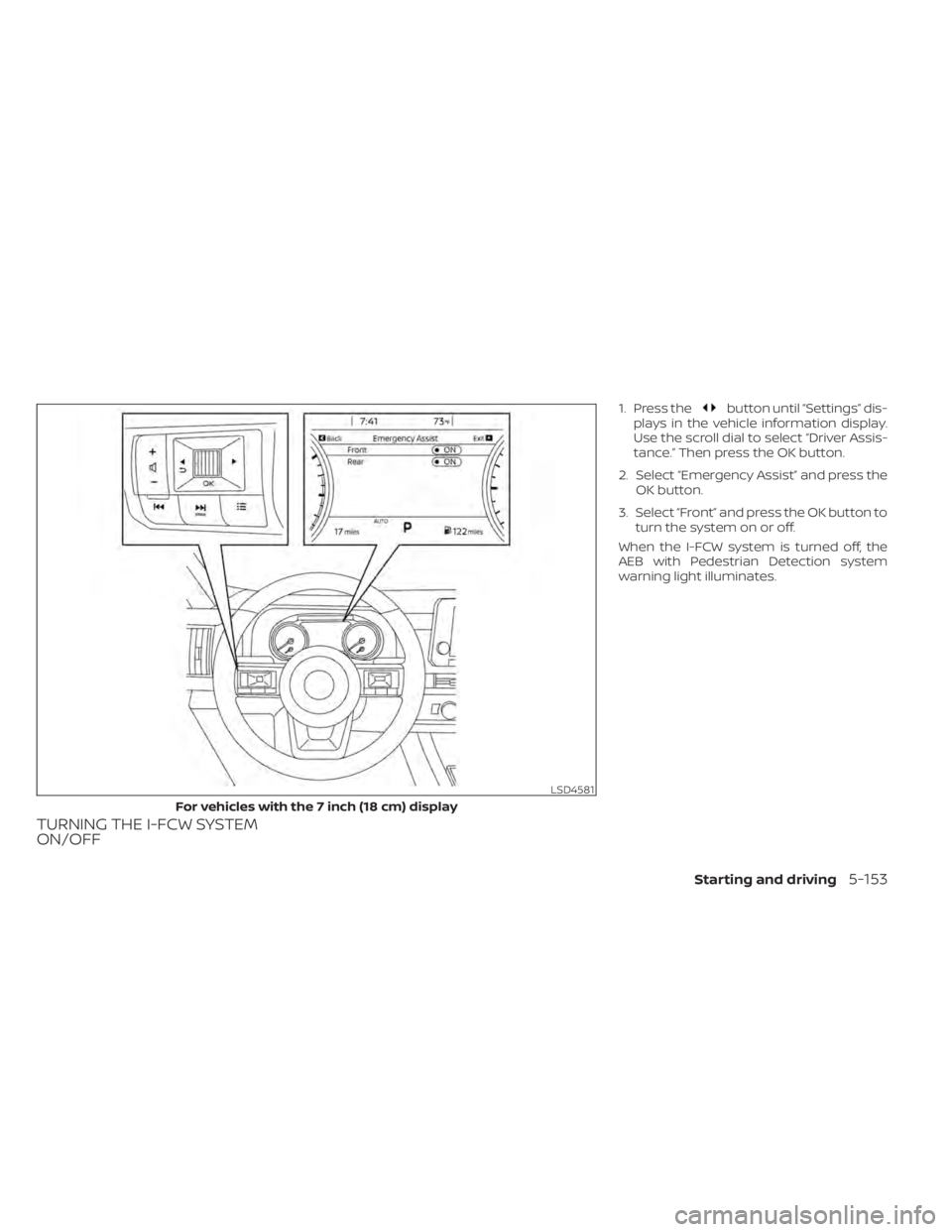
TURNING THE I-FCW SYSTEM
ON/OFF
1. Press thebutton until “Settings” dis-
plays in the vehicle information display.
Use the scroll dial to select “Driver Assis-
tance.” Then press the OK button.
2. Select “Emergency Assist” and press the OK button.
3. Select “Front” and press the OK button to turn the system on or off.
When the I-FCW system is turned off, the
AEB with Pedestrian Detection system
warning light illuminates.
LSD4581
For vehicles with the 7 inch (18 cm) display
Starting and driving5-153
Page 477 of 665
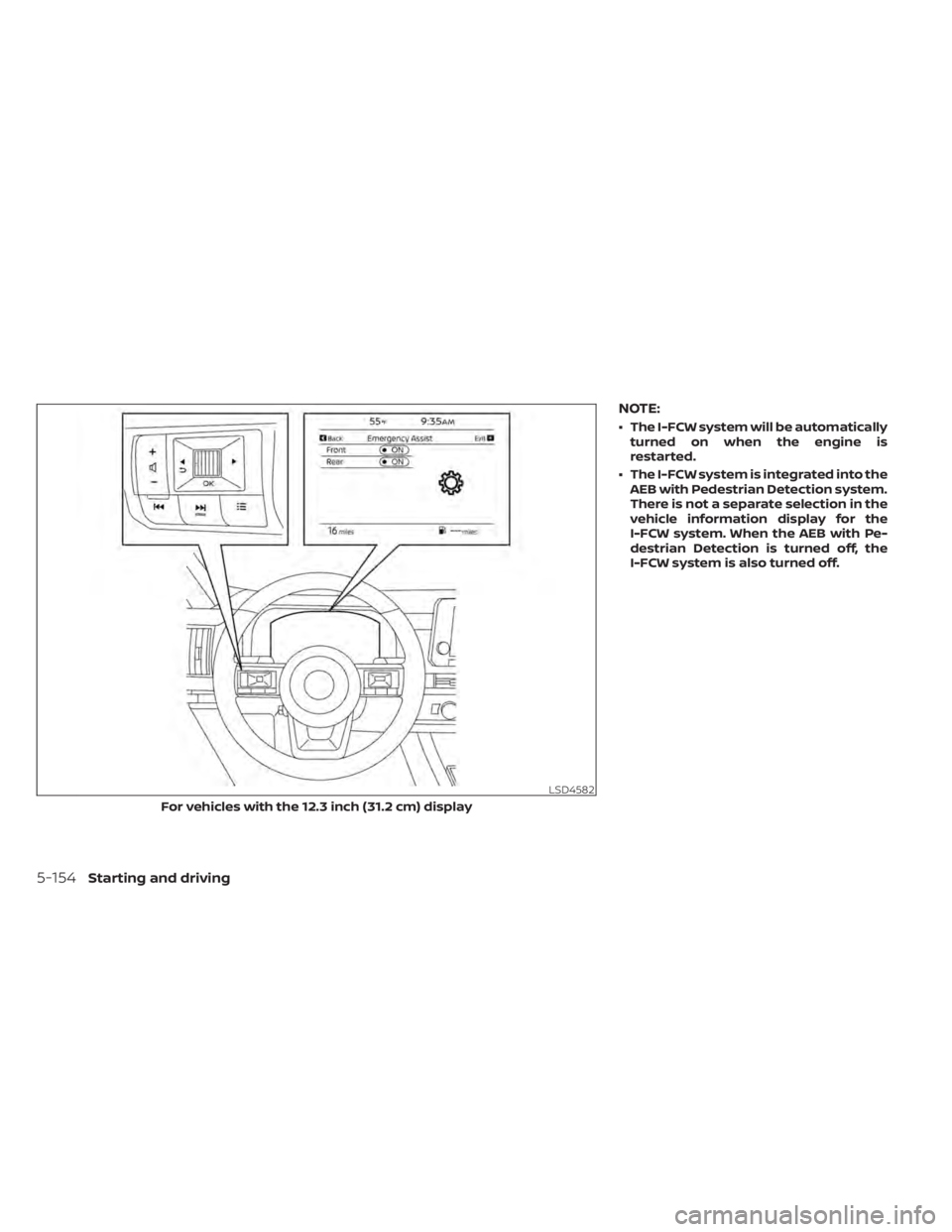
NOTE:
• The I-FCW system will be automaticallyturned on when the engine is
restarted.
• The I-FCW system is integrated into the AEB with Pedestrian Detection system.
There is not a separate selection in the
vehicle information display for the
I-FCW system. When the AEB with Pe-
destrian Detection is turned off, the
I-FCW system is also turned off.
LSD4582
For vehicles with the 12.3 inch (31.2 cm) display
5-154Starting and driving
Page 484 of 665
SYSTEM TEMPORARILY
UNAVAILABLE
Condition A
When the radar sensor picks up interfer-
ence from another radar source, making it
impossible to detect a vehicle ahead, the
I-FCW system is automatically turned off.
The AEB with Pedestrian Detection system
OFF warning light (orange) will flash.
Action to take
When the above conditions no longer exist,
the I-FCW system will resume
automatically.
Condition B
When there is inclement weather (rain, fog,
snow, etc.) blocking the front radar sensor,
the I-FCW system will automatically be
canceled and the “Forward Driving Aids
temporarily disabled Front Sensor Blocked
See Owner’s Manual” warning message will
appear in the vehicle information display.
LSD4183
For vehicles with the 7 inch (18 cm) display
Starting and driving5-161
Page 485 of 665
Action to take:
When the conditions listed above are no
longer present, the warning message will
no longer be available in the vehicle infor-
mation display. If the “Forward Driving Aids
temporarily disabled Front Sensor Blocked
See Owner’s Manual” warning message
continues to be displayed, have the system
checked. It is recommended that you visit a
NISSAN dealer for this service.
Condition C
When the radar sensor of the front bumper
is covered with dirt or is obstructed, the
I-FCW system will automatically be can-
celed. The chime will sound and the “For-
ward Driving Aids temporarily disabled
Front Sensor Blocked See Owner’s Manual”
warning message will appear in the vehicle
information display.
LSD4334
For vehicles with the 12.3 inch (31.2 cm) display
5-162Starting and driving
Page 486 of 665

Action to take:
If the warning message appears, stop the
vehicle in a safe place, press the park but-
ton to engage the P (Park) position, and
turn the engine off. When the radar signal is
temporarily interrupted, clean the sensor
area of the front bumper and restart the
engine. If the “Forward Driving Aids tempo-
rarily disabled Front Sensor Blocked See
Owner’s Manual” warning message contin-
ues to be displayed, have the system
checked. It is recommended that you visit a
NISSAN dealer for this service.
Condition D
When driving on roads with limited road
structures or buildings (for example, long
bridges, deserts, snowfields, driving next to
long walls), the system may illuminate the
system warning light and display the “For-
ward Driving Aids temporarily disabled
Front Sensor Blocked See Owner’s Manual”
warning message.
Action to take:
When the above driving conditions no lon-
ger exist, turn the system back on.
SYSTEM MALFUNCTION
If the I-FCW system malfunctions, it will be
turned off automatically, a chime will
sound, the AEB with Pedestrian Detection
system warning light (orange) will illumi-
nate and the warning message [Malfunc-
tion] will appear in the vehicle information
display.Action to take
If the warning light (orange) comes on, stop
the vehicle in a safe location, turn the en-
gine off and restart the engine. If the
warning light continues to illuminate, have
the I-FCW system checked. It is recom-
mended that you visit a NISSAN dealer for
this service.
LSD4329
Starting and driving5-163
Page 489 of 665
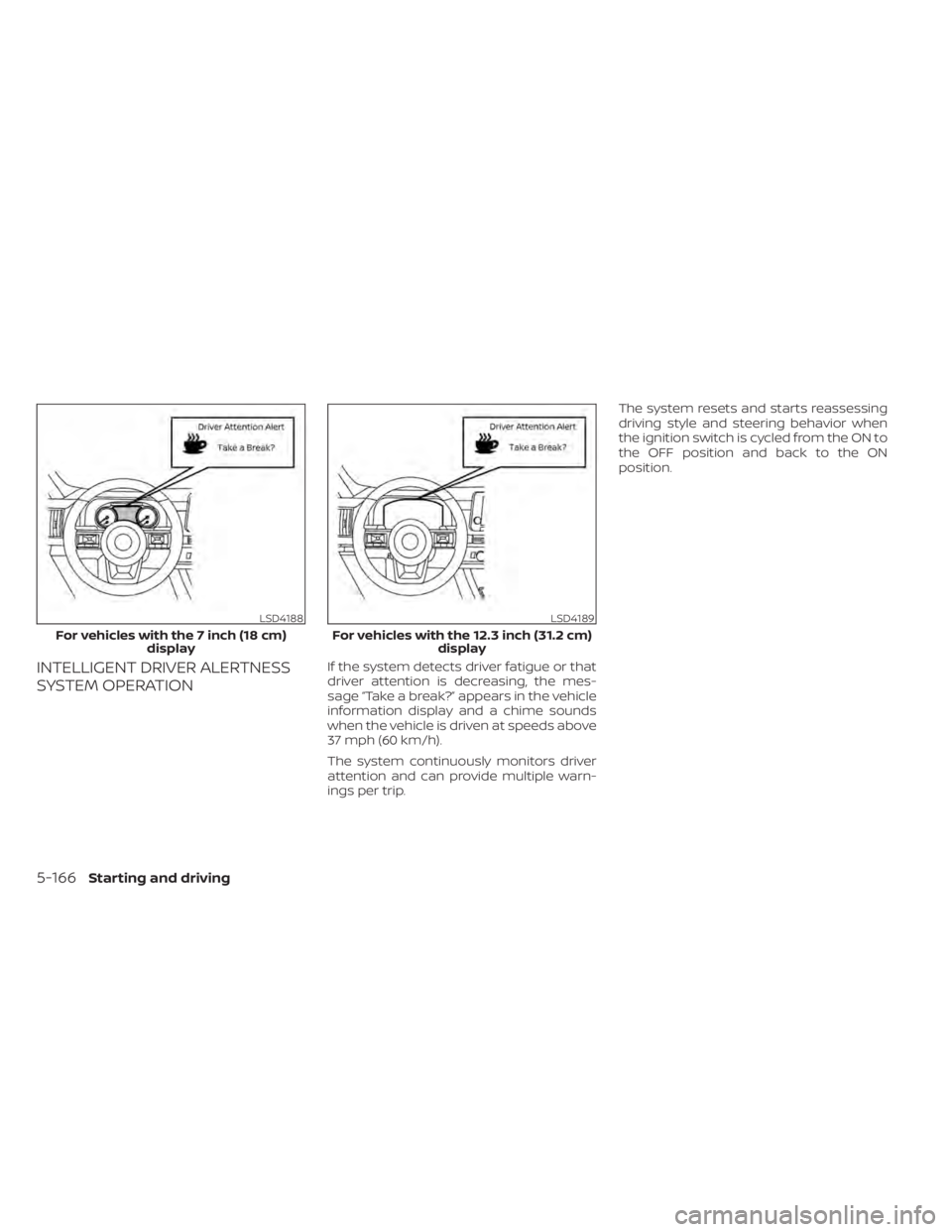
INTELLIGENT DRIVER ALERTNESS
SYSTEM OPERATIONIf the system detects driver fatigue or that
driver attention is decreasing, the mes-
sage “Take a break?” appears in the vehicle
information display and a chime sounds
when the vehicle is driven at speeds above
37 mph (60 km/h).
The system continuously monitors driver
attention and can provide multiple warn-
ings per trip.The system resets and starts reassessing
driving style and steering behavior when
the ignition switch is cycled from the ON to
the OFF position and back to the ON
position.
LSD4188
For vehicles with the 7 inch (18 cm)
display
LSD4189
For vehicles with the 12.3 inch (31.2 cm) display
5-166Starting and driving
Page 490 of 665
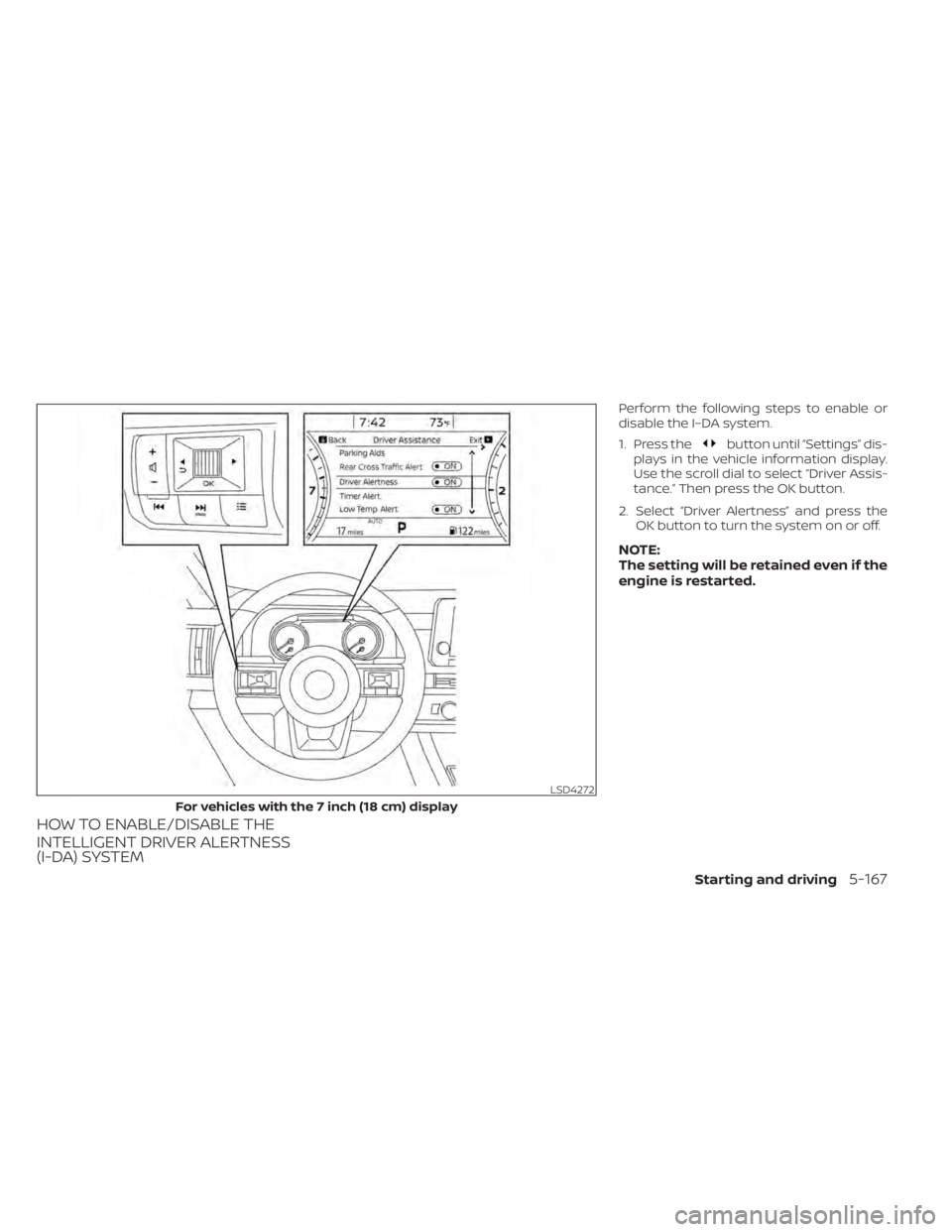
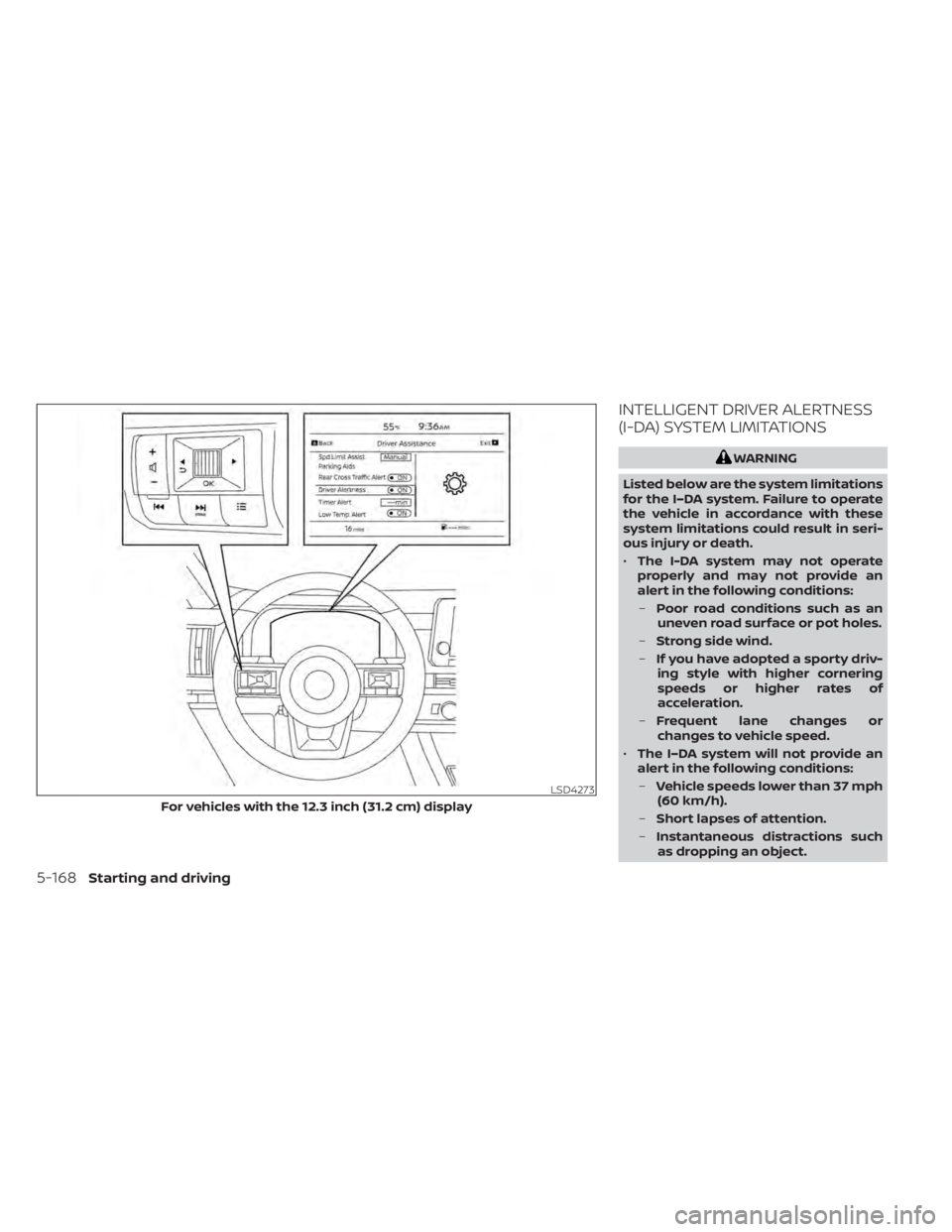
HOW TO ENABLE/DISABLE THE
INTELLIGENT DRIVER ALERTNESS
(I-DA) SYSTEM
Perform the following steps to enable or
disable the I–DA system.
1. Press the
button until “Settings” dis-
plays in the vehicle information display.
Use the scroll dial to select “Driver Assis-
tance.” Then press the OK button.
2. Select “Driver Alertness” and press the OK button to turn the system on or off.
NOTE:
The setting will be retained even if the
engine is restarted.
LSD4272
For vehicles with the 7 inch (18 cm) display
Starting and driving5-167
Page 491 of 665
INTELLIGENT DRIVER ALERTNESS
(I-DA) SYSTEM LIMITATIONS
WARNING
Listed below are the system limitations
for the I–DA system. Failure to operate
the vehicle in accordance with these
system limitations could result in seri-
ous injury or death.
• The I-DA system may not operate
properly and may not provide an
alert in the following conditions:
– Poor road conditions such as an
uneven road surface or pot holes.
– Strong side wind.
– If you have adopted a sporty driv-
ing style with higher cornering
speeds or higher rates of
acceleration.
– Frequent lane changes or
changes to vehicle speed.
• The I–DA system will not provide an
alert in the following conditions:
– Vehicle speeds lower than 37 mph
(60 km/h).
– Short lapses of attention.
– Instantaneous distractions such
as dropping an object.
LSD4273
For vehicles with the 12.3 inch (31.2 cm) display
5-168Starting and driving