2023 NISSAN PATHFINDER Outside mirrors
[x] Cancel search: Outside mirrorsPage 293 of 665
When the camera is first activated with the
bird’s-eye view in the display, a red icon (if so
equipped) will flash on the screen. This in-
dicates that the sonar system is activated.
For additional information, see “Front and
Rear Sonar System (RSS)” (P. 5-183).
Available views
WARNING
• The distance guide lines and the ve-
hicle width lines should be used as a
reference only when the vehicle is on
a paved, level surface. The apparent
distance viewed on the monitor may
be different than the actual distance
between the vehicle and displayed
objects.
• Use the displayed lines and the
bird’s-eye view as a reference. The
lines and the bird’s-eye view are
greatly affected by the number of oc-
cupants, cargo, fuel level, vehicle po-
sition, road condition and road
grade.
• If the tires are replaced with different
sized tires, the predicted course lines
and the bird's-eye view may be dis-
played incorrectly. •
When driving the vehicle up a hill, ob-
jects viewed in the monitor are fur-
ther than they appear. When driving
the vehicle down a hill, objects
viewed in the monitor are closer than
they appear.
• Objects in the rear view will appear
visually opposite compared to when
viewed in the monitor and outside
mirrors.
• Use the mirrors or actually look to
properly judge distances to other
objects.
• On a snow-covered or slippery road,
there may be a difference between
the predicted course lines and the
actual course line.
• The vehicle width and predicted
course lines are wider than the actual
width and course.
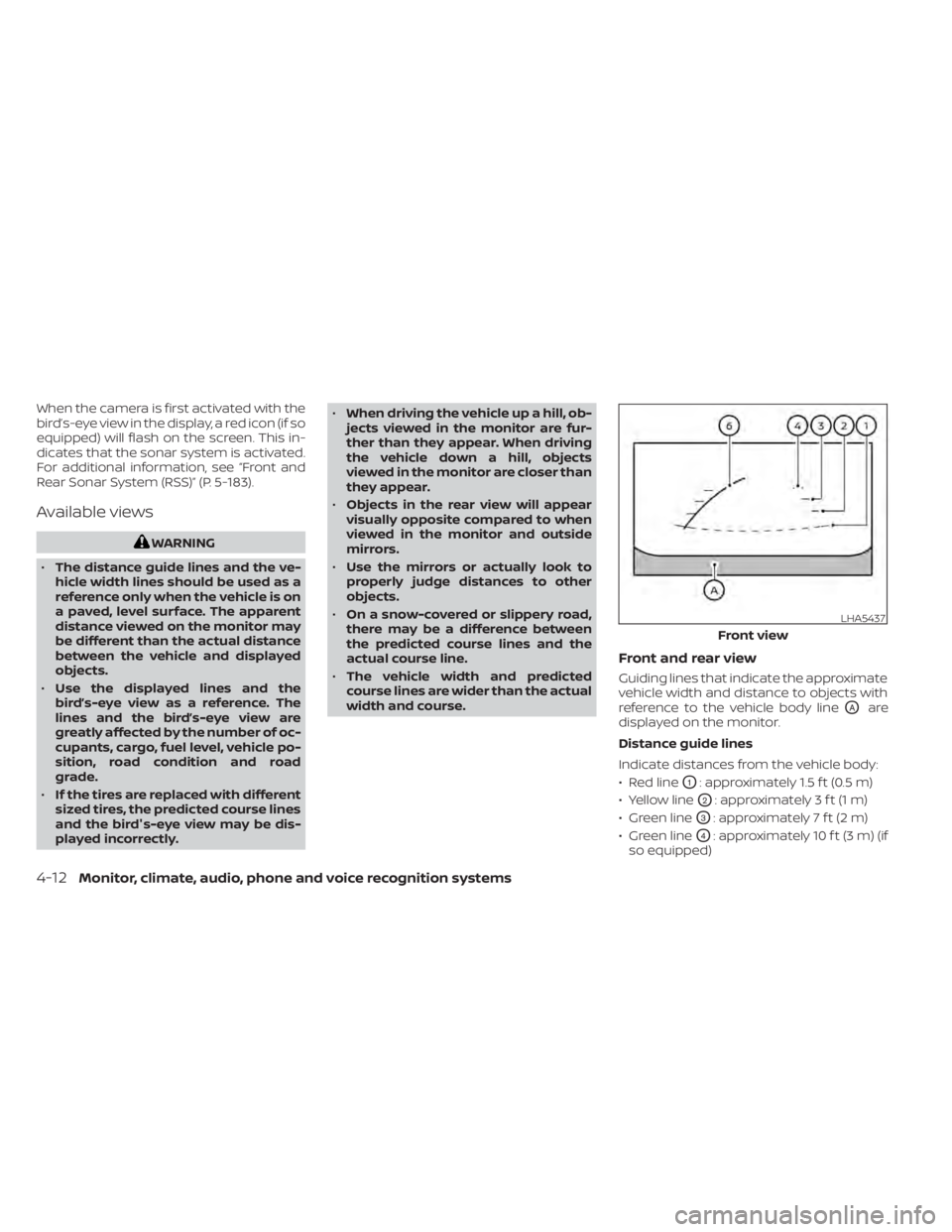
Front and rear view
Guiding lines that indicate the approximate
vehicle width and distance to objects with
reference to the vehicle body line
OAare
displayed on the monitor.
Distance guide lines
Indicate distances from the vehicle body:
• Red line
O1: approximately 1.5 f t (0.5 m)
• Yellow line
O2: approximately 3 f t (1 m)
• Green line
O3: approximately 7 f t (2 m)
• Green line
O4: approximately 10 f t (3 m) (if
so equipped)
LHA5437
Front view
4-12Monitor, climate, audio, phone and voice recognition systems
Page 301 of 665
NOTE:
Do not adjust any of the display settings
of the Intelligent Around View® Monitor
while the vehicle is moving. Make sure
the parking brake is firmly applied.
INTELLIGENT AROUND VIEW®
MONITOR SYSTEM LIMITATIONS
WARNING
Listed below are the system limitations
for Intelligent Around View® Monitor.
Failure to operate the vehicle in accor-
dance with these system limitations
could result in serious injury or death.
• Do not use the Intelligent Around
View® Monitor with the outside mir-
rors in the stored position, and make
sure that the lif tgate is securely
closed when operating the vehicle
using the Intelligent Around View®
Monitor.
• The apparent distance between ob-
jects viewed on the Intelligent
Around View® Monitor differs from
the actual distance.
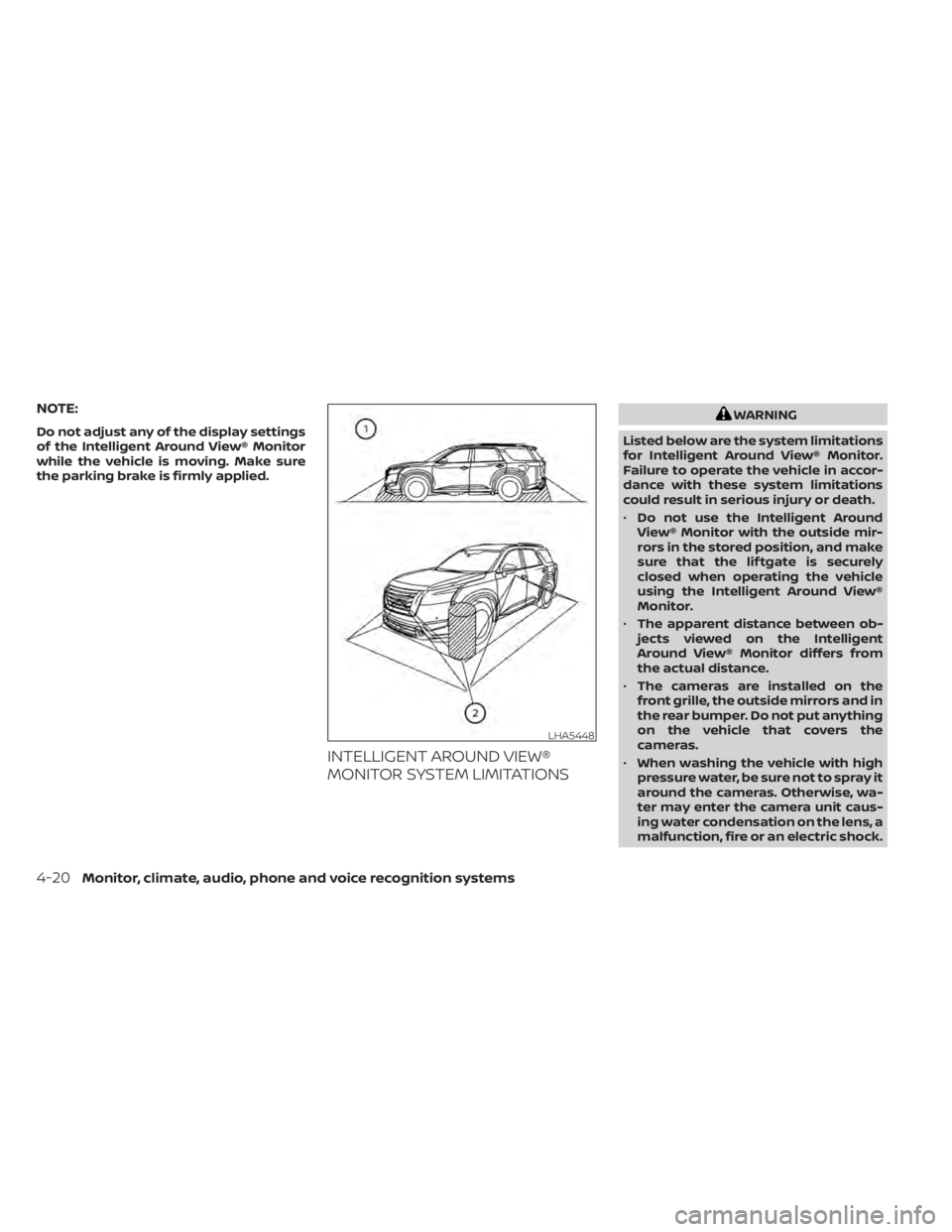
• The cameras are installed on the
front grille, the outside mirrors and in
the rear bumper. Do not put anything
on the vehicle that covers the
cameras.
• When washing the vehicle with high
pressure water, be sure not to spray it
around the cameras. Otherwise, wa-
ter may enter the camera unit caus-
ing water condensation on the lens, a
malfunction, fire or an electric shock.
LHA5448
4-20Monitor, climate, audio, phone and voice recognition systems
Page 308 of 665
WARNING
• Failure to follow the warnings and in-
structions for proper use of the Mov-
ing Object Detection system could
result in serious injury or death.
• The MOD system is not a substitute
for proper vehicle operation and is
not designed to prevent contact with
objects surrounding the vehicle.
When maneuvering, always use the
outside mirrors and rearview mirror
and turn and check the surroundings
to ensure it is safe to maneuver.
• The system is deactivated at speeds
above 6 mph (10 km/h). It is reacti-
vated at lower speeds.
• The MOD system is not designed to
detect surrounding stationary
objects.
The MOD system can inform the driver of
moving objects near the vehicle when
backing out of garages, maneuvering in
parking lots and in other such instances.
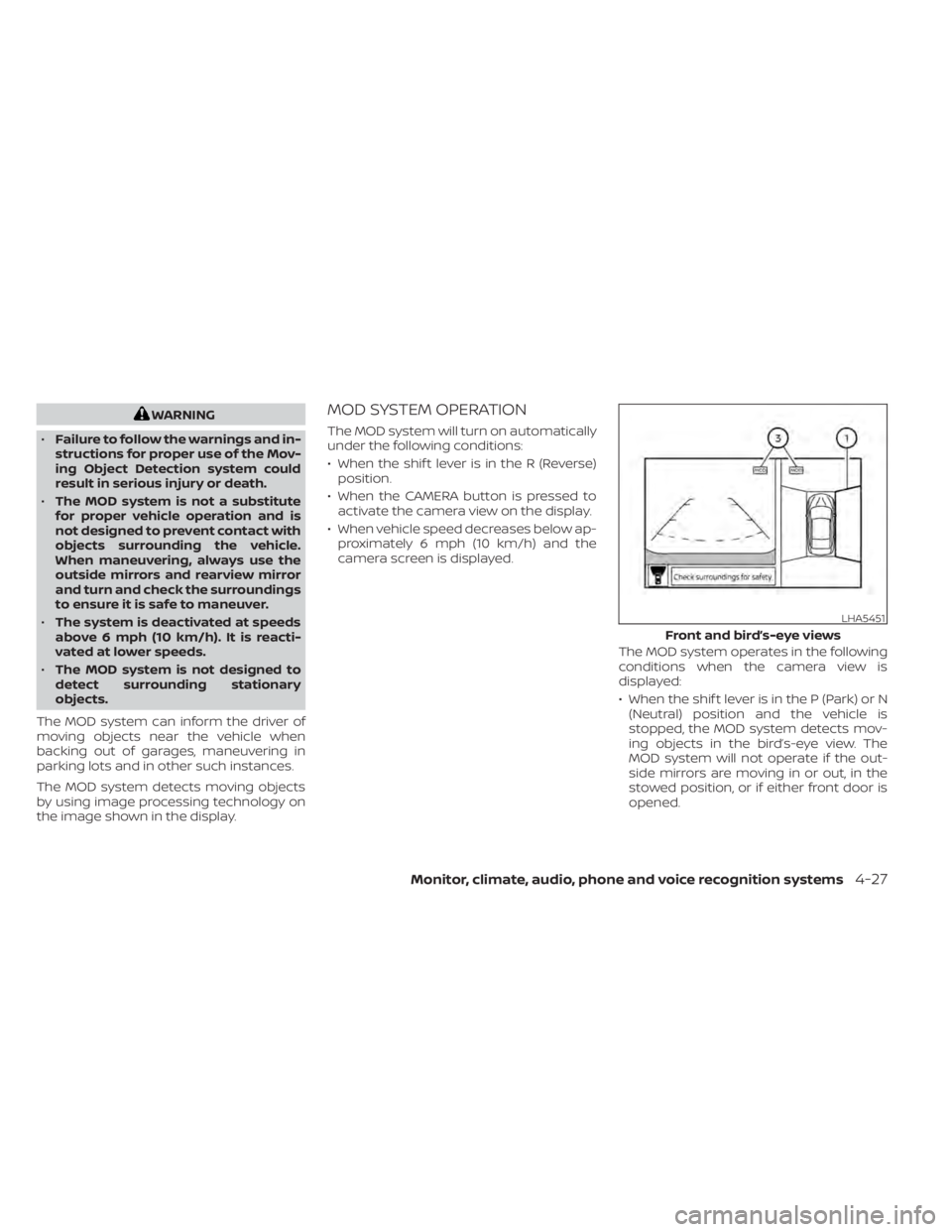
The MOD system detects moving objects
by using image processing technology on
the image shown in the display.MOD SYSTEM OPERATION
The MOD system will turn on automatically
under the following conditions:
• When the shif t lever is in the R (Reverse) position.
• When the CAMERA button is pressed to activate the camera view on the display.
• When vehicle speed decreases below ap- proximately 6 mph (10 km/h) and the
camera screen is displayed.
The MOD system operates in the following
conditions when the camera view is
displayed:
• When the shif t lever is in the P (Park) or N(Neutral) position and the vehicle is
stopped, the MOD system detects mov-
ing objects in the bird’s-eye view. The
MOD system will not operate if the out-
side mirrors are moving in or out, in the
stowed position, or if either front door is
opened.
LHA5451
Front and bird’s-eye views
Monitor, climate, audio, phone and voice recognition systems4-27
Page 339 of 665

NISSAN VEHICLE IMMOBILIZER
SYSTEM
The NISSAN Vehicle Immobilizer System
will not allow the engine to start without
the use of the registered key.
If the engine fails to start using a registered
key (for example, when interference is
caused by another registered key, an auto-
mated toll road device or automatic pay-
ment device on the key ring), restart the
engine using the following procedure:
1. Leave the ignition switch in the ON posi-tion for approximately 5 seconds.
2. Place the ignition switch in the OFF or LOCK position, and wait approximately
10 seconds.
3. Repeat steps 1 and 2.
4. Restart the engine while holding the de- vice (which may have caused the inter-
ference) separate from the registered
key.
If the no start condition re-occurs, NISSAN
recommends placing the registered key on
a separate key ring to avoid interference
from other devices. • Make sure the area around the vehicle is
clear.
• Check fluid levels such as engine oil, cool- ant, brake fluid, and windshield-washer
fluid as frequently as possible, or at least
whenever you refuel.
• Check that all windows and lights are clean.
• Visually inspect tires for their appearance and condition. Also check tires for proper
inflation.
• Lock all doors.
• Position seat and adjust headrests/head restraints.
• Adjust inside and outside mirrors.
• Fasten seat belts and ask all passengers to do likewise.
• Check the operation of warning lights when the ignition switch is pushed to the
ON position. For additional information,
see “Warning lights, indicator lights and
audible reminders” (P. 2-12). 1. Apply the parking brake.
2. Confirm that the vehicle is in the P (Park)
position.
The Intelligent Key must be carried
when operating the ignition switch.
3. Push the ignition switch to the ON posi- tion. Depress the brake pedal and push
the ignition switch to start the engine.
To start the engine immediately, push
and release the ignition switch while de-
pressing the brake pedal with the igni-
tion switch in any position.
• If the engine is very hard to start in extremely cold weather or when re-
starting, depress the accelerator
pedal a little (approximately 1/3 to the
floor) and while holding, crank the en-
gine. Release the accelerator pedal
when the engine starts.
• If the engine is very hard to start be- cause it is flooded, depress the accel-
erator pedal all the way to the floor
and hold it. Push the ignition switch to
the ON position to start cranking the
engine. Af ter 5 or 6 seconds, stop
cranking by pushing the ignition
switch to the LOCK position. Af ter
cranking the engine, release the accel-
erator pedal. Crank the engine with
BEFORE STARTING THE ENGINE STARTING THE ENGINE
5-16Starting and driving
Page 388 of 665

WARNING
Failure to follow the warnings and in-
structions for proper use of the I-BSI
system could result in serious injury or
death.
• The I-BSI system is not a replace-
ment for proper driving procedure
and is not designed to prevent con-
tact with vehicles or objects. When
changing lanes, always use the side
and rear mirrors and turn and look in
the direction you will move to ensure
it is safe to change lanes. Never rely
solely on the I-BSI system.
• There is a limitation to the detection
capability of the radar or the sonar.
Not every moving object or vehicle
will be detected. Using the I-BSI sys-
tem under some road, ground, lane
marker, traffic or weather conditions
could lead to improper system op-
eration. Always rely on your own op-
eration to avoid accidents.
The I-BSI system helps alert the driver of
other vehicles in adjacent lanes when
changing lanes, and helps assist the driver
to return the vehicle to the center of the
traveling lane. The I-BSI system uses radar sensors
O1
installed near the rear bumper to detect
other vehicles in an adjacent lane. In addi-
tion to the radar sensors, the I-BSI system
uses a camera
O2installed behind the
windshield to monitor the lane markers of
your traveling lane. The radar sensors can detect vehicles on
either side of your vehicle within the detec-
tion zone shown as illustrated.
The detection zone starts from the outside
mirror of your vehicle and extends approxi-
mately 10f t (3.0m) behind the rear bumper,
and approximately 10f t (3.0 m) sideways.
LSD4340SSD1030
Detection zone
INTELLIGENT BLIND SPOT
INTERVENTION (I-BSI) (if so
equipped)
Starting and driving5-65
Page 653 of 665

Key fob battery replacement........8-24Keyless entryWith Intelligent Key system (See Intelligent
Key system)
.................3-13KeysNISSAN Intelligent Key®........3-2,3-7NISSAN Vehicle Immobilizer System
keys..................... .3-4
L
Labels
Air conditioner specification label. . .10-13C.M.V.S.S. certification label.......10-12Emission control information label. .10-13Engine serial number..........10-12F.M.V.S.S. certification label........10-12Tire and Loading Information label. .10-13Vehicle identification number (VIN). .10-11Vehicle identification number (VIN)
plate.................... .10-11Warning labels (for SRS)..........1-80Lane Departure Warning (LDW).......5-38LATCH (Lower Anchors and Tethers for
CHildren) System...............1-35LED Daytime Running Lights (DRL). . . .2-87License plate
Installing the license plate........10-14Lif tgate.....................3-23Lif tgate release................3-29LightAir bag warning light........1-80, 2-16Brake light (See stop light)........8-26
Bulb check/instrument panel......2-14Bulb replacement.............8-26Charge warning light...........2-15Exterior and Interior lights........8-26Fog light switch..............2-89Fog lights..................8-26Headlight and turn signal switch. . . .2-82Headlight control switch.........2-82Headlights..................8-26Interior light................2-123Light bulbs.................8-26Low tire pressure warning light.....2-18Low windshield-washer fluid warning
light................. .2-41, 2-68Personal lights..............2-124Spotlights (See map light)........2-123Warning/indicator lights and audible
reminders..................2-12Lights......................8-26Map lights.................2-123Lock
Child safety rear door lock.........3-7Door locks................. .3-5Glove box lock...............2-110Lif tgate release...............3-29Power door locks..............3-6Low fuel warning light.........2-41, 2-67Low tire pressure warning light.......2-18Low windshield-washer fluid warning
light................... .2-41, 2-68Luggage (See vehicle loading
information)..................10-15Luggage hook.................2-115Luggage rack (see roof rack). . . .2-116, 2-117
M
Maintenance
General maintenance...........9-2Inside the vehicle..............9-3Maintenance precautions.........8-2Outside the vehicle.............9-2Seat belt maintenance..........1-30Under the hood and vehicle.......9-4Maintenance requirements..........9-2Maintenance schedules............9-7Malfunction indicator light.........2-20Manual front seat adjustment........1-3Map lights...................2-123Memory seat..............3-40, 3-41Meters and gauges..............2-6Instrument brightness control.....2-88MirrorAutomatic anti-glare inside mirror. . .3-37Heated mirrors...............3-39Outside mirrors..............3-38Rearview.................. .3-37Vanity mirror................3-36Mirrors..................... .3-37Moonroof.................2-121, 7-5Moving Object Detection (MOD)......4-26
N
NISSAN Intelligent Key®..........3-2,3-7NISSAN Intelligent Key® battery discharge
indicator.....................5-15
11-4
Page 654 of 665

NISSAN Vehicle Immobilizer
System..................2-77,5-16NissanConnect® Owner's Manual......4-2
O
Octane rating (See fuel octane rating). .10-6Odometer....................2-7OilCapacities and recommended
fuel/lubricants
...............10-2Changing engine oil............8-6Changing engine oil filter.........8-6Checking engine oil level.........8-6Engine oil.................. .8-6Engine oil and oil filter
recommendation.............10-7Engine oil viscosity.............10-7Outside mirrors................3-38Overhead sunglasses holder........2-111Overheat
If your vehicle overheats.........6-13Owner's manual order form........10-38Owner's manual/service manual order
information................. .10-38
P
Parking
Parking brake operation.........5-26Parking/parking on hills.........5-173Parking brake.......2-15,2-18,2-22,5-26Personal lights................2-124
PowerFront seat adjustment...........1-4Power door locks..............3-6Power outlet............2- 101, 2-102Powerrearwindows...........2-118Power steering system.........5-174Power windows..............2-117Rear power windows...........2-118Power outlet..............2- 101, 2-102Power steering................5-174Precautions
Maintenance precautions.........8-2On-pavement and off-road driving
precautions................ .5-8Precautions on booster
seats..............1-43, 1-50, 1-56Precautions on child
restraints............1-43, 1-50, 1-56Precautions on seat belt usage.....1-20Precautions on supplemental restraint
system................... .1-59Precautions when starting and
driving.................... .5-4ProPILOT Assist................5-88Push starting..................6-13
R
Radio
Car phone or CB radio..........4-40Rain sensor...................2-79Readiness for inspection maintenance
(I/M) test................... .10-36
Rear Automatic Braking (RAB).......5-130Rear center seat belt.............1-26Rear Cross Traffic Alert (RCTA)........5-77Rear Door Alert.........2-40, 2-66, 2-100Rear power sunshade...........2-120Rear power windows............2-118Rear window and outside mirror defroster
switch..................... .2-81Rear window wiper and washer
switches....................2-80Rearview mirror................3-37RearView Monitor................4-3Recommended Fluids............10-2Recorders
Event Data.............10-36, 10-37Refrigerant recommendation.......10-8Registering a vehicle in another
country.................... .10-11Remote Engine Start..........3-20,5-17Reporting safety defects (US only). . . .10-34Roof rack................2-116, 2-117
S
Safety
Child safety rear door lock.........3-7Child seat belts.....1-33, 1-43, 1-50, 1-56Reporting safety defects (US only). .10-34SeatMemory seat.............3-40, 3-41Seat adjustment3rd row seat adjustment..........1-9Front manual seat adjustment......1-3
11-5