Page 130 of 346
Using the system............................ 4-54
Indicators ................................... 4-55
Control buttons ............................. 4-56
Connecting procedure ......................4-57
Voice commands ........................... 4-58
Phone display screen ........................ 4-60
Making a call ................................ 4-61Receiving a call
.............................. 4-62
During a call ................................. 4-62
Ending a call ................................. 4-63
Text messaging (if so equipped) .............4-63
Bluetooth® connections screen .............4-67
Phone and text message settings ...........4-68
Page 131 of 346
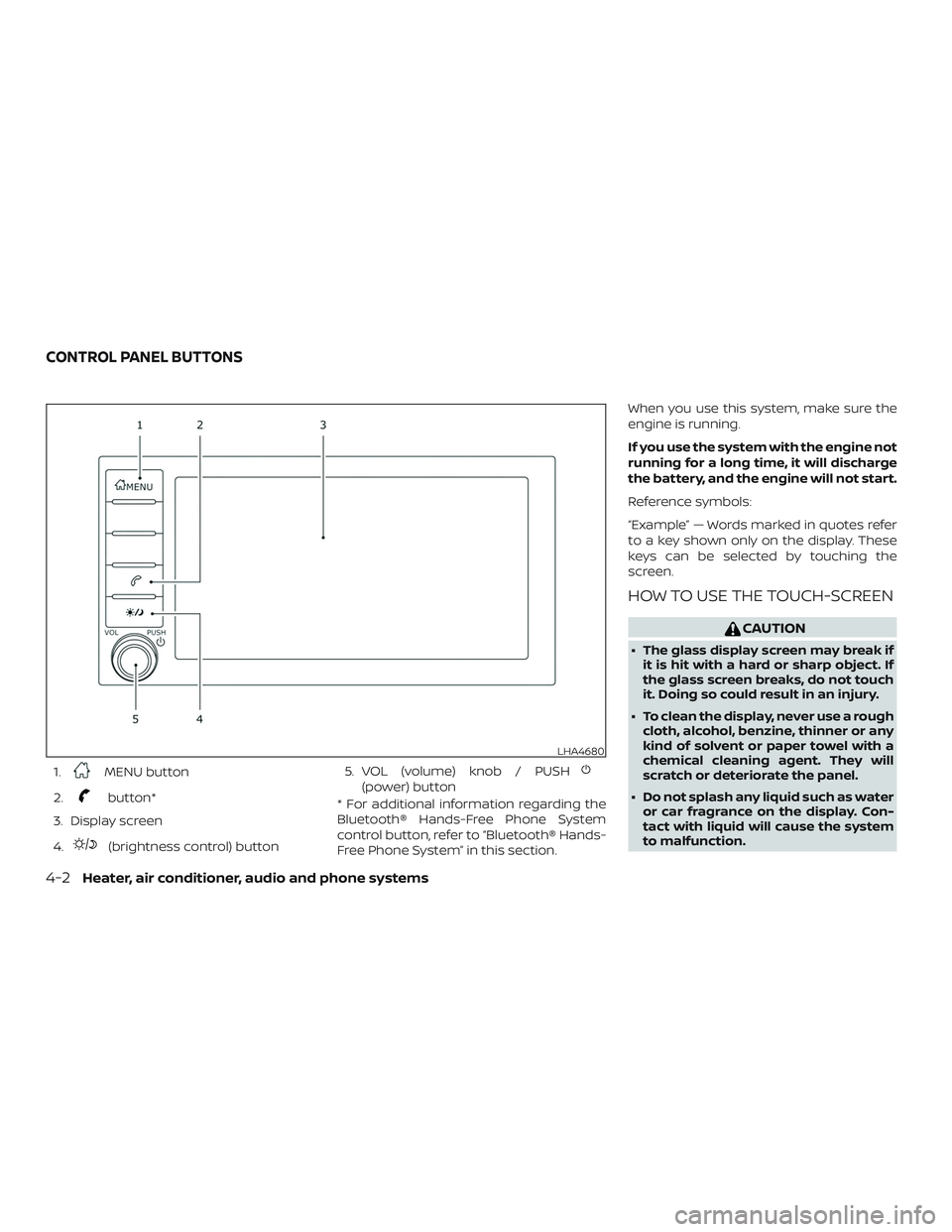
1.MENU button
2.
button*
3. Display screen
4.
(brightness control) button 5. VOL (volume) knob / PUSH
(power) button
* For additional information regarding the
Bluetooth® Hands-Free Phone System
control button, refer to “Bluetooth® Hands-
Free Phone System” in this section. When you use this system, make sure the
engine is running.
If you use the system with the engine not
running for a long time, it will discharge
the battery, and the engine will not start.
Reference symbols:
“Example” — Words marked in quotes refer
to a key shown only on the display. These
keys can be selected by touching the
screen.
HOW TO USE THE TOUCH-SCREEN
CAUTION
∙ The glass display screen may break if
it is hit with a hard or sharp object. If
the glass screen breaks, do not touch
it. Doing so could result in an injury.
∙ To clean the display, never use a rough cloth, alcohol, benzine, thinner or any
kind of solvent or paper towel with a
chemical cleaning agent. They will
scratch or deteriorate the panel.
∙ Do not splash any liquid such as water or car fragrance on the display. Con-
tact with liquid will cause the system
to malfunction.
LHA4680
CONTROL PANEL BUTTONS
4-2Heater, air conditioner, audio and phone systems
Page 134 of 346
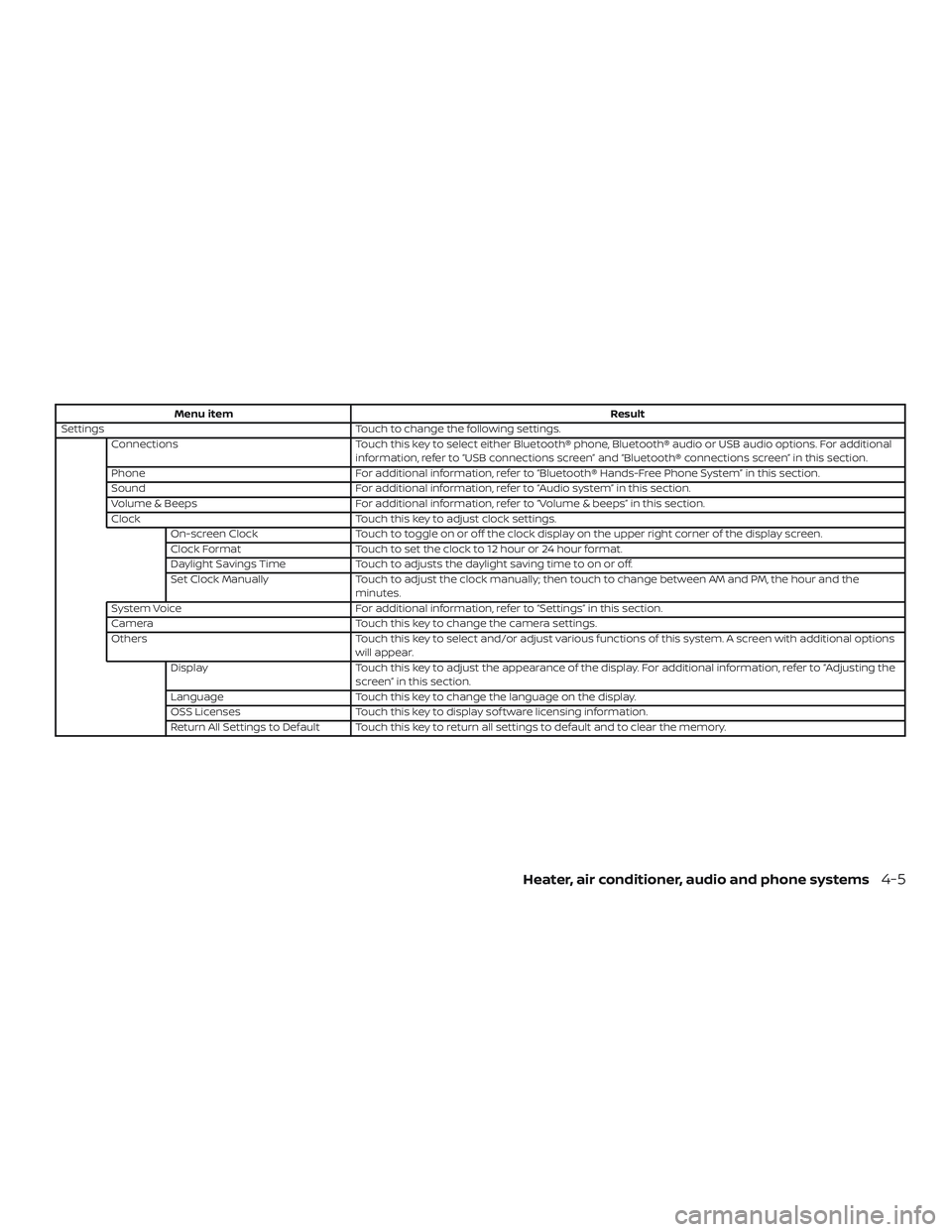
Menu itemResult
Settings Touch to change the following settings.
Connections Touch this key to select either Bluetooth® phone, Bluetooth® audio or USB audio options. For additional
information, refer to “USB connections screen” and “Bluetooth® connections screen” in this section.
Phone For additional information, refer to “Bluetooth® Hands-Free Phone System” in this section.
Sound For additional information, refer to “Audio system” in this section.
Volume & Beeps For additional information, refer to “Volume & beeps” in this section.
Clock Touch this key to adjust clock settings.
On-screen Clock Touch to toggle on or off the clock display on the upper right corner of the display screen.
Clock Format Touch to set the clock to 12 hour or 24 hour format.
Daylight Savings Time Touch to adjusts the daylight saving time to on or off.
Set Clock Manually Touch to adjust the clock manually; then touch to change between AM and PM, the hour and the
minutes.
System Voice For additional information, refer to “Settings” in this section.
Camera Touch this key to change the camera settings.
Others Touch this key to select and/or adjust various functions of this system. A screen with additional options
will appear.
Display Touch this key to adjust the appearance of the display. For additional information, refer to “Adjusting the
screen” in this section.
Language Touch this key to change the language on the display.
OSS Licenses Touch this key to display sof tware licensing information.
Return All Settings to Default Touch this key to return all settings to default and to clear the memory.
Heater, air conditioner, audio and phone systems4-5
Page 135 of 346
(brightness control) BUTTON
To change the display brightness, press
the
button. Pressing the button again
will change the display to the day or the
night display.
Press and hold the
button for more
than 2 seconds to turn the display off. Press
and hold the button again to turn the dis-
play on.
HOW TO USE THE VOL (volume)
KNOB / PUSH
(power)
BUTTON
Press the PUSH(power) button to
turn audio function on and off. Turn the VOL
(volume) knob to adjust audio volume.SELECTING MENU FROM LAUNCH
BAR
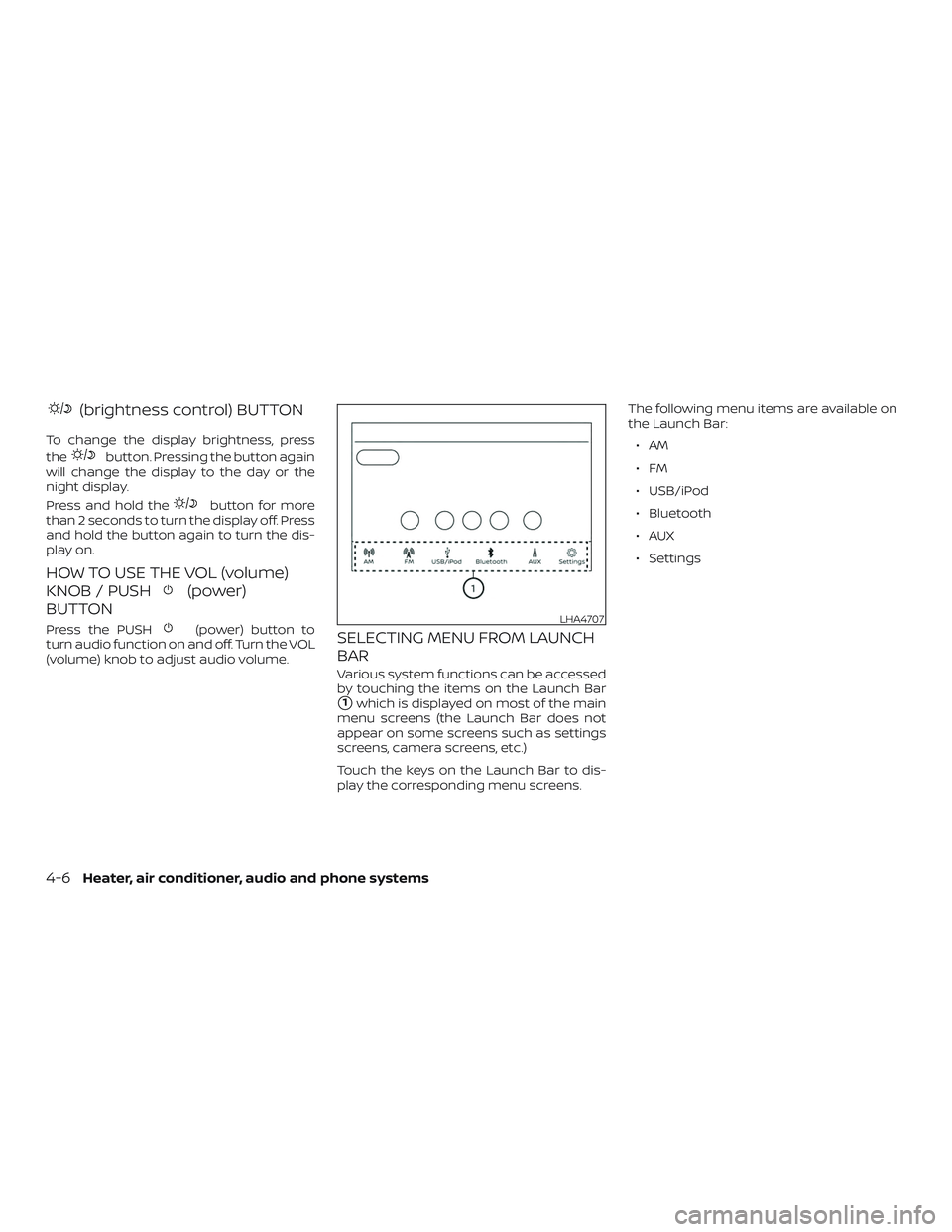
Various system functions can be accessed
by touching the items on the Launch Bar
�1which is displayed on most of the main
menu screens (the Launch Bar does not
appear on some screens such as settings
screens, camera screens, etc.)
Touch the keys on the Launch Bar to dis-
play the corresponding menu screens. The following menu items are available on
the Launch Bar:
∙AM
∙FM
∙ USB/iPod
∙ Bluetooth
∙AUX
∙ Settings
LHA4707
4-6Heater, air conditioner, audio and phone systems
Page 160 of 346
∙ Be careful not to do the following, or thecable could be damaged and a loss of
function may occur:
∙ Bend the cable excessively (1.6 in (40 mm) radius maximum).
∙ Twist the cable excessively (more than 180 degrees).
∙ Pull or drop the cable.
∙ Do not force the iPod® cable connec- tor into the device port.
∙ Close the center console lid on the cable or connectors.
∙ Store objects with sharp edges in the storage where the cable is stored.
∙ Spill liquids on the cable and connec- tors.
∙ Do not connect the cable to the iPod® if the cable and/or connectors are wet. It
may damage the iPod®.
∙ If the cable and connectors are ex- posed to water, allow the cable and/or
connectors to dry completely before
connecting the cable to the iPod® (wait
24 hours for it to dry). ∙ If the connector is exposed to fluids
other than water, evaporative residue
may cause a short between the con-
nector pins. In this case, replace the
cable, otherwise damage to the iPod®
and a loss of function may occur.
∙ If the cable is damaged (insulation cut, connectors cracked, contamination
such as liquids, dust, dirt, etc. in the con-
nectors), do not use the cable. It is rec-
ommended that you visit a NISSAN
dealer to replace the cable with a new
one.
∙ When not in use for extended periods of time, store the cable in a clean, dust free
environment at room temperature and
without direct sun exposure.
∙ Do not use the cable for any other pur- poses other than its intended use in the
vehicle.
*iPod® is a trademark of Apple Inc., regis-
tered in the U.S. and other countries.Bluetooth® streaming audio
∙ Some Bluetooth® audio devices may not be recognized by the in-vehicle au-
dio system.
∙ It is necessary to set up the wireless connection between a compatible
Bluetooth® audio device and the in-
vehicle Bluetooth® module before using
the Bluetooth® audio.
∙ Operating procedure of the Bluetooth® audio will vary depending on the de-
vices. Make sure how to operate your
audio device before using it with this
system.
∙ The Bluetooth® audio may be stopped under the following conditions:
∙ Receiving a call on the Bluetooth® Hands-Free Phone System.
∙ Checking the connection to the hands-free phone.
∙ Do not place the Bluetooth® audio de- vice in an area surrounded by metal or
far away from the in-vehicle Bluetooth®
module to prevent tone quality degra-
dation and wireless connection disrup-
tion.
Heater, air conditioner, audio and phone systems4-31
Page 161 of 346
∙ While an audio device is connectedthrough the Bluetooth® wireless con-
nection, the battery power of the device
may discharge quicker than usual.
∙ This system supports the Bluetooth® Audio Distribution Profile (A2DP, AVRCP).
BLUETOOTH® is a
trademark owned
by Bluetooth SIG,
Inc. and licensed
to Panasonic.
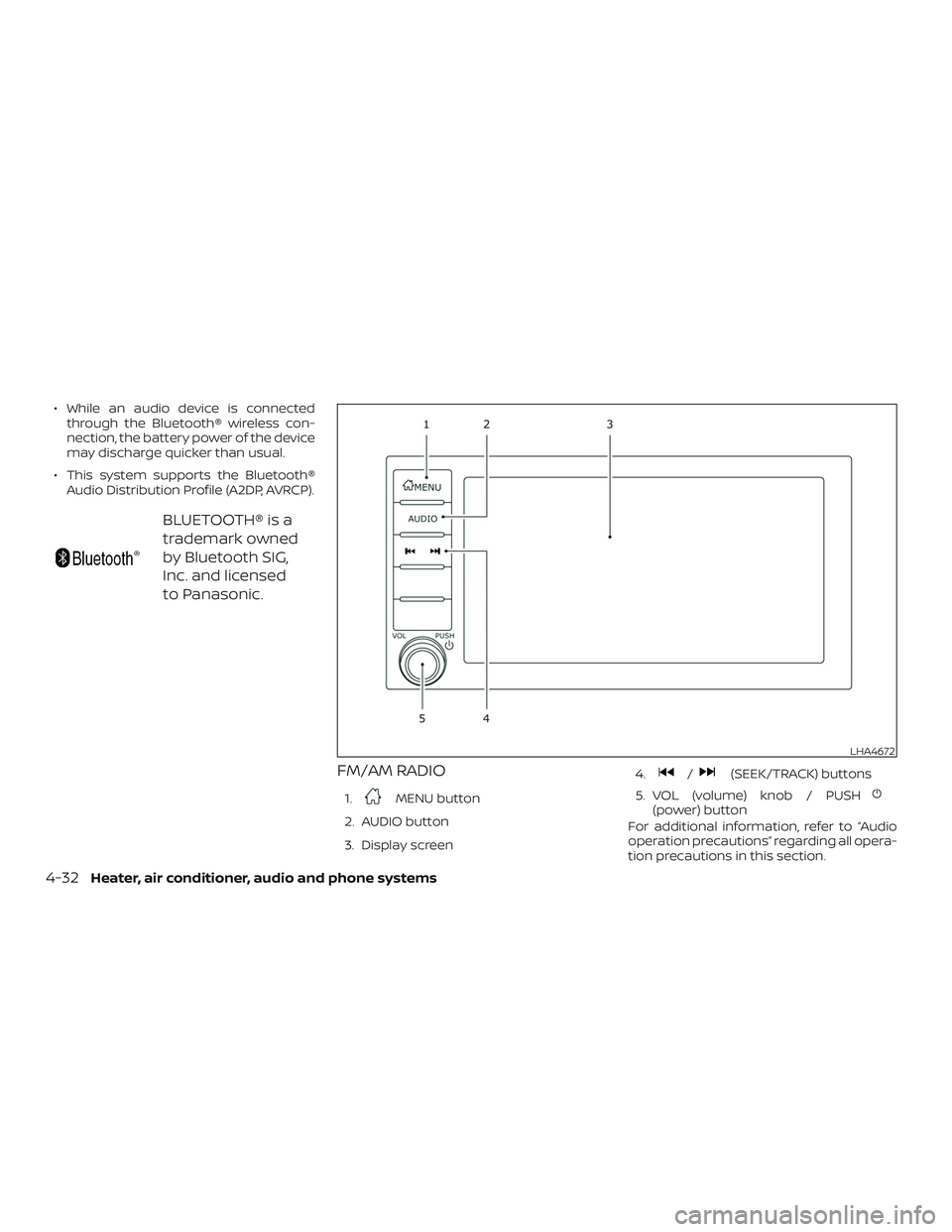
FM/AM RADIO
1.MENU button
2. AUDIO button
3. Display screen 4.
/(SEEK/TRACK) buttons
5. VOL (volume) knob / PUSH
(power) button
For additional information, refer to “Audio
operation precautions” regarding all opera-
tion precautions in this section.
LHA4672
4-32Heater, air conditioner, audio and phone systems
Page 162 of 346
Audio main operation
VOL (volume) knob / PUSH(power)
button
Place the ignition switch in the ON position
and press the PUSH
(power) button
while the system is off to call up the mode
(radio, AUX, Bluetooth® audio, USB or iPod®)
that was playing immediately before the
system was turned off. To turn the system off, press the
PUSH
(power) button.
Turn the VOL (volume) knob to adjust the
volume.
This vehicle may be equipped with Speed
Sensitive Volume. When this feature is ac-
tive, the audio volume changes as the driv-
ing speed changes.
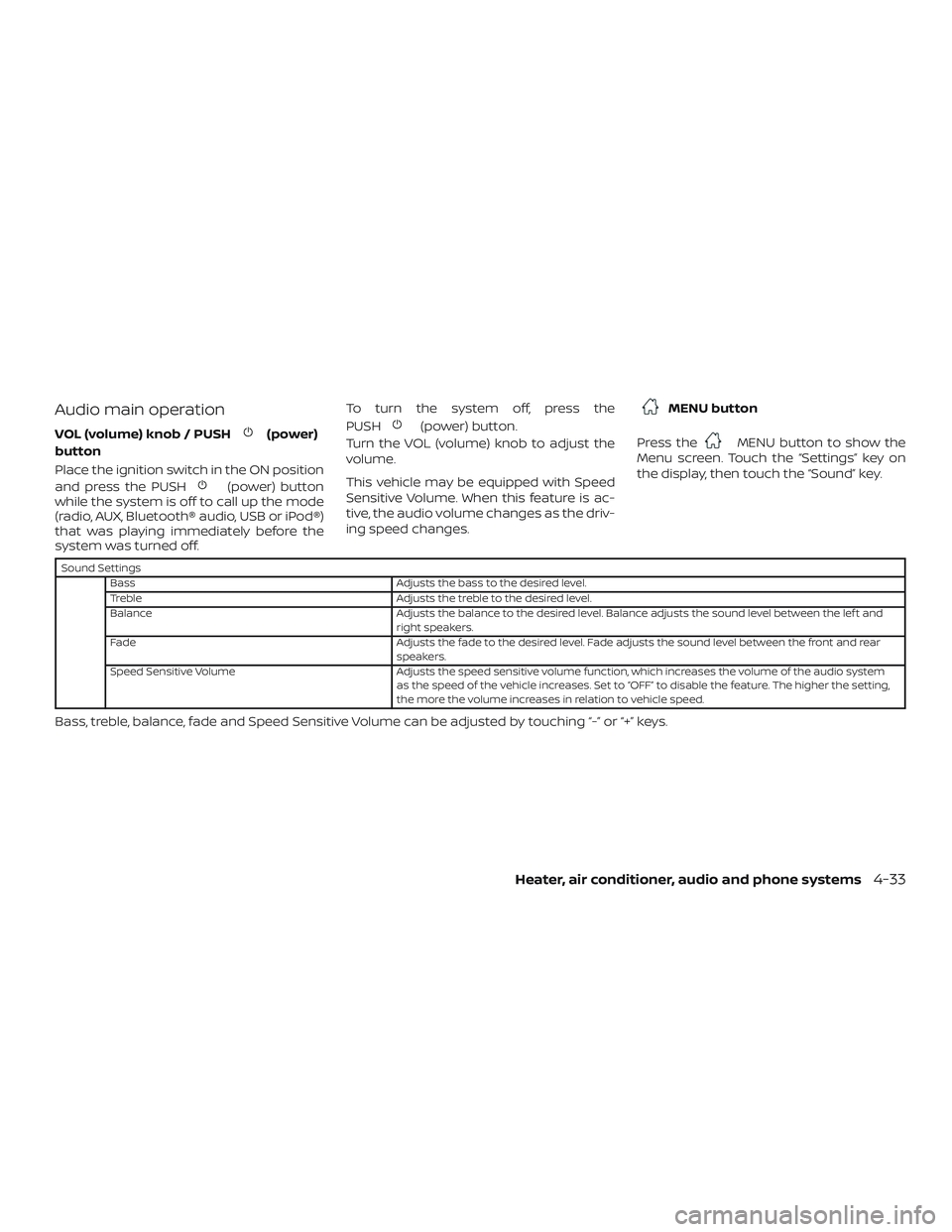
MENU button
Press the
MENU button to show the
Menu screen. Touch the “Settings” key on
the display, then touch the “Sound” key.
Sound Settings
Bass Adjusts the bass to the desired level.
Treble Adjusts the treble to the desired level.
Balance Adjusts the balance to the desired level. Balance adjusts the sound level between the lef t and
right speakers.
Fade Adjusts the fade to the desired level. Fade adjusts the sound level between the front and rear
speakers.
Speed Sensitive Volume Adjusts the speed sensitive volume function, which increases the volume of the audio system
as the speed of the vehicle increases. Set to “OFF” to disable the feature. The higher the setting,
the more the volume increases in relation to vehicle speed.
Bass, treble, balance, fade and Speed Sensitive Volume can be adjusted by touching “-” or “+” keys.
Heater, air conditioner, audio and phone systems4-33
Page 165 of 346
Auxiliary (AUX) devices operation
Connecting auxiliary devices
Connect an AUX device into the AUX input
jack located on the center console.
The AUX input jack accepts any standard
analog audio input such as from a portable
cassette player, CD player, MP3 player or
phone.
Insert a 1/8 in (3.5 mm) stereo mini plug in
the audio input jack. If a cable with a mono
plug is used, the audio output may not
function normally.
Activation and playing
Turn on the AUX device. Connect an AUX
cable to the AUX device and the AUX input
jack. Select AUX mode from the audio
source menu screen or by pressing the
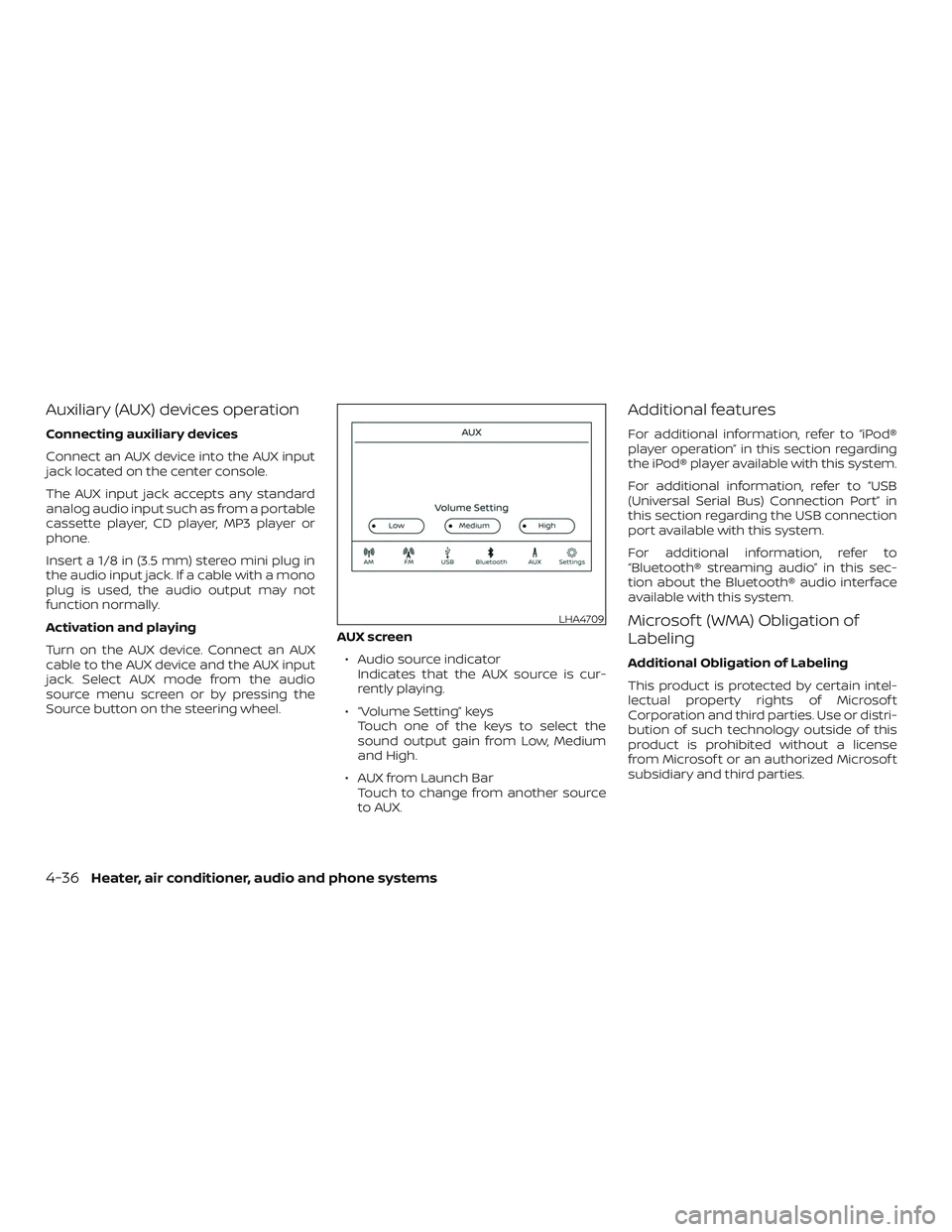
Source button on the steering wheel.AUX screen
∙ Audio source indicator Indicates that the AUX source is cur-
rently playing.
∙ “Volume Setting” keys Touch one of the keys to select the
sound output gain from Low, Medium
and High.
∙ AUX from Launch Bar Touch to change from another source
to AUX.
Additional features
For additional information, refer to “iPod®
player operation” in this section regarding
the iPod® player available with this system.
For additional information, refer to “USB
(Universal Serial Bus) Connection Port” in
this section regarding the USB connection
port available with this system.
For additional information, refer to
“Bluetooth® streaming audio” in this sec-
tion about the Bluetooth® audio interface
available with this system.
Microsof t (WMA) Obligation of
Labeling
Additional Obligation of Labeling
This product is protected by certain intel-
lectual property rights of Microsof t
Corporation and third parties. Use or distri-
bution of such technology outside of this
product is prohibited without a license
from Microsof t or an authorized Microsof t
subsidiary and third parties.
LHA4709
4-36Heater, air conditioner, audio and phone systems