2023 NISSAN LEAF steering
[x] Cancel search: steeringPage 354 of 612
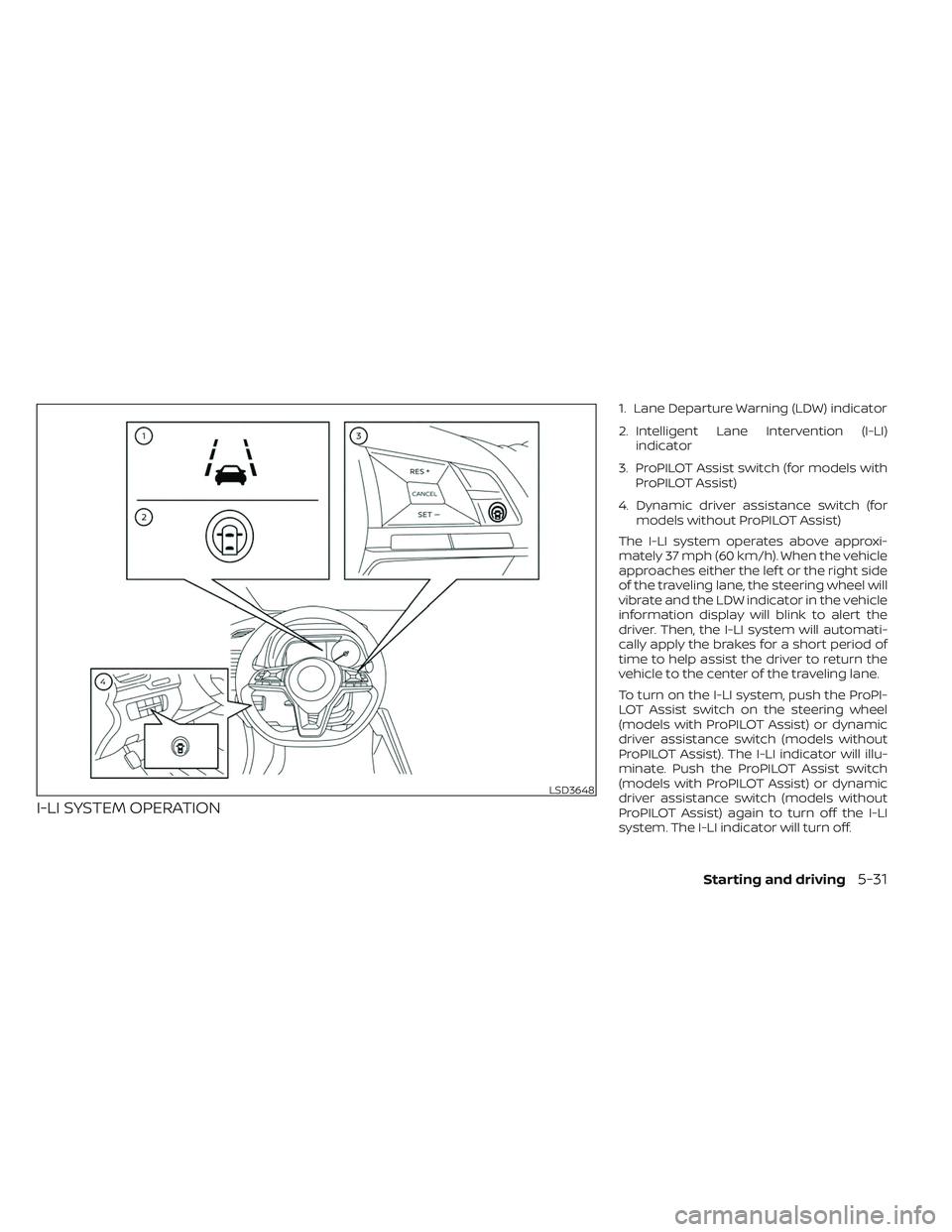
I-LI SYSTEM OPERATION
1. Lane Departure Warning (LDW) indicator
2. Intelligent Lane Intervention (I-LI)indicator
3. ProPILOT Assist switch (for models with ProPILOT Assist)
4. Dynamic driver assistance switch (for models without ProPILOT Assist)
The I-LI system operates above approxi-
mately 37 mph (60 km/h). When the vehicle
approaches either the lef t or the right side
of the traveling lane, the steering wheel will
vibrate and the LDW indicator in the vehicle
information display will blink to alert the
driver. Then, the I-LI system will automati-
cally apply the brakes for a short period of
time to help assist the driver to return the
vehicle to the center of the traveling lane.
To turn on the I-LI system, push the ProPI-
LOT Assist switch on the steering wheel
(models with ProPILOT Assist) or dynamic
driver assistance switch (models without
ProPILOT Assist). The I-LI indicator will illu-
minate. Push the ProPILOT Assist switch
(models with ProPILOT Assist) or dynamic
driver assistance switch (models without
ProPILOT Assist) again to turn off the I-LI
system. The I-LI indicator will turn off.
LSD3648
Starting and driving5-31
Page 355 of 612
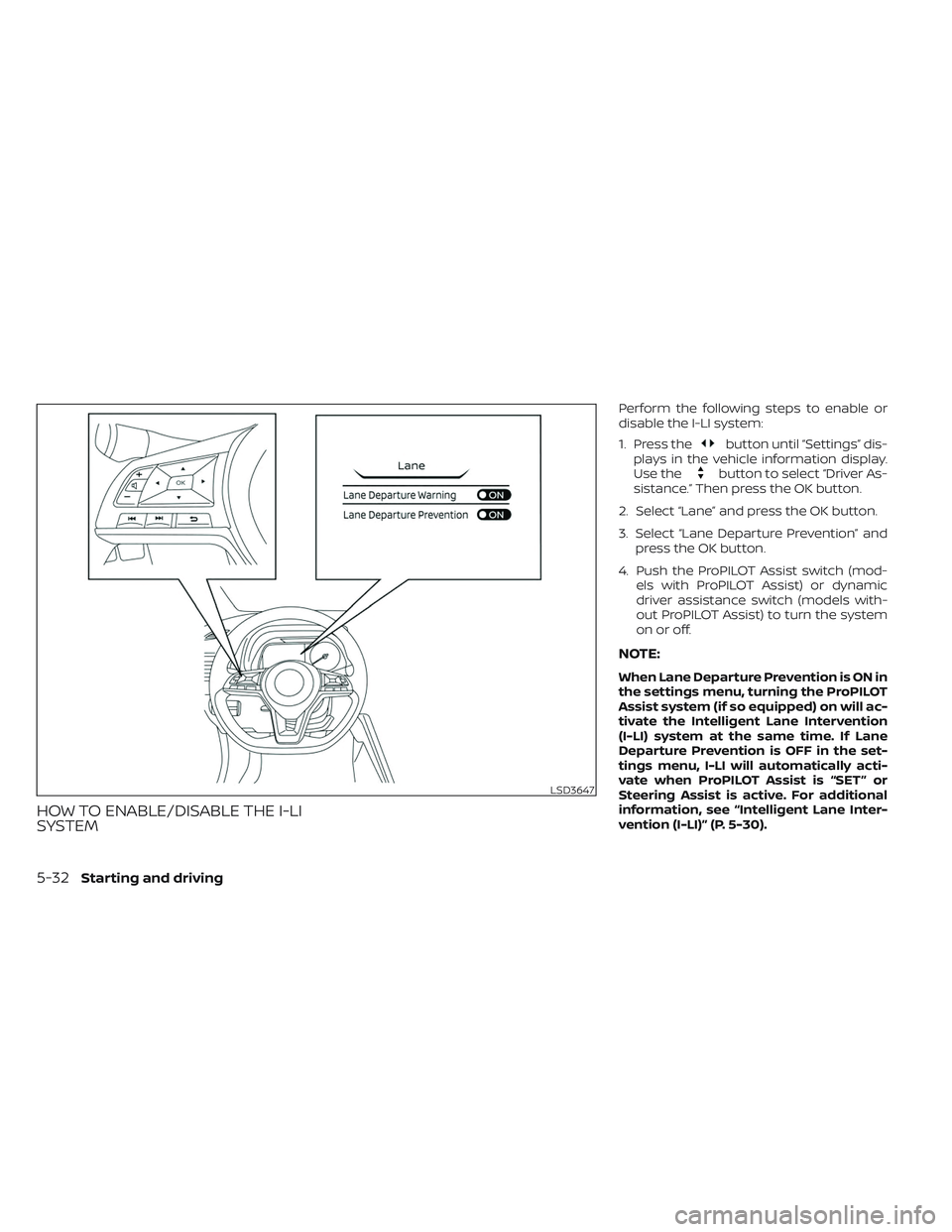
HOW TO ENABLE/DISABLE THE I-LI
SYSTEM
Perform the following steps to enable or
disable the I-LI system:
1. Press the
button until “Settings” dis-
plays in the vehicle information display.
Use the
button to select “Driver As-
sistance.” Then press the OK button.
2. Select “Lane” and press the OK button.
3. Select “Lane Departure Prevention” and press the OK button.
4. Push the ProPILOT Assist switch (mod- els with ProPILOT Assist) or dynamic
driver assistance switch (models with-
out ProPILOT Assist) to turn the system
on or off.
NOTE:
When Lane Departure Prevention is ON in
the settings menu, turning the ProPILOT
Assist system (if so equipped) on will ac-
tivate the Intelligent Lane Intervention
(I-LI) system at the same time. If Lane
Departure Prevention is OFF in the set-
tings menu, I-LI will automatically acti-
vate when ProPILOT Assist is “SET” or
Steering Assist is active. For additional
information, see “Intelligent Lane Inter-
vention (I-LI)” (P. 5-30).
LSD3647
5-32Starting and driving
Page 356 of 612
I-LI SYSTEM LIMITATIONS
WARNING
Listed below are the system limitations
for the I-LI system. Failure to follow the
warnings and instructions for proper
use of the I-LI system could result in
serious injury or death.
• The I-LI system may activate if you
change lanes without first activating
your turn signal or, for example, if a
construction zone directs traffic to
cross an existing lane marker. If this
occurs you may need to apply correc-
tive steering to complete your lane
change.
• Because the I-LI may not activate un-
der the road, weather, and lane
marker conditions described in this
section, it may not activate every
time your vehicle begins to leave its
lane and you will need to apply cor-
rective steering.
• When the I-LI system is operating,
avoid excessive or sudden steering
maneuvers. Otherwise, you could
lose control of the vehicle. •
The I-LI system will not operate at
speeds below approximately 37 mph
(60 km/h) or if it cannot detect lane
markers.
• Do not use the I-LI system under the
following conditions as it may not
function properly:
– During bad weather (rain, fog,
snow, etc.).
– When driving on slippery roads,
such as on ice or snow.
– When driving on winding or un-
even roads.
– When there is a lane closure due to
road repairs.
– When driving in a makeshif t or
temporary lane.
– When driving on roads where the
lane width is too narrow.
– When driving without normal tire
conditions (for example, tire wear,
low tire pressure, installation of
spare tire, tire chains, nonstan-
dard wheels).
– When the vehicle is equipped with
nonoriginal brake parts or sus-
pension parts. –
On roads where there are multiple
parallel lane markers; lane mark-
ers that are faded or not painted
clearly; yellow painted lane mark-
ers; non-standard lane markers;
or lane markers covered with wa-
ter, dirt, snow, etc.
– On roads where discontinued lane
markers are still detectable.
– On roads where there are sharp
curves.
– On roads where there are sharply
contrasting objects, such as shad-
ows, snow, water, wheel ruts,
seams or lines remaining af ter
road repairs. (The I-LI system
could detect these items as lane
markers.)
– On roads where the traveling lane
merges or separates.
– When the vehicle’s traveling direc-
tion does not align with the lane
marker.
– When traveling close to the ve-
hicle in front of you, which ob-
structs the lane camera unit de-
tection range.
Starting and driving5-33
Page 357 of 612
–When rain, snow or dirt adheres to
the windshield in front of the lane
camera unit.
– When the headlights are not
bright due to dirt on the lens or if
the aiming is not adjusted
properly.
– When strong light enters the lane
camera unit (for example, the light
directly shines on the front of the
vehicle at sunrise or sunset).
– When a sudden change in bright-
ness occurs (for example, when
the vehicle enters or exits a tunnel
or under a bridge).
While the I-LI system is operating, you may
hear a sound of brake operation. This is
normal and indicates that the I-LI system is
operating proper ly.SYSTEM TEMPORARILY
UNAVAILABLE
Condition A:
The warning and assist functions of the I-LI
system are not designed to work under the
following conditions:
• When you operate the lane change signal and change the traveling lanes in the di-
rection of the signal. (The I-LI system will
be deactivated for approximately 2 sec-
onds af ter the lane change signal is
turned off.)
• When the vehicle speed lowers to less than approximately 37 mph (60 km/h).
Af ter the above conditions have finished
and the necessary operating conditions
are satisfied, the warning and assist func-
tions will resume.
Condition B:
The assist function of the I-LI system is not
designed to work under the following con-
ditions (warning is still functional):
• When the brake pedal is depressed.
• When the steering wheel is turned as far as necessary for the vehicle to change
lanes.
• When the vehicle is accelerated during I-LI system operation. • When the Intelligent Cruise Control (ICC)
approach warning occurs.
• When the hazard warning flashers are operated.
• When driving on a curve at high speed.
Af ter the above conditions have finished
and the necessary operating conditions
are satisfied, the I-LI system application of
the brakes will resume.
Condition C:
If the following messages appear in the
vehicle information display, a chime will
sound and the I-LI system will be turned off
automatically.
• “Not Available - Poor Road Conditions”: When the Vehicle Dynamic Control (VDC)
system (except Traction Control System
[TCS] function) or ABS operates.
• “Currently not available”: When the VDC system is turned off.
Action to take:
When the above conditions no longer exist,
turn off the I-LI system. Push the ProPILOT
Assist switch (models with ProPILOT Assist)
or dynamic driver assistance switch (mod-
els without ProPILOT Assist) to turn the I-LI
system back on.
5-34Starting and driving
Page 371 of 612
NOTE:
• I-BSI warning and system applicationwill only be activated if the side indica-
tor light is already illuminated when
your vehicle approaches a lane marker.
If another vehicle comes into the de-
tection zone af ter your vehicle has
crossed a lane marker, no I-BSI
warning or system application will be
activated. For additional information,
see “I-BSI driving situations” (P. 5-50).
• The I-BSI system is typically activated earlier than the Intelligent Lane Inter-
vention (I-LI) system when your vehicle
is approaching a lane marker.
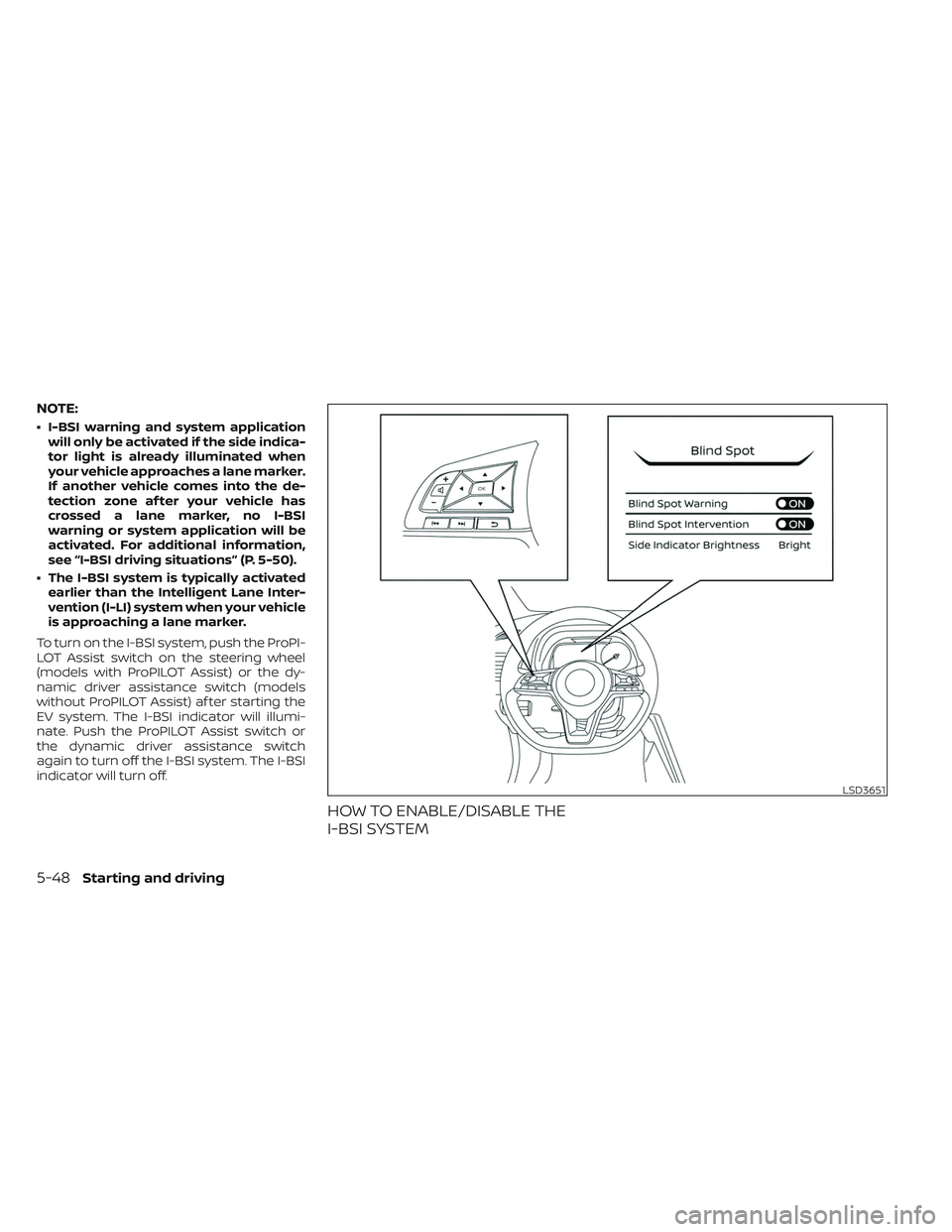
To turn on the I-BSI system, push the ProPI-
LOT Assist switch on the steering wheel
(models with ProPILOT Assist) or the dy-
namic driver assistance switch (models
without ProPILOT Assist) af ter starting the
EV system. The I-BSI indicator will illumi-
nate. Push the ProPILOT Assist switch or
the dynamic driver assistance switch
again to turn off the I-BSI system. The I-BSI
indicator will turn off.
HOW TO ENABLE/DISABLE THE
I-BSI SYSTEM
LSD3651
5-48Starting and driving
Page 378 of 612
• If the driver activates the turn signalbefore a vehicle enters the detection
zone, the side indicator light will flash
but no chime will sound when the
other vehicle is detected.
• I-BSI will not operate or will stop oper- ating and only a warning chime will
sound under the following conditions:– When the brake pedal is depressed.
– When the vehicle is accelerated dur- ing I-BSI system operation.
– When steering quickly.
– When the ICC, I-FCW or AEB with Pe- destrian Detection warnings sound.
– When the hazard warning flashers are operated.
– When driving on a curve at a high speed.
SYSTEM TEMPORARILY
UNAVAILABLE
Under the following conditions, a chime will
sound, the following message will appear
in the vehicle information display and the
I-BSI system will be turned off automati-
cally. The I-BSI system will not be available
until the conditions no longer exist.
• “Not available Poor Road Conditions”
• When the VDC system (except TCS func-tion) or ABS operates. • “Currently not available”
• When the VDC system is turned off.
Action to take:
When the above conditions no longer exist,
push the ProPILOT Assist switch (models
with ProPILOT Assist) or the dynamic driver
assistance switch (models without ProPI-
LOT Assist) again to turn the I-BSI system
back on.
When radar blockage is detected, the I-BSI
system will be turned off automatically, a
chime will sound and the “Unavailable: Side
Radar Obstruction” warning message will
appear in the vehicle information display.
The I-BSI system is not available until the
conditions no longer exist. For additional
information, see “System maintenance”
(P. 5-56).
Action to take:
When the above conditions no longer exist,
turn the I-BSI system on again. If the “Un-
available: Side Radar Obstruction” warning
message appears even af ter the I-BSI sys-
tem is turned on again, stop the vehicle in a
safe location, place the vehicle in the P
(Park) position and turn the EV system off.
Check for and remove objects obscuring
the radar sensors on the rear bumper, and
restart the EV system.
If the vehicle is parked in direct sunlight
under high temperature conditions (over
approximately 104°F (40°C)) and then the
I-BSI system is turned on, the I-BSI system
may be deactivated automatically. The
“Unavailable: High Cabin Temperature”
warning message will appear in the vehicle
information display.
Action to take:
When the interior temperature is reduced,
push the ProPILOT Assist switch (models
with ProPILOT Assist) or the dynamic driver
assistance switch (models without ProPI-
LOT Assist) again to turn the I-BSI system
back on.
SYSTEM MALFUNCTION
When the I-BSI system malfunctions, it will
be turned off automatically, a chime will
sound, and the “Not available System Mal-
function” warning message with the BSW
indicator (orange) will appear in the vehicle
information display.
Starting and driving5-55
Page 395 of 612
Normally when controlling the distance to
a vehicle ahead, this system automatically
accelerates or decelerates your vehicle ac-
cording to the speed of the vehicle ahead.
Depress the accelerator to properly accel-
erate your vehicle when acceleration is re-
quired for a lane change. Depress the brake
pedal when deceleration is required to
maintain a safe distance to the vehicle
ahead due to its sudden braking or if a
vehicle cuts in. Always stay alert when us-
ing the ICC system.
VEHICLE-TO-VEHICLE DISTANCE
CONTROL MODE SWITCHES
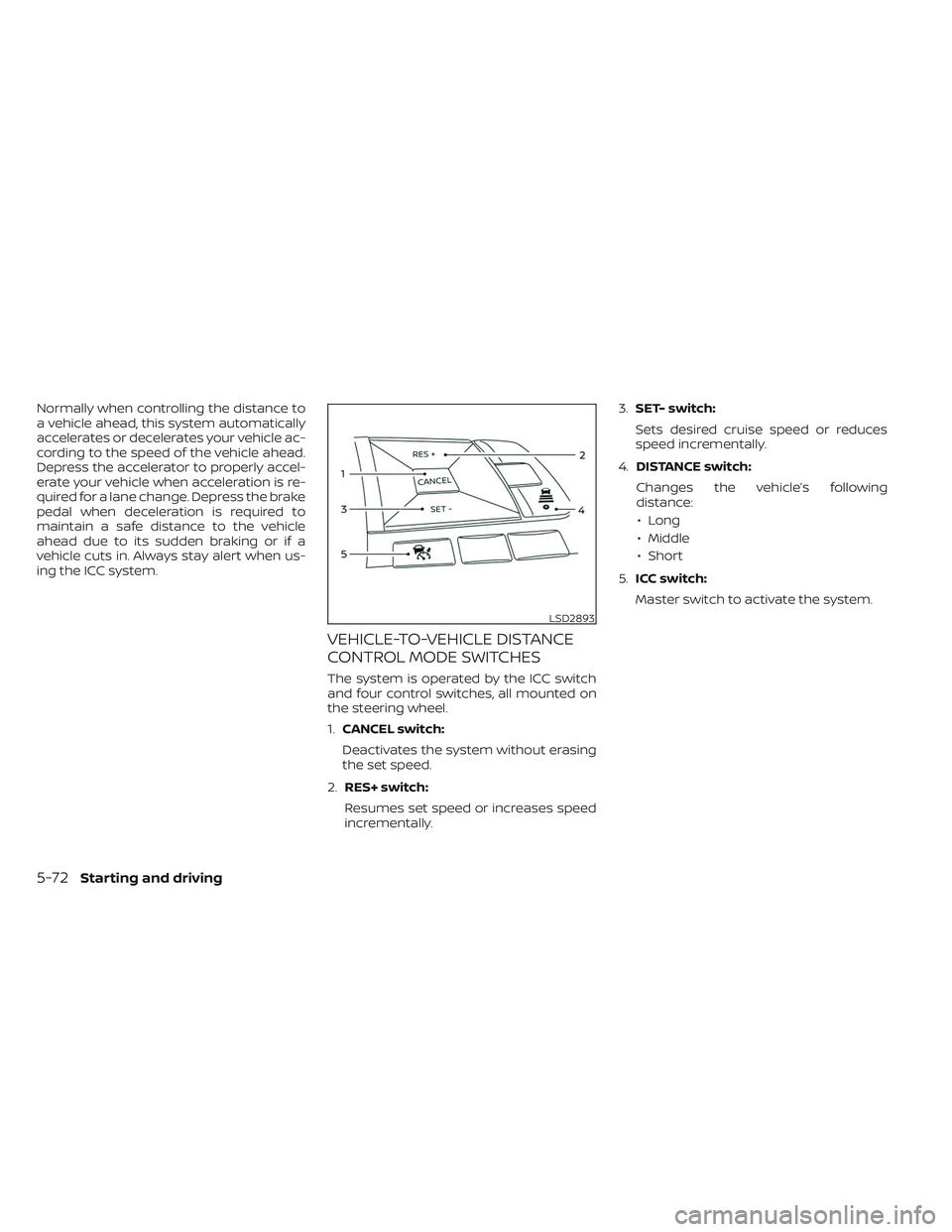
The system is operated by the ICC switch
and four control switches, all mounted on
the steering wheel.
1.CANCEL switch:
Deactivates the system without erasing
the set speed.
2. RES+ switch:
Resumes set speed or increases speed
incrementally. 3.
SET- switch:
Sets desired cruise speed or reduces
speed incrementally.
4. DISTANCE switch:
Changes the vehicle’s following
distance: • Long
• Middle
• Short
5. ICC switch:
Master switch to activate the system.
LSD2893
5-72Starting and driving
Page 401 of 612
NOTE:
The approach warning chime may sound
and the system display may blink when
the ICC sensor detects objects on the
side of the vehicle or on the side of the
road. This may cause the ICC system to
decelerate or accelerate the vehicle. The
ICC sensor may detect these objects
when the vehicle is driven on winding
roads, narrow roads, hilly roads, or when
entering or exiting a curve. In these
cases you will have to manually control
the proper distance ahead of your
vehicle.
Also, the sensor sensitivity can be affected
by vehicle operation (steering maneuver or
driving position in the lane) or traffic or ve-
hicle condition (for example, if a vehicle is
being driven with some damage).
Acceleration when passing
When the ICC system is engaged above 43
mph and following a slower vehicle (below
ICC set speed), and the turn signal is acti-
vated to the lef t, the ICC system will auto-
matically start to accelerate the vehicle to
help initiate passing on the lef t and will
begin to reduce the distance to the vehicle
directly ahead. Only the lef t side turn signal
operates this feature. As the driver steersthe vehicle and moves into the passing
lane, if no vehicle is detected ahead the ICC
system will continue to accelerate to the
ICC system set speed. If another vehicle is
detected ahead, then the vehicle will accel-
erate up to the following speed of that ve-
hicle. If the vehicle is not steered into the
lef t lane to pass, the acceleration will stop
af ter a short time and regain the set follow-
ing distance. Acceleration can be stopped
at any point by depressing the brake pedal
or the CANCEL switch on the steering
wheel.
WARNING
In order to reduce the risk of a collision
that may result in serious injury or
death, please be aware of the following:
• This function is only activated with
the lef t turn signal and will briefly ac-
celerate the vehicle even if a lane
change is not initiated. This can in-
clude non-passing situations such as
lef t side exits.
• Ensure that when passing another
vehicle, the adjacent lane is clear be-
fore initiating the pass. Sudden
changes in traffic may occur while
passing. –
Always manually steer or brake as
needed
– Never solely rely on the system
Automatic cancellation
A chime sounds under the following condi-
tions and the control is automatically
canceled:
• When the vehicle ahead is not detected
and your vehicle is traveling below the
speed of 15 mph (24 km/h)
• When the system judges the vehicle is at a standstill
• When the shif t lever is not in the D (Drive) position or B mode
• When the parking brake system is applied
• When the VDC system is turned off
• When VDC operates
• When distance measurement becomes impaired due to adhesion of dirt or ob-
struction to the sensor
• When a wheel slips
• When the radar signal is temporarily interrupted
5-78Starting and driving