2023 NISSAN LEAF wheel
[x] Cancel search: wheelPage 455 of 612
3. AEB with Pedestrian Detection systemwarning light
The AEB with Pedestrian Detection system
operates at speeds above approximately 3
mph (5 km/h). For the pedestrian detection
function, the AEB with Pedestrian Detec-
tion system operates at speeds between 6
– 37 mph (10 – 60 km/h).
If a risk of a forward collision with a vehicle
is detected, the AEB with Pedestrian Detec-
tion system will first provide a warning to
the driver by flashing the vehicle ahead de-
tection indicator and providing an audible
alert. In addition, the AEB with Pedestrian
Detection system applies partial braking. If
the driver applies the brakes quickly and
forcefully, but the AEB with Pedestrian De-
tection system detects that there is still the
possibility of a forward collision, the system
will automatically increase the braking
force.
If the risk of a collision becomes imminent
and the driver does not take action, the AEB
with Pedestrian Detection system issues
the second warning to the driver by flash-
ing the AEB with Pedestrian Detection
emergency warning indicator (red), provid-
ing an audible warning, and then automati-
cally applies harder braking. If a risk of a forward impact with a pedes-
trian is detected, the AEB with Pedestrian
Detection system will provide a warning to
the driver by flashing the AEB with Pedes-
trian Detection emergency warning indica-
tor (red), provides an audible alert and the
system will apply partial braking. If the
driver applies the brakes quickly and force-
fully but the AEB with Pedestrian Detection
system detects that there is still the possi-
bility of a forward impact with a pedestrian,
the system will automatically increase the
braking force. If the risk of collision be-
comes imminent and the driver does not
take action, the AEB with Pedestrian Detec-
tion system automatically applies harder
braking.
NOTE:
The vehicle’s brake lights come on when
any braking is performed by the AEB
with Pedestrian Detection system.
Depending on vehicle speed and distance
to the vehicle or pedestrian ahead, as well
as driving and roadway conditions, the sys-
tem may help the driver avoid a forward
collision or may help mitigate the conse-
quences if a collision should be unavoid-
able. If the driver is handling the steering
wheel, accelerating or braking, the AEB withPedestrian Detection system will function
later or will not function.
The automatic braking will cease under the
following conditions:
• When the steering wheel is turned to
avoid a collision.
• When the accelerator pedal is depressed.
• When there is no longer a vehicle or a pedestrian detected ahead.
If the AEB with Pedestrian Detection sys-
tem has stopped the vehicle, the vehicle
will remain at a standstill for approximately
2 seconds before the brakes are released.
5-132Starting and driving
Page 457 of 612

AEB WITH PEDESTRIAN
DETECTION SYSTEM LIMITATIONS
WARNING
Listed below are the system limitations
for the AEB with Pedestrian Detection
system. Failure to operate the vehicle in
accordance with these system limita-
tions could result in serious injury or
death.
• The AEB with Pedestrian Detection
system cannot detect all vehicles or
pedestrians under all conditions.
• The AEB with Pedestrian Detection
system does not detect the following
objects:
– Pedestrians that are small (for ex-
ample, children), in a sitting posi-
tion, operating toys/skateboards,
on scooters or in wheelchairs, or
not in an upright standing or
walking position.
– Animals of any size.
– Obstacles (for example, cargo or
debris) on the roadway or
roadside.
– Oncoming or crossing vehicles. –
Vehicles where the tires are diffi-
cult to see or the shape of the rear
of the vehicle is unclear or
obstructed.
– Parked vehicles.
• The AEB with Pedestrian Detection
system has some performance
limitations.
– If a stationary vehicle is in the ve-
hicle’s path, the system will not
function when the vehicle is
driven at speeds over approxi-
mately 50 mph (80 km/h).
– Pedestrian detection will not
function when the vehicle is
driven at speeds over approxi-
mately 37 mph (60 km/h) or below
approximately 6 mph (10 km/h).
• For pedestrians, the AEB with Pedes-
trian Detection system will not issue
the first warning.
• The AEB with Pedestrian Detection
system may not function properly or
detect a vehicle or pedestrian ahead
in the following conditions:
– In poor visibility (conditions such
as rain, snow, fog, dust storms,
sand storms, smoke, and road
spray from other vehicles). –
If dirt, ice, snow, fog or other mate-
rial is covering the radar sensor
area or camera area of the
windshield.
– If strong light (for example, sun-
light or high beams) enters the
front camera or a sudden change
in brightness occurs (for example,
entering a tunnel or driving in
lightning).
– In dark or dimly lit conditions,
such as at night or in tunnels, in-
cluding cases where your vehi-
cle’s headlights are off or dim, or
the tail lights of the vehicle ahead
are off.
– When driving on a steep downhill
slope, on roads with sharp curves,
and/or bumpy or dirt roads.
– If there is interference by other ra-
dar sources.
– When your vehicle’s position or
movement is changed quickly or
significantly (for example, lane
change, turning the vehicle,
abrupt steering, sudden accelera-
tion or deceleration).
5-134Starting and driving
Page 480 of 612
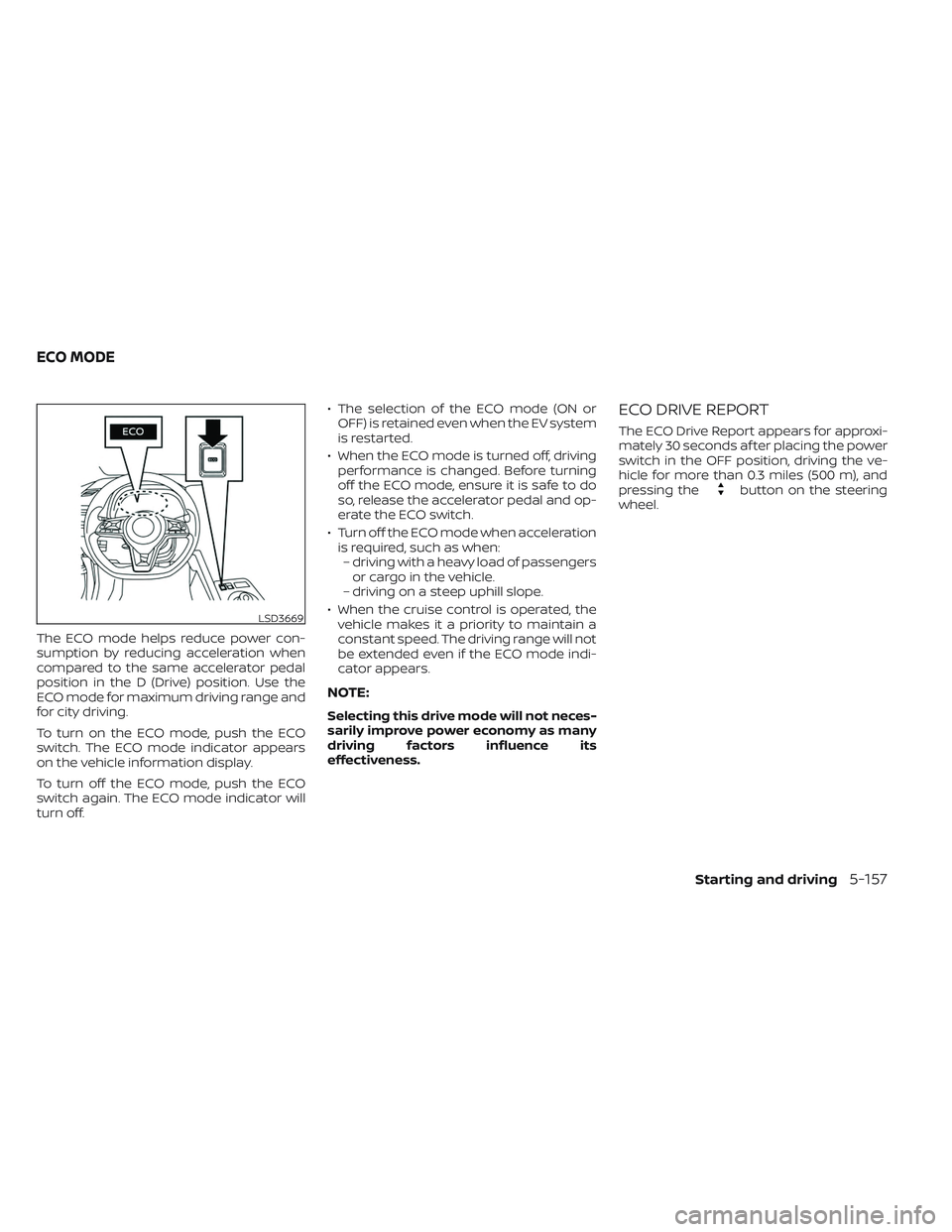
The ECO mode helps reduce power con-
sumption by reducing acceleration when
compared to the same accelerator pedal
position in the D (Drive) position. Use the
ECO mode for maximum driving range and
for city driving.
To turn on the ECO mode, push the ECO
switch. The ECO mode indicator appears
on the vehicle information display.
To turn off the ECO mode, push the ECO
switch again. The ECO mode indicator will
turn off.• The selection of the ECO mode (ON or
OFF) is retained even when the EV system
is restarted.
• When the ECO mode is turned off, driving performance is changed. Before turning
off the ECO mode, ensure it is safe to do
so, release the accelerator pedal and op-
erate the ECO switch.
• Turn off the ECO mode when acceleration is required, such as when:– driving with a heavy load of passengers or cargo in the vehicle.
– driving on a steep uphill slope.
• When the cruise control is operated, the vehicle makes it a priority to maintain a
constant speed. The driving range will not
be extended even if the ECO mode indi-
cator appears.
NOTE:
Selecting this drive mode will not neces-
sarily improve power economy as many
driving factors influence its
effectiveness.
ECO DRIVE REPORT
The ECO Drive Report appears for approxi-
mately 30 seconds af ter placing the power
switch in the OFF position, driving the ve-
hicle for more than 0.3 miles (500 m), and
pressing the
button on the steering
wheel.
LSD3669
ECO MODE
Starting and driving5-157
Page 481 of 612
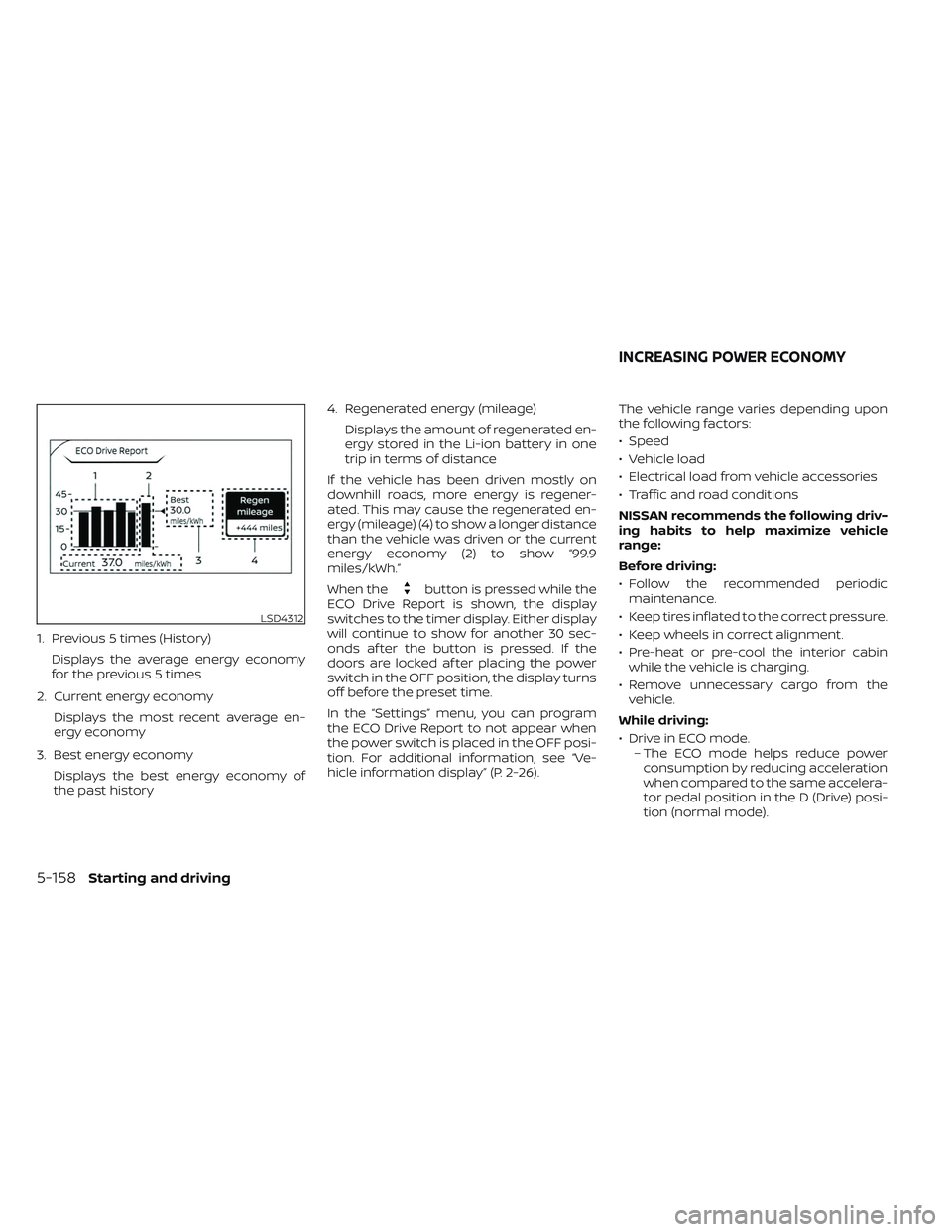
1. Previous 5 times (History)Displays the average energy economy
for the previous 5 times
2. Current energy economy Displays the most recent average en-
ergy economy
3. Best energy economy Displays the best energy economy of
the past history 4. Regenerated energy (mileage)
Displays the amount of regenerated en-
ergy stored in the Li-ion battery in one
trip in terms of distance
If the vehicle has been driven mostly on
downhill roads, more energy is regener-
ated. This may cause the regenerated en-
ergy (mileage) (4) to show a longer distance
than the vehicle was driven or the current
energy economy (2) to show “99.9
miles/kWh.”
When the
button is pressed while the
ECO Drive Report is shown, the display
switches to the timer display. Either display
will continue to show for another 30 sec-
onds af ter the button is pressed. If the
doors are locked af ter placing the power
switch in the OFF position, the display turns
off before the preset time.
In the “Settings” menu, you can program
the ECO Drive Report to not appear when
the power switch is placed in the OFF posi-
tion. For additional information, see “Ve-
hicle information display” (P. 2-26). The vehicle range varies depending upon
the following factors:
• Speed
• Vehicle load
• Electrical load from vehicle accessories
• Traffic and road conditions
NISSAN recommends the following driv-
ing habits to help maximize vehicle
range:
Before driving:
• Follow the recommended periodic
maintenance.
• Keep tires inflated to the correct pressure.
• Keep wheels in correct alignment.
• Pre-heat or pre-cool the interior cabin while the vehicle is charging.
• Remove unnecessary cargo from the vehicle.
While driving:
• Drive in ECO mode. – The ECO mode helps reduce powerconsumption by reducing acceleration
when compared to the same accelera-
tor pedal position in the D (Drive) posi-
tion (normal mode).
LSD4312
INCREASING POWER ECONOMY
5-158Starting and driving
Page 483 of 612
•To help avoid risk of injury or death
through unintended operation of the
vehicle and/or its systems, do not
leave children, people who require
the assistance of others or pets unat-
tended in your vehicle. Additionally,
the temperature inside a closed ve-
hicle on a warm day can quickly be-
come high enough to cause a signifi-
cant risk of injury or death to people
and pets.
1. Firmly apply the parking brake.
2. Push the P (Park) position switch on theshif t lever.
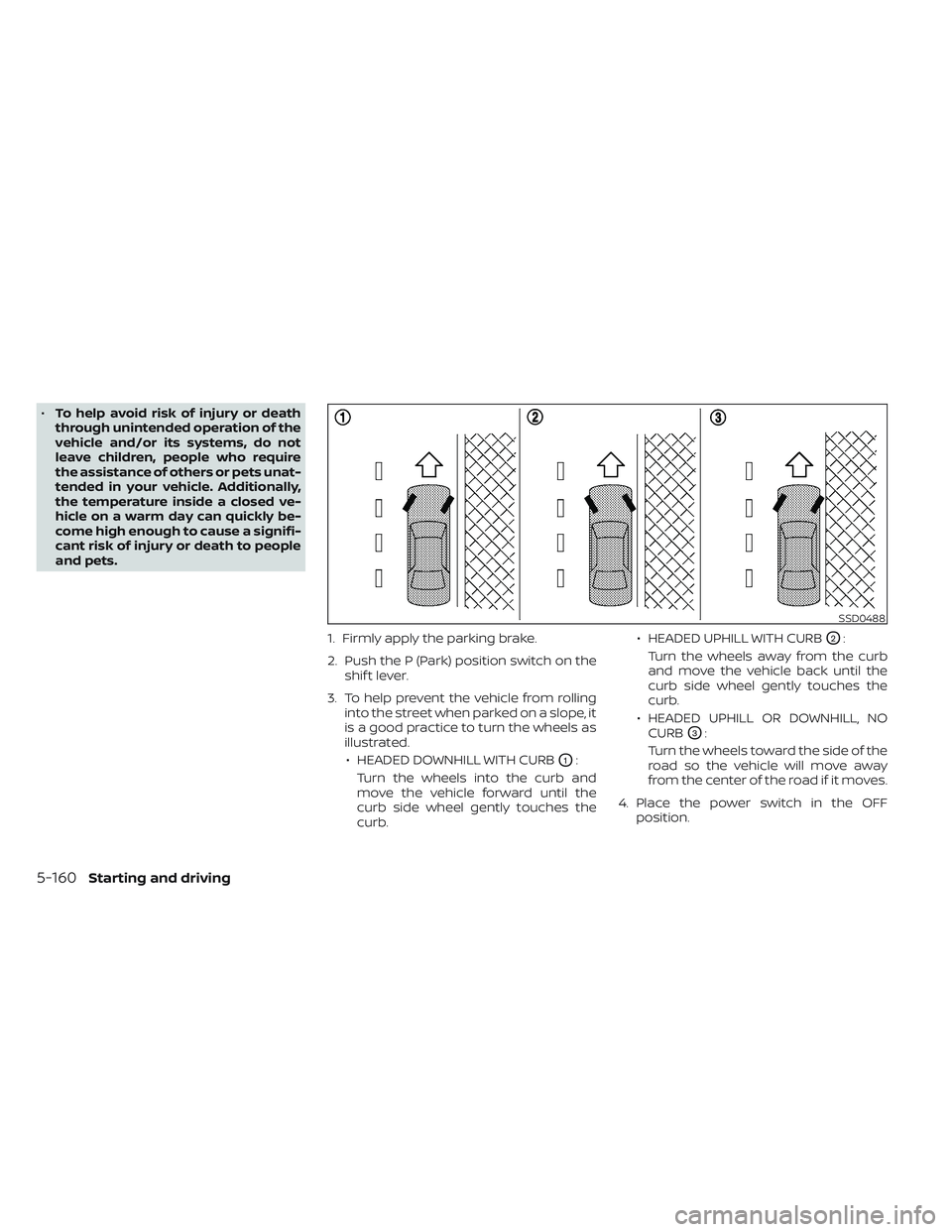
3. To help prevent the vehicle from rolling into the street when parked on a slope, it
is a good practice to turn the wheels as
illustrated.
• HEADED DOWNHILL WITH CURB
O1:
Turn the wheels into the curb and
move the vehicle forward until the
curb side wheel gently touches the
curb. • HEADED UPHILL WITH CURB
O2:
Turn the wheels away from the curb
and move the vehicle back until the
curb side wheel gently touches the
curb.
• HEADED UPHILL OR DOWNHILL, NO CURB
O3:
Turn the wheels toward the side of the
road so the vehicle will move away
from the center of the road if it moves.
4. Place the power switch in the OFF position.
SSD0488
5-160Starting and driving
Page 484 of 612
WARNING
• If the READY to drive indicator light is
off while driving, the power assist for
the steering will not work. Steering
will be harder to operate.
• When the power steering warning
light illuminates while the READY to
drive indicator light is on, the power
assist for the steering will cease op-
eration. You will still have control of
the vehicle but the steering will be
harder to operate.
The power steering system is designed to
provide power assistance while driving to
operate the steering wheel with less effort.
When the steering wheel is operated re-
peatedly or continuously while parking or
driving at a very low speed, the power as-
sist for the steering wheel will be reduced.
This is to prevent overheating of the power
steering system and help protect it from
getting damaged. When the power assis-
tance is reduced, steering wheel operation
will become harder. When the temperature
of the power steering system goes down,
the power assistance level will return to
normal. Avoid repeating such steering
wheel operations that could cause the
power steering system to overheat. You may hear a noise when the steering
wheel is operated quickly. However, this is
not a malfunction.
If the power steering warning light
illuminates while the READY to drive indica-
tor light is on, it may indicate the power
steering system is not functioning properly
and may need servicing. Have the power
steering system checked. It is recom-
mended that you visit a NISSAN certified
LEAF dealer for this service. For additional
information, see “Power steering warning
light” (P. 2-23).
The power assist for steering stops operat-
ing when both the power steering warning
light and READY to drive indicator light are
illuminated. You will still have control of the
vehicle. However, greater steering effort is
needed, especially in sharp turns and at
low speeds.
BRAKE PRECAUTIONS
This vehicle is equipped with two braking
systems:
1. Hydraulic brake system
2. Regenerative brake system
Hydraulic brake system
The hydraulic brake system is similar to the
brakes used on conventional vehicles.
The brake system has two separate hy-
draulic circuits. If one circuit malfunctions,
you will still have braking at two wheels.
Regenerative brake system
The primary purpose of the regenerative
brake system is to provide some power to
help recharge the Li-ion battery and ex-
tend driving range. A secondary benefit is
“engine braking” that operates based on
battery conditions.
In the D (Drive) range, when the accelerator
is released, the regenerative brake system
provides some deceleration and gener-
ates power for the Li-ion battery. Power is
also generated when the brake pedal is
applied.
POWER STEERING SYSTEM
BRAKE SYSTEM
Starting and driving5-161
Page 485 of 612
When you put the shif t lever in the B mode
and take your foot off the accelerator
pedal, more regenerative brake is applied
than in the D (Drive) position. However, dur-
ing high-speed driving you may feel that
regenerative brake provides less decelera-
tion than the engine braking in an ordinary
vehicle. This is normal.
Less deceleration is provided by the regen-
erative brake system when the Li-ion bat-
tery is fully charged. Regenerative brake is
automatically reduced when the Li-ion
battery is fully charged to prevent the Li-ion
battery from becoming overcharged. Re-
generative brake is also automatically re-
duced when the battery temperature is
high/low (indicated by the red/blue zones
on the battery temperature gauge) to pre-
vent Li-ion battery damage.
The brake pedal should be used to slow or
stop the vehicle depending on traffic or
road conditions. The vehicle brakes are not
affected by regenerative brake system
operation.NOTE:
• When applying the regenerativebrakes, you may hear a sound coming
from the regenerative brake system.
This is a normal operating characteris-
tic of an EV.
• If the power switch position is in a po- sition other than ON or READY to drive,
you can stop the vehicle by depressing
the brake pedal. However, greater foot
pressure on the brake pedal will be re-
quired to stop the vehicle, and the
stopping distance will be longer.
• When depressing the brake pedal, the brake pedal feel will not be smooth or
may change when the cooperative re-
generative brake system activates.
However, the electronically controlled
brake system is operating normally
and this does not indicate a
malfunction.
Using the brakes
Avoid resting your foot on the brake pedal
while driving. This will cause overheating of
the brakes, wearing out of the brake pads
and shoes faster, and will reduce driving
range. To help reduce brake wear, and to prevent
the brakes from overheating, reduce speed
and select B mode before going down a
slope or long grade. Overheated brakes
may reduce braking performance and
could result in loss of vehicle control.
WARNING
• While driving on a slippery surface,
be careful when braking or accelerat-
ing. Abrupt braking or accelerating
could cause the wheels to skid, which
could result in an accident.
• If the brake pedal is depressed with
the EV system OFF, you may feel an
increased brake pedal effort and a
decreased pedal stroke. If the BRAKE
warning light does not illuminate
and the brake pedal feels like it has
returned to its normal state af ter the
EV system is started, this indicates
that there is no malfunction and the
vehicle can be operated normally.
Wet brakes
When the vehicle is washed or driven
through water, the brakes may get wet. As
a result, the braking distance will be longer
and the vehicle may pull to one side during
braking.
5-162Starting and driving
Page 486 of 612
To dry brakes, drive the vehicle at a safe
speed while lightly tapping the brake pedal
to heat up the brakes. Do this until the
brakes return to normal. Avoid driving the
vehicle at high speeds until the brakes
have dried.
Parking brake break-in
Break in the parking brake shoes whenever
the stopping effect of the parking brake is
weakened or whenever the parking brake
shoes and/or rotors are replaced, in order
to assure the best braking performance.
This procedure is described in the Genuine
NISSAN Service Manual, and it can be per-
formed by a certified repair facility. It is rec-
ommended that you visit a NISSAN certi-
fied LEAF dealer.
ANTI-LOCK BRAKING SYSTEM (ABS)
WARNING
• The ABS is a sophisticated device, but
it cannot prevent accidents resulting
from careless or dangerous driving
techniques. It can help maintain ve-
hicle control during braking on slip-
pery surfaces. Remember that stop-
ping distances on slippery surfaces
will be longer than on normal sur-
faces even with ABS. Stopping dis-
tances may also be longer on rough,
gravel or snow covered roads, or if
you are using tire chains. Always
maintain a safe distance from the ve-
hicle in front of you. Ultimately, the
driver is responsible for safety.
• Tire type and condition may also af-
fect braking effectiveness.
– When replacing tires, install the
specified size of tires on all four
wheels.
– For additional information, see
“Wheels and tires” (P. 8-25). The ABS controls the brakes so the wheels
do not lock during hard braking or when
braking on slippery surfaces. The system
detects the rotation speed at each wheel
and varies the brake fluid pressure to pre-
vent each wheel from locking and sliding.
By preventing each wheel from locking, the
system helps the driver maintain steering
control and helps to minimize swerving
and spinning on slippery surfaces.
Using the system
Depress the brake pedal and hold it down.
Depress the brake pedal with firm steady
pressure, but do not pump the brakes. The
Anti-lock Braking System will operate to
prevent the wheels from locking up. Steer
the vehicle to avoid obstacles.
WARNING
Do not pump the brake pedal. Doing so
may result in increased stopping
distances.
Starting and driving5-163