2023 NISSAN KICKS cruise control
[x] Cancel search: cruise controlPage 353 of 558
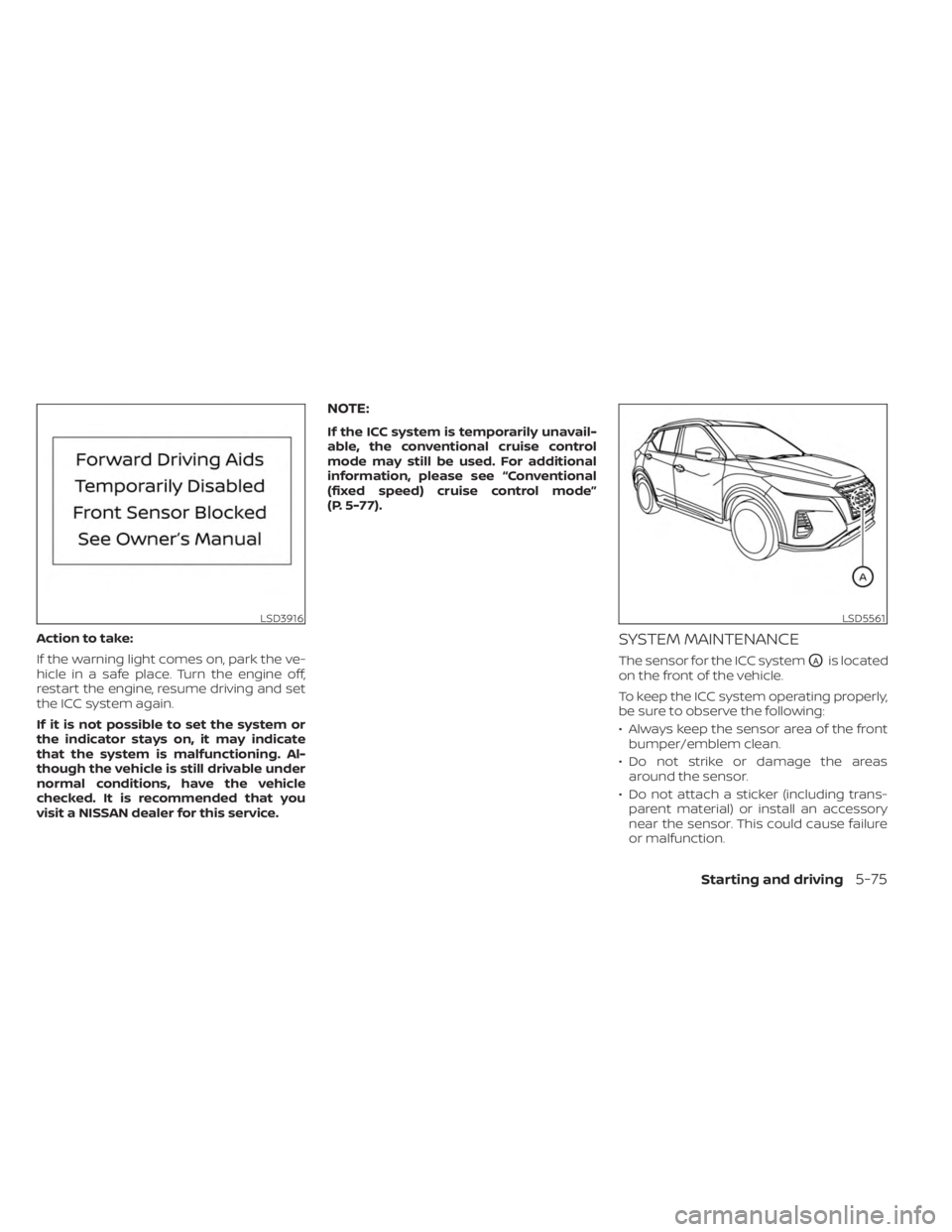
Action to take:
If the warning light comes on, park the ve-
hicle in a safe place. Turn the engine off,
restart the engine, resume driving and set
the ICC system again.
If it is not possible to set the system or
the indicator stays on, it may indicate
that the system is malfunctioning. Al-
though the vehicle is still drivable under
normal conditions, have the vehicle
checked. It is recommended that you
visit a NISSAN dealer for this service.
NOTE:
If the ICC system is temporarily unavail-
able, the conventional cruise control
mode may still be used. For additional
information, please see “Conventional
(fixed speed) cruise control mode”
(P. 5-77).
SYSTEM MAINTENANCE
The sensor for the ICC systemOAis located
on the front of the vehicle.
To keep the ICC system operating properly,
be sure to observe the following:
• Always keep the sensor area of the front bumper/emblem clean.
• Do not strike or damage the areas around the sensor.
• Do not attach a sticker (including trans- parent material) or install an accessory
near the sensor. This could cause failure
or malfunction.
LSD3916LSD5561
Starting and driving5-75
Page 355 of 558
CONVENTIONAL (fixed speed)
CRUISE CONTROL MODE
This mode allows driving at a speed be-
tween 25 to 90 mph (40 to 144 km/h) with-
out keeping your foot on the accelerator
pedal.
WARNING
• In the conventional (fixed speed)
cruise control mode, a warning
chime does not sound to warn you if
you are too close to the vehicle
ahead, as neither the presence of the
vehicle ahead nor the vehicle-to-
vehicle distance is detected.
• Pay special attention to the distance
between your vehicle and the vehicle
ahead of you or a collision could
occur.
• Always confirm the setting in the ICC
system display.
• Do not use the conventional (fixed
speed) cruise control mode when
driving under the following condi-
tions:
– When it is not possible to keep the
vehicle at a set speed –
In heavy traffic or in traffic that
varies in speed
– On winding or hilly roads
– On slippery roads (rain, snow, ice,
etc.)
– In very windy areas
• Doing so could cause a loss of vehicle
control and result in an accident.
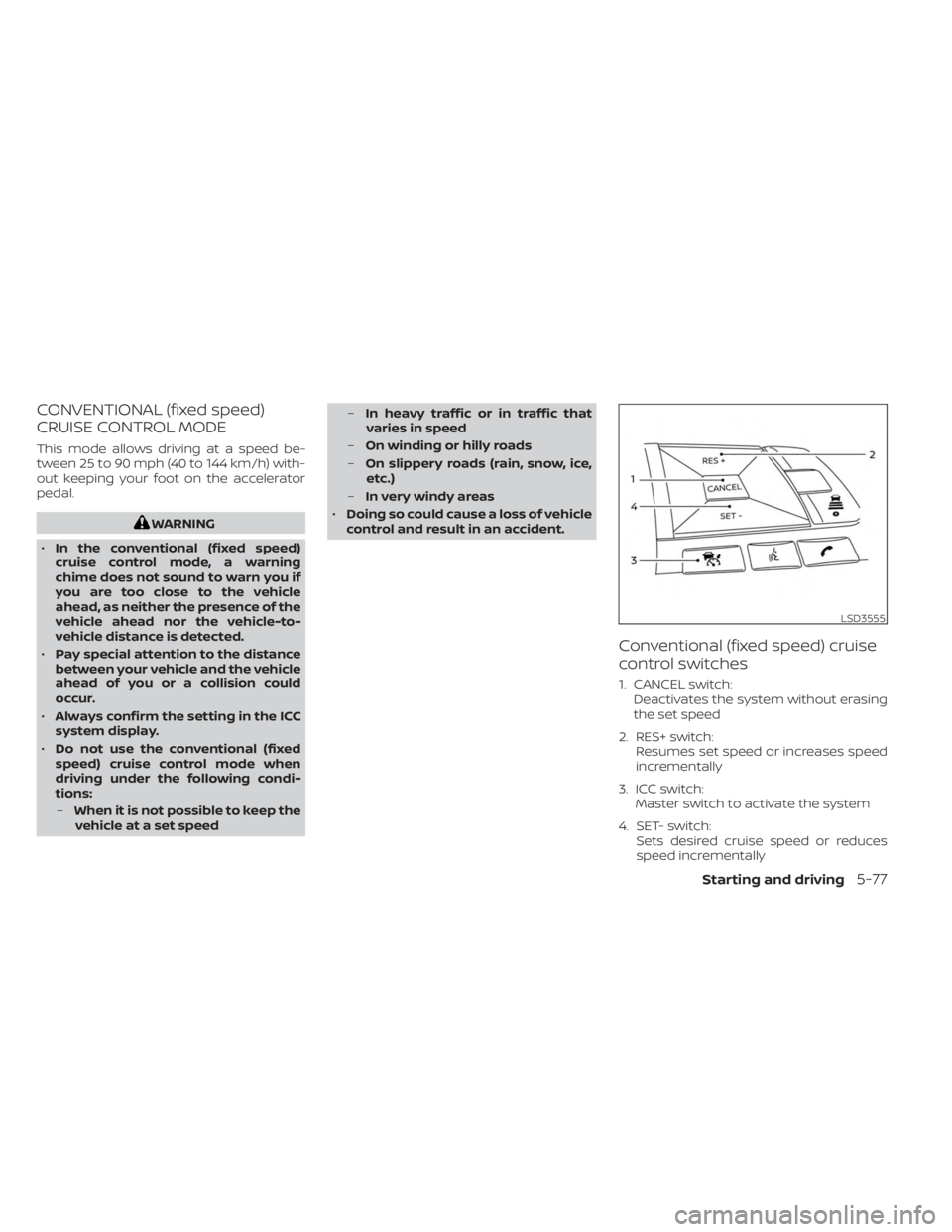
Conventional (fixed speed) cruise
control switches
1. CANCEL switch: Deactivates the system without erasing
the set speed
2. RES+ switch: Resumes set speed or increases speed
incrementally
3. ICC switch: Master switch to activate the system
4. SET- switch: Sets desired cruise speed or reduces
speed incrementally
LSD3555
Starting and driving5-77
Page 356 of 558
Conventional (fixed speed) cruise
control mode display and
indicators
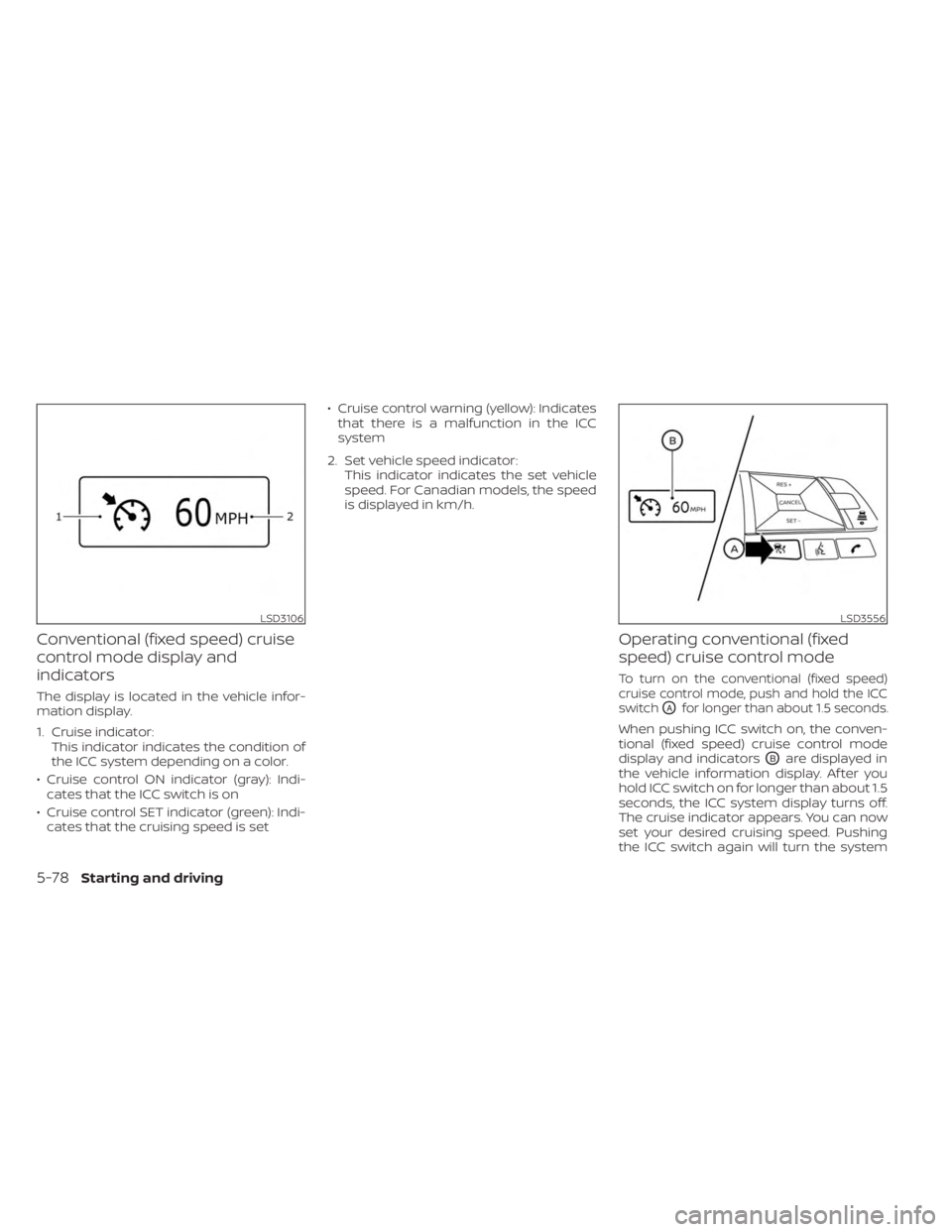
The display is located in the vehicle infor-
mation display.
1. Cruise indicator:This indicator indicates the condition of
the ICC system depending on a color.
• Cruise control ON indicator (gray): Indi- cates that the ICC switch is on
• Cruise control SET indicator (green): Indi- cates that the cruising speed is set • Cruise control warning (yellow): Indicates
that there is a malfunction in the ICC
system
2. Set vehicle speed indicator: This indicator indicates the set vehicle
speed. For Canadian models, the speed
is displayed in km/h.
Operating conventional (fixed
speed) cruise control mode
To turn on the conventional (fixed speed)
cruise control mode, push and hold the ICC
switch
OAfor longer than about 1.5 seconds.
When pushing ICC switch on, the conven-
tional (fixed speed) cruise control mode
display and indicators
OBare displayed in
the vehicle information display. Af ter you
hold ICC switch on for longer than about 1.5
seconds, the ICC system display turns off.
The cruise indicator appears. You can now
set your desired cruising speed. Pushing
the ICC switch again will turn the system
LSD3106LSD3556
5-78Starting and driving
Page 357 of 558
completely off. When the ignition switch is
placed in the OFF position, the system is
also automatically turned off.
To use the ICC system again, quickly push
and release the ICC switch (vehicle-to ve-
hicle distance control mode) or push and
hold it (conventional cruise control mode)
again to turn it on.
CAUTION
To avoid accidentally engaging cruise
control, make sure to turn the ICC
switch off when not using the ICC
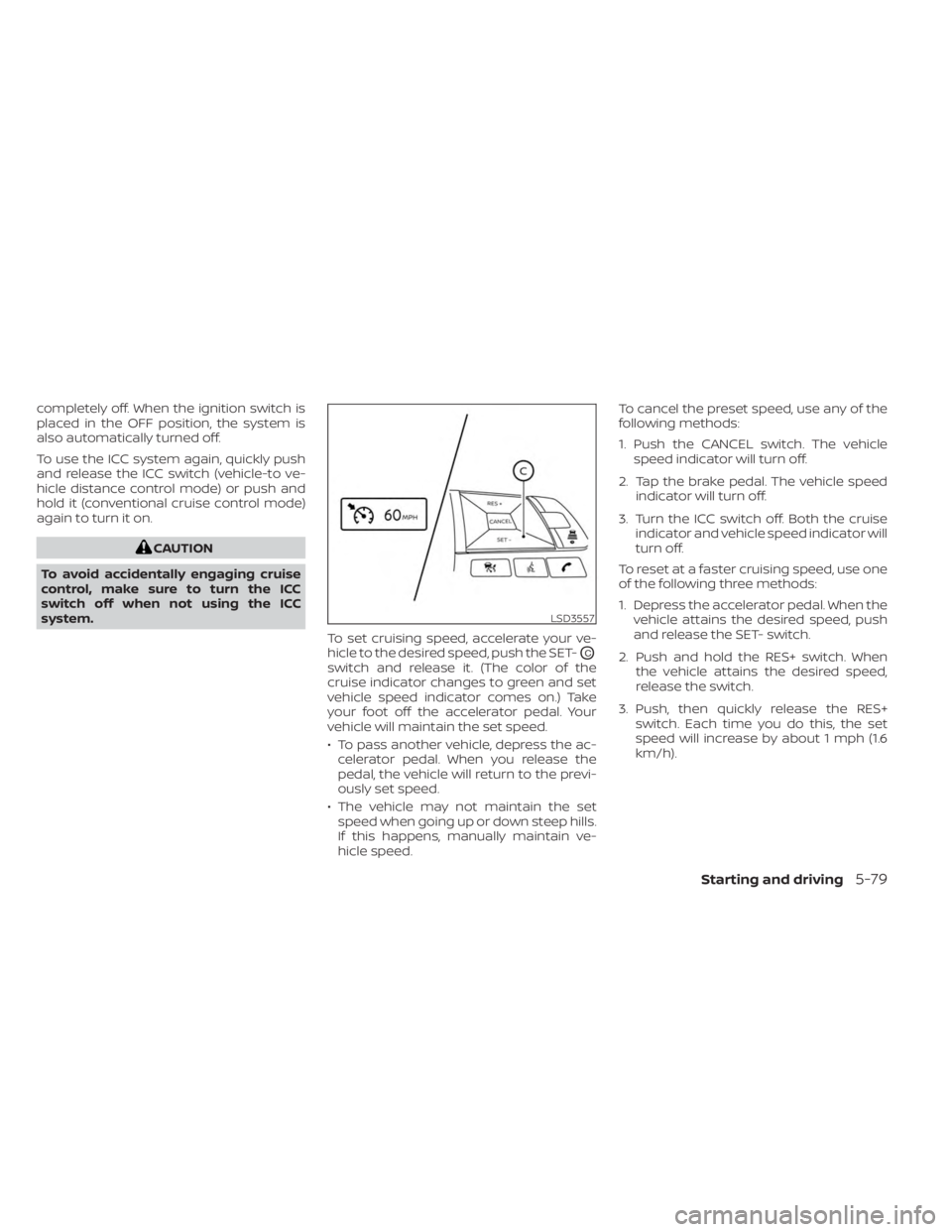
system. To set cruising speed, accelerate your ve-
hicle to the desired speed, push the SET-
OC
switch and release it. (The color of the
cruise indicator changes to green and set
vehicle speed indicator comes on.) Take
your foot off the accelerator pedal. Your
vehicle will maintain the set speed.
• To pass another vehicle, depress the ac-celerator pedal. When you release the
pedal, the vehicle will return to the previ-
ously set speed.
• The vehicle may not maintain the set speed when going up or down steep hills.
If this happens, manually maintain ve-
hicle speed. To cancel the preset speed, use any of the
following methods:
1. Push the CANCEL switch. The vehicle
speed indicator will turn off.
2. Tap the brake pedal. The vehicle speed indicator will turn off.
3. Turn the ICC switch off. Both the cruise indicator and vehicle speed indicator will
turn off.
To reset at a faster cruising speed, use one
of the following three methods:
1. Depress the accelerator pedal. When the vehicle attains the desired speed, push
and release the SET- switch.
2. Push and hold the RES+ switch. When the vehicle attains the desired speed,
release the switch.
3. Push, then quickly release the RES+ switch. Each time you do this, the set
speed will increase by about 1 mph (1.6
km/h).
LSD3557
Starting and driving5-79
Page 359 of 558
A chime sounds under the following condi-
tions and the control is automatically can-
celed:
• When the vehicle slows down more than8 mph (13 km/h) below the set speed
• When the shif t lever is not in the D (Drive) or manual shif t mode
• When the parking brake is applied
• When the VDC operates (including the traction control system)
• When a wheel slips
When the system is not operating properly,
the chime sounds and the color of the
cruise indicator will change to orange.
Action to take
If the color of the cruise indicator changes
to orange, stop the vehicle in a safe place
and place the shif t lever in the P (Park) po-
sition. Turn the engine off, restart the en-
gine, resume driving, and then perform the
setting again.
If it is not possible to set or the indicator
stays on, it may indicate that the system
is malfunctioning. Although the vehicle
is still drivable under normal conditions,
have the vehicle checked. It is recom-
mended that you visit a NISSAN dealer
for this service.
WARNING
Failure to follow the warnings and in-
structions for proper use of the RAB
system could result in serious injury or
death.
• The RAB system is a supplemental
aid to the driver. It is not a replace-
ment for proper driving procedures.
Always use the side and rear mirrors
and turn and look in the direction you
will move before and while backing
up. Never rely solely on the RAB sys- tem. It is the driver’s responsibility to
stay alert, drive safely, and be in con-
trol of the vehicle at all times.
• There is a limitation to the RAB sys-
tem capability. The RAB system is not
effective in all situations.
• Inclement weather or ultrasonic
sources such as an automatic car
wash, a truck’s compressed air
brakes or a pneumatic drill may af-
fect the function of the system; this
may include reduced performance or
a false activation.
The RAB system can assist the driver when
the vehicle is backing up and approaching
objects directly behind the vehicle.
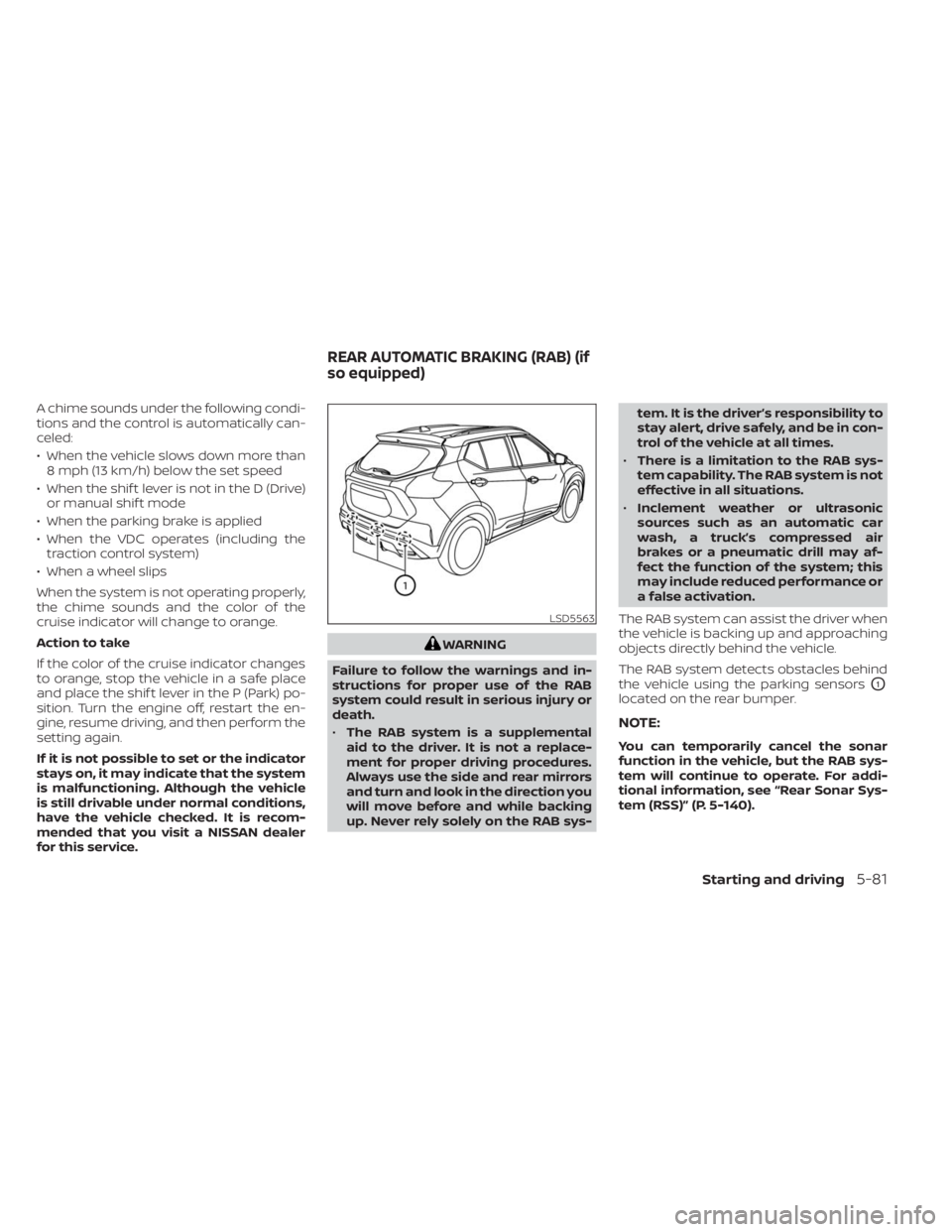
The RAB system detects obstacles behind
the vehicle using the parking sensors
O1
located on the rear bumper.
NOTE:
You can temporarily cancel the sonar
function in the vehicle, but the RAB sys-
tem will continue to operate. For addi-
tional information, see “Rear Sonar Sys-
tem (RSS)” (P. 5-140).
LSD5563
REAR AUTOMATIC BRAKING (RAB) (if
so equipped)
Starting and driving5-81
Page 406 of 558
CAUTION
During the first 1,200 miles (2,000 km),
follow these recommendations to ob-
tain maximum engine performance
and ensure the future reliability and
economy of your new vehicle. Failure to
follow these recommendations may
result in shortened engine life and re-
duced engine performance.
• Avoid driving for long periods at constant speed, either fast or slow, and do not run
the engine over 4,000 rpm.
• Do not accelerate at full throttle in any gear.
• Avoid quick starts.
• Avoid hard braking as much as possible. Follow these easy-to-use Fuel Efficient
Driving Tips to help you achieve the most
fuel economy from your vehicle.
1.
Use Smooth Accelerator and Brake
Pedal Application
• Avoid rapid starts and stops.
• Use smooth, gentle accelerator and brake application whenever possible.
• Maintain constant speed while com- muting and coast whenever possible.
2. Maintain Constant Speed
• Look ahead to try and anticipate and minimize stops.
• Synchronizing your speed with traffic lights allows you to reduce your num-
ber of stops.
• Maintaining a steady speed can mini- mize red light stops and improve fuel
efficiency.
3. Use Air Conditioning (A/C) at Higher
Vehicle Speeds
• Below 40 mph (64 km/h), it is more efficient to open windows to cool the
vehicle due to reduced engine load.
• Above 40 mph (64 km/h), it is more efficient to use A/C to cool the vehicle
due to increased aerodynamic drag. • Recirculating the cool air in the cabin
when the A/C is on reduces cooling
load.
4. Drive at Economical Speeds and
Distances
• Observing the speed limit and not ex- ceeding 60 mph (97 km/h) (where le-
gally allowed) can improve fuel effi-
ciency due to reduced aerodynamic
drag.
• Maintaining a safe following distance behind other vehicles reduces unnec-
essary braking.
• Safely monitoring traffic to anticipate changes in speed permits reduced
braking and smooth acceleration
changes.
• Select a gear range suitable to road conditions.
5. Use Cruise Control
• Using cruise control during highway driving helps maintain a steady speed.
• Cruise control is particularly effective in providing fuel savings when driving
on flat terrains.
BREAK-IN SCHEDULE FUEL EFFICIENT DRIVING TIPS
5-128Starting and driving
Page 424 of 558
SPECIAL WINTER EQUIPMENT
It is recommended that the following items
be carried in the vehicle during winter:
• A scraper and stiff-bristled brush to re-move ice and snow from the windows
and wiper blades.
• A sturdy, flat board to be placed under the jack to give it firm support.
• A shovel to dig the vehicle out of snowdrif ts.
• Extra washer fluid to refill the windshield- washer fluid reservoir.
DRIVING ON SNOW OR ICE
WARNING
• Wet ice (32°F, 0°C and freezing rain),
very cold snow or ice can be slick and
very hard to drive on. The vehicle will
have much less traction or “grip” un-
der these conditions. Try to avoid
driving on wet ice until the road is
salted or sanded.
• Whatever the condition, drive with
caution. Accelerate and slow down
with care. If accelerating or down-
shif ting too fast, the drive wheels will
lose even more traction. •
Allow more stopping distance under
these conditions. Braking should be
started sooner than on dry
pavement.
• Allow greater following distances on
slippery roads.
• Watch for slippery spots (glare ice).
These may appear on an otherwise
clear road in shaded areas. If a patch
of ice is seen ahead, brake before
reaching it. Try not to brake while on
the ice, and avoid any sudden steer-
ing maneuvers.
• Do not use the cruise control on slip-
pery roads.
• Snow can trap dangerous exhaust
gases under your vehicle. Keep snow
clear of the exhaust pipe and from
around your vehicle.
PARKING BRAKE
When parking in an area where the outside
temperature is below 32°F (0°C), do not ap-
ply the parking brake to prevent it from
freezing. For safe parking:
• Place the shif t lever in the P (Park) position.
• Securely block the wheels.
ENGINE BLOCK HEATER (if so
equipped)
Engine block heaters are used to assist
with cold temperature starting.
The engine block heater should be used
when the outside temperature is 20°F (-7°C)
or lower.
WARNING
• Do not use your engine block heater
with an ungrounded electrical sys-
tem or a 2-pronged adapter. You can
be seriously injured by an electrical
shock if you use an ungrounded
connection.
• Disconnect and properly store the
engine block heater cord before
starting the engine. Damage to the
cord could result in an electrical
shock and can cause serious injury.
• Use a heavy-duty 3-wire, 3-pronged
extension cord rated for at least 10 A.
Plug the extension cord into a
Ground Fault Interrupt (GFI) pro-
tected, grounded 110-VAC outlet.
Failure to use the proper extension
cord or a grounded outlet can result
in a fire or electrical shock and cause
serious personal injury.
5-146Starting and driving
Page 548 of 558
Bulb check/instrument panel........2-13Bulb replacement...............8-26
C
Capacities and recommended
fuel/lubricants.................10-2Car phone or CB radio............4-66Cargo
(See vehicle loading information).....10-14Cargo cover................. .2-66Chassis control................5-137Check tire pressure..............2-36Child restraint with top tether strap. . . .1-24Child restraints........1-17,1-18,1-19,1-21LATCH (Lower Anchors and Tethers for
CHildren) System..............1-21Precautions on child
restraints.........1-19,1-26,1-33, 1-38Top tether strap anchor point
locations...................1-24Child safety rear door lock..........3-6Cleaning exterior and interior......7-2,7-4Clock set.................... .4-5Cold weather driving............5-145Console box..................2-64Continuously Variable Transmission
(CVT).......................5-17Continuously Variable Transmission (CVT)
fluid..................... .8-9Driving with Continuously Variable
Transmission (CVT).............5-17
Transmission shif t selector lock
release....................5-20Control panel buttons.............4-3Brightness/contrast button........4-7Controls
Audio controls (steering wheel).....4-62Heater and air conditioner controls. .4-41Heater and air conditioner controls
(automatic)................ .4-40Heater and air conditioner controls
(manual).................. .4-32Coolant
Capacities and recommended
fuel/lubricants
...............10-2Changing engine coolant.........8-5Checking engine coolant level......8-5Corrosion protection..............7-7Cruise control................ .5-56Cup holders................. .2-64
D
Daytime Running Light System......2-49Defroster switch
Rear window and outside mirror defroster
switch
.............2-43, 4-34, 4-42Rear window defroster switch.....2-43Dimensions and weights..........10-9Dimmer switch for instrument panel. . .2-50DisplayInformation display............2-24Display controls (see control panel
buttons).................... .4-3
Door locks....................3-4Door open warning light...........2-14Drive belt....................8-13Drive Systems OFF switch..........2-54Driving
Cold weather driving...........5-145Driving with Continuously Variable
Transmission (CVT).............5-17Precautions when starting and
driving.................... .5-4Driving the vehicle...............5-17
E
Eco Drive Report................2-10Economy - fuel................5-129Emergency call (SOS) button........2-57Emergency engine shutoff.......5-13,6-2Emission control information label. . . .10-11Emission control system warranty. . . .10-21Engine
Before starting the engine........5-15Capacities and recommended
fuel/lubricants...............10-2Changing engine coolant.........8-5Changing engine oil............8-6Changing engine oil filter.........8-6Checking engine coolant level......8-5Checking engine oil level.........8-5Engine compartment check
locations.................. .8-3Engine cooling system...........8-4Engine oil...................8-5
11-2