2023 NISSAN KICKS lights
[x] Cancel search: lightsPage 90 of 558
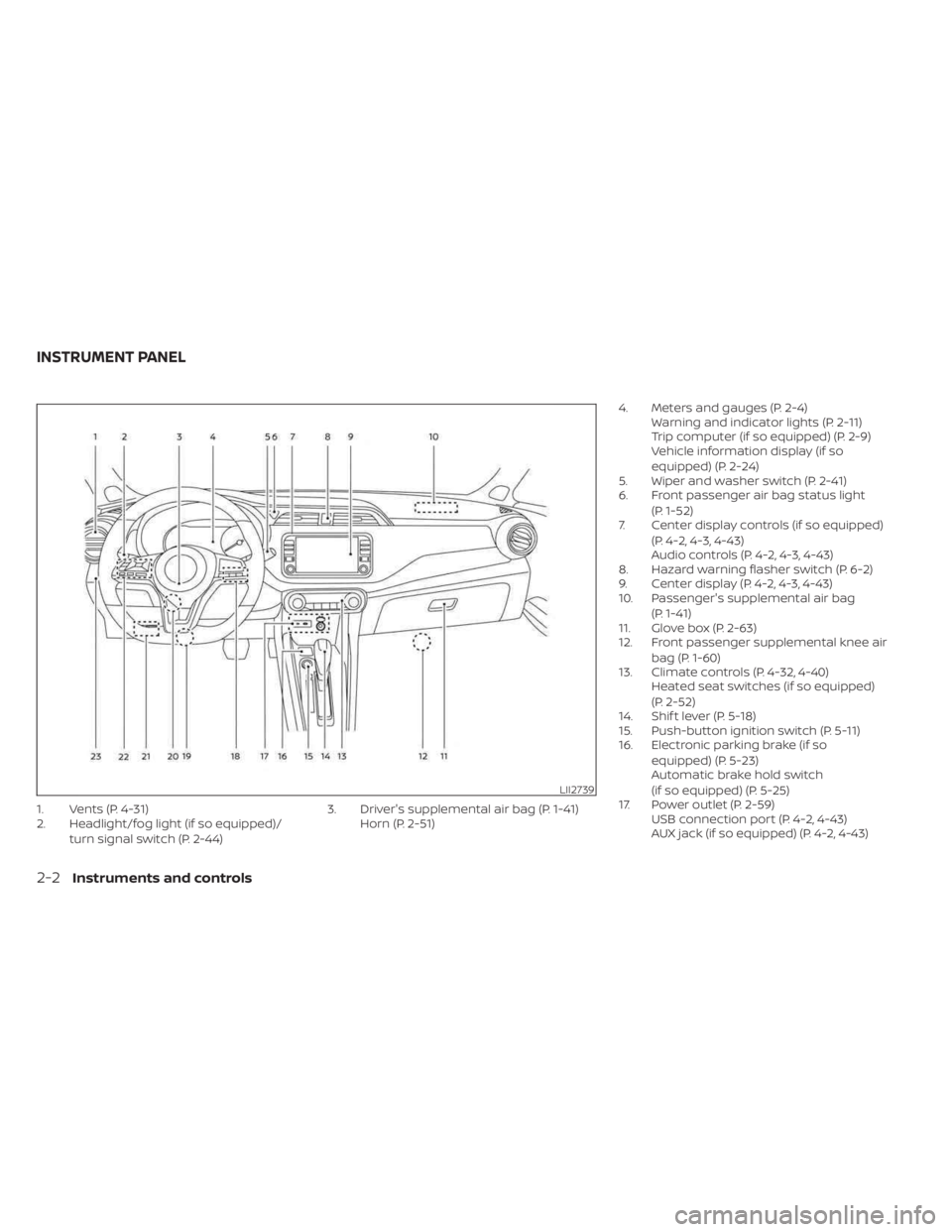
1. Vents (P. 4-31)
2. Headlight/fog light (if so equipped)/turn signal switch (P. 2-44) 3. Driver's supplemental air bag (P. 1-41)
Horn (P. 2-51) 4. Meters and gauges (P. 2-4)
Warning and indicator lights (P. 2-11)
Trip computer (if so equipped) (P. 2-9)
Vehicle information display (if so
equipped) (P. 2-24)
5. Wiper and washer switch (P. 2-41)
6. Front passenger air bag status light
(P. 1-52)
7. Center display controls (if so equipped)
(P. 4-2, 4-3, 4-43)
Audio controls (P. 4-2, 4-3, 4-43)
8. Hazard warning flasher switch (P. 6-2)
9. Center display (P. 4-2, 4-3, 4-43)
10. Passenger's supplemental air bag
(P. 1-41)
11. Glove box (P. 2-63)
12. Front passenger supplemental knee air
bag (P. 1-60)
13. Climate controls (P. 4-32, 4-40) Heated seat switches (if so equipped)
(P. 2-52)
14. Shif t lever (P. 5-18)
15. Push-button ignition switch (P. 5-11)
16. Electronic parking brake (if so
equipped) (P. 5-23)
Automatic brake hold switch
(if so equipped) (P. 5-25)
17. Power outlet (P. 2-59) USB connection port (P. 4-2, 4-43)
AUX jack (if so equipped) (P. 4-2, 4-43)
LII2739
INSTRUMENT PANEL
2-2Instruments and controls
Page 92 of 558
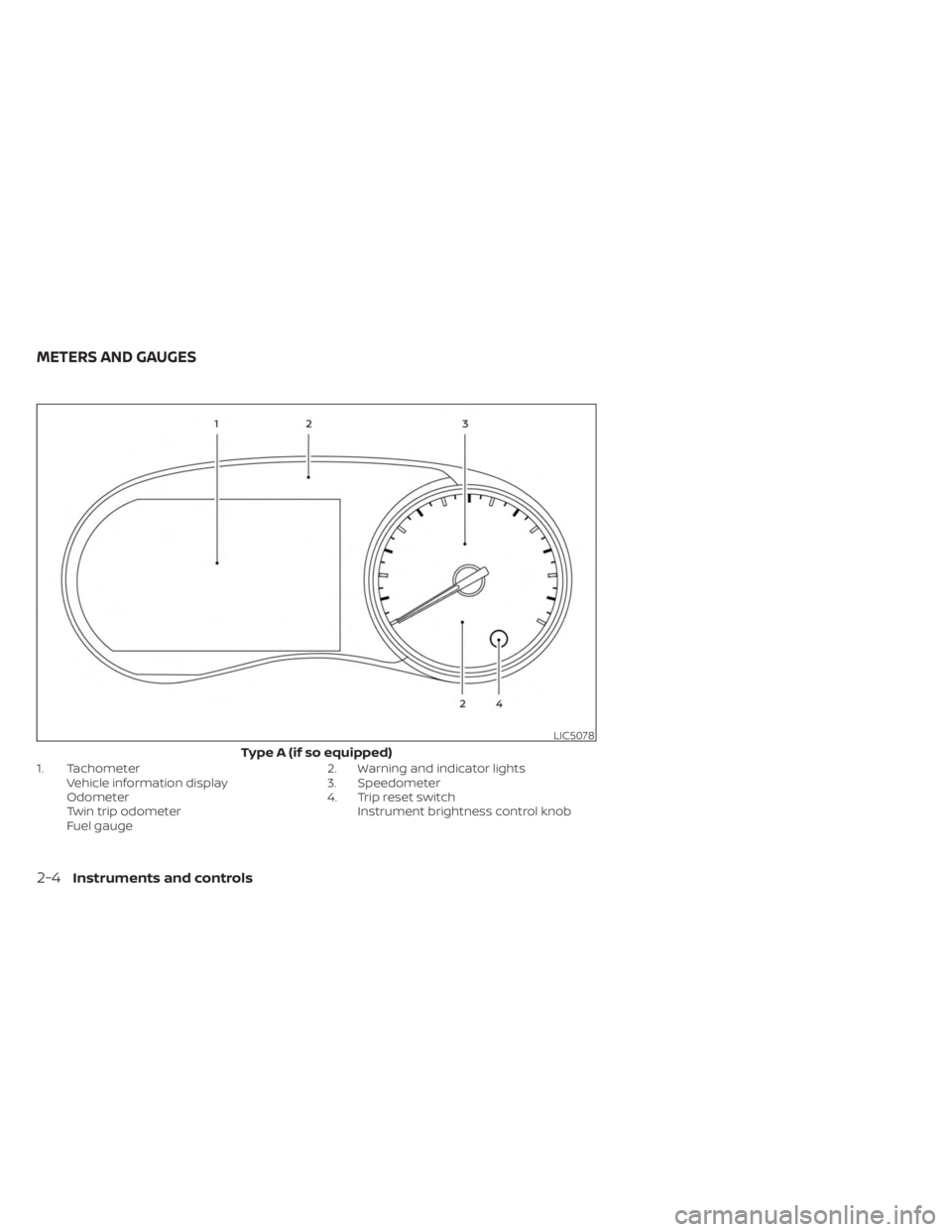
1. TachometerVehicle information display
Odometer
Twin trip odometer
Fuel gauge 2. Warning and indicator lights
3. Speedometer
4. Trip reset switch
Instrument brightness control knob
LIC5078
Type A (if so equipped)
METERS AND GAUGES
2-4Instruments and controls
Page 93 of 558
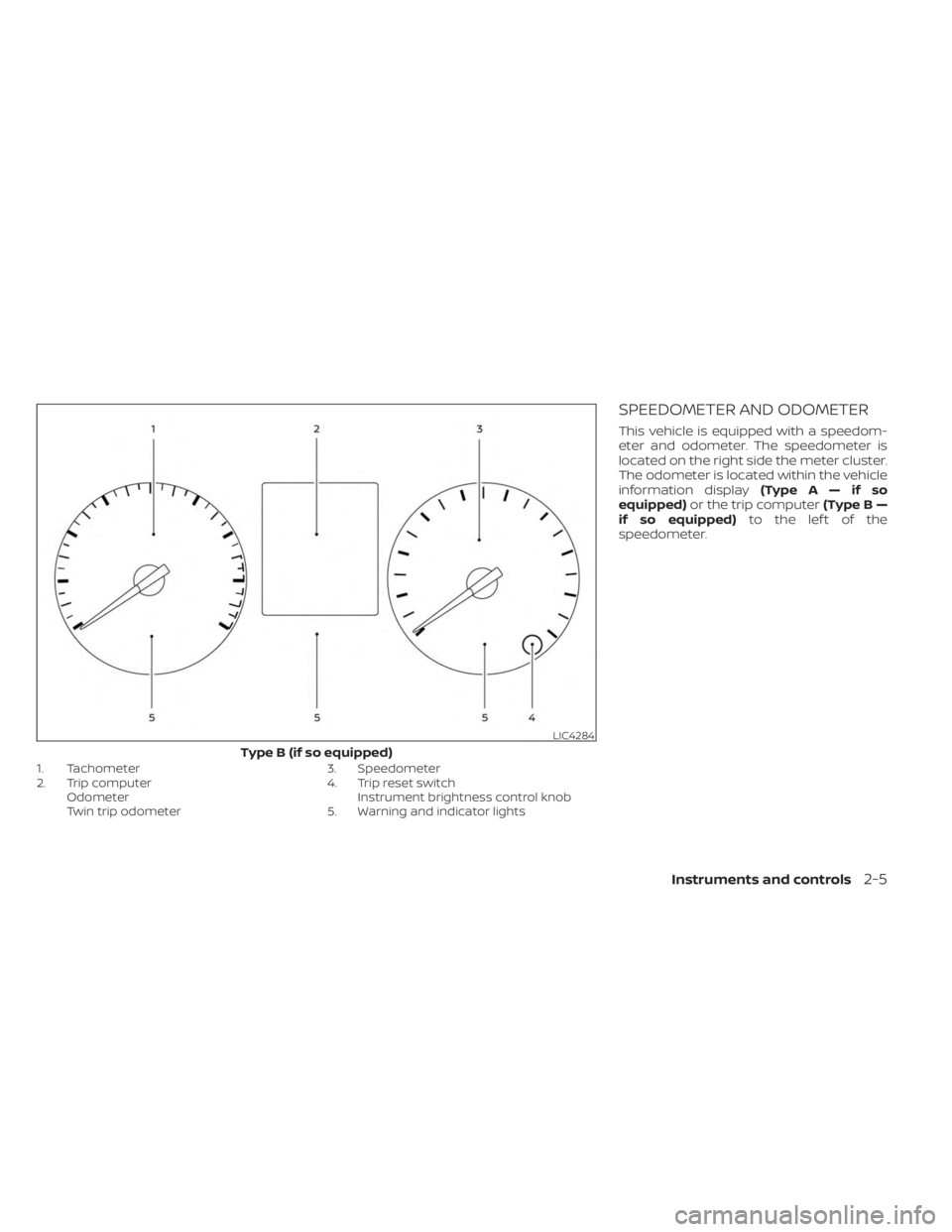
1. Tachometer
2. Trip computerOdometer
Twin trip odometer 3. Speedometer
4. Trip reset switch
Instrument brightness control knob
5. Warning and indicator lights
SPEEDOMETER AND ODOMETER
This vehicle is equipped with a speedom-
eter and odometer. The speedometer is
located on the right side the meter cluster.
The odometer is located within the vehicle
information display (TypeA—ifso
equipped) or the trip computer (Type B —
if so equipped) to the lef t of the
speedometer.
LIC4284
Type B (if so equipped)
Instruments and controls2-5
Page 99 of 558
Warning/Indicator light (red)Warning/Indicator light (yellow) Warning/Indicator light (other)
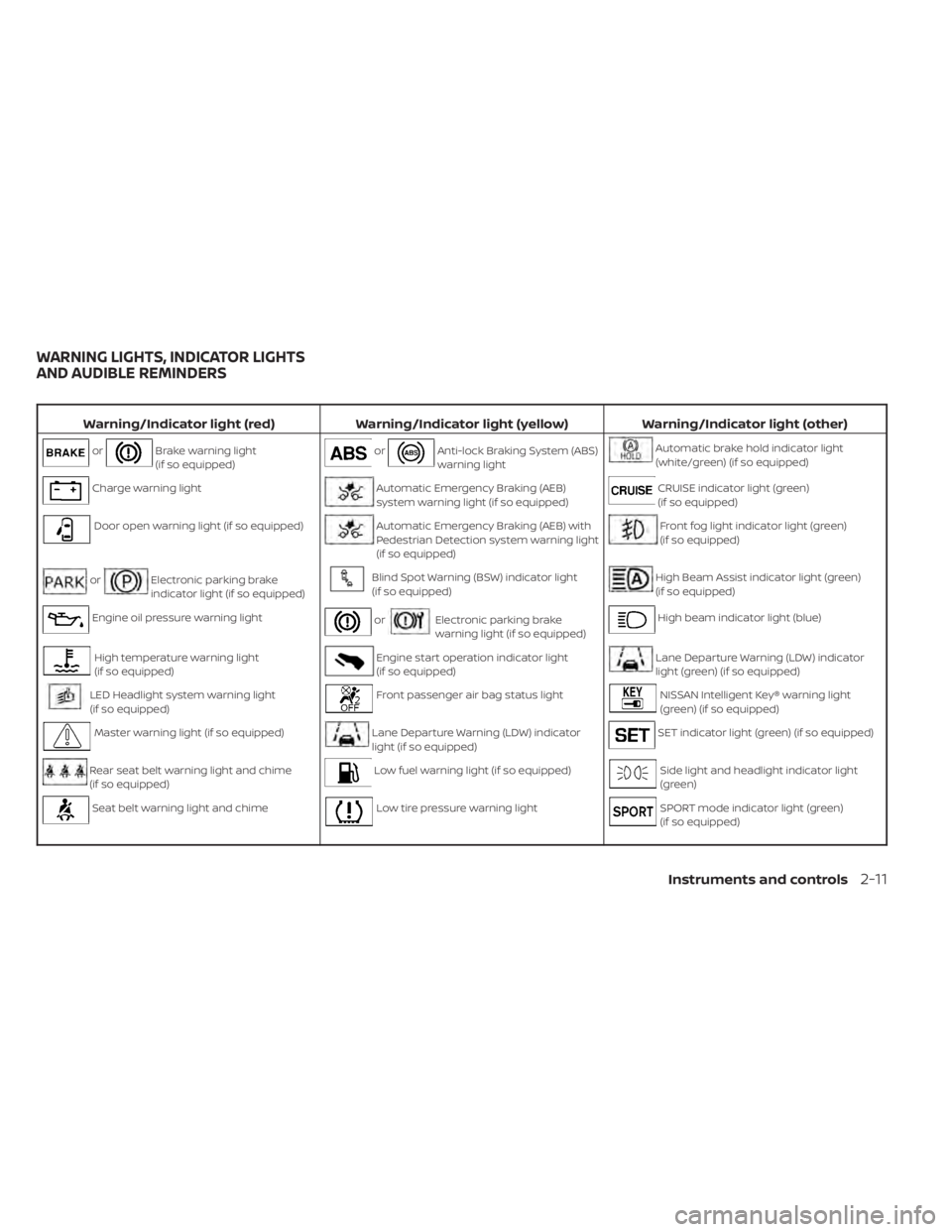
orBrake warning light
(if so equipped)orAnti-lock Braking System (ABS)
warning lightAutomatic brake hold indicator light
(white/green) (if so equipped)
Charge warning lightAutomatic Emergency Braking (AEB)
system warning light (if so equipped)CRUISE indicator light (green)
(if so equipped)
Door open warning light (if so equipped)Automatic Emergency Braking (AEB) with
Pedestrian Detection system warning light
(if so equipped)Front fog light indicator light (green)
(if so equipped)
orElectronic parking brake
indicator light (if so equipped)Blind Spot Warning (BSW) indicator light
(if so equipped)High Beam Assist indicator light (green)
(if so equipped)
Engine oil pressure warning lightorElectronic parking brake
warning light (if so equipped)High beam indicator light (blue)
High temperature warning light
(if so equipped)Engine start operation indicator light
(if so equipped)Lane Departure Warning (LDW) indicator
light (green) (if so equipped)
LED Headlight system warning light
(if so equipped)Front passenger air bag status lightNISSAN Intelligent Key® warning light
(green) (if so equipped)
Master warning light (if so equipped)Lane Departure Warning (LDW) indicator
light (if so equipped)SET indicator light (green) (if so equipped)
Rear seat belt warning light and chime
(if so equipped)Low fuel warning light (if so equipped)Side light and headlight indicator light
(green)
Seat belt warning light and chimeLow tire pressure warning lightSPORT mode indicator light (green)
(if so equipped)
WARNING LIGHTS, INDICATOR LIGHTS
AND AUDIBLE REMINDERS
Instruments and controls2-11
Page 100 of 558
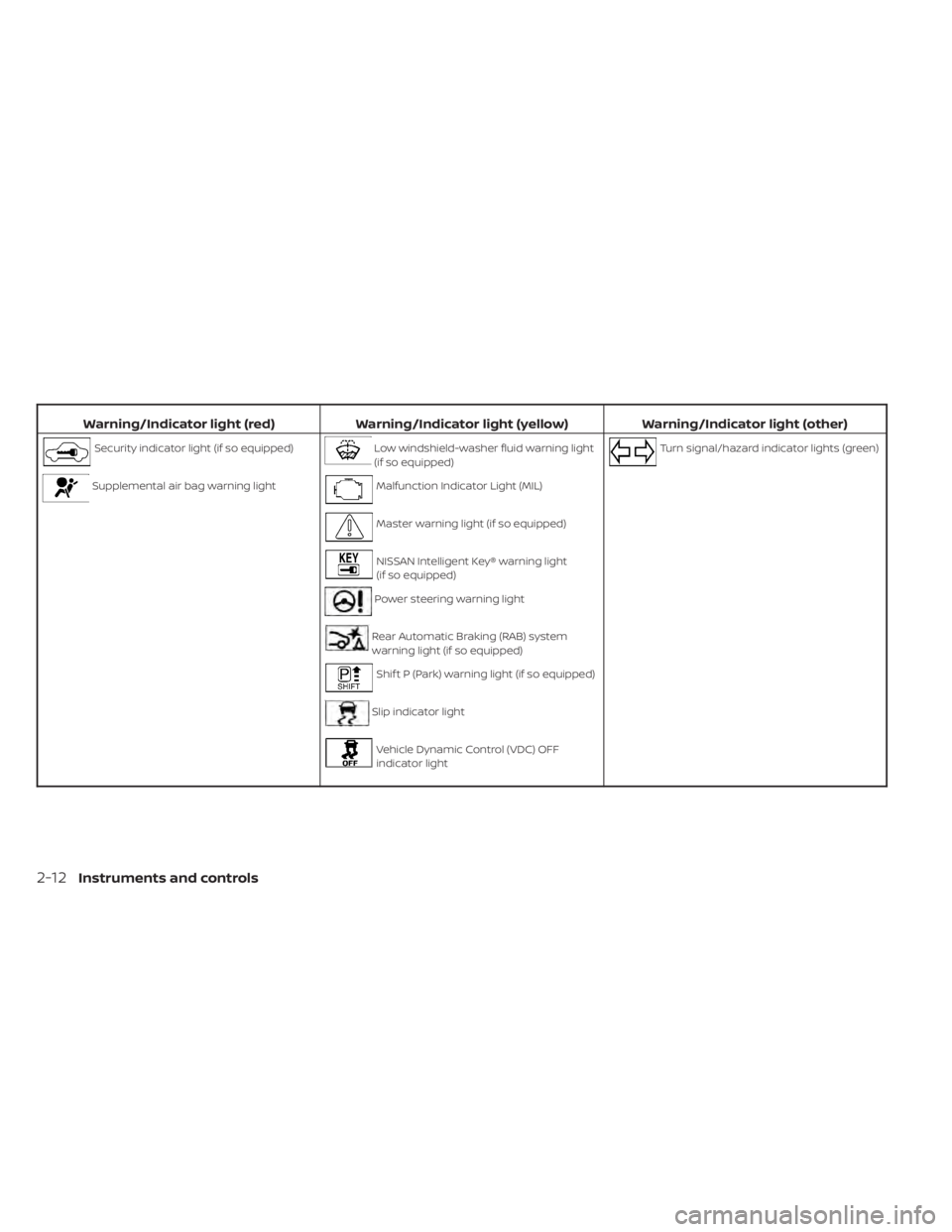
Warning/Indicator light (red)Warning/Indicator light (yellow) Warning/Indicator light (other)
Security indicator light (if so equipped)Low windshield-washer fluid warning light
(if so equipped)Turn signal/hazard indicator lights (green)
Supplemental air bag warning lightMalfunction Indicator Light (MIL)
Master warning light (if so equipped)
NISSAN Intelligent Key® warning light
(if so equipped)
Power steering warning light
Rear Automatic Braking (RAB) system
warning light (if so equipped)
Shif t P (Park) warning light (if so equipped)
Slip indicator light
Vehicle Dynamic Control (VDC) OFF
indicator light
2-12Instruments and controls
Page 101 of 558
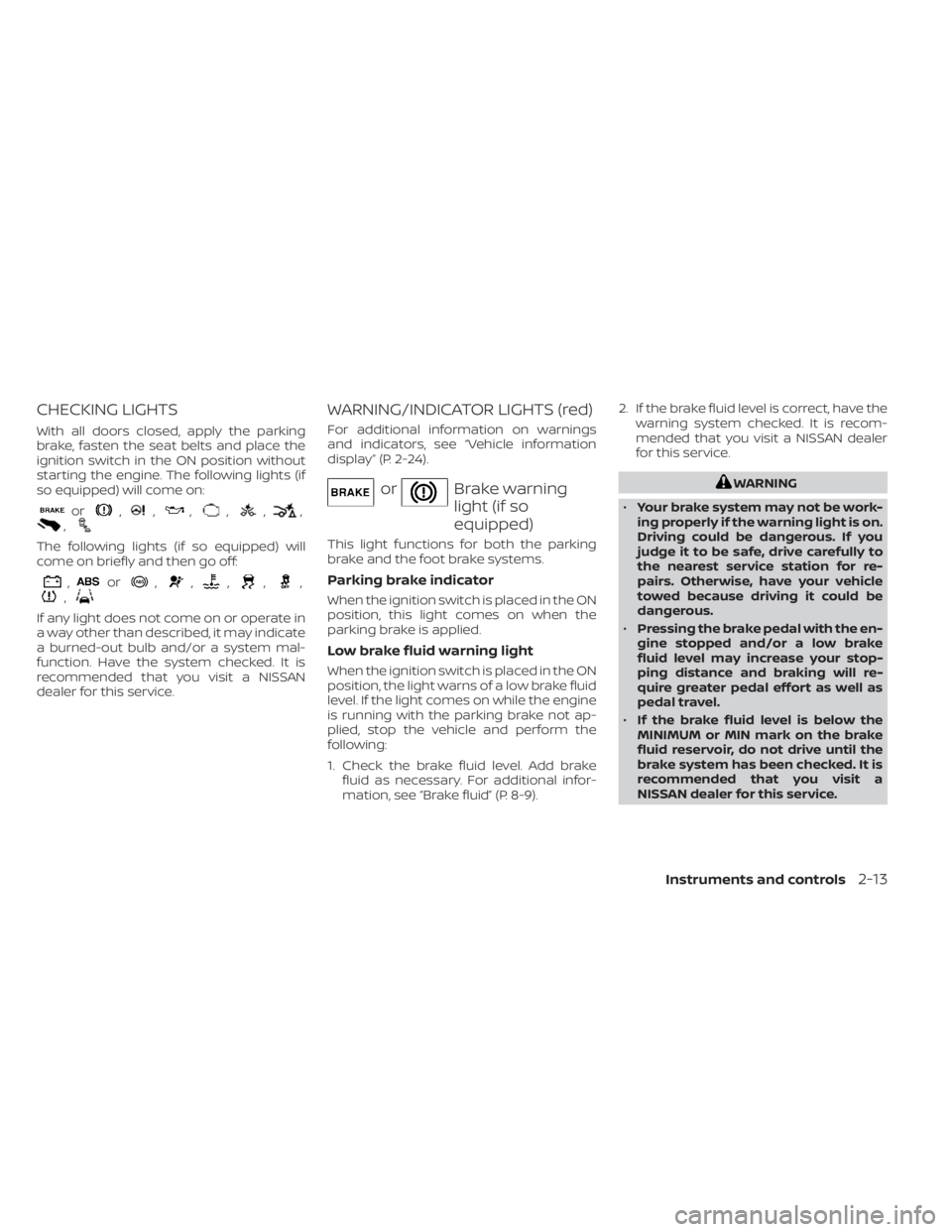
CHECKING LIGHTS
With all doors closed, apply the parking
brake, fasten the seat belts and place the
ignition switch in the ON position without
starting the engine. The following lights (if
so equipped) will come on:
or,,,,,,,
The following lights (if so equipped) will
come on briefly and then go off:
,or,,,,,,
If any light does not come on or operate in
a way other than described, it may indicate
a burned-out bulb and/or a system mal-
function. Have the system checked. It is
recommended that you visit a NISSAN
dealer for this service.
WARNING/INDICATOR LIGHTS (red)
For additional information on warnings
and indicators, see “Vehicle information
display” (P. 2-24).
orBrake warning
light (if so
equipped)
This light functions for both the parking
brake and the foot brake systems.
Parking brake indicator
When the ignition switch is placed in the ON
position, this light comes on when the
parking brake is applied.
Low brake fluid warning light
When the ignition switch is placed in the ON
position, the light warns of a low brake fluid
level. If the light comes on while the engine
is running with the parking brake not ap-
plied, stop the vehicle and perform the
following:
1. Check the brake fluid level. Add brakefluid as necessary. For additional infor-
mation, see “Brake fluid” (P. 8-9). 2. If the brake fluid level is correct, have the
warning system checked. It is recom-
mended that you visit a NISSAN dealer
for this service.
WARNING
• Your brake system may not be work-
ing properly if the warning light is on.
Driving could be dangerous. If you
judge it to be safe, drive carefully to
the nearest service station for re-
pairs. Otherwise, have your vehicle
towed because driving it could be
dangerous.
• Pressing the brake pedal with the en-
gine stopped and/or a low brake
fluid level may increase your stop-
ping distance and braking will re-
quire greater pedal effort as well as
pedal travel.
• If the brake fluid level is below the
MINIMUM or MIN mark on the brake
fluid reservoir, do not drive until the
brake system has been checked. It is
recommended that you visit a
NISSAN dealer for this service.
Instruments and controls2-13
Page 104 of 558
If any of the following conditions occur, the
front air bag, side air bag, curtain air bag,
and pretensioner seat belt systems need
servicing:
•
The supplemental air bag warning light re-
mains on af ter approximately 7 seconds.
• The supplemental air bag warning light flashes intermittently.
• The supplemental air bag warning light does not come on at all.
It is recommended that you visit a NISSAN
dealer for these services.
Unless checked and repaired, the supplemen-
tal restraint system (air bag system) and/or
the pretensioner(s) may not function properly.
For additional information, see “Supplemental
Restraint System (SRS)” (P. 1-41).
WARNING
If the supplemental air bag warning
light is on, it could mean that the front
air bag, side air bag, curtain air bag
and/or pretensioner systems will not
operate in an accident. To help avoid
injury to yourself or others, have your
vehicle checked as soon as possible.
It is recommended that you visit a
NISSAN dealer for this service.
WARNING/INDICATOR LIGHTS
(yellow)
For additional information on warnings
and indicators, see “Vehicle information
display” (P. 2-24).
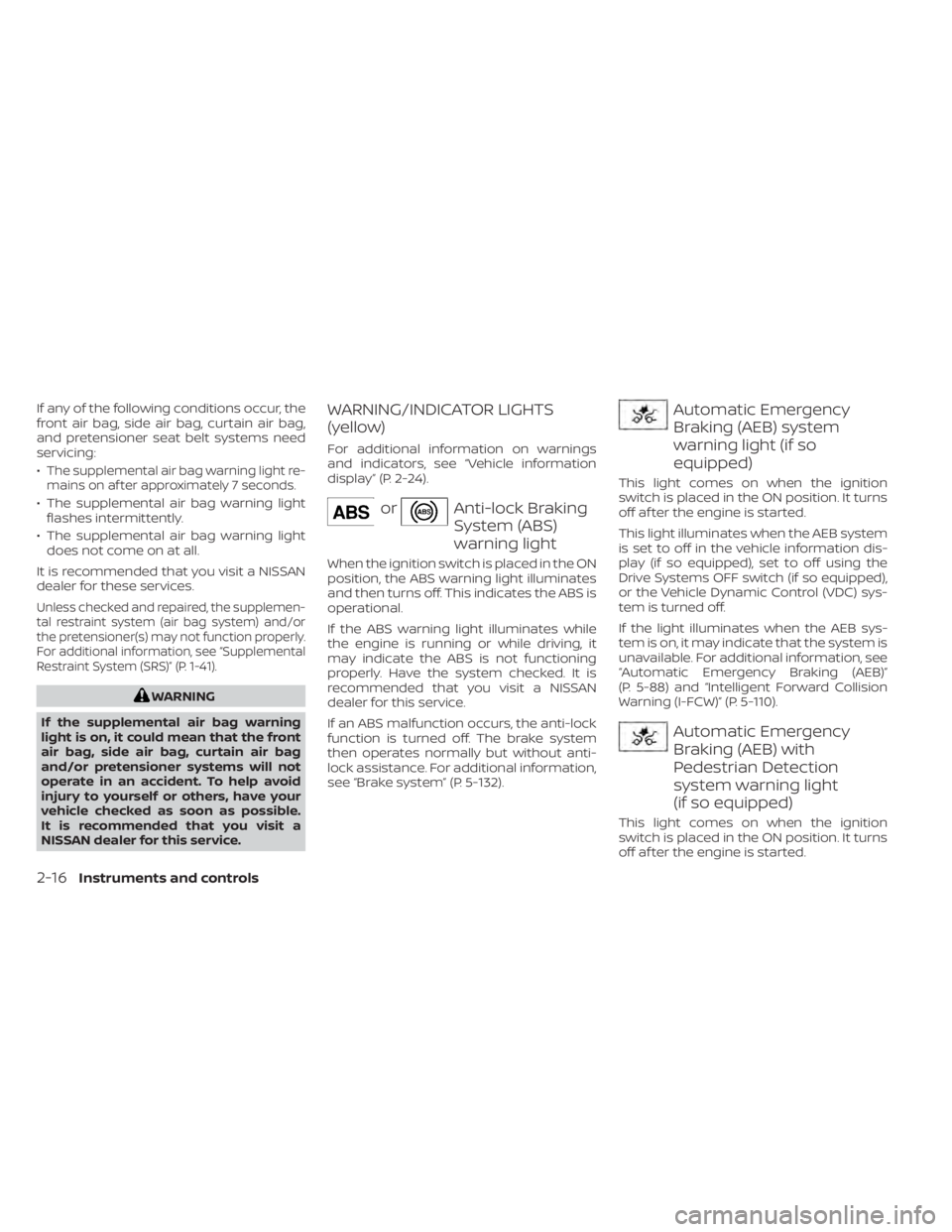
orAnti-lock Braking
System (ABS)
warning light
When the ignition switch is placed in the ON
position, the ABS warning light illuminates
and then turns off. This indicates the ABS is
operational.
If the ABS warning light illuminates while
the engine is running or while driving, it
may indicate the ABS is not functioning
properly. Have the system checked. It is
recommended that you visit a NISSAN
dealer for this service.
If an ABS malfunction occurs, the anti-lock
function is turned off. The brake system
then operates normally but without anti-
lock assistance. For additional information,
see “Brake system” (P. 5-132).
Automatic Emergency
Braking (AEB) system
warning light (if so
equipped)
This light comes on when the ignition
switch is placed in the ON position. It turns
off af ter the engine is started.
This light illuminates when the AEB system
is set to off in the vehicle information dis-
play (if so equipped), set to off using the
Drive Systems OFF switch (if so equipped),
or the Vehicle Dynamic Control (VDC) sys-
tem is turned off.
If the light illuminates when the AEB sys-
tem is on, it may indicate that the system is
unavailable. For additional information, see
“Automatic Emergency Braking (AEB)”
(P. 5-88) and “Intelligent Forward Collision
Warning (I-FCW)” (P. 5-110).
Automatic Emergency
Braking (AEB) with
Pedestrian Detection
system warning light
(if so equipped)
This light comes on when the ignition
switch is placed in the ON position. It turns
off af ter the engine is started.
2-16Instruments and controls
Page 109 of 558
This light illuminates when the RAB system
is turned off in the vehicle information dis-
play or set to off using the Drive Systems
OFF switch.
If the light illuminates when the RAB sys-
tem is on, it may indicate that the system is
unavailable. For additional information, see
“Rear Automatic Braking (RAB)” (P. 5-81).
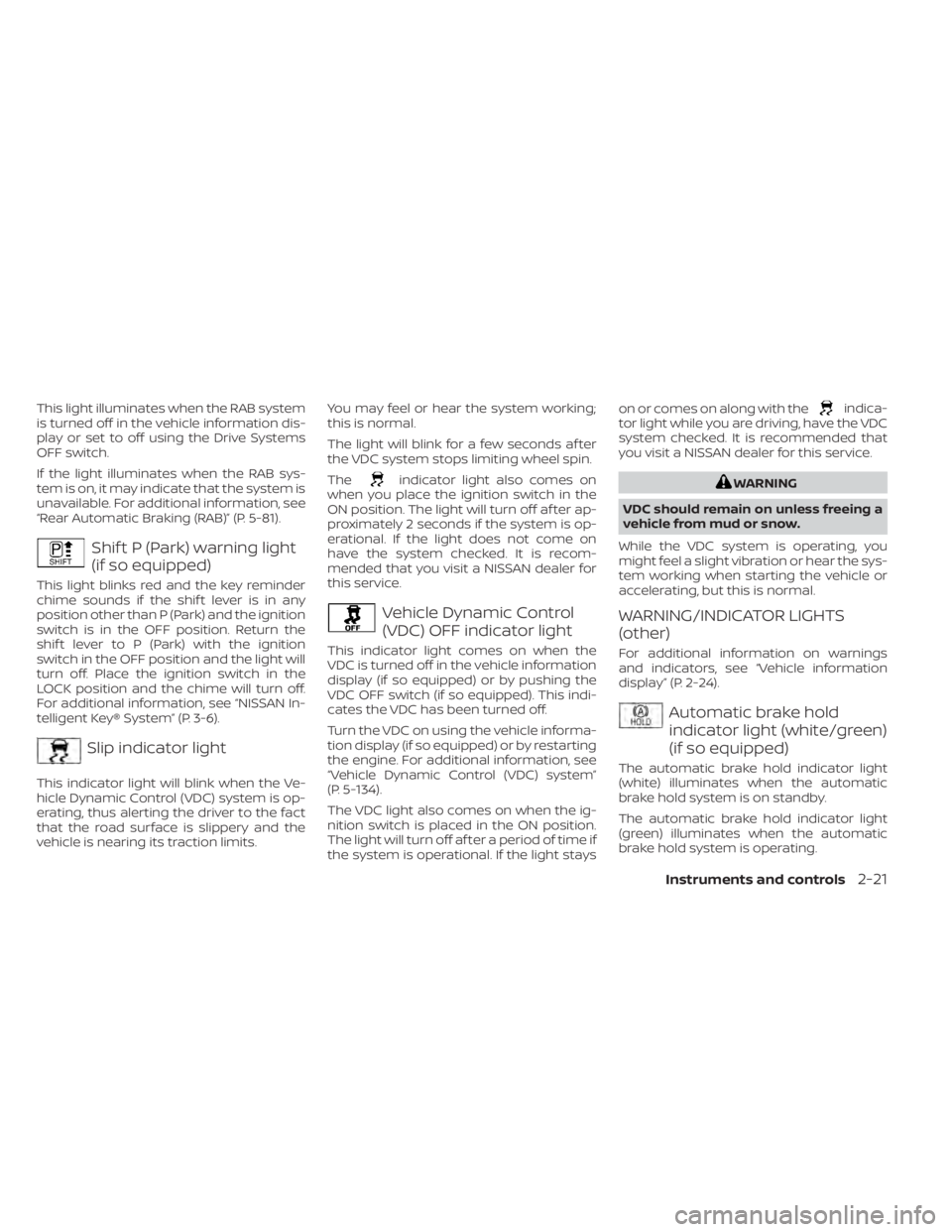
Shif t P (Park) warning light
(if so equipped)
This light blinks red and the key reminder
chime sounds if the shif t lever is in any
position other than P (Park) and the ignition
switch is in the OFF position. Return the
shif t lever to P (Park) with the ignition
switch in the OFF position and the light will
turn off. Place the ignition switch in the
LOCK position and the chime will turn off.
For additional information, see “NISSAN In-
telligent Key® System” (P. 3-6).
Slip indicator light
This indicator light will blink when the Ve-
hicle Dynamic Control (VDC) system is op-
erating, thus alerting the driver to the fact
that the road surface is slippery and the
vehicle is nearing its traction limits.You may feel or hear the system working;
this is normal.
The light will blink for a few seconds af ter
the VDC system stops limiting wheel spin.
The
indicator light also comes on
when you place the ignition switch in the
ON position. The light will turn off af ter ap-
proximately 2 seconds if the system is op-
erational. If the light does not come on
have the system checked. It is recom-
mended that you visit a NISSAN dealer for
this service.
Vehicle Dynamic Control
(VDC) OFF indicator light
This indicator light comes on when the
VDC is turned off in the vehicle information
display (if so equipped) or by pushing the
VDC OFF switch (if so equipped). This indi-
cates the VDC has been turned off.
Turn the VDC on using the vehicle informa-
tion display (if so equipped) or by restarting
the engine. For additional information, see
“Vehicle Dynamic Control (VDC) system”
(P. 5-134).
The VDC light also comes on when the ig-
nition switch is placed in the ON position.
The light will turn off af ter a period of time if
the system is operational. If the light stays on or comes on along with the
indica-
tor light while you are driving, have the VDC
system checked. It is recommended that
you visit a NISSAN dealer for this service.
WARNING
VDC should remain on unless freeing a
vehicle from mud or snow.
While the VDC system is operating, you
might feel a slight vibration or hear the sys-
tem working when starting the vehicle or
accelerating, but this is normal.
WARNING/INDICATOR LIGHTS
(other)
For additional information on warnings
and indicators, see “Vehicle information
display” (P. 2-24).
Automatic brake hold
indicator light (white/green)
(if so equipped)
The automatic brake hold indicator light
(white) illuminates when the automatic
brake hold system is on standby.
The automatic brake hold indicator light
(green) illuminates when the automatic
brake hold system is operating.
Instruments and controls2-21