2023 NISSAN KICKS warning
[x] Cancel search: warningPage 168 of 558
CAUTION
Do not allow the immobilizer system
key, which contains an electrical tran-
sponder, to come into contact with wa-
ter or salt water. This could affect sys-
tem function. When the doors are locked using one of the
following methods, the doors cannot be
opened using the inside or outside door
handles. The doors must be unlocked to
open the doors.
WARNING
• Always have the doors locked while
driving. Along with the use of seat
belts, this provides greater safety in
the event of an accident by helping to
prevent persons from being thrown
from the vehicle. This also helps keep
children and others from uninten-
tionally opening the doors, and will
help keep out intruders.
• Before opening any door, always look
for and avoid oncoming traffic.
•
To help avoid risk of injury or death
through unintended operation of the
vehicle and/or its systems, including
entrapment in windows or inadver-
tent door lock activation, do not leave
children, people who require the assis-
tance of others or pets unattended in
your vehicle. Additionally, the tem-
perature inside a closed vehicle on a
warm day can quickly become high
enough to cause a significant risk of
injury or death to people and pets.
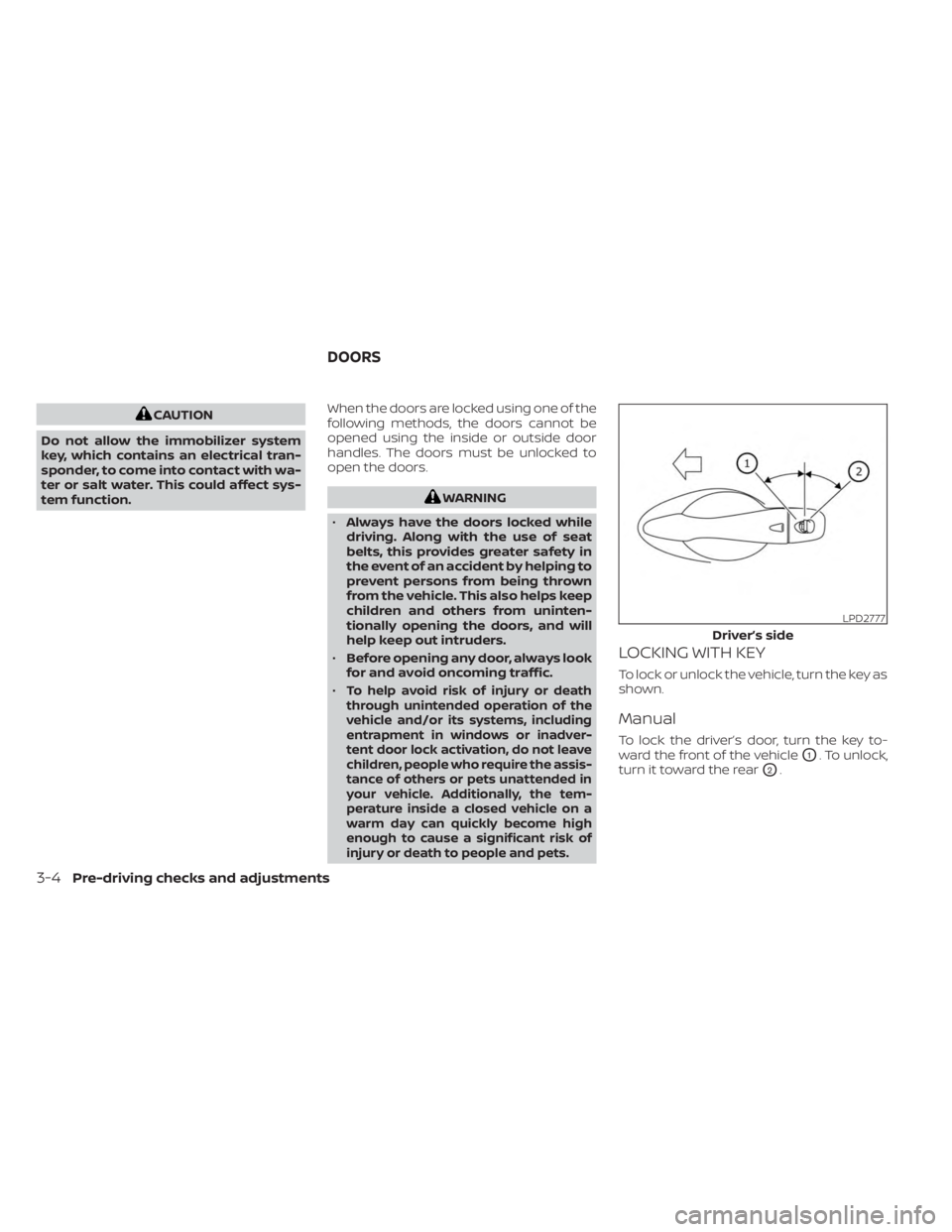
LOCKING WITH KEY
To lock or unlock the vehicle, turn the key as
shown.
Manual
To lock the driver’s door, turn the key to-
ward the front of the vehicle
O1. To unlock,
turn it toward the rear
O2.
LPD2777
Driver’s side
DOORS
3-4Pre-driving checks and adjustments
Page 169 of 558
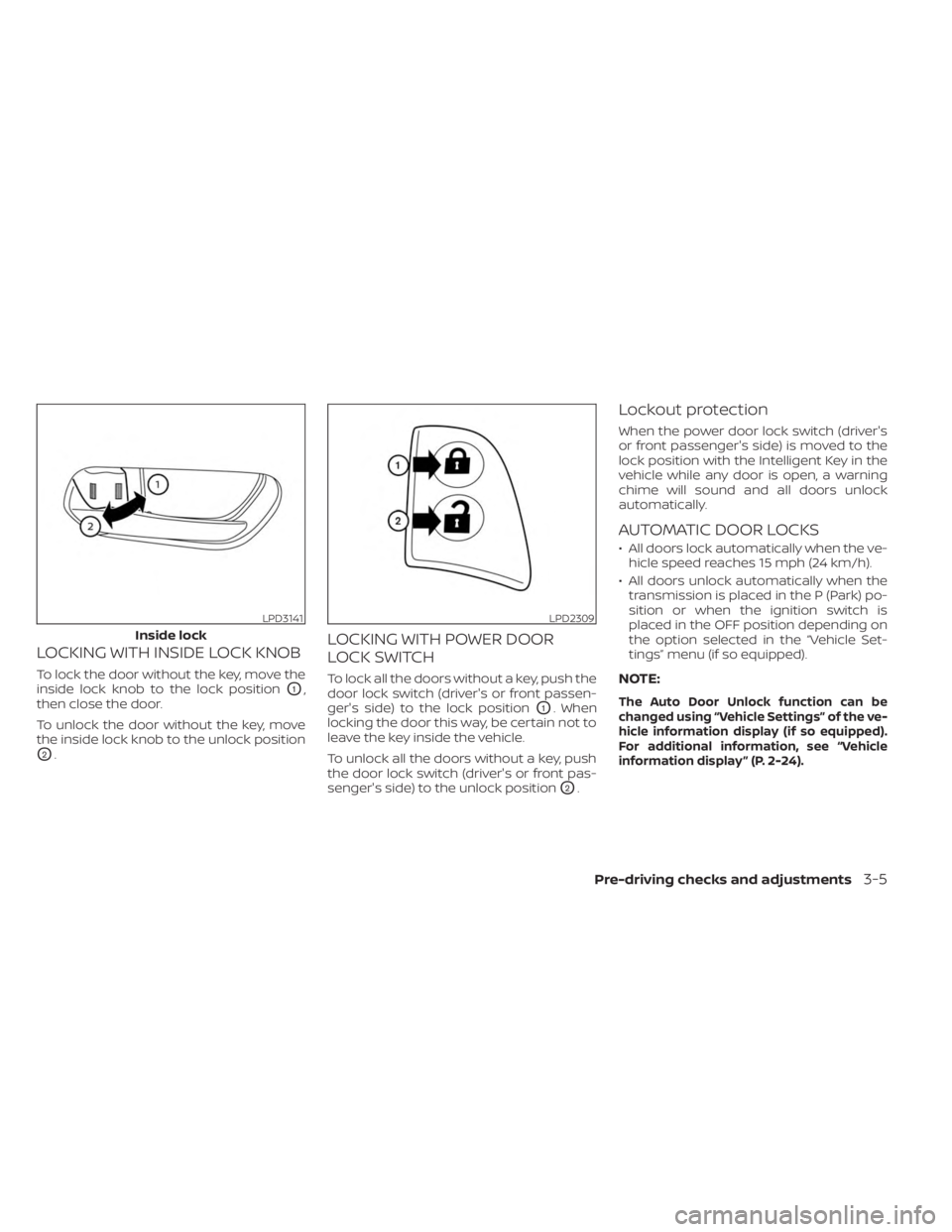
LOCKING WITH INSIDE LOCK KNOB
To lock the door without the key, move the
inside lock knob to the lock position
O1,
then close the door.
To unlock the door without the key, move
the inside lock knob to the unlock position
O2.
LOCKING WITH POWER DOOR
LOCK SWITCH
To lock all the doors without a key, push the
door lock switch (driver's or front passen-
ger's side) to the lock position
O1. When
locking the door this way, be certain not to
leave the key inside the vehicle.
To unlock all the doors without a key, push
the door lock switch (driver's or front pas-
senger's side) to the unlock position
O2.
Lockout protection
When the power door lock switch (driver's
or front passenger's side) is moved to the
lock position with the Intelligent Key in the
vehicle while any door is open, a warning
chime will sound and all doors unlock
automatically.
AUTOMATIC DOOR LOCKS
• All doors lock automatically when the ve- hicle speed reaches 15 mph (24 km/h).
• All doors unlock automatically when the transmission is placed in the P (Park) po-
sition or when the ignition switch is
placed in the OFF position depending on
the option selected in the “Vehicle Set-
tings” menu (if so equipped).
NOTE:
The Auto Door Unlock function can be
changed using “Vehicle Settings” of the ve-
hicle information display (if so equipped).
For additional information, see “Vehicle
information display ” (P. 2-24).
LPD3141
Inside lock
LPD2309
Pre-driving checks and adjustments3-5
Page 170 of 558
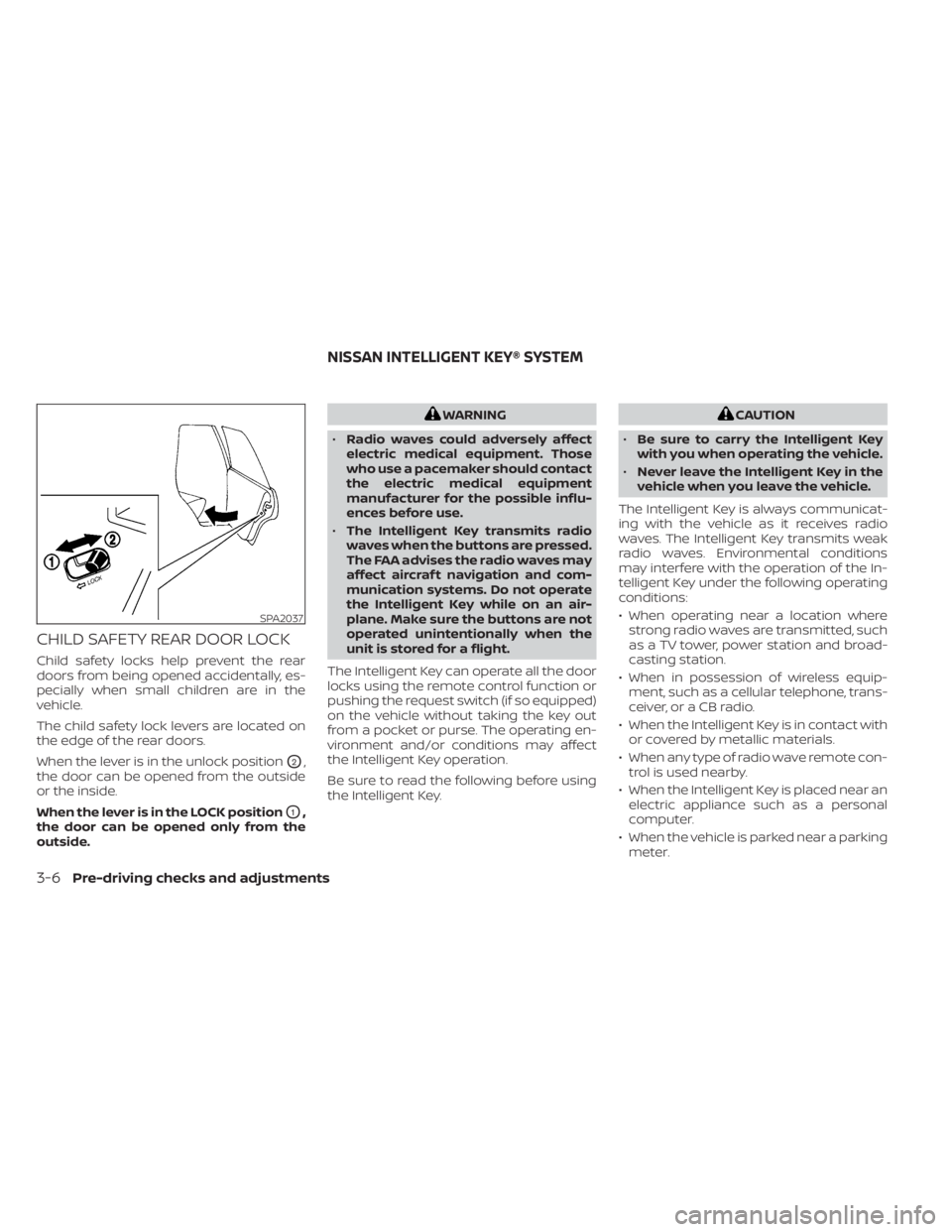
CHILD SAFETY REAR DOOR LOCK
Child safety locks help prevent the rear
doors from being opened accidentally, es-
pecially when small children are in the
vehicle.
The child safety lock levers are located on
the edge of the rear doors.
When the lever is in the unlock position
O2,
the door can be opened from the outside
or the inside.
When the lever is in the LOCK position
O1,
the door can be opened only from the
outside.
WARNING
• Radio waves could adversely affect
electric medical equipment. Those
who use a pacemaker should contact
the electric medical equipment
manufacturer for the possible influ-
ences before use.
• The Intelligent Key transmits radio
waves when the buttons are pressed.
The FAA advises the radio waves may
affect aircraf t navigation and com-
munication systems. Do not operate
the Intelligent Key while on an air-
plane. Make sure the buttons are not
operated unintentionally when the
unit is stored for a flight.
The Intelligent Key can operate all the door
locks using the remote control function or
pushing the request switch (if so equipped)
on the vehicle without taking the key out
from a pocket or purse. The operating en-
vironment and/or conditions may affect
the Intelligent Key operation.
Be sure to read the following before using
the Intelligent Key.CAUTION
• Be sure to carry the Intelligent Key
with you when operating the vehicle.
• Never leave the Intelligent Key in the
vehicle when you leave the vehicle.
The Intelligent Key is always communicat-
ing with the vehicle as it receives radio
waves. The Intelligent Key transmits weak
radio waves. Environmental conditions
may interfere with the operation of the In-
telligent Key under the following operating
conditions:
• When operating near a location where strong radio waves are transmitted, such
as a TV tower, power station and broad-
casting station.
• When in possession of wireless equip- ment, such as a cellular telephone, trans-
ceiver, or a CB radio.
• When the Intelligent Key is in contact with or covered by metallic materials.
• When any type of radio wave remote con- trol is used nearby.
• When the Intelligent Key is placed near an electric appliance such as a personal
computer.
• When the vehicle is parked near a parking meter.
SPA2037
NISSAN INTELLIGENT KEY® SYSTEM
3-6Pre-driving checks and adjustments
Page 171 of 558
In such cases, correct the operating condi-
tions before using the Intelligent Key func-
tion or use the mechanical key.
Although the life of the battery varies de-
pending on the operating conditions, the
battery’s life is approximately two years. If
the battery is discharged, replace it with a
new one.
When the Intelligent Key battery is low, the
NISSAN Intelligent Key® warning light (if so
equipped) will blink green for about 30 sec-
onds af ter the ignition switch is placed in
the ON position.
Since the Intelligent Key is continuously re-
ceiving radio waves, if the key is lef t near
equipment which transmits strong radio
waves, such as signals from a TV and per-
sonal computer, the battery life may be-
come shorter.
When the battery is discharged, firmly ap-
ply the foot brake and touch the ignition
switch with the Intelligent Key. Then push
the ignition switch while depressing the
brake pedal within 10 seconds af ter the
chime sound. For additional information,
see “Push-button ignition switch” (P. 5-11).
For additional information, see “Battery re-
placement” (P. 8-22).As many as four Intelligent Keys can be
registered and used with one vehicle. For
information about the purchase and use of
additional Intelligent Keys, it is recom-
mended that you visit a NISSAN dealer.
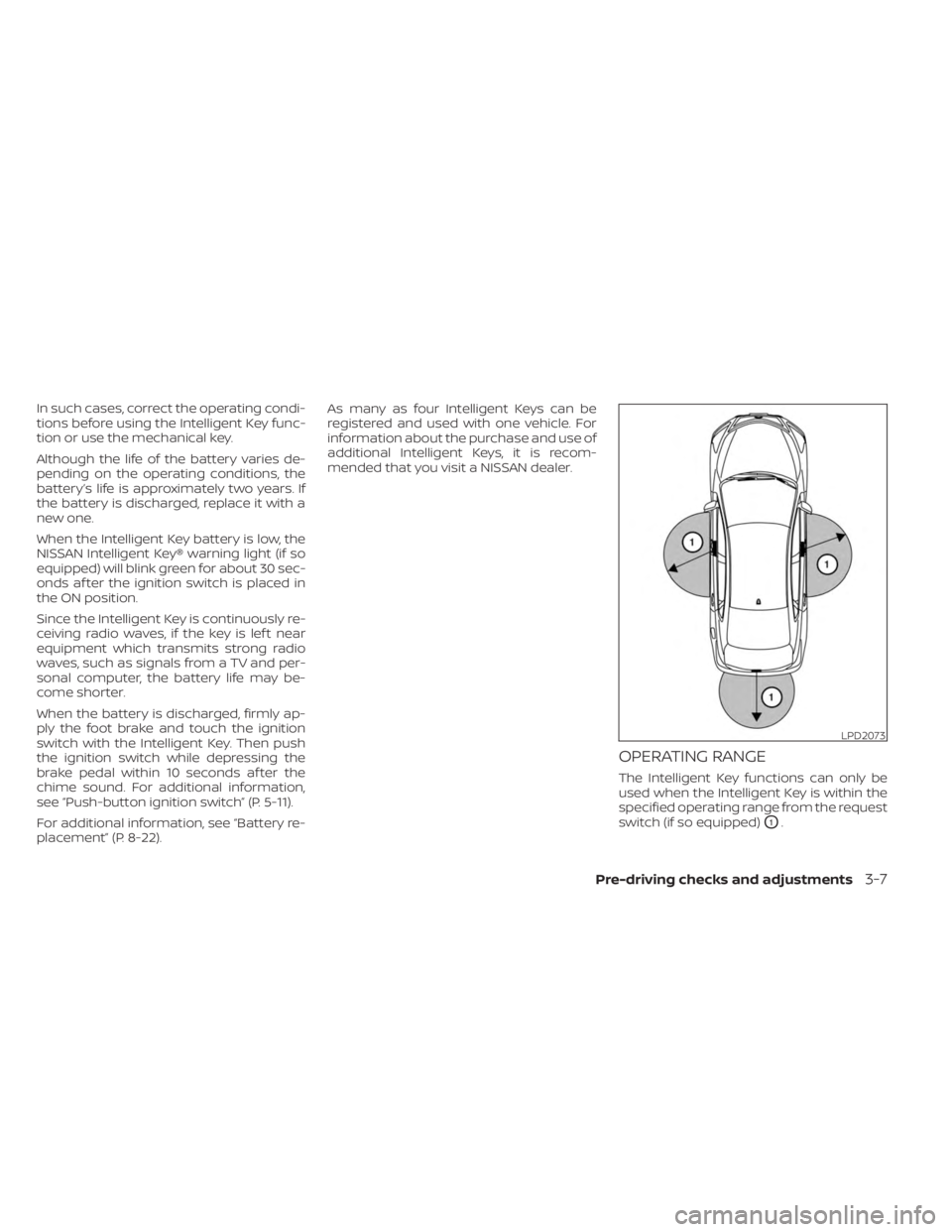
OPERATING RANGE
The Intelligent Key functions can only be
used when the Intelligent Key is within the
specified operating range from the request
switch (if so equipped)
O1.
LPD2073
Pre-driving checks and adjustments3-7
Page 174 of 558
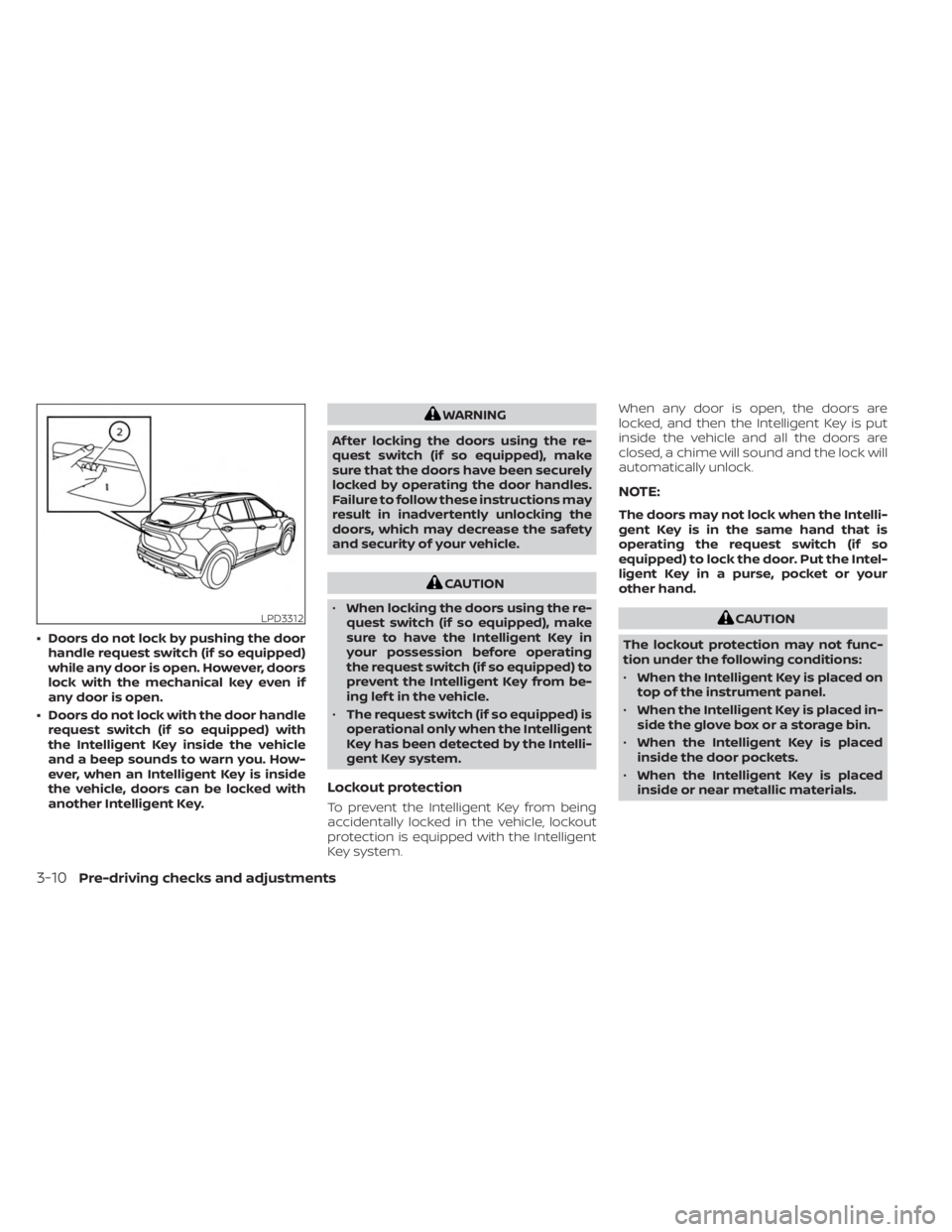
• Doors do not lock by pushing the doorhandle request switch (if so equipped)
while any door is open. However, doors
lock with the mechanical key even if
any door is open.
• Doors do not lock with the door handle request switch (if so equipped) with
the Intelligent Key inside the vehicle
and a beep sounds to warn you. How-
ever, when an Intelligent Key is inside
the vehicle, doors can be locked with
another Intelligent Key.
WARNING
Af ter locking the doors using the re-
quest switch (if so equipped), make
sure that the doors have been securely
locked by operating the door handles.
Failure to follow these instructions may
result in inadvertently unlocking the
doors, which may decrease the safety
and security of your vehicle.
CAUTION
• When locking the doors using the re-
quest switch (if so equipped), make
sure to have the Intelligent Key in
your possession before operating
the request switch (if so equipped) to
prevent the Intelligent Key from be-
ing lef t in the vehicle.
• The request switch (if so equipped) is
operational only when the Intelligent
Key has been detected by the Intelli-
gent Key system.
Lockout protection
To prevent the Intelligent Key from being
accidentally locked in the vehicle, lockout
protection is equipped with the Intelligent
Key system. When any door is open, the doors are
locked, and then the Intelligent Key is put
inside the vehicle and all the doors are
closed, a chime will sound and the lock will
automatically unlock.
NOTE:
The doors may not lock when the Intelli-
gent Key is in the same hand that is
operating the request switch (if so
equipped) to lock the door. Put the Intel-
ligent Key in a purse, pocket or your
other hand.
CAUTION
The lockout protection may not func-
tion under the following conditions:
• When the Intelligent Key is placed on
top of the instrument panel.
• When the Intelligent Key is placed in-
side the glove box or a storage bin.
• When the Intelligent Key is placed
inside the door pockets.
• When the Intelligent Key is placed
inside or near metallic materials.LPD3312
3-10Pre-driving checks and adjustments
Page 177 of 558
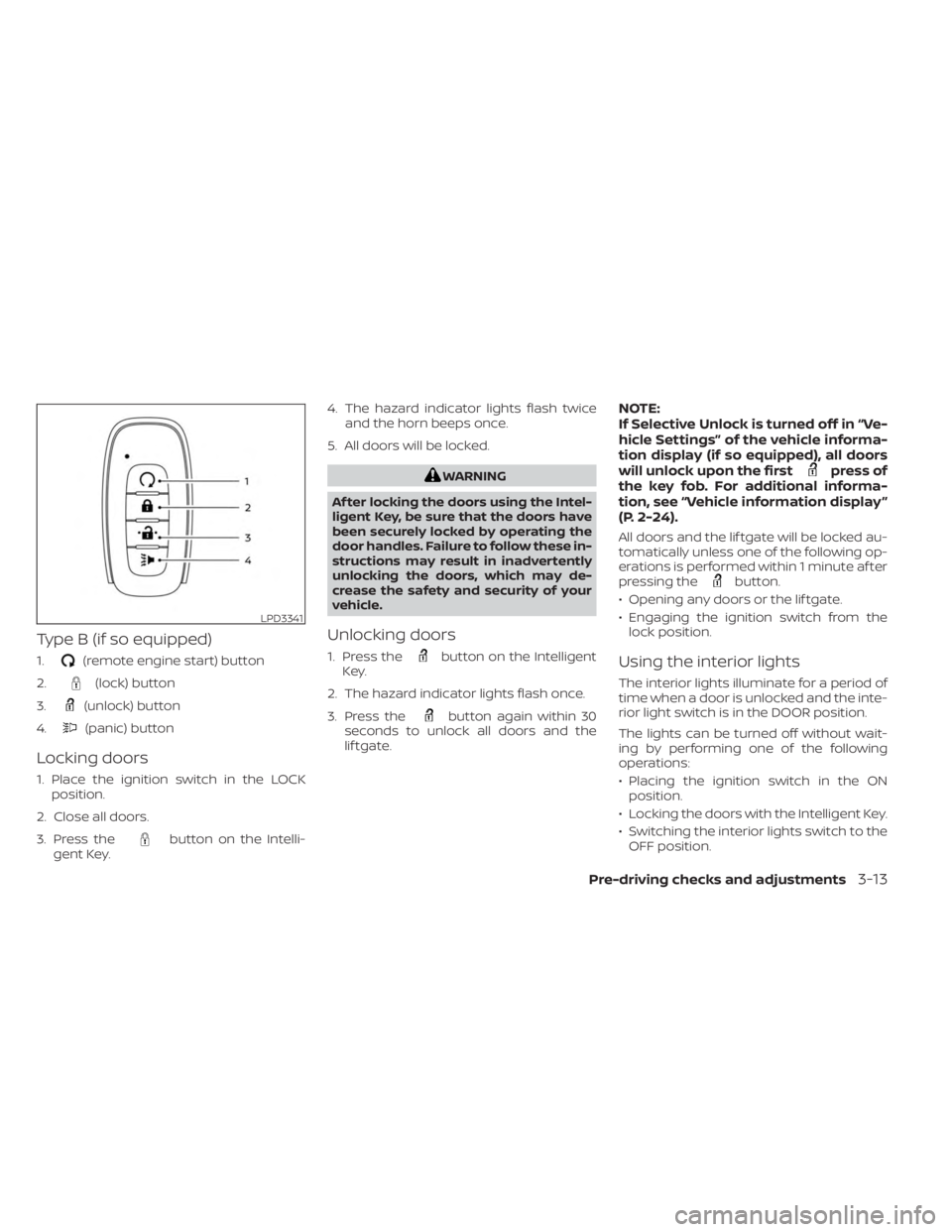
Type B (if so equipped)
1.(remote engine start) button
2.
(lock) button
3.
(unlock) button
4.
(panic) button
Locking doors
1. Place the ignition switch in the LOCK position.
2. Close all doors.
3. Press the
button on the Intelli-
gent Key. 4. The hazard indicator lights flash twice
and the horn beeps once.
5. All doors will be locked.
WARNING
Af ter locking the doors using the Intel-
ligent Key, be sure that the doors have
been securely locked by operating the
door handles. Failure to follow these in-
structions may result in inadvertently
unlocking the doors, which may de-
crease the safety and security of your
vehicle.
Unlocking doors
1. Press thebutton on the Intelligent
Key.
2. The hazard indicator lights flash once.
3. Press the
button again within 30
seconds to unlock all doors and the
lif tgate.
NOTE:
If Selective Unlock is turned off in “Ve-
hicle Settings” of the vehicle informa-
tion display (if so equipped), all doors
will unlock upon the first
press of
the key fob. For additional informa-
tion, see “Vehicle information display ”
(P. 2-24).
All doors and the lif tgate will be locked au-
tomatically unless one of the following op-
erations is performed within 1 minute af ter
pressing the
button.
• Opening any doors or the lif tgate.
• Engaging the ignition switch from the lock position.
Using the interior lights
The interior lights illuminate for a period of
time when a door is unlocked and the inte-
rior light switch is in the DOOR position.
The lights can be turned off without wait-
ing by performing one of the following
operations:
• Placing the ignition switch in the ONposition.
• Locking the doors with the Intelligent Key.
• Switching the interior lights switch to the OFF position.
LPD3341
Pre-driving checks and adjustments3-13
Page 179 of 558
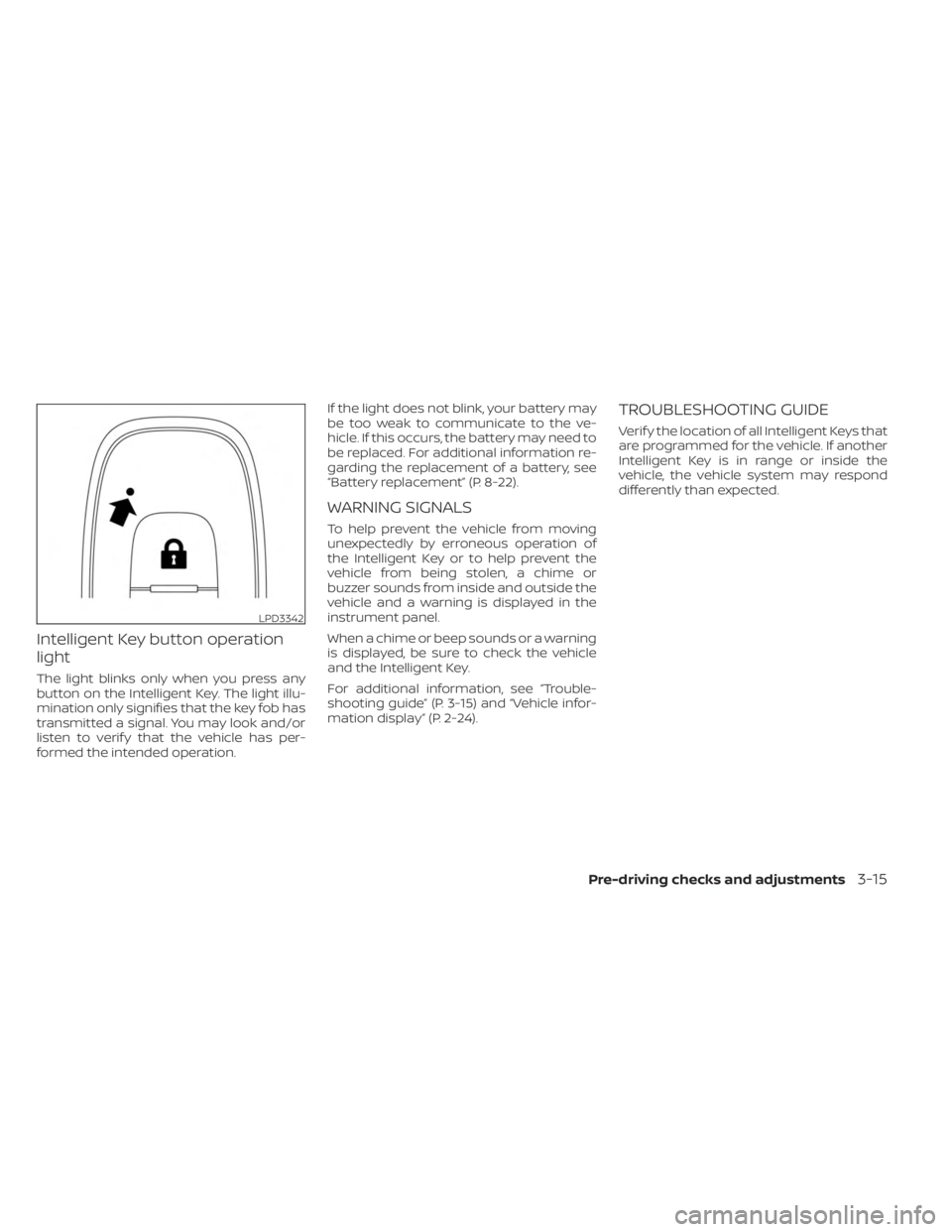
Intelligent Key button operation
light
The light blinks only when you press any
button on the Intelligent Key. The light illu-
mination only signifies that the key fob has
transmitted a signal. You may look and/or
listen to verif y that the vehicle has per-
formed the intended operation.If the light does not blink, your battery may
be too weak to communicate to the ve-
hicle. If this occurs, the battery may need to
be replaced. For additional information re-
garding the replacement of a battery, see
“Battery replacement” (P. 8-22).
WARNING SIGNALS
To help prevent the vehicle from moving
unexpectedly by erroneous operation of
the Intelligent Key or to help prevent the
vehicle from being stolen, a chime or
buzzer sounds from inside and outside the
vehicle and a warning is displayed in the
instrument panel.
When a chime or beep sounds or a warning
is displayed, be sure to check the vehicle
and the Intelligent Key.
For additional information, see “Trouble-
shooting guide” (P. 3-15) and “Vehicle infor-
mation display” (P. 2-24).
TROUBLESHOOTING GUIDE
Verif y the location of all Intelligent Keys that
are programmed for the vehicle. If another
Intelligent Key is in range or inside the
vehicle, the vehicle system may respond
differently than expected.
LPD3342
Pre-driving checks and adjustments3-15
Page 180 of 558
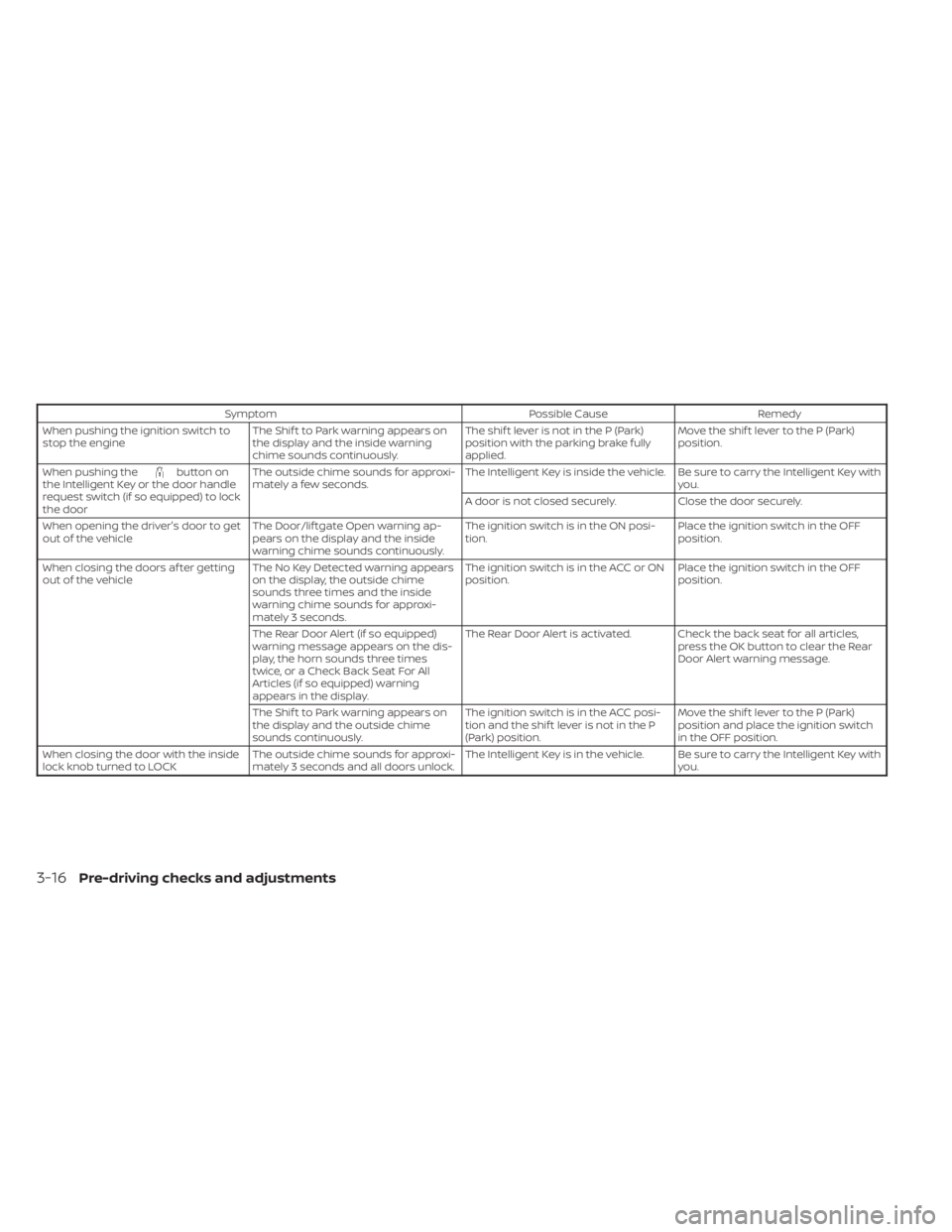
SymptomPossible CauseRemedy
When pushing the ignition switch to
stop the engine The Shif t to Park warning appears on
the display and the inside warning
chime sounds continuously. The shif t lever is not in the P (Park)
position with the parking brake fully
applied.Move the shif t lever to the P (Park)
position.
When pushing the
button on
the Intelligent Key or the door handle
request switch (if so equipped) to lock
the door The outside chime sounds for approxi-
mately a few seconds.
The Intelligent Key is inside the vehicle. Be sure to carry the Intelligent Key with
you.
A door is not closed securely. Close the door securely.
When opening the driver's door to get
out of the vehicle The Door/lif tgate Open warning ap-
pears on the display and the inside
warning chime sounds continuously. The ignition switch is in the ON posi-
tion.
Place the ignition switch in the OFF
position.
When closing the doors af ter getting
out of the vehicle The No Key Detected warning appears
on the display, the outside chime
sounds three times and the inside
warning chime sounds for approxi-
mately 3 seconds. The ignition switch is in the ACC or ON
position.
Place the ignition switch in the OFF
position.
The Rear Door Alert (if so equipped)
warning message appears on the dis-
play, the horn sounds three times
twice, or a Check Back Seat For All
Articles (if so equipped) warning
appears in the display. The Rear Door Alert is activated. Check the back seat for all articles,
press the OK button to clear the Rear
Door Alert warning message.
The Shif t to Park warning appears on
the display and the outside chime
sounds continuously. The ignition switch is in the ACC posi-
tion and the shif t lever is not in the P
(Park) position.Move the shif t lever to the P (Park)
position and place the ignition switch
in the OFF position.
When closing the door with the inside
lock knob turned to LOCK The outside chime sounds for approxi-
mately 3 seconds and all doors unlock. The Intelligent Key is in the vehicle. Be sure to carry the Intelligent Key with
you.
3-16Pre-driving checks and adjustments