2023 NISSAN ARMADA REAR WIPER
[x] Cancel search: REAR WIPERPage 11 of 604

WAA0285X
1. Hood (P.3-21)
2. Windshield wiper and washer— Switch operation (P.2-42)
— Window washer fluid (P.8-10)
— Windshield wiper deicer (if so equipped)
(P.2-46)
3. Moonroof (if so equipped) (P.2-78) 4. Power windows (P.2-75)
5. Roof rack (if so equipped) (P.2-74)
6. Sonar sensors
— Camera aiding sonar function (models
with Intelligent Around View® Monitor)
(P.4-26)
— Sonar system (if so equipped) (P.5-136) 7. Towing hook (P.6-19)
8. Front view camera (if so equipped) (P.4-12)
9. Fog light (if so equipped) (P.2-54)
10. Headlights and turn signal lights (P.2-46)
11. Tires
— Wheel and tires (P.8-28, P.10-9)
— Flat tire (P.6-3)
— Tire Pressure Monitoring System
(TPMS) (P.2-16, P.5-5)
12. Outside mirrors (P.3-38) — Side view camera (P.4-12)
— Welcome light (if so equipped) (P.2-80)
13. Side turn signal lights (if so equipped) (P.8-24)
14. Doors — Keys (P.3-2)
— Door locks (P.3-4)
— Intelligent Key system (P.3-7)
— Remote keyless entry system (P.3-15)
— Remote engine start (if so equipped)
(P.3-19)
15. Child safety rear door locks (P.3-6)
Illustrated table of contents0-3
EXTERIOR FRONT
Page 12 of 604

0-4Illustrated table of contents
WAA0286X
1. Fuel-filler door (P.3-26)— Fuel information (P.10-4)
2. Antenna (P.4-43)
3. Rear combination light (P.8-24)
4. Rear window defroster (P.2-45)
5. Satellite antenna (P.4-44)
6. Rear view camera (P.4-4, P.4-12) 7. Intelligent Rear View Mirror camera (if so
equipped) (P.3-31)
8. High-mounted stop light (P.8-24)
9. Liftgate (P.3-22) — Intelligent Key system (P.3-7)
10. Rear window wiper and washer
— Switch operation (P.2-45) — Window washer fluid (P.8-10)
11. Spare tire (under the vehicle) (P.6-3)
12. Sonar sensors — Camera aiding sonar function (models
with Intelligent Around View® Monitor)
(P.4-26)
— Intelligent Back-up Intervention (I-BI) (if
so equipped) (P.5-63)
— Sonar system (if so equipped) (P.5-136)
13. Towing hook (P.6-19)
14. Trailer hitch (P.10-24)
EXTERIOR REAR
Page 95 of 604

2 Instruments and controls
Cockpit ........................................................................\
.......................... 2-4
Instrument panel ........................................................................\
.. 2-5
Meters and gauges ..................................................................... 2-6Speedometer and odometer ........................................ 2-7
Tachometer ........................................................................\
........ 2-8
Engine coolant temperature gauge ....................... 2-8
Fuel gauge ........................................................................\
........... 2-9
Engine oil pressure gauge .............................................. 2-9
Voltmeter ........................................................................\
........... 2-10
Meter illumination and needle sweep ................ 2-10
Warning lights, indicator lights and
audible reminders ..................................................................... 2-11 Checking lights ..................................................................... 2-12
Warning/indicator lights (red) ................................... 2-12
Warning/indicator lights (yellow) ........................... 2-15
Warning/indicator lights (other) ............................. 2-19
Audible reminders .............................................................. 2-20
Vehicle information display ............................................... 2-20 How to use the vehicle
information display ........................................................... 2-21
Startup display ...................................................................... 2-22
Settings ........................................................................\
............... 2-22
Operational indicators .................................................... 2-30
Trip computer ........................................................................\
2-37
Clock and outside air temperature ...................... 2-39 Security systems ....................................................................... 2-39
Vehicle Security System .............................................. 2-39
NISSAN Vehicle Immobilizer System ................. 2-41
Wiper and washer switch ................................................... 2-42 Windshield wiper and washer operation ...... 2-43
Rain-sensing auto wiper system (if
so equipped) ........................................................................\
. 2-44
Rear window wiper and
washer operation ............................................................. 2-45
Rear window and outside mirror
defroster switch ........................................................................\
. 2-45
Windshield deicer switch (if so equipped) ............. 2-46
Headlight and turn signal switch ................................ 2-46
Headlight switch ............................................................... 2-47
Instrument brightness control .............................. 2-53
Turn signal switch ........................................................... 2-53
Fog light switch (if so equipped) ......................... 2-54
Heated steering wheel (if so equipped) .................. 2-54
Horn ........................................................................\
............................. 2-55
Heated seats (if so equipped) ......................................... 2-55
Front (if so equipped) .................................................... 2-56
Rear (if so equipped) ...................................................... 2-57
Climate controlled seats (if so equipped) ............. 2-57
Warning systems switch (if so equipped) ............. 2-58
SNOW mode switch ................................................................ 2-59
Page 118 of 604

2-24Instruments and controls
Tire Pressure Unit:
The unit for tire pressure that is shown in
the vehicle information display can be
changed to:
.kPa
. psi
. bar
. kgf/cm2
Use the
buttonsand the OKbutton to select and change the unit.
If necessary, refer to the following table to
convert between units.
JVI0938X
Clock
Allows user to adjust the clock settings
and time within the vehicle information
display.
. Clock Mode (if so equipped)
. Clock Format
. Daylight Saving (if so equipped)
. Time Zone (if so equipped)
. Set Clock Manually
The clock may also be set in the touch
screen display. For additional information,
refer to the separate NissanConnect®
Owner’s Manual.
Vehicle settings
The vehicle settings allow user to change
settings for the following menus.
. Lighting
. Locking
. Wipers (if so equipped)
. Driving Position (if so equipped)
. Rear Door Alert
. ACC Off Delay
The vehicle settings can be changed
using the
buttonsand the OKbutton.
Lighting:
The “Lighting” menu has the following
Page 119 of 604
options:
.Auto Room Lamp
The interior light can be set to be ON
or OFF. Use the OK
button to turn
this feature ON or OFF.
. Auto Headlight
The sensitivity of the Intelligent Auto
Headlight (if so equipped) or autolight
(if so equipped) can be adjusted. From
the “Lighting” menu, select “Auto
Headlight”. Use the
buttonsand the OKbutton to select the
required sensitivity. The following op-
tions are available:
— Turn on earliest
— Turn on earlier
— Turn on standard
— Turn on later
. Light Off Delay
The duration of the automatic head-
lights can be changed from 0 to 180
seconds. Use the OK
button to
change the duration.
Locking:
The “Locking” menu has the following
options:
. Ext. Door Switch (if so equipped)
When this item is turned on, the
request switch on the door is acti-
vated. Use the OK
button to activate or deactivate this function.
. Selective Unlock (if so equipped)
When this item is turned on, and the
door handle request switch is pushed,
only the corresponding door is un-
locked. All the doors can be unlocked
if the door handle request switch is
pushed again within 1 minute. When
this item is turned to off, all the doors
will be unlocked when the door han-
dle request switch is pushed once. Use
the OK
button to activate or deac-
tivate this function.
. Auto Door Unlock
The “Auto Door Unlock” feature allows
user to customize the auto door
unlock options. Use the OK
button
to change the mode.
— Shift to P
— IGN OFF
— OFF
Wipers (if so equipped):
The “Wipers” menu has the following
options:
. Speed Dependent
The “Speed Dependent” feature can be
activated or deactivated. Use the OK
button to turn this feature ON or OFF. Driving Position (if so equipped):
.
Exit Seat Slide
This allows user to turn the entry/exit
function ON or OFF. Use the OK
button to turn this function ON or OFF.
(See “Memory seat” (P.3-40).)
. Exit Steering Up (if so equipped)
This allows user to turn the entry/exit
function ON or OFF. Use the OK
button to turn this function ON or OFF.
(See “Memory seat” (P.3-40).)
Rear Door Alert:
The “Rear Door Alert” feature allows user
to customize the Rear Door Alert options.
Use the OK
button to change the mode.
. Horn & Alert
When selected, the alert is displayed
and the horn sounds.
. Alert Only
When selected, only the alert is dis-
played.
. OFF
When selected, no alert or horn will be
active.
(See “Rear door alert” (P.2-61).)
ACC Off Delay (if so equipped):
This allows user to turn the ACC delay
timer function ON or OFF. (See “ACC
(Accessories) delay timer function” (P.5-
Instruments and controls2-25
Page 126 of 604
2-32Instruments and controls
21. Vehicle ahead detection indica-
tor
This indicator shows the status of the
following systems, if the vehicle is
equipped with them.
.Automatic Emergency Braking (AEB)
with pedestrian detection system
. Intelligent Forward Collision Warning
(I-FCW)
For more details, see “Automatic Emer-
gency Braking (AEB) with pedestrian de-
tection system” (P.5-96) or “Intelligent
Forward Collision Warning (I-FCW)” (P.5-
106).
The figure and color of these indicators
will change depending on the conditions
of the above systems.
22. LDW indicator
This indicator shows the status of the
following systems, if the vehicle is
equipped with them.
. Lane Departure Warning (LDW)
. Intelligent Lane Intervention (I-LI)
For more details, see “Lane Departure
Warning (LDW)” (P.5-26) or “Intelligent
Lane Intervention (I-LI)” (P.5-31).
The figure and color of these indicators
will change depending on the conditions
of the above systems.
23. BSW indicator
This indicator shows the status of the
following systems, if the vehicle is
equipped with them.
. Blind Spot Warning (BSW)
. Intelligent Blind Spot Intervention (I-
BSI)
For more details, see “Blind Spot Warning
(BSW)” (P.5-38) or “Intelligent Blind Spot
Intervention (I-BSI)” (P.5-46).
The figure and color of these indicators
will change depending on the conditions
of the above systems.
24. Malfunction
This warning appears when one or more
of the following systems (if so equipped)
is not functioning properly:
. Automatic Emergency Braking (AEB)
with pedestrian detection system
. Intelligent Forward Collision Warning
(I-FCW)
. Lane Departure Warning (LDW)
. Intelligent Lane Intervention (I-LI)
. Blind Spot Warning (BSW)
. Intelligent Blind Spot Intervention (I-
BSI)
. Intelligent Back-up Intervention (I-BI)
. Rear Cross Traffic Alert (RCTA)
If one or more of these warning appears, have the system checked. It is recom-
mended you visit a NISSAN dealer for this
service.
25. Wiper Mode Guidance
This indicator shows the wiper and
washer switch position.
The selected position is illuminated in
orange when the wiper switch position
is changed.
26. Lights Mode Guidance
This indicator shows the headlight switch
position.
The selected position is illuminated in
orange when the headlight switch posi-
tion is changed. (The display of the light
position varies depending on the models.)
27. Intelligent Cruise Control (ICC)
indicators
These indicators show the Intelligent
Cruise Control (ICC) system status. For
additional information, refer to “Intelligent
Cruise Control (ICC)” (P.5-74).
Page 138 of 604

2-44Instruments and controls
JVI1013X
RAIN-SENSING AUTO WIPER SYS-
TEM (if so equipped)
The rain-sensing auto wiper system can
automatically turn on the wipers and
adjust the wiper speed depending on
the rainfall and the vehicle speed by using
the rain sensor located on the upper part
of the windshield.
To set the rain-sensing auto wiper sys-
tem, push the lever down to the AUTO
position
. The wiper will sweep once
while the ignition switch is in the ON
position.
The rain sensor sensitivity level can be
adjusted by turning the knob toward the
front
(High) or toward the rear(Low). .
High — High sensitive operation
. Low — Low sensitive operation
To turn the rain-sensing auto wiper
system off, push up the lever to the OFF
position, or pull down the lever to the LO
or HI position.
CAUTION
Do not touch the rain sensor and
around it when the wiper switch is in
the AUTO position and the ignition
switch is in the ON position. The
wipers may operate unexpectedly
and cause to an injury or may da-
mage a wiper.
. The rain-sensing auto wipers are
intended for use during rain. If the
switch is left in the AUTO position,
the wipers may operate unexpect-
edly when dirt, fingerprints, oil film
or insects are stuck on or around the
sensor. The wipers may also operate
when exhaust gas or moisture affect
the rain sensor.
. The rain-sensing auto wipers may
not operate if rain does not hit the
rain sensor even if it is raining.
. When the windshield glass is coated
with water repellent, the speed of the rain-sensing auto wipers may be
higher even though the amount of
the rainfall is small.
. Be sure to turn off the rain-sensing
auto wiper system when you use a
car wash.
. Using genuine wiper blades is re-
commended for proper operation of
the rain-sensing auto wiper system.
(See “Windshield wiper blades” (P.8-
16) for wiper blade replacement.)
Page 139 of 604
JVI1014X
Type A (if so equipped)
JVI1015XType B (if so equipped)
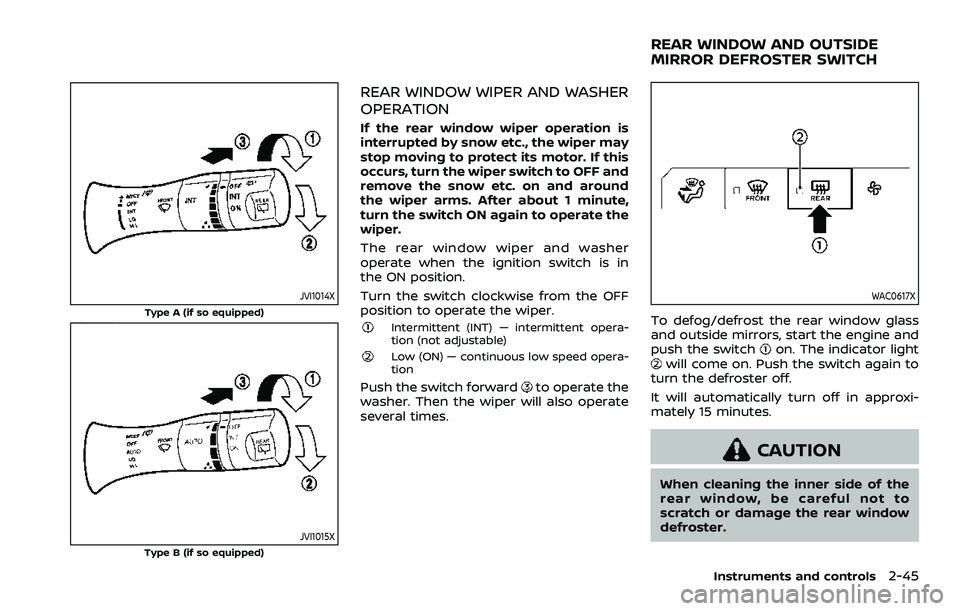
REAR WINDOW WIPER AND WASHER
OPERATION
If the rear window wiper operation is
interrupted by snow etc., the wiper may
stop moving to protect its motor. If this
occurs, turn the wiper switch to OFF and
remove the snow etc. on and around
the wiper arms. After about 1 minute,
turn the switch ON again to operate the
wiper.
The rear window wiper and washer
operate when the ignition switch is in
the ON position.
Turn the switch clockwise from the OFF
position to operate the wiper.
Intermittent (INT) — intermittent opera-
tion (not adjustable)
Low (ON) — continuous low speed opera-
tion
Push the switch forwardto operate the
washer. Then the wiper will also operate
several times.
WAC0617X
To defog/defrost the rear window glass
and outside mirrors, start the engine and
push the switch
on. The indicator lightwill come on. Push the switch again to
turn the defroster off.
It will automatically turn off in approxi-
mately 15 minutes.
CAUTION
When cleaning the inner side of the
rear window, be careful not to
scratch or damage the rear window
defroster.
Instruments and controls2-45
REAR WINDOW AND OUTSIDE
MIRROR DEFROSTER SWITCH