2023 NISSAN ARMADA ECO mode
[x] Cancel search: ECO modePage 83 of 604

children be properly restrained in a rear
seat. NISSAN also recommends that ap-
propriate child restraints and booster
seats be properly installed in a rear seat.
If this is not possible, the occupant
classification sensors are designed to
operate as described above to turn the
front passenger air bag and front pas-
senger knee air bag OFF for specified
child restraints. Failing to properly secure
child restrains and to use the ALR mode
may allow the restraint to tip or move in
an accident or sudden stop. This can also
result in the passenger air bag and front
passenger knee air bag inflating in a
crash instead of being OFF. (See “Child
restraints” (P.1-32) for proper use and
installation.)
If the front passenger seat is not occu-
pied, the passenger air bag and front
passenger knee air bag are designed not
to inflate in a crash. However, heavy
objects placed on the seat could result
in air bag inflation, because of the object
being detected by the occupant classifi-
cation sensors. Other conditions could
also result in air bag inflation, such as if a
child is standing on the seat, or if two
children are on the seat, contrary to the
instructions in this manual. Always be
sure that you and all vehicle occupants
are seated and restrained properly.Using the front passenger air bag status
light, you can monitor when the front
passenger air bag and front passenger
knee air bag are automatically turned
OFF with the seat occupied. The light will
not illuminate when the front passenger
seat is unoccupied.
If an adult occupant is in the seat but the
front passenger air bag status light is
illuminated (indicating that the front pas-
senger air bag and front passenger knee
air bag are OFF), it could be that the
person is a small adult, or is not sitting on
the seat properly.
If a child restraint must be used in the
front seat, the front passenger air bag
status light may or may not be illumi-
nated, depending on the size of the child
and the type of child restraint being used.
If the front passenger air bag status light
is not illuminated (indicating that the air
bag might inflate in a crash), it could be
that the child restraint or seat belt is not
being used properly. Make sure that the
child restraint is installed properly, the
seat belt is used properly and the occu-
pant is positioned properly. If the front
passenger air bag status light is still not
illuminated, reposition the occupant or
child restraint in a rear seat.
If the front passenger air bag status light
will not illuminate even though you be-lieve that the child restraint, the seat belts
and the occupant are properly positioned,
the system may be sensing an unoccu-
pied seat (in which case the air bag is
OFF). Your NISSAN dealer can check that
the system is OFF by using a special tool.
However, until you have confirmed with
your dealer that your air bag is working
properly, reposition the occupant or child
restraint in a rear seat.
The NISSAN Advanced Air Bag System
and front passenger air bag status light
will take a few seconds to register a
change in the front passenger seat sta-
tus. However, if the seat becomes unoc-
cupied, the front passenger air bag status
light will remain off.
If a malfunction occurs in the front
passenger air bag system, the supple-
mental air bag warning light
, located
in the meter and gauges area will blink.
Have the system checked. It is recom-
mended you visit a NISSAN dealer for this
service.
Normal operation:
In order for the occupant classification
sensor system to classify the front pas-
senger based on weight, please follow the
precautions and steps outlined below:
Safety — seats, seat belts and supplemental restraint system1-65
Page 98 of 604

2-4Instruments and controls
WAA0288X
1. Power liftgate switch (if so equipped)
2. Heated steering wheel switch (if soequipped)
3. Instrument brightness control switch
4. TRIP/RESET switch for twin trip odometer
5. Headlight, fog light and turn signal switch — Headlight — Turn signal
— Fog light (if so equipped)
6. Steering-wheel-mounted controls (left side)
— Audio control steering switch (See
NissanConnect® Owner’s Manual)
— Vehicle information display control — Trip computer switch
7. Wiper and washer switch
8. Steering-wheel-mounted controls (right side)
— Intelligent Cruise Control (ICC) system
— Intelligent Lane Intervention (I-LI) sys-
tem
— Intelligent Blind Spot Intervention (I-
BSI) system
— Hands-Free Phone System switch (See
NissanConnect® Owner’s Manual)/Voice
Recognition system switch (See Nissan-
Connect® Owner’s Manual)
9. Shift lever
10. Four-Wheel Drive (4WD) shift switch (if so equipped)/SNOW mode switch/TOW
MODE switch/Vehicle Dynamic Control
(VDC) OFF switch
11. Display Commander (See NissanConnect® Owner’s Manual)
12. Power liftgate main switch (if so equipped)
13. Warning systems switch (if so equipped) — Lane Departure Warning (LDW)
— Blind Spot Warning (BSW)
14. Electric tilting/telescopic steering wheel switch
COCKPIT
Page 106 of 604

2-12Instruments and controls
CHECKING LIGHTS
With all doors closed, apply the parking
brake, fasten the seat belts and place the
ignition switch in the ON position without
starting the engine. The following lights (if
so equipped) will come on:
or,,,,,
The following lights (if so equipped) will
come on briefly and then go off:
,or,,,,,,
If any light does not come on or operates
in a way other than described, it may
indicate a burned-out bulb and/or a
system malfunction. It is recommended
you have the system checked by a
NISSAN dealer.
Some indicators and warnings are also
displayed on the vehicle information dis-
play between the speedometer and tach-
ometer. (See “Vehicle information display”
(P.2-20).)
WARNING/INDICATOR LIGHTS (red)
Automatic Transmission (AT)
oil temperature warning light
This light illuminates when the Automatic
Transmission (AT) oil temperature is too
high. If the light illuminates while driving,
reduce the vehicle speed as soon as
safely possible until the light turns off.
CAUTION
Continued vehicle operation when
the AT oil temperature warning light
is on may damage the AT.
Automatic Transmission (AT)
park warning light (4WD models)
This light indicates that the Automatic
Transmission (AT) parking function is not
engaged. If the transfer control is not
secured in any driving position while the
AT shift lever is in the “P” (Park) position,
the transmission will disengage and the
wheels will not lock.
If the AT park warning light illuminates
with the shift lever in the P (Park)
position, shift the Four-Wheel Drive
(4WD) shift switch to the AUTO, 4H or 4L position again with the shift lever in
the N (Neutral) position.
(See “NISSAN all-
mode 4WD®” (P.5-124).)
orBrake warning light
This light functions for both the parking
brake and the foot brake systems.
Parking brake indicator:
When the ignition switch is in the ON
position, the light comes on when the
parking brake is applied.
Low brake fluid warning light:
When the ignition switch is in the ON
position, the light warns of a low brake
fluid level. If the light comes on while the
engine is running with the parking brake
not applied, stop the vehicle and perform
the following:
1. Check the brake fluid level. If brake fluid is low, add fluid and have the
system checked. It is recommended
you have this service performed by a
NISSAN dealer. (See “Brake fluid” (P.8-
9).)
2. If the brake fluid level is correct, have the warning system checked. It is
recommended you have this service
performed by a NISSAN dealer.
Page 110 of 604

2-16Instruments and controls
For front passenger air bag status light
operation, see “NISSAN Advanced Air Bag
System (front seats)” (P.1-61).
Four-Wheel Drive (4WD) warn-
ing light (4WD models)
Thewarning light comes on when the
ignition switch is placed in the ON posi-
tion. It turns off soon after the engine is
started.
If the 4WD system malfunctions, or the
diameter of the front and the rear wheels
are different, the warning light will either
remain illuminated or blink. (See “NISSAN
all-mode 4WD®” (P.5-124).)
CAUTION
. If the warning light comes on
while driving there may be a
malfunction in the 4WD system.
Reduce the vehicle speed and
have your vehicle checked as
soon as possible. It is recom-
mended you visit a NISSAN dealer
for this service.
. If the 4WD warning light turns on
when driving on dry or hard
surfaced roads: — in the 4H(I) position, shift the
4WD shift switch to AUTO
— in the 4L(O) position, stop the vehicle and shift the transmis-
sion shift lever to the N (Neu-
tral) position and shift the
4WD shift switch to AUTO
. If the warning light is still on after
the above operations, have your
vehicle checked as soon as pos-
sible. It is recommended you visit
a NISSAN dealer for this service.
Low tire pressure warning
light
Your vehicle is equipped with a Tire
Pressure Monitoring System (TPMS) that
monitors the tire pressure of all tires
except the spare.
The low tire pressure warning light warns
of low tire pressure or indicates that the
TPMS is not functioning properly.
After the ignition switch is placed in the
ON position, this light illuminates for
about 1 second and turns off.
Low tire pressure warning:
If the vehicle is being driven with low tire
pressure, the warning light will illuminate.
The “Tire Pressure Low Add Air” warning also appears in the vehicle information
display. If you select the tire pressure
information in the vehicle information
display, the Low Pressure information will
be displayed. The tire pressure for each
tire will also be displayed.
When the low tire pressure warning light
illuminates, you should stop and adjust
the tire pressure to the recommended
COLD tire pressure shown on the Tire and
Loading Information label. The low tire
pressure warning light does not automa-
tically turn off when the tire pressure is
adjusted. After the tire is inflated to the
recommended pressure, the vehicle must
be driven at speeds above 16 MPH (25
km/h) to activate the TPMS and turn off
the low tire pressure warning light. Use a
tire pressure gauge to check the tire
pressure.
The “Tire Pressure Low Add Air” warning
appears each time the ignition switch is
placed in the ON position as long as the
low tire pressure warning light remains
illuminated.
For additional information, see “Vehicle
information display” (P.2-20), “Tire Pres-
sure Monitoring System (TPMS)” (P.5-5)
and “Tire Pressure Monitoring System
(TPMS) ” (P.6-3).
Page 113 of 604
If the light illuminates when the RAB
system is on, it may indicate that the
system is unavailable. (See “Rear Auto-
matic Braking (RAB)” (P.5-116).)
Vehicle Dynamic Control (VDC)
off indicator light
When the ignition switch is in the ON
position, the Vehicle Dynamic Control
(VDC) off indicator light illuminates and
then turns off.
The light comes on when the VDC off
switch is pushed to OFF. This indicates
that the VDC system is not operating.
When the 4L position is selected with the
Four-Wheel Drive (4WD) shift switch, the
VDC system is disabled and the VDC off
indicator light illuminates. (4WD models)
For additional information, see “Vehicle
Dynamic Control (VDC) system” (P.5-144).
Vehicle Dynamic Control (VDC)
warning light
When the ignition switch is in the ON
position, the Vehicle Dynamic Control
(VDC) warning light illuminates and then
turns off.
The light will blink when the VDC system
or the traction control system is operat-
ing, thus alerting the driver that the vehicle is nearing its traction limits. The
road surface may be slippery.
When the VDC warning light illuminates
when the VDC system is turned on, this
light alerts the driver to the fact that the
VDC system’s fail-safe mode is operating,
for example the VDC or hill start assist
system may not be functioning properly.
Have the system checked. It is recom-
mended you visit a NISSAN dealer for this
service. If a malfunction occurs in the
system, the VDC system function will be
canceled but the vehicle is still driveable.
For additional information, see “Vehicle
Dynamic Control (VDC) system” (P.5-144).
WARNING/INDICATOR LIGHTS
(other)
Exterior light indicator
This indicator illuminates when the head-
light switch is turned to the AUTO,orposition and the front parking lights,
instrument panel lights, rear combination
lights, license plate lights or headlights
are on. The indicator turns off when these
lights are turned off.
Front fog light indicator light
(if so equipped)
The front fog light indicator light illumi-
nates when the front fog lights are on.
(See “Fog light switch” (P.2-54).)
High beam assist indicator
light
The high beam assist indicator light
illuminates when the high beam assist
system is turned on and it is operational.
(See “High beam assist” (P.2-50).)
High beam indicator light
This light comes on when the headlight
high beam is on and goes out when the
low beam is selected.
TOW mode indicator light
This light will illuminate when the TOW
MODE is selected while the engine is
running. (See “TOW mode” (P.5-134).)
Turn signal/hazard indicator
lights
The light flashes when the turn signal
switch lever or hazard switch is turned on.
Instruments and controls2-19
Page 115 of 604
— “NISSAN all-mode 4WD®” (P.5-124).
. Intelligent Back-up Intervention (I-BI)
— “Intelligent Back-up Intervention (I-
BI)” (P.5-63).
. Intelligent Cruise Control (ICC)
— “Intelligent Cruise Control (ICC)”
(P.5-74).
. Intelligent Key system
— “Intelligent Key system” (P.3-7).
— “Push-button ignition switch” (P.5-
13).
. Automatic Emergency Braking (AEB)
with pedestrian detection
— “Automatic Emergency Braking
(AEB) with pedestrian detection
system” (P.5-96).
. Intelligent Forward Collision Warning
(I-FCW)
— “Intelligent Forward Collision Warn-
ing (I-FCW)” (P.5-106).
. Lane Departure Warning (LDW)
— “Lane Departure Warning (LDW)”
(P.5-26).
. Intelligent Lane Intervention (I-LI)
— “Intelligent Lane Intervention (I-LI)”
(P.5-31).
. Intelligent Blind Spot Intervention (I-
BSI)
— “Intelligent Blind Spot Intervention
(I-BSI)” (P.5-46). .
Blind Spot Warning (BSW)
— “Blind Spot Warning (BSW)” (P.5-38).
. Rear Automatic Braking (RAB)
— “Rear Automatic Braking (RAB)” (P.5-
116).
. Intelligent Driver Alertness (I-DA)
— “Intelligent Driver Alertness (I-DA)”
(P.5-114).
. Traffic Sign Recognition (TSR)
— “Traffic Sign Recognition (TSR)” (P.5-
23).
. Rear Cross Traffic Alert (RCTA)
— “Rear Cross Traffic Alert (RCTA)”
(P.5-57).
WAC0613X
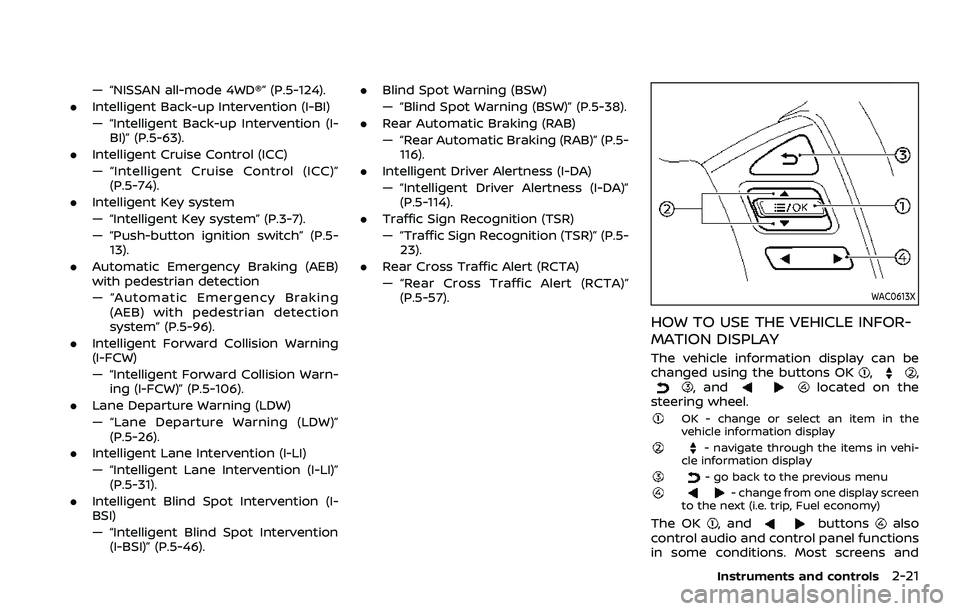
HOW TO USE THE VEHICLE INFOR-
MATION DISPLAY
The vehicle information display can be
changed using the buttons OK,,, andlocated on the
steering wheel.
OK - change or select an item in the
vehicle information display
- navigate through the items in vehi-
cle information display
- go back to the previous menu- change from one display screen
to the next (i.e. trip, Fuel economy)
The OK, andbuttonsalso
control audio and control panel functions
in some conditions. Most screens and
Instruments and controls2-21
Page 116 of 604

2-22Instruments and controls
menus offer instruction prompts of the
steering switch buttons to indicate how
to control the vehicle information display.
The OK
button changes the audio
source and thebuttonsalso
control voice recognition manual mode.
The OK
button can be used to change
the audio source when the audio screen
is displayed. The
buttonscan be
used when controlling voice recognition
prompts manually. (See NissanConnect®
Owner’s Manual.)
STARTUP DISPLAY
When the ignition switch is placed in the
ON position, the vehicle information dis-
play may display the following screens if
the vehicle is equipped with them:
. Home
. Speed
. Drive Computer
. Fuel Economy
. Navigation
. Audio
. CRUISE
. Driving Aids
. TPMS
. Speed Limit Sign
Warnings will only display if there are any
present. (See “Operational indicators” (P.2-
30).) To control what items display in the
vehicle information display, see “Settings”
(P.2-22).
SETTINGS
The setting mode allows user to change
the information displayed in the vehicle
information display and some settings:
.
Driver Assistance
. TPMS Setting
. Clock
. Vehicle settings
. Maintenance
. Customize Display
. Unit/Language
. Factory Reset
Driver Assistance
To change the status, warnings or turn on
or off any of the systems/warnings dis-
played in the “Driver Assistance” menu,
use the
buttonsto select and
change a menu item:
. Emergency Brake
. Lane
. Blind Spot
. Speed Limit Sign
. Cross Traffic Alert
. Driver Attention Alert .
Timer Alert
. Low Temp. Alert
Emergency Brake:
. Front
Allows user to turn the Automatic
Emergency Braking (AEB) with pedes-
trian detection system and Intelligent
Forward Collision Warning (I-FCW) sys-
tem ON/OFF.
. Rear
Allows user to turn the Rear Auto-
matic Braking (RAB) system ON/OFF.
(See “Automatic Emergency Braking (AEB)
with pedestrian detection system” (P.5-
96), “Intelligent Forward Collision Warning
(I-FCW)” (P.5-106) and “Rear Automatic
Braking (RAB)” (P.5-116).)
Lane:
. Warning(LDW)
Allows user to turn the Lane Depar-
ture Warning (LDW) system ON/OFF.
. Prevention(LDP)
Allows user to turn the Intelligent Lane
Intervention (I-LI) system ON/OFF.
(See “Lane Departure Warning (LDW)” (P.5-
26) and “Intelligent Lane Intervention (I-
LI)” (P.5-31).)
Page 119 of 604
options:
.Auto Room Lamp
The interior light can be set to be ON
or OFF. Use the OK
button to turn
this feature ON or OFF.
. Auto Headlight
The sensitivity of the Intelligent Auto
Headlight (if so equipped) or autolight
(if so equipped) can be adjusted. From
the “Lighting” menu, select “Auto
Headlight”. Use the
buttonsand the OKbutton to select the
required sensitivity. The following op-
tions are available:
— Turn on earliest
— Turn on earlier
— Turn on standard
— Turn on later
. Light Off Delay
The duration of the automatic head-
lights can be changed from 0 to 180
seconds. Use the OK
button to
change the duration.
Locking:
The “Locking” menu has the following
options:
. Ext. Door Switch (if so equipped)
When this item is turned on, the
request switch on the door is acti-
vated. Use the OK
button to activate or deactivate this function.
. Selective Unlock (if so equipped)
When this item is turned on, and the
door handle request switch is pushed,
only the corresponding door is un-
locked. All the doors can be unlocked
if the door handle request switch is
pushed again within 1 minute. When
this item is turned to off, all the doors
will be unlocked when the door han-
dle request switch is pushed once. Use
the OK
button to activate or deac-
tivate this function.
. Auto Door Unlock
The “Auto Door Unlock” feature allows
user to customize the auto door
unlock options. Use the OK
button
to change the mode.
— Shift to P
— IGN OFF
— OFF
Wipers (if so equipped):
The “Wipers” menu has the following
options:
. Speed Dependent
The “Speed Dependent” feature can be
activated or deactivated. Use the OK
button to turn this feature ON or OFF. Driving Position (if so equipped):
.
Exit Seat Slide
This allows user to turn the entry/exit
function ON or OFF. Use the OK
button to turn this function ON or OFF.
(See “Memory seat” (P.3-40).)
. Exit Steering Up (if so equipped)
This allows user to turn the entry/exit
function ON or OFF. Use the OK
button to turn this function ON or OFF.
(See “Memory seat” (P.3-40).)
Rear Door Alert:
The “Rear Door Alert” feature allows user
to customize the Rear Door Alert options.
Use the OK
button to change the mode.
. Horn & Alert
When selected, the alert is displayed
and the horn sounds.
. Alert Only
When selected, only the alert is dis-
played.
. OFF
When selected, no alert or horn will be
active.
(See “Rear door alert” (P.2-61).)
ACC Off Delay (if so equipped):
This allows user to turn the ACC delay
timer function ON or OFF. (See “ACC
(Accessories) delay timer function” (P.5-
Instruments and controls2-25