2023 MAZDA MAZDA warning light
[x] Cancel search: warning lightPage 367 of 623
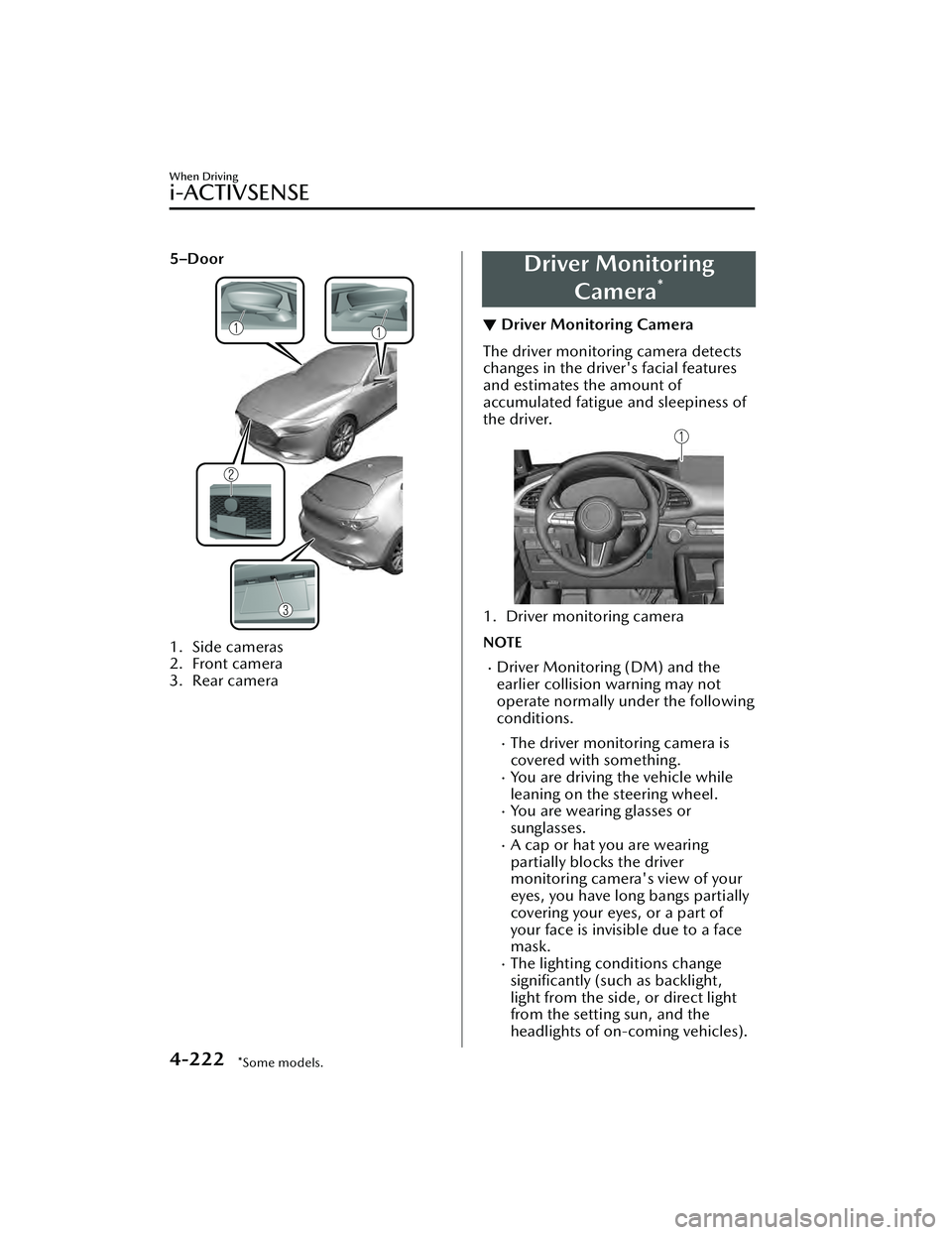
5–Door
1. Side cameras
2. Front camera
3. Rear camera
Driver MonitoringCamera
*
▼Driver Monitoring Camera
The driver monitoring camera detects
changes in the driver's facial features
and estimates the amount of
accumulated fatigue and sleepiness of
the driver.
1. Driver monitoring camera
NOTE
Driver Monitoring (DM) and the
earlier collision warning may not
operate normally under the following
conditions.
The driver monitoring camera is
covered with something.
You are driving the vehicle while
leaning on the steering wheel.
You are wearing glasses or
sunglasses.
A cap or hat you are wearing
partially blocks the driver
monitoring camera's view of your
eyes, you have long bangs partially
covering your eyes, or a part of
your face is invisible due to a face
mask.
The lighting conditions change
significantly (such as backlight,
light from the side, or direct light
from the setting sun, and the
headlights of on-coming vehicles).
When Driving
i-ACTIVSENSE
4-222*Some models.
Mazda3_8LC2-EA-22G_Edition1_new
2022-5-20 11:26:10
Page 373 of 623

Tire Pressure MonitoringSystem (TPMS)
▼Tire Pressure Monitoring System
(TPMS)
The TPMS monitors the air pressure of
each tire and if it decreases below the
specified
value, the system
notifies the
driver by turning on the TPMS warning
light in the instrument cluster and
indicating a message on the
multi-information display.
For the TPMS, the air pressure data
sent from the tire pressure sensors
installed on each wheel via radio signal
is received by the receiver unit in the
vehicle to monitor the tire pressures.
1. Tire pressure sensors
In addition, the current tire pressures
can be checked using the center
display.
Refer to the Vehicle Status Monitor
section in the Mazda Connect
Owner's Manual.
NOTE
When the ambient temperature is
low, the tire temperatures also
decrease. If the tire temperatures
decrease, the air pressure in the tires
will also decrease which could turn
on the TPMS warning light.
Before driving, visually inspect the
tires for abnormalities. Additionally,
inspect the tire pressures monthly. A
digital type air pressure gauge is
recommended for inspecting the tire
pressures.
The TPMS is not a substitute for your
own periodic inspection of the tires.
Always inspect the tires yourself
periodically.
CAUTION
Each tire, including the spare (if
provided), should be checked
monthly when cold and
inflated to
the inflation pressure recommended
by the vehicle manufacturer on the
vehicle placard or tire inflation
pressure label. (If your vehicle has
tires of a different size than the size
indicated on the vehicle placard or
tire inflation pressure label, you
should determine the proper tire inflation pressure for those tires.)
As an added safety feature, your
vehicle has been equipped with a
tire pressure monitoring system
(TPMS) that illuminates a low tire
pressure telltale when one or more
of your tires is significantly
under-inflated. Accordingly, when
the low tire pressure telltale
illuminates, you should stop and
check your tires as soon as possible,
and inflate them to the proper
pressure. Driving on a significantly
under-inflated tire causes the tire to
overheat and can lead to tire failure.
Under-inflation also reduces fuel
efficiency and tire tread life, and may
affect the vehicle's handling and
stopping ability.
When Driving
Tire Pressure Monitoring System (TPMS)
4-228
Mazda3_8LC2-EA-22G_Edition1_new 2022-5-20 11:26:10
Page 374 of 623

Please note that the TPMS is not a
substitute for proper tire
maintenance, and it is the driver's
responsibility to maintain correct tire
pressure, even if under-inflation has
not reached the level to trigger
illumination of the TPMS low tire
pressure telltale.
Your vehicle has also been equipped
with a TPMS malfunction indicator to
indicate when the system is not
operating properly.
The TPMS malfunction indicator is
combined with the low tire pressure
telltale. When the system detects a
malfunction, the telltale will flash for
approximately one minute and then
remain continuously illuminated.
This sequence will continue upon
subsequent vehicle start-ups as long
as the malfunction exists. When the
malfunction indicator is illuminated,
the system may not be able to detect
or signal low tire pressure as
intended. TPMS malfunctions may
occur for a variety of reasons,
including the installation of
replacement or alternate tires or
wheels on the vehicle that prevent
the TPMS from functioning properly.
Always check the TPMS malfunction
telltale after replacing one or more
tires or wheels on your vehicle to
ensure that the replacement or
alternate tires and wheels allow the
TPMS to continue to function
properly.
To avoid false readings, the system
samples for a little while before
indicating a problem. As a result it
will not instantaneously register a
rapid tire deflation or blow out.▼ If there is a problem with the Tire
Pressure Monitoring System
(TPMS)
If the TPMS warning light flashes, there
may be a problem with the system.
Consult an Authorized Mazda Dealer
to have the system inspected.
Refer to Tire Pressure Monitoring
System (TPMS) Warning Indication/
Warning Light (Flashing) on page
7-33.
In the following cases, the system
cannot recognize the tire pressures
correctly and the TPMS warning light
may
flash.
There is equipment or a device
nearby emitting radio signals the
same as a tire pressure sensor.
A metallic object such as a
non-genuine electronic device is
installed near the center of the
dashboard (obstructs the radio
signals from the tire pressure sensors
to the receiver).
A device such as one of the following
is used in the cabin.
Electronic devices such as a
computer.
Converter devices such as a
DC-AC converter.
There is a large accumulation of
snow or ice around the vehicle tires.
The battery in a tire pressure sensor
is dead.
A wheel not equipped with a tire
pressure sensor is used.
Tires employing steel in the sidewall
of the tire are installed.
Tire chains are used.
When Driving
Tire Pressure Monitoring System (TPMS)
4-229
Mazda3_8LC2-EA-22G_Edition1_new 2022-5-20 11:26:10
Page 375 of 623

▼When a tire pressure decreases
If the TPMS warning light turns on, a
tire pressure may be low. Inspect the
tire pressures and adjust them to the
correct inflation pressure.
Refer to Tire Pressure Monitoring
System (TPMS) Warning Indication/
Warning Light (Turns on) on page
7-37.
▼Tires and Wheels
CAUTION
When inspecting/adjusting the tire
pressures, do not apply excessive force
to the air valve of the tire pressure
sensor. Otherwise, the tire pressure
sensor could be damaged.
When changing tires and wheels
When changing the tires or wheels
(such as installing winter tires), it will
be necessary to register the ID signal
code of the tire pressure sensor to the
TPMS.
Have an Authorized Mazda Dealer do
the registration or register the ID signal
codes of the tire pressure sensors using
the following procedure.
NOTE
The tire pressure sensors on each
wheel have a unique ID signal code.
For the TPMS to operate correctly, the
ID signal codes of the tire pressure
sensors need to be registered to the
system.
1. Wait more than 19 minutes after
changing a tire or wheel.
2. After more than 19 minutes havepassed, drive the vehicle at a speed
of about 25 km/h (16 mph) or
faster for 3 minutes or longer. While
driving , the ID signal codes of the
tire pressure sensors are
automatically registered.
NOTE
If you drive the vehicle within 19
minutes of changing a tire or wheel,
the TPMS warning light will flash
because the ID signal codes for the tire
pressure sensors were not registered.
In this case, stop the vehicle and
register the ID signal codes of the tire
pressure sensors following the
procedure.
When replacing tires and wheels
CAUTION
When replacing the tires and wheels,
consult an Authorized Mazda Dealer
Otherwise, the tire pressure sensors
could be damaged when replacing
them.
Do not install non-genuine wheels. If
wheels other than genuine ones are
installed, it may not be possible to
install the tire pressure sensors.
When replacing a tire or wheel, always
install the tire pressure sensor. The
following combinations of tires,
wheels, or tires and wheels are
possible.
The tire pressure sensor from the old
wheel is removed and it is installed
to the new wheel.
Only a tire is replaced without
replacing the tire pressure sensor and
wheel.
A new tire pressure sensor is installed
to a new wheel.
When Driving
Tire Pressure Monitoring System (TPMS)
4-230
Mazda3_8LC2-EA-22G_Edition1_new 2022-5-20 11:26:10
Page 395 of 623

If the switch is pressed again, the parking sensor becomes operational and the
indicator light turns off.
1. Indicator light
Sound and viewing distance display
Informs the driver of the ap proximate distance from the vehicle to the obstruction
using warning beeps depending on the distance. If multiple obstructions are
detected at the same time, warning beeps are activated according to the distance to
the nearest obstruction.
Front
*, Rear
Distance between vehicle and ob-
struction Display
Beeper sound
Front Rear Without 360° view
monitor With 360° view
monitor
Approx. 100― 60.0
cm (39.3 ―23.6 in)
Approx.
150― 60.0 cm
(59.0― 23.6 in)
Green
Slow intermittent
sound
When Driving
Pa r k i n g S e n s o r Sys te m
4-250*Some models.
Mazda3_8LC2-EA-22G_Edition1_new 2022-5-20 11:26:10
Page 405 of 623
Air intake selector switch
This switch controls the source of air
entering the vehicle.
Outside or recirculated air positions
can be selected. Press the switch to
select outside/recirculated air
positions.
Recirculated air position (indicator
light illuminated)
Outside air is shut off. Air within the
vehicle is recirculated. Use this
position when going through tunnels,
driving in congested traffic (high engine
exhaust areas), or when quick cooling
is desired.
Outside air position (indicator light
turned off)
Outside air is allowed to enter the
cabin. Use this position for ventilation
or windshield defrosting.
WARNING
Do not use the position (indicator
light turns on) in cold or rainy
weather:
Using the
position (indicator light
turns on) in cold or rainy weather is
dangerous as it will cause the windows
to fog up. Your vision will be
hampered, which could lead to a
serious accident.
NOTE
The recirculated air position is the
default position whenever the
ignition is switched ON, the climate
control system is on, and the outside
temperature exceeds about 73°F
(23 ℃).
To exit the default recirculated air
position, press the air intake selector
switch to select the outside air
position.
When the air intake selector switch is
set to the outside air position and
the outside temperature exceeds
about 73°F (23 ℃), the climate
control system may automatically
select the recirculated air position to
improve the efficiency of the climate
control system.
Windshield defroster switch
Press the switch to defrost the
windshield and front door windows.
Refer to Windshield Defrosting and
Defogging on page 5-8.
Interior Features
Climate Control System
5-6
Mazda3_8LC2-EA-22G_Edition1_new 2022-5-20 11:26:10
Page 406 of 623

Rear window defogger switch
Press the rear window defogger switch
to defrost the rear window.
Refer to Rear Window Defogger on
page 4-69.
▼Heating
1. Press the switch.
2. Set the air intake selector to the outside air position (indicator light
turns off).
3. Set the temperature control dial to
the hot position.
4. Set the fan control dial to the desired speed.
5. If dehumidified heating is desired, turn on the air conditioner.
NOTE
If the windshield fogs up easily, press
the
switch.If cooler air is desired at face level,
press the
switch and adjust the
temperature control dial to maintain
maximum comfort.
The air to the floor is warmer than air
to the face (except when the
temperature control dial is set at the
extreme hot or cold position).
▼ Cooling
1. Press the switch.
2. Set the temperature control dial to the cold position.
3. Set the fan control dial to the desired speed.
4. Turn on the air conditioner by pressing the A/C switch.
5. After cooling begins, adjust the fan control dial and temperature
control dial as needed to maintain
maximum comfort.
CAUTION
If the air conditioner is used while
driving up long hills or in heavy traffic,
monitor the high engine coolant
temperature warning indication to see
if it is displayed (page 7-29).
The air conditioner may cause engine
overheating. If the warning indication
is displayed, turn the air conditioner
off (page 7-21).
NOTE
When maximum cooling is desired,
set the temperature control dial to
the extreme cold position and set
the air intake selector to the
recirculated air position, then turn
the fan control dial fully clockwise.
If warmer air is desired at floor level,
press the
switch and adjust the
temperature control dial to maintain
maximum comfort.
The air to the floor is warmer than air
to the face (except when the
temperature control dial is set at the
extreme hot or cold position).
Interior Features
Climate Control System
5-7
Mazda3_8LC2-EA-22G_Edition1_new 2022-5-20 11:26:10
Page 407 of 623

▼Ve n t i l a t i o n
1. Press the switch.
2. Set the air intake selector to the outside air position (indicator light
turns off).
3. Set the temperature control dial to the desired position.
4. Set the fan control dial to the desired speed.
▼Windshield Defrosting and
Defogging
1. Press the switch.
2. Set the temperature control dial to the desired position.
3. Set the fan control dial to the desired speed.
4. If dehumidified heating is desired, turn on the air conditioner.
WARNING
Do not defog the windshield using the
switch with the temperature
control set to the cold position:
Using the
switch with the
temperature control set to the cold
position is dangerous as it will cause
the outside of the windshield to fog
up. Your vision will be hampered,
which could lead to a serious accident.
Set the temperature control to the hot
or warm position when using the
switch.
NOTE
Fogging on the windows clears up
more easily while the air conditioner
is on, but they will fog up more easily
if the air conditioner is turned off.
Be careful that the windows do not
fog up when doing any of the
following:
Switching to recirculate modeTurning off the air conditionerFor maximum defrosting, turn on the
air conditioner, set the temperature
control dial to the extreme hot
position, and turn the fan control
dial fully clockwise.
If warm air is desired at the floor,
press the
switch.
With the or *1 switch, the air
conditioner is automatically turned
on and the outside air position is
automatically selected to defrost the
windshield. In the
switch, the
outside air position cannot be
changed to the recirculated air
position.
*1 Depending on the market.
▼ Dehumidifying
Operate the air conditioner in cool or
cold weather to help defog the
windshield and side windows.
1. Press the desired mode switch you
want to set.
2. Set the air intake selector to the outside air position (indicator light
turns off).
3. Set the temperature control dial to the desired position.
4. Set the fan control dial to the desired speed.
5. Turn on the air conditioner by pressing the A/C switch.
Interior Features
Climate Control System
5-8
Mazda3_8LC2-EA-22G_Edition1_new 2022-5-20 11:26:10