2023 MAZDA MAZDA warning light
[x] Cancel search: warning lightPage 277 of 623

▼Mazda Radar Cruise Control
(MRCC) Display Indication
The MRCC setting status and operation
conditions are indicated on the
multi-information display and the
active driving display.
Multi-information display (Basic
display)
1. Vehicle ahead display
2. MRCC set vehicle speed
Multi-information display
(i-ACTIVSENSE display)
1. Vehicle ahead display
2. MRCC set vehicle speed
Active driving display*
1. Vehicle ahead display
2. MRCC set vehicle speed
If there is a problem with the MRCC
system, a message is displayed on the
multi-information display. Check the
center display to verify the problem
and then have your vehicle inspected
by an Authorized Mazda Dealer.
Refer to If a Warning Light Turns On or
Flashes on page 7-27.
When Driving
i-ACTIVSENSE
4-132*Some models.
Mazda3_8LC2-EA-22G_Edition1_new
2022-5-20 11:26:10
Page 286 of 623
Do not get out of the vehicle while
the stop hold control is operating:
Getting out of the vehicle while the
stop hold control is operating is
dangerous as the vehicle may move
unexpectedly and result in an accident.
Before getting out of the vehicle,
switch the MRCC with Stop & Go
function system off, shift the selector
lever to the P position, and apply the
parking brake.
CAUTION
If your vehicle is towed or you are
towing something , switch the MRCC
with Stop & Go function system off
to prevent an unexpected operation.
Turn the system
off when the vehicle
is running on a chassis roller.
NOTE
The MRCC with Stop & Go function
system does not detect the following
as physical objects.
Vehicles approaching in the
opposite direction
Pe d e s t r i a n sStationary objects (stopped
vehicles, obstructions)
If a vehicle ahead is traveling at an
extremely low speed, the system may
not detect it correctly.
If there is a structure on the road or
an object (such as a monorail) at a
low height off the ground in front of
the vehicle, the system may operate.
Therefore, do not use the MRCC
with Stop & Go function.
Do not use the MRCC with Stop &
Go function system under conditions
in which close proximity warnings
are frequently activated.
During headway control travel, the
system accelerates and decelerates
your vehicle in conjunction with the
speed of the vehicle ahead.
However, if it is necessary to
accelerate for a lane change or if the
vehicle ahead brakes suddenly
causing you to close in on the vehicle
rapidly, accelerate using the
accelerator pedal or decelerate using
the brake pedal depending on the
conditions.
While the MRCC with Stop & Go
function system is in use, it does not
cancel even if the selector lever is
operated and any intended engine
braking does not occur. If
deceleration is required, lower the
set speed or depress the brake
pedal.
While braking by the MRCC with
Stop & Go function control is
operating , you might hear an
operation sound, however, this does
not indicate a problem.
The brake lights turn on while
braking by the MRCC with Stop &
Go function control is operating,
however, they may not turn on while
the vehicle is on a down slope at the
set vehicle speed or traveling at a
constant speed and following a
vehicle ahead.
Stop the headway control function to
switch the system to the cruise
control function.
Refer to the Settings section in the
Mazda Connect Owner's Manual.
When Driving
i-ACTIVSENSE
4-141
Mazda3_8LC2-EA-22G_Edition1_new 2022-5-20 11:26:10
Page 287 of 623
▼Mazda Radar Cruise Control with
Stop & Go function (MRCC with
Stop & Go function) Display
Indication
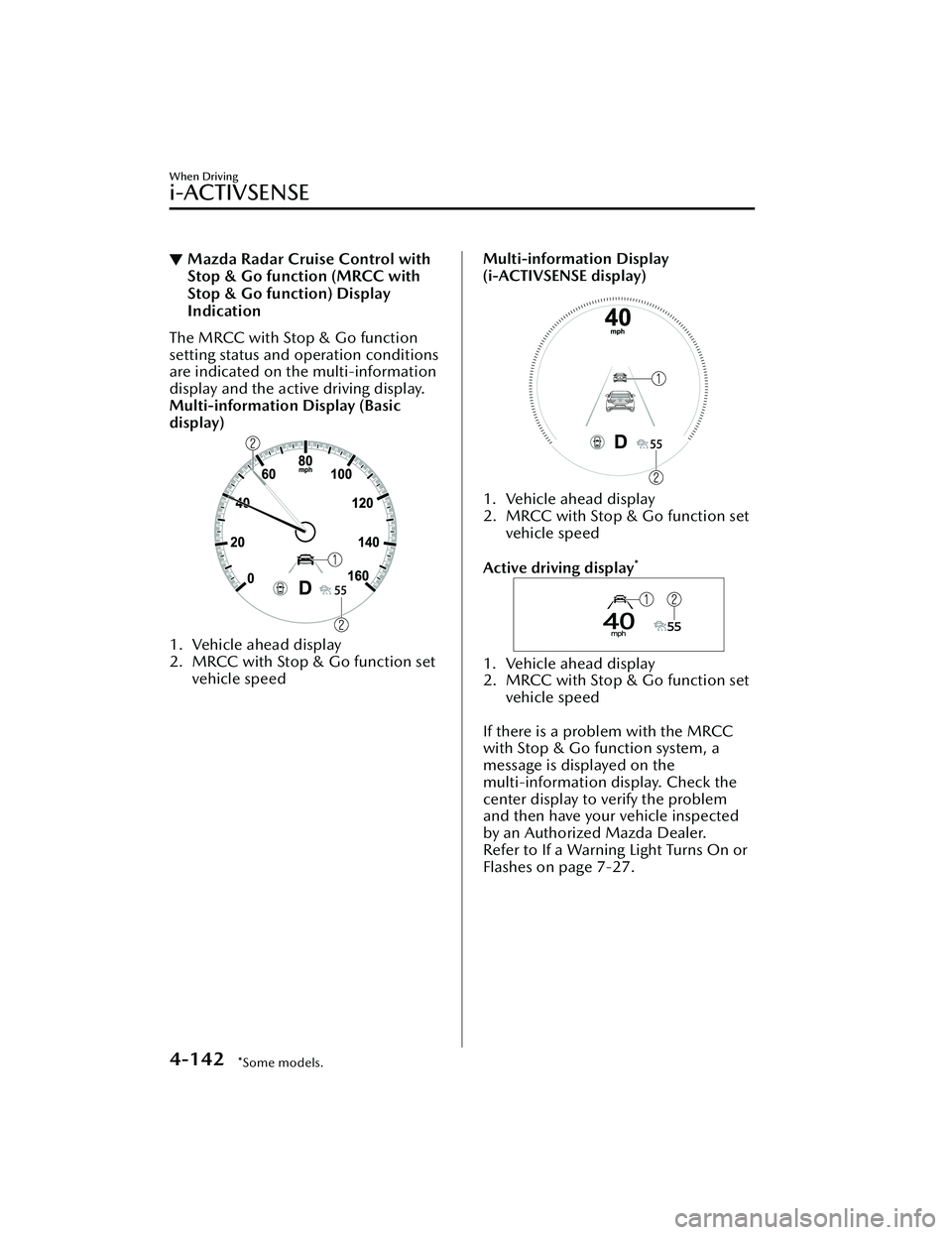
The MRCC with Stop & Go function
setting status and operation conditions
are indicated on the multi-information
display and the active driving display.
Multi-information Display (Basic
display)
1. Vehicle ahead display
2. MRCC with Stop & Go function set
vehicle speed
Multi-information Display
(i-ACTIVSENSE display)
1. Vehicle ahead display
2. MRCC with Stop & Go function set vehicle speed
Active driving display
*
1. Vehicle ahead display
2. MRCC with Stop & Go function set vehicle speed
If there is a problem with the MRCC
with Stop & Go function system, a
message is displayed on the
multi-information display. Check the
center display to verify the problem
and then have your vehicle inspected
by an Authorized Mazda Dealer.
Refer to If a Warning Light Turns On or
Flashes on page 7-27.
When Driving
i-ACTIVSENSE
4-142*Some models.
Mazda3_8LC2-EA-22G_Edition1_new 2022-5-20 11:26:10
Page 298 of 623

There are various road markings or
division lines (lane markings) of
various shapes near an
intersection.
The area in front of the camera is
soiled or an object that obstructs
the field of view is installed.
Exhaust gas from the vehicle in
front, sand, snow, and water vapor
rising from manholes and grating ,
and water splashed into the air.
The surroundings are dark such as
during the early evening or early
morning.
A vehicle ahead with a certain
taillight shape.
A vehicle ahead veers off course
from your vehicle's line of travel.
A vehicle ahead is driving
erratically.
The vehicle is driven on roads with
tight curves.
Headway control function
If a vehicle ahead is detected while
traveling at a constant speed, the
vehicle-ahead indication is displayed
and headway control is performed.
Steering assist function
When lane lines are detected, the
function assists the driver in keeping
the vehicle within the lane lines. If lane
lines are not detected, the function
provides the driver driving assistance in
keeping the vehicle along the motion
path with the vehicle ahead.
NOTE
Steering assist limit warning
If the steering assi st function cannot
keep the vehicle within the lane lines
while the steering assist function is
operating, a warning sound is activated
and a warning is displayed on the
multi-information display to urge the
driver to operate the steering wheel.
When Driving
i-ACTIVSENSE
4-153
Mazda3_8LC2-EA-22G_Edition1_new 2022-5-20 11:26:10
Page 300 of 623

Inactive
Active (vehicle ahead)
Active (lane line)
If there is a problem with the TJA, a
message is displayed on the
multi-information display. Check the
details of the problem on the center
display and then have your vehicle
inspected by an Authorized Mazda
Dealer.
Refer to If a Warning Light Turns On or
Flashes on page 7-27.
▼Close Proximity Warning
If your vehicle rapidly closes in on the
vehicle ahead while you are traveling
under headway control, the warning
sound is activated and the brake
warning is indicated on the display.
Keep a safe distance between your
vehicle and a vehicle ahead.
1. “Depress Brake Pedal” message is
displayed
NOTE
In the following cases, the warnings
and brakes may not operate even if
your vehicle starts closing in on the
vehicle ahead.
You are driving your vehicle at the
same speed as the vehicle ahead.
Directly after the TJA operates.Directly after the accelerator pedal is
released.
Another vehicle cuts into the driving
lane in front of you.
When Driving
i-ACTIVSENSE
4-155
Mazda3_8LC2-EA-22G_Edition1_new 2022-5-20 11:26:10
Page 307 of 623
NOTE
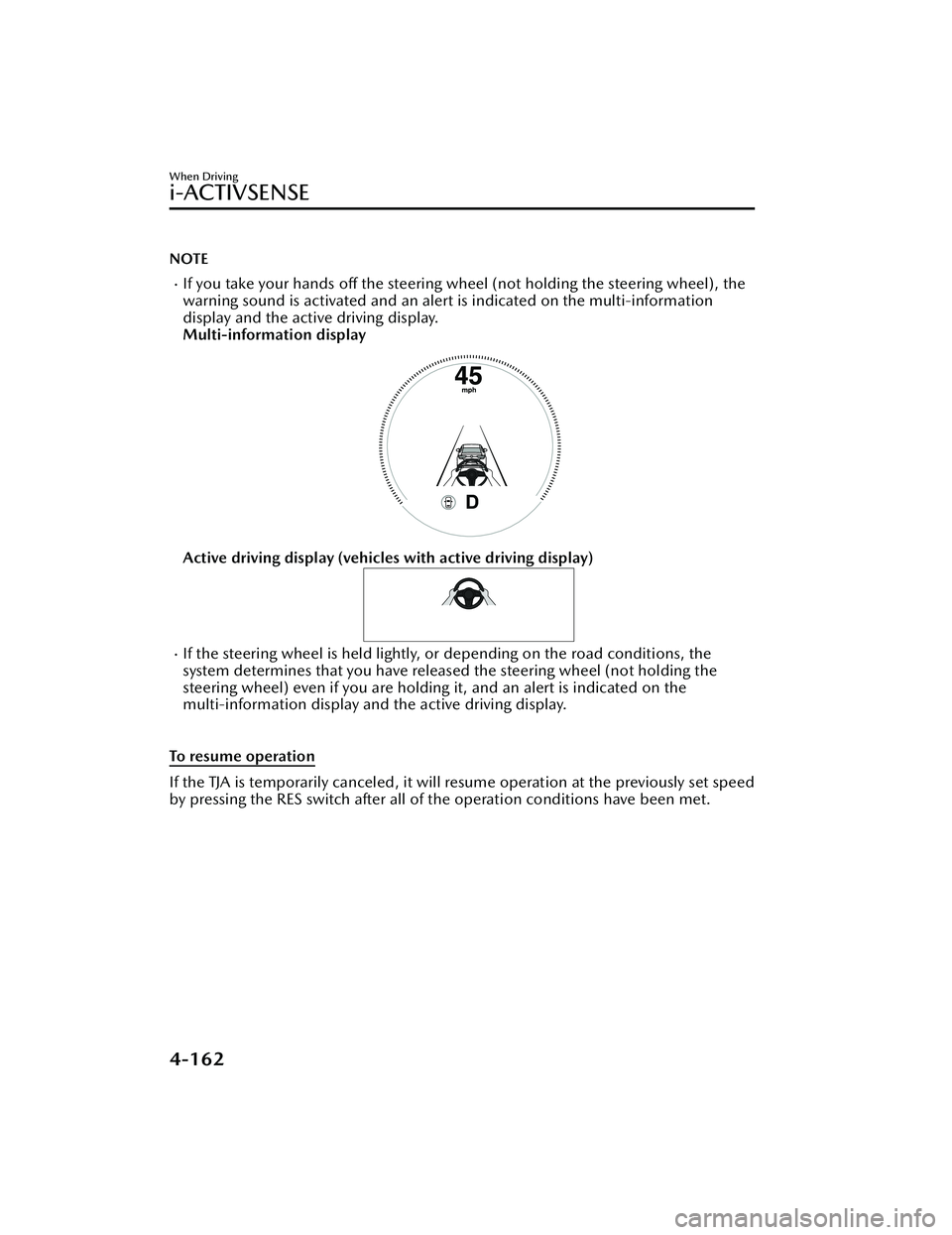
If you take your hands off the steering wheel (not holding the steering wheel), the
warning sound is activated and an alert is indicated on the multi-information
display and the active driving display.
Multi-information display
Active driving display (vehicles with active driving display)
If the steering wheel is held lightly, or depending on the road conditions, the
system determines that you have released the steering wheel (not holding the
steering wheel) even if you are holding it, and an alert is indicated on the
multi-information display and the active driving display.
To resume operation
If the TJA is temporarily canceled, it will resume operation at the previously set speed
by pressing the RES switch after all of the operation conditions have been met.
When Driving
i-ACTIVSENSE
4-162
Mazda3_8LC2-EA-22G_Edition1_new 2022-5-20 11:26:10
Page 309 of 623

To resume driving
After the vehicle ahead starts moving
while your vehicle is stopped under
stop hold control, press the RES switch
or depress the accelerator pedal to
cancel the stop hold control and start
driving.
NOTE
When you resume driving by pressing
the RES switch, your vehicle does not
start moving until the distance
between your vehicle and the vehicle
ahead lengthens to the specified
distance or farther.
If the TJA is temporarily canceled,
depress the accelerator pedal and
start driving the vehicle. If the TJA is
temporarily canceled, you cannot
resume driving by pressing the RES
switch when there are no vehicles in
front of your vehicle.
If the vehicle ahead starts moving
within 3 seconds after your vehicle is
stopped by the stop hold control,
headway control will continue even if
you do not resume driving your
vehicle, such as by depressing the
accelerator pedal.
Vehicle departure information
If you do not resume driving within a
few seconds after the vehicle ahead
starts moving during stop hold control,
the multi-information display
vehicle-ahead indication flashes to
urge the driver to resume driving. If you
do not resume driving after the
indicator light flashes, a sound is
activated to urge you to resume
driving.
Lane-keep Assist System
(LAS)
*
▼Lane-keep Assist System (LAS)
The LAS provides steering assistance to
help the driver stay within the vehicle
lane if the vehicle might be deviating.
The forward sensing camera (FSC)
detects the white lines (yellow lines) of
the vehicle lane in which the vehicle is
traveling and if the system determines
that the vehicle may deviate from its
lane, it operates the electric power
steering to assist the driver’s steering
operation. The system also alerts the
driver by displaying an alert on the
multi-information display. Use the
system when you drive the vehicle on
roads with white (yellow) lines such as
expressways and highways.
1. Forward sensing camera (FSC)
WARNING
Do not rely completely on the LAS:
The LAS is not an automated driving
system. In addition, the system is not
designed to compensate for a
driver’s lack of caution, and
over-reliance on the system could
lead to an accident.
When Driving
i-ACTIVSENSE
4-164*Some models.
Mazda3_8LC2-EA-22G_Edition1_new 2022-5-20 11:26:10
Page 311 of 623
▼System Operation
When the ignition is switched ON, the
i-ACTIVSENSE status symbol (warning/
risk avoidance support system) (white)
turns on and the system goes on
standby.
NOTE
If the i-ACTIVSENSE status symbol
(warning/risk avoidance support
system) (white) does not turn on, the
system is canceled using the
i-ACTIVSENSE OFF switch or the
personalization feature.
Operation conditions
When all of the following conditions
are met, the i-ACTIVSENSE status
symbol (warning
/risk avoidance
support system) on the
multi-information display changes
from white to green and the system
becomes operational.
The vehicle speed is about 64 km/h
(40 mph) or faster.
The system detects white (yellow)
lane lines.
NOTE
When the system does not detect a
white (yellow) lane line on one side
only, the system does not operate on
the side that is not being detected.
When temporarily canceling the
system
The LAS goes on standby in the
following cases: The LAS operation is
automatically restored when the
system's operation conditions are met.
The system cannot detect white
(yellow) lane lines.
The vehicle speed is less than about
56 km/h (35 mph).
The turn signal lever is operated.The accelerator pedal is depressed
abruptly.
The TCS/DSC is operating.The TCS/DSC is turned off.The steering wheel is operated.The brake pedal is operated.
The function is temporarily stopped.
The LAS stops functioning in the
following cases:
The temperature in the forward
sensing camera (FSC) is too high or
too low.
The windshield around the forward
sensing camera (FSC) is foggy.
The windshield around the forward
sensing camera (FSC) is blocked by
an obstruction, causing poor forward
visibility.
Strong light (such as sunlight, or
headlights (high-beam) of
on-coming vehicles) is directed at
the forward sensing camera (FSC).
When Driving
i-ACTIVSENSE
4-166
Mazda3_8LC2-EA-22G_Edition1_new 2022-5-20 11:26:10