Page 135 of 660
Without adaptive front lighting.A
With adaptive front lighting.B
Situational Supplemental Lighting
Adaptive front lighting provides supplementallight on the road depending on your vehiclespeed, steering wheel input, and cameradetection of stop or yield traffic signs.
Standard low beam.A
Supplemental lighting.B
SWITCHING ADAPTIVE FRONTLIGHTING ON AND OFF
Set the lighting control to the autolampsposition to use adaptive front lighting.
Note:Other lighting control positions do notturn on adaptive front lighting.
131
2023 Navigator (TB9) Canada/United States of America, enUSA, Edition date: 202207, DOMExterior LightingE161714 E275680
Page 136 of 660

SWITCHING ALL OF THE INTERIOR
LAMPS ON AND OFF
The lamps turn on under the followingconditions:
•You open any door.
•You press a button on the remote control.
•You press the all lamps on button on theoverhead console.
Press to switch all interior lampson or off.
SWITCHING THE FRONT INTERIOR
LAMPS ON AND OFF
The front interior lamp switches are on theoverhead console.
Note:The position of each button on theoverhead console depends on your vehicle.
Individual Map Lamps
Press to switch the left-handindividual dome lamp on and off.
Press to switch the right-handindividual dome lamp on and off.
SWITCHING THE REAR INTERIOR
LAMPS ON AND OFF
The rear interior lamps may be above therear seat or above the rear windows.
Press to switch the lamps on or off.
Note:If you switch the rear lamps on throughthe overhead console, you cannot switchthem off with the rear lamp switch.
132
2023 Navigator (TB9) Canada/United States of America, enUSA, Edition date: 202207, DOMInterior LightingE259649 E262162 E262193 E281231 E259649
Page 137 of 660

INTERIOR LAMP FUNCTION
WHAT IS THE INTERIOR LAMPFUNCTION
The interior lamp function switches thecourtesy and door lamps on or off.
SWITCHING THE INTERIOR LAMPFUNCTION ON AND OFF
Press to switch the interior lampfunction on and off.
Note:The indicator lamp illuminates amberwhen the door function is off.
ADJUSTING THE INSTRUMENT
PANEL LIGHTING BRIGHTNESS
The instrument lighting dimmer buttons areon the lighting control.
Repeatedly press one of thebuttons to adjust the brightness.
AMBIENT LIGHTING
SWITCHING AMBIENT LIGHTING ONAND OFF
1.Press Settings on the touchscreen.
2.Press Vehicle Settings.
3.Press Ambient Light.
4.Press a color.
ADJUSTING AMBIENT LIGHTING
Drag the selected color up or down.
INTERIOR LIGHTING –
TROUBLESHOOTING
INTERIOR LIGHTING – FREQUENTLYASKED QUESTIONS
Why do my courtesy lamps or interior lampsturn off when I have them switched onwhen I switch my vehicle off?
The battery saver turns the courtesylamps and interior lamps off after a shortperiod of time after you switch yourvehicle off.
133
2023 Navigator (TB9) Canada/United States of America, enUSA, Edition date: 202207, DOMInterior Lighting E291299 E296433
Page 138 of 660

OPENING AND CLOSING THE
WINDOWS
WARNING: Do not leave childrenunattended in your vehicle and do not letthem play with the power windows. Failureto follow this instruction could result inpersonal injury.
WARNING: When closing the powerwindows, verify they are free of obstructionand make sure that children and pets arenot in the proximity of the windowopenings.
Press the window control switchto open the window. Lift thewindow control switch to close thewindow.
Note:The power windows operate with theignition on, and for several minutes after youswitch the ignition off or until you open afront door.
To reduce wind noise or pulsing noise whenone window is open, slightly open theopposite window.
One-Touch Open
Fully press the window control switch andrelease it. Press again or lift it to stop thewindow.
One-Touch Close
Fully lift the window control switch andrelease it. Press again or lift it to stop thewindow.
Resetting One-Touch Close
Carry out all steps within 30 seconds ofstarting the sequence.
1.Close the window.
2.Press and hold the window control switchuntil the window is fully open. Keep thewindow control switch pressed for a fewseconds.
3.Lift and hold the window control switchuntil the window is fully closed. Keep thewindow control switch held for a fewseconds.
4.Press and hold the window control switchuntil the window is fully open. Keep thewindow control switch pressed for a fewseconds.
5.Lift and hold the window control switchuntil the window is fully closed. Keep thewindow control switch held for a fewseconds.
Note:Repeat the procedure if the windowdoes not close when you use one-touch.
GLOBAL OPENING (IF EQUIPPED)
WHAT IS GLOBAL OPENING (If Equipped)
You can use the remote control to open thewindows with the ignition off.
134
2023 Navigator (TB9) Canada/United States of America, enUSA, Edition date: 202207, DOMWindows
Page 140 of 660

INTERIOR MIRROR PRECAUTIONS
WARNING: Do not adjust the mirrorswhen your vehicle is moving. This couldresult in the loss of control of your vehicle,serious personal injury or death.
Note:Do not clean the mirror housing orglass with harsh abrasives, fuel or otherpetroleum-based cleaning products.
AUTO-DIMMING INTERIOR MIRROR
WHAT IS THE AUTO-DIMMINGINTERIOR MIRROR
The mirror dims to reduce the effect of brightlight from behind. It returns to normal whenthe bright light from behind is no longerpresent or if you shift into reverse (R).
AUTO-DIMMING INTERIOR MIRRORLIMITATIONS
Do not block the sensors on the front andback of the mirror.
Note:A rear center passenger or raised rearcenter head restraint could prevent light fromreaching the sensor.
CHILDMINDER MIRROR
CHILDMINDER MIRRORPRECAUTIONS
WARNING: Do not use thechildminder mirror to view rearward traffic,do not allow rear passengers to distractyou from the driving task, and make surethe rear view mirror has a clear view ofrearward traffic. Failure to do so couldincrease the risk of a crash from an unseenvehicle, which may result in serious injury.
LOCATING THE CHILDMINDERMIRROR
The mirror allows the driver to view the rearseating area.
136
2023 Navigator (TB9) Canada/United States of America, enUSA, Edition date: 202207, DOMInterior Mirror E369501
Page 142 of 660
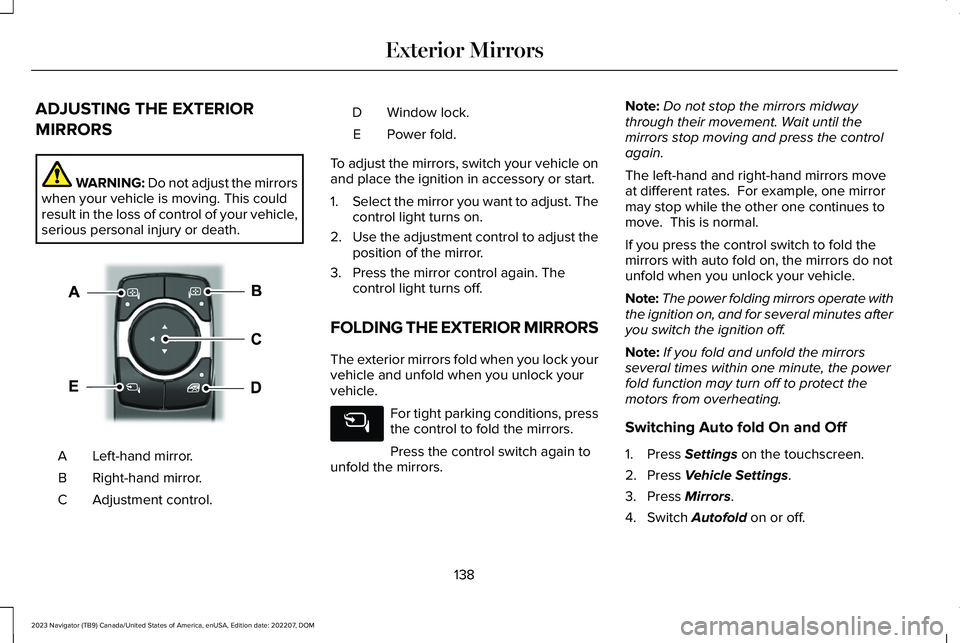
ADJUSTING THE EXTERIOR
MIRRORS
WARNING: Do not adjust the mirrorswhen your vehicle is moving. This couldresult in the loss of control of your vehicle,serious personal injury or death.
Left-hand mirror.A
Right-hand mirror.B
Adjustment control.C
Window lock.D
Power fold.E
To adjust the mirrors, switch your vehicle onand place the ignition in accessory or start.
1.Select the mirror you want to adjust. Thecontrol light turns on.
2.Use the adjustment control to adjust theposition of the mirror.
3.Press the mirror control again. Thecontrol light turns off.
FOLDING THE EXTERIOR MIRRORS
The exterior mirrors fold when you lock yourvehicle and unfold when you unlock yourvehicle.
For tight parking conditions, pressthe control to fold the mirrors.
Press the control switch again tounfold the mirrors.
Note:Do not stop the mirrors midwaythrough their movement. Wait until themirrors stop moving and press the controlagain.
The left-hand and right-hand mirrors moveat different rates. For example, one mirrormay stop while the other one continues tomove. This is normal.
If you press the control switch to fold themirrors with auto fold on, the mirrors do notunfold when you unlock your vehicle.
Note:The power folding mirrors operate withthe ignition on, and for several minutes afteryou switch the ignition off.
Note:If you fold and unfold the mirrorsseveral times within one minute, the powerfold function may turn off to protect themotors from overheating.
Switching Auto fold On and Off
1.Press Settings on the touchscreen.
2.Press Vehicle Settings.
3.Press Mirrors.
4.Switch Autofold on or off.
138
2023 Navigator (TB9) Canada/United States of America, enUSA, Edition date: 202207, DOMExterior MirrorsE369399
Page 143 of 660

Loose Mirror
If your power folding mirrors are manuallyfolded, they may not work properly evenafter you reposition them. You need to resetthem if:
•The mirrors vibrate when you drive.
•The mirrors feel loose.
•The mirrors do not stay in the folded orunfolded position.
•One of the mirrors is not in its normaldriving position.
To reset the mirrors perform the followingsteps:
1.Fold or retract both mirrors manually.
2.Using the power folding/powertelescoping mirror control switch, operatethe mirrors until you hear an audible click.
3.Operate the power folding or powertelescoping mirrors an additional 3 to 4times to synchronize the mirrors.
AUTO-DIMMING EXTERIOR MIRROR
WHAT IS THE AUTO-DIMMINGEXTERIOR MIRROR
The driver exterior mirror dims when theinterior auto-dimming mirror turns on.
Memory Mirrors (If Equipped)
You can save and recall the mirror positionsthrough the memory function. See ExteriorMirrors (page 138).
Heated Exterior Mirrors
See Switching the Heated Rear Window Onand Off (page 160).
Signal Indicator Mirrors (If Equipped)
The forward-facing portion of the appropriatemirror housing blinks when you switch onthe direction indicator.
Lincoln Welcome Mat (If Equipped)
Projection lights, on the bottom of the mirrorhousings, project an image onto the grounda short distance from the vehicle.
Blind Spot Monitor
See What Is Blind Spot Information System(page 311).
360 Degree Camera (If Equipped)
See What Is the 360 Degree Camera (page261).
139
2023 Navigator (TB9) Canada/United States of America, enUSA, Edition date: 202207, DOMExterior Mirrors
Page 151 of 660
Cruise Control (If Equipped)
See Instrument Cluster (page 142).
Front Fog Lamp
See Exterior Lighting (page 120).
Headlamp High Beam
See Exterior Lighting (page 120).
Hill Descent Control
See Hill Descent Control (page250).
Hill Start Assist
See Hill Start Assist (page 242).
Lane Centering
See Lane Centering (page 279).
Lane Keeping System
See Lane Keeping System (page300).
Parking Lamps
See Exterior Lighting (page 120).
Pre-Collision Assist
See Pre-Collision Assist (page 321).
Rear Fog Lamp
See Exterior Lighting (page 120).
Stability and Traction Control
See Stability Control (page 247).See Traction Control (page 245).
Turn Signal
See Exterior Lighting (page 120).
147
2023 Navigator (TB9) Canada/United States of America, enUSA, Edition date: 202207, DOMInstrument ClusterE71340 E67019 E163171 E274708 E297977 E308131 E71341 E329466 E67040 E138639 E130458 E67018

